
Lighting moves in real time with music through SmartThings Music Sync, creating a seamless, in-the-moment experience from the first beat to the last.
Lighting shapes the entire experience of a space, influencing how it looks, feels, and functions from the moment you walk in. With SmartThings expanding its partnership with Nanoleaf, your lights don’t just turn on and off, they respond to what you’re doing, what you’re listening to, and the kind of moment you want to create.
Whether you’re starting your day, hosting friends, or putting on your favorite playlist, your lighting becomes part of the experience. SmartThings Music Sync connects your lighting directly to your music, so your lights move in real time with what you’re playing. The result is a more seamless, in-sync experience that feels intentional from the first beat – right from your Galaxy device.
Turn Your Space Into a Living Visualizer
Nanoleaf is known for bold, colorful lighting and animated scenes, but with SmartThings Music Sync, that experience becomes more intentional and immersive.
Instead of reacting to sound in the room, SmartThings connects directly to your music source from your Galaxy device, so your Nanoleaf lights move in sync with what you’re actually playing. Every beat, drop, and transition feels precise. No guesswork. No delays.
Whether you’re gaming, watching, or listening, your lighting keeps up in real time, bringing a new level of energy to every moment and turning your space into a living, breathing visualizer.
Elevate Your Gaming Experience
Gaming is all about immersion and lighting can take it even further.
With SmartThings Music Sync and Nanoleaf, your space responds in real time as you play. Background music, in-game soundtracks, and audio cues are reflected through dynamic lighting that shifts with the intensity of the moment.
Exploring a new world? Your lighting sets the tone.
In the middle of a fast-paced match? Colors pulse with the action.
Winding down post-game? Your space transitions with you.
It adds another layer to the experience, one that pulls you deeper into what you see, hear, and feel.
A Full Experience, Not Just Lighting
Lighting is just one part of the moment. With SmartThings, your Nanoleaf setup can work alongside other devices to create a more complete experience. Start a routine and your lights, music, and speakers can respond together.That means your space doesn’t just change, it comes together.
Start a playlist and your environment responds instantly. No switching between apps. No extra steps. Just a setup that works the way you expect it to.
Choose the Mood, Everything Follows
SmartThings makes it easy to build routines that fit your day.
From your Galaxy device, you can set up automations like:
- Lights gradually brightening in the morning
- A wind-down routine with softer tones at night
- A party setup that activates music sync and dynamic scenes
- Lights turning off when you leave
Once it’s set, everything runs in the background, so your space is always ready when you are.
Easy to Get Started
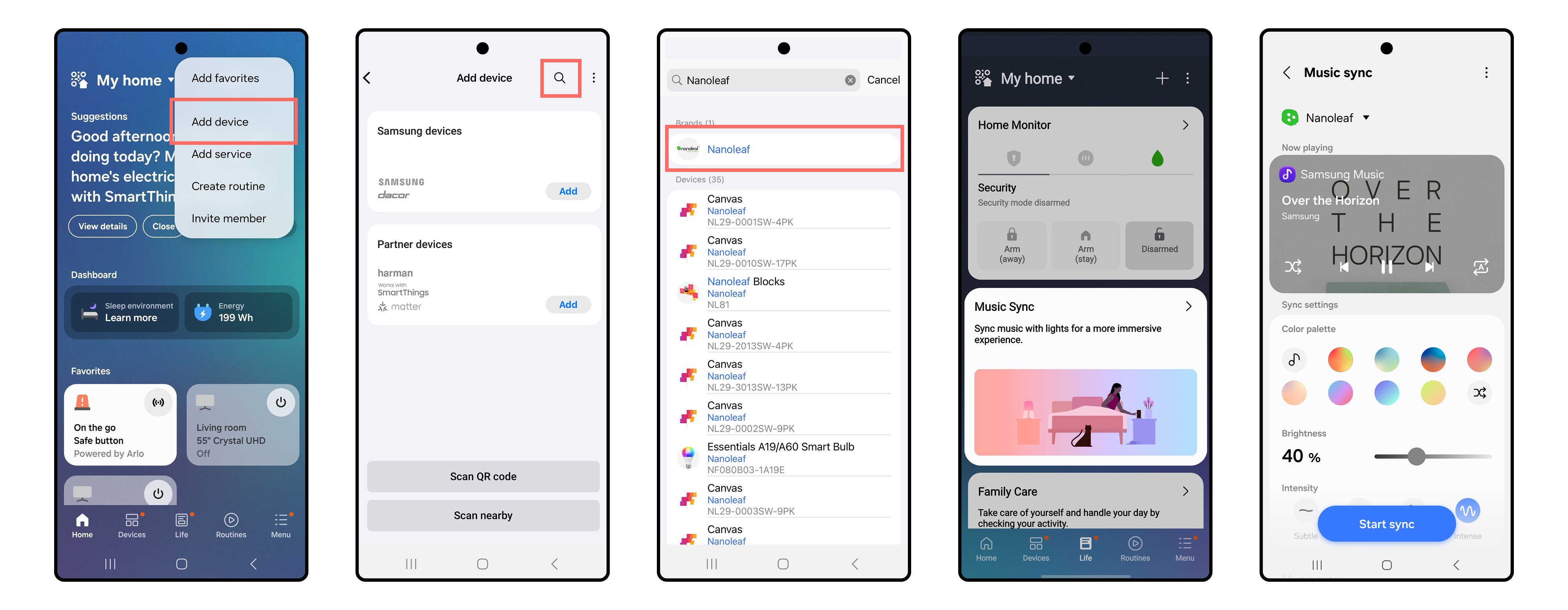
Adding Nanoleaf to SmartThings only takes a few steps:
- First, make sure you have a hub available
- Open the SmartThings app on your Galaxy device
- Tap the “+” icon and select “Add device”
- Search for Nanoleaf and select your device
- Follow the prompts to connect
From there, you can group your lights, create automations, and start building routines right away.
After setting up your routines, go to the Life tab within the SmartThings app. Select Music Sync and follow the prompts to complete the sync with your Nanoleaf devices.
A Space That Feels Just Right
Your space should adapt to you, not the other way around. With Nanoleaf and SmartThings, lighting becomes something more personal. It shifts with your mood, keeps up with your music, and helps create moments that feel effortless. Bring your space to life today and visit partners.smartthings.com/partners/nanoleaf to learn more.


