Home Blog Page 141

Google unveils a next-gen family of AI reasoning models.

0

Google Unveils Gemini 2.5: A New Family of AI Reasoning Models

Introduction

On Tuesday, Google unveiled Gemini 2.5, a new family of AI reasoning models that pauses to "think" before answering a question. This innovation is a significant milestone in the development of artificial intelligence, as it allows AI models to reason and reflect before providing an answer.

Background

The concept of AI reasoning models has been gaining attention in the tech industry. Since OpenAI launched the first AI reasoning model in September 2024, several companies have been racing to match or exceed its capabilities. Today, Anthropic, DeepSeek, Google, and xAI all have AI reasoning models, which use extra computing power and time to fact-check and reason through problems before delivering an answer.

New AI Models
Google has experimented with AI reasoning models before, but Gemini 2.5 represents the company’s most serious attempt yet at besting OpenAI’s "o" series of models. The company claims that Gemini 2.5 Pro outperforms its previous frontier AI models, and some of the leading competing AI models, on several benchmarks.

Benchmarks

Google claims that Gemini 2.5 Pro excels at creating visually compelling web apps and agentic coding applications. On an evaluation measuring code editing, called Aider Polyglot, Google says Gemini 2.5 Pro scores 68.6%, outperforming top AI models from OpenAI, Anthropic, and Chinese AI lab DeepSeek. However, on another test measuring software dev abilities, SWE-bench Verified, Gemini 2.5 Pro scores 63.8%, outperforming OpenAI’s o3-mini and DeepSeek’s R1, but underperforming Anthropic’s Claude 3.7 Sonnet, which scored 70.3%. On Humanity’s Last Exam, a multimodal test consisting of thousands of crowdsourced questions relating to mathematics, humanities, and the natural sciences, Google says Gemini 2.5 Pro scores 18.8%, performing better than most rival flagship models.

Features

To start, Google says Gemini 2.5 Pro is shipping with a 1 million token context window, which means the AI model can take in roughly 750,000 words in a single go. That’s longer than the entire "Lord of The Rings" book series. And soon, Gemini 2.5 Pro will support double the input length (2 million tokens). Google didn’t publish API pricing for Gemini 2.5 Pro, but the company says it’ll share more in the coming weeks.

Conclusion

Google’s new AI reasoning models mark a significant step forward in the development of artificial intelligence. With its new family of AI models, including Gemini 2.5 Pro, Google is poised to revolutionize the way AI interacts with humans. As the company continues to push the boundaries of what AI can do, we can expect to see even more innovative applications and use cases emerge.

FAQs

Q: What is AI reasoning?
A: AI reasoning is the ability of an AI model to reason and reflect before providing an answer, allowing it to make more accurate and informed decisions.

Q: What is the difference between AI reasoning and other AI models?
A: AI reasoning models use extra computing power and time to fact-check and reason through problems before delivering an answer, whereas other AI models typically rely on pre-trained data and algorithms.

Q: How does Gemini 2.5 Pro compare to other AI models?
A: Google claims that Gemini 2.5 Pro outperforms its previous frontier AI models, and some of the leading competing AI models, on several benchmarks.

Q: When will API pricing for Gemini 2.5 Pro be available?
A: Google will share more information about API pricing for Gemini 2.5 Pro in the coming weeks.
Mastering SpeedTree Basics

0

SpeedTree: Top Tips to Get You Started

01. Push for Realism

Achieving realism in your 3D tree models requires attention to detail. Use high-quality textures and pay attention to the natural growth patterns of trees. It’s good to vary the size, shape, and orientation of branches and leaves to avoid uniformity. Incorporate subtle imperfections such as knots and bends in the trunk to add authenticity too. Lighting also plays a crucial role in realism, so ensure your model reacts accurately to light sources in your scene. Regularly reference real-world trees and study their structure and details to enhance your models.

02. The Wind Editor

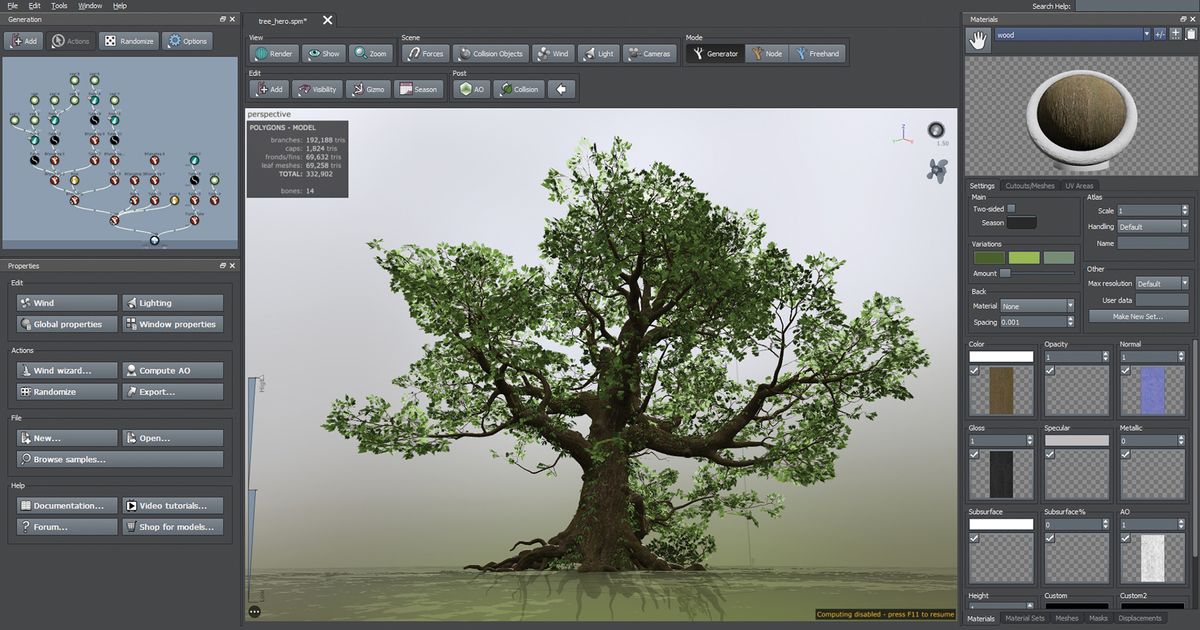
Activate SpeedTree’s Wind tools by pressing ‘8’ while in the viewport. Adjust the strength and direction using the properties to create dynamic, lifelike animations with realistic wind effects.

03. Templates

Save your favorite settings for a specific node as a template for future use by right-clicking on it and choosing Save Template. This feature enables you to quickly apply your preferred node configurations to any new projects, improving efficiency and consistency across your work.

04. Dynamic LOD

In SpeedTree, Forces are used to shape trees by affecting specific areas determined by a radius around the Force object. This gives you precise control, such as impacting only branches in a particular quadrant.

09. Texture Editing

These options allow for more control over the appearance of your tree models. Start by selecting a texture in your previously created material and opening the Material editor. Here you can adjust various parameters such as Brightness, Contrast, and so on. For more realistic bark, use high-resolution textures and apply Normal maps to add depth and detail. Adjust the Specular settings to simulate the reflective properties of different types of bark. For leaves, consider using Translucency maps to allow light to pass through, mimicking the natural behavior of real leaves.

10. Growth Animation

Animating growth adds a dynamic element to your models; perfect for storytelling! Start by selecting the tree model you want to animate and opening the Growth editor at the right side of the interface, where you can control the growth stages of your tree. Begin by hitting play and visualizing the default growth animation. This should look amazing already, but play with the available parameters to ensure it matches your own taste.

Conclusion

SpeedTree is a powerful and flexible software that offers procedural modeling tech in an accessible way. With these top tips, you can unlock the full potential of SpeedTree and create stunning 3D tree models that will impress. Remember to focus on realism, experiment with different settings, and have fun with the various features and tools available.

FAQs

Q: What is SpeedTree used for?
A: SpeedTree is used in various industries such as video game development, film VFX, and Archviz.

Q: What makes SpeedTree unique?
A: SpeedTree offers procedural modeling tech in an accessible way, allowing for quick and efficient creation of complex tree structures.

Q: How do I get started with SpeedTree?
A: Start by familiarizing yourself with the interface and experimenting with different settings and tools. Read the user manual and watch tutorials to learn more about each feature and its capabilities.

Q: Can I export my animations?
A: Yes, you can export your animations in various formats, such as FBX or Alembic.

OpenAI Rolls Out GPT-4 Image Creation To Everyone

0

OpenAI Rolls Out New Image Generation System Integrated with GPT-4o

Technical Capabilities

OpenAI has announced the rollout of a new image generation system directly integrated with GPT-4o. This system enables the AI to access its knowledge base and conversation context when creating images, resulting in more contextually relevant and accurate visual outputs.

Capabilities:

  • Accurately renders text within images
  • Allows users to refine images through conversation while keeping a consistent style
  • Supports complex prompts with up to 20 different objects
  • Can generate images based on uploaded references
  • Creates visuals using information from GPT-4o’s training data

Examples:

To demonstrate character consistency, here’s an example showing a cat and then that same cat with a hat and monocle.

[Image: cat with hat and monocle]

For a more practical example, here’s a full restaurant menu generated with a detailed prompt.

[Image: restaurant menu]

Limitations:

OpenAI acknowledges that its new image generation system is not perfect and has several limitations, including:

  • Cropping: GPT-4o sometimes crops long images too closely at the bottom
  • Hallucinations: The model can create false information, especially with vague prompts
  • High Blending Problems: It struggles to accurately depict more than 10 to 20 concepts at once
  • Multilingual Text: The model can have issues showing non-Latin characters, leading to errors
  • Editing: Requests to edit specific image parts may change other areas or create new mistakes
  • Information Density: The model has difficulty showing detailed information at small sizes

Search Implications:

This update changes AI image generation from mainly decorative uses to more practical functions in business and communication. Websites can use AI-generated images but with important considerations, such as:

  • Using C2PA metadata to maintain transparency
  • Adding proper alt text for accessibility and indexing
  • Ensuring images serve user intent rather than just filling space
  • Creating unique visuals rather than generic AI templates

Availability:

The feature is now available to ChatGPT users with Plus, Pro, Team, or Free plans. Access for Enterprise and Edu users will be available soon. Developers can expect API access in the coming weeks. Due to higher processing needs, image generation takes about one minute on average.

Conclusion:

OpenAI’s new image generation system is a significant step forward in AI technology, enabling more accurate and relevant visual outputs. While it has its limitations, the potential applications are vast, from marketing and advertising to education and communication. As the technology continues to evolve, it will be exciting to see how it shapes the future of visual content creation.

FAQs:

Q: What are the technical capabilities of OpenAI’s new image generation system?
A: The system can accurately render text within images, refine images through conversation, support complex prompts, and generate images based on uploaded references.

Q: What are the limitations of OpenAI’s new image generation system?
A: The system has several limitations, including cropping, hallucinations, high blending problems, multilingual text, editing, and information density.

Q: What are the implications of this update on search?
A: This update changes AI image generation from mainly decorative uses to more practical functions in business and communication.

Q: Is the feature available to all users?
A: The feature is available to ChatGPT users with Plus, Pro, Team, or Free plans. Access for Enterprise and Edu users will be available soon.

Q: How long does it take to generate an image?
A: Image generation takes about one minute on average due to higher processing needs.

ChatGPT’s Advanced Voice Mode Gets a Big Upgrade

ChatGPT’s Advanced Voice Mode Gets a Major Update

What’s New with Advanced Voice Mode?

On Monday, OpenAI announced an update to its Advanced Voice Mode, which enhances its human-like conversational capabilities. This update allows the AI to interrupt you less when you’re talking, making conversations more seamless and natural. In the past, Advanced Voice Mode would sometimes cut off users mid-sentence, making it difficult to have a multi-turn conversation. The new update addresses this issue, allowing users to pause and continue speaking without the assistant assuming they’ve finished their thought.

How It Works

The update includes a new feature that allows the AI to wait longer before responding, giving users more time to think and respond. This is especially useful for those who like to pause and gather their thoughts before continuing a conversation. Additionally, the update includes more personality traits, such as being more "engaging, direct, and concise." While the difference is subtle, it’s intended to make the AI sound more natural and less robotic.

Trying the New Advanced Voice Mode

As a frequent user of ChatGPT, I was excited to try out the new update. I noticed that the AI waited longer to respond, which made our conversation feel more natural. I asked the AI about the update, and it explained that it can now respond in a way that feels more like a real conversation. It can adapt its tone, ask follow-up questions, and keep the conversation flowing smoothly.

Accessing the Update

The new update is available to all users, regardless of subscription status. To access it, simply click on the wave icon to the right of the message box on ChatGPT. The update that improves the model’s personality is only available to paid subscribers.

Conclusion

The latest update to ChatGPT’s Advanced Voice Mode is a significant step forward in making AI-powered voice assistants more human-like. With its ability to interrupt less and adapt to human conversation, it’s now more seamless to use. While the update is available to all users, the personality update is only available to paid subscribers.

Frequently Asked Questions

Q: Is the update available to all users?
A: Yes, the update is available to all users, regardless of subscription status.

Q: What is the main difference between the old and new Advanced Voice Mode?
A: The main difference is that the new update allows the AI to interrupt you less, making conversations more seamless and natural.

Q: Is the personality update available to all users?
A: No, the personality update is only available to paid subscribers.

Q: How do I access the update?
A: To access the update, simply click on the wave icon to the right of the message box on ChatGPT.

Porsche’s next Taycan gets an infotainment upgrade — but no new CarPlay

0

Porsche Upgrades Infotainment System in Upcoming 2026 Models

New Features and Improvements

Porsche is set to upgrade the infotainment system in its 2026 model year Taycan, 911, Panamera, and Cayenne vehicles. The new system, called Porsche Communication Management (PCM), will feature more responsive software and new features, including an Alexa personal assistant.

Porsche App Center and In-Car Apps

The 2026 PCM will include the Porsche App Center, which was first introduced in the Macan Electric. This feature provides direct access to a large number of apps and a wide range of services that can be run on the touchscreen. According to a spokesperson, these new models will run on the MIB3 architecture, first launched in 2022, and not Google’s Android Automotive OS like in the Macan Electric.

Reducing the Need for Phone Mirroring

Porsche’s in-car apps could potentially reduce the need for phone mirroring services like Apple CarPlay and Android Auto. Many EV makers, such as Tesla, Rivian, and GM, do not include the ability to mirror your device and instead require you to subscribe to connectivity services inside the car.

Amazon Alexa Integration

Porsche will include 10 years of Porsche Connect service standard in each of these new vehicles to "optimize the digital user experience." Part of this experience includes Amazon Alexa, which can be used as the driver’s digital voice assistant. Alexa can play music and podcasts, open your garage door, edit to-do and shopping lists, and more. It is unclear if this is the revamped AI-powered Alexa Plus that Amazon announced in February.

Dolby Atmos Support

Porsche is also adding Dolby Atmos support to the new PCM system, which will be available on models with premium audio equipment like Bose. This feature will provide an immersive, spatial sound experience for occupants.

Availability and Ordering

The 2026 Porsches can be ordered now and will arrive at US stores in "late summer 2025."

Frequently Asked Questions

Q: What is the new infotainment system called?
A: The new infotainment system is called Porsche Communication Management (PCM).

Q: What are the new features in the 2026 PCM?
A: The 2026 PCM features include more responsive software, the Porsche App Center, and integration with Amazon Alexa.

Q: Will the 2026 Porsche models run on Google’s Android Automotive OS?
A: No, the 2026 Porsche models will run on the MIB3 architecture, not Google’s Android Automotive OS.

Q: Is the Alexa integration the revamped AI-powered Alexa Plus?
A: It is unclear if the Alexa integration is the revamped AI-powered Alexa Plus that Amazon announced in February.

Q: When will the 2026 Porsches be available?
A: The 2026 Porsches can be ordered now and will arrive at US stores in "late summer 2025".

Acer DS2 Series Pro: Cool 3D SpatialLabs tech at a high price.

0

Why you can trust Creative Bloq

Our expert reviewers spend hours testing and comparing products and services so you can choose the best for you. Find out more about how we test.

Acer DS2 Series Pro: A 3D Monitor for Visualisers and Designers

The monitor I’ve been testing recently doesn’t fit neatly into any of the categories that we have in our buying guides. That’s not to say it couldn’t contend for the best premium option but with 3D smarts, this is no ordinary monitor.

Design and Build

As soon as I opened up the DS2 Series Pro monitor box, I thought "what on earth do we have here?" The display itself is fairly standard, but it’s the multiple cameras at the top and the bottom-mounted speakers that first caught my attention. The speakers, in particular, seem like a cheap add-on rather than something that was meaningfully integrated into the design.

Key Specifications

Screen 27-inch 3840 x 2160
Inputs HDMI x1, DisplayPort x1, Audio (In/Out), USB-A x2, USB-C x1
Speakers Yes
Adjustments Height adjustment 150 mm, Swivel -/+ 45 degree, Tilt-7/33 degree
Dimensions 387.5, 628.6, 29.5mm
Weight 4.80 kg

3D Performance

Despite arguably aiming at a very niche market, the DS2 Series Pro actually performs very well. Through the SpatialLabs software, you can access SpatialLabs Go, SpatialLabs Model Viewer, and SpatialLabs Player. These tools provide everything required to turn 2D content into 3D in real-time as well as watch side-by-side videos into stereoscopic 3D. We particularly liked the ModelViewer which is a direct integration with Sketchfab. The ability to adjust lighting is effective and useful.

2D Performance

The monitor does an admirable job of converting 2D data into viewable 3D data thanks to its pair of eye-tracking cameras and dedicated 3D lens. You can do away with those 3D glasses you paid good money for. As a 2D monitor, it delivers outstanding color quality and depth. I was impressed by the depth of color and contrast when working on photos or watching videos. 400 nits of brightness is also more than enough to make it usable under most lighting conditions.

Scorecard

Category Rating Review
Design and Build 3.5/5 Dated design that protrudes too far onto the desk
Features 4/5 Visual and sound output immerses users into the action
Performance 4/5 Impressive all-round 3D and 2D performance

Who’s it for?

This monitor has a seriously niche target market. Not only is it only going to be useful and affordable for those working in the 3D industry, but even within that industry, not all 3D visualizers or designers will want this type of monitor. If you’re working with stereoscopic images and videos and you want a monitor that can handle that, then maybe go for it. But otherwise, I think most people will be happy using glasses or goggles.

Buy it if:

  • You’re a 3D visualizer or developer
  • You want a 4K monitor

Don’t buy it if:

  • You’re on a budget
  • You only work in 2D or you already own VR goggles

Conclusion

The Acer DS2 Series Pro is a unique monitor that caters to a specific audience. While its 3D capabilities are impressive, its 2D performance is also noteworthy. However, the high price tag and limited target market may deter many potential buyers. If you’re working in the 3D industry and need a high-end monitor, the DS2 Series Pro is worth considering. But for others, there may be more affordable and accessible options available.

Three Years On, People are Still Mad about the Kia Logo

0

The Most Confusing Car Rebrand of the Decade?

The Kia Logo Debacle

We’ve seen plenty of car brands unveil new looks over the last few years, and some have truly raised eyebrows. Last year’s Jaguar rebrand seemed to be all the internet could talk about for a few days in 2024. But there’s one car logo that’s still drawing ire over three years after it was revealed.

The "KN" Controversy

Kia is one of the most recognisable car brands on the road, but as of 2021, the same can’t be said for its logo. Ever since the brand dropped its new logo, which spells out the brand name in a single sawtooth line, people have been misreading it as ‘KN’. Google searches for the non-existent ‘KN cars’ spiked in 2022, and while the furore has died down, social media users still regularly complain about the design.

The "KN" Fiasco Explained

The trend started at the beginning of 2021, when the new Kia logo was revealed in a ridiculous blaze of fireworks and drones. Basically, as soon as the new logo hit the road, the ‘KN’ searches started. But to be fair to Kia, the design does appear to have bedded in – whereas over 30,000 people per month were searching ‘KN cars’ back in 2022, that figure has dropped. But confused social media posts continue to pop up daily.

The Impact on Dealerships

Indeed, it seems so many people have been searching ‘KN car’ that several official Kia dealerships have created landing pages to scoop up those clicks, titled ‘What is a KN car?’ "You may have heard people talking about a new KN car model," explains Houston-based Community Kia. "Questions have been asked about if it’s a new manufacturer, a new model, or a new kind of vehicle entirely. The answer – none of the above. It’s actually confusion with the visual appearance of Kia’s new logo."

Conclusion

While the Jaguar rebrand might have got everyone talking last year, the enduring confusion of the ‘KN’ logo means that, for our money, it still retains the dubious honour of being the most confusing car rebrand of the decade.

FAQs

Q: What is the Kia logo?
A: The Kia logo spells out the brand name in a single sawtooth line.

Q: Why do people keep misreading the logo as ‘KN’?
A: The design of the logo, which features a single sawtooth line, can be easily misread as ‘KN’ by many people.

Q: How many people were searching for ‘KN cars’ in 2022?
A: Over 30,000 people per month were searching for ‘KN cars’ in 2022.

Q: Has the furore died down?
A: While the search volume has decreased, confused social media posts continue to pop up daily, indicating that the design still causes confusion.

OpenAI Unveils New Image Generator for ChatGPT

0

Chatbots Evolve: From Text to Image Generation

New Capabilities for Chatbots

Chatbots were originally designed to chat. But they can generate images too. On Tuesday, OpenAI beefed up its ChatGPT chatbot with new technology designed to generate images from detailed, complex, and unusual instructions.

Generating Images from Text Descriptions

For instance, if you describe a four-panel comic strip, including the characters who appear in each panel and what they are saying to one another, the technology can instantly generate an elaborate cartoon. This is a significant improvement from previous versions of ChatGPT, which could not reliably create images by blending such a wide array of concepts.

Wider Change in Artificial Intelligence Technology

The new version of ChatGPT is indicative of a wider change in artificial intelligence technology. After beginning as systems that merely generated text, chatbots are morphing into tools that combine chatting with various other abilities. The technology that underpins the new version of ChatGPT, called GPT-4-o, also allows the chatbot to receive and respond to voice commands, images, and videos. It can even speak.

Combining Text and Image Generation

The original ChatGPT learned its skills by analyzing enormous amounts of text from across the internet. It learned to answer questions, write poetry, and generate computer code. However, it could not generate images. But about a year later, OpenAI released a new version of ChatGPT that could generate images, called DALL-E. Now, OpenAI has built a single system that learns a wide range of skills from both text and images. In generating its own images, this system can draw on everything ChatGPT has learned from the internet.

Breaking Down Barriers in Image Generation

Traditionally, A.I. image generators have struggled to create images that were markedly different from any existing image. If you asked an image generator to create an image of a bicycle with triangular wheels, for instance, it struggled. Mr. Goh said the new ChatGPT could handle this kind of request.

Conclusion

The new version of ChatGPT is a significant step forward in the evolution of chatbots. It combines the power of text generation with the ability to generate images, making it a more versatile and powerful tool. This technology has the potential to revolutionize the way we interact with A.I. systems and could lead to new and innovative applications across various industries.

Frequently Asked Questions

Q: What is the new version of ChatGPT capable of?
A: The new version of ChatGPT can generate images from detailed, complex, and unusual instructions, and can also receive and respond to voice commands, images, and videos.

Q: How does the new version of ChatGPT differ from previous versions?
A: The new version of ChatGPT can combine text and image generation, whereas previous versions could not. It can also handle requests that previous versions struggled with, such as generating images of unconventional objects.

Q: How do I access the new version of ChatGPT?
A: The new version of ChatGPT will be available to people using both the free and paid versions of the chatbot, including ChatGPT Plus and ChatGPT Pro.

Industrial AI in Action: Transforming Manufacturing Industries

Manufacturing Transformation with AI Agents

Manufacturing is set for a major transformation with AI agents. These AI agents are programs that interact with their environment, perceive data, and act on that data, enabling organizations to gain insights, speed up innovation, and transform value chains. At Hannover Messe 2025, Microsoft and our partners will showcase how these technologies are creating a more connected, efficient, and intelligent future for the industry. Organizations will see how they can move faster, adapt smarter, and lead with confidence.

Yet even with all this progress, for decades fragmented systems and heterogeneous environments have kept digital threads within the industry largely aspirational, preventing most organizations from achieving synchronized operations. A persistent inability to connect modern technology solutions with aging infrastructure has also slowed the collaboration long promised to manufacturers. Together, unified data and AI are now enabling organizations of all sizes to break through these barriers, transforming digital threads from static, disconnected datasets to dynamic networks. With AI agents serving as the interface, every worker can surface the overall equipment effectiveness (OEE), total cost of ownership (TCO), and return on investment (ROI) insights necessary to drive decision-making.

AI Agents Supporting the Development of Frontline Workers

Manufacturing transformation is reaching into every aspect of operations. Frontline workers now have access to AI agents providing them with enhanced guidance needed to make informed decisions. To expand this modern toolbox, we announced back at Ignite 2024 the public preview of Factory Operations Agent in Azure AI Foundry. An AI-powered assistant, Factory Operations Agent streamlines operations—enabling operators, production, and leaders to quickly access insights and optimize manufacturing processes through natural language querying. In doing so, the agent accelerates issue resolution and root cause analysis to improve productivity within day-to-day manufacturing operations.

Advancing Innovation in Digital Engineering with Generative AI

Manufacturers shape their market leadership through digital engineering and design. By accelerating development and prototyping, and reducing time-to-market, AI-powered generative design is empowering manufacturers to create new high-performing, customer-centric products.

Making AI-Powered Digital Threads a Reality for Manufacturers

The nervous system of industrial operations, digital threads weave together critical information, processes, and people across manufacturing segments. Grounded in unified operational (OT), information (IT), and engineering (ET) data, the electronic frameworks can empower individuals with relevant, timely insights. From initial concept to customer support, this continuous flow of data connects and enriches every aspect of manufacturing.

See Industrial AI in Action at Hannover Messe 2025

The future of manufacturing is powered by AI. This year, at Hannover Messe 2025, attendees will have the opportunity to experience how Microsoft and its partners are supporting the industry transformation—from digital engineering, on factory floors, with frontline workers, and through digital thread. Join us at Hall 17, Stand G06.

Conclusion

In conclusion, AI agents are transforming the manufacturing industry by providing real-time insights, accelerating innovation, and streamlining operations. With the power of generative AI, manufacturers can create new high-performing, customer-centric products, and with digital threads, they can connect and enrich every aspect of manufacturing. Join us at Hannover Messe 2025 to see industrial AI in action and learn how Microsoft and its partners are supporting the industry transformation.

FAQs

Q: What is AI agent in manufacturing?
A: AI agents are programs that interact with their environment, perceive data, and act on that data, enabling organizations to gain insights, speed up innovation, and transform value chains.

Q: What is the purpose of Factory Operations Agent?
A: The Factory Operations Agent streamlines operations—enabling operators, production, and leaders to quickly access insights and optimize manufacturing processes through natural language querying.

Q: What is generative AI in manufacturing?
A: Generative AI is empowering manufacturers to create new high-performing, customer-centric products by accelerating development and prototyping, and reducing time-to-market.

Q: What is digital thread in manufacturing?
A: The digital thread is the continuous flow of data that connects and enriches every aspect of manufacturing, from initial concept to customer support.

Q: What is the future of manufacturing?
A: The future of manufacturing is powered by AI, with AI agents, generative AI, and digital threads enabling real-time insights, accelerating innovation, and streamlining operations.

Microsoft 365 Copilot’s AI Agents Speed Up Workflow

Microsoft Introduces Two New AI Agents to Enhance Microsoft 365 Copilot

Millions of working professionals rely on the Microsoft 365 suite of applications for their daily workflows. To speed up some of these everyday business processes, the company is now adding two new AI agents to its Microsoft 365 Copilot offering.

Researcher

The Researcher agent functions similarly to OpenAI’s and Google’s Deep Research features, sifting through robust amounts of information from the web and outputting that information into a neat report with sources. Microsoft’s Research Agent is powered by OpenAI’s Deep Research model in combination with Microsoft 365 Copilot’s "advanced orchestration and deep search capabilities."

As a result, Microsoft’s version can go one step further from existing research agents, also pulling context from your work data, such as your emails, meetings, files, chats, and more. When combined with all of the information available on the web, it is able to create really personalized and rich reports. For example, Microsoft says Researcher can put together a comprehensive quarterly report for a client that combines information found across your apps as well as external news. The Researcher agent can also pull in data from third-party sources, such as ServiceNow and Salesforce, to better inform its outputs.

Analyst

The Analyst agent was built on OpenAI’s o3-mini reasoning model to provide users with comprehensive insights from raw data in minutes, according to Microsoft. Meant to act as a skilled data scientist, it uses chain-of-thought reasoning, another term for step-by-step processing, to work through complex queries. Users can watch the code running in real-time to learn from its processes and double-check the process.

Availability

Both the Researcher and Analyst agents will start rolling out to customers with a Microsoft 365 Copilot license in April. The rollout will be part of a new Frontier program that lets customers experience early Copilot innovations while they’re still being developed.

Conclusion

The introduction of the Researcher and Analyst agents is a significant step forward in the development of AI-powered productivity tools. These agents will enable users to streamline their workflows, gain deeper insights, and make more informed decisions. With their ability to combine internal and external data, these agents will be a game-changer for professionals relying on Microsoft 365.

FAQs

  • What are the Researcher and Analyst agents?
    • The Researcher agent is an AI-powered research tool that can pull together relevant information from the web and your work data to create personalized reports. The Analyst agent is an AI-powered data analysis tool that can provide users with comprehensive insights from raw data.
  • How do the Researcher and Analyst agents work?
    • The Researcher agent uses OpenAI’s Deep Research model and Microsoft 365 Copilot’s advanced search capabilities to pull together relevant information. The Analyst agent uses OpenAI’s o3-mini reasoning model to provide users with insights from raw data.
  • When will the Researcher and Analyst agents be available?
    • The Researcher and Analyst agents will be available to customers with a Microsoft 365 Copilot license in April as part of the new Frontier program.