Home Blog Page 168

Scaling AI Inference with Open-Source Efficiency

NVIDIA Launches Open-Source Inference Software Dynamo to Accelerate and Scale Reasoning Models in AI Factories

Efficiently managing and coordinating AI inference requests across a fleet of GPUs is a critical endeavour to ensure that AI factories can operate with optimal cost-effectiveness and maximize the generation of token revenue. As AI reasoning becomes increasingly prevalent, each AI model is expected to generate tens of thousands of tokens with every prompt, essentially representing its "thinking" process. Enhancing inference performance while simultaneously reducing its cost is therefore crucial for accelerating growth and boosting revenue opportunities for service providers.

A New Generation of AI Inference Software

NVIDIA Dynamo, which succeeds the NVIDIA Triton Inference Server, represents a new generation of AI inference software specifically engineered to maximize token revenue generation for AI factories deploying reasoning AI models. Dynamo orchestrates and accelerates inference communication across potentially thousands of GPUs. It employs disaggregated serving, a technique that separates the processing and generation phases of large language models (LLMs) onto distinct GPUs. This approach allows each phase to be optimized independently, catering to its specific computational needs and ensuring maximum utilization of GPU resources.

Key Innovations of NVIDIA Dynamo

NVIDIA has highlighted four key innovations within Dynamo that contribute to reducing inference serving costs and enhancing the overall user experience:

  • GPU Planner: A sophisticated planning engine that dynamically adds and removes GPUs based on fluctuating user demand. This ensures optimal resource allocation, preventing both over-provisioning and under-provisioning of GPU capacity.
  • Smart Router: An intelligent, LLM-aware router that directs inference requests across large fleets of GPUs. Its primary function is to minimize costly GPU recomputations of repeat or overlapping requests, thereby freeing up valuable GPU resources to handle new incoming requests more efficiently.
  • Low-Latency Communication Library: An inference-optimized library designed to support state-of-the-art GPU-to-GPU communication. It abstracts the complexities of data exchange across heterogeneous devices, significantly accelerating data transfer speeds.
  • Memory Manager: An intelligent engine that manages the offloading and reloading of inference data to and from lower-cost memory and storage devices. This process is designed to be seamless, ensuring no negative impact on the user experience.

Support for Disaggregated Serving

The NVIDIA Dynamo inference platform also features robust support for disaggregated serving. This advanced technique assigns the different computational phases of LLMs – including the crucial steps of understanding the user query and then generating the most appropriate response – to different GPUs within the infrastructure. Disaggregated serving is particularly well-suited for reasoning models, such as the new NVIDIA Llama Nemotron model family, which employs advanced inference techniques for improved contextual understanding and response generation. By allowing each phase to be fine-tuned and resourced independently, disaggregated serving improves overall throughput and delivers faster response times to users.

Conclusion

NVIDIA Dynamo is poised to revolutionize the way AI factories operate, providing a scalable, efficient, and cost-effective solution for managing and coordinating AI inference requests. With its innovative features and capabilities, Dynamo is expected to accelerate the adoption of AI inference across a wide range of organizations, including major cloud providers and AI innovators.

Frequently Asked Questions

Q: What is NVIDIA Dynamo?
A: NVIDIA Dynamo is an open-source inference software designed to accelerate and scale reasoning models within AI factories.

Q: What are the key innovations of NVIDIA Dynamo?
A: The four key innovations of NVIDIA Dynamo are the GPU Planner, Smart Router, Low-Latency Communication Library, and Memory Manager.

Q: What is disaggregated serving, and how does it benefit AI factories?
A: Disaggregated serving is a technique that separates the processing and generation phases of large language models (LLMs) onto distinct GPUs, allowing each phase to be optimized independently and ensuring maximum utilization of GPU resources. This approach improves overall throughput and delivers faster response times to users.

Q: What are the benefits of using NVIDIA Dynamo?
A: The benefits of using NVIDIA Dynamo include reduced inference serving costs, improved performance, and enhanced user experience.


xAI Launches API for Generating Images

0

Elon Musk’s xAI Adds Image Generation Capabilities to Its API

New Image Generation Model

Elon Musk’s AI company, xAI, has recently added image generation capabilities to its API. The company has introduced a new model, "grok-2-image-1212," which can generate up to 10 images per request in JPG format, priced at $0.07 per image.

Comparison with Other Providers

For comparison, AI startup Black Forest Labs, with which xAI partnered last year to launch image generation on Musk’s social network X, charges around $0.05 per image. Another popular image model provider, Ideogram, charges $0.08 on the higher end.

Limitations of the Current Model

In its documentation, xAI notes that the API doesn’t support adjusting the quality, size, or style of images yet. Additionally, prompts in requests are subject to revision by a "chat model."

xAI’s Ambitions

xAI, which launched its API in October 2024, is reportedly meeting with investors about a potential $10 billion funding round that could bring its valuation to $75 billion. The company is also expanding its Memphis-based data center to train and run its various models, hinting at its other ambitions.

Recent Acquisition and Expansion

Recently, xAI acquired a generative AI video startup, further solidifying its position in the AI landscape.

Conclusion

The addition of image generation capabilities to xAI’s API marks an exciting development in the company’s growth and ambitions. With its recent acquisition and expansion, xAI is poised to become a major player in the AI industry.

FAQs

Q: How many images can be generated per request?
A: Up to 10 images per request.

Q: What is the price per image?
A: $0.07 per image.

Q: Does the API support adjusting image quality, size, or style?
A: No, the API does not support adjusting these attributes yet.

Q: How does xAI’s pricing compare to other providers?
A: xAI’s pricing is comparable to other providers, with Black Forest Labs charging slightly less and Ideogram charging more.

Q: What are xAI’s plans for future development?
A: xAI is reportedly meeting with investors about a potential $10 billion funding round and is expanding its data center to train and run its models.

Everyone thinks they know what a lightsaber looks like, but now I really know

0

The Making of a Lightsaber: A Journey of Visual Effects

A World of Details

One of the most iconic elements of all things Star Wars is the lightsaber. Everyone knows what a lightsaber looks like, right? Well, so did Chris McLaughlin, Visual Effects Supervisor at DNEG, before he went to work on creating the VFX for Disney+ series Star Wars: Skeleton Crew, and then he was taught what really makes a lightsaber look like, well… a lightsaber.

The Importance of Collaboration

Chris identifies the value of working with Chris Balog, Associate Visual Effects Supervisor at Lucasfilm, saying that, "It was good to get Chris’ input on the detail of the lightsabers. Everyone thinks they know what a lightsaber looks like, but now I really know. There was a very specific look: it’s about the amount of blur, the frequency of flashing and the colour of it. Our lightsaber in Skeleton Crew was slightly purple with a hint of cyan and blue to it."

A Connection to the Past

Indeed, Chris observes a connection with an earlier Star Wars production, explaining how "In Star Wars: The Force Awakens, the Kylo Ren lightsaber had a kind of cross hilt, and it looked like it’s almost malfunctioning. Ours wasn’t quite as handmade as that, but the frequency of the flashes were definitely loosened up a bit".

The Creative Process

For its work in a galaxy far, far away, visual effects studio DNEG took a crew of about 800 artists on a journey to create animation and environment elements in three episodes of the latest TV serial, Star Wars: Skeleton Crew, one of the best TV shows for VFX.

Working with John Knoll

The studio’s work is featured in episodes 4, 7 and 8 of the show. Chris tells me how working on Star Wars for DNEG was a great opportunity, as this universe traditionally has been kept close to hand at ILM. "Creatively, Star Wars has traditionally been ILM’s playground and so it was a great opportunity for DNEG to get involved," he says.

The Role of Production Visual Effects Supervisor

Of the creative process for Skeleton Crew, Chris notes that he worked with Production Visual Effects Supervisor John Knoll, who has worked on Star Wars VFX since Star Wars: Episode I – The Phantom Menace. "Having John Knoll at the helm, and leading from the front, was important," reflects Chris. "We did reviews with him every week. He would share individual shots from other episodes for reference; but, because of project secrecy we were working in a bit of a bubble, even internally."

Conclusion

The making of a lightsaber is a journey of visual effects that requires collaboration, attention to detail, and a deep understanding of the Star Wars universe. Through the work of DNEG and other VFX studios, we can experience the magic of Star Wars in a way that is both familiar and new.

FAQs

Q: What is the specific look of a lightsaber?
A: According to Chris McLaughlin, it’s about the amount of blur, the frequency of flashing and the colour of it.

Q: How does the lightsaber in Star Wars: Skeleton Crew differ from others?
A: It’s slightly purple with a hint of cyan and blue to it, and has a different frequency of flashing.

Q: Who works on visual effects for Star Wars?
A: Visual effects studios such as DNEG, ILM, and others, working closely with production visual effects supervisors like John Knoll.

Q: What is the creative process like for working on a Star Wars production?
A: It involves collaboration, attention to detail, and a deep understanding of the Star Wars universe, as well as close work with production visual effects supervisors like John Knoll.

The Future of Development: Code to Prompts

AI Operators: The Next Evolution of Developers?

The idea of an "AI operator" isn’t as wild as it sounds. Tools like GitHub Copilot, Cursor, and Claude 3.5 are already nudging developers toward a future where AI does the heavy lifting—writing boilerplate code, debugging, or even generating entire functions. A speculative post on X suggested that roles like "AI Prompt Engineers" or "AI-Human Collaboration Experts" could account for 25% of software jobs by 2026. But does this mean traditional software engineering is on its way out?

Not quite. AI might automate the grunt work, but it won’t erase the need for human ingenuity. Think of it as a partnership: developers could evolve into AI operators, guiding machines to solve complex problems while focusing on strategy, creativity, and innovation. It’s less about replacement and more about redefinition.

The Numbers Tell the Story

  • 75% of companies plan to adopt AI within the next five years, signaling a seismic shift in how tech is built and managed (Source: Web ID 6).
  • 300 million jobs could be displaced globally by AI by 2030, yet 69 million new jobs are expected to rise from the ashes of this disruption (Source: Web ID 8).
  • 25% of routine tasks are already handled by AI, liberating workers from monotony (Source: Web ID 8).
  • AI could inject $19.9 trillion into the global economy by 2030, reshaping industries and creating opportunities we can barely imagine (Source: Web ID 8).

Work-Life Balance: A Dream Within Reach?

Here’s the tantalizing upside: AI could usher in a golden era of work-life balance. If AI takes over repetitive tasks—think endless bug fixes or CRUD operations—developers might reclaim hours for creative pursuits or simply stepping away from the screen. Surveys show 51% of office workers believe AI improves their work-life balance, and 81% say it boosts job performance (Source: Web ID 5).

The Bright Side: Back to Nature?

Elon Musk once mused about a future of abundance where AI produces so much that money becomes irrelevant. It’s a utopian vision, but it sparks an intriguing thought: What if AI frees us from repetitive thinking, pushing us toward a more natural existence? If machines handle the mundane—coding loops, managing servers, optimizing databases—humans could focus on art, exploration, or simply living in harmony with the world.

The Transition: A Rough Ride

But let’s not sugarcoat it—history warns us that big shifts get messy. The Industrial Revolution upended lives before it stabilized, and AI’s takeover could follow suit. The stats are sobering: 60% of jobs in advanced economies face risks from AI automation, and that 300-million-job displacement figure looms large (Source: Web ID 8).

Adapt or Fade: The Developer’s Challenge

So, how do we thrive in this AI-driven future? It’s all about adaptability:

  • Master AI collaboration: Learn to write killer prompts, spot AI’s blind spots, and integrate it into your workflow.
  • Lean into human strengths: Creativity, empathy, and big-picture thinking will outshine any algorithm.
  • Never stop learning: With tech evolving at warp speed, curiosity is your lifeline.

A World Run by AI, Lived by Humans

Let’s dream big for a moment. Picture a future where AI runs the show—managing infrastructure, optimizing resources, even governing with cold efficiency—while humans chase passions and purpose. It’s exhilarating, terrifying, and, frankly, possible. The $19.9 trillion economic boost AI might deliver by 2030 hints at a world of surplus, where scarcity fades and new possibilities bloom.

Your Move

Don’t sit on the sidelines. Start playing with AI tools now—try Cursor, experiment with Claude, or tinker with whatever’s next. Learn to prompt, iterate, and innovate. The future belongs to those who see AI not as a doom, but as a partner in building something extraordinary.

FAQs

Q: Will AI replace developers?
A: No, AI will augment human capabilities, freeing us to focus on high-level tasks.

Q: What kind of jobs will emerge in the future?
A: Roles like AI Prompt Engineers, AI-Human Collaboration Experts, and AI Operators will become more prominent.

Q: How can I adapt to this new landscape?
A: Master AI collaboration, lean into human strengths, and never stop learning.

Q: What are the benefits of AI-driven development?
A: AI will automate routine tasks, freeing us to focus on creativity, strategy, and innovation, while injecting $19.9 trillion into the global economy by 2030.

Choosing the Right Option for Your Business

Have You Ever Wondered if AI Agents Could Outsmart Traditional Software?

Have you ever wondered if AI agents could outsmart traditional software? Should businesses invest in AI agents or stick with traditional software solutions? The shift towards automation vs AI has never been more critical.

While traditional software has served us well, AI agents bring a whole new level of intelligence. Over 51% of organizations are exploring the use of AI agents, with an additional 37% already piloting them.

But is it worth the investment? Let’s explore the difference between traditional software and AI software, comparing AI agents vs traditional software and examining use cases for both.

What Are AI Agents and Traditional Software?

AI agents and traditional software differ in how they handle tasks and automation. When comparing these two solutions, the key difference lies in adaptability. AI agents can evolve and optimize processes, while traditional software requires manual updates and adjustments.

What Are AI Agents?

AI agents are software programs that perform tasks using artificial intelligence. They can learn, adapt, and improve over time, often working autonomously. AI agents are designed to make decisions or carry out tasks without human input.

For example, chatbots can assist customers 24/7, while virtual assistants like Siri or Alexa can help with daily tasks. AI-driven automation tools can handle repetitive tasks, such as sorting emails or analyzing data.

  • AI agents can understand natural language.
  • They help businesses save time and resources.
  • They can improve over time by learning from interactions.

What Is Traditional Software?

Traditional software refers to applications designed to perform specific tasks, often with fixed functions and no learning capability. It requires users to input data and follow set processes.

For instance, ERP systems help businesses manage resources, while CRM software manages customer relationships. Accounting software handles finances, but it doesn’t adapt or learn over time.

  • Traditional software is rule-based and static.
  • It requires regular updates and maintenance.
  • It follows predefined workflows without flexibility.

Key Differences Between AI Agents and Traditional Software

When it comes to choosing the right tool for your business, the decision between AI agents and traditional software can be difficult.

While both serve similar purposes, their differences are significant. AI agents are intelligent systems designed to adapt and make decisions, while traditional software follows strict, pre-programmed instructions.

1. Flexibility and Adaptability

One of the main differences between AI agents and traditional software is their adaptability. AI agents can learn from their environment, while traditional software can only perform tasks it was explicitly programmed to do.

  • AI agents can improve over time, adapting to new situations and learning from past data.
  • Traditional software follows a fixed rule-based approach, without the ability to adapt.

Which Is Right for Your Business?

Making the right choice between AI agents and traditional software can significantly affect your business outcomes. To help you decide, let’s break down when each option works best.

When to Choose AI Agents

If your business deals with large, dynamic data (e.g., AI-driven market analysis), AI agents can process massive datasets and identify patterns faster than traditional software.

A company in the financial sector might analyze thousands of transactions daily, benefiting from AI agents to spot trends and predict market shifts.

When to Stick with Traditional Software

Some businesses still rely on structured workflows that traditional software handles well. For instance, invoicing systems are rule-based and don’t need AI’s complexity. A law firm may prefer fixed rules for document filing rather than an AI-driven system.

  • Structured workflows thrive on traditional systems.
  • Invoicing is best with established software.
  • No need for complex AI agents if the data infrastructure isn’t ready.

Final Thoughts

The choice between AI agents vs. traditional software depends on your business’s specific needs. If your operations require handling dynamic, large datasets, AI agents are the way to go. For example, AI in automation testing can provide faster and more efficient results. On the other hand, if your business thrives on structured workflows and rule-based systems, traditional software might still be the better option.

At LITSLINK, we specialize in developing AI agents tailored to your business. Explore our AI services here. The right solution is just a decision away!

FAQs

What is the difference between AI agents vs. traditional automation?

AI agents learn and adapt, while traditional automation follows fixed rules and processes.

How does AI in automation testing work?

AI in automation testing improves efficiency by predicting and adjusting tests based on data.

What’s the difference between automation and AI?

Automation performs repetitive tasks, while AI learns and makes decisions based on data.

What is the difference between artificial intelligence and traditional systems?

AI adapts and learns, while traditional systems follow pre-set rules without adaptation.

What are the key differences between artificial intelligence vs. traditional systems?

AI can learn, adapt, and make decisions, while traditional systems rely on fixed, programmed rules.

Rebrand or Refresh

0

Rebrand or Refresh: Which is Right for Your Brand?

We’ve seen plenty of headline-hogging rebrands over the last twelve months, and not all of them have, shall we say, landed smoothly. The most notable example has to be Jaguar, whose airy new look seemed to be the most contentious topic online for a moment last year. But while stagnating branding and/or floundering sales might inspire marketing execs to embark on a full rebrand, there is another way.

The Case for a Brand Refresh

Enter the brand refresh. As brands like Lloyds and Herman Miller have shown lately, it’s entirely possible to modernise a brand without embarking on an all-encompassing (and hugely costly) transformation. While the best rebrands can revitalise a brand, in some cases, a refresh that wields a brand’s heritage could be even more impactful.

What’s the Difference?

A brand refresh and a rebrand serve very different purposes, and understanding that distinction is key. According to Ljubica Jovanova, Senior Director of Brand and Content Marketing at Bynder, "A refresh is the right approach when a brand has strong brand equity and recognition in the market but needs to evolve visually or strategically to better reflect its current positioning. It’s about building on what’s already working, refining elements like visual identity, messaging, and tone of voice, without losing the essence of what the brand stands for."

When is a Refresh the Better Option?

According to Ljubica, there are certain situations when a refresh might be the better option. These include when:

  • The brand has strong market recognition but needs a more modern identity.
  • The core audience remains the same, but their expectations or industry trends have evolved.
  • The company wants to refine messaging, tone, or design elements while preserving its overall essence.

Case Studies: Lloyds and Lego

Lloyds Bank and Lego are two brands that have successfully executed a brand refresh. Lloyds’ recent refresh modernised the brand while retaining heritage assets, while Lego’s subtle yet effective new brand identity has provided the building blocks for a truly effective brand refresh.

The Dangers of Rebranding

According to Ljubica, rebranding for the wrong reasons can be dangerous for a brand. "The essence of what the brand stands for should never be lost. Making changes simply for the sake of it, or worse, misleading customers into thinking a minor refresh is a full rebrand, can backfire. The key is to keep your brand’s core values at heart. If your audience trusts your brand, engaging them with fresh visuals and messaging will reinforce their loyalty, not disrupt it."

Conclusion

In conclusion, while a rebrand can be a bold move, it’s not always the right choice for every brand. A brand refresh, on the other hand, offers a more subtle yet effective way to modernise and refine a brand’s identity without losing its heritage. By understanding the difference between the two and choosing the right approach, brands can build a strong foundation for future success.

Frequently Asked Questions

Q: What are the key differences between a brand rebrand and a brand refresh?
A: A rebrand is a full overhaul of a brand’s identity, while a brand refresh is a more subtle refinement of existing elements.

Q: When is a brand refresh the better option?
A: A brand refresh is the better option when a brand has strong brand equity and recognition but needs to evolve visually or strategically to better reflect its current positioning.

Q: What are some successful examples of brand refreshes?
A: Lloyds Bank and Lego are two brands that have successfully executed a brand refresh, modernising their identities while retaining heritage assets.

Q: What are the dangers of rebranding for the wrong reasons?
A: Rebranding for the wrong reasons can be dangerous for a brand, as it can lose its core values and alienate its audience.

Adobe’s App User Journeys Turned into Real-Time Maps

Project Panorama’s Map

Adobe Summit ’24: A Sneak Peek at the Latest Experimental Innovations

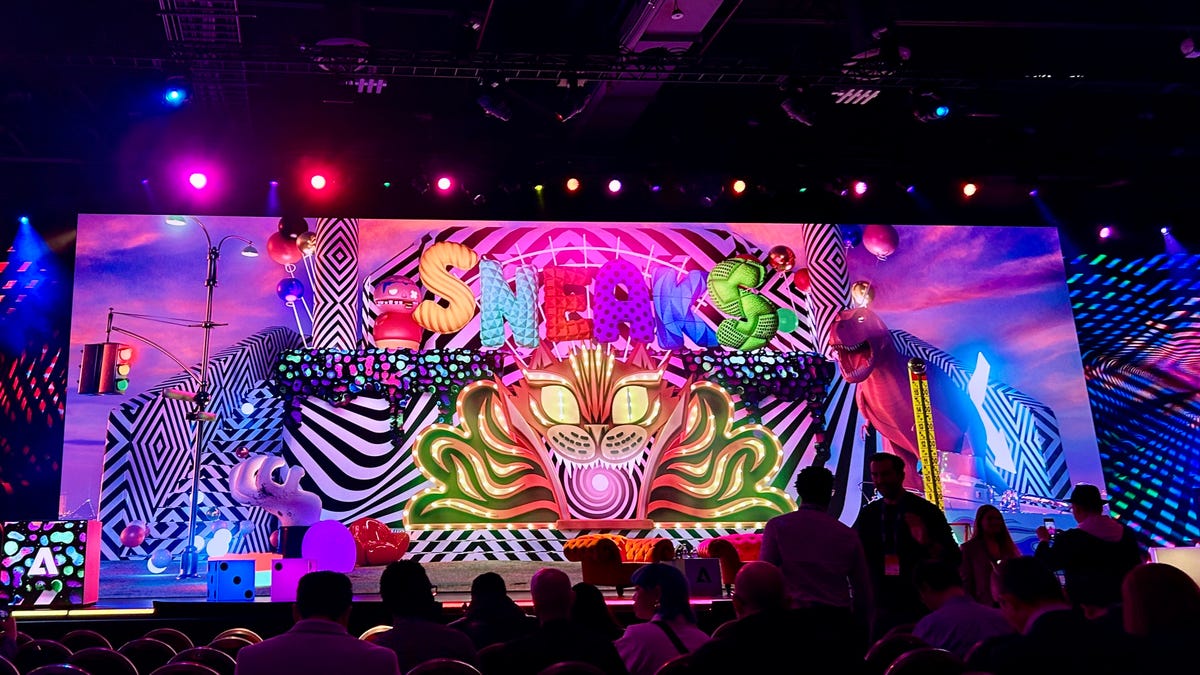
Every year, Adobe gives the public a sneak peek into its latest experimental innovations, with 40% making it to actual rollout historically. Even though the full Sneaks session isn’t slated until tonight, Adobe shared one experiment with ZDNET ahead of time, and it is a game changer for marketers and brands alike.

How to Watch Adobe Sneaks

To watch the rest of Adobe Sneaks, you can tune into the livestream from the Adobe website from 6-7 PM PT live from Las Vegas. Every year, a celebrity guest hosts Sneaks; this year, it is actor and comedian Ken Jeong.

Project Panorama

Project Panorama helps brands make sense of user interactions on mobile applications. This task is typically challenging because of all the different elements found in apps, such as screens, offers, and messages. Instead, Project Panorama would offer a map that brands can use to visualize the user’s journey.

The map would update in real-time, track performance metrics and user behavior, and outline each page and screen of the experience, according to Adobe. Ultimately, marketers could use those insights to deploy new offers and send messages from the Project Panorama interface without additional code, making optimization to increase user engagement easier.

Conclusion

Adobe’s Sneaks session is a must-watch for marketers and brands looking to stay ahead of the curve. With 40% of experimental innovations making it to actual rollout historically, this is an opportunity to get a first look at the latest and greatest from Adobe. Don’t miss out – tune in to the livestream tonight to see what other innovative solutions Adobe has in store.

FAQs

Q: What is Adobe Sneaks?
A: Adobe Sneaks is an annual event where the company gives the public a sneak peek into its latest experimental innovations.

Q: How can I watch Adobe Sneaks?
A: You can tune into the livestream from the Adobe website from 6-7 PM PT live from Las Vegas.

Q: What is Project Panorama?
A: Project Panorama is an experimental innovation that helps brands make sense of user interactions on mobile applications by providing a map that visualizes the user’s journey.

Q: Will all experimental innovations be announced during Adobe Sneaks?
A: Historically, 40% of experimental innovations make it to actual rollout, so not all will be announced during Adobe Sneaks.

Tesla crash victims’ families worried about Musk’s influence over investigations

0

Families of Tesla Crash Victims Urge US Department of Transportation to Keep Rule on Autonomous Vehicle Crashes

Concerns Over Influence of Tesla CEO Elon Musk

A group of families who have lost loved ones in Tesla-related crashes are urging the US Department of Transportation not to scrap a Biden-era rule requiring companies to report crashes involving fully or partially autonomous vehicles. They are also worried that Tesla CEO Elon Musk’s influence in the Trump administration may lead to weakened oversight of his company.

Letter to Transportation Secretary Sean Duffy

In a letter to Transportation Secretary Sean Duffy, the families expressed their deep concern that the federal government would water down oversight of driver assist technology like Tesla’s Autopilot. They stated that they fear this important measure is under threat given recent media reports and the influence of Tesla CEO Elon Musk, whose company operates the most widely used Level 2 Advanced Driver-Assistance Systems (ADAS) in America.

Personal Connection to the Issue

The families appealed to Duffy’s own experience with vehicular violence, referencing the head-on collision that almost killed his wife, Rachel. They wrote, "Just as your family has experienced the life-shattering consequences of a preventable motor vehicle collision, we’ve had our own devastating experiences, all of which were caused by Tesla’s autonomous driving technology being released onto the roadways without the necessary safeguards."

Data on Tesla Crashes

According to an analysis of the crash data, Tesla accounted for 40 out of 45 fatal crashes reported to the National Highway Traffic Safety Administration (NHTSA) through October 2024. Tesla’s Autopilot and Full Self-Driving features, which are considered Level 2 systems that require drivers to pay attention, are both covered under the rule. Since the rule was implemented, Tesla has reported over 1,800 crashes to the federal government.

Call to Action

The families urge Duffy to keep the rule in place and ensure "active investigations into Tesla Autopilot and Full Self-Driving continue free from improper influence."

Conclusion

The families’ concerns highlight the need for continued oversight and regulation of autonomous vehicle technology to ensure public safety. As the use of autonomous vehicles becomes more widespread, it is crucial that authorities prioritize transparency and accountability to prevent further tragedies.

Frequently Asked Questions

Q: What is the purpose of the rule requiring companies to report crashes involving autonomous vehicles?
A: The rule aims to ensure that companies disclose information about crashes involving autonomous vehicles, helping to identify potential safety issues and inform regulatory decisions.

Q: How many crashes has Tesla reported to the federal government?
A: According to the data, Tesla has reported over 1,800 crashes to the federal government.

Q: What are the concerns of the families of Tesla crash victims?
A: The families are worried that the federal government will weaken oversight of Tesla’s autonomous driving technology, potentially putting more lives at risk.

Unity 6 Goes All-In on AI for Future Updates

0

Unity Unveils Future Updates for Game Developers

Three Updates Planned for 2025

On the third day of GDC 2025 in San Francisco, Unity revealed what game developers can expect from future updates of Unity 6, one of the best game development software. Unity plans three updates this year, starting with Unity 6.1 in April.

Unity 6.1: Improved Performance and Stability

The first update, Unity 6.1, is set to be released in April and will bring improved performance and stability, expanded platform support, and new AI-powered workflows. This update will enable higher frame rates, smoother gameplay, lower CPU/GPU load for better device performance, and improved debugging for easier optimization.

Expanded Platform Support

Unity is also doubling down on its platform reach, extending support beyond the current 20+ platforms to include large and foldable Android screens, Meta Quest, Android XR build profiles, and Instant Games, with WebGPU available to all developers on supported browsers.

AI-Powered Workflows

As for those AI workflows, Unity says updates coming later in 2025 will provide agentic AI tools – a type of artificial intelligence that can make decisions without human intervention – directly in the Editor. The aim is to allow faster and more efficient work by automating complex, repetitive tasks.

Integrations with Third-Party GenAI Solutions

Unity will also be integrating with "best-in-class third-party GenAI solutions" to help developers diagnose problems, optimize the player experience, and enhance the quality of new player acquisition.

Commitment to Delivering It All

According to Unity CEO and president Matt Bromberg, "We don’t want developers to have to choose between stability and new features, or between fidelity and ubiquity. We are committed to delivering it all."

Unity Gaming Report

Earlier this week, the latest Unity Gaming Report was published, which suggests that AI hasn’t been the ‘creative cure-all’ that some hoped, but finds that developers are becoming heavily reliant on the use of AI, with 62% of studios incorporating it in their workflows.

Conclusion

Unity’s commitment to delivering improved performance, stability, and AI-powered workflows will be a game-changer for game developers. With its expanded platform support and integrations with third-party GenAI solutions, Unity is poised to remain the leading game engine in the industry.

FAQs

Q: When is Unity 6.1 being released?
A: Unity 6.1 is set to be released in April 2025.

Q: What are the main features of Unity 6.1?
A: Unity 6.1 will bring improved performance and stability, expanded platform support, and new AI-powered workflows.

Q: What is agentic AI?
A: Agentic AI is a type of artificial intelligence that can make decisions without human intervention.

Q: What are the benefits of AI-powered workflows?
A: AI-powered workflows will allow for faster and more efficient work by automating complex, repetitive tasks.

Google Expands AI Overviews to Thousands More Health Queries

0

AI Overviews For Health Queries

Google is showing AI overviews for more health-related queries.

Compared to other types of questions, this topic has had fewer AI overviews. Now, these overviews will be available for more queries and in more languages.

AI Overviews For Health Topics

Google states: "Now, using AI and our best-in-class quality and ranking systems, we’ve been able to expand these types of overviews to cover thousands more health topics. We’re also expanding to more countries and languages, including Spanish, Portuguese and Japanese, starting on mobile."

Google notes health-focused advancements to its Gemini models will go into summarizing information for health topics. With these updates, Google claims AI overviews for health queries are "more relevant, comprehensive and continue to meet a high bar for clinical factuality."

New "What People Suggest" Feature

Google is introducing a new feature for health queries called "What People Suggest".

It uses AI to organize perspectives from online discussions and to analyze what people with similar health conditions are saying. For example, someone with arthritis looking for exercise recommendations could use this feature to learn what works for others with the same condition.

Broader Health AI Initiatives

The search updates were part of a larger set of health technology announcements at The Check Up event. Google also revealed:

  • Medical Records APIs in Health Connect for managing health data across applications
  • FDA clearance for Loss of Pulse Detection on Pixel Watch 3
  • An AI co-scientist built on Gemini 2.0 to help biomedical researchers
  • TxGemma, a collection of open models for AI-powered drug discovery
  • Capricorn, an AI tool for pediatric oncology treatment developed with Princess Máxima Center

Looking Ahead

Hallucination remains a problem for AI models. While Gemini may have upgrades that make it more accurate, it will still be wrong at least sometimes.

Google’s inclusion of personal experiences alongside medical websites marks a shift, recognizing people value both clinical information and real-world perspectives.

Conclusion

Google’s AI-powered health features aim to provide more comprehensive and relevant information for users. The inclusion of "What People Suggest" and AI overviews for health topics can help users find more accurate and relevant information for their health queries.

FAQs

Q: What is Google’s new "What People Suggest" feature?
A: It uses AI to organize perspectives from online discussions and to analyze what people with similar health conditions are saying.

Q: What languages will the "What People Suggest" feature be available in?
A: Currently, it is available in the U.S. on mobile devices, with plans to expand to more countries and languages in the future.

Q: What is the goal of Google’s health-focused AI initiatives?
A: To provide more comprehensive and relevant information for users, including both clinical information and real-world perspectives.