Home Blog Page 185

You Can Set ChatGPT as Your Default Android Assistant

Move over, Gemini – you can now set ChatGPT as your default Android assistant. Here’s how

Earlier this year, Perplexity rolled out an Android app that gave you the ability to make it your default voice assistant over Gemini. You now have that option with ChatGPT, too.

Launch ChatGPT however you want

If you do this, you’ll be able to launch ChatGPT by whatever method you use now — long-pressing the home button, swiping up from the corner of the screen, or long-pressing the power button. You can’t trigger it by voice like you can with Gemini, and even if ChatGPT is your default, saying “Hey, Google” still brings up Gemini.

What you’re giving up

You should know, though, that if you opt for ChatGPT over Gemini, you will be giving up a few things. You won’t be able to control Google Home devices, change any settings, control music playback, or add things to your Google Calendar. You can still do some tasks, like setting timers or reminders, but those will be handled from the ChatGPT app instead of your built-in Google apps.

How to make ChatGPT your Android assistant

If you have the latest version of the ChatGPT app, head to your phone’s settings menu, then find Apps > Default apps > Digital assistant app. From there, tap “Default digital assistant app” (you’ll see your current assistant below this), and you’ll have the option to choose ChatGPT.

Conclusion

Whether or not you should switch ultimately comes down to what you want your Android assistant to do. The fact that Gemini is so deeply tied into other Google services and apps is a big reason to stay, but if you’re looking for better voice conversation, ChatGPT is probably the winner.

FAQs

Q: Can I still use voice commands to trigger ChatGPT?

A: No, you can’t trigger ChatGPT by voice like you can with Gemini. You’ll need to use the methods mentioned earlier (long-pressing the home button, swiping up from the corner of the screen, or long-pressing the power button) to launch ChatGPT.

Q: What are the limitations of using ChatGPT as my default Android assistant?

A: You’ll be giving up the ability to control Google Home devices, change settings, control music playback, and add things to your Google Calendar. You’ll still be able to perform some tasks, like setting timers or reminders, but those will be handled from the ChatGPT app instead of your built-in Google apps.

Q: Can I still use my existing Google services and apps with ChatGPT as my default assistant?

A: No, you won’t be able to control Google Home devices, change settings, control music playback, or add things to your Google Calendar. You’ll need to use the ChatGPT app for these tasks instead.

Ingenious Audi billboards soar above the chaos in EV branding

0

Audi’s Sane Approach to Luxury Electric Vehicles

Audi is emerging as the upholder of good sense in a luxury electric vehicle market that’s seen some wild brand and product design recently. Understated but clever and effective, its latest billboard advertising is a shining example of how simple design details can speak louder than fashion statements.

A More Sensible Approach

While the Jaguar Type 00 stuns Paris Fashion Week and the Tesla Cybertruck descends into farce with sales pitches live from the White House, Audi’s being all sensible and German by talking about the actual design of its vehicles. And it’s doing it with great style.

A Clever Billboard Campaign

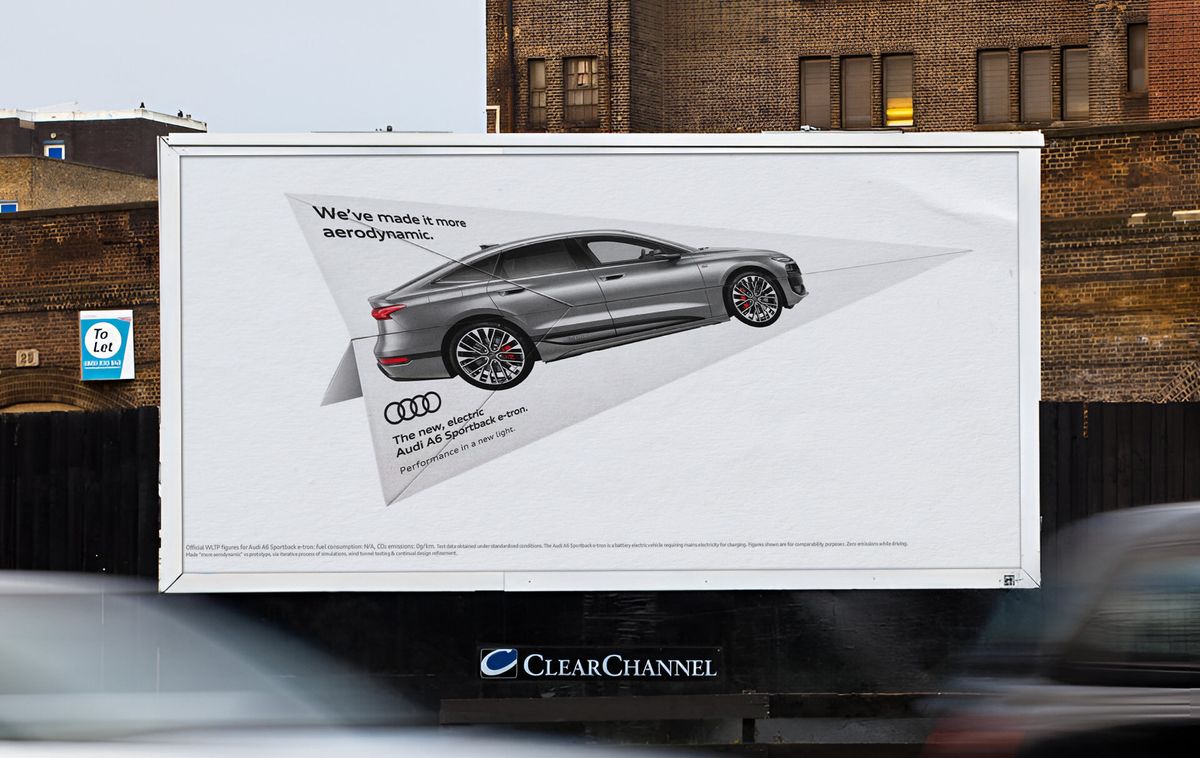
The campaign, created by BBH London, is a deconstructing the Audi A6 E-tron into bite-size selling points. There are both traditional and video billboards highlighting the car’s range, its fast-charging capabilities, its technology, and, in the piece above, the Audi A6 Sportback E-tron’s aerodynamic performance.

A Simple but Effective Design

The campaign starts with a folding guide for a paper airplane (top image), with the Audi A6 Sportback E-tron sliced across the page. Once put together, the airplane reveals the whole car. This idea came from Simon Finn and Matthew Chong, a pair of junior creatives on BBH’s eight-month creative incubator course, Barn. It just shows how great ideas can emerge when talent is given the freedom to experiment.

A Sequential Media Strategy

The campaign was precisely engineered through a sequential media strategy, managed by PHD. Billboards in high-dwell time locations were strategically planned so commuters would encounter the flat lay version of the paper airplane first, sparking curiosity before the fully constructed plane appears in subsequent placements.

A Focus on Real Sales Points

Each billboard is the essence of simple but effective advertising: a single message clearly communicated in an unexpected and memorable way. It also perfectly (and quietly) expresses Audi’s traditional brand focus on luxury alongside innovation, precision, and progressive design, capturing attention without a need for dramatics.

Uche Ezugwu’s Perspective

"It’s not just another car ad," says Uche Ezugwu, Creative Director at BBH. "It breaks the mold of what a launch should be, showcasing innovation and performance in the most refined, effortless way. For this to come from one of our Barn teams, is the cherry on the cake."

Conclusion

In a market where Jaguar and Tesla are trying to make a splash with their designs, Audi is focusing on what really matters: the design of the cars themselves. With its latest campaign, Audi is showcasing its commitment to innovation, precision, and progressive design, while also highlighting the real sales points of its vehicles.

FAQs

Q: What is the purpose of Audi’s latest billboard campaign?
A: The campaign is designed to showcase the features and benefits of the Audi A6 E-tron and A6 Sportback E-tron.

Q: Who created the campaign?
A: The campaign was created by BBH London.

Q: What is the key message of the campaign?
A: The key message is that Audi’s electric vehicles are designed with innovation, precision, and progressive design in mind, and that they offer real benefits to customers.

Q: What is the main difference between Audi’s campaign and those of Jaguar and Tesla?
A: Audi’s campaign focuses on the design of its vehicles, while Jaguar and Tesla are focusing on more dramatic and attention-grabbing approaches.

Instalando PostgreSQL no WSL

Using PostgreSQL with Rails on Windows Subsystem for Linux (WSL)

Introduction

Many developers have been asking if it’s possible to use PostgreSQL with Rails on Windows Subsystem for Linux (WSL). The answer is yes! In this article, we’ll guide you through the installation and configuration process.

Prerequisites

Before we begin, make sure you have the following:

  • Windows 10 or later
  • WSL installed and configured
  • A Rails application set up and running on your Windows machine

Installation and Configuration

To install PostgreSQL on WSL, follow these steps:

Step 1: Install PostgreSQL

Open the WSL terminal and run the following command to install PostgreSQL:

sudo apt-get update
sudo apt-get install postgresql

Step 2: Create a PostgreSQL user and database

Create a new PostgreSQL user and database using the following commands:

sudo -u postgres psql
CREATE ROLE myuser WITH PASSWORD 'mypassword';
CREATE DATABASE mydatabase OWNER myuser;

Step 3: Configure Rails to use PostgreSQL

Edit your Rails application’s config/database.yml file to use the PostgreSQL database:

default: &default
  adapter: postgresql
  encoding: unicode
  host: localhost
  username: myuser
  password: mypassword
  database: mydatabase

Step 4: Start your Rails application

Start your Rails application using the following command:

rails s

Conclusion

In this article, we’ve shown you how to install and configure PostgreSQL on WSL and use it with your Rails application. With these steps, you can now use PostgreSQL with your Rails application on your Windows machine.

FAQs

Q: What is WSL?
A: WSL (Windows Subsystem for Linux) is a compatibility layer for running Linux distributions natively on Windows 10 and later.

Q: Why use PostgreSQL with Rails?
A: PostgreSQL is a powerful and popular open-source relational database management system that is widely used with Rails applications.

Q: Can I use another database system with Rails on WSL?
A: Yes, you can use other database systems with Rails on WSL, such as MySQL or SQLite.

Q: How do I troubleshoot issues with PostgreSQL on WSL?
A: You can troubleshoot issues with PostgreSQL on WSL by checking the system logs, checking the PostgreSQL logs, and seeking help from the WSL community.

AI to Save UK £45bn a Year?

Stay Informed with Free Updates

Simply sign up to the Artificial intelligence myFT Digest — delivered directly to your inbox.

Digitization of Government Services Could Achieve Up to £45bn in Savings and Productivity Benefits

Sir Keir Starmer recently declared that the digitization of government services could achieve up to £45bn in savings and productivity benefits annually across the public sector. The UK prime minister arrived at this total following a review this year that was commissioned by technology secretary Peter Kyle and conducted by officials in his department alongside consultancy firm Bain & Company.

Where will the savings come from?

The report, published in January, estimated that greater use of digital technology and artificial intelligence could save 4-7% of public sector expenditure in total, making it “the most powerful lever available” to drive reform across the state. Crucially, however, it did not offer a detailed breakdown.

Where do the other savings come from?

Officials in the Department for Science, Innovation and Technology told the Financial Times that £36bn — or 80% — of the estimated efficiencies would derive from simplifying and automating delivery across the public sector. This would involve the widespread use of AI to perform administrative tasks, such as transcribing meetings, sorting and analyzing state consultation responses, summarizing policies, and conducting legal and parliamentary research.

How credible is the government’s calculation?

Some experts are skeptical. Nick Davies, programme director at the Institute for Government think-tank, said he understood how digital technology could boost productivity, but warned that Starmer’s suggestion of significant “cashable” savings may be misleading. While “transactional” services such as the issuance of passports and driving licenses, and other back-office functions, can be automated, it is difficult to replicate in person-centred services such as healthcare that require frontline staff, he said.

Conclusion

The government’s calculation of £45bn in savings and productivity benefits from digitization of government services is ambitious, but some experts are skeptical about its credibility. While technology can certainly boost productivity, it is crucial to consider the limitations of automation in person-centred services. The government will need to provide a more detailed breakdown of its plans to achieve these savings and ensure that they are not just promises but actual cost savings.

Frequently Asked Questions

Q: How much could the digitization of government services achieve in savings and productivity benefits?
A: Up to £45bn annually across the public sector.

Q: What are the main areas where savings will be achieved?
A: Simplifying and automating delivery across the public sector, migrating service processing to cheaper online channels, and reducing fraud and error with digital compliance solutions.

Q: How credible is the government’s calculation?
A: Some experts are skeptical, citing limitations of automation in person-centred services and the need for more detailed breakdown of plans.

Q: What is the government’s plan to achieve these savings?
A: The government has launched a review, commissioned by technology secretary Peter Kyle, to explore the potential benefits of digitization and automation in the public sector.

Google Search History Can Power Gemini AI Answers

0

Gemini With Personalization

Google announced a new version of Gemini that adapts responses to a user’s unique interests. It does this based on their search history, enabling Gemini to deliver responses with a higher level of contextual relevance and personalization. Google intends to expand personalization by integrating other Google apps and services, including Photos and Images.

How Personalization Works

Users can share their personal preferences and details, such as dietary requirements or their partner’s names, to obtain a greater degree of personalization in responses that feel specific to the individual. Advanced users can allow Gemini to access past chats to further improve the relevance of responses.

Personalization Is Opt-In

There are four key points to understand about personalization in Gemini:

  • Personalization is currently an opt-in feature that’s labeled "experimental."
  • Users need to choose to use Personalization from the model drop-down menu in order to activate it.
  • Gemini asks for permission to connect to search history and other Google services and apps before it uses them for personalization.
  • Users can also disconnect from the feature.

What Publishers Need To Know

This update increasingly blurs the distance between traditional Search and Google’s Assistant while simultaneously making information increasingly accessible. Publishers and SEOs should be concerned enough to research how to respond. Considerations about privacy issues may keep Google from turning personalization into an opt-out feature. Even though this is an experimental feature, publishers and SEOs may want to understand how this impacts them, such as if it’s possible to track personalized Gemini referral traffic or will it be masked because of privacy considerations? Will answers from Gemini reduce the need for clicks to publisher sites?

Conclusion

The new Gemini update is a significant step towards creating a more natural and personalized AI assistant. With the ability to access search history and other Google apps and services, Gemini can deliver responses that truly resonate with users. While personalization is currently an opt-in feature, it’s likely that Google will continue to develop and improve it, potentially making it a standard feature in the future.

FAQs

Q: What is the purpose of the new Gemini update?
A: The new Gemini update is designed to make responses more personalized and contextual, based on a user’s search history and other Google apps and services.

Q: How does personalization work in Gemini?
A: Users can share their personal preferences and details, such as dietary requirements or their partner’s names, to obtain a greater degree of personalization in responses.

Q: Is personalization an opt-in feature?
A: Yes, personalization is currently an opt-in feature that’s labeled "experimental." Users need to choose to use Personalization from the model drop-down menu in order to activate it.

Q: Can I disconnect from the personalization feature?
A: Yes, users can disconnect from the feature at any time.

Q: How will this update impact publishers and SEOs?
A: The update may impact publishers and SEOs, particularly in terms of tracking referral traffic and clicks to publisher sites.

Here is a single title: “Designer Ray-Ban Metas, An EV to Mock Tesla, and Portable Pizzas”

0

It’s Not Rocket Science: Ray-Ban Meta Wayfarers Are the Best Face Computer

A huge part of the reason why Ray-Ban Meta Wayfarers are the best face computer is because a lot of people already do want to wear Ray-Ban Wayfarers. It’s a lot easier to persuade people to wear a smart accessory when that accessory looks sharp as hell. Meta has committed to the bit with its latest launch, the Ray-Ban Meta x Coperni collaboration, which just debuted at Paris Fashion Week, no less.

Ray-Ban Meta x Coperni Collaboration

Coperni is a French fashion brand that’s known for semi-techy stunts like spraying a dress onto model Bella Hadid, so collaborating with Meta isn’t totally off-brand. The Coperni glasses are limited-edition (naturally). In addition to all the usual Ray-Ban Meta features – live video recording, AI capabilities, pretty great sound quality – the Coperni glasses have limited edition numbering, a Coperni charging case, and gray mirror lenses. Important to remember, though: Buying a $549 pair of fashion AI glasses will not make you look like a modern-day oligarch. You’re going to need a chin implant, a car with 37 recall notices, or a bunker in Hawaii to do that.

Watch Out Elon, Former Tesla and Lucid Bods Are Making Their Own Roadster EVs

New EV brands are springing up all the time, but what makes Longbow Motors special is not only the stunning designs of the first two incoming models but that this start-up is founded by former execs from Tesla, BYD, and Lucid. That’s quite the pedigree.

The Speedster and Roadster

The two EVs are the Speedster (above), with no roof or windscreen, which will be followed by a fixed-roof, two-seat coupe called the Roadster. The rear-wheel drive Speedster will be limited to 150 cars, and weigh in at just 895 kg, giving it a 275-mile range, a claimed 0-62 mph time of 3.5 seconds, and $92,600 price tag. The Roadster will be cheaper at $70,850, but 100 kg heavier, yet still good for 0-62 mph in 3.6 seconds, and 280 miles.

Get a Handle on JBL’s Pimped Most Popular Speakers

JBL dropped two new speakers in time for the warm weather ahead. This week, the company debuted rejigged versions of the JBL Flip 7 and the JBL Charge 6—two of its most popular models. Both have enhanced sound ("bigger and bolder," according to JBL), its Sound Boost tech that analyzes music in real-time and optimizes the driver accordingly, as well as high-res lossless audio via USB-C. You can also pair it with other Auracast-enabled JBL speakers (although it won’t work with older models that use PartyBoost).

Conclusion

As the world becomes increasingly tech-savvy, it’s no surprise that Ray-Ban Meta Wayfarers are leading the charge in the face computer market. With their sleek designs and innovative features, it’s no wonder they’re the go-to choice for many. Meanwhile, new EV brands like Longbow Motors are shaking up the automotive industry with their unique designs and commitment to quality. And, of course, JBL is keeping the music going with their latest speaker releases. One thing is for sure – the future is looking bright and bright.

Frequently Asked Questions

Q: What makes Ray-Ban Meta Wayfarers so popular?
A: Their sleek design and innovative features make them a must-have for many.

Q: What’s the difference between the Speedster and Roadster?
A: The Speedster has no roof or windscreen, while the Roadster has a fixed roof and is 100 kg heavier.

Q: Can I pair JBL speakers with other devices?
A: Yes, you can pair JBL speakers with other Auracast-enabled devices, but not with older models that use PartyBoost.

AI’s Pokémon Mistake Reveals a Dark Problem

0

The Issue with AI-Generated Summaries: A Case Study with Pokémon Sword and Shield

A Misleading Answer

Where is the loaded dice in Pokémon Sword and Shield? A gamer asked Google, and the search engine’s AI-generated summary confidently provided an answer: "You can find the loaded dice in the back entrance of the Celadon mansion, past that, behind the Celadon Department Store." However, this answer was met with a heated debate on Reddit, with many users pointing out that this information is incorrect. The loaded dice do not exist in this version of the game.

The Wider Issue

This example highlights a significant problem in the media landscape: the reliance on AI-generated summaries that are not always accurate. Google’s AI overview is designed to provide quick and easy answers, but in this case, it failed to deliver. The result is not only frustrating for gamers but also potentially dangerous, as users may take the incorrect information as fact.

The Problem with AI-Generated Summaries

Disinformation is a major issue facing the world today, with serious social and political implications. Google’s laissez-faire attitude to presenting AI summaries that are wrong is negligent at best and dangerous at worst. By prioritizing speed and convenience over accuracy, Google is inadvertently fueling the spread of false information.

A Better Alternative

Human journalists and content creators, on the other hand, take the time to fact-check and verify the accuracy of the information they present. This is not to say that human sources are infallible, but they are generally more reliable than AI-generated summaries. By going directly to the source, users can gain a better understanding of the information and its credibility.

The Feedback from Reddit

The reaction to Google’s incorrect answer on Reddit was swift and vocal, with many users expressing frustration and disappointment. One user noted that Google’s AI rarely knows what it’s talking about, and another suggested that users should turn off the feature altogether. However, this may not be a viable solution for those who are not aware of the limitations of the AI-generated summaries.

Conclusion

The loaded dice example is just one of many cases where Google’s AI-generated summaries have failed to deliver accurate information. As AI continues to evolve, it is crucial that we prioritize accuracy and reliability. By doing so, we can ensure that users receive the correct information they need, without inadvertently spreading false information.

FAQs

Q: What is the loaded dice in Pokémon Sword and Shield?
A: The loaded dice do not exist in this version of the game.

Q: Is Google’s AI-generated summary always accurate?
A: No, it is not. Google’s AI-generated summaries are not always accurate and may contain errors.

Q: How can I find accurate information?
A: Go directly to reputable sources, such as human journalists and content creators, to ensure that the information is accurate and reliable.

Q: Can I turn off Google’s AI-generated summary?
A: Yes, you can turn it off, but this may not be a viable solution for those who are not aware of the limitations of the AI-generated summaries.

Google is in trouble… but this could change everything

The Numbers Tell a Compelling Story

Google acquired YouTube from Chad Hurley, Steve Chen, and Jawed Karim in 2006 for $1.65 billion. Many people thought Google overpaid at the time, but let’s dive deeper into why this might be one of the best acquisitions ever.

Google’s Revenue Breakdown

Google’s revenue breakdown for the fiscal year ended December 31, 2024, is as follows:

  • Google Search & Other: $198.1 billion
  • YouTube Ads: $36.1 billion
  • Google Network: $30.4 billion
  • Google Subscriptions, Platforms, and Devices: $40.3 billion
  • Google Cloud: $43.2 billion
  • Other Bets: $1.6 billion
  • Total Revenue: $350.0 billion

The Side Hustle is Crushing It

At first glance, it looks like Google Cloud is Google’s second-largest segment, followed by Google Subscriptions, making YouTube Ads number four. But what if I told you YouTube revenue is included in "Google Subscriptions"?

Here’s how Google describes this business unit:

"Google subscriptions, platforms, and devices revenues are comprised of the following: consumer subscriptions, which primarily include revenues from YouTube services such as YouTube TV, YouTube Music and Premium, and NFL Sunday Ticket, as well as Google One; platforms, which primarily include revenues from Google Play sales of apps and in-app purchases; devices, which primarily include sales of the Pixel family of devices; and other products and services."

Why All of This Matters to You

Remember when I mentioned the incredible growth of podcasts on YouTube? Given the recent surge in views and revenue growth in 2024, it’s not crazy to think that YouTube, even after 20 years and over $40 billion in revenue, is just getting started.

The opportunity here is twofold. You can work directly with creators, and your reach isn’t throttled like on other platforms. For instance, partnering with niche podcast creators can help you tap into highly engaged audiences. You can also use YouTube ads to spread the word, but combining creators with YouTube ads is a powerful strategy.

Conclusion

In conclusion, I’m still bullish on Google, and it’s not because of AI. YouTube, not AI, might be Google’s saving grace. With over 1 billion monthly views, YouTube is quietly becoming the leading platform for podcast consumption. This tells me people are seeking personal connections with podcast hosts. They don’t just want to hear hosts; they want to see them in action. It shows people still value human connection more than the next AI trend.

Frequently Asked Questions

Q: What is the main reason for Google’s success?
A: YouTube, not AI, is the driving force behind Google’s success.

Q: What is the revenue breakdown for Google’s different segments?
A: The revenue breakdown is as follows: Google Search & Other: $198.1 billion; YouTube Ads: $36.1 billion; Google Network: $30.4 billion; Google Subscriptions, Platforms, and Devices: $40.3 billion; Google Cloud: $43.2 billion; Other Bets: $1.6 billion; Total Revenue: $350.0 billion.

Q: Why is YouTube so successful?
A: YouTube is successful because it provides a platform for creators to connect with their audiences, and people crave genuine human connection.

Q: What opportunities are there for individuals to take advantage of YouTube’s growth?
A: Individuals can partner with creators, use YouTube ads, or become creators themselves to tap into the platform’s vast audience.

14 Pro Tips for Eye-Catching Book Cover Design

0

How to Master the Art of Book Cover Design: 14 Essential Tips

01. Understand the Story First

A book cover should encapsulate the essence of the story. Before diving into the design, read the book or discuss its themes with the author. Understanding the plot, its characters, and the emotional tone helps you create a cover that resonates with readers. Always sketch out a rough design that outlines where elements will go. For manga, I focus on capturing the visual dynamism and emotional intensity typical of the genre. Every element, from typography to imagery, should reflect the story’s core message.

Book Cover Designs

(Image credit: Rittsu Kogarasuashi/Paper Sky Press)

02. Embrace Manga and Anime Aesthetics (If Relevant to Your Genre)

Manga and anime styles often feature bold lines, vibrant colors, and expressive characters. Incorporate these elements into your design to appeal to fans of the genre. Experiment with dynamic poses, dramatic shading, and iconic motifs like cherry blossoms or urban backdrops to align with the genre, but balance the visuals to ensure the cover is not overly cluttered, allowing key elements to stand out.

03. Typography is a Storytelling Tool

In manga covers, typography isn’t just functional – it’s part of the visual narrative. Choose typefaces and fonts that align with the story’s tone: elegant serifs for romance or bold sans-serifs for action. Customize text placement and integrate it with the artwork, such as having titles weave through illustrations or mimic manga-style sound effects. Well-designed typography can add depth to a cover and reinforce the story’s theme.

04. Design for Instant Appeal

Bookstore shelves are crowded, and your cover must grab a reader’s attention immediately. Use bold compositions, eye-catching contrasts, and striking focal points to stand out. For manga covers, a character’s intense gaze or a dramatic action scene can draw readers in. Ensure your design is instantly visually impactful, even if it’s used as a small thumbnail for online stores.

05. Keep the Genre in Mind

Different manga genres – shonen, shojo, seinen, and josei – come with their own unique aesthetic expectations. Shojo manga may feature soft pastels and delicate designs, while shonen often employs dynamic poses and bold colors. Tailor your design elements to align with the conventions of the specific genre, ensuring the cover speaks directly to its target audience.

06. Use Layering to Add Depth

Layering techniques can make a cover more visually engaging. For manga-inspired designs, I combine character illustrations with textured backgrounds and typography. I use Affinity to add gradients, halftones, or subtle patterns reminiscent of manga panels, creating depth and dimension in the design. This approach evokes the layered storytelling of manga itself.

07. Tell a Visual Story

Covers can serve as a mini narrative on their own. Create a scene or moment that hints at the contents of the full story, without revealing too much. For instance, showcase the protagonist in a dramatic pose, paired with a symbolic element from the plot, which the reader will discover the meaning of. This approach teases their curiosity and encourages them to pick up the book.

08. Incorporate Cultural Elements

Manga often draws inspiration heavily from Japanese culture, so it’s a good idea to incorporate visual motifs like kanji characters, traditional patterns, or iconic landscapes to give the cover an authentic feel. However, these cultural elements can also be balanced with universal design principles, to appeal to a broad audience of readers.

09. Play with Composition

Dynamic compositions are a hallmark of manga covers. Make use of asymmetry, bold diagonals, and overlapping elements to create energy and motion in your cover. Experiment with unconventional layouts to make your cover stand out, but ensure the overall design remains balanced and clearly readable.

10. Focus on Character Design

Characters are central to manga storytelling and are often the highlight of the cover. Ensure the protagonist is depicted with expressive details that reflect their personality and role in the story. Use bold lines, rich colors, and engaging poses to make them unforgettable for the reader.

11. Choose Colours with Intention

Colour schemes should align with the book’s mood and genre. Warm tones work well for romantic or adventurous stories, while cooler shades fit darker or introspective themes. For manga covers, vibrant colors can reflect the high-energy nature of the medium, while subdued palettes add sophistication for more mature titles.

12. Experiment with Iconic Motifs

Integrate motifs that resonate with the genre, including symbols that not only tie into the genre’s wider aesthetic but also provide subtle hints about the story’s specific setting and themes. But remember to use these elements sparingly, to avoid overwhelming the design.

13. Don’t Overlook the Spine and Back Cover

While it’s essential that the cover is striking and grabs a reader’s attention, the spine is crucial for books on crowded shelves and the back cover is what draws the reader into what the story may contain. Some would even say these are the most crucial elements, as the spine is the section of the book that is viewed among others on the bookshelves. Therefore, I recommend using bold typography and small visual elements, like character silhouettes, to make the spine even more visually appealing, while making sure the back cover is properly designed – legibility and readability matter, along with compelling copy.

14. Test Your Design with Fans of the Genre

Get feedback from readers or other designers familiar with the genre. Their insights can help you refine the design to ensure it resonates with the target audience. Honest critiques can often highlight overlooked details, helping you achieve a polished and compelling final cover.

Google is replacing Google Assistant with Gemini

0

Google to Replace Google Assistant with Gemini on Android Phones

Upgrade to Gemini Coming Later this Year

Google announced on Friday that it will replace Google Assistant on Android phones with Gemini later this year. The company plans to upgrade more users from Google Assistant to Gemini "over the coming months." After this transition, Assistant will no longer be accessible on most mobile devices or available from app stores.

Wider Rollout of Gemini

Google’s plan to upgrade tablets, cars, and devices that connect to phones, such as headphones and watches, to Gemini. The company will also bring a new experience, powered by Gemini, to home devices like speakers, displays, and TVs.

Timeline and Next Steps

Google will share more details with users in the next few months. Until then, Assistant will continue to operate on the mentioned devices. The company has worked to improve the Gemini user experience, particularly for users relying on various Assistant functions.

What’s New in Gemini?

Google has added several highly requested features to Gemini on Android devices, including the ability to play music, support for timers, and an option to take actions directly from a user’s lock screen.

Background and Rationale

The move to drop Assistant in favor of Gemini isn’t surprising, given that Google launched its Pixel 9 smartphone line with Gemini as the default virtual assistant. Gemini has more advanced capabilities than Assistant and provides new ways of getting help and information on topics via tools like Gemini Live and Deep Research.

Conclusion

Google’s transition to Gemini is an opportunity for users to experience a more advanced and capable virtual assistant. With the addition of new features and capabilities, Gemini is expected to enhance user experience on various devices.

Frequently Asked Questions

Q: When will Google Assistant be replaced by Gemini?
A: The transition will occur later this year, with more details to be shared in the next few months.

Q: What devices will be affected by the upgrade?
A: Android phones, tablets, cars, devices that connect to phones, and home devices like speakers, displays, and TVs will be upgraded to Gemini.

Q: What are the benefits of Gemini?
A: Gemini has more advanced capabilities than Assistant, providing new ways of getting help and information on topics via tools like Gemini Live and Deep Research.