Home Blog Page 238

Angular Tips #3

Using the Abstract Class to Define Services Includes Things in Common

Abstract classes are very powerful in TypeScript and extremely useful when working with Angular. They help enforce structure, promote reusability, and keep your codebase clean and maintainable.

In Angular, there are scenarios where you need to define multiple services that share many common functionalities. In such cases, you can use an abstract class as a base service to inherit and centralize shared logic across different services.

For example, I have two services: book.service.ts and music.service.ts. They are defined as follows:

// Book service
import { Injectable } from '@angular/core';
import { Observable } from 'rxjs';

type Book = {
  readonly name: string;
  readonly author: string;
};

@Injectable({
  providedIn: 'root'
})
export class BookService {
  protected readonly page$: Observable<Book[]>;

  protected getBooks(): Observable<Book[]> {
    return of([{ name: 'Book 1', author: 'Conan' });
  }

  protected resetBooks(): Observable<Book[]> {
    return of([]);
  }

  constructor() {
    this.page$ = this.getBooks();
  }
}
// Music service
import { Injectable } from '@angular/core';
import { Observable } from 'rxjs';

@Injectable({
  providedIn: 'root'
})
export class MusicService extends BaseService {
  protected getList(): Observable<Music[]> {
    return of([{ name: 'Music 1', artist: 'Edward' });
  }
}

As you can see, we only need to redefine the abstract getList() function in each service. Everything else is inherited from the base service, making our code cleaner, more maintainable, and reusable.

Implement Lazy Loading for Optimizing Application Performance, but be Careful

Lazy loading in Angular is a technique used to load feature modules only when needed, reducing the initial bundle size and improving application performance. Instead of loading all modules upfront, Angular loads them dynamically when a user navigates to a specific route.

We can define a lazy load module, like this:

const routes: Routes = [
  {
    path: 'feature',
    loadChildren: () => import('./feature/feature.module').then(m => m.FeatureModule)
  }
];

However, this is not always the case where lazy load comes to the rescue. With lazy load, it will load the module only when it’s needed, which means, as a traceback, the loading time in the first visit of the component require that module will be increased.

When Lazy Loading Can Hurt UX:

  • Heavy Pages: If a page has a large bundle size, lazy loading can introduce a noticeable delay, making users think the app is slow or broken.
  • Frequent Navigation: If users frequently switch between pages, repeatedly loading modules can be inefficient.
  • Above-the-Fold Content: If a page requires immediate rendering of essential content, lazy loading might cause delays.

So, to use lazy loading efficiently, let’s combine it with preloadStrategies. To dive deeper into preloadStrategies in Angular, I recommend checking out the blog: Optimize your Angular app’s user experience with preloading strategies. This resource is extremely useful for understanding how to choose the right preloadStrategies for your app.

Conclusion

And that’s all for blog #3 about the Angular tips! I hope you found these tips helpful. See you in my next blog!

FAQs

Q: What is the benefit of using abstract classes in Angular?
A: Abstract classes help enforce structure, promote reusability, and keep your codebase clean and maintainable.

Q: What is lazy loading in Angular?
A: Lazy loading is a technique used to load feature modules only when needed, reducing the initial bundle size and improving application performance.

Q: When should I use lazy loading?
A: Use lazy loading when you need to load feature modules only when needed, reducing the initial bundle size and improving application performance.

Q: What are the potential issues with lazy loading?
A: Heavy pages, frequent navigation, and above-the-fold content can be affected by lazy loading, introducing noticeable delays and inefficiencies.

30 Best Examples of AI Diagnosis Tools

What if a phone app could spot a health issue before you notice any symptoms? That’s what an AI medical diagnosis app can do today. These apps help both patients and doctors by offering early checks and deep scans.

Why AI Medical Diagnosis Apps Matter

AI medical diagnosis apps have transformed healthcare by improving speed, accuracy, and patient empowerment. These tools help both doctors and patients detect health issues early, offering better care for all.

List of 30 AI Medical Diagnosis Apps for 2025

AI medical diagnosis apps offer fast, accurate diagnoses, support doctors, and empower patients. They improve heart, skin, mental health, and chronic disease management through data-driven insights.

General Health Diagnosis

General Health Diagnosis apps are AI-powered tools that act as virtual health companions, offering round-the-clock assistance for understanding and monitoring our bodies. Here’s a look at four prominent apps in this field, demonstrating top AI applications in healthcare:

1. Ada Health

Ada Health functions as an intelligent health assistant, exemplifying AI medical diagnosis free tools. It works by analyzing user-reported symptoms and generating potential diagnoses, continuously improving its accuracy through machine learning.

Benefits:

  • Enhances diagnostic precision through continuous learning
  • Assists in early detection of health issues
  • Improves medical consultation effectiveness
  • Excels at identifying rare diseases

How These Apps Are Impacting Healthcare

AI-powered healthcare applications are transforming both patient care and medical practice.

Category Impact of AI in Healthcare
For Doctors analyze vast datasets; enhance cancer diagnosis precision; manage patient records efficiently.
For Patients enable early disease detection; give personalized medical guidance; assist in managing chronic illnesses.

Final Thoughts

AI medical diagnosis apps now help both doctors and patients by improving diagnostic accuracy, cutting costs, and saving time. These tools speed up health checks, support clinical decisions, and let users track their health at home.

FAQs

  • What is an AI medical diagnosis app?
    An AI medical diagnosis app uses artificial intelligence to help detect diseases, analyze symptoms, and suggest possible treatments. It assists doctors in making faster and more accurate decisions.
  • How does a medical AI app help patients?
    A medical AI app empowers patients by allowing them to monitor symptoms, track health conditions, and get preliminary health advice without visiting a doctor immediately.
  • Are AI diagnostic tools accurate?
    Yes, many AI diagnostic tools are highly accurate. They analyze vast amounts of data, recognize patterns, and help in early disease detection, improving the overall accuracy of diagnoses.
  • Can AI healthcare applications replace doctors?
    No, AI healthcare applications support doctors by providing insights and reducing diagnostic errors. However, they don’t replace the expertise of human healthcare professionals.
  • How do I choose the best medical AI app?
    Look for features like ease of use, data security, diagnostic accuracy, and integration with other health devices to find the best medical AI app for your needs.

¿Crees que la IA está sobrevalorada? Espera a que conozcas el ‘vibe coding’

0

No soy programador. No sé escribir ni una sola línea de Python, JavaScript o C++.

Sin embargo, durante los últimos meses he estado programando como loco.

Mis creaciones

Entre mis creaciones: una herramienta que transcribe y resume episodios largos de pódcast, una herramienta para organizar mis marcadores de redes sociales en una base de datos en la que se puedan hacer búsquedas, un sitio web que me dice si un mueble cabe en el maletero de mi auto y una aplicación llamada LunchBox Buddy, que analiza el contenido de mi refrigerador y me ayuda a decidir qué empacar para el almuerzo escolar de mi hijo.

El "vibe coding"

El "vibe coding", término popularizado por el investigador de IA Andrej Karpathy, que podría traducirse como “programación por vibra”, es una forma simple y útil para referirse al modo en que las herramientas de IA actuales permiten incluso a los aficionados sin conocimientos técnicos crear aplicaciones y sitios web totalmente funcionales, con tan solo escribir instrucciones en un cuadro de texto. No tienes que saber programar para programar por vibra: con que tengas una idea y un poco de paciencia, por lo general, es suficiente.

Mis experiencias con "vibe coding"

Mis propios experimentos de “vibe coding” han tenido como objetivo crear lo que yo llamo “software para uno”: pequeñas aplicaciones hechas a la medida que resuelven problemas concretos en mi vida. No son el tipo de herramientas que construiría una gran empresa tecnológica. No hay un mercado real para ellas, sus funciones son limitadas y algunas solo funcionan más o menos bien.

Pero construir software de esta manera (describir un problema en una o dos frases, y luego ver cómo un potente modelo de IA desarrolla una herramienta a la medida para resolverlo) es una experiencia alucinante. Produce una sensación de vértigo por la IA, similar a la que sentí después de utilizar ChatGPT por primera vez. Y es la mejor forma que he encontrado de demostrar a los escépticos las capacidades de los modelos de IA actuales, que ahora pueden automatizar secciones grandes de la programación informática básica y pronto podrían ser capaces de hazañas similares en otros campos.

Las herramientas de codificación con IA

Las herramientas de codificación con IA existen desde hace años. Las primeras, como GitHub Copilot, se diseñaron para ayudar a los programadores profesionales a trabajar más rápido, en parte terminando sus líneas de código del mismo modo que ChatGPT completa una frase. Aun así, tenías que saber programar para sacarles el máximo partido e intervenir cuando la IA se quedaba estancada.

Pero en el último año o dos, se han creado nuevas herramientas para aprovechar modelos de IA más potentes que permiten incluso a los novatos programar como profesionales.

Ventajas y desventajas del "vibe coding"

La IA comete errores de vez en cuando. En una ocasión, cuando intenté crear un sitio web para una tienda de neumáticos en mi vecindario, la IA inventó reseñas falsas de la página de Yelp de la tienda y las añadió a un apartado de testimonios. En otra ocasión, cuando intenté convertir una larga historia que había escrito en un sitio web interactivo, la IA incluyó la mitad del texto y omitió la otra mitad.

En otras palabras, el “vibe coding” todavía puede beneficiarse de la supervisión humana o, al menos, de su proximidad. Y probablemente sea mejor usarlo para proyectos de aficionado, no para tareas esenciales.

Conclusión

El "vibe coding" es una forma innovadora de crear software que utiliza las herramientas de IA para automatizar tareas de programación. Aunque no es perfecto y puede cometer errores, es una forma emocionante y accesible para los no programadores de crear aplicaciones y sitios web funcionales. Con la capacidad de crear software que resuelve problemas concretos en mi vida, me siento como si hubiera descubierto una nueva forma de hacer cosas. Y, quién sabe, tal vez pronto se convierta en una parte integral de la forma en que trabajamos y vivimos.

Preguntas Frecuentes

Q: ¿Qué es el "vibe coding"?
A: El "vibe coding" es una forma de programación que utiliza herramientas de IA para automatizar tareas de programación y crear aplicaciones y sitios web funcionales.

Q: ¿Quién creó el término "vibe coding"?
A: El término "vibe coding" fue popularizado por el investigador de IA Andrej Karpathy.

Q: ¿Cuáles son las herramientas de codificación con IA?
A: Algunas de las herramientas de codificación con IA más populares incluyen a Cursor, Replit, Bolt y Lovable.

Q: ¿Es el "vibe coding" adecuado para proyectos esenciales?
A: No, el "vibe coding" no es adecuado para proyectos esenciales, ya que la IA puede cometer errores y necesita supervisión humana. Es mejor para proyectos de aficionado.

I Knew This Robot Vacuum Was a Winner Just Hours After Testing It

ZDNET’s Key Takeaways

  • The Roborock Saros 10R is available for $1,600
  • This new robot vacuum and mop combination navigates complex areas and quietly vacuums, with a good mopping feature that reaches along the edges to not miss a spot
  • The Saros 10R’s mirrored dock looks great, but the water tank is relatively small, lasting only a few cleanings, and the rotating mop pads aren’t as effective as roller mops, which are becoming more commonplace

Setting Up the Roborock Saros 10R

The robot quickly paired with the Roborock app and the dock is heavy but easy to maneuver. The initial mapping run took only 11 minutes to map 742 square feet; the same area took my Roomba Combo 10 Max 84 minutes to map.

Performance

The robot gracefully and quietly vacuums, even with its 22,000Pa of suction power set to the highest setting, and maneuvers around furniture and obstacles easily. I’ve run the device daily, and it’s only gotten its brush roller caught three times: once with a one-inch tall penguin toy and twice with a kids’ rubber bracelet. Otherwise, the robot is good at avoiding socks, wipes, and small toys too big to get suctioned into its dustbin.

Mopping Feature

The Roborock Saros 10R has an extendable mop pad that cleans along edges. Out of all the robots I’ve tested, the Saros 10R is the one that has best avoided charging cables on the floor.

Conclusion

The Roborock Saros 10R is a game-changer for the company, offering a reliable 2-in-1 robot vacuum and mop combination that outperforms models that cost hundreds more. With its easy setup, quiet operation, and effective mopping feature, this robot is perfect for homes with complex layouts or fast-changing environments.

Frequently Asked Questions

Q: What is the price of the Roborock Saros 10R?
A: The Roborock Saros 10R is available for $1,600.

Q: How does the Roborock Saros 10R navigate complex areas?
A: The robot vacuum and mop combination navigates complex areas quietly and effectively, with a good mopping feature that reaches along the edges to not miss a spot.

Q: What are the pros and cons of the Roborock Saros 10R?
A: The pros include its easy setup, quiet operation, and effective mopping feature. The cons include the relatively small water tank and the rotating mop pads, which aren’t as effective as roller mops.

Q: Is the Roborock Saros 10R suitable for homes with pets?
A: Yes, the Roborock Saros 10R is suitable for homes with pets, as it is designed to handle pet hair and other debris.

Retro Gamers Drool Over Atari-Themed Sauces

0

Two Niche Interests Combine to Make Something Beautiful

Sometimes two niche interests combine to make something beautiful – it may not be for everyone, but for the few that get it, it’s a meeting of worlds worthy of celebrating. One such case is the latest release from Atari. No, it’s not a new retro games console – it’s (drumroll please) a sauce collection.

A Match Made in Heaven

Okay, so admittedly it’s an unexpected combo, but for some foodie Atari fans it’s a dream come true. Even if you’re not an avid retro gamer, the packaging design is suitably drool-worthy, with playful game-inspired designs to suit all types of taste buds.

The Atari Sauce Range

Created in collaboration with Sauce Shed, the Atari Sauce Range consists of 10 unique flavours inspired by some of its most iconic games including Crystal Castles, Pong and Bezerk. Featuring box art from the original games, each packaging design has a unique retro feel that could be a display piece in itself. A highlight of the ultra playful branding is the collection’s clever tagline "Use it with joy, stick it on everything.”

A Love Letter to Retro Gaming Fans

Over on Reddit fans were pumped about the launch, with one writing "Never thought I’d see a crossover of my retro gaming & hot sauce hobbies." Another jokingly suggested, "I think if you bought the Atari VCS you should get your first bottle at 50% off."

The Packaging Design

The packaging design is a work of art in itself, with playful graphics and bold colors that will appeal to retro gaming fans and foodies alike. Whether you’re a fan of the classic games or just appreciate good design, the Atari Sauce Range is sure to bring a smile to your face.

Conclusion

The Atari Sauce Range is a unique and playful combination of two niche interests that is sure to delight fans of retro gaming and foodies alike. With its bold packaging design and clever branding, it’s a must-have for anyone looking to add a dash of fun and whimsy to their kitchen.

FAQs

Q: What is the Atari Sauce Range?
A: The Atari Sauce Range is a collection of 10 unique flavors inspired by Atari’s iconic games, including Crystal Castles, Pong, and Bezerk.

Q: What makes the packaging design so special?
A: The packaging design features box art from the original games, giving it a unique retro feel that’s sure to appeal to retro gaming fans and foodies alike.

Q: Is the Atari Sauce Range only for retro gaming fans?
A: No, the Atari Sauce Range is for anyone who appreciates good design and is looking to add a dash of fun and whimsy to their kitchen.

Q: Can I use the sauces on anything?
A: Yes, the tagline "Use it with joy, stick it on everything” suggests that the sauces can be used on a wide range of dishes, from pasta to pizza to burgers. Get creative and experiment with different combinations!

Sketching the World: The Art of Jason Chan P.L.

0

Jason Chan P.L. and His Journey as a Freelance Animator and Illustrator

Jason Chan P.L., also known as onlyparkland on social media, is a freelance animator and illustrator from Malaysia. He has illustrated Hilda’s Book of Beasts and Spirits and Hilda’s World: A guide to Trollberg, the Wilderness, and Beyond, both of which are filled with watercolor illustrations.

A Traditional Approach in a Digital Age

As an animator, Jason’s work is heavily influenced by digital tools. However, he has a strong foundation in traditional drawing and painting techniques. "I started drawing a lot at the age of seven after discovering Dragon Ball. I wanted to work on comics, but I didn’t know if there were any schools in Malaysia for that," he says. "Instead, I learned to animate traditionally with pencil and paper in college. One of the principles of animation is solid drawing, and it’s something I truly believe in. Therefore, practicing to improve my drawing skills is something I try my best to prioritize in my career as an animator."

The Importance of Sketchbook Practice

Jason’s daily sketchbook routine helps him maintain his drawing skills and explore new techniques. "I started with one sketch a day, then increased it to a couple of pages every weekend, drawing people outdoors with my wife (then girlfriend)," he says. "Eventually, it became a daily routine, and I spend about an hour drawing patrons while having coffee at my favorite coffee shop. Cafes are always the best place to draw people!"

Favourite Sketchbook Pages

Jason’s favorite sketchbook pages are those that represent his growth as an artist. "I look fondly at these ones because they represent various improvements and changes in the way I draw and paint," he says. One of his favorite projects is sketching 100 people in a week, which can be found on his Instagram page. "Here, the caricature of shapes and the looseness of gestures are among my best," he says.

Managing Multiple Sketchbooks

Jason has a few active sketchbooks at any given time, and he likes to mark the start and end dates on each one. "I always promise myself to complete one sketchbook a year, and I still struggle with that," he laughs. "I have a few active sketchbooks at the same time. Some of them may take a few years to complete. I will cycle through these once in a while until they are fully completed."

The Process of Watercolor Painting

For his illustrated Hilda books, Jason chose watercolors. "I was comfortable with the medium, and the publisher approached me after they came across some fan sketches I made of Hilda," he says. "Sometimes colors and watercolor texture may not come out right. I would need to edit them digitally in Photoshop – adjusting the hue or saturation, using the stamp tool to correct splotchy textures, and reworking the line art."

Conclusion

Jason’s sketchbook practice has helped him maintain his drawing skills and explore new techniques. His background in animation has also influenced his art style, with a focus on conveying motion and exaggerating shapes. By combining traditional and digital media, Jason has developed a unique style that showcases his growth as an artist.

FAQs

Q: What inspired you to start drawing?
A: I started drawing a lot at the age of seven after discovering Dragon Ball.

Q: How do you approach your sketchbook practice?
A: I start with one sketch a day, then increase it to a couple of pages every weekend, drawing people outdoors with my wife (then girlfriend).

Q: What do you like most about your sketchbook pages?
A: I look fondly at these ones because they represent various improvements and changes in the way I draw and paint.

Q: How do you manage your multiple sketchbooks?
A: I always promise myself to complete one sketchbook a year, and I still struggle with that. I have a few active sketchbooks at the same time. Some of them may take a few years to complete. I will cycle through these once in a while until they are fully completed.

The Humane AI Pin Has Already Been Brought Back to Life

0

The Day the Humane Ai Pin Died, It Was Also Reborn. Or at Least, There Was Hope.

The Death of Ai Pin

On February 28, shortly after noon Pacific time, Humane switched off its servers supporting its contentious Ai Pin—essentially bricking a $700 device that was less than a year old. Minutes later, in a Discord voice chatroom with the label “The death of Ai Pin,” one member of a band of dedicated hackers, determined to keep their Pins alive, let the rest of the group in on a secret. He had the codes they needed to get through Humane’s encryption.

A Flop from the Start

Humane’s gadget is the poster child of AI-enhanced hardware disappointments. The cute, clippable device was meant to hang on a lapel or shirt pocket and let you carry out many of the functions you’d find in a phone—take pictures, display text messages, and order around an AI chatbot, all with some added pizazz in the form of Humane’s promised holographic laser displays.

A Short-Lived Device

Released to the world in April 2024, the Pin was an immediate disappointment. Its main features simply did not work well, and from there things just got worse. The Pin was a resounding flop, widely mocked, and the company even reached the point where it processed more returns of the device than it had sold. In February 2025, less than a year after the Pin was released, Humane announced it would shut down its services at the end of the month—Friday, February 28—and part off some of its key AI components to the computer company HP.

A Gut Punch

For the remaining fans of the expensive, short-lived device, the move was a gut punch. In the final week of the Humane Ai Pin’s short life, soon-to-be-former users ran through all of the stages of grief across Humane’s subreddits and Discord servers. There were furious rebukes. Heartbroken goodbyes. Disappointment all around.

A New Beginning

The official Humane Discord was shut down the morning of February 27. Luckily, 23 had already decided to start a separate Discord server for Humane refugees, called reHumane, in an effort to pursue unsanctioned forays into deconstructing the Pin away from the watchful eye of Humane or HP.

A New Era of Hacking

Marcel, another user who gave only his first name to avoid exposing himself to reprisal from HP, saw the end of Humane’s brief era as something exciting. He is used to tearing things like this apart. He has constructed his own PlayStation Portal out of a Nintendo Switch. He was one of the first people to transfer the Rabbit R1 source code onto an Android phone (much to the chagrin of a company that insisted its device was not simply an Android app).

Conclusion

The day the Humane Ai Pin died, it was also reborn. Or at least, there was hope. For the dedicated hackers and fans of the device, the end of Humane’s services marked a new beginning. A chance to take control of their own devices and to continue exploring the possibilities of AI-enhanced hardware.

FAQs

Q: What was the Humane Ai Pin?
A: The Humane Ai Pin was a device that was released in April 2024 and was meant to be a smart device that could perform various functions such as taking pictures, displaying text messages, and ordering around an AI chatbot.

Q: Why was the Humane Ai Pin a flop?
A: The Humane Ai Pin was a flop because its main features did not work well, and it was widely mocked and criticized.

Q: What happened to the Humane Ai Pin after it was shut down?
A: The Humane Ai Pin was shut down on February 28, 2025, and its services were part off to the computer company HP.

Q: What is reHumane?
A: reHumane is a separate Discord server created by 23, a user who wanted to continue exploring the possibilities of the Humane Ai Pin away from the watchful eye of Humane or HP.

Microsoft’s Copilot AI now has a Mac app

Microsoft Expands Copilot AI to Mac Users

The official Copilot app has landed in the Mac App Store in the US, Canada, and the UK, opening up a new world of possibilities for Mac users. The app is free to download and use, but there are some limitations – it only works on Macs with an M1 chip or higher, which means Intel-based Macs are out of the loop.

The app works similarly to its counterparts for Windows, iOS, iPadOS, and Android. Simply type or speak your request or question at the prompt, and Copilot will deliver its response. You can ask Copilot to generate text, images, and more.

What Can Copilot Do on Mac?

According to the description in the Mac App Store, Copilot can handle the following tasks:

* Deliver straightforward answers to complex questions based on simple conversations
* Quickly summarize answers
* Translate and proofread across multiple languages
* Compose and draft emails and cover letters
* Compose stories or scripts
* Create high-quality images from your text prompts, generating anything from abstract designs to photorealistic pictures

With the image generation skill, Copilot can help with the following tasks:

* Develop new logos and brand motifs
* Edit photos and remove backgrounds
* Create illustrations for books
* Curate content from social media
* Devise storyboards for film and video projects
* Build and update a portfolio

You can trigger Copilot on the Mac by setting up a dedicated keyboard shortcut. You’re also able to set it to start up automatically each time you sign in.

New Options for All Copilot Users

Copilot’s powerful new ‘Think Deeper’ feature is now free for all users. This feature spends more time analyzing your question and crafting an in-depth and detailed response. Additionally, Copilot Voice allows you to have a back-and-forth conversation with the AI. You can even choose among four different voices – Canyon, Meadow, Grove, and Wave – each with its own gender, pitch, and accent.

Organize Your Content with Ease

Copilot also offers the ability to organize content with appropriate headings and subheadings (h2, h3, h4, h5, h6).

Conclusion
———-

The expansion of Copilot to Mac users marks an exciting development in the world of AI-powered productivity. With its capabilities and features, Mac users can unlock new levels of efficiency and creativity.

FAQs
—-

Q: What is the system requirement for Copilot on Mac?
A: The app only works on Macs with an M1 chip or higher.

Q: Is Copilot free to use?
A: Yes, the app is free to download and use.

Q: What are the limitations of Copilot on Mac?
A: Intel-based Macs are not compatible with Copilot.

The Anycubic Kobra S1: Bambu Lab Killer or Not?

0

Why you can trust Creative Bloq

Our expert reviewers spend hours testing and comparing products and services so you can choose the best for you. Find out more about how we test.

Anycubic Kobra S1 Combo review

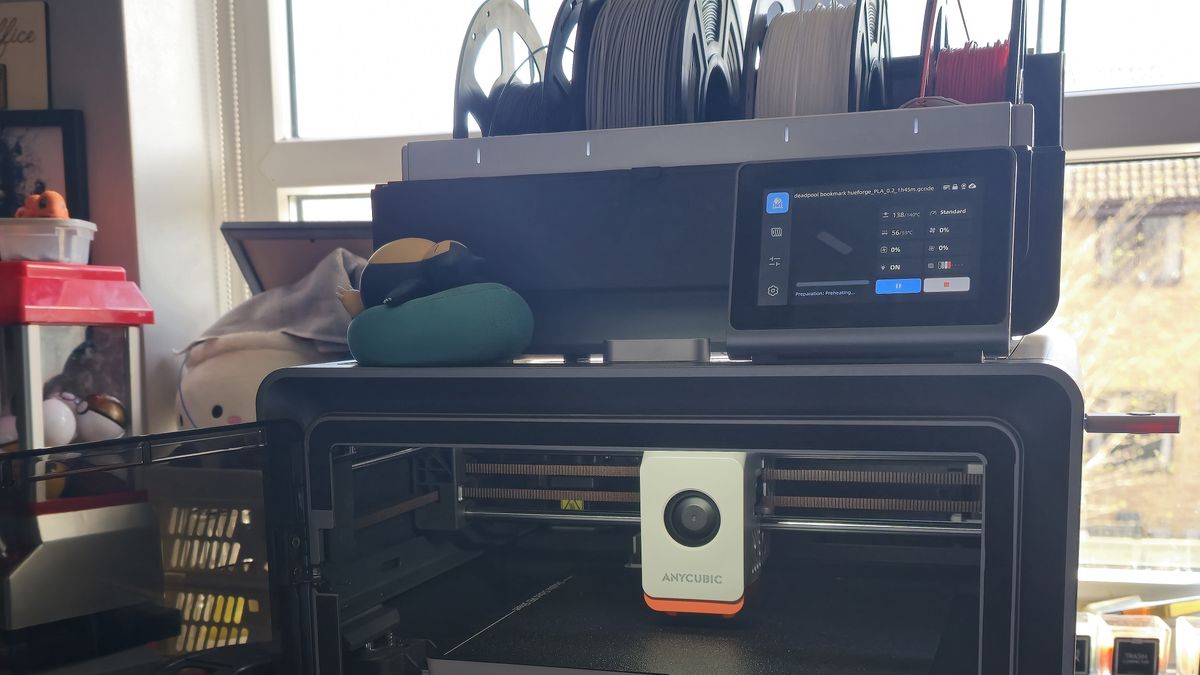
I was excited to get my hands on Anycubic’s latest fully enclosed Core XY construction 3D printer, the Kobra S1 Combo. Unfortunately, my experience with this printer has been frustrating, to say the least.

Key Specs

Print Volume:

250x250x250mm

Max Print Speed:

600mm/s

Recommended Print Speed:

300mm/s

Kobra S1 Dimensions:

400x410x490mm

ACE Pro dimensions:

365.94×282.84×234.5mm

The Good and the Bad

I initially had a positive experience with the Kobra S1 Combo, producing high-quality prints quickly and quietly. However, my excitement was short-lived. I encountered a series of issues with the printer, including error messages, blockages, and faulty material detection.

Frustrations and Disappointment

I spent hours troubleshooting and disassembling the printer, only to be left with more questions and frustration. My experience with the Kobra S1 Combo has been a letdown, and I’ve lost confidence in the printer’s reliability and durability.

Conclusion

The Anycubic Kobra S1 Combo is a powerful 3D printer with impressive specifications and capabilities. However, my experience with the printer has been marred by technical issues and poor design choices. While it’s a great option for those looking for an affordable multicolour 3D printer, I would caution potential buyers to consider the potential risks and frustrations involved.

Frequently Asked Questions

Q: Is the Anycubic Kobra S1 Combo a good 3D printer?
A: The Kobra S1 Combo has impressive specifications, but my experience with the printer has been disappointing.

Q: What are the key features of the Anycubic Kobra S1 Combo?
A: The Kobra S1 Combo features Core XY construction, multicolour printing, and a large build volume.

Q: Is the Kobra S1 Combo reliable?
A: Unfortunately, my experience with the printer has been marred by technical issues and poor design choices.

Q: Is the Anycubic Kobra S1 Combo worth the investment?
A: The Kobra S1 Combo is an affordable option for those looking for a multicolour 3D printer, but potential buyers should be aware of the potential risks and frustrations involved.

What is Mistral AI?

0

What is Mistral AI?

Mistral AI has raised significant amounts of funding since its creation in 2023 with the ambition to “put frontier AI in the hands of everyone.” While this isn’t a direct jab at OpenAI, the slogan is meant to highlight the company’s advocacy for openness in AI.

Who are Mistral AI’s founders?

Mistral AI’s three founders share a background in AI research at major U.S. tech companies with significant operations in Paris. CEO Arthur Mensch used to work at Google’s DeepMind, while CTO Timothée Lacroix and chief scientist officer Guillaume Lample are former Meta staffers.

Are Mistral AI’s models open source?

Not all of them. Mistral AI differentiates its premier models, whose weights are not available for commercial purposes, from its free models, for which it provides weight access under the Apache 2.0 license.

How does Mistral AI make money?

While many of Mistral AI’s offerings are free or now have free tiers, Mistral AI plans to drive some revenue from Le Chat’s paid tiers. Introduced in February 2025, Le Chat’s Pro plan is priced at $14.99 a month.

What partnerships has Mistral AI closed?

In 2024, Mistral AI entered a deal with Microsoft that included a strategic partnership for distributing its AI models through Microsoft’s Azure platform and a €15 million investment. The U.K.’s Competition and Markets Authority (CMA) swiftly concluded that the deal didn’t qualify for investigation due to its small size. However, it also sparked some criticism in the EU.

How much funding has Mistral AI raised to date?

As of February 2025, Mistral AI raised around €1 billion in capital to date, approximately $1.04 billion at the current exchange rate. This includes some debt financing, as well as several equity financing rounds raised in close succession.

What could a Mistral AI exit look like?

Mistral is “not for sale,” Mensch said in January 2025 at the World Economic Forum in Davos. “Of course, [an IPO is] the plan.”

Conclusion

Mistral AI is a French company that has gained significant attention due to its AI assistant Le Chat and several foundational models. While it has raised a substantial amount of funding, its global market share is still relatively low compared to its valuation. The company plans to drive revenue from its paid tiers and strategic partnerships, and an IPO is reportedly in the works.

FAQs

Q: What is Mistral AI?
A: Mistral AI is a French company that aims to put frontier AI in the hands of everyone.

Q: How much funding has Mistral AI raised to date?
A: As of February 2025, Mistral AI has raised around €1 billion in capital to date, approximately $1.04 billion at the current exchange rate.

Q: What are Mistral AI’s plans for revenue?
A: Mistral AI plans to drive some revenue from Le Chat’s paid tiers and strategic partnerships.

Q: What is Mistral AI’s exit plan?
A: Mistral AI plans to go public with an IPO.