Home Blog Page 258

Mastering the Essentials of Leadership

Artificial Intelligence: The Future of Business

What is AI and How Can it Benefit Your Organization?

Artificial intelligence (AI) is the simulation of human intelligence by machines. It’s often misunderstood, but AI is not here to create superhuman technology. It’s a tool for efficiency, making it easier for businesses to process massive amounts of data, make predictions, and automate tasks.

AI vs. Machine Learning: What’s the Difference?

AI is the broader field, aiming to mimic human capabilities, such as problem-solving or decision-making. Machine learning (ML) is a subset of AI that focuses on teaching machines how to learn from data without explicit programming. Think of machine learning as statistics on steroids, using mathematical algorithms to analyze patterns, adapt to new data, and make decisions.

The Power of Neural Networks and Large Language Models

Neural networks and large language models (LLMs) are the intelligence behind many advanced AI systems. Neural networks are a type of machine learning inspired by the human brain, consisting of layers of interconnected nodes that process information. LLMs are a specialized type of neural network focused on predicting tokens (words) in a sequence.

Real-World AI: Practical, Not Science Fiction

AI’s transformative power lies in its ability to learn from massive datasets and generalize its training to make predictions. But what makes this possible? It all comes down to probability and mathematics.

Real-World Applications of AI

AI is making the impossible possible, delivering real results and value to businesses. By integrating AI into routine workflows, businesses can unlock tangible benefits, such as:

  • Automating repetitive tasks to free up time and resources
  • Enhancing customer experiences through personalized interactions
  • Uncovering hidden insights in data to inform business decisions

Ethics and Trust: The AI Frontier

AI holds tremendous potential, but it also raises important questions: Can we trust AI with sensitive data, and how do we prevent bias in AI models? To address these concerns, AI systems should be fine-tuned with data sets appropriate to the use case to reduce hallucinations.

Conclusion

AI is evolving at a rapid pace, and companies should already be considering emerging regulations like the European Union’s Digital Operational Resilience Act (DORA) Act and the AI Act. To succeed with AI, businesses should collaborate with their AI providers, prioritize data quality, and stay informed about trends, regulations, and ethical considerations.

FAQs

Q: What is AI, and how can it benefit my organization?
A: AI is a tool for efficiency, making it easier for businesses to process massive amounts of data, make predictions, and automate tasks.

Q: What is the difference between AI and machine learning?
A: AI is the broader field, while machine learning is a subset that focuses on teaching machines how to learn from data without explicit programming.

Q: What is the power of neural networks and large language models?
A: Neural networks and LLMs are the intelligence behind many advanced AI systems, allowing for pattern recognition, adaptation, and prediction.

Q: How can I start using AI in my business?
A: Start by identifying repetitive tasks that can be automated, customer interactions that can be optimized, and insights hidden in your data that can be uncovered.

Paddington in Peru’s Use of Previs Turned a London Studio into a Jungle

0

Using previz and techviz in Paddington in Peru

Sylvain Degrotte, VFX Supervisor at Framestore London, shared with us how the team created the visuals for Paddington in Peru. He explained that the team had limited input into the creative choices when it came to previz and techviz, as a lot of the work was done at the storyboard stage by Pablo, Alexis Wajsbrot, Production VFX Supervisor. However, Framestore got to work on the key shots and sequences.

Key to making things work

Key to making things work for Paddington in Peru was the dynamic between location filming, work on-set in London, and compositing elements. Sylvain explains that, “On this movie previz was essential: we were shooting plates in Colombia and plates in London. So the previz and the techviz, in particular, were very important for planning the shoot and for planning work in both locations.”

Previz and techviz in action

Highlighting the set-build on the beach sequence, Sylvain says the team first visited Colombia to get lidar scans. This information was given to techviz, which then went to the prop builder who analyzed it and created the physical build. Then the beach could be inserted digitally into the Colombian plate.

“Previz also helps when you have limited time in a hard-to-access location,” says Sylvain, who explains: “We did previz for the river rapid sequence that was shot in Columbia, because it helps you lock down your sequence, identify the necessary cameras, the speed of the boat and so on.”

Conclusion

Paddington in Peru’s visual effects are beautifully real, often very subtle, and occasionally bamboozling – you’ll rewatch Paddington’s perilous adventure to find Aunt Lucy and wonder, ‘how was that done?’ The use of previz and techviz made recreating jungles in London possible, allowing the team to plan the shoot and work in both locations efficiently. The result is a stunning visual effects experience that immerses the audience in the world of Paddington.

Frequently Asked Questions

Q: What is previz and techviz?

A: Previz is a pre-visualization of the shoot, while techviz is the technical visualization of the set. It helps plan the shoot, identify the necessary cameras, and plan the work in both locations.

Q: How did the team use previz and techviz in Paddington in Peru?

A: The team used previz and techviz to plan the shoot, identify the necessary cameras, and plan the work in both locations. They also used it to create the physical build for the beach sequence and to replicate drone motion for the last shot of the Browns on the beach going into the forest.

Q: What are the benefits of using previz and techviz?

A: The benefits of using previz and techviz include planning the shoot, identifying the necessary cameras, planning the work in both locations, and creating a cohesive visual experience. It also helps to replicate drone motion and create a physical build for sets.

Q: What did you think of the film’s visual effects?

A: The visual effects in Paddington in Peru are beautifully real, often very subtle, and occasionally bamboozling – you’ll rewatch Paddington’s perilous adventure to find Aunt Lucy and wonder, ‘how was that done?’

Meta AI arrives in the Middle East and Africa with support for Arabic

0

Meta Expands Meta AI to the Middle East and North Africa (MENA)

Meta AI Now Available in 42 Countries Across 13 Languages

Meta has formally expanded Meta AI to the Middle East and North Africa (MENA), opening the AI-enabled chatbot to millions more people.

Previous Announcements

Back in October, Meta announced it was launching Meta AI in six additional markets, including Brazil and the U.K. At the same time, the company teased gradual rollout plans for additional markets around the world, including MENA.

New Markets and Language Support

Moving forward, Meta AI will be available in Algeria, Egypt, Iraq, Jordan, Libya, Morocco, Saudi Arabia, Tunisia, the United Arab Emirates (UAE), and Yemen. In tandem, Meta is also expanding language support to include Arabic.

What Users Can Expect

Users can summon a virtual assistant by tagging @meta in a chat on apps like Instagram, WhatsApp, and Messenger — although availability varies by region — to recommend places to visit nearby, or songs to include in a playlist for a roadtrip. Meta says it plans to go multimodal in terms of the available AI features in the MENA region, and will include tools such as "Imagine Me," which creates stylistic selfies of users, and audio dubbing for Instagram Reels.

Global Reach

With this announcement, Meta AI is now available in 42 countries across 13 languages, with some 700 million users already across its various apps including WhatsApp, Instagram, Messenger, and Facebook itself.

Limitations and Variations

However, the exact feature set that’s available in each market does vary — for instance, Meta AI is limited in some European countries to general questions only on its Ray-Ban Meta AR glasses, due to data privacy regulations.

Conclusion

Meta’s expansion of Meta AI to the MENA region marks an important step in its global ambitions, providing users with access to a wide range of AI-powered features and tools. As the company continues to grow and evolve, it’s likely that we’ll see even more innovative uses of AI in the future.

FAQs

Q: What countries is Meta AI available in?
A: Meta AI is available in 42 countries across 13 languages.

Q: What apps support Meta AI?
A: Meta AI is available on WhatsApp, Instagram, Messenger, and Facebook.

Q: What are the limitations of Meta AI in some European countries?
A: Meta AI is limited in some European countries to general questions only on its Ray-Ban Meta AR glasses, due to data privacy regulations.

Q: How many users can access Meta AI?
A: Some 700 million users across its various apps can access Meta AI.

Republicans Face Backlash, and the Dangers of Fake A.I. Therapists

0

The Revival of Daytime Soap Operas

A Brief History of Daytime Soap Operas

Daytime soap operas have been a staple of American television since the 1930s, with the first soap opera, "Painted Dreams," debuting in 1934. The genre gained immense popularity in the 1950s and 1960s with shows like "As the World Turns" and "General Hospital." However, the rise of primetime TV dramas and reality TV led to a decline in the popularity of soap operas, with many shows ending production or being cancelled.

The Revival of the Format

In recent years, there has been a resurgence of interest in daytime soap operas. This can be attributed to the rise of streaming services like Netflix, Hulu, and Amazon Prime, which have created new opportunities for the format. Shows like "Riverdale" and "Dynasty" have found success on these platforms, and new shows like "The Bay" and "The Young and the Restless" have been produced exclusively for streaming services.

What Makes a Successful Daytime Soap Opera?

A successful daytime soap opera typically has a strong core cast of characters, engaging storylines, and a mix of romance, drama, and suspense. Modern shows have also incorporated new elements, such as social media and online presence, to engage with audiences and create a sense of community. The key to success lies in creating a show that is both entertaining and addictive, with characters that audiences care about and root for.

The Future of Daytime Soap Operas

As the TV landscape continues to evolve, it’s unclear what the future holds for daytime soap operas. However, with the rise of streaming services and the continued popularity of the format, it’s likely that we’ll see more new shows and revivals of classic series. The success of shows like "Riverdale" and "Dynasty" suggests that there is still an appetite for the genre, and with the right blend of drama, romance, and intrigue, daytime soap operas can continue to thrive.

FAQs

Q: What is a daytime soap opera?
A: A daytime soap opera is a serialized drama that airs during the daytime and features a mix of romance, drama, and suspense.

Q: What are some popular daytime soap operas?
A: Some popular daytime soap operas include "General Hospital," "The Young and the Restless," "Days of Our Lives," and "The Bold and the Beautiful."

Q: How can I watch daytime soap operas?
A: Daytime soap operas can be found on TV, streaming services like Netflix and Hulu, and on the official websites of the shows themselves.

Acer PD3: A Glorious Tallscreen

0

Why you can trust Creative Bloq

Our expert reviewers spend hours testing and comparing products and services so you can choose the best for you. Find out more about how we test.

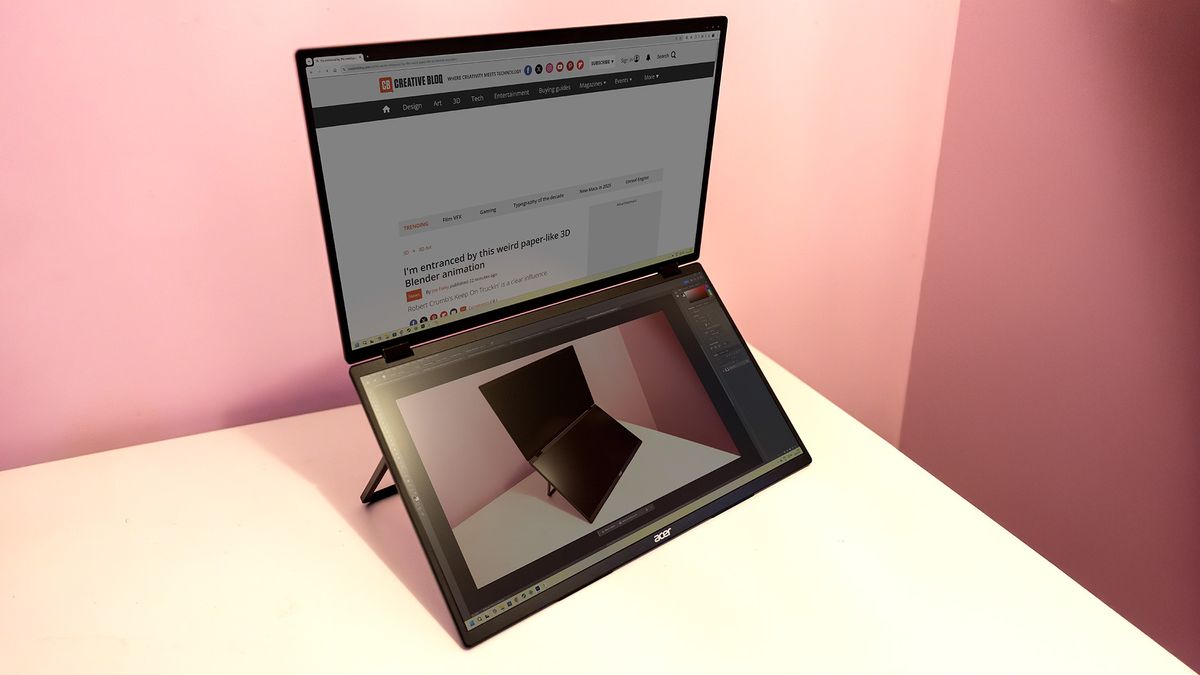
Portable Monitor Review: Acer PD3

Portable monitors come in all sizes, though not shapes, and can range from the extremely cheap to premium models. They’re extremely useful for extending your laptop’s screen space, perhaps when you’re working away or if you just like to keep an uncluttered desk, as they can easily be packed away when not needed. We’ve never seen one like this before though: Acer has paired two panels to create a folding device that triples your screen space, allowing you to have more apps open at the same time and impress those around you too. But can it compete with the best monitors for working from home?

Key Specifications

Screen size: 2x 18.5in
Screen type: LED backlit TFT non-touch
Resolution: 1920 x 1080 x 2 (1920 x 2160)
Refresh rate: 100Hz
Colour gamut (measured): 100% sRGB, 84% Adobe RGB, 91% P3
Brightness (measured): 165 nits
Ports: 2x USB-C, 1x HDMI, 1x 3.5mm headphone
Wireless connectivity: none
Dimensions: 256 x 423 x 24.5 mm
Weight: 2.33 kg

Design and Build

If you’re familiar with portable monitors, you might expect each panel of the P3 to be about the size of a 15in laptop screen, and a reasonably light, flat thing not too dissimilar to a tablet computer. It’s really not. Each of the P3’s halves is a 18.5in 1080p panel. The thing is massive, and when folded up looks like you’ve bought yourself an 18in gaming laptop.

However, it is nicely made. At 2.33 kg and with a metal frame you’re not going to get any of the flex you might expect from plastic construction, and the stand that folds out from the back keeps it well supported. It’s also possible to fold the screen over backwards so that it enters the ‘tent’ position beloved of 2-in-1 laptops. There are two modes, one that treats it as a single display (known as ‘fill’), and one which shows the same picture on both halves of the screen. If you bend it over backwards it detects this and rotates the top half of the screen, so you could use it to show the same content on both sides at the same time.

Performance

The Acer PD3 costs $449 / £469, only a little more than the Asus ZenScreen OLED MQ13AH – the Asus is an OLED, so comes with excellent brightness and colours, but is also a single panel and only 13.3 inches across. You get a lot more for your money with the PD3, but you might still prefer the way the OLED looks – and it’s much easier to carry with you too.

Who is it for?

  • Hybrid workers

Traveller’s are going to probably want something smaller and easier to pop in a bag, perhaps even something with wireless capabilities such as the Asus ZenScreen Go. Those who regularly work out of unusual places, perhaps a regular trip to a photo studio or a hotel with the kind of bags that can take the PD3, will appreciate the extra screen space it provides, but it’s too bulky for cramped spaces such as plane seats.

Scorecard

Attributes Notes Rating
Design Made to last, but might not fit in every bag. 4/5
Features Enough ports, but controls can be fiddly. 3/5
Performance Not as bright as we might like, but good colour. 3/5
Value You get a lot for your money, but other screens may suit your needs better. 3/5

Buy it if…

  • You want an innovative portable screen
  • The line down the middle doesn’t bother you
  • Bigger is better

Don’t buy it if…

  • You want OLED brightness
  • You don’t have the room to use it
  • A standard desktop screen would do

Also consider…

  • Other portable monitors with more compact designs
  • Monitors with wireless connectivity
  • Monitors with higher brightness levels

We’ve been making video for social since before social was a thing: a day in the life of Pete Gibbons

0

Day in the Life of Pete Gibbons, Co-Founder of Formidable

Walk Me Through a Typical Day in Your Role

It’s tricky to define because every day is different, it fluctuates quite a lot due to the nature of the work we do. There’s lots of checking in with the team every day, making sure everyone feels supported and troubleshooting any challenges that come up. And that’s balanced by the fun project stuff, whether that’s working out how we’re going to attack a challenge set by a new brief, or getting into the weeds of a project and working with the team to develop an idea.

What was Your Early Career Like?

I started at the BBC and am a total Nepo kid. I’m much more comfortable with it now, because since realizing this, I’ve done my fair share of helping others along the way that didn’t have the benefits I had.

My dad ran a BBC radio station when we were kids and I’d go with him on the school holidays and really enjoyed it. Then a small junior position on the sports show came up and I went for it and was getting paid about £6 per week. I was 13 and just answering the phones, making teas, helping out wherever I could. I worked my way up from there and instead of going to university, I went and got a job in radio at BBC Manchester and then came to London to work at 5Live, and then the BBC.

I actually bought a pub in 2004; it didn’t go so well, as I enjoyed owning the pub too much and my career started to stall. I had launched a production company and a pub on the same day, and it wasn’t until the pub was gone that the company really took off. That’s when I got into making video content, which was quite late in the day as I was already in my 20s by the time I got there. I didn’t want to make TV because at the time I thought it was boring, so I started making videos for websites in the same year that YouTube launched and ended up migrating towards social and new platforms, versus the more traditional channels. That’s why I say that we’ve been making video for social since before social was a thing.

What Are Your Favourite Tools?

I quite like Canva, which we use a lot for creating presentations, and obviously CapCut. I’m a big advocate for continuing to learn and staying across what the content creators on the street are using. So I’m usually a fan of any new system, tool, or plug-in that pops up and will be on the case with our editors to try it out. We might not end up using it, but it’s great to test and learn with these things. And then the obvious go-to is the whole Adobe Suite, including Premiere and After Effects, I think we’d all be in trouble without them.

What’s One Thing You Wished More People Understood About Your Industry?

People really need to understand how hard everybody works. There was a period where I felt that because I was working in a glamorous industry, I should be happy to have this job and just suck it up and do the hours. But now I’ve gotten a bit older, I’ve gained more perspective.

There are certain roles that require really hard physical work and it can be quite intense, for example on film sets, or places where you’re working for long periods with little downtime for the duration of the shoot. It might not be traditional physical labour, but it’s still extremely full-on and that should be recognised. I sound like a snowflake saying ‘oh it’s hard work’, but it kind of is.

What Do You Think the Industry Needs to Improve?

I think we’re in an era where it’s trying to improve, and overall people are doing a good job. It’s an industry that everyone chooses to be in and it can be glamorous in some ways, but the hours are long and the work can be tough, which is why we work really hard on prioritising a good work-life balance where we can.

It feels like the industry is making headways with representation, it’s been a bit of a men’s playground for a long time and things have certainly improved now, but we can probably still do better. We certainly try and make sure that we give those who don’t necessarily come from a privileged background a chance; we’ve used services like Creative Access to hire people in the past as we’d much rather work with great talent, regardless of their background or gender, but we’re always trying to be better every day.

Conclusion

Pete Gibbons, co-founder of Formidable, shares his insights on his day-to-day life, early career, and what he wishes people understood about his industry. From his humble beginnings at the BBC to his current role at Formidable, Pete has had an interesting journey. He emphasizes the importance of hard work, representation, and prioritizing a good work-life balance.

FAQs

Q: How did you get started in the industry?
A: I started at the BBC and worked my way up from there.

Q: What are your favorite tools?
A: I like Canva and CapCut, and I’m a fan of new systems, tools, and plug-ins.

Q: What do you wish people understood about your industry?
A: I wish people understood how hard everyone works, and that it’s not all glamour.

Q: What do you think the industry needs to improve?
A: I think we need to prioritize a good work-life balance and continue to work on representation.

AI Assistants Join the Factory Floor

0

The Evolution of Grinding Steel Ball Bearings

The Basic Machine

The basic machine for grinding a steel ball bearing has been the same since around 1900, but manufacturers have been steadily automating everything around it. Today, the process is driven by a conveyor belt, and, for the most part, it’s automatic. The most urgent task for humans is to figure out when things are going wrong—and even that could soon be handed over to AI.

The Manufacturing Process

The Schaeffler factory in Hamburg starts with steel wire that is cut and pressed into rough balls. Those balls are hardened in a series of furnaces, and then put through three increasingly precise grinders until they are spherical to within a tenth of a micron. The result is one of the most versatile components in modern industry, enabling low-friction joints in everything from lathes to car engines.

The Challenge of Defect Detection

That level of precision requires constant testing—but when defects do turn up, tracking them down can present a puzzle. Testing might show a defect occurring at some point on the assembly line, but the cause may not be obvious. Perhaps the torque on a screwing tool is off, or a newly replaced grinding wheel is impacting quality. Tracking down the problem means comparing data across multiple pieces of industrial equipment, none of which were designed with this in mind.

Introducing AI-Powered Defect Detection

This too may soon be a job for machines. Last year, Schaeffler became one of the first users of Microsoft’s Factory Operations Agent, a new product powered by large language models and designed specifically for manufacturers. The chatbot-style tool can help track down the causes of defects, downtime, or excess energy consumption. The result is something like ChatGPT for factories, with OpenAI’s models being used on the backend thanks to the company’s partnership with Microsoft’s Azure.

How it Works

Kathleen Mitford, Microsoft’s corporate vice president for global industry marketing, describes the project as "a reasoning agent that operates on top of manufacturing data." As a result, Mitford says, "the agent is capable of understanding questions and translating them with precision and accuracy against standardized data models." So a factory worker might ask a question like "What is causing a higher than usual level of defects?" and the model would be able to answer with data from across the manufacturing process.

The Power of Data Analysis

The agent is deeply integrated into Microsoft’s existing enterprise products, particularly Microsoft Fabric, its data analytics system. This means that Schaeffler, which runs hundreds of plants on Microsoft’s system, is able to train its agent on data from all over the world.

The Limitations of AI in Manufacturing

Despite the name, this isn’t agentic AI: It doesn’t have goals, and its powers are limited to answering whatever questions the user asks. You can set up the agent to execute basic commands through Microsoft’s Copilot studio, but the goal isn’t to have the agent making its own decisions. This is primarily AI as a data access tool.

Conclusion

The future of manufacturing is likely to be shaped by the increasing adoption of AI-powered solutions like Microsoft’s Factory Operations Agent. As the industry continues to evolve, we can expect to see more and more applications of AI in areas like defect detection, predictive maintenance, and supply chain optimization.

FAQs

Q: What is the Factory Operations Agent?
A: The Factory Operations Agent is a new product powered by large language models and designed specifically for manufacturers.

Q: What does the agent do?
A: The agent can help track down the causes of defects, downtime, or excess energy consumption by analyzing data from across the manufacturing process.

Q: How does it work?
A: The agent operates on top of manufacturing data and can understand questions and translate them with precision and accuracy against standardized data models.

Q: Is it agentic AI?
A: No, it’s not agentic AI. It doesn’t have goals, and its powers are limited to answering whatever questions the user asks.

AI-Powered Teaching Assistants: Redefining Their Role

The Role of Teaching Assistants in the Era of Artificial Intelligence

The Complexities of Teaching Assistants

The role of a teaching assistant (TA) is more complex than ever. Whether helping students grasp complex concepts, supporting those who need extra guidance, or managing classroom behaviors, TAs are an essential support for student success. However, as entry-level employees, they rarely receive all the training necessary to be immediately effective and are forced to learn as they go. The nationwide shortage of teachers has caused a similar shortage in the ranks of teacher assistants.

The Power of Artificial Intelligence

As generative artificial intelligence (AI) is supporting the creation of powerful tool suites that can enhance the teaching and learning process, it seems reasonable to identify some ways that teacher assistants can use these tools as well. TAs often work with individual students or small groups to support students, making learning more personalized, engaging, and efficient. From AI-powered tutoring that adapts to each student’s needs to real-time language translation for multilingual learners, these tools offer endless possibilities. AI can help students write stronger essays, solve tricky math problems, and even manage their stress levels, all while giving TAs more time to focus on what matters most – building meaningful connections with students.

Ways TAs Can Utilize AI

Paraphrasing: Rephrasing materials for lower reading levels. TAs can use a general chatbot or a specialized tool designed to support teachers, like MagicSchoolAI or Eduaide.ai, to reduce the reading level to make materials accessible for each student. Diffit provides leveled resources as well.

Summaries: For students with significant issues with reading or attention issues, TAs can use AI tools to summarize long passages of text. Nearly all generative AI tools offer a summary function. Documentor.cc is a free summarizing tool that offers both detailed and concise summaries. Evernote.com can be used to take student notes and provide a summary. SummarizeTech can assist TAs by summarizing videos, so they can focus on other materials while students watch a video.

Translations: Translating materials for non-native speakers is another potential use for AI. TAs who have an ESL case load can save significant time in using AI tools for translation services. MagicSchool.ai can translate into Spanish, Mandarin, Vietnamese, and Tagalog. DeepL can translate directly from PDFs, as well as from text.

Study Guides and Practice Quizzes: TAs can use these tools to develop study guides and sample quizzes to help prepare students. In some cases, outlines can be drafted for students with difficulty in note taking, so the student can simply fill in the points on the outline. Kahoot and Revisely are good examples of quiz generators.

Concepts: Sometimes all educators can appreciate giving students another viewpoint in which to try to develop the understanding of difficult concepts. Teachmateai, for instance, allows educators to use a concept explainer tool to develop additional ways to explain a concept to students. Magicschool.ai has a scaffolding tool that can break complex concepts down into smaller pieces that are easier to understand.

Behavior Management: Classroom management is often identified as one of the most difficult issues in classrooms today. Though there is not yet a tool that can manage behavior directly, there are tools that provide educators with recommendations for managing behaviors, including tools in MagicSchool.ai. Classcraft is an example of a gamified behavior management tool for classrooms. Goblin Tools is a set of single-focus tools providing for the needs of neurodivergent students. TAs may find them useful when working with students on the autism spectrum.

Conclusion

While artificial intelligence tools cannot replace the essential human connection and support that teaching assistants provide, they can significantly enhance a TA’s ability to serve diverse student needs effectively. By leveraging AI for tasks like differentiated content creation, translation, and behavior management support, TAs can spend more time focusing on what matters most – building relationships with students and providing individualized attention.

FAQs

Q: Can AI replace the role of teaching assistants?
A: No, AI cannot replace the essential human connection and support that teaching assistants provide.

Q: What are some benefits of using AI in teaching and learning?
A: AI can help students write stronger essays, solve tricky math problems, and even manage their stress levels, all while giving TAs more time to focus on what matters most – building meaningful connections with students.

Q: Can AI be used for behavior management in the classroom?
A: While there is not yet a tool that can manage behavior directly, there are tools that provide educators with recommendations for managing behaviors, including tools in MagicSchool.ai.

From Beyoncé to Ariana Grande, how fashion illustrator Hayden Williams used social media to get noticed

0

The Art of Getting Noticed

Hayden Williams has built a career that blends traditional fashion illustration with digital techniques, amassing a following that includes some of the biggest names in entertainment and fashion. His journey, driven by passion, has been shaped by an ability to adapt, connect, and create in ways that have resonated across diverse industries.

The art of getting noticed

For Hayden, inspiration is everywhere, from vintage Hollywood to contemporary pop culture, his art is rooted in a love for fashion, beauty, and storytelling. His ability to capture the essence of a subject, whether a real-life celebrity or a fictional character, has caught the eye of the stars he sees as his muses (a sketch of Margot Robbie led to a Barbie movie premiere and after-party invitation). His illustrations are stylized and lithe, with nods to 1940s, 1950s, and 1960s fashion while feeling very modern.

Building connections and collaborations

Building unexpected yet meaningful connections with celebrities has propelled Hayden into the limelight. He says this has been a surreal experience but also an eye-opening one that reveals "how art can touch people," even when those people are Rihanna – the singer and fashion icon who stumbled upon his Instagram and fell in love with his work.

Discovering the creative potential of Procreate

As his social media following grew, Hayden discovered the creative potential of Procreate, an iPad-based digital painting app. He began to use it to create stunning fashion illustrations that showcased his attention to detail and ability to capture the essence of his subjects.

Paint what you love

Hayden’s success has also meant taking control of both creative and business aspects of his work. He has learned a lot along the way from sketching during class to mixing it up on the Barbie red carpet, and offers some advice for emerging artists navigating the evolving creative industry.

Finding what you’re passionate about is crucial. Once you find what makes you happy, you can turn that into a career. But passion alone isn’t enough. He emphasizes the importance of consistency and resilience in the face of criticism.

Consistency and resilience are key

"Even with all the success I’ve had, my work still gets criticized. People pick it apart. But I create from a pure place, and not everyone will love it – that’s okay. You have to push past that and keep going."

Protecting your work

He also warns about the realities of sharing art online, from copyright infringement to AI-generated imitations. "Make sure you’re protected," he advises. "I’ve had the same legal team for over a decade, dealing with people who steal and sell my work without permission. Not everyone has access to lawyers, but be strategic and careful about showcasing your work."

Conclusion

Hayden Williams’ story is a testament to the power of passion, creativity, and perseverance. He has built a successful career by staying true to himself and his art, and continues to inspire others to do the same.

Frequently Asked Questions

Q: What inspired your love for fashion illustration?
A: My love for fashion, beauty, and storytelling.

Q: How do you stay creative and inspired?
A: I find inspiration everywhere, from vintage Hollywood to contemporary pop culture.

Q: How do you balance creative and business aspects of your work?
A: I’ve learned to take control of both, staying true to my artistic vision while also being strategic about my business.

Q: What advice would you give to emerging artists?
A: Find what you’re passionate about, and turn that into a career. Consistency and resilience are key, and always be prepared for criticism.

Q: How do you stay ahead of the competition?
A: I stay hungry and passionate, always pushing myself to create new and innovative work.

The Vision Pro is getting Apple Intelligence in April

0

Apple Intelligence Comes to Vision Pro with visionOS 2.4 Update

Apple has confirmed that its generative AI platform, Apple Intelligence, will be coming to the Vision Pro as part of the visionOS 2.4 update. The beta version of the software is currently available for developers, with the public version set for an April release.

Wave of Updates

Like the iPhone and Mac, the Vision Pro will receive Apple Intelligence updates in waves. The first wave includes several familiar offerings, primarily focused on generating text and images. The company sees the addition of features like Rewrite, Proofread, and Summarize as key components for on-device workflow.

Improving Text Composition

One of the challenges with composing text on the headset is the default typing method, which requires looking at a letter and pinching two fingers together to select. While well-implemented, this method can be cumbersome for writing more than a word or two at a time. Voice dictation helps to address this bottleneck, and Apple’s recent AI-powered Siri supercharge bodes well for the smart assistant’s Vision Pro future.

Image Generation

Image Playground is another big piece of the puzzle, bringing image generation to the wearable display as part of the visionOS 2.4 update. This feature is integrated directly into the visionOS Photos app, allowing users to create images through verbal prompts.

Vision Pro iPhone App

Along with visionOS 2.4, Apple has also launched a Vision Pro iPhone app, arriving with iOS 18.4, which is also now in beta. The app allows users to browse visionOS content, such as TV shows and movies, which can then be transferred onto the headset. This feature appears to be a response to the limitations of wearing the headset, both in terms of personal comfort and battery life.

Managing Guest Accounts

The app can also be used to manage guest accounts, with the Vision Pro prompting its owner when someone is attempting to sign in as a guest. A streaming image of the guest’s in-headset view is accessible through the new app.

Conclusion

The integration of Apple Intelligence in visionOS 2.4 brings a new level of efficiency and creativity to the Vision Pro, making it an even more powerful tool for daily use. With the addition of image generation and text composition features, users will be able to work and play in new and innovative ways.

FAQs

Q: When will the visionOS 2.4 update be available?
A: The public version of visionOS 2.4 is set for an April release.

Q: What features are included in the first wave of Apple Intelligence updates?
A: The first wave includes features like Rewrite, Proofread, and Summarize, primarily focused on generating text and images.

Q: How does the Vision Pro iPhone app work?
A: The app allows users to browse visionOS content, such as TV shows and movies, and transfer it onto the headset. It also allows for managing guest accounts and viewing the guest’s in-headset view.