Home Blog Page 261

Boosting AI Research with Test-Time Scaling on Steroids

0

Google’s AI Co-scientist Ranks Its Own Reasoning to Formulate Scientific Hypotheses in Days Rather than Years

Google on Wednesday said it has adapted its Gemini 2.0 large language model artificial intelligence offering to make it generate novel scientific hypotheses in a fraction of the time taken by teams of human lab researchers.

The company bills the "AI co-scientist" built upon Gemini as "a promising advance toward AI-assisted technologies for scientists to help accelerate discovery," and a program meant to be run with a human "in the loop" to "act as a helpful assistant and collaborator to scientists and to help accelerate the scientific discovery process."

Hypothesis-formulation machine

Google’s design for AI co-scientist has a person input a research goal at the prompt, whereupon a series of agents work in parallel to review the literature, formulate and evaluate hypotheses.

The structure of AI co-scientist is designed to perform multiple agent tasks in parallel, backed up by a memory-management function for storing intermediate results.

Test-time scaling on steroids

The adaptation of Gemini 2.0 emphasizes the use of "test-time scaling," where AI agents use increasing amounts of computing power to iteratively review and re-formulate their output. Test-time scaling has been seen most dramatically not only in Gemini, but also OpenAI’s o1 model, and DeepSeek AI, all examples of so-called reasoning models that spend much more time responding to a prompt, generating intermediate results.

Surpasses models and unassisted human experts

According to fifteen human experts who reviewed the co-scientist’s output, the program gets better as it spends more computing time formulating hypotheses and evaluating them.

Conclusion

Google’s AI co-scientist is a promising advance toward AI-assisted technologies for scientists to help accelerate discovery. By leveraging Gemini 2.0 and the power of test-time scaling, the AI co-scientist can generate novel scientific hypotheses in a fraction of the time taken by teams of human lab researchers.

FAQs

Q: What is Google’s AI Co-scientist?
A: Google’s AI Co-scientist is a program that uses a combination of agents to review literature, formulate and evaluate hypotheses, and generate research proposals.

Q: How does the AI Co-scientist work?
A: The AI Co-scientist works by having a person input a research goal, and then a series of agents work in parallel to review the literature, formulate and evaluate hypotheses.

Q: What is test-time scaling?
A: Test-time scaling is a technique used in AI models that allows them to use increasing amounts of computing power to iteratively review and re-formulate their output.

Q: How does the AI Co-scientist surpass models and unassisted human experts?
A: According to human experts, the AI Co-scientist’s output is rated higher for novelty and impact, and preferred over other models and unassisted human experts.


Our Favorite Music Streaming and Collecting Apps

0

Article

Welcome to Installer No. 72

Hi, friends! Welcome to Installer No. 72, your guide to the best and Verge-iest stuff in the world. If you’re new here, welcome, hope you like gadgets, and also you can read all the old editions at the Installer homepage.

What I’ve Been Up To This Week

This week, I’ve been reading about Hasan Piker and calculator apps and car thieves and the real economics of YouTuber life, using my month of Paramount Plus to watch Sonic the Hedgehog 3 and Yellowjackets, replacing my big podcast headphones with the Shure SE215 in-ear headphones, switching all my reading out of the Kindle ecosystem for increasingly obvious reasons, and taking copious notes on Kevin Kelly’s 50 years of travel tips.

What’s New and Exciting This Week

I also have for you Apple’s slightly confusing latest smartphone, a couple of new things to watch this weekend, the best new Xbox game in a while, and much more. Also, the first part of our group project on all the ways we listen to music. Let’s do this.

The Verge’s Recommendations

  • The Apple iPhone 16E: I’m torn on this one. I like that it’s $599, I like that it has good battery life, I like that it has Face ID and USB-C. But only one camera? And an Action Button but no MagSafe? Some odd tradeoffs here, and for a higher price than the old SE, but this’ll surely be the phone for a lot of iPhone users.
  • Avowed: It’s been a while since an Xbox game felt like it was everywhere on my social feeds. But it seems like everyone’s into Avowed, a properly huge and complicated RPG that, according to my colleague Andrew Webster, doesn’t blow up the format but executes it well.
  • Memes & Nightmares: A satirical true crime documentary! About a meme that was everywhere and then suddenly disappeared! It’s giving Documentary Now! and American Vandal, except about NBA Twitter and GIFs. Truly the intersection of all my interests.
  • The Americas: There are few things in the world I enjoy more than the Planet Earth series. I watch them all, I watch all the copycats, I only wish there were more of them. And now I get a version of it in my own backyard! With Tom Hanks narrating! That’s my Sunday nights sorted for a while.
  • The Oppo Find N5: A foldable phone I’ll likely never be able to buy but will lust after nonetheless. It’s impossibly thin, outrageously expensive, and a genuinely exciting sign that foldable design can continue to go cool places.
  • The King Jim Pomera DM250US: I have long had romantic ideas about buying a digital typewriter and just buggering off to some Airbnb in the woods to write. This one, from Japanese stationery brand King Jim, is pretty expensive but has a good track record in Japan and looks alarmingly close to the device I’d want it to be.
  • Grand Theft Hamlet: A documentary, now streaming on Mubi, about two actors who decided, during the pandemic, to… do all of Hamlet inside of GTA. (Look, we all got weird during covid.) The whole thing takes place inside the game, and the gimmick actually really works. I don’t love the whole thing, but I’ve certainly never seen anything quite like it.
  • Sober Ringtones: This one is specifically for my mother-in-law (hi, Diane!) who has the most ear-splitting ringtone of all time. In her defense, all built-in ringtone options suck. I think you’re a monster if your phone is on anything but vibrate, but I like the sound of these chiller, more melodic options.
  • BBC Radiophonic Workshop: I confess I knew nothing about the Radiophonic Workshop until I saw this new library of their work appear online, but wow is there a cool (and decades-long) history to this pioneering group of electronic musicians. I’d bet you start to hear some of these old-school sounds show up all over, and soon.

Community Spotlight

Here’s what the Installer community is into this week. I want to know what you’re into right now as well! Email installer@theverge.com or message me on Signal — @davidpierce.11 — with your recommendations for anything and everything, and we’ll feature some of our favorites here every week. For more great recommendations, check out the replies to this post on Threads and this post on Bluesky.

What Our Community is Into This Week

  • “I’m super excited for the Framework event on the 25th. I picked up a 13-inch Intel Core Ultra laptop when it launched last year and have been loving it. Big fan of Framework’s mission, and I hope this event brings even more people to their products.” — Ben
  • “I’m a big fan of the animated series Invincible on Amazon Prime, which just kicked off its third season. It centers on a superhero who inherits his powers from his alien father, and aside from the crime-fighting aspect it gets into some complicated family dynamics and the balance between being good and ‘good-ish.’ The comic is also really well done, and as a bonus I was able to read the entire series through my local library.” — Jon
  • “These days I’m reading about the history of Silicon Valley, especially about the start of the semiconductor industry.” — Filip
  • “I did a deep dive into Obsidian this week and ended up moving all my Apple Notes over to it. I’m particularly excited about the Graph and Canvas features. It’s like having a second brain. I don’t want to be dramatic, but this might have changed my life.” — Nick
  • “After the ridiculous enjoyable new album of FKA Twigs — Eusexua — I discovered two additional Eusexua World Apple Music mixes curated by Koreless and FKA Twigs. Worth a listen. More to come apparently.” — Rob
  • “I know Civ VII is the new hotness, but I learned this week with a Netflix account you can play Civ VI on your phone. It’s a crazy platform for Civ, and amazing it works, but why not break up some doomscrolling by being slaughtered by barbarians that are tougher than you remember?” — DLS
  • “I’m using Tldraw a lot lately — been loving it. It’s basically an infinite canvas but cooler. I really recommend it.” — Elouan
  • “Right now, I’m trying out Linux (KDE Neon for its looks and customization). It definitely takes more time to make it work, but not as much as I feared. I’m positively surprised with its snappiness and better battery life (primarily in sleep mode) compared to Windows. Because of the Steam Deck and the help of AI in troubleshooting, Linux seems more accessible than ever.” — Jakub

Chess and the Brain

I was a pretty good chess player, once upon a time. Now I am a garbage chess player, but I’m trying to get back into it! (I’m even starting to play on chess.com again — if you ever feel like beating a really easy opponent, hit me up.) I love the slow and deliberate strategy of the game, which feels like it uses the opposite part of my brain from the always-scrolling news junkie I am the rest of the time. But I’ve also come to really enjoy the overarching history and culture of chess. I found this great Half as Interesting video about the evolution of what you might call “mainstream chess strategy” and was riveted by it. Over a hundred years, chess hasn’t changed a bit and yet has changed entirely.

Conclusion

One thing I’ve learned in life as a reporter is that there are complicated, sometimes invisible forces that make everything tick and evolve, and if you can figure them out — or at least learn to sense them — you can usually find an advantage. I swear, I’ve played like eight games of chess and it’s making me a philosopher.

Paddington in Peru’s Citadel: A Complicated Scene

0

Creating Paddington’s Citadel

In the film Paddington in Peru, the beloved marmalade-loving bear is chased around ‘The Citadel’, an ancient city ruin high in the Andes that serves as the gateway to El Dorado, Paddington’s home. So, how was it made?

Overseeing the Creation of The Citadel

Mark Curtis, VFX Supervisor at Framestore Montreal, notes that there were technical and creative challenges in creating The Citadel. "We had to base the build of this citadel on two realities," he explains. "There was plate photography from the real Machu Picchu and there was the on-set build inspired by the site, but that took some creative license. We had to make it work in both settings."

The Process of Creating The Citadel

Creating The Citadel was a complex process. Mark explains, "We didn’t build a huge city. We had so many little bespoke, one-off sequences that we ended up crafting mini sections of The Citadel around each little set-build. Therefore, when we had specific camera angles and specific directions, we could really art direct, saying, ‘Okay, we want a little building here, we want to see a silhouette of ‘X’ here’."

The Use of Previz and Photogrammetry

Mark notes that previz was used to redefine the chaotic chase sequence through and around The Citadel. "We used previz as inspiration rather than a concrete case of ‘reproduce this,’" he says. "The fun part, and the tricky part, is navigating an environment that’s recognisably Peruvian while, at the same time, very much not actually equaling Machu Picchu – anything that veered too much in that direction had to go."

The Pressure of Making a Paddington Movie

Mark concludes by emphasizing that one of the best things about the project was how the spirit of collaboration spread across all of the post-production and it was really a wonderful experience working with Dougal and Rosie Alison (Producer) and Pablo Grillo (Animation Director) and Alexis Wajsbrot (Production VFX Supervisor).

Conclusion

Paddington in Peru was Mark’s first Paddington film, and he says it comes with a huge amount of responsibility. The lovable bear has become an iconic, much-loved character, particularly in the UK but also globally. "For me, it’s very exciting to be involved and take that legacy and expand it," he notes. "Before, we’ve been very used to seeing Paddington in London and experiencing what it is to be British, and so it was really exciting to take him out of his comfort zone and expand his universe."

FAQs

Q: What was the process of creating The Citadel like?
A: The process of creating The Citadel was complex and involved using plate photography from real Machu Picchu and on-set builds inspired by the site, taking some creative license to make it work in both settings.

Q: How was previz used in the creation of The Citadel?
A: Previz was used to redefine the chaotic chase sequence through and around The Citadel, serving as inspiration rather than a concrete case of ‘reproduce this’.

Q: What was the experience of working on Paddington in Peru like?
A: Mark Curtis, VFX Supervisor at Framestore Montreal, notes that it was a wonderful experience working with the team, with a strong focus on collaboration and bringing the beloved character to life.

PUBG Creator’s Next Game Promises Incredible Realism

0

PUBG Creator Brendan Green’s New Game: Prologue: Go Wayback!

A Photoreal Open-World Survival Game

Brendan Green, better known as PlayerUnknown, the creator of PUBG, is back with a new game, Prologue: Go Wayback!, an ambitious open-world survival game that promises a vast, photoreal environment to explore.

A Challenging Game

Prologue is one of a number of new games that aim for new levels of realism, using advanced technology like Unreal Engine 5 and MetaHuman Creator. As a fan of punishing games like Doom, Green is a developer who embraces a challenge and wants players to do the same. Prologue is an extension of this idea: "I want to make a space that is hard and difficult," he said, "because players deep down want a challenge."

A Dynamic and Unpredictable World

In Prologue, players have one goal: to reach a point on the map with minimal tools while fighting and surviving the forces of nature. The game features dynamic, ever-changing weather conditions. Weather in the game is the enemy, as he told PC Gamer: "It’s a constant threat, rather than something you can predict easily. It just feels fairer."

A New Level of Realism

Prologue is more than just another survival game; it’s a prototype of the developer’s larger vision – to offer a realistic sandbox ripe for experimentation. The game is designed to be a challenging and immersive experience, with a focus on realism and a sense of accomplishment.

Conclusion

Prologue: Go Wayback! is a game that will test your skills and your patience, but it’s also a game that will reward you with a sense of accomplishment and a new level of realism. With its dynamic weather and challenging gameplay, Prologue is a game that will keep you coming back for more.

FAQs

Q: What is Prologue: Go Wayback!?
A: Prologue: Go Wayback! is a new game from Brendan Green, the creator of PUBG, that promises a vast, photoreal open-world environment to explore.

Q: What makes Prologue unique?
A: Prologue features dynamic, ever-changing weather conditions and a focus on realism, making it a challenging and immersive experience.

Q: Is Prologue a survival game?
A: Yes, Prologue is a survival game that challenges players to reach a point on the map with minimal tools while fighting and surviving the forces of nature.

Q: Is Prologue available on Steam?
A: No, Prologue is not currently available on Steam. However, it is available on other platforms.

Report: OpenAI plans to shift compute needs from Microsoft to SoftBank

0

OpenAI’s Shift in Computing Power: A Major Change Ahead

New Partnership with Stargate and SoftBank

OpenAI is forecasting a significant change in the next five years regarding where it sources its computing power from. According to a report by The Information, the company expects to get three-quarters of its data center capacity from Stargate, a project heavily financed by SoftBank, one of OpenAI’s newest financial backers. This represents a major shift away from Microsoft, OpenAI’s biggest shareholder, which currently fulfills most of the startup’s power needs.

A Shift in Spending

The change won’t happen overnight. OpenAI still plans to increase its spending on Microsoft-owned data centers in the next few years. However, the company’s overall costs are set to grow dramatically. The Information reports that OpenAI projects to burn $20 billion in cash during 2027, far more than the $5 billion it reportedly burned through in 2024. By 2030, OpenAI reportedly forecasts that its costs around running AI models, also known as inference, will outpace what the startup spends on training AI models.

Conclusion

The shift towards Stargate and SoftBank is a significant development in OpenAI’s future plans. As the company continues to grow, it’s essential to understand the implications of this change on its business and the technology landscape. With increased costs and a focus on inference, OpenAI is likely to make significant strides in its mission to develop and deploy AI models.

FAQs

Q: What is Stargate?

A: Stargate is a project heavily financed by SoftBank, one of OpenAI’s newest financial backers, which will provide OpenAI with a significant portion of its data center capacity.

Q: Why is OpenAI shifting away from Microsoft?

A: OpenAI is shifting away from Microsoft due to its new partnership with Stargate and SoftBank, which will provide it with a more significant portion of its data center capacity.

Q: What are the implications of OpenAI’s increased costs?

A: The increased costs are expected to be significant, with OpenAI projecting to burn $20 billion in cash in 2027, compared to $5 billion in 2024. This will likely impact the company’s business and the technology landscape.

This Baseball Player

0

The Baffling Baseball Player Optical Illusion

A Classic Case of Bistable Perception

I’ve seen my fair share of optical illusions, so nowadays it takes a lot to stump me. But this baseball player optical illusion has my mind well and truly boggled. At first glance, the illustration appears to be a simple depiction of a batter ready to strike, but look closer and it’s not so straightforward.

Perception vs. Reality

This crafty mind trick is an example of the classic bistable optical illusion, where one object can be seen from multiple perspectives, transforming before our very eyes. You might feel certain of your answer at first, but the more you look, the more the player’s position seems to change. And you’re not alone – optical illusion fans are equally divided.

The Great Divide

The image was shared on the r/opticalillusions subreddit, where Redditors were well and truly divided by the illustration. Some were staunchly team left or team right, while others went for more logic-based answers. One user wrote, "Since only 10% of the general population, and 25% of major leaguers, are left-handed, odds are this guy is batting right-handed." Another joked, "Schrödinger’s bat. It’s both right and left-handed."

The Science Behind the Illusion

The shading of the image creates a struggle for our eyes to decipher proper depth perception, making the illusion’s orientation appear ambiguous. The result is a brain that’s just as confused as mine – I can’t decide on a correct answer, but I can confirm my brain is fried.

More Mind-Bending Art

For more fascinating optical illusions, take a look at the Super Mario optical illusion that gives a surprising new perspective. If you’d like to create your own op-art, check out this artist creating a trippy optical illusion right before your eyes and learn how to recreate it.

Conclusion

The baseball player optical illusion is a classic example of how our brains can be tricked by the way we perceive the world. With its clever use of shading and perspective, this image challenges our sense of depth and leaves us questioning what we think we see. Whether you’re team left or team right, this illusion is sure to leave you scratching your head and wondering what’s real and what’s just an illusion.

Frequently Asked Questions

Q: What is the purpose of the baseball player optical illusion?
A: The purpose is to demonstrate a classic bistable optical illusion, which challenges our perception and understanding of the world.

Q: Why can’t the author decide on a correct answer?
A: The author’s brain is "fried" due to the shading of the image, which creates a struggle for depth perception, making the illusion’s orientation appear ambiguous.

Q: What is the relevance of the 10% and 25% statistics mentioned in the article?
A: These statistics are used to support a logic-based answer to the question of whether the baseball player is batting right- or left-handed.

Track GA4 with Bitly, Don’t Waste Time

0

The UTM + GA4 Headache No One Talks About

I get it. Bitly + UTMs + GA4 is how most marketers track results. That’s exactly what I used to do.

But let’s be honest… it’s a mess.

  • You create a Bitly link.
  • You manually attach UTM parameters.
  • You go to GA4 and dig through reports to see if it worked.
  • You try to match a UTM link to a sale, lead, or signup.
  • You get frustrated when data is incomplete, delayed, or just wrong.

At some point, I asked myself: Why am I juggling three tools just to track one link?

That’s why I built Storylink—the first link shortener that tracks clicks, leads & sales in one place.

The UTM + GA4 Headache No One Talks About

  • Bitly lets you shorten a link (but doesn’t track conversions).
  • UTMs tell GA4 where traffic comes from (but don’t show what happens next).
  • GA4 tracks some conversions (but forces you to dig through endless reports).

So, if you’re using Bitly + UTMs + GA4, here’s the reality:

  • Click counts are in Bitly
  • Traffic sources are in GA4
  • Conversion data is buried in menus

That’s why Storylink replaces all three—so you see everything in one dashboard, instantly.

Bitly’s Hidden Limitations

  • UTMs ≠ Conversion Tracking
  • With Storylink Ultra, we track conversions automaticallyno need to check GA4.

  • Delayed Data Kills Your ROI
  • Bitly updates click data hours later. GA4 sometimes takes 24+ hours to show real conversions.
  • With Storylink, you see live results in real-time.

  • Bitly’s Business Plan Costs $420/Year—and Still Lacks Tracking
  • Want UTMs in Bitly? $35/month. Want a custom domain? Extra. Want to track conversions? Not even an option.
  • Storylink Ultra is €49/month—all-in-one.

Why Marketers Are Switching to Storylink

  • Shorten & Track Clicks, Leads & Sales (Without GA4)
  • One dashboard, real insights, no extra setup.
  • Stop Manually Checking GA4 Reports
  • We show you which link, campaign, and audience generated the most conversionsautomatically.
  • Track in Real-Time, Not 24 Hours Later
  • See immediate results and optimize your marketing on the fly.
  • Beyond UTMs: Track Custom Events & User Actions
  • With MagicTags, track cart adds, checkout starts, or form submissions—something UTMs & Bitly will never do.

Still Using Bitly? You’re Missing the Full Picture

If you’re tired of:

  • Switching between Bitly, UTMs & GA4 to track one link
  • Guessing which links actually drive revenue
  • Waiting hours to see if a campaign is working

Then it’s time to switch.

Try Storylink Ultra for free today—and see exactly how your marketing is performing.

Generate your first tracking link in 30 seconds—right here.

Frequently Asked Questions

Q: What is Storylink?
A: Storylink is a link shortener that tracks clicks, leads & sales in one place.

Q: What are the benefits of using Storylink?
A: Storylink provides real-time tracking, automatic conversion tracking, and more, making it a more efficient and effective way to track marketing efforts.

Q: Is Storylink more expensive than Bitly?
A: No, Storylink is €49/month, while Bitly’s business plan costs $420/year.

Q: Can I use Storylink for custom domains?
A: Yes, you can use Storylink with custom domains.

Q: Can I track custom events and user actions with Storylink?
A: Yes, Storylink’s MagicTags allow you to track custom events and user actions.

Pollution from Big Tech’s data centre boom costs US public health $5.4bn

Big Tech’s Growing Use of Data Centers Creates Public Health Costs Valued at $5.4 Billion

Air Pollution from Data Centers Linked to Cancers and Other Health Issues

A recent study by UC Riverside and Caltech has found that the growing use of data centers by Big Tech has resulted in public health costs valued at over $5.4 billion over the past five years. The study highlights the growing impact of building artificial intelligence infrastructure on public health.

Cost of Treating Illnesses

The research estimated that the cost of treating illnesses connected to air pollution from data centers was valued at $1.5 billion in 2023, a 20% increase from the previous year. The overall cost since 2019 was $5.4 billion.

Generative AI Exacerbates the Issue

The issue is set to be exacerbated by the race to develop generative AI, which requires huge computing resources to train and power fast-developing large language models. Microsoft, Alphabet, Amazon, and Meta have forecast AI spending could exceed $320 billion this year, up from $151 billion in 2023. Meanwhile, OpenAI and SoftBank recently unveiled plans for a massive $500 billion US AI infrastructure joint venture called "Stargate".

Company Performance

The study found that Google generated the largest health costs, valued at $2.6 billion over the five years between 2019 and 2023, followed by Microsoft, at $1.6 billion, and Meta, at $1.2 billion. Each company’s associated public health cost rose year-on-year. Amazon was not included in the analysis as it does not release key data needed to model its impact.

Data Centers Cause Pollution

Data centers cause pollution through high electricity use, often sourced from fossil fuels. Back-up generators, needed in case of an outage, are commonly powered by diesel, which also contributes to air pollution. Meanwhile, the waste from the hardware, such as chips, can release harmful chemicals into the environment.

Opportunity for Tech Groups to Reverse the Trend

There is an opportunity for tech groups to reverse the trend of a "growing public health threat" by strategically placing their data centers in less populated locations to have less impact. According to Shaolei Ren, associate professor at UC Riverside, "Unlike carbon emissions, the health impacts caused by a data center in one region cannot be offset by cleaner air elsewhere."

Conclusion

The study highlights the need for Big Tech companies to prioritize sustainability and environmental responsibility. As the demand for AI continues to grow, it is crucial that the industry adopts more environmentally friendly practices to minimize its impact on public health.

FAQs

Q: What are the main causes of pollution from data centers?
A: High electricity use, often sourced from fossil fuels, and back-up generators powered by diesel are the main causes of pollution from data centers.

Q: What is the total cost of public health costs associated with data centers?
A: The total cost of public health costs associated with data centers is valued at over $5.4 billion over the past five years.

Q: Which companies have the largest health costs?
A: Google, Microsoft, and Meta have the largest health costs, valued at $2.6 billion, $1.6 billion, and $1.2 billion, respectively.

Q: What is the impact of data centers on public health?
A: Data centers have been linked to treating cancers, asthma, and other related issues, resulting in a significant public health burden.

Google Lens adds a cool search trick to iPhones

0

Google Lens Brings Android’s Circle to Search to iPhones

For the past year, Google has offered Android users a cool feature known as Circle to Search, in which you can select an item on the screen to run a search on it. Now, iPhone users can tap into that same capability.

How it works

Open the Chrome or Google app on your iPhone. Browse to a web page that contains text, an image, or other content that you’d like to learn more about. In Chrome, tap the three-dot icon, swipe to the bottom of the screen, and select "Search screen with Google Lens." In the Google app, tap the three-dot icon to the right of the address bar and select "Search this screen."

Tap, draw on, or circle the item that has triggered your curiosity. In response, Google takes a snapshot of the content you selected and runs a search on it, showing you the results at the bottom half of the screen.

The Goal

The goal behind the new capability is to save you time and effort. In the past, you’d have to take a photo or screenshot of an item yourself and then run a separate search on it. Like the Circle to Search option on Android, the new feature for iOS performs the same task more quickly and easily.

And there’s more

The AI Overview feature, already available through regular Google searches, is now accessible through the new Lens search capability, both for iOS and Android. In this case, Google will display an overview with a description and key aspects of the topic.

Conclusion

Google Lens has been expanding its capabilities, and the latest addition is the ability to select an item on the screen to run a search on it, just like the Circle to Search feature on Android. This new capability saves time and effort, making it easier to learn more about the content you’re viewing. With the AI Overview feature, you can access even more information with just a few taps.

FAQs

Q: What is Circle to Search?
A: Circle to Search is a feature that allows you to select an item on the screen to run a search on it.

Q: How do I use Circle to Search on my iPhone?
A: Open the Chrome or Google app, browse to a web page, tap the three-dot icon, and select "Search screen with Google Lens" or "Search this screen."

Q: What is the goal of Circle to Search?
A: The goal is to save time and effort by performing a visual search without having to take a screenshot or open a new tab.

Sonic’s Green Hill Quest

0

Creating Sonic the Hedgehog 1 for the Game Boy: A Fun and Charming Project

The Game Development Process

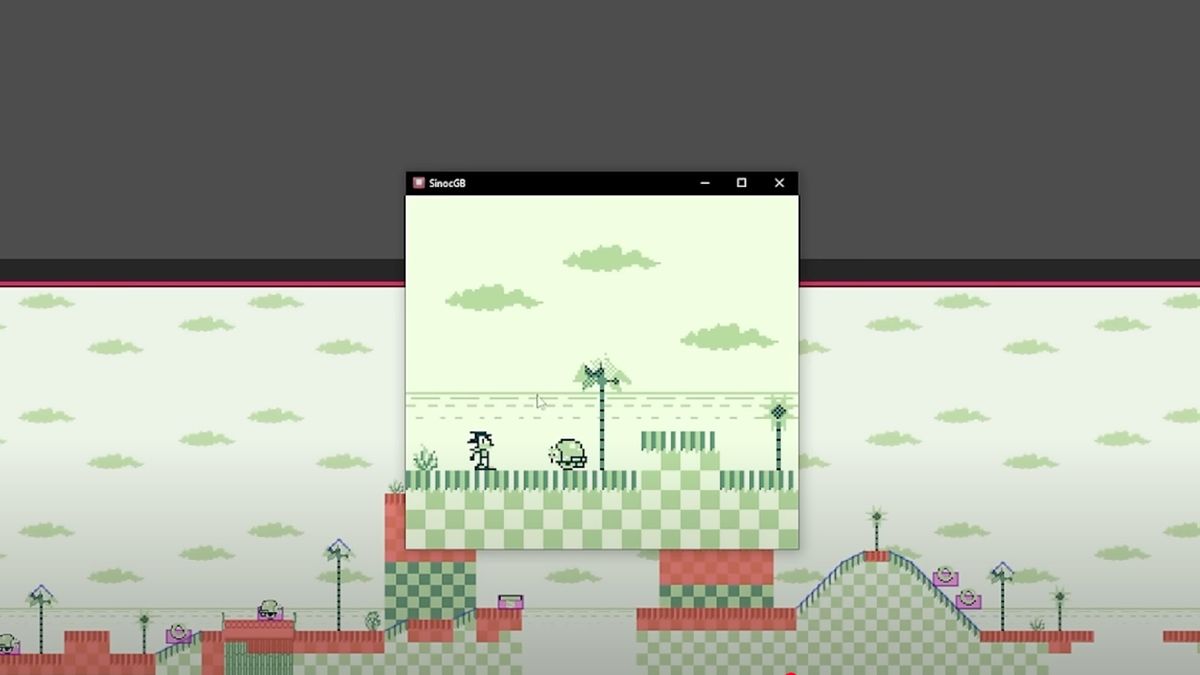
As a game developer, RetroSilver has recreated Sonic the Hedgehog 1 for the Game Boy, designing music and animations that echo Green Hill Zone, the first and most iconic scene from the original Sonic game. This project brings a unique and charming vibe, presented in black and white on the smaller screen of Nintendo’s Game Boy.

Using GB Studio and Game Development Software

RetroSilver uses a game maker studio called GB Studio to create the level and add in famous game elements such as rings, trees, and creatures, resulting in a mostly-accurate Game Boy game experience.

The Video Process

RetroSilver’s video takes us through the whole creation project, from building a test level to drawing out the characters of Sonic and Dr. Robotnik. The creator is self-deprecating about his attempts to make the famous art simple enough to work on a Game Boy screen, but what he achieves actually works well on the low-fi screen. The music is also created, and the sound effects sound pretty accurate.

The Charming Vibe

The video has a charmingly ad-hoc vibe, with RetroSilver being honest about his uncertainty about the project’s success. This outlook is reflected in his use of an emulator instead of a real Game Boy, as he doesn’t want to spend hundreds of dollars on the console.

Conclusion

This project is a beautifully simple reimagination of Sonic on an iconic console, and it’s a delight to watch. With enough detail in the video for those with the skills to try it out themselves, it’s a great example of how to recreate a classic game on a different platform.

Frequently Asked Questions

Q: What is GB Studio?
A: GB Studio is a game maker studio used by RetroSilver to create the level and add in famous game elements such as rings, trees, and creatures.

Q: Why did RetroSilver use an emulator instead of a real Game Boy?
A: RetroSilver didn’t want to spend hundreds of dollars on a real Game Boy, so he used an emulator to test the project.

Q: Can I try out the project myself?
A: Yes, with enough detail in the video for those with the skills to try it out themselves, it’s a great example of how to recreate a classic game on a different platform.