Home Blog Page 396

Nintendo Switch 2: Prepare to Preorder

0

Nintendo Switch 2: Register Your Interest and Get Ready for Pre-Orders

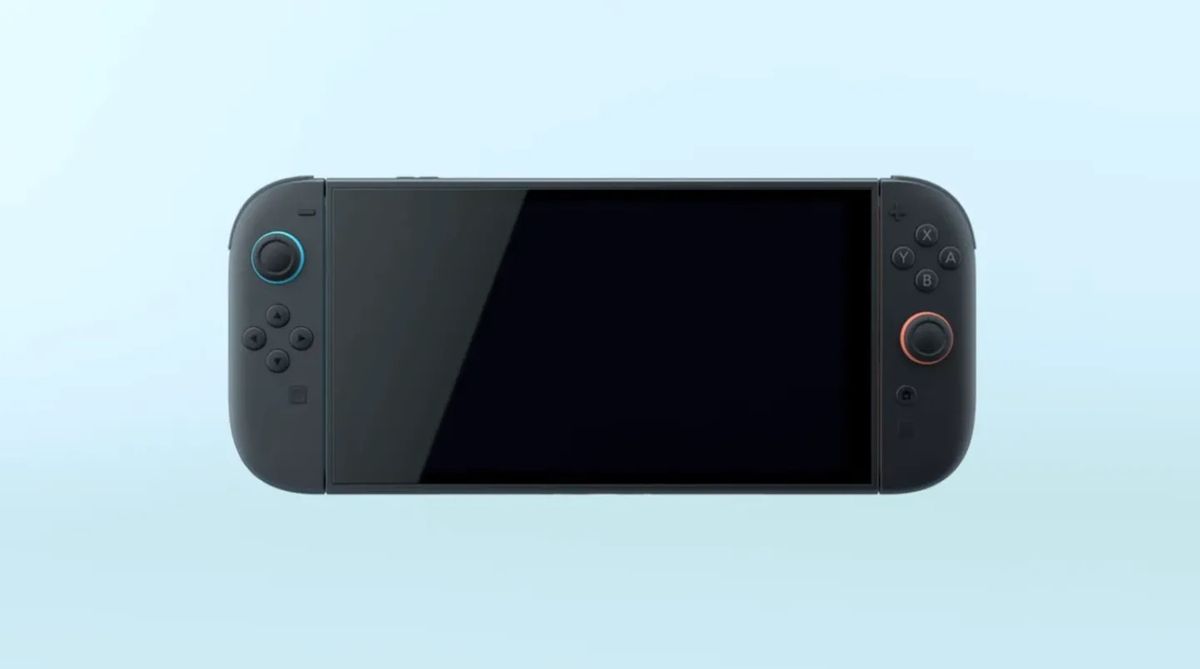
If you’ve seen the recent Nintendo Switch 2 reveal and are giddy with excitement over this highly anticipated console, then you’re not alone. Despite Nintendo fans being somewhat divided over the design of this console, we know that plenty of gamers will likely still be buying it come launch day.

Register Your Interest

We might be a while away from the Switch 2 hitting shelves, but if you’re someone hoping to score a Nintendo Switch 2 pre-order on day one, then it’s a good idea to get prepared early. You might be thinking that there’s no way Nintendo won’t have enough stock – but major console releases like this have all sold out in the past, so do you really want to chance it?

Top Retailers to Buy From

It’s a good idea to think about which retailer you might want to buy your console from. There’s Nintendo’s official online store, of course, which should probably be your first point of call for any bundle deals available, or to purchase any exclusive console editions that might be announced in the run-up to release.

Other US retailers to consider are Amazon if you’re a fan of preorder price guarantees and next-day delivery. But it’s also possible that stores such as Walmart and Best Buy will reserve some stock back exclusively for its Plus and Total members, offering dibs and first access to console pre-orders as links go live. So this might be a better option if you’re already a member, to secure your Switch 2 and avoid disappointment.

Price and Availability

We expect that pre-orders for the new Nintendo Switch 2 handheld console will go live on April 2, 2025 – which is the same date that Nintendo has scheduled its next Direct event to discuss details on the Switch 2 and any new Nintendo titles. It’s possible that we could be drip-fed some more details before this time, as two months is quite a while for excited gamers to be kept waiting.

With that said, Nintendo has been pretty stealthy with its announcements lately, so who knows when we’ll get official confirmation on pricing and a global release date? At a guestimate, we think the Nintendo Switch 2 could have a price tag between $350-$450, but don’t quote us on this.

Conclusion

In conclusion, if you’re excited about the Nintendo Switch 2, it’s a good idea to register your interest early to secure a pre-order. With the launch date just around the corner, you can expect pre-orders to go live on April 2, 2025. Make sure to check out the top retailers to buy from, and stay tuned for more information on pricing and availability.

Frequently Asked Questions

Q: When will Nintendo Switch 2 pre-orders go live?
A: We expect pre-orders to go live on April 2, 2025.

Q: Which retailers will have the Nintendo Switch 2 for pre-order?
A: Top retailers to consider include Nintendo’s official online store, Amazon, Walmart, and Best Buy.

Q: What is the expected price range for the Nintendo Switch 2?
A: We estimate the price to be between $350-$450, but this is subject to change.

Q: Will there be any bundle deals available for the Nintendo Switch 2?
A: Yes, it’s possible that Nintendo will offer bundle deals, including a physical or digital copy of Mario Kart 9, exclusive Joy-Con variants, or a decorated dock.

Lawmakers Press Tech Giants

0

Senators Pressure Big Tech Firms to Explain Inauguration Donations

Sens. Elizabeth Warren (D-MA) and Michael Bennet (D-CO) are putting pressure on big tech firms to explain their motives for donating to President-elect Donald Trump’s inauguration fund. In letters to Amazon, Apple, Google, Meta, Microsoft, OpenAI, and Uber, the lawmakers express concerns about the companies making contributions to “avoid scrutiny, limit regulation, and buy favor.”

Recent Donations to Trump’s Inauguration

Over the past several weeks, Google, Microsoft, Apple CEO Tim Cook, Meta, Amazon, and OpenAI CEO Sam Altman all donated $1 million apiece to Trump’s inauguration, while Uber and its CEO, Dara Khosrowshahi, each contributed $1 million. Many of these tech execs have already met with Trump, and Meta CEO Mark Zuckerberg is even hosting an inauguration party for the incoming president, according to The New York Times.

Comparing Donations to Biden’s Inauguration

These sizable donations surpass the amount most of these companies contributed to President Joe Biden’s inauguration fund in 2021. A filing with the Federal Election Commission shows Uber donated $1 million to the event, followed by Microsoft with a $500,000 contribution, Google at $337,500, and Amazon at $276,509. Apple donated just $43,200 to Biden’s inauguration, while Meta and OpenAI didn’t contribute at all.

Concerns Over Regulatory Scrutiny

In the letters, Sens. Warren and Bennet draw attention to the regulatory scrutiny the Biden administration has directed toward big tech firms. “You have a clear and direct interest in obtaining favors from the incoming administration: your company and many other Big Tech donors are already the subject of ongoing federal investigations and regulatory actions,” the lawmakers write. “These donations raise questions about corruption and the influence of corporate money on the Trump administration, and Congress and the public deserve answers.”

Conclusion

The lawmakers are seeking transparency from the big tech firms, and the companies have until January 30th to respond. The controversy surrounding the donations highlights the growing concern over the influence of corporate money on politics and the potential for corruption.

FAQs

Q: Why are Sens. Warren and Bennet seeking explanations from big tech firms?

A: The lawmakers are concerned that the companies are making contributions to avoid scrutiny, limit regulation, and buy favor with the incoming administration.

Q: What are the companies being asked to explain?

A: The lawmakers are seeking the rationale behind the donations and when and under what circumstances the companies decided to make a contribution.

Q: What is the deadline for the companies to respond?

A: The companies have until January 30th to respond to the lawmakers’ questions.

A Brief History of Automation and AI

0

Automation and artificial intelligence (AI) have rapidly evolved from science fiction concepts to integral parts of our daily lives. From industrial machines that revolutionised manufacturing processes to intelligent algorithms that power our smartphones, the journey of automation and AI is as fascinating as it is complex.

This evolution has also transformed the educational space, making specialised programs like an online engineering masters more relevant than ever.

Let’s take a stroll through this history, examining key milestones and reflecting on the future challenges we face as these technologies continue to advance.

Early Beginnings: The Dawn of Automation

The concept of automation isn’t new; it dates back to ancient civilisations. The Greeks and Egyptians devised early forms of automated systems, such as water clocks and mechanical devices. However, the real shift toward modern automation began during the Industrial Revolution in the late 18th and early 19th centuries.

James Watt’s improvements to the steam engine in 1776 marked a pivotal point. These enhancements made it possible to power machinery in factories, which led to mass production and significant economic growth. Innovations like the spinning jenny, power loom, and the cotton gin transformed industries, setting the stage for the future of automation.

The 20th Century: Electromechanical Automation

The 20th century witnessed substantial advancements in electromechanical systems. Henry Ford’s introduction of the assembly line in 1913 revolutionised manufacturing.

By employing a conveyor belt system and a series of specialised workers performing specific tasks, Ford drastically reduced the time and cost of producing automobiles. This method became a standard across various industries.

World War II further accelerated automation technology. The need for efficient manufacturing and logistics led to the development of more advanced machines, including early computers like the ENIAC in 1945. These machines were initially used for military applications but soon found their way into commercial and scientific domains.

The Birth of Artificial Intelligence

The term “artificial intelligence” was coined in 1956 at the Dartmouth Conference, where scientists gathered to explore the possibility of creating machines that could “think.”

Early AI research focused on symbolic reasoning and problem-solving, leading to the development of the first AI programs, such as the Logic Theorist and the General Problem Solver.

The 1960s and 1970s saw the emergence of expert systems, which used predefined rules to mimic human decision-making in specific domains, such as medical diagnosis or geological exploration. However, these systems were limited by their reliance on manually encoded knowledge and struggled to handle uncertainty and complexity.

The AI Winter and Subsequent Resurgence

The journey of AI hasn’t been without its setbacks. The 1970s and 1980s experienced what is known as the “AI Winter,” a period of reduced funding and interest due to unmet expectations and technological limitations. AI research was criticised for its inability to deliver on its grand promises, leading to scepticism and a decline in progress.

The late 1990s and early 2000s saw a resurgence in AI, driven by advancements in computing power, data availability, and machine learning algorithms.

The rise of the internet and digital technologies provided vast amounts of data for training AI models. Neural networks, inspired by the human brain, began to show promise, particularly with the advent of deep learning.

The Modern Era: AI in Everyday Life

Today, AI is omnipresent, and embedded in our smartphones, cars, homes, and workplaces. Virtual assistants like Siri, Alexa, and Google Assistant have become household names, while recommendation algorithms shape our online experiences on platforms like Netflix and Amazon. Self-driving cars, once a futuristic dream, are now a reality.

In healthcare, AI assists in diagnosing diseases, predicting patient outcomes, and personalising treatment plans. In finance, it detects fraudulent transactions and automates trading. AI-powered robots work alongside humans in factories, enhancing productivity and safety. The potential applications of AI are virtually limitless, promising to transform every aspect of our lives.

The Dark Side of AI

While the benefits of AI are immense, there is also a dark side that we cannot ignore. One of the primary concerns is the potential for job displacement. As AI and automation technologies become more sophisticated, they are capable of performing tasks that once required human labour.

This raises fears of widespread unemployment, particularly in sectors like manufacturing, transportation, customer service and sadly, within the arts and creative industries; which may become our reality sooner than we think.

AI systems can perpetuate and even exacerbate societal biases. Machine learning models learn from historical data, which often contains biases reflecting existing social inequalities. If not carefully managed, AI can reinforce discriminatory practices in areas such as hiring, lending, and law enforcement.

Privacy and security are also significant concerns. AI systems often rely on vast amounts of personal data to function effectively. This data can be vulnerable to breaches and misuse, leading to potential violations of individual privacy. The development of deepfakes and other AI-generated content poses threats to information integrity and trust.

Perhaps the most alarming issue is the potential for autonomous weapons. AI-powered military systems could make decisions about targeting and engagement without human intervention, raising ethical and moral questions about the role of machines in warfare.

The Need for Regulation

As AI and automation technologies continue to evolve, there is an urgent need for comprehensive regulation. Governments, industry leaders, and academic institutions must collaborate to establish frameworks that ensure the ethical and responsible development and deployment of AI.

Transparency and accountability should be at the core of AI systems. Developers must ensure that AI algorithms are explainable, allowing users to understand how decisions are made. This is particularly crucial in high-stakes applications like healthcare, finance, and criminal justice.

Regulations should also address data privacy and security. Clear guidelines are needed to protect individuals’ personal information and prevent misuse. Policies must be put in place to manage the risks associated with autonomous weapons and other potentially dangerous applications of AI.

Education and workforce development are critical to mitigating the impact of job displacement. By investing in reskilling and upskilling programs, we can prepare workers for the change in the future of employment, and ensure that the benefits of AI are broadly shared.

The Future of AI

The rise of robots and AI represents one of the most significant technological transformations in human history. From the early days of steam engines and assembly lines to the sophisticated AI systems of today, we have witnessed remarkable progress. However, this journey is not without its challenges.

As we continue to embrace the possibilities of AI, we must also confront its potential pitfalls. By fostering a culture of ethical innovation and implementing robust regulatory frameworks, we can harness the power of AI to create a better future for all.

The key lies in balancing the benefits of automation and AI with the imperative to protect human values and societal well-being.

Print Friendly, PDF & Email

The Ultimate Game Development Toolkit: Unreal Engine 5, Unity 6, and GameMaker

0

The Best Game Development Software

The best game development software is often a ‘platform’ of tools to bring your dream video game creation to life. In recent years, there have been two game making softwares – or ‘game engines’ – that have stood out from the rest; Unreal Engine and Unity, which are why they are top of my list.

The Best Game Development Software: Quick List

  • Unreal Engine
  • Unity
  • Godot Engine
  • GameMaker
  • Stencyl
  • Construct 3

Unreal Engine 5

Unreal Engine 5 is one of the best game engines that doubles up as a real-time creation platform. It has everything you need for game development, visualisation, and VFX.

Unity

Unity is a real-time development platform for game creation as well as generation of VR and AR content. Unity runs on Windows, Mac, and Linux.

Godot Engine

Godot Engine stands out from the likes of Unreal Engine and Unity in that it is open-source and 100% free. It’s therefore ideal for games with small budgets.

GameMaker

GameMaker is one of the longest running engines on the market. It’s fantastic for beginners thanks to the GM Visual interface and workflow, which require no programming knowledge.

Stencyl

As the name suggests, Stencyl is an easy-to-use drag-and-drop gameplay designer. Create your game in no time at all thanks to hundreds of ready-to-use blocks.

Construct 3

Construct 3 uses a drag-and-drop system just like Godot Engine, GameMaker, and Stencyl, but it’s not quite as user-friendly as those, especially Stencyl. Like a lot of beginner game creation software, Construct 3 is 2D-focused, so there’s no support for 3D game creation.

Best Game Dev Software: Also Recommended

  • Unreal Engine
  • Unity
  • Godot Engine
  • GameMaker
  • Stencyl
  • Construct 3

Best Game Dev Software: Frequent Questions

  • What kind of laptop do I need for game development?
  • Where do I start with choosing a piece of game software?
  • I’m a 3D visualiser, is there a best option for me?
  • What’s the best game software for mobile gaming development?

Best Game Development Software: How to Choose

When deciding on what game development software to use, first you need to consider what you intend to make as well as your skill level, knowledge, and how much time you can invest. Below are some things to consider that can help decide which game making software to use, but also remember there are free versions of all the best game development softwares, so try before you commit.

  1. What kind of game are you making?
    • 2D games: Godot Engine, Unity 6, GameMaker, Construct, and Stencyl.
    • 3D games: Unity 6 and Unreal Engine 5.
    • Mobile games: Unity 6 and Buildbox.
    • VR/AR games: Unreal Engine 5 and Unity 6.
  2. What’s your skill level?
    • Beginner: GameMaker, Godot, Construct, Stencyl, Buildbox all offer no-code or drag-and-drop workflows.
    • Intermediate: Unity 6 and Unreal Engine 5, despite advanced tech these are free to try and approachable but you’ll need some coding experience.
    • Experienced: Unreal Engine 5 or Godot Engine (as despite be accessible it can be customised for more complex tasks.
  3. What’s your budget?
    • Free software: Godot Engine is the only truly free, open-source game development software, and is a great compliment to Blender.
    • Free non-commercial: GameMaker, Unity 6, and Unreal Engine 5 all offer free versions for personal use, but commercial features will cost.
    • Paid full software: GameMaker, Buildbox, and Construct 3 all offer affordable payment plans for commercial use.
    • Revenue models: check the T&Cs of the app you’re using, for example Unreal Engine 5 is free but takes 5% royalty after you earn $1 million, and Unity 6 has a tiered subscription model.

Conclusion

Choosing the best game development software can be overwhelming, but by considering your goals, skill level, and budget, you can find the perfect tool for your needs. Whether you’re a beginner or an experienced developer, there’s a game engine out there for you.

Frequently Asked Questions

  • What is the best game development software for beginners?
    • GameMaker, Godot, Construct, Stencyl, and Buildbox are all great options for beginners.
  • What is the best game development software for 3D games?
    • Unreal Engine 5 and Unity 6 are great options for 3D game development.
  • What is the best game development software for mobile games?
    • Unity 6 and Buildbox are great options for mobile game development.
  • What is the best game development software for VR/AR games?
    • Unreal Engine 5 and Unity 6 are great options for VR/AR game development.

Real-Time AI Insights

0

The Power of HTML Tags: Understanding

and

What is

?

The

tag is one of the most fundamental HTML tags used to define a paragraph of text. It is used to wrap a block of text that is a standalone paragraph, and it is typically used to separate different sections of content on a web page. The

tag is an empty tag, meaning it does not have a closing tag, and it is used to define the start and end of a paragraph.

What is
?

The
tag is used to insert a line break in a paragraph of text. It is an empty tag, meaning it does not have a closing tag, and it is used to separate lines of text within a paragraph. The
tag is often used to create a visual separation between lines of text, making it easier to read and understand.

Key Differences Between

and

While both

and
are used to separate text, there are some key differences between the two tags. The main difference is that

is used to define a block of text, whereas
is used to insert a line break within a block of text. Additionally,

is used to define the start and end of a paragraph, whereas
is used to separate lines of text within a paragraph.

Best Practices for Using

and

When using

and
, there are some best practices to keep in mind. For example, it is generally recommended to use

to define a block of text, and to use
to insert line breaks within that block of text. Additionally, it is important to use

and
in a way that makes sense for the content of the web page, and to avoid using them excessively or unnecessarily.

Conclusion

In conclusion,

and
are two important HTML tags that are used to define and separate text on a web page. Understanding the differences between the two tags, as well as best practices for using them, is essential for creating effective and readable web content.

FAQs

Q: What is the difference between

and
?

A: The main difference is that

is used to define a block of text, whereas
is used to insert a line break within a block of text.

Q: When should I use

?

A: You should use

to define a block of text that is a standalone paragraph.

Q: When should I use
?

A: You should use
to insert a line break within a block of text, such as to separate lines of text within a paragraph.

Q: Can I use both

and
in the same paragraph?

A: Yes, you can use both

and
in the same paragraph, but it is generally recommended to use them in a way that makes sense for the content of the web page.

Mildly Terrifying Directions

How Tasks Work in ChatGPT

Tasks are a new beta feature for the paid-for versions of ChatGPT, allowing you to schedule a prompt to run at a certain time. In this article, we’ll explore the feature and demonstrate its capabilities.

How to Enable Tasks

To enable tasks, you need a Plus (or better) paid account to ChatGPT, and you’ll need to select the GPT-4o with scheduled tasks model.

Scheduling a Task

Once you’re in the model, you can invoke the scheduling of tasks in your prompt with something like the "at" statement or "schedule a task" prefix. It seems like ChatGPT does a fair job of interpreting anything that implies a future time request as a task.

Managing Tasks

You can see and manage existing tasks in the browser interface by selecting "Tasks" from the drop-down menu under your profile picture. The tasks screen allows you to see the tasks you’ve scheduled and those that have been completed. Hovering over the time will reveal a pencil and three dots, which allow you to pause, prevent, or delete a task.

Editing a Task

The pencil icon gives you an edit screen that lets you revise the task before it next runs. You can rename the task, edit the prompt, and change its scheduling.

Gateway Drug to Agentifying AI

Adding tasks to ChatGPT seems fairly uninteresting at first glance. However, it can also do more than full-featured task managers. It can run an AI prompt, which means it can take fairly intelligent action automatically at a specific time or times in the future.

Attempting to Get a Daily News Briefing

I attempted to get a daily news briefing by combining the agent service with ChatGPT web searching. Sometimes, ChatGPT made up stories. Sometimes, it gave me sources and stories from a year ago. Sometimes it cited stories that supposedly came from one site but came from completely different sites.

Generating a Custom Weather Briefing

My next attempt was to get a daily weather briefing. I wanted something more than just a quick weather report. I have a weather widget on my desktop and can see the weather detail… wanted it to draw a picture representing the weather at the time the prompt was executed.

Conclusion

To be fair, OpenAI does label this feature as beta. And boy-oh-boy, is it beta. On one hand, the idea of an AI agent being able to do things like draw a representative picture of a certain set of data seems intriguing. On the other hand, an AI agent that refuses to follow directions and goes off on all sorts of tangents seems terrifying.

FAQs

Q: What is ChatGPT Tasks?
A: ChatGPT Tasks is a new beta feature for the paid-for versions of ChatGPT, allowing you to schedule a prompt to run at a certain time.

Q: How do I enable Tasks?
A: To enable tasks, you need a Plus (or better) paid account to ChatGPT, and you’ll need to select the GPT-4o with scheduled tasks model.

Q: What can I do with Tasks?
A: You can schedule a prompt to run at a certain time, allowing you to take intelligent action automatically at a specific time or times in the future.

Q: Is ChatGPT Tasks ready for prime time?
A: No, the feature is still in beta and has some issues with following directions and generating accurate results.

A.I.’s Environmental Impact

0

The Deadline for TikTok’s Sale Looms

Supreme Court Upholds Law, What’s Next?

The deadline for TikTok to sell or face a ban is rapidly approaching. The Supreme Court justices, who opted to uphold the law on Friday, reacted to arguments in the case. The Chinese government’s stance on Elon Musk’s potential purchase of the app remains unclear. Meanwhile, self-proclaimed TikTok refugees are flocking to a different Chinese app, RedNote.

A.I. Industry Insider Weighs In

We spoke with an A.I. industry insider about the environmental impact of artificial intelligence. The expert revealed what we actually know about the effects of A.I. on the environment.

Meta’s Masculine Energy

Following Mark Zuckerberg’s recent appearance on Joe Rogan’s podcast, Casey offers Kevin some ideas on how to bring more "masculine energy" to Meta.

Guest and Additional Reading

Credits

Production Team

  • Hosts: Kevin Roose and Casey Newton
  • Producers: Whitney Jones and Rachel Cohn
  • Editor: Rachel Dry
  • Executive Producer: Jen Poyant
  • Engineering: Brad Fisher
  • Original Music: Dan Powell and Rowan Niemisto
  • Fact-Checking: Caitlin Love

Special Thanks

  • Paula Szuchman
  • Pui-Wing Tam
  • Dahlia Haddad
  • Jeffrey Miranda

Conclusion

The fate of TikTok hangs in the balance as the deadline for its sale or ban approaches. The Supreme Court’s decision to uphold the law sets the stage for a potentially significant shift in the social media landscape. Meanwhile, the A.I. industry is grappling with the environmental implications of its rapid growth. As the tech world continues to evolve, it’s essential to stay informed about the latest developments and their potential impact.

Frequently Asked Questions

Q: What is the deadline for TikTok’s sale?
A: The deadline is approaching, but the exact date is not publicly disclosed.

Q: Will the Chinese government allow Elon Musk to buy TikTok?
A: The government’s stance on the potential purchase remains unclear.

Q: What is RedNote, the alternative Chinese app?
A: RedNote is a social media platform that has gained popularity among former TikTok users.

Q: How does artificial intelligence affect the environment?
A: According to industry experts, the environmental impact of A.I. is still largely unknown, but research is ongoing to better understand its effects.

Boost

GitHub Branching Name Best Practices

Jack Pritom Soren ・ Jan 17

When it comes to managing code repositories on GitHub, one of the most important aspects is naming conventions for branches. In this article, we will explore the best practices for naming branches on GitHub.

Why Branching is Important

Branching is a fundamental concept in version control systems like Git. It allows developers to work on different features or bug fixes independently without affecting the main codebase. Branching also enables collaboration among team members by allowing them to work on different tasks simultaneously.

Best Practices for Branching Names

When naming branches, it’s essential to follow certain best practices to ensure clarity, consistency, and maintainability. Here are some guidelines to follow:

  • Use descriptive names: Use names that clearly indicate the purpose of the branch. For example, "feature/new-login-system" or "fix/bug-login-page".
  • Use the format "feature/branch-name" or "fix/branch-name": This format helps to clearly indicate the type of branch (feature or fix) and the name of the branch.
  • Use lowercase letters and hyphens: Use lowercase letters and hyphens to separate words in the branch name. This makes it easier to read and understand.
  • Avoid using special characters: Avoid using special characters like!, @, #, etc. in branch names.
  • Keep it short and concise: Keep the branch name short and concise. Aim for a maximum of 50 characters.

Example Branch Names

Here are some examples of well-named branches:

  • feature/new-login-system
  • fix/bug-login-page
  • hotfix/urgent-security-patch
  • release/v1.2.3

Conclusion

In conclusion, naming conventions for branches on GitHub are crucial for maintaining a well-organized and easily understandable codebase. By following the best practices outlined in this article, you can ensure that your branch names are clear, consistent, and maintainable.

FAQs
Q: Why is it important to use descriptive branch names?

A: Using descriptive branch names helps to clearly indicate the purpose of the branch, making it easier for team members to understand the context and purpose of the branch.

Q: Can I use special characters in branch names?

A: No, it’s recommended to avoid using special characters like!, @, #, etc. in branch names. Instead, use lowercase letters and hyphens to separate words.

Q: How long should my branch name be?

A: Aim for a maximum of 50 characters in your branch name. This helps to keep the name concise and easy to read.

Q: Can I use uppercase letters in branch names?

A: No, it’s recommended to use lowercase letters in branch names. This helps to maintain consistency and readability.

Performance Review Templates for HR

0

Performance reviews are a key step in the employee evaluation process. They provide a valuable opportunity for managers and employees to:

  • assess performance
  • set goals
  • provide feedback
  • discuss growth & development opportunities

But without a proper framework, performance reviews can become bureaucratic, ineffective, and disengaging. That’s where performance review templates come in. Using performance review templates, organizations can streamline the employee review process. HR leaders can ensure consistency and help managers create a constructive feedback culture that supports employee development and employee engagement.

In this blog, we’ll explore:

  • The role of performance review templates and their key components
  • The importance of constructive feedback
  • Performance review templates to inspire your reviews
  • Strategies for effective implementation
  • The benefits of performance review software

Understanding the role of performance reviews

Before we dive into performance review templates, let’s discuss the role of performance reviews in performance management. Performance reviews—when implemented well—enable employees to grow and develop. They help employees contribute to the success of your organization. Performance reviews:

  • Help open communication between managers and employees
  • Align employee performance with organizational goals
  • Support employee growth and development

The Importance of Constructive Feedback in Performance Reviews

Perhaps the most essential component of performance reviews is constructive feedback. Performance feedback plays a vital role in boosting employee performance and expediting growth. It helps managers help employees grow, develop, and improve. Great feedback is:

  • Specific: uses examples and data
  • Frequent: is timely, not saved for annual review conversations
  • Outcome-focused: put into context of meaningful performance goals and objectives
  • Positive: shares what employees are doing well
  • Conversational: encourages employees to share their perspective

Quantum Workplace research shows that employees who receive more frequent feedback are 2X more engaged, 3X less likely to apply or seek other jobs, and 1.4X more likely to stay at your organization. Helpful feedback isn’t just a soft suggestion—it’s key to engagement and retention!

Check out our 170+ performance review examples, comments, and phrases to inspire your next employee review. 

Elevating performance reviews from administrative tasks to strategic initiatives

Performance reviews can help align teams around your organization’s strategic initiatives and goals. These conversations are paramount for driving employee and business success. Reviews can also boost employee engagement and improve your culture. By emphasizing the value of feedback, you can position reviews as catalysts for development and career growth.

Simple performance review templates help HR and managers:

Streamline the performance review process. You’ll need to put some work in up front to develop your templates. But once you’ve created them, it’s easy for everyone to launch and complete reviews. Spending less time on manual and clunky processes helps everyone stay focused on the most important work.

Create consistency. Implementing performance review templates is a good way to level the playing field. It helps ensure reviewers across your teams evaluate and discuss performance similarly. It helps managers review objectively. And it helps employees see the review process as clear and fair.

Do feedback better. Feedback is not an inherent skill—it’s a practiced one. Performance review templates give managers guardrails for giving feedback. You can help ensure feedback is clear and actionable, ultimately helping employees grow and improve.


What are the key elements of a good performance review template?

A best practices performance review form includes clear and specific performance criteria. It includes examples of employee accomplishments and areas for improvement, taking a balanced approach. It should include a rating system—but don’t make the rating the central focus. It should have plenty of space for comments and feedback for the reviewer and the employee. And it should be focused on the future, helping fuel employee growth with goals and development plans.

Key Components of an Effective Performance Review Template

An effective performance review process involves several key components. Each component helps ensure review conversations are meaningful, transparent, and fair. A well-designed performance appraisal template provides consistent structure across the organization. It also reduces the administrative burden on managers. Managers can launch effective conversations with ease.

  • Rating scale. A rating scale helps quantify employee performance using predefined criteria. It allows for a fair and standardized evaluation process. Be careful not to focus on the rating too much in the actual review conversation. It’s meant to help identify gaps in perception between managers and employees—not serve as a focal point.
  • Performance review summary. A summary provides an overview of an employee’s overall performance during the review period. It should cover a holistic view of contributions, accomplishments, and areas for improvement.
  • Performance goals. Performance goals should be central to any performance conversation. Managers and employees should take part in goal-setting together outside of the review. Review conversations should address progress, performance, and next steps on those goal identified as key performance goals.
  • Performance competencies. Review should include core competencies necessary to job performance and development. Assessing relevant skills such as communication, teamwork, and problem-solving can help identify role-related strengths and areas in need of development.
  • Templated questions. Outside of goals and competencies, what else is important to employee success in your organization? Create a fuller picture of performance by incorporating performance review questions on company core values, organizational priorities, required trainings, or other areas of interest.
  • Two-way comments. This might be the most important component of any performance review process. Expect managers and employees to participate equally. Employees should clearly understand topics of discussion. And they should have the chance to contribute through self-rating and contextual comments.

What to avoid in an employee performance review template?

There are a few things to avoid in your performance reviews. Your performance review templates can help address some of these performance review pitfalls:

  • Don’t include vague or unclear language. Instead, be specific and to the point. Encourage managers and employees to include specific examples and behaviors in their comments.
  • Don’t let bias or subjectivity creep in. Having good data on employee performance throughout the year helps. Think feedback, recognition, goal progress, and more.
  • Don’t take a “kitchen sink” approach. If there’s too many factors to evaluate, reviews will easily get out of hand and lack focus. Focus on the most important goals and competencies.

Types of performance review templates

Your teams should have a variety of performance conversations outside the annual review. Research shows employees prefer weekly 1-on-1s to check in on performance. Incorporate a few of the templates below into your performance management cycle. The templates will help bring structure to your process that benefits everyone in your organization.

1. Quantum Workplace’s GOOD Performance Review Template
 

good performance review

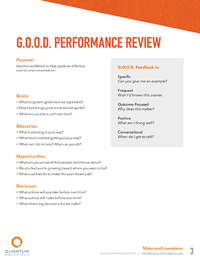
The GOOD template is a special template to us! Quantum Workplace uses this very template for our own monthly manager-employee performance conversations. It’s a staple in our company culture (learn more about that here!).

A GOOD stands for Goals, Obstacles, Opportunities, and Decisions. This template is great for monthly 1-on-1s. It helps managers and employees zoom out and revisit the big picture.

Goals:

  • What long-term goals have we agreed to?
  • How have things gone since we last spoke?
  • What are our plans until next time?

Obstacles:

  • What’s standing in your way?
  • What have I noticed getting in your way?
  • What can I do to help you?

Opportunities:

  • What are you proud of that people don’t know about?
  • Do you feel you’re growing toward where you need to be?
  • What could be done to make this your dream job?

Decisions:

  • What actions will you take before next time?
  • What actions will I take before next time?
  • What other big decisions did we make?

Pros: Encourages conversation, reflection, and future planning

Cons: Doesn’t include metrics by which to measure or compare employees (we don’t encourage that anyway)

Get the template >>>


2. Quarterly Check-In Template
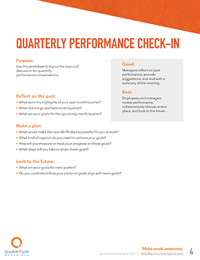
 

quarterly performance check-in

If monthly performance conversations aren’t feasible, we recommend having them at least quarterly. Managers and direct reports should collaboratively review an employee’s performance, discuss action plans, and look to the future. This worksheet will guide you through topics of discussion for quarterly performance conversations.

Reflect on the past:

  • What were the highlights of your past month/quarter?
  • What did not go well last month/quarter?
  • What are your goals for the upcoming month/quarter?

Make a plan:

  • What would make the next 60-90 days successful for you at work?
  • What kind of support do you need to achieve your goals?
  • How will you measure or track your progress on these goals?
  • What steps will you take to attain these goals?

Look to the future:

  • What are your goals for next quarter?
  • Do you understand how your personal goals align with team goals?

Pros: Employees and managers can act on findings more quickly

Cons: Isn’t always focused on long-term goals of the company and employee

Get the template >>>


3. Mid-Year Performance Review Template
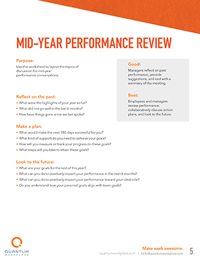
 

mid-year performance review

A mid-year performance review is a prime opportunity to check on goals and adjust them as needed. It should focus on key highlights, obstacles, and a plan for the future.

Reflect on the past:

  • What were the highlights of your year so far?
  • What did not go well in the last 6 months?
  • How have things gone since we last spoke?

Make a plan:

  • What would make the next 180 days successful for you?
  • What kind of support do you need to achieve your goals?
  • How will you measure or track your progress on these goals?
  • What steps will you take to attain these goals?

Look to the future:

  • What are your goals for the rest of this year?
  • What can you do to positively impact your performance in the next 6 months?
  • What can you do to positively impact your performance toward your ideal role?
  • Do you understand how your personal goals align with team goals?

Pros: Allows managers and employees to recalibrate before the year is over

Cons: Leaves a long gap between performance reviews if this is all you do

Get the template >>>


4. Annual Performance Review Template
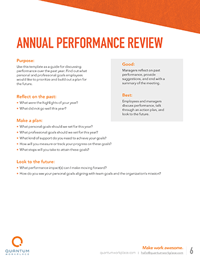
 

annual performance review

The annual performance review is for summarizing performance across the year. It’s also a good opportunity to discover what goals employees would like to prioritize before the next performance review.

Reflect on the past:

  • What were the highlights of your year?
  • What did not go well this year?

Make a plan:

  • What personal goals should we set for this year?
  • What professional goals should we set for this year?
  • What kind of support do you need to achieve your goals?
  • How will you measure or track your progress on these goals?
  • What steps will you take to attain these goals?

Look to the future:

  • What performance impact(s) can I make moving forward?
  • How do you see your personal goals aligning with team goals and the organization’s mission?

Pros: Allows managers and employees to look at the big picture of an employee’s performance

Cons: It’s tough to review an entire year of performance in one conversation

Get the template >>>


5. One-Page Performance Review Template

If you’re looking for the absolute basics, check out this one-page employee evaluation form from Seismic.

Pros: Quick and straightforward—has a defined rating scale

Cons: Leaves little room for additional information; doesn’t encourage two-way discussion

Get the template >>>


6. Self-Assessment Template
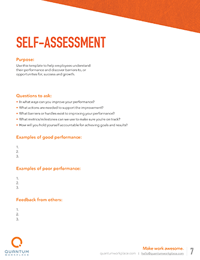
 

self-assessment

A self-assessment review helps employees reflect on their own performance. They can identify barriers and opportunities to discuss with their managers. It helps employees have a voice in their own development path—and provides managers with valuable coaching insight.

Questions to ask:

  • In what ways can you improve your performance?
  • What actions are needed to support the improvement?
  • What barriers or hurdles exist to improving your performance?
  • What metrics/milestones can we use to make sure you’re on track?
  • How will you hold yourself accountable for achieving goals and results?

Share examples of good performance:

1.

2.

3.

Share examples where you could improve:

1.

2.

3.

Pros: Instills reflective habits in employees and encourages them to own their own performance

Cons: Doesn’t account for feedback from peers and managers

Get the template >>>


7. Upward Feedback Template
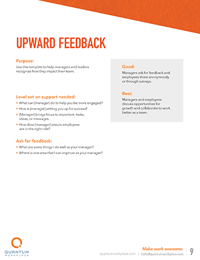
 

upward feedback

It’s important for managers to gather feedback on their own performance as well. Upward feedback allows employees to share feedback on their manager with their manager’s boss. After receiving this feedback, managers can discuss areas of opportunity and collaborate with their team to grow and improve.

Level set on support needed:

  • What can [manager] do to help you be more engaged?
  • How is [manager] setting you up for success?
  • [Manager] brings focus to important, tasks, ideas, or messages.
  • How does [manager] ensure employees are in the right role?

Ask for feedback:

  • What are some things I do well as your manager?
  • What is one area that I can improve as your manager?

Pros: Opens up the door for a two-way conversation about manager effectiveness

Cons: Employees might be worried about the consequences of providing feedback

Get the template >>>


8. Team Performance Review Template
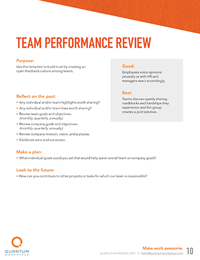
 

team performance review

High-performing teams are the key to organizational success. Use this template to build trust by creating an open feedback culture among teams. Ideally, teams can discuss performance openly, sharing roadblocks and hardships and developing solutions.

Reflect on the past:

  • Any individual and/or team highlights worth sharing?
  • Any individual and/or team lows worth sharing?

Review team goals and objectives (monthly, quarterly, annually):

  • Review company mission, vision, and purpose.
  • Celebrate wins and successes.

Make a plan:

  • What individual goals could you set that would help assist overall team or company goals?

Look to the future:

  • How can you contribute to other projects or tasks for which our team is responsible?

Pros: Gives a sense of how an overall team, not just individuals, is performing

Cons: Extremely high or low scores by a few individuals can skew results

Get the template >>>


9. 360 Performance Review Template
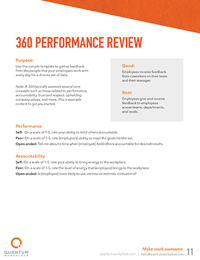
 

360 performance review

A 360 review helps managers get feedback from an employee’s team. Managers can develop a broader perspective of an employee’s performance, shedding light on strengths or challenges that might not be obvious. Use this sample template to gather feedback from the people that your employees work with every day for a diverse set of data.

Note: A 360 typically looks at several core concepts such as those related to performance, accountability, trust and respect, upholding company values, and more. This is example content to get you started.

Performance Self: On a scale of 1-5, rate your ability to hold others accountable.

  • Peer: On a scale of 1-5, rate [employee’s] ability to meet the goals he/she set.
  • Open-ended: Tell me about a time when [employee] held others accountable for desired results.

Accountability Self: On a scale of 1-5, rate your ability to bring energy to the workplace.

  • Peer: On a scale of 1-5, rate the level of energy that [employee] brings to the workplace.
  • Open-ended: Is [employee] more likely to use intrinsic or extrinsic motivations?

Pros: Shines a light on the entirely of an employee’s actions, not just what the manager witnesses

Cons: Could be difficult for some employees to judge accurately

Get the template >>>


10. Professional Development Template
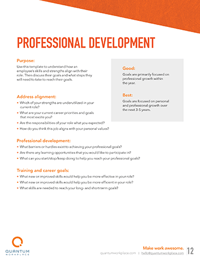
 

professional development

Professional development and career growth are key drivers of employee engagement and performance. Use this template to check on the alignment of employee strengths, skills, goals, and job role. Then discuss their goals and what steps they will need to take to reach their goals. Focus on career development and growth over the next 3-5 years.

Address alignment:

  • Which of your strengths are underutilized in your current role?
  • What are your current career priorities and goals that most excite you?
  • How do you think this job aligns with your personal values?

Discuss development:

  • What barriers or hurdles exist to achieving your professional goals?
  • Are there any learning opportunities that you would like to participate in?
  • What can you start/stop/keep doing to help you reach your professional goals?

Talk through training and goals:

  • What new or improved skills would help you be more effective in your role?
  • What new or improved skills would help you be more efficient in your role?
  • What skills are needed to reach your long- and short-term goals?

Pros: Allows aligned expectations to be compared pre- and post-performance cycle

Cons: Can be fairly general

Get the template >>>


11. Performance Improvement Template
 

performance improvement

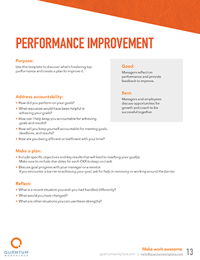
If an employee isn’t meeting expectations, it might be time for performance improvement plan. Use this template to discover what’s hindering performance and to create a plan to improve it. Managers and employees can discuss opportunities and work toward success together.

Address accountability:

  • How did you perform on your goals?
  • What resources would have been helpful in achieving your goals?
  • How can I help keep you accountable for achieving goals and results?
  • How will you keep yourself accountable for meeting goals, deadlines, and results?
  • How are you being efficient or inefficient with your time?

Make a plan:

  • Include specific objectives and key results that will lead to reaching your goal(s). Make sure to include due dates for each OKR or SMART goal to keep on track.
  • Discuss goal progress with your manager or a mentor.
  • If you encounter a barrier to achieving your goal, ask for help in removing or working around the barrier.

Reflect:

  • What is a recent situation you wish you had handled differently?
  • What would you have changed?
  • What are other situations you can use these strengths?

Pros: Can course-correct declining performance and give employees a fair chance to improve

Cons: Can be disengaging

Get the template >>>


12. Behavior Change Template
 

behavior change

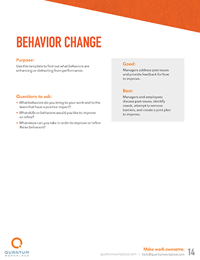
Employee behaviors can have a big impact on individual and team success. Use this template to understand and address behaviors that are helping or hindering performance.

Questions to ask:

  • What behaviors do you bring to your work and to the team that have a positive impact?
  • What skills or behaviors would you like to improve or refine?
  • What steps can you take in order to improve or refine these behaviors?

Pros: Helps managers and employees identify issues, needs and barriers together

Cons: An effective conversation can only be had with a self-driven employee

Get the template >>>


13. Compensation Check-In
 

compensation check-in

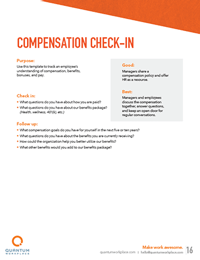
It’s important for managers and employees to talk openly about an employee’s compensation. Use this template to talk about compensation, benefits, bonuses, and pay with employees. Managers and employees can get on the same page, answer questions, and keep an open door.

Check in:

  • What questions do you have about how you are paid?
  • What questions do you have about our benefits package?

Follow up:

  • What compensation goals do you have for yourself in the next five or ten years?
  • What questions do you have about the benefits you are currently receiving?
  • How could the organization help you better utilize our benefits?
  • What other benefits would you add to our benefits package?

Pros: Encourages pay transparency among organizations, managers, and employees

Cons: Employee expectations can’t be met all the time

Get the template >>>


14. 90-Day Review Template
 

90-day review

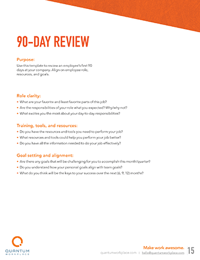
New hires deserve to know how they’re doing. Use this template to review an employee’s first 90 days at an organization after employee onboarding. It will help you set short-term goals and a shared vision for the future and align on role, resources, and goals.

Role clarity:

  • What are your favorite and least favorite parts of this job?
  • Are the responsibilities of your role what you expected? Why/why not?
  • What excites you the most about your day-to-day responsibilities?

Training, tools, and resources:

  • Do you have the resources and tools you need to perform your job?
  • What resources and tools could help you perform your job better?
  • Do you have all the information needed to do your job effectively?

Goal setting and alignment:

  • Are there any goals that will be challenging for you to accomplish this month/quarter?
  • Do you understand how your personal goals align with team goals?
  • What do you think will be the keys to your success over the next (6, 9, 12) months?

Pros: Helps provide clarity and early performance feedback for new hires

Cons: Limited to manual labor employees

Get the template >>>


15. Goal Setting Conversation Template
 

goal setting conversations

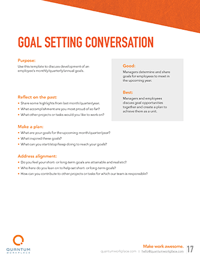
Goal-setting conversations are an important piece of your performance management puzzle. Your employees need measurable, aligned goals to work toward. Use this template to develop an employee’s monthly, quarterly, or annual goals.

Reflect on the past:

  • Share some highlights from last month/quarter/year.
  • What accomplishment are you most proud of so far?
  • What other projects or tasks would you like to work on?

Make a plan:

  • What are your goals for the upcoming month/quarter/year?
  • What inspired these goals?
  • What can you start/stop/keep doing to reach your goals?

Address alignment:

  • Do you feel your short- or long-term goals are attainable and realistic?
  • Who here do you lean on to help set short- or long-term goals?
  • How can you contribute to other projects or tasks for which our team is responsible?

Pros: Helps managers and employees set aligned, measurable goals

Cons: Will not be effective if not discussed regularly throughout the performance cycle

Get the template >>>


16. Simple 1-on-1 Progress Check
 

simple 1-on-1 progress check

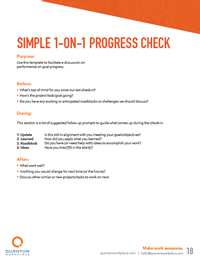
Formal performance conversations are important. But it’s also important managers and employees keep in touch with weekly check-ins. These quick conversations allow managers and employees to address obstacles in real-time. Use this template to facilitate a weekly check in on performance and progress.

  • What’s top of mind for you since our last check-in?
  • How’s the project/task/goal going?
  • Do you have any existing or anticipated roadblocks or challenges we should discuss?

Pros: Quick and frequent check-ins allow for better communication and agility

Cons: Managers need to set dedicated time aside for each employee

Get the template >>>


How Quantum Workplace can help you streamline performance reviews

Performance conversations don’t need to be hard. Keep your managers and employees on the same page with engaging performance reviews. Our performance review software gives your teams reliable context to help them have more objective and engaging conversations.

4_performance-reviews_product-imagery

1. Customize reviews to fit your needs. 

Easily measure what you want, when you want with flexible review modules that you can tailor to fit the needs of your culture and the various groups within it. 


2. Help your managers build positive performance habits.

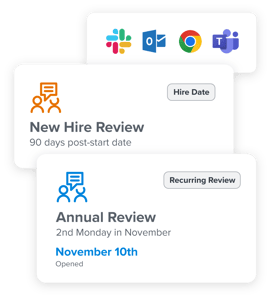
Make it easy for manager to coach to performance by integrating your process into their existing workflows. Set up formal conversation cycles to create the right frequency and consistency of touch points.

1_performance-reviews_product-imagery


2_performance-reviews_product-imagery


3. Easily track review response rates. 

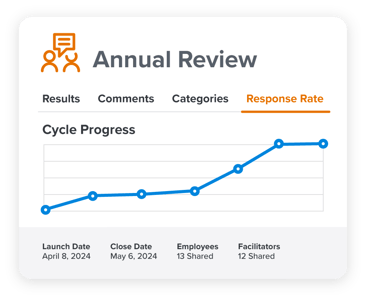
See the status of each review cycle to help your teams stay accountable and monitor performance ratings in real-time. 


4. Embed performance goals directly into reviews.

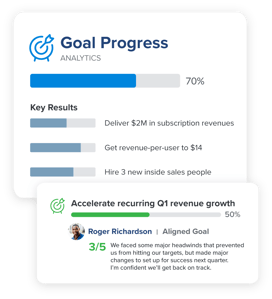
Our platform makes it easy to include goals as part of performance evaluations—and helps coach managers have objective, effective, and growth-oriented conversations.

3_performance-reviews_product-imagery


360Feedback_EmployeeMagnetism_7.1


5. Orient reviews around multi-rater feedback.

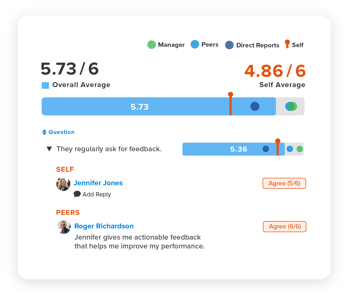
Incorporate feedback into your review cycles to gain valuable insight from the individuals your people work with most, and better orient  performance conversations around development.


6. Visualize and align on performance data across teams.

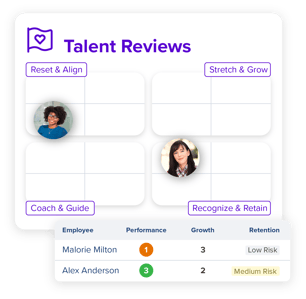
Get a comprehensive view of your organization’s talent with our talent dashboard. Zoom out and see the big picture, to help you make more informed decisions on how to keep and develop your best talent.

TalentReviews_EmployeeImpact_6.3


Make your performance review process more effective, efficient, and engaging. Quantum Workplace’s performance review software helps your managers and teams prepare for, facilitate, and follow up for better reviews and better performance.


QW-logo-color


Honor Magic 7 Pro vs Samsung S24 Ultra: Camera Shootout

0

Camera Phone Shootout: Honor Magic 7 Pro vs Samsung S24 Ultra

I’ve been a photographer for over 14 years, and I believe this era is as close as we’ve ever gotten to smartphones being able to replace digital cameras. I spent some time in Slovenia with Honor, and captured some stunning landscape shots of Lake Bled (one of the most beautiful places I have ever seen) using nothing but one of the best camera phones – the new Honor Magic 7 Pro.

The Test

I decided to put Honor’s new Magic 7 Pro to the test during my time in Slovenia, with a camera phone shootout against my current smartphone, the S24 Ultra. To keep things fair, I used the same aspect ratio when shooting these images and the same resolution wherever possible. Take a look at the 100% unedited image sliders (move the slider to see the full image) and galleries below for the results of this ultimate camera phone shootout.

Photos from the Honor Magic 7 Pro

[Image galleries]

Photos from the Samsung S24 Ultra

[Image galleries]

The Verdict

As you can see from the image galleries above, both of these are exceptional camera phones (though the beautiful Slovenian landscapes certainly help). I found that my Samsung S24 Ultra produced the sharpest unedited results in most cases, though only by a fraction, whereas the Honor Magic 7 Pro produced the best final image with AI enhancements made for more vibrant colors and hues.

Conclusion

In conclusion, I think if you’re someone who likes to edit and tweak images yourself for the best result then the S24 Ultra offers the best starting point with RAW capabilities. But if you’re looking for a shot that’s Instagram-ready from the get-go then Honor’s Magic 7 Pro takes the crown.

Frequently Asked Questions (FAQs)

Q: What is the main difference between the Honor Magic 7 Pro and Samsung S24 Ultra?
A: The Honor Magic 7 Pro has a 50MP main camera with a larger aperture (f/1.4) than the S24 Ultra’s 200MP main camera (f/1.7).

Q: How does the Super Zoom on the Honor Magic 7 Pro compare to the S24 Ultra?
A: The Super Zoom on the Honor Magic 7 Pro has amazing potential, but I don’t think it’s quite there yet. You can blatantly tell that AI has been used to fill in the gaps, and I think the result looks more like an abstract painting for now than a real image.

Q: Which camera phone is best for me?
A: If you’re someone who likes to edit and tweak images yourself for the best result, then the S24 Ultra offers the best starting point with RAW capabilities. But if you’re looking for a shot that’s Instagram-ready from the get-go, then Honor’s Magic 7 Pro takes the crown.