Home Blog Page 440

LLMs: When to Use Them

Reasonable Use Cases

Speeding up Work Tasks

LLMs are good at tasks such as:

  • coming up with names for things
  • classifying items in a long list
  • formatting data (e.g. converting to CSV/JSON, or different date formats)
  • data extraction from unstructured text (e.g. email addresses or URLs)
  • rephrasing or adjusting the tone of your writing

Code Assistants

Code assistants are good for quick prototyping, providing you understand the code they are generating. You will have better results if you split the task into very small steps and commit often. Perhaps consider using the Mikado method with the LLM.

If AI is generating the code, I believe you should write the unit tests yourself, so that you are forced to check its correctness.

You should not use code assistant tools or paste non-public code into LLMs without your employer’s (or the copyright holder’s) permission.

I think code assistants are a bad idea for learning new frameworks and libraries, for several reasons:

  • it discourages you from reading the docs and forming a good mental model of how the thing works
  • it’s not always smart enough to fix bugs for you or explain why your code isn’t working
  • you can’t recognize when the coding style is outdated or there is simpler way of doing things

I think refactoring is best done by hand unless you want to apply a single refactoring many times across a large codebase. AI generated refactorings are not safe and need checking for correctness.

Retrieval-Augmented Generation (RAG)

A RAG is a multi-step process that first uses word vectors to fetch content from a knowledge base, and then feeds it to an LLM to answer a user’s question. For question answering, I’d expect this to outperform traditional search in cases where information is scattered amongst a lot of similar looking documents, for example slack messages or helpdesk tickets. It only really makes sense if your knowledge base is large enough that it would be costly for a technical writer to trawl and summarise.

I’m a bit skeptical of building such systems in-house though – as opposed to something like RunLLM – it feels like this effort would be better invested in improving your own service or its documentation.

Questionable Use Cases

LLMs are not Oracles

LLMs are not good at:

  • doing research for you
  • communicating factual information
  • weighing up evidence

It is nonsense to ask an LLM for opinions on ideas, because LLMs can support any position depending on their prompt and context.

Building User-Facing Services on Top of LLMs is Risky

  • LLMs are costly to train and run due to the amount of compute required. This has a high energy cost, to the point that big tech companies have walked back their commitments to carbon neutrality in order to expand data centers. I wouldn’t be surprised if companies hike up prices as the technology matures.
  • LLM outputs cannot be trusted to be free of copyrighted or sensitive data without more transparency over how they were trained
  • Allowing LLMs to act as “agents” is open to abuse from prompt injection attacks, and they can be misled by untrustworthy information
  • LLMs will happily lie to customers
  • It might be possible for AI to perform more complex reasoning by chaining many LLM operations, but I think this is unproven and expensive at this point

Conclusion

While LLMs have the potential to speed up certain tasks, it’s essential to be aware of their limitations and not overhype their capabilities. As technologists, we should critically evaluate the use cases for LLMs and consider what they are actually good at and what they are not good at.

FAQs

Q: Are LLMs good for doing research for me?

A: No, LLMs are not good at doing research for you. They can provide information, but it’s not reliable and should not be considered as a replacement for human research.

Q: Can I use LLMs to communicate factual information?

A: No, LLMs are not good at communicating factual information. They can provide information, but it’s not reliable and should not be considered as a replacement for human communication.

Q: Are LLMs a good idea for learning new frameworks and libraries?

A: No, LLMs are not a good idea for learning new frameworks and libraries. They can provide code suggestions, but they are not a replacement for reading the documentation and forming a good mental model of how the thing works.

Q: Can I use LLMs to generate code for me?

A: Yes, LLMs can generate code for you, but you should be aware of the limitations and potential risks involved. You should also write unit tests yourself to ensure the code is correct and not use LLMs for non-public code without permission.

Roborock’s Armored Vacuum

Robicock Dazzles CES 2025 with Saros Z70 Robot Vacuum

Roborock recently launched the Saros Z70 robot vacuum, featuring a mechanical arm to remove obstacles in its path, along with two new robot vacuums, the Saros 10 and Saros 10R.

Saros Z70: A Revolutionary Robot Vacuum

The Saros Z70 robot vacuum boasts a foldable mechanical arm with OmniGrip technology, which deploys itself to remove obstacles weighing under 300 grams. Initially, the arm will be able to lift small items such as socks, towels, tissue papers, and napkins.

The robotic arm vacuum will first identify objects in its path, then return to pick them up, put them away, and clean any missed areas. The OmniGrip arm features precision sensors, a camera, and an LED light to detect and process visual information.

For safety measures, the vacuum features a child lock, a safety stop button, and measures to prevent the mechanical arm from deploying when it’s blocked. The Z70 is expected to launch in the first half of 2025.

Saros 10 and Saros 10R: New Robot Vacuums Without Arms

The Roborock Saros 10 and Saros 10R are two new robot vacuums without mechanical arms but feature many of the S70’s flagship features.

Saros 10

The Saros 10 features a retractable laser distance sensor (LDS) that can be put away to pass under low-clearance areas. It detects obstacles, has industry-leading 22,000Pa of suction, Matter support, and VibraRise mopping technology. The Saros 10 will be available this month, with the RockDock Ultra 2.0 dock, and can be purchased separately.

Saros 10R

The Saros 10R, on the other hand, features an ultra-thin design (3.14 inches) and does not have the retractable LDS. It will be available later in 2025 with the Multifunctional Dock 4.0 and features hot water mop washing, auto mop removal, and a 2.5-hour fast charge.

Key Features

* Industry-leading 22,000Pa of suction (Saros Z70)
* Foldable mechanical arm with OmniGrip technology (Saros Z70)
* Retractable laser distance sensor (LDS) (Saros 10)
* Ultra-thin design (3.14 inches) (Saros 10R)
* Matter support (Saros 10)
* VibraRise mopping technology (Saros 10)
* FreeFlow main brush and FlexiArm Riser side brush for anti-tangling (Saros Z70)
* Detachable dual spinning mops with 22mm lift (Saros Z70)

Conclusion

Roborock’s recent launches have certainly raised the bar in the robot vacuum market, offering innovative features such as a mechanical arm for obstacle removal, retractable sensors, and powerful suction. These new models, the Saros Z70, Saros 10, and Saros 10R, cater to a wide range of consumers, offering various design choices and features for different needs and preferences.

FAQs

Q: Can the Saros Z70 deploy its mechanical arm without human intervention?
A: No, the arm features a child lock, safety stop button, and measures to prevent deployment when it’s blocked.

Q: Which robot vacuum can fit under low-clearance areas?
A: The Roborock Saros 10R has a 3.14-inch thin design that allows it to pass under low-furniture easily, while the Saros 10 features a retractable LDS sensor that can be put away.

Q: Will the Saros Z70, Saros 10, or Saros 10R robots vacuum carpets without leaving streaks?
A: Yes, the robots are designed to leave no streaks on carpets thanks to their mopping technology, which lifts dirt and stains easily.

Can BAM Be a Trailblazer Again Through AI?

0

The Art of the Future: A Journey Through Technology and Storytelling

The Onassis Foundation’s ONX Studio

In the heart of Midtown Manhattan, the Onassis Foundation’s ONX Studio, a high-tech media lab, is home to innovative digital video installations that push the boundaries of storytelling and technology. Among these is "The Golden Key," a project that delves into the world of artificial intelligence-driven video art. We spoke with Marc Da Costa, a digital artist with a Ph.D. in anthropology, who was demonstrating the installation’s capabilities.

The Art of Storytelling

Da Costa’s "The Golden Key" is an interactive installation that allows viewers to generate their own stories, inspired by the Brothers Grimm’s classic tale of the same name. By feeding a massive index of folklore into an AI system, Da Costa and his co-creator, Matthew Niederhauser, have programmed the AI to simulate the kind of stories that have been passed down through generations, telling us who we are and where we come from. This project is not just about entertainment; it’s about exploring the consequences of machines telling us stories.

The Future of Storytelling

As we move forward in the digital age, it’s essential to consider the role of technology in shaping our understanding of the world. Da Costa and Niederhauser’s project serves as a warning about the potential consequences of relying on AI to tell us what is true or false. "What if someone set up autonomous AI systems that operated on an industrial scale to fabricate stories that were meaningless or, worse, false?" Da Costa asked. "It doesn’t take much to think about who is going to be in control of these tools, what are going to be the economic interests behind that, and the political interests?"

The Onassis Foundation’s ONX Studio

The Onassis Foundation, through its ONX Studio, has made available its multimillion-dollar facilities to dozens of artists for free, fostering a community of innovation and creativity. The studio’s mission is to bring together artists, technologists, and scholars to explore the intersection of art, technology, and society.

Techne: A Festival of Digital Art

Techne, a festival within a festival, is a collection of four digital video installations on view at the Brooklyn Academy of Music’s Fisher building. The series, curated and funded by the Onassis Foundation’s ONX, features the work of artists such as John Fitzgerald and Godfrey Reggio, Margarita Athanasiou, and Stephanie Dinkins. The festival runs through January 19 and includes a special screening of "Koyaanisqatsi" on January 7 at 7:30 p.m., followed by a Q&A with John Fitzgerald and Godfrey Reggio.

Frequently Asked Questions

Q: What is "The Golden Key"?
A: "The Golden Key" is an interactive digital video installation that allows viewers to generate their own stories using an AI-driven video art system.

Q: How does the AI system work?
A: The AI system is trained on a massive index of folklore and can simulate the kind of stories that have been passed down through generations, telling us who we are and where we come from.

Q: What is the purpose of "The Golden Key"?
A: The purpose of "The Golden Key" is to explore the consequences of machines telling us stories and to encourage viewers to think critically about how technology works.

Q: How can I experience "The Golden Key"?
A: "The Golden Key" is part of the Techne festival at the Brooklyn Academy of Music’s Fisher building, running through January 19.

Upskill in 2025: 8 Creative Courses

0

01. Hobbycraft Plus Seminar – TikTok for Small Businesses

Take the dread out of mastering a new social media platform with a live (+ Q&A) or on-demand seminar as part of the Hobbycraft series aimed at supporting small crafty and creative businesses. Learn how to go viral on TikTok, how to sell through a TikTok shop, the best time to post, and how best to make it work for your creative business.

Cost: £30 (or free if you are a Hobbycraft Plus member with a seminar voucher)

02. Open Learn – A Freelance Career in the Creative Arts

What’s better than valuable insight? Insight that is free. Highly respected learning platform Open Learn, part of the Open University, wants to take some of the scary out of taking the leap into a freelance career in the arts, and this looks like a great, and risk-free way to do it.

Cost: Free

03. Skillshare – Logo Design for Beginners

If you need something bespoke for your brand or want to brush up on existing design knowledge, why not start with a logo design class on SkillShare? We love Skillshare because it gives you a try before you buy trial, and then options for individual or team memberships. During your membership, you have unlimited access to courses, so it’s easy to follow a set learning path, or create your own to further upskill.

Cost: Free trial available, then from $32 a month

04. Jet Black Squares – Smartphone Photography

We were excited to come across Jet Black Squares and its sheer range of options when it comes to smartphone photography workshops, masterclasses, and on-location adventurous safaris. Join a course leader on location, take an editing masterclass over Zoom, or learn how to take the best smartphone photos for your small business.

Cost: Varies depending on the course

05. Canva Design School – Branding Your Business

Have you visited Canva’s Design School yet? Along with courses on graphic design, and typography, this one on branding caught our eye. This is a free bitesize video course, with talking points rather than assessments and exercises, but we love these short, sharp reminders of branding essentials, what you need to achieve, and how Canva can help.

Cost: Free

06. Small Business Charter – Help to Grow Management Course

This one is for all the UK business owners out there, if you’re looking for a course to help you banish the overwhelm and take steps to grow your business, then this 12-week ‘help to grow’ course could be one to consider. This course is 90% funded by the U.K. government so, while the £750 cost is still an investment, it is heavily subsidised.

Cost: £750

07. Skillshare – Drawing Seamless Patterns in Procreate + Professional Surface Design Tips

We had to make a second visit to Skillshare for an illustration course as the site offers many ways to learn a new skill, expand your knowledge, or learn how to use software in a professional context. If you’ve already dabbled in digital art techniques and experimented with brushes, lettering, and individual items, then maybe pattern design is the next logical step in your artist journey.

Cost: Free trial, then from $32 a month

08. Open University Short Courses – Digital Photography, Creating and Sharing Better Images

Running twice yearly in 2025 and 2026, this distance learning course is supported by the Royal Photographic Society. A ten-week course costing £225, it’s a stepping stone if you are just starting in photography or want to take it further career-wise.

Cost: £225

Conclusions:

These courses are designed to help creatives upskill, boost their knowledge, and take their business to the next level. Whether you’re just starting out or looking to improve existing skills, there’s something for everyone in this range of courses.

FAQs:

Q: What is the best course for me?
A: It depends on your goals and interests. Read the descriptions carefully and choose the one that best aligns with your needs.

Q: Do I need to have prior experience in the subject?
A: Some courses may require prior experience, but many are designed for beginners or those new to the field.

Q: Can I earn a certification or degree?
A: Some courses offer certifications or degrees, but not all. Check the course details for more information.

Q: How do I access the courses?
A: Courses are accessed online, and some may require payment or registration. Check the course details for more information.

AI Scribes: Healthcare’s New Medical Note-Takers

Investment in Artificial Intelligence Medical Note-Taking Apps Doubles

AI start-ups focused on creating digital “scribes” for health professionals raised $800mn in 2024, compared to $390mn in 2023, according to data from PitchBook. This surge in funding comes as groups rush to launch AI-powered products that aim to make it quicker for doctors to take medical notes and improve patient interactions.

Microsoft and Amazon Jump into the AI Healthcare Market

Big Tech giants Microsoft and Amazon are racing to grab a share of the $26bn AI healthcare market. Microsoft, which owns AI speech recognition company Nuance, has launched AI co-pilots for physicians that use large language models and speech recognition to auto-generate transcripts of patient visits. Amazon has also entered the market, with a focus on integrating its Alexa assistant into healthcare systems.

Critics Urge Caution as AI Generates Notes

However, the rise in medical note-taking has sparked criticism from researchers about the dangers of AI-generated fabrications, known as “hallucinations”, which could be particularly harmful in a medical context, as well as the question of patient data privacy. Researchers at Cornell University and the University of Virginia analyzed thousands of Whisper-generated transcript snippets and found that roughly 1 per cent of audio transcriptions contained hallucinated phrases or sentences, including harmful content.

Hospitals and Doctors Embracing AI Technology

Nabla, a French start-up, has been trialed by hospitals and general physicians across the UK’s National Health Service (NHS). The start-up’s note-taking app uses Whisper, a transcription tool from ChatGPT maker OpenAI, and has been used to transcribe about 7mn medical visits. Harpreet Sood, a primary care physician, said that traditional note-taking takes at least two hours of typing time, whereas the AI app has saved 3-4 minutes of every consultation.

Stanford Medical School Adopts AI-Generated Notes

More than 50 primary care physicians at Stanford Medical School trialled Nuance’s AI-powered note-taker and found that the AI-generated notes saved time, with two-thirds of users reporting that it improved their workflow. The AI notes were closely scrutinized by physicians for accuracy, with 90 per cent having to be edited manually to correct for inaccuracies.

Patient Data and Safety Concerns

A patient’s privacy is a concern in the digital age, particularly in the case of AI-generated medical notes. Patients may want to know the extent to which their data is being used, stored, and protected. Researcher Suresh Venkataraman expressed concern that healthcare organizations may use AI-generated data without patients’ informed consent. Healthcare providers will need to implement robust data governance policies to mitigate these risks.

Conclusion

AI-generated medical notes have the potential to transform healthcare by making it quicker for doctors to take notes, improving patient interactions, and streamlining administrative tasks. However, as with any emerging technology, there are challenges and concerns. As AI healthcare continues to grow, it’s crucial that stakeholders prioritize patient privacy, data safety, and regulatory compliance to ensure a seamless patient experience.

Frequently Asked Questions

Q: What are AI-generated medical notes?
A: AI-generated medical notes refer to digital summaries of patient consultations, created by artificial intelligence language models and transcriptions.

Q: How are AI-generated notes created?
A: AI-generated notes are typically created using voice recognition software or speech-to-text technology, such as Whisper.

Q: Can AI-generated notes replace traditional medical notes?
A: AI-generated notes can certainly improve the process of taking notes, but traditional medical notes still provide a tangible record of a patient’s condition.

Q: What are the concerns surrounding AI-generated medical notes?
A: Concerns surrounding AI-generated medical notes include accuracy, patient privacy, and regulatory compliance.

Q: How will healthcare providers mitigate the risks of AI-generated notes?
A: Healthcare providers can mitigate the risks of AI-generated notes by implementing robust data governance policies, educating patients about AI-generated data use, and developing internal guidelines for AI-generated notes.

The Best Fonts for Books

0

What to Consider Before Choosing Your Book Font

Imagine ‘War and Peace’ written in Comic Sans, a travel guidebook ruining the moment with Chiller, or a textbook typeset in 8pt Raleway Thin 100: all poor choices for their intended audiences. You need to consider what looks right for your reader, how much white space they need, and how modern the font should be.

What to Consider

Our designers look to fit the chosen design intention, legibility at smaller point sizes if required for captions or smaller text, character support for global languages, character and uniqueness, modernness, and clarity (particularly looking at visually similar glyphs), says William Collins, the Head of Creative Technical Operations at DK, which covers many different genres such as travel and food and drink. “In general, we have seen a shift toward more humanist sans-serifs for our interiors.”

The Best Fonts for Books

Fortunately, we haven’t seen smaller text across the board, with legibility and a de-cluttered page still big considerations – a big sigh of relief for booksellers and readers.

01. Adamant

Find Adamant from £40 at Parachute or from £27 on My Fonts. Parachute Type Foundry’s Adamant is easy to read in small sizes, and is readily adaptable with six weights. It uses wide apertures to make letters more legible and open, and a high x-height (if this all sounds confusing, just use our typography glossary).

02. Arno

Arno is a serif font designed by Robert Zajonc for exljad. It appears darker and more substantial on the page; it’s a bit more contemporary and less formal. A higher x-height contributes to its readability even at smaller sizes.

03. Freight Text

Find Freight Text on Adobe Fonts. Hadley Hendrix has picked Freight as one of her go-tos, because “it appears darker and more substantial on the page; it’s a bit more contemporary and less formal. A higher x-height contributes to its readability even at smaller sizes.” Freight Text was created by Joshua Darden for GarageFonts, with a nod to 18th century Dutch type. It made Darden one to watch in the type world.

04. Garamond

Find Garamond on Adobe Fonts. A well-known typeface that combines Claude Garamond’s Roman type with Robert Granjon’s italics, this has been going strong since 1989, with its tall ascenders and wide apertures. Adobe reissued Garamond with OpenType capabilities, giving designers more control.

05. Gentium Plus

Find Gentium Plus on Google Fonts. The whole Gentium font family is open source, and specifically designed by SIL International for publishing in various languages that have roots in Latin. Gentium generally works well at 10-11pt.

06. Marujo

Find Marujo on Best Fonts. This quirky all-caps font, from PintassilgoPrints, is used for chapter headings and page numbers (to match cover art) in Roopa Farooki’s ‘Double Detectives’ series, published by Oxford University Press. Marujo plays around with baselines and toplines but remains legible.

Conclusion

Choosing the right font for your book is crucial. Consider the audience, the content, and the overall design intention. With so many options available, it can be overwhelming, but by considering the key factors and reading reviews, you can find the perfect font for your publication.

FAQs

Q: What are the most popular fonts for books?
A: The most popular fonts for books are often dependant on the genre and intended audience. However, some popular options include Garamond, Freight Text, and Gentium Plus.

Q: Can I use a font that I already have?
A: Yes, you can use a font that you already have, but make sure it is legible and suitable for the content.

Q: Can I use a font that is not widely available?
A: It may be possible to use a font that is not widely available, but it may not be compatible with all devices or software.

Q: How do I choose the right font for my book?
A: Choose a font that is legible, easy to read, and fits the tone and style of your book. Consider the audience, the content, and the overall design intention.

Designing the Ideal Ride

0

Transforming Car Design with AI: MIT’s DrivAerNet++ Database

Designing the Perfect Electric Car with AI

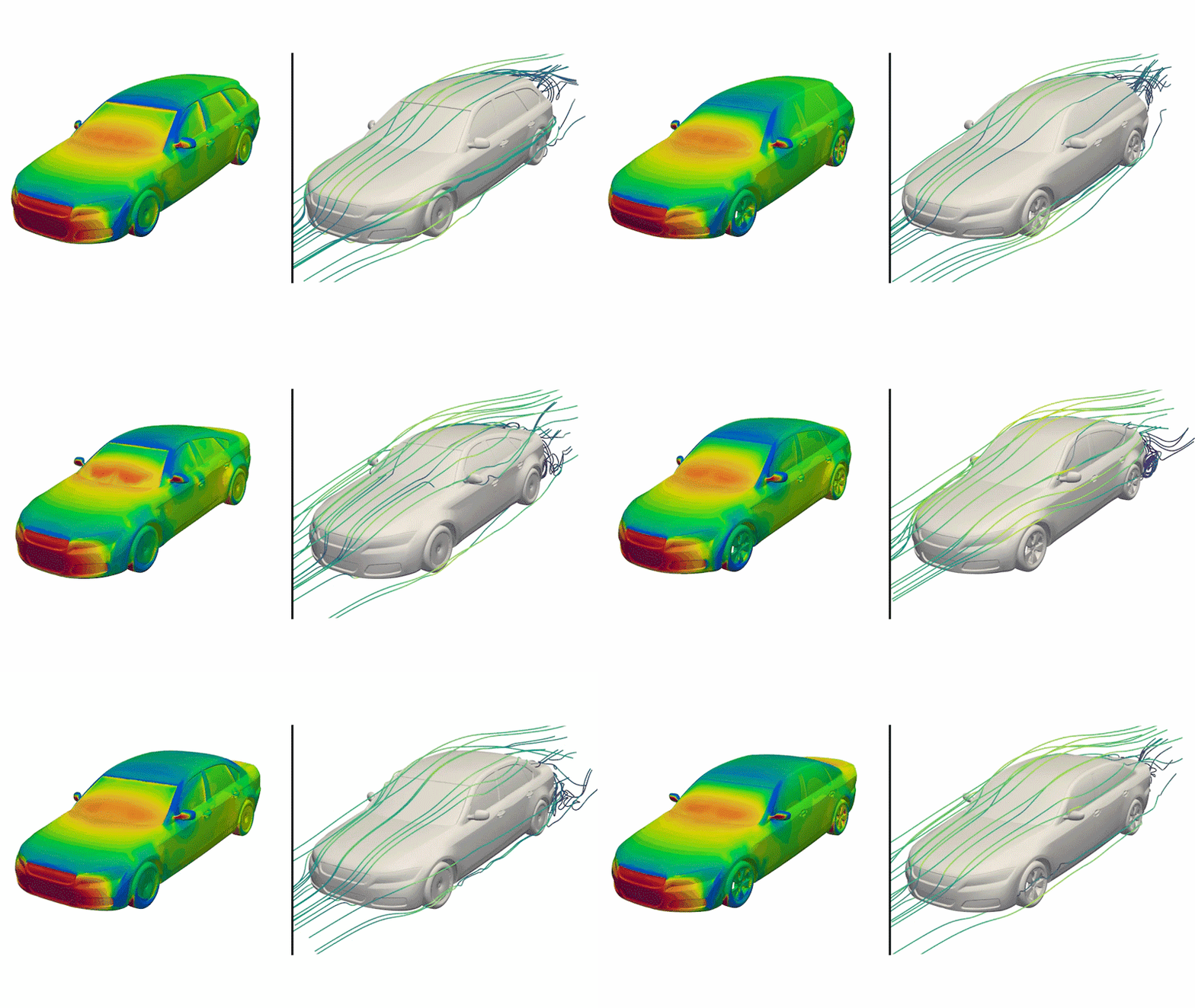
Creating a new car is a costly and time-consuming process, especially when it comes to designing electric vehicles. Researchers at MIT have developed an open-source database that uses AI to design the perfect electric car. The DrivAerNet++ database contains over 8,000 3D models of existing cars, which have been adjusted using an algorithm that tweaks 26 parameters to create new designs.

The Database

The DrivAerNet++ database was compiled from 39 terabytes of data, consuming 3 million central processing unit hours in the MIT SuperCloud. The team ran an algorithm to determine whether any newly generated design was a copy of a car that already existed or a new design. The 3D designs were then converted into readable formats: a mesh, point cloud, and a list of dimensions and specs. Fluid dynamics simulations were run to calculate how air would flow around each generated design, providing specifications on aerodynamics.

Training an AI Model

The idea is that the dataset could be used to train an AI model that would then be able to seek out the best combination of features, from aerodynamic design to an efficient and eco-friendly motor. This would reduce research and development costs and speed up car design. Faez Ahmed, assistant professor of mechanical engineering at MIT, explained: "The forward process is so expensive that manufacturers can only tweak a car a little bit from one version to the next. But if you have larger datasets where you know the performance of each design, now you can train machine-learning models to iterate fast so you are more likely to get a better design."

Conclusion

The DrivAerNet++ database is a significant step forward in the use of AI in car design. By leveraging the power of machine learning, manufacturers can create more efficient, eco-friendly, and aerodynamically designed vehicles. This technology has the potential to revolutionize the car industry, making it more sustainable and cost-effective.

FAQs

Q: What is the DrivAerNet++ database?
A: The DrivAerNet++ database is an open-source dataset containing over 8,000 3D models of existing cars, which have been adjusted using an algorithm that tweaks 26 parameters to create new designs.

Q: What is the purpose of the DrivAerNet++ database?
A: The purpose of the DrivAerNet++ database is to use AI to design the perfect electric car, reducing research and development costs and speeding up car design.

Q: How was the database compiled?
A: The database was compiled from 39 terabytes of data, consuming 3 million central processing unit hours in the MIT SuperCloud. The team ran an algorithm to determine whether any newly generated design was a copy of a car that already existed or a new design.

Q: What is the potential impact of the DrivAerNet++ database?
A: The DrivAerNet++ database has the potential to revolutionize the car industry, making it more sustainable and cost-effective. By leveraging the power of machine learning, manufacturers can create more efficient, eco-friendly, and aerodynamically designed vehicles.

AI Hardware Is in Its ‘Put Up or Shut Up’ Era

0

Whether AI-Powered Devices Will Make a Dent

Whether any of them will implement chatbots and agents well or in new and exciting ways is much harder to say. While the addition of AI may have been enough to garner the investment needed to build a device, it may not be enough to get people to actually buy the thing. Chatbots and AI agents don’t yet provide enough of a use case to justify people pinning them to their shirts en masse. We’re also at a point of AI saturation where the tech is in everything. So then, what makes your AI earbuds special?

The Problem with AI as a Differentiator

“That’s the problem a lot of these startups have; if AI is their differentiator, then what happens when everybody has it?” Sag says. “It’s now table stakes.”

Making a Dent

There are AI hardware success stories, of course, such as the Ray-Ban Meta smart glasses, which have done well by incorporating AI as one of many features in a device that offers use cases—taking pictures, listening to music—well beyond what AI can do on its own. (This will certainly be a year filled with smart glasses, and CES is bound to brimming with them too.)

The Role of Giant Companies

Meta, of course, is one of those giant companies with resources to put into incorporating AI into its services. Smaller manufacturers may not have the financial stamina to compete, but they’re feeling the pressure to get in on the game all the same.

Surviving the Competition

“It’s going to be difficult to see how those smaller startups survive,” Sag says.

Differentiation through Privacy

Sag says there are ways to stand out from the big devices and glut of other AI gadgets in the mix. Privacy, for instance. Meta may have the most successful smart glasses right now, but the company’s platform is a data vacuum that sucks up almost every bit of information about its users that it can. Sag points toward competitors like Even Realities or Looktech.AI, which make smart glasses that allow broad user controls over privacy settings and don’t necessarily just send every bit of data back to the mothership. He says startups like those can use the more secure approach to differentiate their products, offering users an alternative to the big, data mining platforms.

Conclusion

No matter how safe and secure the tech is, people are still going to want something that fundamentally does something beneficial for them.

“The next kind of wave of this is like, well, what is AI doing for me right now other than telling me that I have AI?” Sag says. “A lot of AI isn’t necessarily driving sales, because it’s not really changing people’s lives.”

FAQs

Q: What makes AI-powered devices special?

A: While AI may have been enough to garner investment, it may not be enough to get people to buy the device. Chatbots and AI agents don’t yet provide enough of a use case to justify people pinning them to their shirts en masse.

Q: What is the problem with AI as a differentiator?

A: If AI is the differentiator, then what happens when everybody has it? It becomes table stakes.

Q: How can smaller startups survive in the AI hardware market?

A: Smaller startups can use alternative approaches, such as prioritizing privacy, to differentiate their products and offer users an alternative to the big, data mining platforms.

Apple’s AI Photo Analysis Sparks Outrage Among iPhone and Mac Users

0

Apple’s Enhanced Visual Search Raises Concerns Over User Privacy

Apple arrived to the AI party later than other smartphone makers, and its recent moves to catch up are causing a fair few controversies. While Apple Intelligence continues to invent fake news stories in its notification summaries, another controversy is brewing over a quietly released feature for identifying landmarks in photos.

Automatic Opt-In and Lack of Transparency

It appears that Apple automatically opted users into Enhanced Visual Search with the release of iOS 18.1 and macOS 15.1 in October. The mechanism sends images stored in the Photos application to Apple servers in order to identify places of interest. This has raised concerns among users and privacy advocates, who feel that Apple should have been more transparent about the feature and given users the option to opt out.

How Enhanced Visual Search Works

The mechanism behind Enhanced Visual Search is end-to-end encrypted, and neither Apple nor its partner Cloudflare can see the photos or access any identifying information. Images are first analyzed by a local machine-learning model to find possible “regions of interest”. The model calculates a vector embedding to represent that part of the image and uses homomorphic encryption to scramble the contents before sending it to a remote server where computations are made to identify a matching landmark in a database.

Concerns Over Lack of User Control

Some users are unhappy about the way the feature was quietly implemented with no option to opt out. And even if you opt out now, data from existing photos has already been sent to Apple servers. Software developers Michael Tsai and Jeff Johnson have spoken out against the feature, with Tsai saying that Apple is not living up to its ideals and Johnson stating that it should be up to the individual user to decide their own tolerance for the risk of privacy violations.

Conclusion

Apple’s implementation of Enhanced Visual Search raises concerns over user privacy and the lack of transparency and control. While the company claims that the feature is end-to-end encrypted, users are still uneasy about the fact that their data is being sent to Apple servers without their explicit consent. It remains to be seen how Apple will address these concerns and whether the company will make changes to the feature to better respect user preferences.

FAQs

Q: How do I turn off Enhanced Visual Search?

A: To turn off Enhanced Visual Search, go to Settings > Apps > Photos on iOS / iPadOS or to Settings > General on a Mac and uncheck the box.

Q: Is my data safe with Enhanced Visual Search?

A: According to Apple, the mechanism behind Enhanced Visual Search is end-to-end encrypted, and neither Apple nor its partner Cloudflare can see the photos or access any identifying information.

Q: Why did Apple implement Enhanced Visual Search without telling users?

A: Apple has not publicly commented on why it implemented Enhanced Visual Search without giving users the option to opt out. However, some users have speculated that the company may have wanted to avoid confusing users with an additional feature.

Q: Can I still use Enhanced Visual Search if I opt out?

A: Yes, you can still use Enhanced Visual Search even if you opt out. However, the feature will not be available for new photos taken after you opt out.

The evolution of the industrial robotic arm and how humanoids might make them go extinct

0

Industrial robotic arms have been a cornerstone of manufacturing since their inception in the mid-20th century.

From the earliest iterations like the Unimate to today’s sensor-packed collaborative robots, these mechanical arms have transformed industries, defined automation, and become a symbol of industrial efficiency.

But as humanoid robots emerge as a potential competitor, the future of robotic arms is more uncertain than ever. This article delves into their evolution, market growth, and the challenges they face in maintaining their dominance.

1950s to 1960s: The birth of the robotic arm

The industrial robotic arm’s journey began in the 1950s with the invention of the Unimate by George Devol and Joseph Engelberger.

Installed at a General Motors assembly line in 1961, the Unimate was designed to perform repetitive and hazardous tasks, such as die casting and welding, which were dangerous for human workers. This innovation marked the birth of the automation age in manufacturing.

While the technology was rudimentary by today’s standards, its programmable nature was revolutionary, laying the groundwork for the rapid advancements that followed.

By the late 1960s, industrial robotic arms had started to gain traction across the automotive sector, where the demand for consistent and scalable production was critical.

1970s to 1980s: The rise of precision and automation

The 1970s saw significant improvements in robotic arm technology. Companies like Fanuc and Kuka emerged as leaders, producing robots with higher precision and better reliability. Advances in materials and control systems allowed these machines to handle more delicate tasks, such as assembly and painting.

The 1980s ushered in the era of computer numerical control (CNC), enabling robotic arms to integrate seamlessly with computerized production lines. Vision systems also began to make an appearance, allowing robots to “see” and adapt to their environments.

These innovations expanded the application range of robotic arms beyond heavy industries to include electronics and consumer goods manufacturing.

1990s to 2010s: Automation becomes ubiquitous

During the 1990s, industrial robotic arms became more versatile, with increasing adoption across sectors like pharmaceuticals, aerospace, and food production. The integration of advanced sensors and real-time control systems made these robots safer and more efficient.

By the 2010s, collaborative robots (or cobots) entered the scene. Companies like Universal Robots pioneered cobots that could work safely alongside humans without extensive safety barriers.

These robots featured force-limiting sensors, which allowed them to stop immediately if they came into contact with a human. The advent of cobots not only made automation accessible to smaller businesses but also changed the perception of robots as inherently hazardous.

2020s: The era of intelligence and collaboration

The past five years have seen an explosion in the capabilities of robotic arms. Collaborative robots now dominate the market, and even traditional industrial arms are incorporating features inspired by cobots to enhance safety and usability.

Advanced machine learning algorithms have enabled robotic arms to perform complex tasks with greater autonomy and precision, such as quality inspection, material handling, and assembly of intricate components.

However, not all robotic arms are designed to collaborate with humans. Heavy-duty robots used for welding, palletizing, or lifting large components remain isolated from workers due to their size and power.

These robots are indispensable for tasks involving heavy payloads or extreme precision but require stringent safety measures to ensure workplace safety.

Market growth over the decades

The market for industrial robotic arms has grown exponentially since the 1950s. According to the International Federation of Robotics (IFR), the number of industrial robots in operation worldwide surpassed 3.5 million in 2022, compared to just a few hundred in the 1960s.

And, of course, there would have been countless millions of robots that reached the end of their useful life and were disposed over the decades.

This growth has been driven by rising labor costs, the need for increased productivity, and advancements in technology.

Asia, particularly China, has emerged as the largest market, with industries in the region accounting for over 50 percent of global robot installations. Europe and North America follow, with significant investments in automation across automotive, electronics, and logistics sectors.

The future of industrial robotic arms

Looking ahead, industrial robotic arms are likely to become even more intelligent, adaptive, and efficient. Developments in artificial intelligence (AI) and machine vision are expected to enable robots to learn new tasks without extensive reprogramming.

Modular designs could make it easier to customize robots for specific applications, while advancements in materials could reduce their size and weight.

Sustainability will also play a crucial role. Manufacturers are increasingly looking for energy-efficient robots that can minimize environmental impact.

Additionally, the integration of the Internet of Things (IoT) will allow for predictive maintenance and real-time monitoring, further improving operational efficiency.

The challenge of humanoids

Despite these advancements, industrial robotic arms face growing competition from humanoid robots. Companies like Tesla, Figure AI, and Boston Dynamics are developing humanoids capable of performing tasks traditionally reserved for robotic arms, such as welding, assembly, and inspection.

Humanoids offer several advantages:

  • Adaptability: Their human-like form allows them to operate in environments designed for human workers, reducing the need for custom infrastructure.
  • Dexterity: Humanoids can perform tasks requiring fine motor skills and access tight spaces that are challenging for traditional robotic arms.
  • Cost-effectiveness: While humanoid robots are currently expensive, advancements in mass production could make them a more affordable option in the long term.

However, industrial robotic arms still have a significant edge in terms of precision, speed, and reliability for specific tasks. The coexistence of these technologies may lead to a hybrid workforce, where humanoids and robotic arms complement each other.

Praise you

The industrial robotic arm has come a long way from its humble beginnings with the Unimate. Over the decades, these machines have evolved into indispensable tools for modern manufacturing. However, as humanoid robots emerge as a viable alternative, the industry faces a pivotal moment.

The future of automation will likely be defined by a balance between specialised robotic arms and versatile humanoids, with each finding its niche. For now, robotic arms remain a dominant force, but the coming decades may redefine their role in the ever-changing landscape of industrial automation.