Home Blog Page 452

Viral Zooperstars

0

GIPHY’s Trend Predictions for 2025: A Gen Z Takeover in the Making

1. Verbosity

According to GIPHY’s Trend Forecast report, there’s been a significant increase in search for flamboyant language, with a +850% increase in "Lugubriousness" and a +446% increase in "Pulchritudinous". It seems we’re moving towards an era of exorbitant verbiage. Better break out those thesauruses in the new year.

02. Group Chat Slang

In 2024, group chat slang was on the rise, with terms like "gm chat", "hey chat", and "gn chat" dominating search. It’s no surprise, as GIPHY claims it "reigns supreme" in Gen Z’s group chats, expanding the way we communicate with GIFs, clips, and custom stickers.

03. Viral Zooperstars

If you’re chronically online, you’ll likely have developed a mild obsession with the baby pygmy hippo, Moo Deng. GIPHY predicts that these adorable animal influencers will continue to trend in 2025, after searches like "smoking duck" saw a +5394% increase, alongside "dancing raccoon" with a humble +182% increase.

04. The Death of Millennial Slang

Sorry, millennials, your slang’s not "lit" anymore – time to get back to adulting because Gen Z and Gen Alpha slang is taking over. With increasing search for terms like "aura" (+778% increase) and "skibidi" (+112% increase), brainrot speak is regretfully on the rise, with familiar terms like "lol" and "vibe" fading into extinction.

05. Vintage Internet Revival

Fear not, although Gen Z is dominating the 2025 trends, there’s also an increased interest in Y2K aesthetics. From digital cameras (+71% increase) to flash games (+74% increase) and flare jeans (+64% increase), we’re getting nostalgic for the early days of the internet.

Conclusion

GIPHY’s Trend Forecast report is a wild ride, embracing the bizarre and offbeat. As we look to 2025, it’s clear that a Gen Z takeover is imminent. Whether you’re ready for the death of millennial slang or the rise of vintage internet revival, one thing is certain – it’s going to be a wild ride.

FAQs

Q: What does GIPHY’s Trend Forecast report predict for 2025?
A: According to the report, GIPHY predicts a Gen Z takeover, with increasing search for flamboyant language, group chat slang, and viral zooperstars.

Q: What is the significance of group chat slang in 2025?
A: GIPHY claims that group chat slang "reigns supreme" in Gen Z’s group chats, expanding the way we communicate with GIFs, clips, and custom stickers.

Q: What is the most popular trend in the vintage internet revival?
A: According to the report, the most popular trends in the vintage internet revival include digital cameras, flash games, and flare jeans.

Trust Me, You Don’t Watch Apple TV+ for Free This Weekend

0

The Meaning Behind Apple TV+ Ads Revealed

Free Weekend for All: No Subscription Required

For the first time, Apple TV+ is offering a free weekend for everyone, with no need to sign up for a subscription. From January 3 to 5, 2025, anyone can access Apple TV+ without any commitment. This move is a strategic one, as it coincides with the highly-acclaimed series "Severance" releasing its second season on January 17, 2025.

What’s the Catch?

While this may sound like a great deal, Apple has a clever plan to get you hooked on their platform. Once you’ve binge-watched "Severance" Season 1, you’ll likely want to sign up for a $9.99-a-month subscription or grab the Apple TV+ free trial. This is a clever move by Apple to increase subscription numbers and retain viewers.

How to Watch Apple TV+ for Free?

To take advantage of this offer, follow these simple steps:

How to Create an Apple Account

  • If you have an Apple device, you likely already have an Apple ID.
  • If not, you can create an Apple Account on a Windows PC via the Apple TV app, the Apple Music app, or iTunes for Windows.
  • To create an Apple Account on an Android device, smart TV, or streaming device, follow the on-screen instructions. You’ll need to provide your full name, date of birth, an email address or phone number, and a payment method (although no charges will be made in this case).

What Devices Can I Use?

Apple TV+ can be accessed on various devices, including online, Roku, Google TV, FireOS, and the Apple TV app for iPhone, iPad, and Mac. The Apple TV+ free weekend will be available in all countries where the platform is present.

Conclusion

Apple’s strategic move to offer a free weekend is a clever way to attract new viewers and keep existing ones engaged. With the highly-anticipated release of "Severance" Season 2, this is an opportunity you won’t want to miss. So, mark your calendars for January 3-5, 2025, and get ready to binge-watch some of the best shows on Apple TV+ – for free!

FAQs

  • Q: Do I need to sign up for a subscription to watch Apple TV+ for free?
    A: No, you don’t need to sign up for a subscription to watch Apple TV+ for free during the promotional period.
  • Q: How long does the free weekend last?
    A: The free weekend is from January 3 to 5, 2025.
  • Q: Can I watch Apple TV+ on my device?
    A: Yes, you can watch Apple TV+ on various devices, including online, Roku, Google TV, FireOS, and the Apple TV app for iPhone, iPad, and Mac.
  • Q: Will I be charged for using the free weekend offer?
    A: No, you won’t be charged for using the free weekend offer.

AI Exchange

Unlocking the Potential of Artificial Intelligence

In this monthly series, we explore the latest applications of artificial intelligence (AI) in various aspects of our lives. From healthcare to finance, education to entertainment, AI is transforming the way we live and work. In this article, we’ll delve into the latest developments and innovations in the field of AI.

The Future of Healthcare

AI is revolutionizing the healthcare industry by enabling doctors and medical professionals to make more accurate diagnoses, develop personalized treatment plans, and improve patient outcomes. For instance, AI-powered chatbots are being used to triage patients, freeing up medical staff to focus on more complex cases. Additionally, AI-assisted imaging analysis is helping doctors detect diseases earlier and more accurately.

Personalized Medicine

AI is also being used to develop personalized medicine, where treatment plans are tailored to individual patients based on their unique genetic profiles. This approach has shown promising results in treating diseases such as cancer and Alzheimer’s. Furthermore, AI-powered wearables are enabling patients to track their health metrics in real-time, allowing for more effective disease management.

The Impact on Finance

AI is transforming the finance industry by enabling faster and more accurate processing of transactions, improved risk management, and enhanced customer service. For instance, AI-powered chatbots are being used to assist customers with their financial queries, while AI-assisted trading platforms are helping investors make more informed decisions.

Enhanced Customer Experience

AI is also being used to enhance the customer experience in finance, by enabling personalized product recommendations, improved account management, and more effective fraud detection. Additionally, AI-powered virtual assistants are helping customers manage their finances more effectively, by providing them with real-time updates and alerts.

The Future of Education

AI is revolutionizing the education sector by enabling personalized learning, improved student outcomes, and more effective teacher support. For instance, AI-powered adaptive learning systems are adjusting the difficulty level of course materials based on individual students’ performance, while AI-assisted grading systems are freeing up teachers to focus on more important tasks.

Improved Student Outcomes

AI is also being used to improve student outcomes by enabling real-time feedback, identifying knowledge gaps, and providing personalized learning recommendations. Additionally, AI-powered virtual teaching assistants are helping students with their homework and assignments, while AI-assisted language translation is enabling students to access educational resources in their native language.

Conclusion

In conclusion, AI is transforming various aspects of our lives, from healthcare to finance, education to entertainment. As the technology continues to evolve, we can expect to see even more innovative applications of AI in the future. Whether it’s improving patient outcomes, enhancing customer experience, or improving student outcomes, AI is poised to make a significant impact on our lives.

FAQs

Q: What are the benefits of AI in healthcare?

A: AI is revolutionizing healthcare by enabling doctors and medical professionals to make more accurate diagnoses, develop personalized treatment plans, and improve patient outcomes.

Q: How is AI being used in finance?

A: AI is being used in finance to enable faster and more accurate processing of transactions, improved risk management, and enhanced customer service.

Q: What are the benefits of AI in education?

A: AI is revolutionizing education by enabling personalized learning, improved student outcomes, and more effective teacher support.

Q: What are the potential risks of AI?

A: While AI has the potential to transform various aspects of our lives, there are also potential risks associated with its use, including job displacement, bias in decision-making, and cybersecurity threats.

People Spot Unfortunate Resemblance in New York County’s Logo

0

Westchester County’s Redesigned Logo Sparks Controversy

### Unfortunate Resemblance to a Popular Dating App

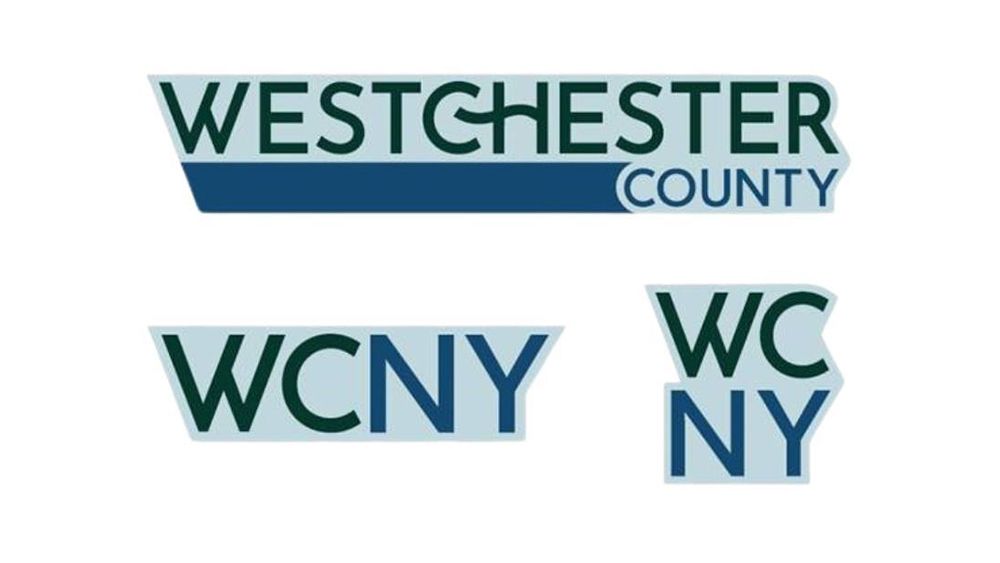
The Westchester County government recently launched a new logo, intended to symbolize the county’s “interconnected community and its enduring commitment to innovation, natural beauty, and shared progress.” However, some residents are quick to point out an unfortunate resemblance to the dating app Hinge.

The redesigned logo features a squiggle for the crossbar on the ‘H,’ which has raised eyebrows among social media users. One person likened it to the Hinge logo, writing “Screams ‘Westchester is boring and bland’.”

### Other Complaints and Concerns

Besides the perceived plagiarism, the color palette of the new logo is also receiving criticism. The three colors used, “Columbia Blue” representing history, “Dark Green” representing the environment, and “Indigo Dye” representing the county’s waterways, are being dubbed “boring” and “outdated” by some. One person commented, “It looks like an 80s/90s logo but not in a fun way.”

Another issue with the redesign is the two abbreviated logos, which use the acronym WCNY. “It looks like an early 90s radio station logo,” one person joked, pointing out that there is a PBS station with the same name.

### County Executive Explains the Inspiration

Westchester County Executive George Latimer attempted to defend the design, saying that the squiggle is intended to represent a hook, symbolizing the fact that residents are “linked by rail, road, and air. By culture. And most importantly, by choice.”

### Conclusion

The new Westchester County logo has sparked widespread criticism, with many residents citing plagiarism, boring colors, and unoriginal design elements. While every logo redesign generates some negative reactions, the level of backlash from this redesign suggests that the design may not resonate with the local community.

FAQs

### Q: Why did Westchester County redesign their logo?
A: The old logo prominently displayed the county’s ‘.com’ domain, which the county is being told to change to ‘.gov’. A new logo is needed to ensure compliance with government regulations.

### Q: Why does the logo resemble Hinge?
A: The designer is still unknown, but it has been suggested that the squiggle on the ‘H’ may have been inspired by the dating app.

### Q: What do residents think of the new logo?
A: So far, reaction has been mostly negative, with many residents comparing it to boring and outdated design elements.

### Q: Has the county heard any feedback about the new logo?
A: Yes, through social media channels and public feedback. The county executive has released a statement in response to criticisms, attempting to explain the inspiration behind the design.

Cracking the Code with BenQ’s RD320UA Monitor

0

Design & Build

The most obvious design feature of the RD320UA is its chin. This downward protrusion from the centre of the lower bezel acts as a function bar, essentially an evolved OSD that allows quick mode-switching by swiping your finger left and right. The menu is large and easy to use, and BenQ also supplies a Windows app, Display Pilot 2, which can adjust settings too. It’s an imposing screen, somehow appearing larger than the 32-inch screen we use every day, but looks really good when sat on a desk.

The included stand is easy to put together and has a large, heavy flat base that provides plenty of support. It screws together easily with a single thumb-screw, and connects solidly into the recessed VESA mount. There’s also a loop made of leather (or leather-like substance) to hold your cables, which is a nice touch. A flexible arm stand is available for the screen, which increases the adjustability, though it wasn’t included in our review sample. The inputs face outwards rather than downwards, which makes it easy to insert cables, and the USB hub has its ports on the button edge of the screen, which is another win for easy access.

Key Specs

  • Screen size: 31.5in
  • Screen type: IPS, LED backlight, 60Hz
  • Resolution: 3840×2160
  • Connectivity: 2x HDMI 2.0, 1x DisplayPort 1.4, 2x USB-C, 1x USB-B, 2x USB-A, headphones
  • HDR: HDR400
  • Webcam: No
  • Features: KVM
  • Speakers: 2x 3w
  • Adjustments: 30° tilt, 275° swivel, 90° pivot. 130mm height
  • Dimensions: 601 x 714.6 x 477.6mm
  • Weight: 11kg

Features & Performance

The programming monitor isn’t pitched as a content creation display, but it could easily function as one due to its excellent contrast and colour reproduction. In ‘user’ mode, with no extra calibration, it supplied 100% of sRGB, 92% of Adobe RGB and 96% P3, with maximum brightness hitting 420 nits. We’ve come to expect this level of performance from LED-backlit IPS screens, but it’s nice to see that corners haven’t been cut here. The contrast ratio approaches 2000:1, which will make all that lovely text show up more clearly, but isn’t as great as the contrast supplied by OLED screens.

The pixel density of 138ppi also allows it to produce smooth and well-formed text without jaggies. It’s not as dense as the ASUS 5K ProArt screen we reviewed recently, but there’s very little to complain about. It may be aimed at programmers, but it works very nicely for writers too, a 32-inch screen allows two browser windows to be tiled next to each other comfortably, and even working with four (that’s still 1080p each thanks to the 4K resolution, like working on a laptop) isn’t that bad.

Price

The BenQ RD320UA costs $/£699.99. Seven hundred of your local currency is quite a lot for a monitor, especially as 32in screens have been dropping in price, and if you want the size but not the eye-care features or colour reproduction then you can pay a lot less. However, if you spend your time staring at details on a computer screen, then it might be worth the outlay – and it’s certainly a handsome display that will look mighty fine on a desk next to a small Mac or PC.

Who is it for?

Well, programmers are clearly pretty close to the top of the target list, but this is a screen that many different users will enjoy. It might not appeal to gamers specifically, though the high contrast, respectable brightness and 60Hz refresh rate are still going to give a decent experience, but office workers, late-night page compositors, writers of reams of prose or Python and even designers and photo editors are going to find much to like, and will all benefit from the eye-care features too.

Buy it if…

  • You’re a programmer worried about their eyes
  • You want a big, impressive screen
  • Something cheaper just won’t do

Don’t buy it if…

  • Something cheaper will, in fact, do
  • The pixel density of a 5K screen is calling to you
  • Portability is important

Conclusion

The BenQ RD320UA is a fantastic monitor for programmers and anyone who spends a lot of time staring at text on a screen. Its excellent contrast and colour reproduction, combined with its 4K resolution and 60Hz refresh rate, make it an excellent choice for anyone who wants a high-quality display. The KVM feature is also a major plus, allowing you to easily switch between multiple computers. While it may be a bit pricey, the BenQ RD320UA is definitely worth considering if you’re in the market for a new monitor.

FAQs

Q: Is the BenQ RD320UA a good choice for gamers?
A: While the monitor has a high contrast ratio and respectable brightness, its 60Hz refresh rate may not be enough for gamers who want a smooth experience.

Q: Can I use the BenQ RD320UA with a laptop?
A: Yes, the monitor has USB-C and USB-A ports, making it easy to connect to a laptop.

Q: Is the BenQ RD320UA a good choice for designers and photo editors?
A: Yes, the monitor’s excellent colour reproduction and high contrast ratio make it an excellent choice for anyone who works with graphics or video.

Q: Can I adjust the monitor’s settings to suit my needs?
A: Yes, the BenQ RD320UA has a range of adjustable settings, including brightness, contrast, and colour temperature.

11 Data Points That Surprised Us

0

A.I. “Slop” Can Become a Threat to A.I. Itself

The rapid expansion of artificial intelligence has posed a conundrum: If A.I. learns from the internet, and the internet starts containing more artificially generated content, will A.I. start ingesting its own output? Researchers I spoke to described an unintentional feedback loop that can reduce the quality and diversity of A.I.-generated content in the long run.

While reporting for this article, I trained a generative A.I. to mimic handwritten numbers. At first, these A.I.-generated reproductions weren’t bad. But as I repeatedly fed this A.I. its own output, I was amazed to watch as its drawings became increasingly incoherent and blurry. This was a genuine “aha” moment that illustrated the central problem that researchers had described — one that they are working on ways to solve. — Aatish Bhatia

Flights Take Longer than They Used To, but They’re Somehow Early More Often

I was looking at raw data from the Bureau of Transportation Statistics on flight schedules and delays when something hit me: Many flights had a negative value for “ArrDelay,” meaning flights that arrived earlier than scheduled. In fact, the first 15 recorded flights of 2024 all had negative values — they all arrived earlier than the scheduled time.

Digging further, I discovered an interesting pattern. While flights today are less likely to be late than they were 30 years ago, they take longer to taxi out from the gate, take longer in the air, and take longer to taxi in from the runway. Flights from J.F.K. to LAX take 18 minutes longer than they used to, but are about 15 percent more likely to be considered early than they used to be. Flight times have increased, but the scheduled flight times have increased even more.

In other words, the airlines can’t seem to stop the trend of longer flights, but they have figured out a way to face less customer scorn. — Ben Blatt

Factory Foremen Once Made More than Computer Programmers in America

We thought a lot this year about the economy through the lens of the election: Why were voters so unhappy? Yes, inflation had spiked for a period, but many economic measures seemed positive, like a low unemployment rate.

We ultimately created our own metric — one that measures the status people hold in the economy relative to everyone else, and how that status has changed. One surprising finding: In 1980, front-line production supervisors (essentially factory foremen) made more on average than computer programmers. That’s obviously not true anymore. One of those jobs has evolved in complexity, pay, and prestige; the other has been squeezed by automation and globalization. No wonder factory workers might feel unmoored.

We learned this while analyzing census microdata. But we were so startled by the comparison that we went back to the source to check it: The document above is a 1980 census publication showing the average income of production supervisors in the heyday of American manufacturing. — Emily Badger, Robert Gebeloff, and Aatish Bhatia

Abortions Increased After Dobbs, Even for Women in States with Bans

When Roe v. Wade was overturned, it seemed obvious that the number of abortions in America would decline — we even published estimates of the potential effect. Six states had “trigger laws” on the books to ban abortion the day of the Supreme Court’s announcement. Several more were poised to enact new restrictions.

We knew that easily mailed abortion pills, increasing donations to travel funds, and the determination of some women to end their pregnancies would blunt the effects of those laws. But it was still a surprise to see this report from the group WeCount in October showing that the number of abortions among women in states with bans was actually higher last year than before Roe was overturned. Abortions for some women have clearly been prevented, but even more women appear to have found a way to end their pregnancies despite the bans.

Donald J. Trump’s position on abortion during the campaign was that it was an issue best left for the states. But the data suggests that for states that want to prevent abortions, state-level bans are not enough. — Margot Sanger-Katz, Claire Cain Miller, and Josh Katz

Connections Difficulties are Well-Calibrated

When Wyna Liu, an editor on the New York Times Games team, began designing Connections puzzles, she established the game’s color-coded system: Yellow would be the most straightforward category; green and blue would be more difficult with rarer terms and trivia; and purple would be the trickiest of all, often using word play.

Players often say they disagree with the choice of colors for a puzzle, citing examples of particularly difficult “yellow” categories, or easy “purple” categories. So when we created the Upshot’s companion to the game, called Connections Bot, we realized we could figure out which categories were actually the hardest.

When we looked at every Connections game since June 15, we were surprised by just how strongly correlated the colors’ expected difficulties were with their actual difficulties. On average, the yellow category is found first 42 percent of the time, green 29 percent of the time, blue 20 percent of the time, and purple 8 percent of the time.

There will always be room for disagreement, but on average, Ms. Liu’s category colors are spot on, and the coveted “reverse rainbow” remains a challenge for even the most skilled players. — Eve Washington, Asmaa Elkeurti, and Eden Weingart

Special Elections Really Were All About Turnout, and Thus Meant Little for November

The biggest surprise, for me, wasn’t simply that there was a decent correlation between turnout and results. The surprise was how clearly it could be detected, given the paucity of data on these idiosyncratic, ultra-low-turnout elections.

Separate data showed Donald J. Trump doing very well with infrequent voters, the kind who may show up for presidential races but rarely for special elections.

The answer on special elections was clear: The aggregate Democratic advantage in these elections was simply a turnout advantage, and they didn’t mean much for Mr. Biden’s (or Kamala Harris’s) chances in November. — Nate Cohn

Manhattan’s Street Grid Was an Afterthought

New York City’s trash collection is a mess. When reporting on why, we found one reason that surprised us: the Erie Canal.

Most American city street grids have back alleys between buildings. New York’s street grid does not. In most American cities, trash is stored for collection back there, out of view. But in New York, trash really only has one place left to go: on the sidewalk, often piled high. (The city is trying to do something about it.)

Why didn’t New York build alleys into its street plans? It appears it wasn’t as much a deliberate choice as a rush job. In the early 1800s, as Manhattan’s streets were being laid out, a number of the planners were distracted by a different job: connecting the Great Lakes to the Atlantic Ocean. Major deadlines for both projects coincided.

With time running out, the planners took a smaller street grid from 15 or so years earlier and simply enlarged it to cover the rest of Manhattan island. It didn’t include alleys. “It isn’t because they said alleys were bad,” the historian Gerard Koeppel told us. “It’s because they were thinking about the Erie Canal.” — Larry Buchanan and Emily Badger

School Districts’ Pandemic Recoveries Weren’t as Simple as Rich vs. Poor

Early this year, researchers shared with us the first school-district-level data comparing students’ test scores before and after pandemic school closures. We expected that students in poor districts would remain further behind students in rich districts, and that was generally true. But some districts surprised us, like those in these spreadsheets.

Some districts that are typically assumed to be high performing — low-poverty, suburban, or mostly white — had not recovered from the pandemic at all. Their students were still performing behind where they were in 2019. On the other end, there were clusters of districts with high poverty where students had completely made up any ground lost during the pandemic.

We explored why. In poor districts with strong recoveries, specific strategies were helping children recover. And the rich districts with no recovery highlighted a surprising fact about American education: Schools in rich areas aren’t necessarily delivering higher-quality education than those in poorer areas. Despite these districts’ ample resources and high test scores, they have been unable to make up for pandemic learning losses.

Instead, other data shows, the achievement gap between students from rich and poor families is driven by family resources. It begins well before students start school, and schools themselves don’t do much to close it. — Claire Cain Miller, Sarah Mervosh, and Francesca Paris

Arizona Got Many of Its New Republicans from California

When Americans move to new states, new towns, and new neighborhoods, partisanship often plays a role.

We used millions of individual voter registration records to follow American movers as they chose new homes. Some of our research confirmed patterns that have been observed before: On average, voters

Cost-Effective Guide to Prepare and Pass the KCNA

0

Preparation Timeline and Resources

The average preparation time for the KCNA certification is 3–6 months, depending on your prior experience with Kubernetes and cloud technologies. Here’s the curriculum path I followed, which is well-structured and affordable:

Free Courses

  • Introduction to Linux (LFS101): Covers the fundamentals of Linux, which is crucial for working with Kubernetes.
  • Introduction to Cloud Infrastructure Technologies (LFS151): Gives an overview of cloud technologies, setting the stage for understanding Kubernetes.
  • Introduction to Kubernetes (LFS158): A comprehensive introduction to Kubernetes, perfect for beginners.

Paid Course

  • Kubernetes and Cloud Native Essentials (LFS250): This course dives deeper into Kubernetes concepts and cloud-native practices. It’s a great investment for serious learners.

Practice Makes Perfect

Studying is one thing, but practicing under exam conditions is equally important. Here are the practice resources I used, all of which are free or offer free samples:

  • ExamPro by Andrew Brown: Huge thanks to Andrew Brown for his free content and the complete practice exam. This resource alone boosted my confidence significantly.
  • Tutorial Dojo: Provides 20 free sample exam questions with detailed explanations.
  • ExamTopics: Offers 30 free KCNA practice questions. Beyond 30, there’s a paid option, but the free content is a great start.
  • ITExams: Similar to ExamTopics, with different questions.
  • VMExams: Features 10 sample questions per session. While many repeat, they’re still helpful for reinforcing key concepts.

Registering for the KCNA Exam

When you feel ready to take the KCNA exam, you can register here: KCNA Exam Registration.

Pro Tip: Keep an eye out for sales on the Linux Foundation website! They often offer discounts of up to 60%, which can make certification significantly more affordable.

Key Takeaways

  • Follow a structured path: The Linux Foundation’s resources are a reliable and affordable starting point.
  • Practice consistently: Use free materials to test your knowledge and get a feel for the exam format.
  • Stay cost-conscious: By leveraging free resources and only spending on essentials, you can prepare for KCNA without overspending.

Conclusion

I hope my experience inspires and helps you on your own certification journey. Kubernetes is a fascinating and valuable skill, and earning the KCNA certification is a fantastic first step into the world of cloud-native technologies.

FAQs

Q: What is the average preparation time for the KCNA certification?
A: The average preparation time is 3–6 months, depending on your prior experience with Kubernetes and cloud technologies.

Q: What are the key takeaways from this article?
A: Follow a structured path, practice consistently, and stay cost-conscious.

Q: How can I register for the KCNA exam?
A: You can register for the KCNA exam here: KCNA Exam Registration.

Q: Are there any discounts available for the KCNA exam?
A: Yes, the Linux Foundation often offers discounts of up to 60% on their website.

Dancing Robots of 2024

0

Artificial Intelligence Made Big Moves This Year

From Silicon Valley to India, Boston to Japan, here are some of the autonomous machines and robotics technologies, powered by NVIDIA AI, that offered helping hands in 2024.

Clearbot Tidies Up Ocean Litter

Hong Kong- and India-based Clearbot, a member of the NVIDIA Inception program for cutting-edge startups, is making a splash with its autonomous trash-collection boats enabled by the NVIDIA Jetson platform for edge AI and robotics.

[Image: Clearbot autonomous trash-collection boats]

With plastic making up at least 85% of marine waste across the globe, Clearbot aims to remove waste from waterways before it gets into the seas. The startup’s autonomous ocean vessels are equipped with two cameras – one for navigation and another for waste identification of what boats have scooped up.

Figure Unveils Latest Humanoid Robot

Silicon Valley-based Figure introduced its Figure 02 conversational humanoid robot that taps into the NVIDIA Omniverse platform and accelerated computing for fully autonomous tasks.

[Video: Figure 02 humanoid robot]

New human-scale hands, six RGB cameras, and perception AI models trained with synthetic data generated in the NVIDIA Isaac Sim robotics developer simulation platform enable Figure 02 to perform high-precision pick-and-place tasks required for smart manufacturing applications.

ORBIT-Surgical Researchers Prep Robots for Surgery

The ORBIT-Surgical simulation framework – developed by researchers from the University of Toronto, UC Berkeley, ETH Zürich, Georgia Tech, and NVIDIA – helps train robots that could augment the skills of surgical teams while reducing surgeons’ cognitive loads.

[Video: ORBIT-Surgical simulation framework]

It supports more than a dozen maneuvers inspired by the training curriculum for minimally invasive surgeries.

Zordi Robots Grow Strawberries Indoors

Boston-based autonomous agriculture startup Zordi – with farms in southern New Jersey and western New York – is tapping into robotics to grow strawberries indoors.

[Image: Zordi’s autonomous greenhouse systems]

Autonomous greenhouse systems can support regional markets across the globe, cutting down on the carbon footprint for transportation and providing fresher, better-tasting fruits grown more sustainably.

Conclusion

Artificial intelligence made big moves this year, and robotics technologies are catching up fast. With AI-powered machines and autonomous systems, we’re seeing innovative solutions to real-world problems. From ocean litter to surgical procedures, agriculture, and more, AI is playing a critical role in shaping the future of various industries.

Frequently Asked Questions

Q: What is NVIDIA’s role in the development of AI-powered robotics?
A: NVIDIA provides the necessary computing power and AI technologies to enable the development of AI-powered robots.

Q: What are some examples of AI-powered robotics in action?
A: Some examples include Clearbot’s autonomous trash-collection boats, Figure’s humanoid robot, ORBIT-Surgical’s surgical simulation framework, and Zordi’s autonomous greenhouse systems.

Q: How is AI being used in robotics?
A: AI is being used in robotics to enable tasks such as object recognition, motion planning, and control, allowing robots to perform complex tasks with greater precision and accuracy.

Perplexity’s Value Triples to $9bn

Unlock the Editor’s Digest for free

Roula Khalaf, Editor of the FT, selects her favourite stories in this weekly newsletter.

Perplexity, an AI-driven search engine, triples its valuation to $9bn

Perplexity, an artificial intelligence-driven search engine, has closed its fourth funding round this year, tripling its valuation to $9bn as it seeks to compete with offerings from Google and OpenAI.

Funding Round Details

The $500mn round was led by Institutional Venture Partners, with involvement from Nvidia, New Enterprise Associates, B Capital and T Rowe Price, according to multiple people with knowledge of the deal. Previous investors have included SoftBank’s Vision Fund 2, Nvidia and Amazon founder Jeff Bezos, as well as several prominent names from the AI industry such as OpenAI co-founder Andrej Karpathy and Meta’s chief AI scientist Yann LeCun.

Company Growth

The San Francisco-based group has grown rapidly this year, with its product receiving hundreds of millions of queries a month. It has 15mn monthly active users with most of that traffic coming from the US.

Competitive Landscape

The new funding will help Perplexity compete with west coast rivals in an increasingly fierce fight for engineers. “The talent war for AI is like no other time before,” according to Ali Ghodsi, co-founder and chief executive of Databricks, the AI and data analytics company that announced a $10bn fundraising round on Tuesday.

Advertising Plans

Perplexity is seeking to capitalise and improve on the search advertising system pioneered by Google, in which marketers bid to have a sponsored link placed against search queries. It is in talks with major brands to pilot advertising on its platform.

Industry Trends

In a sign of growing competition in the space, AI companies have recently targeted the search market by linking up chatbots to the internet. This week, OpenAI rolled out web searching for its popular ChatGPT product, while Anthropic’s Claude can perform searches through a feature called “computer use”.

Conclusion

Perplexity’s latest round has pushed its valuation higher by nine-fold since the start of the year, in another sign of how hot start-ups developing new AI tools can draw in hundreds of millions or even billions of dollars in investment.

Frequently Asked Questions

Q: What is Perplexity?
A: Perplexity is an artificial intelligence-driven search engine.

Q: Who led the funding round?
A: Institutional Venture Partners led the funding round, with involvement from Nvidia, New Enterprise Associates, B Capital and T Rowe Price.

Q: What is the valuation of Perplexity?
A: Perplexity’s valuation has tripled to $9bn.

Q: How many monthly active users does Perplexity have?
A: Perplexity has 15mn monthly active users, with most of that traffic coming from the US.

Q: What is the company’s revenue growth?
A: Perplexity’s annualised revenues have grown from $5mn in January to $35mn in August.

Google AI Overviews Claims More Pixel Height in SERPs

0

Organic Results Blocking Creeping Up

Google’s AI Overviews feature, launched in May 2024, has been a controversial feature among publishers and SEOs since day one. Many publishers resent that Google is using their content to create answers in the search results that discourage users from clicking through and reading more, thereby negatively influencing earnings.

Google AIO Taking Over Entire Screen

BrightEdge’s research shows that AI Overviews started out in May 2024 taking up to 600 pixels of screen space, crowding out the organic search results, formerly known as the ten blue links. When advertising is factored in, there isn’t much space left over for links to publisher sites.

Graph Showing Growth Of AIO Pixel Size By Height

Percentage Of Queries Showing AIOs

The percentage of queries that display Google’s AI Overviews have also been creeping up. Health related search queries have been trending higher than any other niche. B2B Technology, eCommerce, and finance queries are also increasingly showing AI Overview search results.

The Takeaway

I asked BrightEdge for a comment about what they feel publishers should get ahead of for 2025.

Jim Yu, CEO of BrightEdge, responded:

“Publishers will need to adapt to the complexity of content creation and optimization while leaning into core technical SEO to guarantee their sites are seen and valued as authoritative sources.

Citations are a new form of ranking. As search and AI continue to converge, brands need to send the right signals to search and AI engines to help them decide if the content is helpful, unique, and informative. In a multi-modal world, this means schema tags about a publisher’s company, products, images, videos, overall site and content structure, reviews, and more!

In 2025, content, site structure, and authority will matter more than ever, and SEO has a huge role to play in that.

Key Questions Marketers Need to Address in 2025

  • Is your content ready for 4-5 layered intents?
  • Can you match Google’s growing complexity?
  • Have you mapped your industry’s intent combinations?

Key Actions for 2025

The Pattern is clear: Simple answers → rich, context-aware responses!

  • Intent Monitoring: See which intents AIO’s are serving for your space
  • Query Evolution: Identify what new keyword patterns are emerging that AIO’s are serving
  • Citation Structure: Align content structure to intents and queries AIO’s are focused on to ensure you are cited
  • Competitive Intelligence: Track which competitor content AIOs select and why

Conclusion

AIOs aren’t just displaying content differently – they’re fundamentally changing how users find and interact with information. The takeaway from the data is that publishers are encouraged to create unambiguous content that directly addresses topics in order to rank for complex search queries. A careful eye on how AI Overviews are displayed and what kinds of content are cited and linked to is encouraged.

Frequently Asked Questions

Q: What is the purpose of Google’s AI Overviews?
A: Google’s AI Overviews aim to provide users with more accurate and relevant search results by aggregating information from multiple sources and presenting it in a concise manner.

Q: What are the implications for publishers?
A: The rise of AI Overviews is likely to have significant implications for publishers, who may see a decline in traffic and revenue as users increasingly rely on the aggregated search results provided by Google.

Q: How can publishers adapt to the changing landscape?
A: Publishers can adapt to the changing landscape by creating high-quality, informative content that addresses users’ needs and is optimized for search engines. They should also focus on building their brand and establishing themselves as authorities in their respective niches.

Q: What is the future of search and AI?
A: The future of search and AI is likely to be shaped by the increasing use of machine learning and natural language processing. As AI becomes more sophisticated, search engines will become more able to understand the nuances of human language and provide more accurate results. This will likely lead to a shift away from traditional search results and towards aggregated search results.