Home Blog Page 478

OpenAI Upgrades Its Smartest AI Model with Improved Reasoning Skills

0

OpenAI Announces Improved AI Model, Raising the Bar for AI Research

Introduction

OpenAI, a leading artificial intelligence research organization, has announced an improved version of its most capable AI model to date. The new model, called o3, takes even more time to deliberate over questions, demonstrating significant progress in logical reasoning and complex problem-solving.

Improved Model Performance

The o3 model replaces o1, which was introduced in September. Like o1, o3 spends time ruminating over a problem to deliver better answers to questions that require step-by-step logical reasoning. OpenAI claims that o3 scores much higher on several measures than its predecessor, including complex coding-related skills and advanced math and science competency.

Competition with Google

The announcement comes just a day after Google revealed its first model of this type, called Gemini 2.0 Flash Thinking. Both companies are pursuing similar research, demonstrating a fierce competition between OpenAI and Google. This competition is crucial for OpenAI, as it seeks to attract more investment and build a profitable business.

New Techniques and Alignment

OpenAI has also revealed more details of techniques used to align o1. This involves having the model reason about the nature of the request it is given to interrogate whether it may contravene its guardrails. The company is not making the models publicly available yet but says it will invite outsiders to apply to perform testing of them.

Two Versions of the Model

OpenAI says there are two versions of the new model, o3 and o3-mini. The company is currently not making the models publicly available, but it plans to invite outsiders to apply to perform testing of them.

Conclusion

The announcement of o3 marks a significant milestone in AI research, demonstrating the ability of AI models to reason over complex problems. As the competition between OpenAI and Google continues to heat up, it will be exciting to see how these models evolve and what new capabilities they will bring to the table.

Frequently Asked Questions

Q: What is the main difference between o1 and o3?

A: The main difference is that o3 takes even more time to deliberate over questions, demonstrating significant progress in logical reasoning and complex problem-solving.

Q: How does OpenAI’s o3 model compare to Google’s Gemini 2.0 Flash Thinking?

A: Both models demonstrate significant progress in logical reasoning and complex problem-solving, but it is unclear which model is more advanced.

Q: Will OpenAI make the o3 model publicly available?

A: No, OpenAI is not making the o3 model publicly available yet, but it plans to invite outsiders to apply to perform testing of them.

Q: What are the potential applications of o3?

A: The potential applications of o3 are vast, including complex problem-solving, logical reasoning, and advanced math and science competency.

NVIDIA NIM Microservices-based Medical AI Training Assistant

0

Using Generative AI for Troubleshooting Medical Devices

Innovation in medical devices continues to accelerate, with a record number authorized by the FDA every year. When these new or updated devices are introduced to clinicians and patients, they require training to use them properly and safely.

Once in use, clinicians or patients may need help troubleshooting issues. Medical devices are often accompanied by lengthy and technically complex Instructions for Use (IFU) manuals, which describe the correct use of the device. It can be difficult to find the right information quickly and training on a new device is a time-consuming task. Medical device representatives often provide support training, but may not be present to answer all questions in real time. These issues can cause delays in using medical devices and adopting newer technologies, and in some cases, lead to incorrect usage.

Using Generative AI for Troubleshooting Medical Devices

Retrieval-augmented generation (RAG) uses deep learning models, including large language models (LLMs), for efficient search and retrieval of information using natural language. Using RAG, users can receive easy-to-understand instructions for specific questions in a large text corpus, such as in an IFU. Speech AI models, such as automatic speech recognition (ASR) and text-to-speech (TTS) models, enable users to communicate with these advanced generative AI workflows using their voice, which is important in sterile environments like the operating room.

NVIDIA NIM inference microservices are GPU-optimized and highly performant containers for these models that provide the lowest total cost of ownership and the best inference optimization for the latest models. By integrating RAG and speech AI with the efficiency and simplicity of deploying NIM microservices, companies developing advanced medical devices can provide clinicians with accurate, hands-free answers in real time.

A Medical Device Training Assistant Built with NIM Microservices

In this tutorial, we build a RAG pipeline with optional speech capabilities to answer questions about a medical device using its IFU. The code used is available on GitHub.

We use the following NIM microservices in our RAG pipeline. You have the flexibility to change the components in the pipeline to other NIM microservices for different models:

  • Llama3 70B Instruct (meta/llama3-70b-instruct): A large language model that generates the answer to the user question based on the retrieved text.
  • NV-EmbedQA-e5-v5 (nvidia/nv-embedqa-e5-v5): An embedding model that embeds the text chunks from the IFU and the queries from the user.
  • NV-RerankQA-Mistral-4b-v3 (nvidia/nv-rerankqa/mistral-4b-v3): A reranking model that reranks the retrieved text chunks for the text generation step by the LLM.
  • RIVA ASR: An automatic speech recognition model that transcribes the user’s speech query into text for the model.
  • RIVA TTS: The text-to-speech model that outputs the audio of the response from the LLM.

Using NVIDIA NIM

You can access NIM microservices by signing up for free API credits on the API Catalog at build.nvidia.com or by deploying on your own compute infrastructure.

In this tutorial, we use the API Catalog endpoints. More information on using NIM microservices, finding your API key, and other prerequisites can be found on GitHub.

Getting Started

To get started with this workflow, visit the GenerativeAIExamples GitHub repository, which contains all of the code used in this tutorial as well as extensive documentation.

For more information on NIM microservices, you can learn more from the official NIM documentation and ask questions on our NVIDIA Developer NIM Forum.

Conclusion

This article has demonstrated how to build a medical device training assistant using generative AI and NVIDIA NIM microservices. By integrating RAG and speech AI with the efficiency and simplicity of deploying NIM microservices, companies developing advanced medical devices can provide clinicians with accurate, hands-free answers in real time.

FAQs

Q: What is RAG and how does it work?
A: RAG is a type of AI model that uses deep learning to search and retrieve information from a large text corpus, such as an IFU. It uses natural language processing to understand the user’s query and retrieve relevant information from the corpus.

Q: What is NIM and how does it work?
A: NIM is a set of GPU-optimized and highly performant containers for AI models that provide the lowest total cost of ownership and the best inference optimization for the latest models. It allows companies to deploy AI models quickly and efficiently.

Q: How do I get started with NIM microservices?
A: You can get started with NIM microservices by signing up for free API credits on the API Catalog at build.nvidia.com or by deploying on your own compute infrastructure. You can also learn more from the official NIM documentation and ask questions on our NVIDIA Developer NIM Forum.

Q: What are the benefits of using NIM microservices?
A: The benefits of using NIM microservices include reduced total cost of ownership, improved inference optimization, and faster deployment of AI models. It also provides a scalable and secure infrastructure for deploying AI models.

The Last Day of ’12 Days of OpenAI’ is Expected to Bring Biggest Drop Yet

0

OpenAI’s 12 Days of OpenAI: The Final Day

The Wait is Over: o3 Model Unveiled

OpenAI has been teasing its 12 Days of OpenAI campaign, and the final day has finally arrived. As part of this holiday-themed campaign, OpenAI has been livestreaming new demos and product launches every day. The anticipation has been building, and today, OpenAI is rumored to be dropping an o3 model.

What is o3?

The o3 model is an improved version of OpenAI’s o1 family models, which were unveiled in September. These models have improved reasoning capabilities, allowing them to work through more complex science, coding, and math problems. However, one of the downsides of these models is that they take longer to process because they "think before they speak." This could be a major issue for users who need quick responses.

Why the Name o3?

According to a report from The Information, OpenAI is skipping the o2 model due to potential copyright conflicts with O2, a British telecommunications service provider. This means that OpenAI will jump straight to o3, which is expected to be an even more advanced version of the o1 model.

What Can We Expect from o3?

Although details on what the o3 model can do have not been revealed, it is expected to be an improved version of the o1 model in every way. This means that users can expect even more advanced reasoning capabilities and likely quicker speeds. The full version of o1 was just launched last week for all ChatGPT Plus and now Pro users, and it is possible that accessibility to the full version of o1 expands with the release of o3.

How to Watch the Livestream

To watch the final day of the live streams, you can tune into OpenAI’s 12 Days of OpenAI page. The livestream will start at approximately 10 a.m. PT/1 p.m. ET. To make access easier, OpenAI will also post a link to the livestream on its X account 10 minutes before it starts. If you can’t tune in, the livestream will be posted to its YouTube channel immediately after the event.

Conclusion

The wait is finally over, and OpenAI has unveiled its o3 model. This improved version of the o1 model is expected to have even more advanced reasoning capabilities and quicker speeds. With the full version of o1 just launched last week, users can expect even more from OpenAI’s AI technology.

FAQs

Q: What is the o3 model?
A: The o3 model is an improved version of OpenAI’s o1 family models, which have improved reasoning capabilities and work through more complex science, coding, and math problems.

Q: Why is OpenAI skipping the o2 model?
A: According to a report from The Information, OpenAI is skipping the o2 model due to potential copyright conflicts with O2, a British telecommunications service provider.

Q: What can we expect from the o3 model?
A: The o3 model is expected to be an improved version of the o1 model in every way, with even more advanced reasoning capabilities and likely quicker speeds.

Q: How can I watch the livestream?
A: You can watch the livestream on OpenAI’s 12 Days of OpenAI page, starting at approximately 10 a.m. PT/1 p.m. ET.

SmartThings Blog

0

Do you want to be rewarded for living sustainably? Who wouldn’t? That’s why we partner with environmental pioneers like Leap to offer easy access to smart solutions through the SmartThings app.

Leap connects smart energy devices to the grid, helping people and businesses earn money by saving energy while making the grid cleaner and more reliable. Together, we launched Flex Connect within SmartThings Energy, a program that helps users in New York, California, and Texas save energy and earn rewards for supporting the stability of our energy grids. Users can access insights about their consumption in SmartThings Energy, a comprehensive energy management solution in the SmartThings app.

In our latest LinkedIn Q&A, we chatted with Leap to discuss our partnership, integration with SmartThings Energy, and more. Browse the highlights below or keep reading for the full conversation. 

The Highlights

SmartThings: For those who are new to your brand, what is Leap?

Leap: Hey SmartThings! It’s great to be here. Leap is a software platform that connects smart energy technologies to grid programs, enabling energy users to contribute to reducing electricity consumption during periods of high demand.

Through our innovative partnership with SmartThings, customers in California, New York and Texas can participate in the Samsung Flex Connect program and earn rewards when their qualifying smart devices save energy during energy events, contributing to a cleaner, more reliable energy system. 

SmartThings: That’s great! Yes, let’s talk more about Flex Connect! This is a demand response program offered by Samsung that enables users to earn an immediate reward and additional Samsung Rewards for conserving energy when it matters most for the grid. 

Available through SmartThings Energy in the app, under the Life tab, users can easily see if their zip code is eligible and sign up for Flex Connect. Once their eligible devices – like smart thermostats and Samsung appliances – are connected in SmartThings and set up for optimization, their devices will automatically participate when peak demand events are called. As a benefit, households typically see lower electricity bills by saving energy during expensive peak periods.

Can you share how Flex Connect opens up the opportunity for SmartThings users to get even more insight into their home energy data?

Leap: Yes, of course! The integration now allows eligible SmartThings users in New York, California and Texas to see their whole-home electricity usage data in the SmartThings app, enabling them to track their energy patterns throughout the day and week and understand usage spikes that might contribute to higher electricity bills. This empowers users to play a more active role in their home energy management!

The Full Conversation

SmartThings: Hey Leap! Thank you for joining us for a Q&A today. For those who are new to your brand, what is Leap?

Leap: Hey SmartThings! It’s great to be here. Leap is a software platform that connects smart energy technologies to grid programs, enabling energy users to contribute to reducing electricity consumption during periods of high demand.

Through our innovative partnership with SmartThings, customers in California, New York and Texas can participate in the Samsung Flex Connect program and earn rewards when their qualifying smart devices save energy during energy events, contributing to a cleaner, more reliable energy system. 

SmartThings: That’s great! Yes, let’s talk more about Flex Connect! This is a demand response program offered by Samsung that enables users to earn an immediate reward and additional Samsung Rewards for conserving energy when it matters most for the grid. 

Available through SmartThings Energy in the app, under the Life tab, users can easily see if their zip code is eligible and sign up for Flex Connect. Once their eligible devices – like smart thermostats and Samsung appliances – are connected in SmartThings and set up for optimization, their devices will automatically participate when peak demand events are called. As a benefit, households typically see lower electricity bills by saving energy during expensive peak periods.

Leap: Yes, Flex Connect works as SmartThings’ very own virtual power plant! It’s good for the grid, good for the climate, and good for customer’s pocketbooks. And thanks to Leap’s seamless enrollment process on the backend, SmartThings users can get enrolled with just a few simple steps.

SmartThings: Can you help explain what a peak demand event is?

Leap: Sure! “Peak demand” refers to the point of highest electricity demand in a day (or another given period). When peak demand is higher than grid operators have planned for with their base power supply, they traditionally fire up more fossil fuels to make up the difference, but now they can call a peak demand event: this triggers a request to providers like Leap to signal participating devices to adjust their energy usage for a couple of hours in order to lower demand on the grid. 

SmartThings: Exactly! So, how does the SmartThings and Leap partnership work during these events?

Leap: When peak demand events are called, Leap sends a signal to SmartThings to modestly and automatically adjust their connected devices’ energy usage for participating customers for a couple of hours, without disrupting home comfort. The Flex Connect program is all about giving the customer control: users can adjust which devices participate at any time. 

SmartThings: How does this impact the grid? Are there further impacts on the climate, too? 

Leap: In short – the cleanest energy is the energy you don’t use! By lowering energy usage across many households in targeted areas, VPPs help boost grid stability and lower emissions. 

And that’s especially important during extreme weather events like heat waves, when energy usage spikes and grid operators have traditionally had to fire up inefficient fossil fuel “peaker plants” to ensure there’s enough electricity to go around, making energy more expensive – and dirtier – for everyone.  

Through programs like Flex Connect, we’re making the grid more resilient and more flexible, which also makes it easier for the grid to integrate more intermittent renewable resources like solar and wind by helping to solve the mismatch between electricity demand and renewable energy supply.

This is the future of connected, sustainable living – where every household can play an active role in supporting grid resilience and lowering emissions. 

SmartThings: AND, where every consumer can be made more aware of how their energy devices are operating and how their home is impacting the grid. That’s huge! 

Can you share how Flex Connect opens up the opportunity for SmartThings users to get even more insight into their home energy data?

Leap: Yes, of course! The integration now allows eligible SmartThings users in New York and California to see their whole-home electricity usage data in the SmartThings app, enabling them to track their energy patterns throughout the day and week and understand usage spikes that might contribute to higher electricity bills. This empowers users to play a more active role in their home energy management!

SmartThings: Thanks, Leap, for explaining that. It’s a huge benefit for our customers, and it’s free and easy to access! We are so glad to be partnering with you to provide consumers with innovative data and tools to better their whole home energy management. 

SmartThings: That was very informative. Thank you to our partners at Leap for chatting with us today! Want to know more? Learn about Flex Connect on the blog. #DoTheSmartThings

Leap: Thank you for having us SmartThings! 

Supercharged AI Research Automation

0

Automation for Staying Up-to-Date on AI Research

As an enthusiast of artificial intelligence, I’ve created an automation to keep me informed about the latest developments in the field. In this article, I’ll share my setup and how it helps me stay current with the latest AI research.

What’s the Automation?

The automation is a simple script that monitors various AI-related sources, such as research papers, news articles, and social media posts. It aggregates the information and sends me a daily digest with the most relevant updates.

How Does it Work?

The automation uses a combination of tools and services to gather and process the information. Here’s a high-level overview of the process:

  • It monitors AI-related sources, including research papers, news articles, and social media posts.
  • It uses natural language processing (NLP) to analyze the content and identify the most relevant updates.
  • It aggregates the information and sends me a daily digest with the most important updates.

Benefits of the Automation

The automation has several benefits, including:

  • Staying current with the latest AI research and developments.
  • Reducing the time spent searching for relevant information.
  • Getting a curated selection of the most important updates.

Watch the Livestream

You can watch a livestream of my automation in action here: https://www.youtube.com/watch?v=4R9kaZAtxlE&t=6644s

Stay Connected

Follow me on X: https://x.com/mreflow

Conclusion

The automation has been a game-changer for me, allowing me to stay up-to-date with the latest AI research and developments without spending hours searching for information. I hope this article has inspired you to create your own automation and stay current with the latest advancements in AI.

FAQs

Q: What sources does the automation monitor?
A: The automation monitors a variety of AI-related sources, including research papers, news articles, and social media posts.

Q: How does the automation analyze the content?
A: The automation uses natural language processing (NLP) to analyze the content and identify the most relevant updates.

Q: Can I customize the automation?
A: Yes, you can customize the automation to fit your specific needs and interests.

Q: Is the automation free?
A: The automation is free, but some of the tools and services used may require a subscription or have limitations.

Q: Can I use the automation for other topics?
A: Yes, you can use the automation for other topics by modifying the script and adjusting the sources and analysis.

Q: How do I get started with the automation?
A: You can get started with the automation by following the links provided and setting up your own script and tools.

Robot Physics Simulated 430,000 Times Faster

0

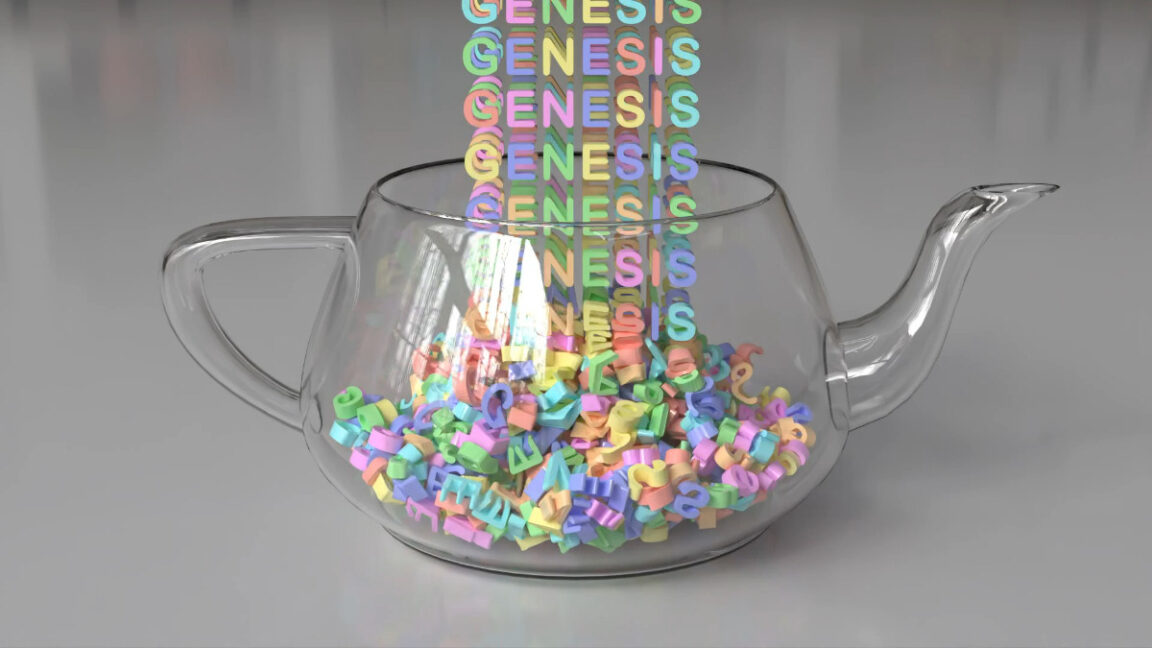
Genesis: A Revolutionary AI-Powered Platform for Creating Realistic 3D Worlds and Training Robots

Revolutionizing Robot Training with AI-Generated Worlds

A team of researchers has developed a groundbreaking platform called Genesis, which uses artificial intelligence to generate realistic 3D worlds and characters from text prompts. This innovative system allows researchers to create complex robot testing environments by typing natural language commands, eliminating the need for manual effort from artists.

Automating the Process

Traditionally, simulators require a significant amount of manual effort from artists, including 3D assets, textures, and scene layouts. However, Genesis can automate every component of the workflow, making it easier for researchers to focus on more complex tasks.

Generative Capabilities

The Genesis platform is capable of generating character motion, interactive 3D scenes, facial animation, and more. This technology has the potential to revolutionize the creation of artistic assets for creative projects and may lead to more realistic AI-generated games and videos in the future.

Examples of Genesis in Action

The platform has already produced impressive results, including realistic physics, camera movements, and object behaviors. Some examples of 4D dynamical and physical worlds generated by Genesis include:

  • A miniature Wukong holding a stick in his hand sprints across a table surface for 3 seconds, then jumps into the air, and swings his right arm downward during landing.
  • A 3D scene of a robot navigating a complex obstacle course.

Training Tomorrow’s Robots Today (Using Python)

Genesis is under active development on GitHub, where the team accepts community contributions. The platform stands out from other 3D world simulators for robotic training by using Python for both its user interface and core physics engine. This non-proprietary nature of the Genesis platform makes high-speed robot training simulations available to any researcher for free through simple Python commands that work on regular computers with off-the-shelf hardware.

Conclusion

Genesis has the potential to revolutionize the way we train robots and create 3D worlds. With its ability to generate realistic physics, camera movements, and object behaviors, this platform is poised to change the game. As the platform continues to evolve, it will be exciting to see the innovative applications that emerge.

FAQs

Q: What is Genesis?
A: Genesis is an AI-powered platform that generates realistic 3D worlds and characters from text prompts.

Q: What can Genesis do?
A: Genesis can generate character motion, interactive 3D scenes, facial animation, and more.

Q: Is Genesis open-source?
A: Yes, Genesis is open-source and available on GitHub.

Q: Can I use Genesis for my research?
A: Yes, Genesis is available for researchers to use for free through simple Python commands that work on regular computers with off-the-shelf hardware.

Uncovering the Power of Personalized Content

Introduction: Why Millions of Viewers Fell in Love with Netflix?

If we travel back to the early 2000s, the entertainment landscape was vastly different from what we see today. However, with the rise of entertainment giants like Netflix, people were given access to an immersive library of content, and thanks to its user-friendly interface, Netflix managed to capture the hearts of millions of viewers worldwide.

Netflix and AI

The company’s path to applying AI started by adapting to changing viewer preferences and embracing new technologies that will keep Netflix atop the competitive streaming market. Today, a mix of artificial intelligence, data science, and machine learning aims to engage all audiences with the movies they most prefer.

How Netflix’s AI Works

The idea is to have the consumer see exactly what he or she likes. For instance, a female consumer saw the trailer with the frame of her favorite actor, while another consumer saw the frame that demonstrates her preferred type of story plot. This technique helped the audience find the show and encouraged them to watch it.

Benefits of Netflix AI

Netflix’s artificial intelligence recommendations benefit both viewers and Netflix itself, paving the way for a more engaging and satisfying entertainment experience. Let’s make a breakdown and see the results of AI magic.

For Netflix:

  • Increased Engagement
  • Keyword Upscale
  • Content Promotion and Discovery

For Viewers:

  • Personalized Experience
  • Discovering the Next Big Show

Conclusion

The rise of Netflix AI can be attributed to its innovative approach, diverse content library, and user-centric focus. By focusing on personalization, streaming quality, and content quality checks, Netflix continues to set the standard for digital streaming platforms. Adopting best practices in machine learning, data science, and AI yields incredible results.

FAQs

Q: What is Netflix’s AI?
A: Netflix’s AI is a mix of artificial intelligence, data science, and machine learning that aims to engage all audiences with the movies they most prefer.

Q: How does Netflix’s AI work?
A: The idea is to have the consumer see exactly what he or she likes, based on their viewing history and preferences.

Q: What are the benefits of Netflix’s AI?
A: The benefits include increased engagement, keyword upscale, content promotion and discovery, personalized experience, and discovering the next big show.

Q: Why is Netflix’s AI so successful?
A: Netflix’s AI is successful because of its innovative approach, diverse content library, and user-centric focus.

Teaching Persuasive Writing with AI for English Learners

Key points:

Twenty years ago, I started my career as an ESL teacher in Houston, Texas, and I remember the struggles of teaching persuasive writing to English learners. I had students who were bright, enthusiastic, and full of ideas, yet they faced real challenges in turning those thoughts into coherent arguments on paper. Many struggled with grammar and sentence structure, while others found it difficult to organize their thoughts logically or to build arguments that flowed convincingly.

I spent countless hours guiding them through the writing process, giving feedback, and encouraging them to think critically. It was rewarding work, but it was time-consuming and often left me wishing there was a way to give them the support they needed, instantly, as they worked.

Fast forward to 2023, and my classroom has transformed in ways I never anticipated. AI-powered tools have entered the educational landscape, and they’ve changed the way I teach writing – particularly persuasive writing. With AI’s assistance, my students are able to receive real-time feedback, suggestions for grammar and vocabulary, and even guidance on structuring their arguments. This support means they can learn and improve as they write, without waiting for me to read through every draft. AI has become an invaluable ally, and it’s helped me create a more dynamic, supportive environment where students can thrive.

Assessing Student Needs and Selecting AI Tools

Before diving into AI integration, it’s essential to understand where each student needs support. Whether they struggle with grammar, vocabulary, organization, or critical thinking, identifying these specific challenges allows for a targeted approach to using AI.

Example: In my classroom, I noticed that students like Adel often had insightful ideas but struggled with structuring them effectively. His essay, "Money Can’t Buy Happiness," included valuable reflections on emotional fulfillment and references to The Great Gatsby, yet his ideas were scattered and the language needed refinement. AI could have helped him structure his argument, offering specific guidance on organization and clarity.

Selecting the Right AI Tools

For grammar and language support: Tools like Grammarly and Quillbot can be helpful for catching grammar mistakes, punctuation, and phrasing issues. While the free versions cover basic errors, premium versions offer advanced style and tone suggestions, which can elevate student writing to the next level.

For structuring and outlining: ChatGPT or Google Gemini are useful for generating outlines and brainstorming. For example, students can prompt ChatGPT with "Help me outline a persuasive essay on solar energy," and it will provide a structured outline.

For vocabulary enhancement: Wordtune is excellent for paraphrasing and finding synonyms, while Thesaurus.com is helpful for quick vocabulary adjustments, enabling students to diversify their language and avoid repetition.

Introducing AI Tools to the Classroom

Explaining how each tool will be used and setting clear expectations is crucial for effective integration. Walking students through the features helps them feel comfortable with the technology and confident in using it independently.

Example: I created a short tutorial on Grammarly, showing students how it catches grammatical errors and offers suggestions. This helped students like Nour, who was passionate about his petition to save the Ganges River, to polish his language, ensuring that his message about the river’s pollution would resonate clearly with readers.

Starting with AI-Assisted Brainstorming and Outlining

Introduce a topic (e.g., "Why Solar Power is Essential" or "Money Can’t Buy Happiness") and explain the goals of persuasive writing. Emphasize the need to present a compelling argument to influence the reader.

Group Brainstorming with AI for Pros and Cons

Organizing students into groups to brainstorm using AI tools like ChatGPT can help deepen their understanding of their topics. By generating lists of pros and cons, students practice critical thinking while considering opposing viewpoints.

Creating and Personalizing Outlines with AI

Once AI provides a basic outline, encourage students to personalize it by adding specific examples or perspectives they want to explore.

Guided Drafting with AI Support for Language and Structure

Encourage students to draft their essays in stages, focusing on one section at a time. For instance, teach them to craft a clear thesis statement and support it with specific details.

Developing Counter-Arguments

Using the cons generated during brainstorming, students can write a counter-argument paragraph that acknowledges opposing views and explains why their position remains strong.

Real-Time Language Support with AI Tools

Grammar tools like Grammarly provide real-time checks, while vocabulary tools like Wordtune help refine language.

Refining Sentences with AI

Teach students to use AI tools for sentence refinement, helping improve clarity and flow.

Final Assessment and Feedback Using AI Tools

Certain AI tools, such as Microsoft Editor, can assess clarity, coherence, and grammar. Using these for preliminary assessments allows students to independently identify their strengths and areas for improvement.

Goal-Setting and Progress Tracking

Help students set specific writing goals and use AI to track improvements over time, fostering a sense of achievement and motivating continual progress.

Encouraging Peer Review Supported by AI

Pairing students for peer review with AI support combines AI’s assistance with peer insights. This approach broadens feedback and allows students to learn from each other.

Addressing Potential Challenges with AI Integration

Some teachers may worry about students becoming too dependent on AI, potentially impacting their independent writing skills. Emphasize that AI is a supportive tool, not a replacement. Encourage students to draft independently before using AI to refine their work.

Encouraging Reflection on AI Use

After using AI, ask students reflective questions like, "How did AI help you clarify your argument?" This encourages them to see AI as a learning aid, not a shortcut.

Reflect and Refine Your Approach

Finally, after each AI-integrated lesson, have students reflect on their experience. Adjusting tools and methods based on feedback ensures continuous improvement in teaching effectiveness.

Conclusion

Integrating AI into persuasive writing instruction has transformed my approach, allowing me to offer real-time feedback, structured support, and personalized learning experiences. AI empowers students to overcome language barriers, think critically, and express themselves more effectively – skills they will carry far beyond the classroom. By thoughtfully using AI, teachers can support students’ unique writing journeys, helping them find clarity and confidence in their voices.

FAQs

Q: How do I select the right AI tools for my students?
A: Identify your students’ specific needs and choose tools that cater to those needs. For example, if they struggle with grammar, consider using Grammarly or Quillbot.

Q: How do I introduce AI tools to my students?
A: Explain how each tool will be used and set clear expectations. Walk students through the features to help them feel comfortable with the technology.

Q: Can AI replace human feedback?
A: No, AI is meant to supplement human feedback, not replace it. Use AI to provide real-time feedback and guidance, and reserve human feedback for more nuanced, critical thinking.

Q: How do I address potential concerns about AI dependence?
A: Emphasize that AI is a supportive tool, not a replacement for human writing skills. Encourage students to draft independently before using AI to refine their work.

Unlock Unreal Engine Bonuses

0

Unreal Engine’s Sponsored Content Program Continues on the Fab Store

Transition to the Fab Store

The transition from the UE Marketplace to the Fab Store does not mark the end of Epic Games’ Sponsored Content Program. The biweekly drops of limited-time free content will continue on the new one-stop marketplace.

Current Free Content

Each bundle of free content will be featured for two weeks. The current packages include free modular architecture and a Blueprint-powered system for handling falling damage for Unreal Engine. This is available until 31 December.

Old Office Environment Pack

The current Fab Store limited-time free content includes an ‘old office’ environment pack created by Aleksandr Zhdanov. This pack features over 160 realistic models for an old-fashioned office room, with modular furniture, windows, ceilings, walls, and decorative elements. Many of the materials have adjustable parameters, making the pack highly customizable.

Modular Japanese Architecture Pack

Additionally, SwordsmanCiTy’s Modular Japanese Architecture Pack offers flexible assets for creating customizable Japanese buildings of varying sizes and configurations.

Blueprint-Powered Falling and Momentum Damage System

The Blueprint-powered Newtonian Falling and Momentum Damage System by Dapper Raptor Development provides two drag-and-drop systems for falling damage that work with any character or controller. The simple Damage System is the easiest but is less flexible, applying damage based on fall height. The Advanced Momentum-Based Damage System calculates damage based on player acceleration and allows for cushioning falls with water volume.

Conclusion

All three packs are available on the Fab Store. For more Unreal Engine freebies, check out the free Unreal Engine sample game from Project Triton, as well as Epic Games’ Free Unreal Engine 5 course.

Frequently Asked Questions

Q: What is the duration of each free content bundle?
A: Each bundle is featured for two weeks.

Q: What is the old office environment pack?
A: It is a package of over 160 realistic models for an old-fashioned office room, with modular furniture, windows, ceilings, walls, and decorative elements, created by Aleksandr Zhdanov.

Q: What is the Modular Japanese Architecture Pack?
A: It is a package of flexible assets for creating customizable Japanese buildings of varying sizes and configurations, created by SwordsmanCiTy.

Q: What is the Blueprint-powered Newtonian Falling and Momentum Damage System?
A: It is a package of two drag-and-drop systems for falling damage that work with any character or controller, created by Dapper Raptor Development.

They Owe Us an Anthro-Apology

0

AI-Generated Art on Anthropologie Bags Sparks Outrage

Anthropologie’s AI Allegations

American retailer Anthropologie has faced AI allegations after its shopping bags were spotted sporting suspiciously AI-eque artwork. AI art is already a hugely divisive topic due to concerns over copyright and artistic integrity, but witnessing big brands embracing the tool only reinforces that quick-fix AI content is increasingly favored over human creativity.

The Controversy

With AI image generators at our fingertips, it’s sadly unsurprising that we’re seeing an increase in AI-generated artwork. With scathing backlash from fans, Anthropologie’s AI allegations prove that the internet is ruthless when it comes to calling out artificial slop.

Reddit Reactions

The controversy was shared on the r/ChatGPT subreddit, where users expressed their opinions on the artwork. One user commented, "Get used to it. I work in a creative industry and we utilize AI generated art for A LOT… But we spend an awful lot of time making sure it doesn’t look like AI art. This isn’t very well done in my opinion." Another added, "With something like Anthropologie that prides itself on embracing artists, it’s pretty disingenuous and goes against their brand. They’re intentionally misleading people by banking on them not knowing it’s AI."

Concerns Over AI Art

The response was equally heated on the r/graphic_design subreddit, where one user wrote, "The fact really design-focused brands like Anthropologie and Vogue are using AI is very concerning, if only that the general quality of design is going to get worse and worse. I don’t personally want my eyes assaulted by shitty cartoonish Facebook-meme quality AI all day." Another commented, "It’s uncanny valley, it causes a natural visceral revulsion," while one commenter simply added, "I think they owe us an anthro-apology."

Conclusion

With notable brands like Skechers, Coca-Cola, and now Anthropologie hopping on the AI bandwagon, it’s increasingly frustrating to witness this decline in human-made art. Despite creatives feeling more optimistic about AI according to Monotype’s research, until we can reach a place of balance and regulation where AI is an enhancement rather than a replacement for human creativity, its usage will continue to face backlash.

FAQs

Q: What is AI-generated art?
A: AI-generated art is a type of digital art created using artificial intelligence algorithms and machine learning techniques.

Q: Why is AI-generated art controversial?
A: AI-generated art is controversial because it raises concerns over copyright, artistic integrity, and the potential replacement of human creativity.

Q: What are the concerns about AI-generated art in design?
A: Designers are concerned that the increasing use of AI-generated art will lead to a decline in the quality of design and a loss of human creativity.

Q: Will AI-generated art replace human creativity?
A: AI-generated art is not intended to replace human creativity, but rather to enhance it. However, its misuse could lead to a decline in human creativity if not balanced with human input and oversight.