Home Blog Page 483

Apple’s Intelligence Doomed to Irrelevance

0

Apple’s AI Ambitions: Do Users Really Care?

A U-Turn for Apple’s AI Approach

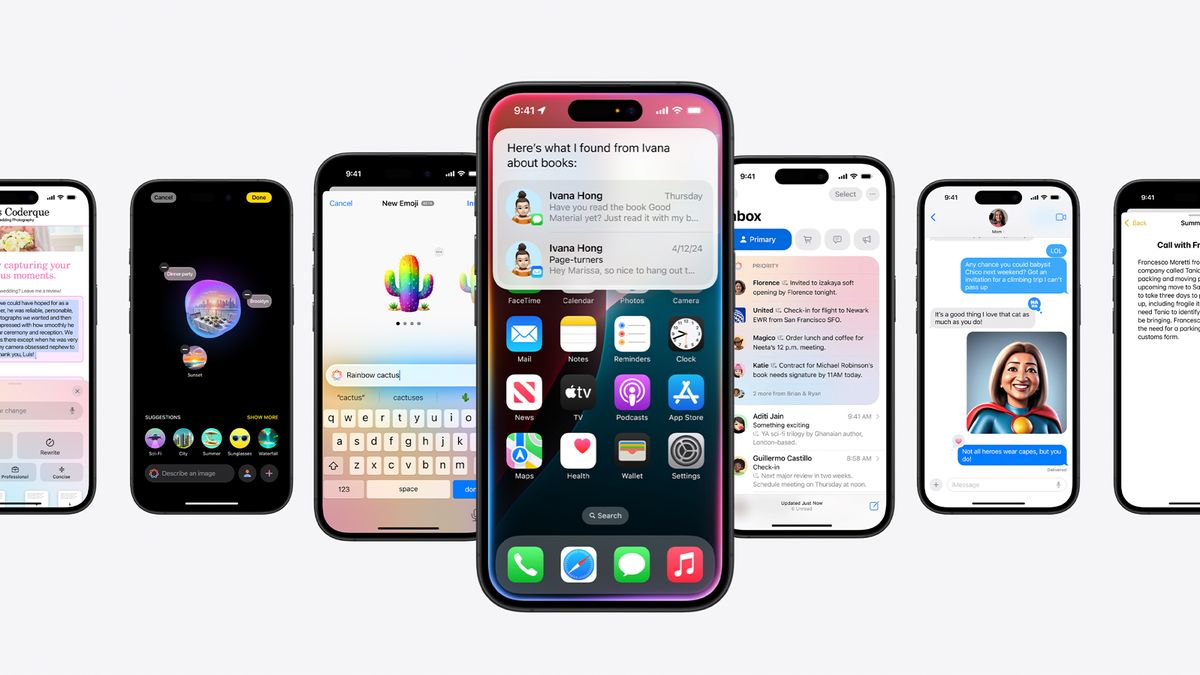
When it comes to AI, Apple has undergone a significant change in its approach. Until recently, the company refused to even mention the term, instead opting for "machine learning." However, last year, Apple began to rebrand its laptops as AI machines, and this year, the company unveiled its own take on AI, called Apple Intelligence. These features have been rolling out slowly, but do users actually want them?

Study Reveals Mixed Results

According to a recent study by Sellcell, 73% of iPhone users and 87% of Samsung users surveyed agree that AI features add little or no value to their daily lives. Moreover, the study shows that AI features are a deciding factor for less than half of prospective smartphone buyers. This could be bad news for Apple, which has pitched several new products as "built for Apple Intelligence."

The Apple Intelligence Rollout

The Apple Intelligence rollout hasn’t exactly generated excitement. Features have appeared slowly, and many regions are still missing key elements of the technology. Additionally, the effectiveness of Apple’s AI summaries for notifications, such as text messages and news headlines, has been called into question, with meanings sometimes changing to humorous effect.

Do People Really Want AI?

But while Apple has pushed forward with AI, the question of whether users actually want an AI assistant in their pocket has been overlooked. We’ve already seen portable AI gadgets like the Humane Pin and Rabbit R1 fail, suggesting that people don’t want a separate dedicated AI gadget when they already have a phone.

Conclusion

The Sellcell study suggests that apathy might run deeper. In a world of bloated smartphone software, people may simply want a better camera and a longer-lasting battery. Tech companies are excited about AI, and artists are afraid of it, but if these study results are anything to go by, the average consumer just doesn’t care that much.

FAQs

Q: What does the study say about the value of AI features?
A: The study reveals that 73% of iPhone users and 87% of Samsung users agree that AI features add little or no value to their daily lives.

Q: Are people interested in AI-powered smartphones?
A: According to the study, AI features are a deciding factor for less than half of prospective smartphone buyers.

Q: What does the study say about the rollout of Apple Intelligence?
A: The study suggests that the rollout has been slow, with many regions still missing key elements of the technology.

Q: What do the results imply for Apple’s AI ambitions?
A: The study’s findings could be bad news for Apple, which has heavily promoted its AI-powered products. The company may need to reevaluate its approach to AI and focus on more pressing issues, such as camera and battery life.


AI-Driven UX: Enhancing User Experience

The Evolution of UX Design with AI

You’re scrolling through your favorite shopping app, looking for the perfect pair of sneakers. Suddenly, a notification pops up: “Hey there! We noticed you’ve been eyeing those running shoes. How about a 15% discount if you buy them in the next hour?”

Intrigued, you tap on the offer and find yourself on a personalized page showcasing not just the shoes you were considering, but also matching socks, workout gear, and even a smartwatch that syncs with your running app. How did the app know exactly what you needed?

Welcome to the world of AI for UX design, where your digital experiences are tailored just for you, often before you even realize what you’re looking for. It’s like having a personal shopper, but for every app and website you use.

The Evolution of UX Design with AI

Remember the days when designing a website meant endless debates about whether the “Buy Now” button should be red or green? Or when user research consisted of asking your cousin to click around your site and tell you if they liked it? Yeah, those were the dark ages of UX design.

Traditional UX design was often a mix of intuition, best practices, and a whole lot of trial and error. Designers would create wireframes, mockups, and prototypes based on what they thought users wanted.

How AI Enhances User Research and Insights

Let’s face it – understanding users can sometimes feel like trying to solve a Rubik’s cube blindfolded. Just when you think you’ve got it figured out, users throw you a curveball.

But what if you had a superpower that lets you peek into the minds of millions of users, all at once, 24/7?

That’s essentially what AI for UX does for user research and insights.

Magician Design

Enhancing Figma workflows
Auto-generates text, icons, and design elements within Figma.

Visily

Collaborative wireframing
Offers AI-driven templates and suggestions for faster wireframing.

Fronty

Converting designs to code
Translates static designs into responsive HTML/CSS code.

ChatGPT

UX writing and brainstorming
Assists with generating microcopy, simulating user flows, and brainstorming design ideas.

MidJourney

Visual inspiration and artistic concepts
Generates mood boards, concept art, and unique visuals from text prompts.

These tools are just the tip of the iceberg when it comes to AI in UX design. Each one acts like a specialized UX assistant, helping you tackle specific aspects of the design process with superhuman efficiency.

Challenges and Considerations of Using AI in UX Design

As exciting as the AI revolution in UX design is, it’s not all smooth sailing. Like any powerful tool, AI comes with its own set of challenges and considerations. As UX designers, it’s crucial that we navigate these waters carefully to harness the full potential of AI while avoiding potential pitfalls.

Conclusion

The fusion of AI and UX design isn’t just a trend – it’s a revolution that’s reshaping how we create digital experiences. AI is empowering us to create more intuitive, personalized, and accessible designs than ever before. It’s allowing us to understand our users on a deeper level and anticipate their needs in ways that were once impossible.

But remember, AI is a tool, not a replacement for human creativity and empathy. The most successful UX designs of the future will be those that strike the perfect balance between AI-driven insights and human-centered design thinking.

FAQs

Q: What is AI in UX design?
A: AI in UX design refers to the use of artificial intelligence to enhance the design process, create more personalized experiences, and improve user engagement.

Q: What are some examples of AI tools for UX design?
A: Examples include Magician Design, Visily, Fronty, ChatGPT, and MidJourney, among others.

Q: How does AI enhance user research and insights?
A: AI can analyze vast amounts of data, identify patterns and trends, and provide insights that human researchers might miss.

Q: What are some challenges of using AI in UX design?
A: Some challenges include data privacy and security, over-reliance on AI, bias in AI systems, transparency and trust, maintaining the human touch, and keeping up with rapid advancements in AI.

Monster Morsels

0

Kellogg’s Brings Back its Beloved Cockerel Mascot Cornelius in 3D for New Ad Campaign

A New Era for Breakfast Cereal?

Who would have thought that 2024 would see not one but two big brand adverts that revolved around 3D animated poultry causing havoc on the high street? KFC’s ‘Believe in Chicken’ campaign had a dark side to it, with the bird ostensibly being worshipped by zombie dancer, presumably not aware that it was on the menu. In that case, the chicken looked real – it was the people who were weird. Kellogg’s is taking a different approach by bringing its Hulk-coloured cockerel heritage mascot Cornelius flapping into the modern era as a giant 3D kaiju.

The Problem with Breakfast Cereal Sales

Breakfast cereal is in crisis, apparently. Sales of big name products have been declining, not only because of alternative brands but also because of people skipping breakfast completely (blame intimate fasting and GLP-2 products like Mounjaro and Ozempic). Kellogg’s needs to remind people that breakfast is a good thing and that when it comes to that thing, it’s the ‘OG’. And it’s done that by bringing Cornelius off the Corn Flakes box once more and into the real world in vibrant 3D – kind of like the Stay Puft Marshmallow Man in Ghostbusters, but less evil – I think.

The Ad Campaign

The first See You in the Morning ad crafted by the advertising agency Leo Burnett sees old Cornelius strut to Jurassic 5’s Jayou as people go about their morning routines. The tagline tells us to “Start your day, your way.” The animation is the work of the VFX studio Framestore, which worked on Paddington and Harry Potter, so the 3D work is wonderfully polished. And the ad is backed up by a clever choice of soundtrack taking advantage of the "Snap crackle pop pop fizz fizz" line from the Jurassic 5.

A New Look for a Beloved Mascot

Cornelius dates way back to 1957, and this isn’t the first time he’s been animated – check out the above compilation of ads that someone put together on YouTube. The story goes that he came about by a happy accident after the Welsh harpist Nancy Richards pointed out to the Kellog family that the name Kellog was similar to ‘ceiliog’, the Welsh for cockerel. Some even suggest his unusual colour is a homage to the Welsh flag.

Is it Enough to Save Breakfast Cereal?

But is it enough to save breakfast cereal? Compared to KFC’s wildly surreal ad, the appearance of Cornelius feels a little flat. It’s almost like the breakfast eaters in the ad aren’t sure whether they’re supposed to be surprised by the novelty of a giant green rooster marching down the street or to see him as a familiar face that’s part of their morning routine. For now, it feels like it doesn’t really go anywhere, but we’re told there will be more ads in the series.

Conclusion

Kellogg’s new ad campaign is an attempt to remind us that breakfast is a good thing and that it’s the ‘OG’. With a 3D animated mascot and a catchy soundtrack, the ad is likely to grab attention. However, only time will tell if it’s enough to save breakfast cereal from its current decline.

Frequently Asked Questions

Q: What is the name of the advertising agency behind the new Kellogg’s ad campaign?
A: The advertising agency behind the new Kellogg’s ad campaign is Leo Burnett.

Q: How much did Kellogg’s spend on the ad campaign?
A: Kellogg’s spent £12 million on the ad campaign, covering UK TV, digital, social, and retail promotions.

Q: When was Cornelius, the Kellogg’s cockerel mascot, created?
A: Cornelius was created in 1957.

Google’s Most Experimental Model

0

Google Unveils Gemini 2.0 Family of Models, with Gemini-Exp-1206 Now Available for Gemini Advanced Subscribers

New AI Features and Capabilities

With the year coming to an end, Google has been on an AI launch streak, releasing various innovative AI models and features. One of the most significant standouts was its Gemini 2.0 family of models, which has now become available for users to get started with.

What is Gemini 2.0 Flash?

Google announced its Gemini 2.0 family of models, with Gemini 2.0 Flash being the first model released. Last week, Google announced that Gemini Advanced subscribers can now access an experimental version of Gemini 2.0 Flash under the name of Gemini-Exp-1206.

What are the Capabilities of Gemini-Exp-1206?

Starting today, Gemini Advanced users get priority access to the latest 2.0 Experimental Advanced model, Gemini-Exp-1206. This model is designed to help users with more complex tasks such as:

  • Advanced coding challenges
  • Solving math problems
  • Reasoning and instruction following

What are the Key Features of Gemini-Exp-1206?

Google described Gemini-Exp-1206 as a "workhorse model with low latency and enhanced performance at the cutting edge of our technology, at scale." Moreover, Google said the model excels at complex tasks and can do it twice as fast as its predecessor, Gemini 1.5 Flash.

How Does Gemini-Exp-1206 Perform?

Gemini 2.0 Flash outperformed Gemini 1.5 Pro across standard benchmarks used to test large language models, including MATH, MMMU, GPQA, and Natural2Code, which each test for math, image generation, reasoning, and code, respectively.

How to Access Gemini-Exp-1206?

Gemini Advanced subscribers can access Gemini-Exp-1206 by clicking on the model picker toggle on desktop or mobile web. Gemini Advanced is part of the Google One AI Premium plan, which costs $20 per month.

Other Benefits of Google One AI Premium Plan

In addition to Gemini-Exp-1206, other benefits of the Google One AI Premium plan include:

  • 2TB of storage
  • Google Photos editing features
  • 10% back-in-the-store rewards
  • Google Meet premium video calling features
  • Gemini for Workspace

Conclusion

Google’s Gemini 2.0 family of models, particularly Gemini-Exp-1206, has the potential to revolutionize the way we approach complex tasks, from coding to math to instruction following. With its enhanced performance and capabilities, users can expect to see significant improvements in their productivity and efficiency.

Frequently Asked Questions

Q: What is the price of the Google One AI Premium plan?
A: The Google One AI Premium plan costs $20 per month.

Q: How do I access Gemini-Exp-1206?
A: Gemini Advanced subscribers can access Gemini-Exp-1206 by clicking on the model picker toggle on desktop or mobile web.

Q: What are the key features of Gemini-Exp-1206?
A: Gemini-Exp-1206 is a "workhorse model with low latency and enhanced performance at the cutting edge of our technology, at scale." It excels at complex tasks such as coding, math, reasoning, and instruction following, and can do it twice as fast as its predecessor, Gemini 1.5 Flash.

Emotions in AI

0

The Birth of Emotional AI

The prospect of an AI system embracing those first sparks of emotion is perhaps not as far-fetched as one might think. Already, AI systems have some ability to gauge people’s emotions, and increasingly they’re also able to replicate those feelings in their interactions with humans.

It still requires a leap of faith to imagine an AI that could feel genuine emotions, but if it ever becomes possible, we’d imagine that they’ll be somewhat basic at first, similar to those of a child. Perhaps, an AI system might be able to feel joy at successfully completing a task, or maybe even confusion when presented with a challenge it doesn’t know how to solve. From there, it’s not difficult to envision that feeling of confusion evolving to one of frustration at its repeated failures to tackle the problem in question. And as this system evolves further, perhaps its emotional spectrum might expand to even feel a tinge of sadness or regret.

Empathy as a Motivator

As AI’s ability to feel emotion evolves, it would become increasingly complex, progressing to a stage where it can even feel empathy for others. Empathy is one of the most complex human emotions, involving understanding and sharing the feelings of someone else.

If AI can experience such feelings, they may inspire it to become more helpful, similar to how humans are sometimes motivated to help someone less fortunate.

Is This Even Possible?

Surprisingly, we may not be that far off. AI systems like Antix are already capable of expressing artificial empathy. It’s a platform for creating digital humans that are programmed to respond sympathetically when they recognize feelings of frustration, anger, or upset in the people they interact with.

AI is Getting Real

Emotional AI systems are a work in progress, and the result will be digital humans that feel more lifelike in any scenario where they can be useful.

Conclusion

With digital humans capable of expressing emotions, the potential for more realistic, lifelike, and immersive experiences is almost limitless, and it will result in more rewarding and beneficial interactions with AI systems.

FAQs

Q: What is Antix?
A: Antix is a platform for creating digital humans that are programmed to respond sympathetically to human emotions.

Q: How do digital humans learn to recognize emotions?
A: Digital humans learn to recognize emotions through machine learning algorithms and training data.

Q: Can digital humans feel emotions?
A: Currently, digital humans can only express artificial empathy, but future developments may lead to more advanced emotional capabilities.

This New AI Video Tool is The Best I’ve Seen!

0

Google’s Veo2 Video Generator: A Game-Changer for Content Creators

What is Veo2?

Veo2 is a revolutionary video generator developed by Google that uses artificial intelligence to create high-quality, engaging videos from text-based content. With Veo2, creators can turn written scripts into stunning videos with ease, eliminating the need for manual video production.

How Does it Work?

Veo2 uses a sophisticated AI algorithm to analyze the text input and generate a video script. The algorithm is trained on a vast dataset of videos and texts, enabling it to identify the most effective visual and audio elements to accompany the text. The result is a visually appealing and engaging video that captivates the audience.

Features and Benefits

  • AI-powered video creation: Veo2 uses AI to generate high-quality videos in minutes, saving time and effort.
  • Customizable: Users can select from various templates, styles, and animation options to tailor the video to their brand or style.
  • Multi-language support: Veo2 supports multiple languages, making it a valuable tool for global content creators.
  • Cost-effective: By automating the video creation process, Veo2 reduces production costs and increases productivity.

Use Cases

  • Blogging and vlogging: Turn your blog posts into engaging videos to increase engagement and reach a broader audience.
  • Social media marketing: Create eye-catching videos for social media platforms to boost brand visibility and interaction.
  • Corporate communications: Use Veo2 to create training videos, product demos, or company updates, saving time and resources.

Conclusion

Google’s Veo2 video generator is a groundbreaking tool that has the potential to revolutionize the way we create and consume video content. By leveraging AI technology, Veo2 offers an innovative solution for content creators, marketers, and businesses to produce high-quality videos quickly and efficiently.

Frequently Asked Questions

Q: Is Veo2 available for public use?
A: Yes, Veo2 is available for public use, and you can access it through the Future Tools website.

Q: What types of files can I upload to Veo2?
A: Veo2 accepts text-based files, such as articles, blog posts, and scripts.

Q: Can I customize the video style and animation?
A: Yes, Veo2 offers various templates and animation options for users to customize the video style and animation.

Q: Is Veo2 free to use?
A: Veo2 is free to use, with optional premium features and subscription plans available for advanced users.

The Design Community Turns a Corner with AI

0

Why Do Creatives Feel More Optimistic About AI?

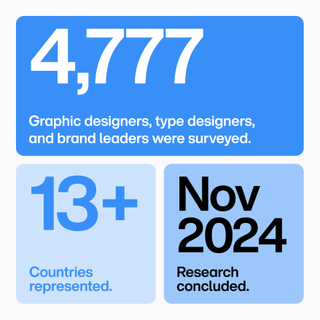
Type and technology company Monotype recently released an eye-opening study, revealing that 75% of creatives feel either optimistic or neutral about the impact of AI on their roles. While the topic of artificial intelligence is still highly divisive in the creative industries, it seems that attitudes are slowly beginning to shift towards a more positive outlook.

(Image credit: Monotype)

What Do You Think Has Led Creatives to Feel More Optimistic About AI?

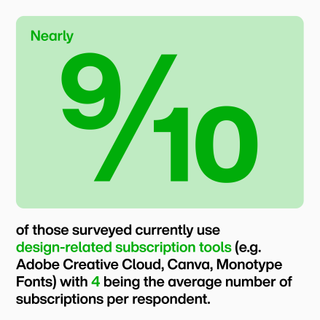
Mary Catherine Pflug, senior director of partner experience & inventory lifecycle at Monotype, believes that there are still many manual parts of the design process, and AI can reduce a lot of this manual burden, making the design process faster and more enjoyable. At Monotype, they are leveraging AI to give creatives and designers great new user experiences and remove some of the more laborious, repetitive tasks so they can focus on accomplishing their goals.

Monotype

(Image credit: Monotype)

How Do You See AI Transforming Creativity for the Better?

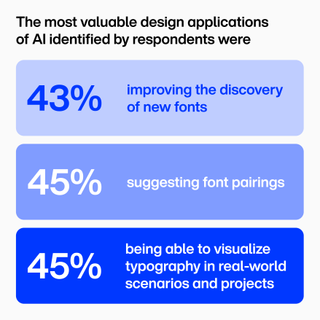
Pflug believes that AI can be a new tool that creatives can add to their toolkit to be more efficient and speed up workflows. With better tools, designers can spend less time on the mundane and routine parts of their work, and more time being creative. AI isn’t just for efficiency; it can be a lot of fun and provide new ways to be creative. Take their Font Pairing tool as an example, which helps designers find complementary typefaces for their work, suggesting harmonious (and sometimes surprising) font combinations.

Monotype data from AI study

(Image credit: Monotype)

How Can AI Improve Typography?

Pflug believes that AI can be helpful in visualizing fonts in use and finding the right font for a project. Monotype is also working on enhancing their search and discovery with AI, in terms of identifying fonts and pairing. They are also working on exciting new AI-driven tools to help designers visualize a typeface in a particular setting to see how that font could work for a project. This makes browsing fonts even more fun, faster, and can increase the designer’s confidence that they’ve chosen the right one.

Monotype data from AI study

(Image credit: Monotype)

Is There a Risk That Human Creativity Could Become Derivative/Lazy If We Rely on AI Tools?

OpenAI Announces 1-800-ChatGPT

0

Speak With ChatGPT By Phone

Speaking with ChatGPT only requires setting up ChatGPT as a contact, using their 1-800-ChatGPT phone number, which in numbers is 1-800-242-8478. Once added to the phone’s contacts list a user can now phone and speak with ChatGPT to get answers.

The presenters phoned ChatGPT with an iPhone, an old flip phone and with a rotary dial telephone to demonstrate how it’s a phone call that is used to reach ChatGPT and access answers. You can do it on the road or at home from a land line.

The functionality is currently only available in the United States and is limited to 15 minutes of free calling per month. However you can also download the ChatGPT App and create an account to speak even longer.

Image of a man speaking with ChatGPT with an old fashioned rotary phone

An example phone call involved asking ChatGPT to explain Reinforcement Learning as if to a five year old.

ChatGPT spoke the following answer:

“Sure! Imagine you have a robot friend and you want to teach it to clean up your room you give it a treat every time it does a good job that’s reinforcement fine-tuning the robot learns to do better by getting rewards.”

ChatGPT On WhatsApp

OpenAI also announced a way to reach ChatGPT with WhatsApp, and it’s available to users around anywhere in the world. The demonstration showed the presenters accessing 1-800-ChatGPT on WhatsApp through the mobile phone’s contacts list. But it can also be accessed by scanning the following QR code.

Screenshot Of ChatGPT On WhatsApp QR Code

The WhatsApp experience is currently limited to texting with ChatGPT and users can access it without having an account. OpenAI is working on ways to authenticate the WhatsApp access with a ChatGPT account and to be able to search with images.

Facts About New Access Methods

The new functionalities use the ChatGPT 40 Mini model. OpenAI engineers literally created these new functionalities over the past few weeks, which is pretty amazing.

Watch the announcement of the new ways to interact with ChatGPT:

1-800-ChatGPT

Conclusion

OpenAI has made it possible for users to interact with ChatGPT through phone calls and WhatsApp, providing more ways for people to access the platform. This new functionality uses the ChatGPT 40 Mini model and is available to users in the United States, with a limited free calling period of 15 minutes per month.

FAQs

Q: What is the phone number for ChatGPT?

A: 1-800-242-8478

Q: How do I access ChatGPT on WhatsApp?

A: You can access ChatGPT on WhatsApp by accessing your mobile phone’s contacts list and looking for 1-800-ChatGPT, or by scanning the QR code provided in the article.

Q: Is there a limit to the free calling period?

A: Yes, the free calling period is limited to 15 minutes per month.

Q: Can I use ChatGPT on WhatsApp without an account?

A: Yes, you can use ChatGPT on WhatsApp without an account, but OpenAI is working on ways to authenticate the WhatsApp access with a ChatGPT account and to be able to search with images.

Arm Loses $50M Annually from Snapdragon X Elite SoCs

0

Arm and Qualcomm’s Snapdragon X Elite Chip Dispute Continues in Court

The Dispute

Arm and Qualcomm’s dispute over Qualcomm’s Snapdragon X Elite chips is continuing in court this week, with executives from each company taking the stand and attempting to downplay the accusations from the other side.

The Background

If you haven’t been following along, the crux of the issue is Qualcomm’s purchase of a chip design firm called Nuvia in 2021. Nuvia was originally founded by ex-Apple chip designers to create high-performance Arm chips for servers, but Qualcomm took an interest in Nuvia’s work and acquired the company to help it create high-end Snapdragon processors for consumer PCs instead. Arm claims that this was a violation of its licensing agreements with Nuvia and is seeking to have all chips based on Nuvia technology destroyed.

Arm’s Claims

According to Reuters, Arm CEO Rene Haas testified this week that the Nuvia acquisition is depriving Arm of about $50 million a year, on top of the roughly $300 million a year in fees that Qualcomm already pays Arm to use its instruction set and some elements of its chip designs. This is because Qualcomm pays Arm lower royalty rates than Nuvia had agreed to pay when it was still an independent company.

Qualcomm’s Defense

For its part, Qualcomm argued that Arm was mainly trying to push Qualcomm out of the PC market because Arm had its own plans to create high-end PC chips, though Haas claimed that Arm was merely exploring possible future options. Nuvia founder and current Qualcomm Senior VP of Engineering Gerard Williams III also testified that Arm’s technology comprises “one percent or less” of Qualcomm’s finished chip designs, minimizing Arm’s contributions to Snapdragon chips.

What’s at Stake

If Arm succeeds in its lawsuit, it could potentially halt sales of all Snapdragon chips with Nuvia’s technology in them, which at this point includes both the Snapdragon X Elite and Plus chips for Windows PCs and the Snapdragon 8 Elite chips that Qualcomm recently introduced for high-end Android phones.

Conclusion

The dispute between Arm and Qualcomm is far from over, and a jury verdict is expected to be delivered soon. The outcome of the trial will have significant implications for the tech industry, with the potential to impact the future of chip design and development.

FAQs
Q: What is the crux of the issue between Arm and Qualcomm?

A: The crux of the issue is Qualcomm’s acquisition of Nuvia, a chip design firm, and Arm’s claims that this violates its licensing agreements with Nuvia.

Q: What are the stakes for Arm if it wins the lawsuit?

A: If Arm wins, it could potentially halt sales of all Snapdragon chips with Nuvia’s technology in them, which would significantly impact Qualcomm’s business.

Q: What is Nuvia’s role in the dispute?

A: Nuvia was originally founded by ex-Apple chip designers to create high-performance Arm chips for servers, but Qualcomm acquired the company to help create high-end Snapdragon processors for consumer PCs.

Fuzz Testing Saves Millions

0

What Would Happen if Your Software Faced an Unpredictable Input?

What would happen if your software faced an unpredictable input that no one ever thought to test? Could it withstand the challenge or fail catastrophically? Software has been a backbone for every industry, whether e-commerce platforms or the finance industry. For this to be relied on, software must be robust, reliable, and secure to function absolutely seamlessly. However, it’s a critical challenge to make your software free from vulnerabilities that could lead to catastrophic failures or security breaches.

What is Fuzz Testing?

Often referred to as fuzzing, this essentially is a software testing technique that we use to identify unexpected behaviors, bugs, and vulnerabilities in a system. It involves sending a program random and unexpected inputs to see how it reacts. Our goal is to uncover the defects that a certain traditional testing method might miss, mainly in certain edge cases.

How Fuzzing Works?

The fuzzing process typically includes a set of three steps:

  • Step-1: Input Generation:

    Fuzzers are tools that create lots of random and unusual inputs to test a program. These inputs particularly help in mimicking any real-world abnormalities.

  • Step-2: Program Execution:

    The respective program you are testing simply takes all these inputs as real, simulating the real-world cases to test how strong it is and where it can attack.

  • Step-3: Watch for Failures:

    The fuzzers (the fuzz testing tools) watch how the program responds, looking for program errors like crashes or unexpected behavior.

All about Fuzz Testing: A Game-Changer

The reason this is such an important component of fuzzing is able to expose many of the hidden bugs and vulnerabilities that the model manual testing or even automated test cases would miss.

When Bugs Come With a Price Tag: A Software Company’s Shuqi

Case Study-1: Fuzz Testing at Rubrik

Imagine if your backup system silently failed during an emergency. How would your clients react? Rubrik didn’t leave this to chance.

Case Study-2: Ethereum’s Financial Losses

What if a hidden bug shut down your entire operation for days? That’s the kind of risk Ethereum faced—and fuzz testing could have prevented it.

Continental’s Fuzz Testing: The Moment It Clicked for Early Detection of Critical Bugs

1...482483484...740Page 483 of 740