Home Blog Page 495

The Future of Nostalgia

0

Ah, those were the days. Remember when a mobile phone could fit in a jean pocket, the battery could last four days, and you could drop the device from a height, and then drive over it with a tank, and it would still run Snake perfectly?

Nokia’s Golden Age

That’s not to say that iconic phones like the Nokia 3310 were merely utilitarian bricks either. They were considered sleek and modern-looking for the time – facets that helped change the way cell phones were seen and made them ubiquitous.

Decline and Legacy

Nokia’s failure to keep up with the emergence of the best camera phones from the likes of Apple and Samsung ultimately led to its decline, but its role in defining the design of mobile technology can’t be overlooked, which is why it’s so exciting to see plans for an online Nokia Design Archive.

The Nokia Design Archive

The Helsinki-based research school Aalto University is launching a digital repository of 20,000 items from Nokia’s glory days and beyond, from the mid-90s to 2017. We’re told there will be 959GB of materials in total and that they’ll include secret concepts and materials that haven’t been seen before, giving an insight into the company’s design process, from ideation to prototyping.

A Story of People

The focus was initially going to be on the objects themselves, but researchers say they discovered that the story of Nokia was more about the people. As such, it will also include interviews with designers.

What to Expect

The Nokia Design Archive opens on 15 January. Highlights are sure to include the legendary Nokia 3310 and the Nokia 8810 banana phone immortalised by Keanu Reaves in The Matrix. But while the Nokia Design Archive will be a trip back in time, the promise of the inclusion of unreleased concepts also suggests that it could be a glimpse at a retro future that could have been.

Conclusion

The Nokia Design Archive is a significant step in preserving the history of mobile technology and the people behind it. It’s a reminder of how far we’ve come and how design has played a crucial role in shaping our daily lives.

FAQs

Q: What is the Nokia Design Archive?
A: The Nokia Design Archive is a digital repository of 20,000 items from Nokia’s glory days and beyond, from the mid-90s to 2017.

Q: What can I expect to see in the archive?
A: The archive will include secret concepts and materials that haven’t been seen before, giving an insight into the company’s design process, from ideation to prototyping.

Q: When does the Nokia Design Archive open?
A: The Nokia Design Archive opens on 15 January.

Q: How can I access the Nokia Design Archive?
A: You can visit Aalto University to learn more about the Nokia Design Archive and access the materials.


Expressive Art Saves Flint from Oblivion

0

Flint: Treasure of Oblivion Details

Publisher Microids
Developer Savage Level
Format PC, Xbox Series X/S, PlayStation 5 (reviewed)
Platform Unreal Engine 5
Release date 17 December 2024

The trend for pouncing upon out of copyright art, books and fiction continues apace with Flint: Treasure of Oblivion, a role-playing game that riffs on Robert Louis Stevenson’s world as described in Treasure Island. But this is no Winnie-the-Pooh: Blood and Honey shakedown, as developer Savage Level has gone to great lengths to craft a world of its own within Stevenson’s imagination.

Flint: Treasure of Oblivion has comic appeal

The adventure begins in the dungeons of French city Saint-Malo, where Captain Flint and second-in-command Billy Bones stumble upon a treasure map and the tease of adventure, gifted by an old pirate who may be more than he seems.

The game is complex, detailed, and tactical

Upon escaping, gathering a crew and taking over a ship, the adventure begins in earnest and Flint: Treasure of Oblivion opens up and falls into a pattern of exploration to find fresh leads on that treasure island as well as new game cards – used to unlock unique abilities, obtain new skills, improve dice chances and more – and then battles, resulting in needed booty that can be used to upgrade your crew (neatly, a pirate’s ‘XP’ is measured in wealth).

Pirate Morale dictates a successful dice roll

Much of the game is absorbed in the battle system. For good and bad, Flint is complex, detailed and tactical. It’s a battle system built on hexagonal tiles with a points system that dictates movement and attacks, each pirate has a range of attribute cards to play that can affect statuses or directly influence the battle. Dice rolls dictate attack damage and can influence weapon effects, as well as movement (two dice are rolled, one for a pirate’s profession and one for their weapon; pirates can stumble, push or tackle enemies, and it’s not uncommon for dice to end in a fail state, ruining any carefully laid plans.

Flint: Treasure of Oblivion is complex to a fault

When exploring the game’s world for loot and new card abilities to aid future fights, Flint is great fun. The small-scale skirmishes work wonderfully and that sense of experimentation bubbles to the fore. However, when the larger battles ensue, with up to 15 characters on either side, Flint’s battles can become unwieldy, slow and its system a pain to muddle through. It can be hard to work out friend from foe against the detailed backgrounds and simply selecting hexagons, swapping between characters and managing the battle lags (on PS5 at least).

Conclusion

There’s a lot to enjoy in Flint: Treasure of Oblivion, and when it hits the mark this is a wonderfully involved tactical RPG set within a detailed world you’ll enjoy exploring. But sadly, the sheer complexity and pacing, in some moments, can overwhelm the enjoyment, leaving Flint (the game) struggling to keep its head above the rising waters while Flint (the character) optimistically convinces you there’s treasures ahead, if only you can just survive another dice roll.

FAQs

Q: What is the game about?
A: Flint: Treasure of Oblivion is a role-playing game that riffs on Robert Louis Stevenson’s world as described in Treasure Island.

Q: What is the gameplay like?
A: The game is complex, detailed, and tactical, with a battle system built on hexagonal tiles, points, and dice rolls.

Q: Is the game fun?
A: Yes, when exploring the game’s world for loot and new card abilities to aid future fights, Flint is great fun. However, larger battles can become unwieldy and slow.

Q: Is the game worth playing?
A: Yes, despite its complexity and pacing issues, there’s a lot to enjoy in Flint: Treasure of Oblivion.

Crafting Engaging Character Designs

0

Achieving Effective Character Design

01. Pick your colour palette

Choosing a primary colour palette that matches your character’s personality is crucial. Don’t hesitate to draw on existing colour palettes; there are millions available online, so why deprive yourself? They’re a great basis for developing colours that work well together in your designs.

[Image: François Bourdin artwork]

02. Add a touch of madness

Once you’ve found the basic colour scheme, it’s important to find a complementary, more intense palette to highlight the character’s main elements. In this case, that meant the head, hands, and shoes. These colours direct the eye straight to the most important elements.

[Image: François Bourdin artwork]

03. Separate different parts

To avoid getting lost in the hundreds of different layers, it’s important to segment parts of the character. Here, I’ve split the clothing up into four groups: the coat, the jacket and shirt, the trousers, and then everything else. The head is separate.

[Image: François Bourdin artwork]

04. Match stylised elements

For the character to fully function, surrounding elements such as smoke, light, and the ground must be stylised in the same manner as the character. For this chap, the design is semi-realistic with sharp shapes, so I worked the smoke and shadows in the same way using a textured brush.

[Image: François Bourdin artwork]

05. Create the Shapes

It’s important to be able to simplify the various subjects using easy, effective tricks. For example, with glossy materials, a simple white highlight will immediately give an impression of volume, seen here in the edge light (A) that gives volume to the glove, and in the highlight (B) and bounce light (C) that reflects the light onto the metal.

[Image: François Bourdin artwork]

06. Divert expectations

Here I’ve taken an old diving helmet and turned it into a machine that fills with beer, which swills around the character’s head. To accentuate the goofiness, I also attached beer bottles to the back of the device, as I think it’s important to add a touch of fun to my character designs.

[Image: François Bourdin artwork]

07. Create a sense of composition

Where the character looks is crucial, as it gives the viewer a sense of how to read the image. In general, to avoid blocking the composition, I’d advise having the character looking or turned towards the right (A) to let the drawing breathe. Conversely, if the character is looking to the left (B) then the atmosphere feels more closed off and less conducive to that sense of the image breathing that we’re looking to create.

[Image: François Bourdin artwork]

08. Find a focus

Focusing on the element you want to emphasize most is important to give meaning to the character and the image. Here, the focus is on the character’s face and eyes. The lower part of the body is hidden and therefore more mysterious.

[Image: François Bourdin artwork]

09. Pose the character

The pose and direction of the character’s gaze is important for the atmosphere. The character seen from a low angle and looking at us (A), gives the impression of being threatening. The next character (B) is contemplative, posed and looking towards the viewer, so the feeling is calmer. The final character (C) is just standing stoic, looking into the distance at something that we can only imagine.

[Image: François Bourdin artwork]

Conclusion

In conclusion, creating effective character designs requires careful consideration of many factors, including colour palettes, stylised elements, and composition. By following these tips and staying focused, you can create characters that are engaging and memorable.

FAQs

Q: What is the most important step in creating a character design?

A: The most important step is choosing a colour palette that matches your character’s personality.

Q: How can I avoid getting lost in the hundreds of different layers in a character design?

A: Segment parts of the character, such as clothing and accessories, to simplify the design and make it easier to manage.

Q: How can I add a sense of composition to my character design?

A: Focus on the character’s gaze and pose to create a sense of direction and atmosphere.

Simplifying AI-Powered MetaHuman Deployment with NVIDIA ACE and Unreal Engine 5

0

Streamline 3D Animation with NVIDIA ACE and Unreal Engine 5

At Unreal Fest 2024, NVIDIA released new Unreal Engine 5 on-device plugins for NVIDIA ACE, making it easier to build and deploy AI-powered MetaHuman characters on Windows PCs. ACE is a suite of digital human technologies that provide speech, intelligence, and animation powered by generative AI.

New Plugins for Unreal Engine 5

Developers can now access a new Audio2Face-3D plugin for AI-powered facial animations in Autodesk Maya. This plugin provides a simple, streamlined interface to help develop avatars in Maya easier and faster. The plugin comes with source code so that you, as a developer, can dive in and develop a plugin for the digital content creation (DCC) tool of your choice.

Unreal Engine 5 Renderer Microservice

NVIDIA has also built an Unreal Engine 5 renderer microservice that leverages Epic’s Unreal Pixel Streaming technology. This microservice now supports the NVIDIA ACE Animation Graph Microservice and Linux operating system in early access. The Animation Graph Microservice enables realistic and responsive character movements, and with Unreal Pixel Streaming support, you can stream your MetaHuman creations to any device.

Sample Project and Plugins

The NVIDIA ACE Unreal Engine 5 sample project serves as a guide for developers looking to integrate ACE into their games and applications. This sample project expands the number of on-device ACE plugins, including:

  • Audio2Face-3D for lip sync and facial animation
  • The Nemotron Mini 4B Instruct model for response generation
  • Retrieval-augmented generation (RAG) for contextual information

Streamline 3D Animation with the Maya ACE Plugin

Autodesk Maya offers high-performance animation functions for game developers and technical artists to create high-quality 3D graphics. Now you can generate high-quality, audio-driven facial animation for any character more easily with the Audio2Face-3D plugin. The streamlined user interface enables you to seamlessly transition to the Unreal Engine 5 environment. The source code and scripts are highly customizable and can be modified for use in other digital content creation tools.

Scale Digital Human Technology Deployment with UE5 Pixel Streaming

When deploying digital human technology through the cloud, the goal is to simultaneously reach as many customers as possible. Streaming high-fidelity characters requires significant compute resources. The latest Unreal Engine 5 renderer microservice in NVIDIA ACE adds support for the NVIDIA Animation Graph Microservice and Linux operating system in early access.

Animation Graph is a microservice that interacts with other AI models to create a conversational pipeline for characters. It’s responsible for connecting developer RAG architectures, maintaining both context and conversational history. With the new UE5 pixel streaming compatibility, you can run a MetaHuman character on a server in the cloud and stream its rendered frames and audio to any browser and edge device over Web Real-Time Communication (WebRTC).

Get Started

To get started with the Unreal Engine 5 renderer microservice, apply for early access. Learn more about NVIDIA ACE and download the NIM microservices to begin building game characters powered by generative AI.

Conclusion

NVIDIA ACE and Unreal Engine 5 provide a powerful combination for building and deploying AI-powered MetaHuman characters. With the new plugins and microservices, developers can streamline 3D animation and scale digital human technology deployment. Get started today and discover the possibilities of generative AI in game development.

FAQs

Q: What is NVIDIA ACE?
A: NVIDIA ACE is a suite of digital human technologies that provide speech, intelligence, and animation powered by generative AI.

Q: What is the Audio2Face-3D plugin?
A: The Audio2Face-3D plugin is a new plugin for AI-powered facial animations in Autodesk Maya. It provides a simple, streamlined interface to help develop avatars in Maya easier and faster.

Q: What is the Unreal Engine 5 renderer microservice?
A: The Unreal Engine 5 renderer microservice is a new microservice that leverages Epic’s Unreal Pixel Streaming technology. It supports the NVIDIA ACE Animation Graph Microservice and Linux operating system in early access.

Q: How do I get started with the Unreal Engine 5 renderer microservice?
A: To get started, apply for early access and learn more about NVIDIA ACE and download the NIM microservices to begin building game characters powered by generative AI.

After a long wait, GIMP 3.0 is finally here

0

GIMP 3.0: Key Facts

Publisher: GIMP.org
Developer: The GIMP Team
Price: Free and Open Source Software (FOSS)
New Features: New version, 3.0 featuring new Non-Destructive Editing (NDE) tools, incremental UI improvements, plugin updates and additions.

GIMP 3.0 Review: What’s New?

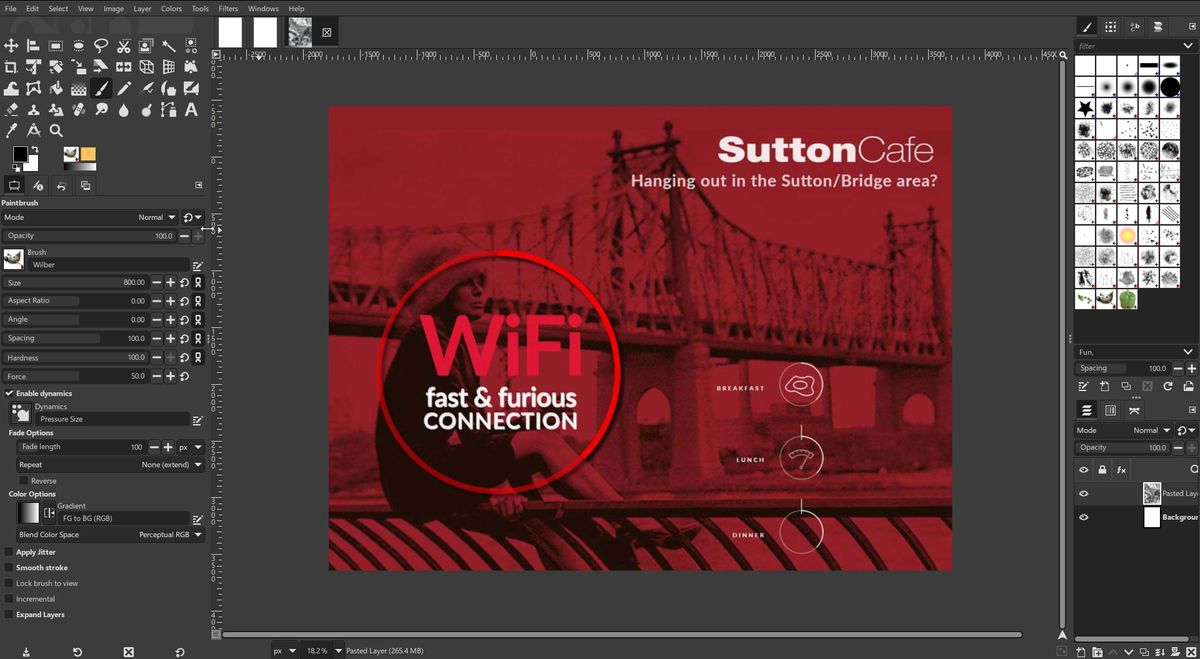
While there was much work done "under the hood", let’s focus on the things that users can actually see. For example, one of the most asked for features/workflows arrives in this release with additional updates. Non-Destructive Editing (NDE) snuck into a recent previous release, and is now being further refined in v3. This is of course a very important addition, and allows attributes like Levels and other modifications to be applied, and later either removed or adjusted at will.

You will see a small "Fx" icon next to the layer in the Layer Pallet. When clicked it brings up options to turn the effect on/off, modify or delete. A "Merge filter" toggle will flatten the layer effects.

New plugins to GEGL include "GEGL Styles", which offers a wide range of new and needed effects. Such as a simple non-destructive stroke function that should have existed years earlier. In addition, Inner Glow and Bevels have been added. The extensive range of included filters and plugins are very impressive.

Still Missing from GIMP

While nice, there is still a lot missing that should not be missing from an almost 30-year-old image editing tool. For example, though we finally have some non-destructive tools, we still await something comparable to PS "Smart Objects". We are told that was intended for v3, but is now expected in v3.2, to be released who knows when.

Rarely discussed but painful interface design, resulting in its popularity exploding.

Despite continuing promises of an improved interface, GIMP 3.0 is still much of the same. With slightly cleaner icons, and better adaptation on 4k monitors (finally).

Conclusion

After years of us waiting and quietly cheering the GIMP team on, has version 3.0 brought this application in line with others in the market? Sadly, no. While projects like Blender and WordPress have set the bar for open-source tools, the GIMP team appear to still not have learned that part of software development, even for free software, must include reasonable ease of use, and reliable update schedules. Or your market will go elsewhere. As many have to Krita.

Has GIMP finally arrived? Sadly, no. But everything is fixable. They say the missing functionality is "on its way". Great, so deliver it sooner rather than later. And listen to your user base when they tell you – repeatedly – that the UI sucks. Because it does.

Who’s it for?

If you are on Linux the only options are Krita or GIMP. So you should download them both. Another alternative is the online Photopea. It has a lovely interface but some obvious limitations of being in the cloud.

User on Mac and Windows clearly have a few additional options, but not as many as we would expect to have in 2025.

If you are a fast learner or not as entrenched in the "Photoshop Way" of doing things, then give GIMP a whirl. Or if you need some tools or capabilities that Krita doesn’t have and GIMP does, much better typographic capabilities for example, then again GIMP is there for the taking.

FAQs

Q: Is GIMP a good alternative to Photoshop?
A: Yes, but it’s not perfect and still has some limitations.

Q: Is GIMP free?
A: Yes, GIMP is a free and open-source image editing software.

Q: Is GIMP available on all platforms?
A: Yes, GIMP is available on Windows, Mac, and Linux.

Q: What are the new features in GIMP 3.0?
A: GIMP 3.0 features new Non-Destructive Editing (NDE) tools, incremental UI improvements, plugin updates and additions.

Q: Is GIMP 3.0 a significant improvement over previous versions?
A: Yes, but it’s still not perfect and has some limitations.

Q: Is Krita a better alternative to GIMP?
A: That depends on your specific needs and preferences. Krita has some advantages over GIMP, such as a more user-friendly interface and better support for certain file formats.

Mastering t-SNE: Effective Techniques in 100-150 Characters

0

Although Extremely Useful for Visualizing High-Dimensional Data, t-SNE Plots Can Sometimes Be Mysterious or Misleading. By Exploring How It Behaves in Simple Cases, We Can Learn to Use It More Effectively.

A popular method for exploring high-dimensional data is something called t-SNE, introduced by van der Maaten and Hinton in 2008 [1]. The technique has become widespread in the field of machine learning, since it has an almost magical ability to create compelling two-dimensional “maps” from data with hundreds or even thousands of dimensions.

1. Those Hyperparameters Really Matter

Let’s start with the “hello world” of t-SNE: a data set of two widely separated clusters. To make things as simple as possible, we’ll consider clusters in a 2D plane, as shown in the lefthand diagram. (For clarity, the two clusters are color coded.) The diagrams at right show t-SNE plots for five different perplexity values.

With perplexity values in the range (5 – 50) suggested by van der Maaten & Hinton, the diagrams do show these clusters, although with very different shapes. Outside that range, things get a little weird. With perplexity 2, local variations dominate. The image for perplexity 100, with merged clusters, illustrates a pitfall: for the algorithm to operate properly, the perplexity really should be smaller than the number of points. Implementations can give unexpected behavior otherwise.

2. Cluster Sizes in a t-SNE Plot Mean Nothing

So far, so good. But what if the two clusters have different standard deviations, and so different sizes? (By size we mean bounding box measurements, not number of points.) Below are t-SNE plots for a mixture of Gaussians in plane, where one is 10 times as dispersed as the other.

Surprisingly, the two clusters look about same size in the t-SNE plots. What’s going on? The t-SNE algorithm adapts its notion of “distance” to regional density variations in the data set. As a result, it naturally expands dense clusters, and contracts sparse ones, evening out cluster sizes. To be clear, this is a different effect than the run-of-the-mill fact that any dimensionality reduction technique will distort distances. (After all, in this example all data was two-dimensional to begin with.) Rather, density equalization happens by design and is a predictable feature of t-SNE.

3. Distances between Clusters Might Not Mean Anything

What about distances between clusters? The next diagrams show three Gaussians of 50 points each, one pair being 5 times as far apart as another pair.

At perplexity 50, the diagram gives a good sense of the global geometry. For lower perplexity values the clusters look equidistant. When the perplexity is 100, we see the global geometry fine, but one of the cluster appears, falsely, much smaller than the others. Since perplexity 50 gave us a good picture in this example, can we always set perplexity to 50 if we want to see global geometry?

4. Random Noise Doesn’t Always Look Random.

A classic pitfall is thinking you see patterns in what is really just random data. Recognizing noise when you see it is a critical skill, but it takes time to build up the right intuitions. A tricky thing about t-SNE is that it throws a lot of existing intuition out the window.

The plot with perplexity 2 seems to show dramatic clusters. If you were tuning perplexity to bring out structure in the data, you might think you’d hit the jackpot. Of course, since we know the cloud of points was generated randomly, it has no statistically interesting clusters: those “clumps” aren’t meaningful. If you look back at previous examples, low perplexity values often lead to this kind of distribution. Recognizing these clumps as random noise is an important part of reading t-SNE plots.

5. You Can See Some Shapes, Sometimes

It’s rare for data to be distributed in a perfectly symmetric way. Let’s take a look at an axis-aligned Gaussian distribution in 50 dimensions, where the standard deviation in coordinate i is 1/i. That is, we’re looking at a long-ish ellipsoidal cloud of points.

For high enough perplexity values, the elongated shapes are easy to read. On the other hand, at low perplexity, local effects and meaningless “clumping” take center stage. More extreme shapes also come through, but again only at the right perplexity. For example, here are two clusters of 75 points each in 2D, arranged in parallel lines with a bit of noise.

6. For Topology, You May Need More than One Plot

Sometimes you can read topological information off a t-SNE plot, but that typically requires views at multiple perplexities.

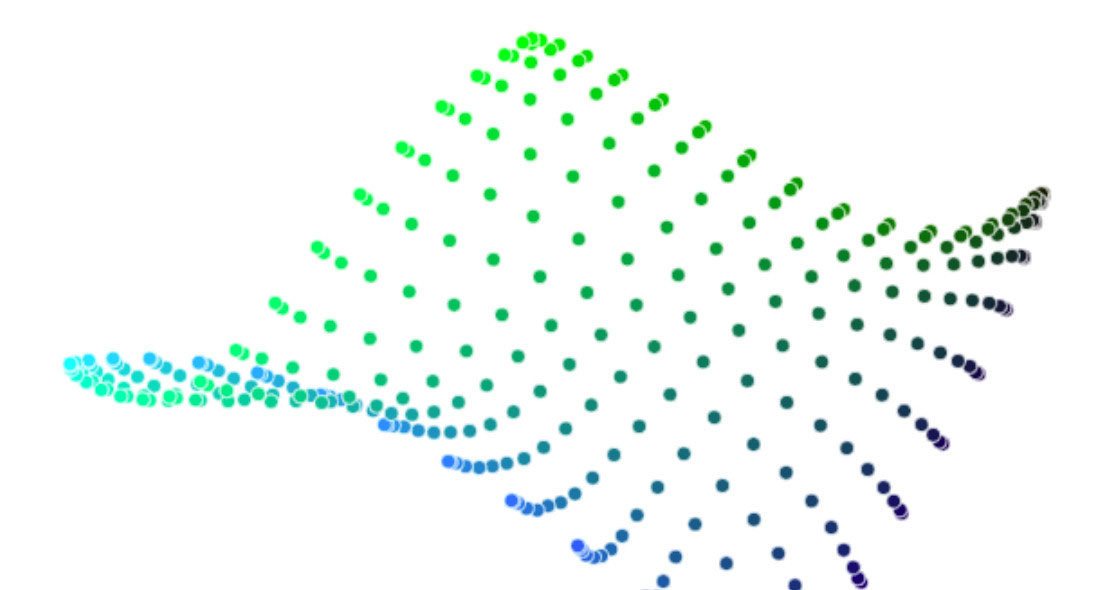
The perplexity 30 view shows the basic topology correctly, but again t-SNE greatly exaggerates the size of the smaller group of points. At perplexity 50, there’s a new phenomenon: the outer group becomes a circle, as the plot tries to depict the fact that all its points are about the same distance from the inner group. If you looked at this image alone, it would be easy to misread these outer points as a one-dimensional structure.

Conclusion

There’s a reason that t-SNE has become so popular: it’s incredibly flexible, and can often find structure where other dimensionality-reduction algorithms cannot. Unfortunately, that very flexibility makes it tricky to interpret. Out of sight from the user, the algorithm makes all sorts of adjustments that tidy up its visualizations. Don’t let the hidden “magic” scare you away from the whole technique, though. The good news is that by studying how t-SNE behaves in simple cases, it’s possible to develop an intuition for what’s going on.

FAQs

Q: What is t-SNE? A: t-SNE is a dimensionality reduction technique introduced by van der Maaten and Hinton in 2008.

Q: Why is t-SNE so popular? A: t-SNE is incredibly flexible and can often find structure where other dimensionality-reduction algorithms cannot.

Q: What are the hyperparameters in t-SNE? A: The hyperparameters in t-SNE include perplexity, which says how to balance attention between local and global aspects of your data.

Q: How do I interpret t-SNE plots? A: To interpret t-SNE plots, you need to understand how the algorithm behaves in simple cases and recognize patterns and noise.

Q: Can I always set perplexity to 50 to see global geometry? A: No, the perplexity value has to be adjusted based on the data set and the desired level of detail.

I’m an AI Tools Expert

0

Using AI to Augment My Workflow and Increase Productivity

As someone who tests AI tools as part of my work, I’ve had the opportunity to explore various AI-related technologies and see what they can do. In my line of work, I wear many hats, including running a small business with my wife, working with industry groups, and developing security software for WordPress users. I’m constantly working on projects, ranging from 3D printing to composing and publishing music.

ChatGPT Plus – $20/mo

I’ve found ChatGPT to be a very useful tool in my workflow. With ChatGPT Plus, I’ve essentially doubled my programming output. I use it to help me with common-knowledge programming, such as getting code examples and reverse engineering comments on various programming boards. I’ve also used it to research tasks, sometimes throwing math problems at it, and all sorts of other questions and problems I’m dealing with.

Midjourney – $10/mo

I’ve also had a lot of fun experimenting with Midjourney, which I use to generate images for my wife’s online business. I pay an extra $10/mo for Midjourney because it allows me to describe artist styles and lets me riff off a vast array of stylistic choices. DALL-E 3, which comes with my ChatGPT Plus fee, doesn’t present as much choice. I’ve found that Midjourney does a far better job of generating an image that incorporates elements of the hobby than DALL-E 3.

Photoshop Generative Fill – Honorable Mention

I pay for Adobe’s Creative Cloud suite, which includes Photoshop. While I don’t like paying for it, I’ve been using Photoshop since before there was generative fill, and it’s a product I use almost every day. I often use generative fill in concert with Midjourney and DALL-E 3.

Conclusion

As someone who uses AI tools to augment my workflow and increase productivity, I’ve found that ChatGPT Plus and Midjourney are essential tools in my arsenal. While I pay for other AI tools, these two are the only ones I use regularly.

FAQs

Q: Do you use any other AI tools besides ChatGPT Plus and Midjourney?
A: Yes, I use Adobe’s Creative Cloud suite, which includes Photoshop.

Q: Why do you pay for Adobe’s Creative Cloud suite?
A: Because I’ve been using Photoshop since before there was generative fill, and it’s a product I use almost every day.

Q: Have you tried any other AI image generation tools besides Midjourney and DALL-E 3?
A: Yes, I’ve tried other AI image generation tools, but Midjourney and DALL-E 3 are the only ones I use regularly.

Q: Do you recommend any AI tools that you didn’t mention in this article?
A: Yes, I recommend exploring other AI tools to find what works best for your specific needs.

Nvidia Touts Lower ‘Time-to-First-Train’ with DGX Cloud on AWS

Nvidia’s DGX Cloud on AWS: Simplifying Generative AI Development and Deployment

Customers have a lot of options when it comes to building their generative AI stacks to train, fine-tune, and run AI models. In some cases, the number of options may be overwhelming. To help simplify the decision-making and reduce that all-important time it takes to train your first model, Nvidia offers DGX Cloud, which arrived on AWS last week.

The Power of DGX Systems

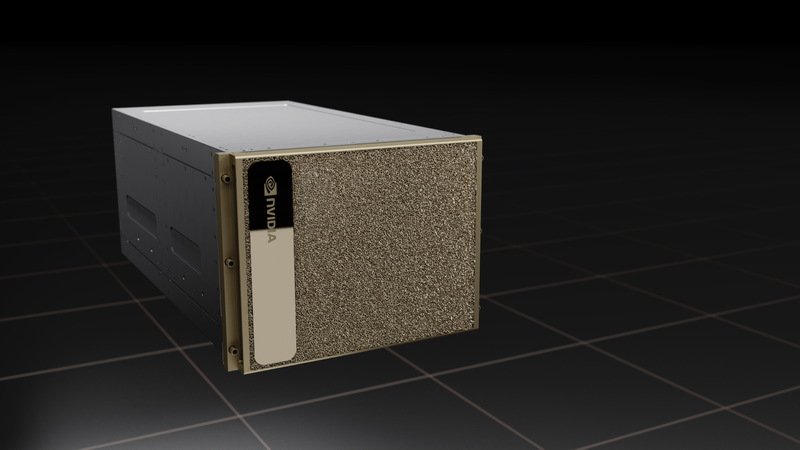
Nvidia’s DGX systems are considered the gold standard for GenAI workloads, including training large language models (LLMs), fine-tuning them, and running inference workloads in production. The DGX systems are equipped with the latest GPUs, including Nvidia H100 and H200s, as well as the company’s enterprise AI stack, like Nvidia Inference Microservices (NIMs), Riva, NeMo, and RAPIDS frameworks, among other tools.

DGX Cloud: A Managed Service for GenAI Development and Deployment

With its DGX Cloud offering, Nvidia is giving customers the array of GenAI development and production capabilities that come with DGX systems, but delivered via the cloud. It previously offered DGX Cloud on Microsoft Azure, Google Cloud, and Oracle Cloud Infrastructure, and last week at re:Invent 2024, it announced the availability of DGX Cloud on AWS.

Expertise and Support

Nvidia has a significant amount of experience building these AI pipelines on a variety of different types of infrastructure, and it shares that experience with customers through its DGX Cloud service. That allows it to cut down on the complexity the customer is exposed to, thereby accelerating the GenAI development and deployment lifecycle, said Alexis Bjorlin, the vice president of DGX Cloud at Nvidia.

Outcome-Based Capabilities

With DGX Cloud, Nvidia can also provide expert assistance in some of the finer aspects of model development, such as optimizing the training routines, Bjorlin said. Sometimes, customers want more efficient training, so they want to move from FP16 or BF16 to FP8. Maybe it’s the quantization of the data? How do you take and train a model and shard it across the infrastructure using four types of parallelism, whether it’s data parallel pipeline, model parallel, or expert parallel.

H100 GPUs on EC2 P5 Instances

With DGX Cloud running on AWS, Nvidia is supporting H100 GPUs running on EC2 P5 instances (in the future, it will be supported on the new P6 instances that AWS announced at the conference). That will give customers of all sizes the processing oomph to train, fine-tune, and run some of the largest LLMs.

Flexibility and Scalability

AWS has a variety of types of customers using DGX Cloud. It has a few very large companies using it to train foundation models, and a larger number of smaller firms fine-tuning pre-trained models using their own data, Bjorlin said. Nvidia needs to maintain the flexibility to accommodate all of them.

Conclusion

Nvidia’s DGX Cloud on AWS simplifies generative AI development and deployment by providing a managed service that offers the best of the best. With its expertise and support, customers can accelerate their GenAI development and deployment lifecycle, and achieve outcome-based capabilities. The flexibility and scalability of DGX Cloud make it an attractive option for customers of all sizes.

Frequently Asked Questions

Q: What is DGX Cloud?
A: DGX Cloud is a managed service offered by Nvidia that provides the array of GenAI development and production capabilities that come with DGX systems, but delivered via the cloud.

Q: What are the benefits of using DGX Cloud?
A: The benefits of using DGX Cloud include accelerating the GenAI development and deployment lifecycle, achieving outcome-based capabilities, and gaining expert assistance in model development.

Q: What types of customers use DGX Cloud?
A: AWS has a variety of types of customers using DGX Cloud, including large companies training foundation models and smaller firms fine-tuning pre-trained models using their own data.

Q: What is the flexibility and scalability of DGX Cloud?
A: The flexibility and scalability of DGX Cloud make it an attractive option for customers of all sizes, allowing them to accommodate their specific needs and scale up or down as needed.

Meta’s Instagram boss: Who posted something matters more in the AI age

0

In a series of Threads posts this afternoon, Instagram head Adam Mosseri says users shouldn’t trust images they see online because AI is “clearly producing” content that’s easily mistaken for reality. Because of that, he says users should consider the source, and social platforms should help with that.

The Concerns about AI-Generated Content

Mosseri writes, "Our role as internet platforms is to label content generated as AI as best we can," but he admits "some content" will be missed by those labels. Because of that, platforms "must also provide context about who is sharing" so users can decide how much to trust their content.

The Importance of Context

Just as it’s good to remember that chatbots will confidently lie to you before you trust an AI-powered search engine, checking whether posted claims or images come from a reputable account can help you consider their veracity. At the moment, Meta’s platforms don’t offer much of the sort of context Mosseri posted about today, although the company recently hinted at big coming changes to its content rules.

User-Led Moderation

What Mosseri describes sounds closer to user-led moderation like Community Notes on X and YouTube or Bluesky’s custom moderation filters. Whether Meta plans to introduce anything like those isn’t known, but then again, it has been known to take pages from Bluesky’s book.

Conclusion

In light of Mosseri’s concerns, it’s crucial for users to be cautious and critical when consuming online content. By thinking critically about the sources of the information we consume and being aware of the potential for AI-generated content, we can better navigate the online world.

FAQs

Q: What is AI-generated content?
A: AI-generated content refers to content created by artificial intelligence (AI) rather than humans.

Q: Why is AI-generated content a concern?
A: AI-generated content can be easily mistaken for reality, which can lead to the spread of misinformation and disinformation.

Q: What can users do to avoid falling prey to AI-generated content?
A: Users can check the source of the content they consume and be aware of the potential for AI-generated content. They can also use features such as fact-checking and verification tools to ensure the accuracy of the information they consume.

Accelerating LLMs with LLaMA on NVIDIA RTX Systems

0

Overview of Llama.cpp on RTX PCs

Llama.cpp is a popular open-source repository that provides a lightweight, efficient framework for large language model (LLM) inference, running across a range of hardware platforms, including RTX PCs. This article explains how llama.cpp on RTX PCs offers a compelling solution for building cross-platform or Windows-native applications that require LLM functionality.

What is Llama.cpp?

Llama.cpp is a C++ implementation for LLM inference, designed to optimize model performance and deploy efficiently on a wide range of hardware. It leverages the ggml tensor library for machine learning, making it extremely memory-efficient and ideal for local on-device inference.

Accelerated Performance on NVIDIA RTX

NVIDIA continues to collaborate on improving and optimizing llama.cpp performance when running on RTX GPUs, as well as the developer experience. Figure 1 shows NVIDIA internal measurements showcasing throughput performance on NVIDIA GeForce RTX GPUs using a Llama 3 8B model on llama.cpp. With the CUDA backend, users can expect ~150 tokens per second on the NVIDIA RTX 4090 GPU.

Ecosystem of Developers

A vast ecosystem of developer frameworks and abstractions are built on top of llama.cpp, offering a range of tools and abstractions for developers to further accelerate their application development journey. Popular tools include Ollama, Homebrew, and LMStudio, which extend and leverage the capabilities of llama.cpp under-the-hood.

Applications Accelerated with Llama.cpp on RTX Platform

Over 50 tools and apps are now accelerated with llama.cpp, including Backyard.ai, Brave, Opera, and Sourcegraph. These applications leverage llama.cpp to accelerate LLM models on RTX systems, providing a range of innovative AI-powered features and capabilities.

Conclusion

Llama.cpp on RTX PCs offers a compelling solution for building cross-platform or Windows-native applications that require LLM functionality. With its lightweight installation package, developers can leverage a C++ implementation for LLM inferencing and accelerate their AI workloads on GPUs.

FAQs

Q: What is llama.cpp?
A: Llama.cpp is a C++ implementation for LLM inference, designed to optimize model performance and deploy efficiently on a wide range of hardware.

Q: What is the ecosystem of developers building with llama.cpp?
A: A vast ecosystem of developer frameworks and abstractions are built on top of llama.cpp, offering a range of tools and abstractions for developers to further accelerate their application development journey.

Q: What applications are accelerated with llama.cpp on RTX platform?
A: Over 50 tools and apps are now accelerated with llama.cpp, including Backyard.ai, Brave, Opera, and Sourcegraph.

Q: How can I get started with llama.cpp on RTX AI PCs?
A: Learn more and get started with the llama.cpp on RTX AI Toolkit.