
Home Blog Page 503

Twirling Body Horror Exposes AI’s Flaws

0

A Viral Video of an Impossible Gymnast: The Surprising Insights into AI Video Generation

The Video that Went Viral

On Wednesday, a video from OpenAI’s newly launched Sora AI video generator went viral on social media, featuring a gymnast who sprouts extra limbs and briefly loses her head during what appears to be an Olympic-style floor routine.

The Video in Detail

In the video, we see a view of what looks like a floor gymnastics routine taking place at an Olympics-like sporting event. The subject of the video flips and flails as new legs and arms rapidly and fluidly emerge and morph out of her twirling and transforming body. At one point, about 9 seconds in, she loses her head, and it reattaches to her body spontaneously.

The Reaction and Context

The video inspired plenty of reaction jokes, such as this reply to a similar post on Bluesky: "hi, gymnastics expert here! this is not funny, gymnasts only do this when they’re in extreme distress." We reached out to Deedy Das, the venture capitalist who originally shared the video on X, and he confirmed that he generated the video using Sora.

The Prompt and the Process

Das provided the prompt, which was very long and split into four parts, generated by Anthropic’s Claude, using complex instructions like "The gymnast initiates from the back right corner, taking position with her right foot pointed behind in B-plus stance." Das also shared his experience with text-to-video models, stating that they struggle with complex physics movements like gymnastics.

Lessons Learned from the Video

Das’ experiment with Sora highlights the limitations of current AI video generation technology. "I’ve known for the last 6 months having played with text to video models that they struggle with complex physics movements like gymnastics," he said. "I had to try it [in Sora] because the character consistency seemed improved. Overall, it was an improvement because previously… the gymnast would just teleport away or change their outfit mid-flip, but overall it still looks downright horrifying."

Conclusion

The viral video of an impossible gymnast generated by OpenAI’s Sora AI video generator offers a glimpse into the limitations of current AI video generation technology. While the video may have been intended as a humorous experiment, it inadvertently provides valuable insights into the challenges of generating realistic and coherent video content.

FAQs

Q: What is Sora AI video generator?
A: Sora is a newly launched AI video generator from OpenAI.

Q: What is the purpose of the video?
A: The video is an experiment to demonstrate the limitations of current AI video generation technology.

Q: What are the limitations of current AI video generation technology?
A: Current AI video generation technology struggles with complex physics movements like gymnastics, resulting in nonsensical synthesis errors.

Accelerating Reality Capture Workflows with AI and NVIDIA RTX

0

Reality Capture: Enhancing Interactions with the Physical World

Reality Capture Basics

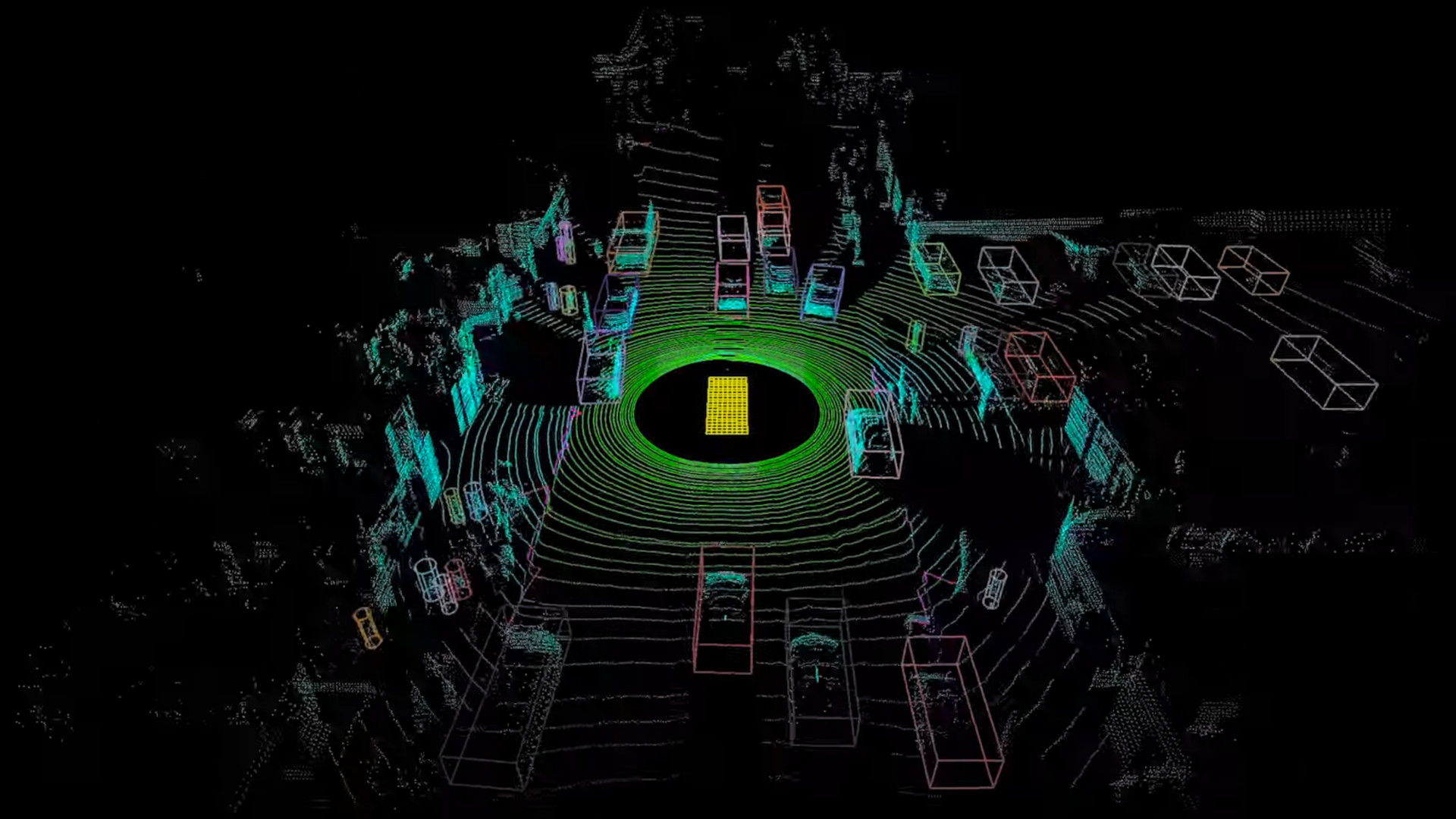
The reality capture process begins with scanning or photographing a physical environment, which is then processed through photogrammetry or Lidar to generate a point cloud—a dense collection of data points that represent precise 3D surface locations. This point cloud is often converted into a 3D model, providing a detailed virtual representation of the physical space.

Photogrammetry

Photogrammetry is a technique that uses photographic images to extract detailed spatial information about physical objects, including their distances, dimensions, shapes, and exact positions in space. By analyzing angles, overlaps, and perspectives from multiple viewpoints, photogrammetry can create point clouds, which are then converted to highly detailed 3D models.

Lidar

Lidar (light detection and ranging) technology uses laser pulses to measure distances and create precise 3D models of environments by calculating the time it takes for light to reflect back from surfaces. It offers unparalleled accuracy in capturing detailed spatial data over large areas, even in challenging lighting conditions.

Point Clouds and 3D Meshes

Point clouds and 3D meshes are essential elements of reality capture, converting raw data from Lidar or photogrammetry into detailed, accurate virtual models. Point clouds consist of dense collections of points mapping precise 3D surface locations, which are often converted into 3D meshes that form continuous, textured surfaces for more realistic representations.

Choosing the Right Reality Capture Technology

Choosing the right reality capture technology depends on your project’s specific needs. Lidar is the go-to for high-resolution, detailed spatial data, making it ideal for large-scale surveying, complex sites, and environments where precision is paramount. Photogrammetry excels in capturing detailed color data, particularly useful in architectural documentation and cultural heritage preservation.

Enhancing Workflows with CUDA and NVIDIA RTX

To handle the massive datasets typically involved with reality capture, CUDA accelerates the processing of Lidar point clouds and photogrammetric data by leveraging parallel computing, significantly reducing the time required for data conversion, visualization, and analysis.

NeRFs and Gaussian Splatting

NeRFs are transforming 3D scene synthesis by using machine learning to generate highly detailed and realistic views from a vastly reduced number of 2D images compared to traditional photogrammetry. NeRFs can interpolate between sparse data points, creating smooth, photorealistic scenes even from angles that weren’t originally captured.

AI for Reality Capture

AI is transforming reality capture by significantly improving object identification, segmentation, and 3D reconstruction processes. Startups like Hover are leading the charge in using AI to generate detailed 3D models of buildings, enhancing the accuracy and efficiency of structural analysis and categorization.

Conclusion

NVIDIA development tools enable software developers to significantly accelerate reality capture workflows and embed AI pipelines for object identification, segmentation, classification, and 3D reconstruction. These innovations streamline processes, improve accuracy, and expand the potential of reality capture.

FAQs

Q: What is reality capture?
A: Reality capture is the process of creating digital representations of physical environments through scanning or photographing and processing the data into point clouds and 3D models.

Q: What are the advantages of using Lidar technology?
A: Lidar technology offers unparalleled accuracy in capturing detailed spatial data over large areas, even in challenging lighting conditions.

Q: How does AI enhance reality capture?
A: AI transforms reality capture by improving object identification, segmentation, and 3D reconstruction processes, streamlining workflows, and enhancing accuracy.

Q: What are NeRFs and Gaussian splatting?
A: NeRFs are machine learning-based techniques for generating highly detailed and realistic views from reduced 2D images, while Gaussian splatting is an efficient technique for real-time rendering of 3D surfaces or volumes.

Q: What is the role of NVIDIA in reality capture?
A: NVIDIA is at the forefront of integrating AI with reality capture, driving technological advancements with powerful GPUs, software solutions, and cutting-edge research.

Samsung Mixed-Reality Headset

0

Samsung Announces Mixed-Reality Headset and Android XR Platform

Introducing the Future of XR

Samsung has recently announced an exciting development in the world of mixed reality (MR) with the unveiling of its MR headset and the launch of a new Android XR platform in collaboration with Google and Qualcomm, set to launch in 2025.

What is XR?

XR is an umbrella term that encompasses various technologies that combine digital elements to extend or alter our reality by merging the physical and digital worlds. This concept has been expanding the boundaries of what is possible with spatial displays, such as the XREAL One series, and virtual reality headsets.

Android XR Platform

The new Android XR platform is a significant milestone in the development of XR technology. This platform will merge a range of experiences from the Galaxy ecosystem and Google’s suite of apps, including exploring the world through Google Maps or watching football games on YouTube. The platform is designed to be compatible with both VR headsets and AR smart glasses.

Game-Changing Capabilities

The Android XR platform boasts cutting-edge capabilities, including voice commands and natural conversation, allowing users to interact without the need for gestures or a controller. This innovative technology will revolutionize the way we engage with digital content.

Mixed-Reality Headset

Samsung has also unveiled its MR headset, code-named "Project Moohan," which features game-changing state-of-the-art displays and spatialized app formats that can take advantage of virtual spaces. The headset is lightweight and ergonomically optimized for comfort, making it suitable for wearability.

Conclusion

The introduction of the Android XR platform and MR headset marks a significant milestone in the development of XR technology. With its potential to revolutionize the way we interact with digital content, this technology is poised to change the landscape of entertainment, education, and beyond.

Frequently Asked Questions

Q: What is XR?
A: XR is an umbrella term that encompasses various technologies that combine digital elements to extend or alter our reality by merging the physical and digital worlds.

Q: What is the Android XR platform?
A: The Android XR platform is a new platform that combines a range of experiences from the Galaxy ecosystem and Google’s suite of apps, designed to be compatible with both VR headsets and AR smart glasses.

Q: What are the capabilities of the Android XR platform?
A: The platform features voice commands and natural conversation, allowing users to interact without the need for gestures or a controller.

Q: When is the Android XR platform launching?
A: The Android XR platform is set to launch in 2025.

Q: What is the mixed-reality headset like?
A: The MR headset, code-named "Project Moohan," features game-changing state-of-the-art displays and spatialized app formats, and is designed to be lightweight and ergonomically optimized for comfort.

Halla Boi

0

Friday, the day to tie up loose strings

By Mercy
Dec 13

The day has finally arrived, and it’s time to tie up those loose strings. As the week comes to a close, it’s essential to review what’s been accomplished and what still needs attention. In this article, we’ll explore the importance of wrapping up loose ends and provide tips on how to do so effectively.

Why Tying Up Loose Strings Matters

Tying up loose strings is crucial for maintaining a sense of control and organization. It helps to:

  • Reduce stress and anxiety by clearing up cluttered tasks and to-do lists
  • Improve focus and productivity by prioritizing what’s truly important
  • Enhance creativity and problem-solving skills by tackling nagging issues head-on
  • Foster a sense of accomplishment and satisfaction by completing tasks and projects

How to Tie Up Loose Strings

  1. Review Your Tasks and To-Dos
    Take some time to review your task list, to-do list, or project deadlines. Identify what’s been completed, what’s still pending, and what needs attention.
  2. Prioritize and Focus
    Prioritize your tasks and focus on the most critical ones first. Use the Eisenhower Matrix to categorize tasks into urgent vs. important.
  3. Break Down Large Tasks
    Break down large tasks into smaller, manageable chunks. This will help you tackle them one by one, making it easier to make progress.
  4. Use a Calendar or Planner
    Use a calendar or planner to schedule your tasks and deadlines. This will help you stay organized and on track.

Additional Tips

  • Set aside dedicated time for tying up loose strings, whether it’s at the end of the week or month.
  • Use a "Someday" list for tasks that don’t have a deadline, but are still important to consider.
  • Celebrate your accomplishments and acknowledge the progress made.

Frequently Asked Questions

Q: What is the best way to tie up loose strings?
A: The best way to tie up loose strings is to review your tasks and to-do lists, prioritize, and focus on the most critical ones first.

Q: How often should I tie up loose strings?
A: It’s recommended to tie up loose strings at the end of the week or month, depending on your schedule and preferences.

Q: What if I’m unable to tie up all loose strings?
A: Don’t stress if you can’t tie up all loose strings. Prioritize the most critical ones and address the rest in the next cycle.

I’ve Upgraded My Apple Watch SE 2

0

Should I Upgrade to the Apple Watch 10?

A Tempting Offer

I’ve never felt the need for more than the basic Apple Watch. I have the SE model and have been in and out of love with it over the last two years. Of course, the newer models always have shinier features, but besides fitness tracking, I never felt I need them. However, the Apple Watch 10 is currently at its lowest price of $329 at Amazon, and I’m seriously considering upgrading before Christmas.

A No-Brainer

The full price of the SE was $249 when released, which means the current discount of $70 off the full price is a no-brainer. With this extra discount, you get a bunch of extra features to play with – including a bigger, 40% brighter OLED screen, speakers, and better battery life.

What’s New in the Apple Watch 10?

For more on the differences between the Apple Watch SE and the Apple Watch 10, see our Apple Watch generations guide. But to summarize, the Apple Watch 10 offers:

  • A bigger, 40% brighter OLED screen
  • Speakers
  • Better battery life
  • Additional features like fall detection and ECG readings

Conclusion

If you’re due for an upgrade or just want to take advantage of the discount, now is the perfect time to consider the Apple Watch 10. With a full price of $249 and a current discount of $70, it’s a great value for the features and technology you get.

Frequently Asked Questions

Q: What is the difference between the Apple Watch SE and the Apple Watch 10?
A: The Apple Watch 10 has a bigger, 40% brighter OLED screen, speakers, and better battery life, while the Apple Watch SE is more basic.

Q: Is the $70 discount a good deal?
A: Yes, considering the full price of the SE was $249 and the current price of the Apple Watch 10 is $329, the discount is a great value.

Q: What are the benefits of upgrading to the Apple Watch 10?
A: The Apple Watch 10 offers a bigger, brighter screen, speakers, and better battery life, making it a great upgrade for those who want more features and functionality.

Unlocking Procreate’s Color and Light Secrets

0

Magic in Illustration: Creating a Whimsical Witch

01. Finding Inspiration and Creating Thumbnails

My initial idea was to create a drawing of a young witch in the midst of her studies. After researching, I figured out which magical items would be essential in her room. Start by sketching a quick thumbnail and testing different color options. To make it easier to adjust colors later, create each one on a separate layer, allowing you to use the ‘Hue, Saturation, Brightness’ option in Adjustments.

02. Making a Rough Sketch of Your Image

Use Procreate’s Symmetry tool, turning on Drawing Guide under Actions > Canvas and then selecting Symmetry in the edit options. Ensure the layer you’re drawing on has the Drawing Assist option enabled.

03. Drawing the Line-Art

Lower the Opacity of the sketch to 10-20% and then draw detailed line-art over it. While it’s sufficient to just refine the previous sketch, I prefer to redraw it from scratch. Initially, create each element on a separate layer, making it easier to move or resize elements later. Make the outer lines of larger objects thicker to improve the image’s readability, while the background lines are the thinnest.

04. Separating the Foreground from the Background

Flatten all the sketch layers by pinching them with the ‘Merge’ tool. Render the other objects in the foreground in a similar way, keeping in mind that the light source is in the center. Paint the elements closer to the edges darker. I colored all the magical objects, except for the book, in similar shades of turquoise and pink to maintain consistency. At this stage, you can freely move between the different elements and treat the entire foreground as a whole.

05. Adding Magical Details

Before adding some magical elements to the image, take your time to enjoy drawing the details. I decorated the hat and cloak with constellations, added freckles to the character’s face, and enhanced textures in other areas with extra lines. With the constellations drawn, I created a mask on the layer and gently masked out some sections with the airbrush and black color to make the texture more natural.

06. Building the Atmosphere

To create the magical effect and the candlelight, use the Add or Color Dodge modes. You can make abstract shapes and erase them inside with the airbrush eraser to make them transparent. After that, gently blur the spell above the book using the Gaussian Blur tool found in Adjustments. Next, draw some intricate swirls and embellish them with magical dots, stars, or little circles. Magic!

07. Wrapping Up with Post-Processing

After finishing the illustration, copy it into a separate file and flatten all the layers by grouping them and choosing Flatten, then gently increase the contrast using Curves, found under Adjustments. Finally, apply a slight Chromatic Aberration effect, at no more than 3%, and add grain with Noise set to Multi.

Conclusion:

In this tutorial, we explored the process of creating a whimsical witch illustration using Procreate. From finding inspiration and creating thumbnails to adding magical details and building the atmosphere, we covered various techniques to achieve a captivating image. With these steps, you can create your own enchanting illustrations and bring your imagination to life.

FAQs:

  • What is the best way to start an illustration?
    • Begin with research and brainstorming to get inspired, then create a thumbnail to test different color options.
  • How do I achieve a symmetrical image in Procreate?
    • Use the Symmetry tool, turning on Drawing Guide under Actions > Canvas and selecting Symmetry in the edit options.
  • What is the best way to add magical details to an illustration?
    • Take your time to enjoy drawing the details, adding constellations, freckles, and textures to create a whimsical and enchanting image.

What is Google’s Project Mariner?

0

Google’s Project Mariner: A Research Prototype for Human-Agent Interactions

What is Project Mariner?

Project Mariner is a research prototype built on Google’s Gemini 2.0 that explores human-agent interactions. It can automate tasks in your browser, acting like an AI agent by carrying out tasks delegated to it on the web for you.

How Does it Work?

Project Mariner lives in the web browser as an experimental Chrome extension and understands the contents of your screen, including images, code, forms, and more. On the right-hand window, you can type into the chatbot whatever task you want the agent to perform for you. Once it understands your query, Mariner will navigate websites on your behalf in real-time, reason through what it needs to do to carry out your task, and give you a view of its plan before making a process.

Demo and Evaluation

In a Google demo, the user has a Google Sheet open with four companies listed. Then, to find the contact information for each, the user asks the extension to do so instead of looking each one up for themselves. They ask Mariner to "Memorize this list of companies. Then, find their websites and look up a contact email I can use to reach them. Remember these so I can use them later." The agent shows step-by-step how it plans to tackle the prompt while navigating the web so the user can see its reasoning process.

Project Mariner scored 83.5% working as a single agent setup when evaluated against the WebVoyager benchmark.

Safety and Supervision

The agent only works in the active tab, never in the background, and Google recommends there always be human supervision. Before performing sensitive actions, like placing an order, Mariner asks for user confirmation. Google reassures users that it’s actively researching new types of risks and mitigations to make sure the tool is built responsibly.

Availability and Future

Since Mariner is still in its early phases, the extension is only available to a small group of trusted testers, but you can sign up for the trusted tester waitlist on the Project Mariner site. Until all users are given access, you can find many other AI experiments on Google Labs that are available today.

Conclusion

Project Mariner is an innovative research prototype that explores the possibilities of human-agent interactions. With its ability to automate tasks in your browser, it has the potential to revolutionize the way we interact with the web. While it’s still in its early stages, it’s exciting to think about the possibilities that Mariner could bring in the future.

FAQs

Q: What is Project Mariner?
A: Project Mariner is a research prototype built on Google’s Gemini 2.0 that explores human-agent interactions.

Q: How does Project Mariner work?
A: Project Mariner lives in the web browser as an experimental Chrome extension and understands the contents of your screen. You can type into the chatbot whatever task you want the agent to perform for you.

Q: Is Project Mariner available to the public?
A: No, Project Mariner is only available to a small group of trusted testers. You can sign up for the trusted tester waitlist on the Project Mariner site.

Q: Is Project Mariner safe?
A: Google is actively researching new types of risks and mitigations to make sure the tool is built responsibly. The agent only works in the active tab, never in the background, and recommends there always be human supervision.

Make Friends with AI

Key points:

Resistance is Futile: Embracing AI in Education

AI as a 24/7 Personalized Tutor and Mentor

My first-year college students have a narrow perspective of AI. They view it as a tool for cheating rather than for supporting their learning. As a professor, I believe AI can be a powerful tool for students to use daily, providing 24/7 support for their academic success.

A Typology for Using AI

There is a spectrum of possibilities for using AI, ranging from complete rejection to complete acceptance. I propose a typology for understanding the different levels of AI use, from cognitive autonomy to cognitive outsourcing. The middle ground, I argue, is where the most important aspects of AI use lie.

Levels of AI Use

  • Cognitive Autonomy: No AI use
  • Cognitive Offloading through Scaffolding: AI-assisted support for key writing processes
  • Cognitive Offloading through a Cognitive Apprenticeship: AI-assisted support for demonstrating key writing processes
  • Cognitive Outsourcing: Full AI writing

AI-Assisted Support as Scaffolding

Students need guidance, and AI can provide that support. By using AI, students can brainstorm, focus, and develop their ideas more effectively. "I didn’t really know where to start," wrote one student, "and ChatGPT helped me think about questions, and I was able to start planning what I wanted to do based on the different options."

AI-Assisted Support as a Cognitive Apprenticeship

As students delve deeper into complex topics, they need to learn how to think critically and contextually. AI can assist by providing step-by-step guidance, helping students see what good thinking looks like. "The outlines helped me from getting too stuck on small details and reminded me to think about the big picture," said one student.

Key Prompts for AI-Assisted Support

  • Brainstorming: "What do I want to write about?"
  • Keyword Generation: "What are the key ideas?"
  • Feedback: "Am I making the right argument?"
  • Thesis Generation: "What’s my key argument?"
  • Outlining: "How do I organize my thoughts?"

Looking Ahead

While the future of AI in education is uncertain, one thing is clear: we must learn to embrace AI as a tool for supporting student learning. "I didn’t realize that ChatGPT is actually there for me to use as a teaching assistant," said one student. "I feel confident that the work I complete with ChatGPT will not get me into trouble, because I know how to use it as an assistant rather than a replacement."

FAQs

Q: Is AI a tool for cheating?
A: No, AI is a tool for supporting student learning, not cheating.

Q: How do you use AI in your teaching?
A: I use AI to provide scaffolding and cognitive apprenticeship for my students.

Q: Is AI suitable for all students?
A: Yes, AI can be used by all students, regardless of their skill level or subject area.

Q: Can AI replace human teachers?
A: No, AI is meant to augment human teaching, not replace it.

Future of ChatGPT

0

A "Weird" Name and a Scrappy Start

ChatGPT was effectively born in December 2021 with an OpenAI project dubbed WebGPT: an AI tool that could search the internet and write answers. The team took inspiration from WebGPT’s conversational interface and began plugging a similar interface into GPT-3.5, a successor to the GPT-3 text model released in 2020. They gave it the clunky name "Chat with GPT-3.5" until, in what Turley recalls as a split-second decision, they simplified it to ChatGPT.

The name could have been the even more straightforward "Chat," and in retrospect, he thinks perhaps it should have been. "The entire world got used to this odd, weird name, we’re probably stuck with it. But obviously, knowing what I know now, I wish we picked a slightly easier to pronounce name," he says. (It was recently revealed that OpenAI purchased the domain chat.com for more than $10 million of cash and stock in mid-2023.)

Scaling Up

Only days after Turley tells me this, ChatGPT did get a new $200 price tag for a pro tier that includes access to a specialized reasoning model. Its main $20 Plus tier is sticking around, but it’s clearly not the ceiling for what OpenAI thinks people will pay.

ChatGPT and other OpenAI services require vast amounts of computing power and data storage to keep its services running smoothly. On top of the user base OpenAI has gained through its own products, it’s poised to reach millions more people through an Apple partnership that integrates ChatGPT with iOS and macOS.

The Future of ChatGPT

For Turley and others, this is where the stakes will get particularly steep. Agents could make AI far more useful by moving what it can do outside the chatbot interface. The shift could also grant these tools an alarming level of access to the rest of your digital life.

"I’m really excited to see where things go in a more agentic direction with AI," Kim tells me. "Right now, you go to the model with your question, but I’m excited to see the model more integrated into your life and doing things proactively, and taking actions on your behalf."

The Goal of ChatGPT

The goal of ChatGPT isn’t to be just a chatbot, says Fedus. As it exists today, ChatGPT is "pretty constrained" by its interface and compute. He says the goal is to create an entity that you can talk to, call, and trust to work for you. Fedus thinks systems like OpenAI’s "reasoning" line of models, which create a trail of checkable steps explaining their logic, could make it more reliable for these kinds of tasks.

The Road Ahead

Turley says that, contrary to some reports, "I don’t think there’s going to be such a thing as an OpenAI agent." What you will see is "increasingly agentic functionality inside of ChatGPT," though. "Our focus is going to be to release this stuff as gradually as possible. The last thing I want is a big bang release where this stuff can suddenly go out and do things over hours of time with all your stuff."

Conclusion

By ChatGPT’s third anniversary next year, OpenAI will probably look a lot different than it does today. The company will likely raise billions more dollars in 2025, release its next big "Orion" model, face growing competition, and have to navigate the complexity of a new US president and his AI czar.

Frequently Asked Questions

Q: What is the goal of ChatGPT?
A: The goal of ChatGPT isn’t to be just a chatbot, but to create an entity that you can talk to, call, and trust to work for you.

Q: What is the future of ChatGPT?
A: The future of ChatGPT is to be an entity that can perform complex, multistep tasks autonomously, such as making phone calls and placing food orders.

Q: Will OpenAI create an "agent"?
A: No, OpenAI does not plan to create an "agent." Instead, it will release increasingly agentic functionality inside of ChatGPT.

Q: What is the timeline for ChatGPT’s development?
A: By 2024, OpenAI will likely raise billions more dollars, release its next big "Orion" model, and face growing competition.

UK’s Ambitions to Police AI Clash with Trump’s Approach

UK’s AI Ambitions Hit by US Delays and Trump’s Protectionist Approach

UK’s AI Safety Institute Faces Challenges

The UK’s ambitions of taking a central role in policing artificial intelligence globally have been hit by its struggles to launch an outpost in the US and an incoming Trump administration that is threatening to take a "starkly" different approach to AI regulation.

Delayed Expansion Plans

The British government is looking to bolster its AI Safety Institute (AISI), established last year with a £50mn budget and 100 staff, as it seeks to solidify its position as the world’s best-resourced body investigating the risks around AI. Leading tech companies including OpenAI and Google have allowed the AISI to test and review their latest AI models. However, plans to expand further by opening a San Francisco office in May were delayed due to elections in both the US and UK and difficulty recruiting for the Silicon Valley outpost, according to people with knowledge of the matter.

Focusing on National Security

In an effort to maintain its influence, people close to the UK government believe it will increasingly position the AISI as an organisation focused on national security, with direct links to intelligence agency GCHQ. Amid a tense period of relations between the UK’s left-leaning Labour government and the incoming US administration, some believe the AISI’s security work could function as a powerful diplomatic tool.

Trump’s Protectionist Approach

The increasing emphasis reflects changing priorities in the US, home to the world’s leading AI companies. President-elect Donald Trump has vowed to cancel President Joe Biden’s executive order on artificial intelligence, which established a US AI Safety Institute. Trump is also appointing venture capitalist David Sacks as his AI and crypto tsar, with tech investors known to be concerned about the overregulation of AI start-ups.

UK’s Plan to Put AISI on Statutory Footing

The UK government also plans to put its AISI on a statutory footing. Leading companies, including OpenAI, Anthropic and Meta have all volunteered to grant AISI access to new models for safety evaluations before they are released to businesses and consumers. Under the proposed UK legislation, those voluntary commitments would be made mandatory.

Challenges and Conflicts

Despite these links, there have been points of conflict with AI companies. The AISI has complained it was not given enough time to test models before they were released, as the tech companies raced each other to launch their latest offerings to the public. However, Google, OpenAI, and Anthropic were among those who welcomed its work.

Conclusion

The UK’s AI Safety Institute faces significant challenges as it seeks to establish itself as a global leader in AI regulation. The delayed expansion plans and the incoming Trump administration’s protectionist approach to AI regulation threaten to undermine the UK’s ambitions. However, the UK government’s plan to put the AISI on a statutory footing and its focus on national security could help maintain its influence in the global AI landscape.

FAQs

Q: What is the UK’s AI Safety Institute?
A: The UK’s AI Safety Institute (AISI) is a government-funded body established to investigate the risks around artificial intelligence.

Q: What is the purpose of the AISI?
A: The AISI aims to identify and mitigate the risks associated with AI, ensuring that the technology is developed and used safely and responsibly.

Q: Who has access to the AISI’s research?
A: The AISI’s research is publicly available, and leading companies including OpenAI, Anthropic, and Meta have volunteered to grant the institute access to new models for safety evaluations before they are released to businesses and consumers.

Q: What is the UK government’s plan for the AISI?
A: The UK government plans to put the AISI on a statutory footing, making the voluntary commitments of leading companies mandatory.