Home Blog Page 521

A Designer’s Fix for the Jaw-Dropping New Jaguar Logo

0

The Controversial Jaguar Logo Redesign: A Designer’s Attempt to "Fix" the Issue

The New Jaguar Logo: A Source of Controversy

By now, you’ve probably seen the new Jaguar logo as well as the controversial Jaguar Type 00 EV design concept. A large section of the public seems to have taken almost personal offence to both (whether they’re in the target market or not). So it’s perhaps not surprising that a designer’s attempt to "fix" the logo has gone viral.

The Viral Redesign

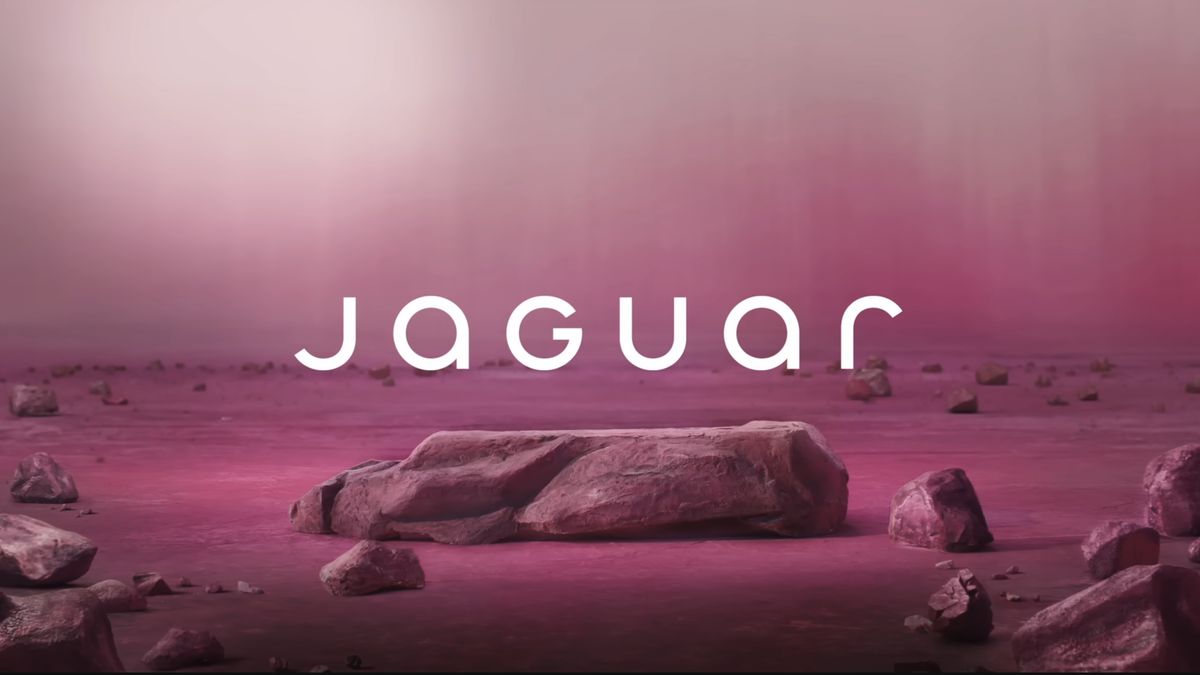
In fact, Allan Peters’ TikTok video has picked up more views and likes than much of Jaguar’s own social media content on its rebrand. But is it a better design? To recap, let’s take a look at the new Jaguar logo again.

The Original Logo: A Source of Criticism

There’s a lot of things that can be criticised about the new Jaguar logo. The wide kerning, the random uppercase ‘G’ in the middle of lowercase letters. These are hardly things unique to Jaguar, but with such a historic car brand, people seem to expect that the logo should be… historic. That is, that they should retain a nod to their legacy even if they aim to look more modern.

A New Design: A Different Approach

So, let’s take a look at Peter’s viral Jaguar logo redesign on TikTok:

@petersdesigncompany
♬ original sound – Allan Peters

Peters, who runs Peters Design Company, makes the same criticisms of the new Jaguar logo that we’ve heard from many. For his redesign, he turns to the one symbol that remains from Jaguar’s past, the South American big cat itself. He reworks the redesigned cat from the official logo to "fix the geometry" and also comes up with a new logotype with typography that he thinks fits Jaguar’s aim to communicate a forward-looking vision and its focus on electric vehicles while maintaining brand equity. And, of course, he ditches the new Miami pink brand and London Blue brand colours to return to the classic British racing green.

The Verdict

Given the vehemence of reactions to the Jaguar rebrand, it’s not surprising that Peter’s "fix" has gone down a storm on TikTok. The video has picked up close to 128K likes. In comparison, Jaguar’s own TikTok video on the Type 00 reveal received just 741 likes. It’s best-performing post on Instagram about the launch received 87K.

Conclusion

While Peter’s redesign has its merits, it’s not entirely convincing. The return to racing green, while a nod to the brand’s heritage, may not be the right direction for a brand looking to move forward. The logotype, while well-crafted, gives off Tesla or Skoda vibes, which may not be what Jaguar is aiming for with its bold new look.

FAQs

Q: Is the new Jaguar logo a success?
A: The jury is still out, as the reaction to the rebrand has been largely negative.

Q: What do designers think of the new logo?
A: Many designers, including Allan Peters, have criticized the new logo for its lack of heritage and poor typography.

Q: What is the purpose of the new logo?
A: The new logo is meant to signal Jaguar’s shift towards electric vehicles and its future-forward approach.
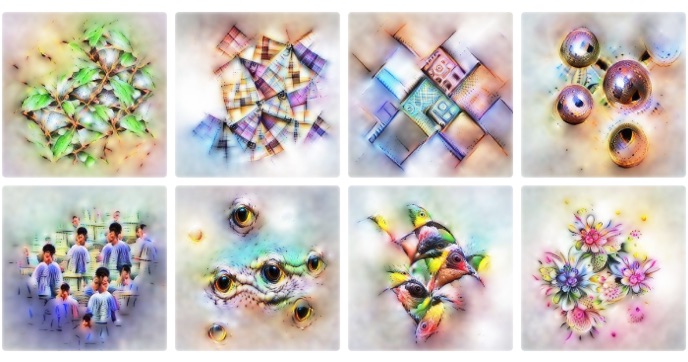
Image Parameterizations

Neural networks trained to classify images have a remarkable — and surprising! — capacity to generate images.
Techniques such as DeepDream , style transfer, and feature visualization leverage this capacity as a powerful tool for exploring the inner workings of neural networks, and to fuel a small artistic movement based on neural art.

All these techniques work in roughly the same way.
Neural networks used in computer vision have a rich internal representation of the images they look at.
We can use this representation to describe the properties we want an image to have (e.g. style), and then optimize the input image to have those properties.
This kind of optimization is possible because the networks are differentiable with respect to their inputs: we can slightly tweak the image to better fit the desired properties, and then iteratively apply such tweaks in gradient descent.

Differentiable Parameterizations

1:
As long as an
image para­meter­ization
is differ­entiable, we can back­propagate
( )
through it.

Spotify Wrapped: Your Year in Music

Spotify Wrapped AI: A New Era of Music Personalization

The Evolution of Spotify Wrapped

The music you listen to reflects your emotions, life phases, and tastes. As a result, every year, Spotify users eagerly await their Spotify Wrapped results, which showcase their most-played artists, songs, albums, and podcasts of the year. Now, the experience is here, and it comes with a major AI upgrade.

Introducing My Wrapped AI Podcast

On Wednesday, Google and Spotify unveiled a new "My Wrapped AI Podcast," featuring two NotebookLM hosts discussing — or "unwrapping" — your music listening results from the previous year. The unique conversation is generated to discuss your specific results and musical tastes.

How it Works

The technology powering the feature is Google’s NotebookLM Audio Overviews, the AI tool that has gone viral for transforming notes into engaging podcasts. Some popular use cases for the tool include discussing complex research papers or class notes because the AI streamlines complex material into an interesting and informal conversation.

Availability and Limitations

The Wrapped AI Podcast is available for free and premium Spotify users in the US, UK, Australia, New Zealand, Canada, Ireland, and Sweden for a limited time. To access it, visit your Wrapped feed on the Spotify homepage or visit this link and tap "Your Wrapped AI podcast." Google warns that the AI hosts may occasionally mispronounce words or not generate an in-depth overview as expected, due to the unpredictability of AI models.

New Features

Other new, non-AI-related features are coming to Spotify Wrapped, such as Your Music Evolution data story, which showcases up to three musical phases that define your year in music. You will also receive a Music Evolution Playlist that can be found on the Wrapped feed on the home page. The playlist includes your musical phases throughout the year, as well as new songs that Spotify thinks you will be interested in based on your picks.

Longest Listening Streak and Top Listeners

To help you identify whether you are a superfan, Spotify will now show you the artist you enjoyed the most in the year with a "longest listening streak" feature that shows how many days in a row you listened to an artist. This will be shared along with the classic "Top Listeners" feature that shows what percentage of listeners you are in for your favorite artists.

Artist Clips and Podcaster Clips

Lastly, Artist Clips and Podcaster Clips will offer you short messages from your favorite artists, including the top artists at the moment, such as Peso Pluma, Billie Eilish, Sabrina Carpenter, and more.

Conclusion

Spotify Wrapped AI is a game-changer for music lovers, offering a unique and personalized experience that showcases your musical tastes and preferences. With the introduction of My Wrapped AI Podcast, you can now engage with your music in a whole new way, and discover new artists and songs based on your listening habits.

FAQs

Q: Is the Wrapped AI Podcast available globally?
A: No, the Wrapped AI Podcast is currently available for free and premium Spotify users in the US, UK, Australia, New Zealand, Canada, Ireland, and Sweden.

Q: Will the AI hosts always generate an in-depth overview?
A: No, due to the unpredictability of AI models, the AI hosts may occasionally mispronounce words or not generate an in-depth overview as expected.

Q: Can I access the Wrapped AI Podcast on my Wrapped feed?
A: Yes, you can access the Wrapped AI Podcast by visiting your Wrapped feed on the Spotify homepage or by visiting this link and tapping "Your Wrapped AI podcast".

Q: Are there any new non-AI-related features coming to Spotify Wrapped?
A: Yes, Spotify Wrapped will also include new features such as Your Music Evolution data story, Music Evolution Playlist, Longest Listening Streak, and Top Listeners.

Installing Fonts on Mac: A Step-by-Step Guide

0

Typography: How to Download and Install Fonts on Your Mac

01. Find the right font

You might already have a font in mind that you want to download, but if you’re just browsing, Adobe Fonts, DaFont, Creative Market, and MyFonts are the best places to find a range of typefaces. Access to Adobe Fonts is included with Adobe subscriptions, and all fonts are excellently crafted and cleared for professional use, while DaFont is free and many are only available for personal use. Creative Market and MyFonts feature a range of professional, well-known fonts to buy and download at standard pricing.

02. Download the font

Whatever website you find your font on, there will be a Download button either already or after buying. Click this and a downloading motion graphic will flash across the screen.

03. Open the download

In the top right-hand corner, there will be a Downloads icon. It might now be flashing grey to help you find it. When you click on this, a small panel will appear next to it with a file named after the font you just downloaded. In the example, we’re downloading a font called Lemon Milk, so when we clicked on the Downloads icon, a file named lemon_milk.zip appeared in the panel. Double-click on the file.

04. Expand the zip file

After double-clicking on the file, the Downloads window will pop up in Finder with a zip file already selected. The zip file will be named after your font and will have the extension .zip. This contains the files needed to install the font. Double-click on the zip file. A folder will appear next to it, also named after the font. Open this folder.

05. Open the .otf files

The folder will contain one or more .otf files, and usually a .txt file as well. The .otf files are the font itself. If there are several, each one will install a different weight or variation of the font family. The .txt file will contain information about the licensing and usage of the font. It is important to read this to make sure you use the font within the correct permissions. There might also be .png files in the folder; these are just flat images included as examples of how the font should look once you have downloaded it. To continue installing the font, double-click on the first .otf file to open it.

06. Click on ‘Install’

Opening the .otf file will automatically launch the Fonts app, which is where all the typefaces on your Mac are stored. A pop-up window will already be open in the app showing a preview of the font. Click on Install.

07. Repeat the process

If you have more weights and variations of the font family to install, repeat the same process with each .otf file.

08. Read the licensing document

Remember that .txt file we mentioned earlier? Now is the time to read it. It’s something that should not be overlooked so that you can ensure the font is licensed to be used in the places you intend to use it. Double-click on the .txt file and double-check the license.

09. Get designing!

You’re ready to go! The whole font family is now available to use in all applications and software across your whole Mac. Now go and get designing.

FAQs

Q: Where can I find a range of typefaces?
A: Adobe Fonts, DaFont, Creative Market, and MyFonts are great places to find a range of typefaces.

Q: How do I download a font?
A: Click the Download button on the website you found the font on.

Q: How do I install a font?
A: Follow the steps outlined in this article to install a font on your Mac.

Q: What do I need to do with the .txt file?
A: Read it to ensure the font is licensed to be used in the places you intend to use it.

Training Highly Accurate LLMs with Zyda-2 5T-Token Dataset

0

Train Highly Accurate LLMs with Zyda-2

Open-source datasets have significantly democratized access to high-quality data, lowering the barriers of entry for developers and researchers to train cutting-edge generative AI models. By providing free access to diverse, high-quality, and well-curated datasets, open-source datasets enable the open-source community to train models at or close to the frontier, facilitating the rapid advancement of AI.

Building Blocks of Zyda-2

Zyda-2 combines the existing sources of open high-quality tokens such as DCLM, FineWeb-edu, Dolma, and Zyda-1. It performs robust filtering and cross-deduplication to improve the performance of each dataset alone. Zyda-2 combines the best elements of these datasets with many high-quality educational samples for logical reasoning and factual knowledge, while its other Zyda-1 component provides more diversity and variety and excels at more linguistic and writing tasks.

NeMo Curator’s Role in Creating the Dataset

NeMo Curator is a GPU-accelerated data curation library that improves generative AI model performance by processing large-scale, high-quality datasets for pretraining and customization. Yury Tokpanov, dataset lead at Zyphra said, "NeMo Curator played a crucial role in bringing the dataset to market faster. By using GPUs to accelerate the data processing pipelines, our team reduced the total cost of ownership (TCO) by 2x and processed the data 10x faster (from 3 weeks to 2 days)."

Train Highly Accurate LLMs with Zyda-2

Zyda-2 is ideal for general high-quality language model pretraining that is especially focused on language proficiency, as opposed to code and math that require additional specialized datasets. This is because Zyda-2 possesses the strengths of the top existing datasets while improving on their weaknesses.

Get Started

Download the Zyda-2 dataset directly from Hugging Face and train higher-accuracy models. It comes with an ODC-By license which enables you to train on or build off of Zyda-2 subject to the license agreements and terms of use of the original data sources.

Conclusion

In conclusion, Zyda-2 is a significant step forward in the field of natural language processing, offering a high-quality, diverse, and well-curated dataset that can be used to train highly accurate language models. With the power of NeMo Curator, Zyphra has created a dataset that is well-suited for developing advanced language models.

Frequently Asked Questions

Q: What is Zyda-2?
A: Zyda-2 is a high-quality, pretraining dataset for language models.

Q: What is the size of Zyda-2?
A: Zyda-2 is 5T tokens in English, making it 5x the size of Zyda-1.

Q: What are the strengths of Zyda-2?
A: Zyda-2 possesses the strengths of the top existing datasets while improving on their weaknesses, making it ideal for general high-quality language model pretraining.

Q: How do I get started with Zyda-2?
A: You can download the Zyda-2 dataset directly from Hugging Face and train higher-accuracy models.

Multilingual Voice Studio

AI Podcast Concept

Today’s generative AI can create text, images, videos, music, and more. But one skill that’s becoming increasingly popular is the ability to create a podcast. Google’s NotebookLM is one tool that can generate a podcast that sounds like two people chatting. Now, an app called ElevenReader can do the same.

ElevenReader: Create a Podcast in Minutes

Developed by AI audio research firm ElevenLabs, the app taps into a feature called GenFM. Using the ElevenLabs Reader app for iOS, you can choose your source content. You can copy a link to a webpage, write or paste written text, import a PDF or other document type, or scan printed or on-screen text. You then tell the app to create a new podcast episode.

How It Works

In response, the ElevenLabs app chooses the right host and co-host among its AI voices, adds conversational touches, and creates the podcast. You can then listen to it via the built-in audio player and share it with others.

The app supports 32 different languages, so you can create and listen to podcasts in English, Spanish, French, Italian, Japanese, Chinese, Hindi, and more.

Features and Pricing

ElevenLabs offers other AI features with its website and mobile apps, including AI agents, text-to-speech, voice cloning, dubbing, and a text-to-sound effect generator. Most of these options will take a bite out of the 10,000 credits that ElevenLabs gives you each month. If the limit continually runs out, you can sign up for one of the paid subscription plans.

How Does It Compare to Google’s NotebookLM?

The ElevenLabs app can handle 32 languages, while Google’s tool only supports English for now. NotebookLM is limited to two AI-generated voices, while ElevenLabs offers dozens of voices, automatically choosing the two best suited for your podcast. The ability to create podcasts with ElevenLabs is limited to the iOS app with Android support coming soon, while NotebookLM is a web-based tool. Both are free to use and accept many content types as the source.

Conclusion

Both tools can create a podcast that accurately reflects the content. However, the conversations offered by NotebookLM sound more natural and more like real people than the ones from ElevenLabs. Still, both tools are worth trying.

FAQs

Q: What is ElevenLabs?
A: ElevenLabs is an AI audio research firm that offers various AI features, including podcast creation.

Q: What is GenFM?
A: GenFM is a feature in the ElevenLabs Reader app that allows you to create a podcast in minutes.

Q: What are the supported languages for podcast creation?
A: The app supports 32 different languages, including English, Spanish, French, Italian, Japanese, Chinese, Hindi, and more.

Q: How do I use the ElevenLabs app?
A: Download and install the ElevenLabs Reader app for iOS, set up an account, and choose your source content to create a new podcast episode.

How to Paint Epic Warhammer Battles in Traditional Pen and Ink

0

Awe-Inspiring Battles with Traditional Inks

Get Started by Creating Some Thumbnails

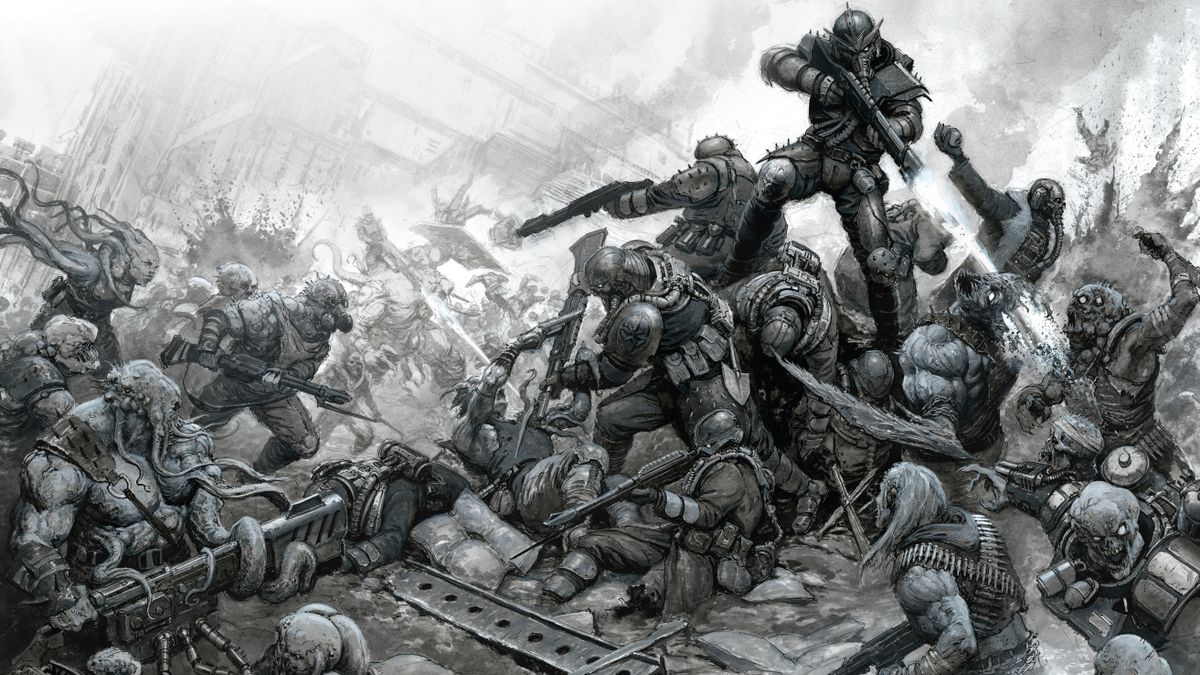
Any good picture begins with a hearty thumbnailing session! This is an important stage as it lets you experiment with ideas and make mistakes without investing too much time. I went into this picture with the rough idea that I wanted it to be an outdoor battle scene featuring a huge pile of figures, with lots of little duels playing out across the image. In my thumbnail sketches, you can see that I’m looking at the general shape of the composition as well as sketching out ideas for individual fights between the characters.

Draw an Initial Sketch

With this being a traditional picture, it’s essential that everything is laid out successfully early on, as it will be hard to move elements once we start painting. To help achieve this, sketch everything super loosely to begin with. This allows you to rub out and move elements around to find the best possible composition. The important thing to get across at this stage is the general pose of the figures and the space they’ll occupy.

Refine the Image

Once you’re happy with the initial sketch, head in and start adding details to the figures. We’ll be refining and adding more details later on, so the sketch doesn’t need to be super detailed or precise. The goal here is simply to have a solid framework that we can paint over.

Make a Tonal Mock-up

Scan in the sketch and use it as a base for a tonal digital sketch. With this being such a complex piece, it’s helpful to have something to aim for and refer back to while painting. This digital mock-up provides a better idea of what the finished painting will look like, while showing us where the shadows and highlights will need to be.

Prepare Your Ink

With all the details being locked in with the pen, we can put washes of watered-down ink over the top. This allows us to focus on refining the tonal aspects of the painting while keeping our details. The goal here is to suggest colour though black and white tones; elements that would be brown, red or black will appear darker and lighter-coloured elements will be paler. Looking at black and white photography here can be helpful.

Deepen the Shadows

To get the maximum level of depth in a painting, you need to use the full spectrum of values available. Until now we’ve been watering down the black ink, but here we’ll go in with pure black and place it in selective areas. It’s easy to go overboard; less is more here. After this stage, you’ll find the painting begins to pop.

Develop Background Elements

So far we’ve been focusing almost exclusively on the foreground figures, as they’re the focal point and require the most work. We want to give the impression that this scene is part of a wider vista. With super watered down ink, paint the suggestion of figures fighting in the background as well as a huge industrial structure. Try boiling down your background figures into areas of light and areas of shadow, as this will make them easier to read and quicker to render.

Add the Mid-Tones

You might be forgiven for thinking the painting looks finished at this point, but there’s one crucial stage still to be done. I mentioned earlier that these inks can be used like watercolours, but can also be used like typical acrylic paints. We’ll be painting in the mid-tones with opaque grey ink mixed from the white and the black. To achieve this, make a mixture of a big splash of grey and then adjust the exact tone depending on the area that you’re touching in on the image.

Complete the Painting

Go over the foreground elements, picking out the mid-tones with the opaque grey ink. This gives the foreground figures a pleasing physicality, which contrasts nicely with the translucently painted background. The other advantage of this is that it’s a last opportunity to adjust the highlights and tones, giving the suggestion of colour to this greyscale painting.

Conclusion

This process for painting an awe-inspiring battle scene with traditional inks involves thumbnailing, sketching, refining, and layering. It requires patience and attention to detail, but the results can be truly stunning.

FAQs

Q: What kind of ink should I use?
A: I used acrylic inks for this piece, as they are flexible and offer a huge variety of approaches.

Q: How do I achieve the mid-tones?
A: You can achieve the mid-tones by mixing opaque grey ink from the white and black inks.

Q: What is the importance of thumbnailing?
A: Thumbnailing is an important stage in the process, as it allows you to experiment with ideas and make mistakes without investing too much time.

ByteDance Leads AI Charge in China

ByteDance Leads the Charge in China’s AI Landscape

Early Frontrunner in Generative AI

TikTok-owner ByteDance has emerged as an early frontrunner in the race to capitalize on generative artificial intelligence (AI) in China. The company has poached top AI engineers and researchers from local rivals, including Alibaba and start-ups such as 01.ai and Zhipu, and created and expanded teams to work on its large language models and AI products.

Hiring Spree and AI Infrastructure

ByteDance has ploughed billions of dollars into AI infrastructure, purchasing enough cutting-edge Nvidia graphics processing units to build advanced AI models. The company has also created a team to work on its large language models and AI products, with the goal of developing artificial general intelligence (AGI).

Close Ties with Nvidia

ByteDance has a close commercial relationship with Nvidia, its largest customer in China. The company can only buy Nvidia’s H20s for Chinese data centers, but it can purchase top-of-the-range H100s and Blackwell chips for data centers outside of China. This has led ByteDance to increase its computing capacity outside of China, including signing on as the anchor tenant for new data centers in Malaysia.

AI Expansion

Key to its AI expansion is its close commercial relationship with Nvidia. ByteDance has also created and expanded teams to work on its large language models and AI products. The company has poached top AI engineers and researchers from local rivals, including Alibaba and start-ups such as 01.ai and Zhipu.

Doubao: The Most Popular AI Application in China

ByteDance’s Doubao has emerged as the most popular AI application in China, with 60 million regular monthly active mobile users. The chatbot brings together multiple AI capabilities in one polished application, including search, translation, image, and video generation.

Global Expansion

ByteDance has also launched an overseas chatbot, Cici AI, which is powered by third-party models including OpenAI’s GPT. The company has secured the lead in developing China’s most popular AI app, with its AI chatbot Doubao emerging as the best challenger to ChatGPT in China.

Conclusion

ByteDance’s efforts to develop AI have led to significant growth and recognition, with the company now considered the largest customer of Nvidia in China. The company’s focus on generative AI has positioned it as a leader in the field, with its Doubao chatbot emerging as the most popular AI application in China.

FAQs

Q: What is ByteDance’s strategy for AI development?
A: ByteDance is focusing on developing large language models and AI products to achieve artificial general intelligence (AGI).

Q: What is ByteDance’s relationship with Nvidia?
A: ByteDance has a close commercial relationship with Nvidia, purchasing cutting-edge graphics processing units and top-of-the-range chips for its AI infrastructure.

Q: What is the significance of ByteDance’s Doubao chatbot?
A: Doubao is the most popular AI application in China, bringing together multiple AI capabilities in one polished application, including search, translation, image, and video generation.

Q: What is the future of ByteDance’s AI efforts?
A: ByteDance is focused on achieving AGI, with its founder Zhang Yiming personally overseeing the company’s AI strategy and hiring top AI engineers and researchers.

Last Chance: 50% Off Adobe Creative Cloud

0

Heads up, creatives! There’s just one day left to save 50% on Adobe Creative Cloud All Apps (or 70% if you’re a student!) The Black Friday and Cyber Monday had been extended from last weekend, but it ends today, and it’s likely to be the best deal on Adobe’s software until Black Friday 2025.

The Best Adobe Deal This Year

The best Adobe deal this year reduces the price of a 12-month subscription to the likes of Photoshop, Premiere Pro, After Effects and Illustrator from $59.99 to $29.99 per month in the US. That’s a saving of $299 over a year. Similar discounts equivalent to 50% off are available in other countries, and the usual free seven-day trial applies, so you have time to test out the apps before you start paying anything (see our full Adobe software list for more details on what apps come included in Creative Cloud).

Who Can Use the Adobe Half-Price Deal?

The Adobe Creative Cloud half-price deal applies only to new subscribers for their first year. Students can get an even better deal, claiming 70% off.

After 12 months, your subscription charge will increase to the standard price, although you can always cancel at that point and see if Adobe offers a discount.

Note that the discount only applies to the Adobe Creative Cloud All-Apps plan. Single-app subscriptions remain at the usual price of $19.99. That means that the all-app package costs only $10 more than the price of a single app, making it the obvious choice unless you’re really sure that you’ll only need to use just one Adobe program during the next 12 months.

When Does the Adobe Sale End?

Adobe says its 2024 Cyber Monday Creative Cloud sale will end on Sunday 8 December (today!). We don’t expect to see another deal like this until next year.

Why is Adobe Creative Cloud so Popular?

Adobe’s Creative Cloud apps are popular partly because many creatives simply have to use them since they’re the programs most used in their fields. However, in most cases, Adobe’s software is simply the best on the market. Every year, it introduces new features to improve the apps, keeping the ahead of the competition – most recently with many generative AI tools. As a subscriber you automatically get access to all new features as soon as they’re released (or even before the full releases if you install the beta versions).

Many Adobe apps integrate well with each other, allowing creatives to work across a seamless ecosystem. And as well as the 20 plus software programs themselves, you’ll also get access to a range of fonts, stock images, and other creative assets.

Conclusion

If you’re a creative looking for a great deal on Adobe’s software, today is your last chance to take advantage of the 50% discount on the Adobe Creative Cloud All-Apps plan. Don’t miss out on this opportunity to save hundreds of dollars and get access to the industry’s best creative tools.

Frequently Asked Questions

Q: Who is eligible for the Adobe half-price deal?

A: The Adobe Creative Cloud half-price deal applies to new subscribers for their first year. Students can get an even better deal, claiming 70% off.

Q: Will my subscription price increase after 12 months?

A: Yes, your subscription charge will increase to the standard price after 12 months. However, you can always cancel at that point and see if Adobe offers a discount.

Q: Does the discount apply to single-app subscriptions?

A: No, the discount only applies to the Adobe Creative Cloud All-Apps plan. Single-app subscriptions remain at the usual price of $19.99.

Q: Will I get access to all new features as a subscriber?

A: Yes, as a subscriber, you’ll automatically get access to all new features as soon as they’re released (or even before the full releases if you install the beta versions).

Apple Music Replay Falls Short

Brace Yourself: Apple Music Replay vs Spotify Wrapped

The Battle for Music Streaming Supremacy

Brace yourself: It’s that time of year again, when music streaming platforms reveal our top (and most embarrassing) listening habits.

What’s the Difference?

Both Apple Music Replay and Spotify Wrapped results have arrived, and everyone is about to be sharing them on social media. Although the two generally provide the same information, one streaming platform’s offerings outshine the other.

Apple Music Replay

On Tuesday, Apple Music unveiled Apple Music Replay, through which users can access their top songs, albums, artists, playlists, genres, and stations. They can also access a year-end highlight reel and see if they are among the top listeners for their favorite artist or genre.

Spotify Wrapped

On Wednesday, just a day later, Spotify unveiled its Spotify Wrapped, which also shows users their top listening insights. However, this year, the company added a plethora of new features, including a new "My Wrapped AI Podcast," featuring two NotebookLM hosts discussing — or "unwrapping" — your music listening results from the previous year.

New Features

This is particularly noteworthy because Google’s NotebookLM Audio Overviews have repeatedly gone viral this year for transforming text into engaging podcasts. Some use cases include making dull information more engaging, such as class notes, textbook passages, articles, or research papers.

Other new features include a new Music Evolution data story, which showcases up to three musical phases that define your year in music, accompanied by a Music Evolution Playlist on the Wrapped feed and a new "longest listening streak" feature that shows how many days in a row you listened to an artist.

Subscription Costs

The subscription costs for both are very similar, with Apple Music costing $10.99 per month and Spotify $11.99 per month. However, Spotify does have a free version with some limitations, such as ads.

Accessing Apple Music Replay and Spotify Wrapped

How to Access Apple Music Replay

To access Apple Music Replay, go to your Apple Music app, click on the Search tab in the bottom right-hand corner, and tap Replay 2024. You can also visit the Replay website and sign into your Apple Music account.

How to Access Spotify Wrapped

To access your Spotify Wrapped, go to your Spotify app and tap the "Wrapped" tab on the home page, which will bring you to the experience. If it isn’t there, you may need to update your app to the latest version.

Conclusion

In conclusion, while both Apple Music Replay and Spotify Wrapped provide valuable insights into our music listening habits, Spotify’s offerings this year outshine Apple Music’s. With its new features, including the AI podcast and Music Evolution data story, Spotify has set a new standard for music streaming platforms.

Frequently Asked Questions

Q: What is Apple Music Replay?
A: Apple Music Replay is a feature that provides users with their top songs, albums, artists, playlists, genres, and stations from the previous year.

Q: What is Spotify Wrapped?
A: Spotify Wrapped is a feature that provides users with their top listening insights, including their top songs, artists, and genres from the previous year.

Q: What are the new features in Spotify Wrapped this year?
A: The new features in Spotify Wrapped this year include a new "My Wrapped AI Podcast," a new Music Evolution data story, and a new "longest listening streak" feature.

Q: How much does Apple Music cost?
A: Apple Music costs $10.99 per month.

Q: How much does Spotify cost?
A: Spotify costs $11.99 per month, but it also has a free version with some limitations.