Home Blog Page 100

Stunning Coding Assistant Threatens ChatGPT

Article

As part of my AI coding evaluations, I run a standardized series of four programming tests against each AI. These tests are designed to determine how well a given AI can help you program. This is kind of useful, especially if you’re counting on the AI to help you produce code. The last thing you want is for an AI helper to introduce more bugs into your work output, right?

Test 1: Write a simple WordPress plugin

Wow. Well, this is certainly a far cry from how Bard failed twice and Gemini Advanced failed back in February 2024. Quite simply, Gemini Pro 2.5 aced this test right out of the gate. The challenge is to write a simple WordPress plugin that provides a simple user interface. It randomizes the input lines and distributes (not removes) duplicates so they’re not next to each other.

Test 2: Rewrite a string function

In the second test, I asked Gemini Pro 2.5 to rewrite some string processing code that processed dollars and cents. My initial test code only allowed integers (so, dollars only), but the goal was to allow dollars and cents. This is a test that ChatGPT got right. Bard initially failed, but eventually succeeded.

Test 3: Find a bug

At some point during my coding journey, I was struggling with a bug. My code should have worked, but it did not. The issue was far from immediately obvious, but when I asked ChatGPT, it pointed out that I was looking in the wrong place.

Test 4: Writing a script

This last test isn’t all that difficult in terms of programming skill. What it tests is the AI’s ability to jump between three different environments, along with just how obscure the programming environments can be. This test requires understanding the object model internal representation inside of Chrome, how to write AppleScript (itself far more obscure than, say Python), and then how to write code for Keyboard Maestro, a macro-building tool written by one guy in Australia.

Conclusion

It was really just a matter of when. Google is filled with many very, very smart people. In fact, it was Google that kicked off the generative AI boom in 2017 with its "Attention is all you need" research paper. So, while Bard, Gemini, and even Gemini Advanced failed miserably at my basic AI programming tests in the past, it was only a matter of time before Google’s flagship AI tool caught up with OpenAI’s offerings.

FAQs

Q: Have you tried Gemini Pro 2.5 yet?
A: Yes, I have tried it, and it has performed well on my coding tasks.

Q: How did it perform on your own coding tasks?
A: Gemini Pro 2.5 was able to assist me in writing a simple WordPress plugin, rewriting a string function, and finding a bug in my code.

Q: Do you think it has finally caught up to, or even surpassed, ChatGPT when it comes to programming help?
A: Yes, I believe Gemini Pro 2.5 has caught up to ChatGPT in terms of programming help.

Q: How important is speed versus accuracy when you’re relying on an AI assistant for development work?
A: Accuracy is more important than speed when relying on an AI assistant for development work.

Q: Did Gemini Pro 2.5 surprise you the way it did here?
A: Yes, Gemini Pro 2.5 surprised me with its ability to assist me in writing code and finding bugs in my code.

3D Art: Guochao Zho’s Week

0

The Art of 3D Character Modeling: A Look into Guochao Zho’s Work

Introduction

Guochao Zho is a talented 3D character artist based in Shanghai, China. He is known for his exceptional work in 3D character modeling, often using ZBrush and Substance Painter to bring his ideas to life. In this article, we will take a closer look at his artwork "How to Raise Your Dragon in the West" and explore the process behind it.

The Concept and Inspiration

When I saw this concept designed by iGgu, I fell for it straight away and set out to remake it in 3D. Although it took me four months to complete this project, I enjoyed the journey immensely. I’m so grateful to the concept’s original artist for creating this piece. The cartoon style is my favorite and it excites me to do something I love!

The Modeling Process

I started in ZBrush for the blockout before moving on to ZModeler, and developed a final version several times with DynaMesh and ZRemesher. I didn’t use too much sculpting as I felt that the model would look clean, more stylized and remain in my control without it.

Tools and Software Used

  • ZBrush: For the initial blockout and final detailing
  • ZModeler: For refining the model
  • DynaMesh: For dynamic meshing and smoothing
  • ZRemesher: For remeshing and optimizing the model
  • Substance Painter: Not mentioned in the original text but implied as part of Guochao Zho’s workflow

Conclusion

Guochao Zho’s work showcases the beauty of 3D character modeling. His attention to detail and mastery of various tools and software have resulted in a stunning piece of art. By following his process and experimenting with different techniques, artists can improve their skills and create their own unique masterpieces.

Frequently Asked Questions

Q: What software did Guochao Zho use to create "How to Raise Your Dragon in the West"?

A: Guochao Zho used ZBrush, ZModeler, DynaMesh, and ZRemesher to create the model. Substance Painter was not explicitly mentioned, but it is likely part of his workflow.

Q: How long did it take Guochao Zho to complete the project?

A: The project took Guochao Zho four months to complete.

Q: What inspired Guochao Zho to create this artwork?

A: Guochao Zho was inspired by the concept designed by iGgu, which initially caught his attention and sparked his interest in re-creating it in 3D.

Accelerating Innovation with Generative AI

Manufacturers face significant challenges in today’s global market, including shifting customer demands, supply chain disruptions, and the rapid adoption of new technologies, including generative AI. To succeed, manufacturers must balance the need to increase revenue with the need to reduce costs across the value chain, spanning engineering, manufacturing, and supply chains.

Benefits of Generative AI in Product Engineering

Generative AI is transforming product engineering and R&D, enabling manufacturers to realize several benefits, including:

  • Cost reduction: Optimizing product designs for cost, sustainability, and manufacturability can reduce product development and production costs.
  • Better decision-making: Facilitated through data analysis and scenario simulation, generative AI provides valuable insights for informed decisions that can enhance product development, improve product quality, and better meet customer demands.
  • Productivity and skills gap: Helps experienced designers automate tasks they do often, and inexperienced designers to get up to speed quickly and avoid errors with best practice guidance.
  • Efficiency: Reduces the time taken by engineers to both search across, and interact with, product data from various sources across the product lifecycle.
  • Faster time-to-market: Shorter product development cycles mean products can reach the market faster to capitalize on new opportunities more quickly.
  • Innovation: Continuously analyzing product-related data from various sources, customer feedback, and learning from it with generative AI can suggest innovative solutions that might not be more readily apparent.

Establishing a Secure Engineering Data Foundation

Product engineering and R&D involve handling many types and modalities of data, including CAD files, technical specifications, product data and configurations, requirements, and process data. Manufacturers commonly use a range of systems, including PLM, ALM, and ERP systems, to manage this complex data. The following are examples where generative AI is helping to deliver value in a secure, engineering data foundation with AI on the Microsoft Cloud:

  • Siemens has integrated Microsoft Teams, Microsoft Azure OpenAI Service, and Siemens’ Teamcenter PLM solution into an app to facilitate real-time communication and collaboration among frontline workers and engineers.
  • Aras has introduced AI-assisted search and an intelligent copilot, using Azure OpenAI Service and Microsoft Copilot Studio on Azure, enhancing user interaction with PLM data, facilitating quicker access, analysis, and action on critical information through scalable search and conversational AI.
  • PTC Codebeamer Copilot focuses on requirements authoring and analysis for the flagship Codebeamer Application Lifecycle Management (ALM) solution.

Accelerating Product Engineering and R&D

Engineers use a range of complex solutions in product engineering when producing product designs from CAD, CAM, and CAE applications. This also involves creating and using many different data types, from 3D CAD and CAM files, to CAE simulation datasets, documents, specifications, and various knowledge repositories. The following are examples where customers and generative AI-powered partner solutions are helping to deliver value in accelerating product engineering and R&D with AI on the Microsoft Cloud:

  • HARTING reduced design time from weeks to minutes by introducing an AI-powered assistant fueled by Azure OpenAI Service and Microsoft Cloud for Manufacturing, interoperating with Siemens NX CAD for rapid design.
  • Hexagon AI-powered automated CAM programming solution, ProPlanAI, reduces the time taken to program factory machine tools by 75%.
  • Siemens copilot for NX X software uses an adapted industry AI model to help users ask natural language questions, access technical insights, and streamline design tasks for faster product development.

The Next Step: Unlock Innovation in Product Engineering with AI-Powered Digital Threads

The next stage in revolutionizing product engineering and R&D sees the addition of multi-agent AI systems that can orchestrate, collaborate, and scale across complex enterprise workloads, including product engineering solutions, supply chain, manufacturing execution systems, customer relationship management, field service, and enterprise resource planning. The following are several such examples of innovations that are fueling the emergence and promise of AI-powered digital threads:

  • Aras InnovatorEdge is a new low-code API management framework for extending product digital thread ecosystems, which will also integrate with Microsoft Fabric, Microsoft 365 Copilot, and Microsoft Cloud for Manufacturing, enabling seamless connectivity for advanced analytics and AI-powered insights.
  • Autodesk Fusion connects people, data, and process through the product development lifecycle.
  • PTC is collaborating with Microsoft on an enterprise data framework and agentic model for PLM scenarios in PTC Windchill within Microsoft Fabric to accelerate manufacturers digital thread strategies and unlock insights and workflows across the value chain using AI-powered agents.

Conclusion

By using Microsoft Cloud for Manufacturing and AI-powered solutions from our partner ecosystem, manufacturers can securely unlock new levels of impact. The integration of AI-powered solutions and AI agents unlocks innovation, reduces costs and improves operational efficiencies, meaning manufacturers are better equipped to navigate challenges and seize opportunities.

FAQs

Q: What are the benefits of generative AI in product engineering?
A: Generative AI provides benefits such as cost reduction, better decision-making, productivity and skills gap, efficiency, faster time-to-market, and innovation.

Q: How is generative AI transforming product engineering and R&D?
A: Generative AI is transforming product engineering and R&D by enabling manufacturers to realize benefits such as cost reduction, better decision-making, productivity and skills gap, efficiency, faster time-to-market, and innovation.

Q: What are some examples of innovations that are fueling the emergence and promise of AI-powered digital threads?
A: Some examples include Aras InnovatorEdge, Autodesk Fusion, and PTC’s collaboration with Microsoft on an enterprise data framework and agentic model for PLM scenarios in PTC Windchill within Microsoft Fabric.

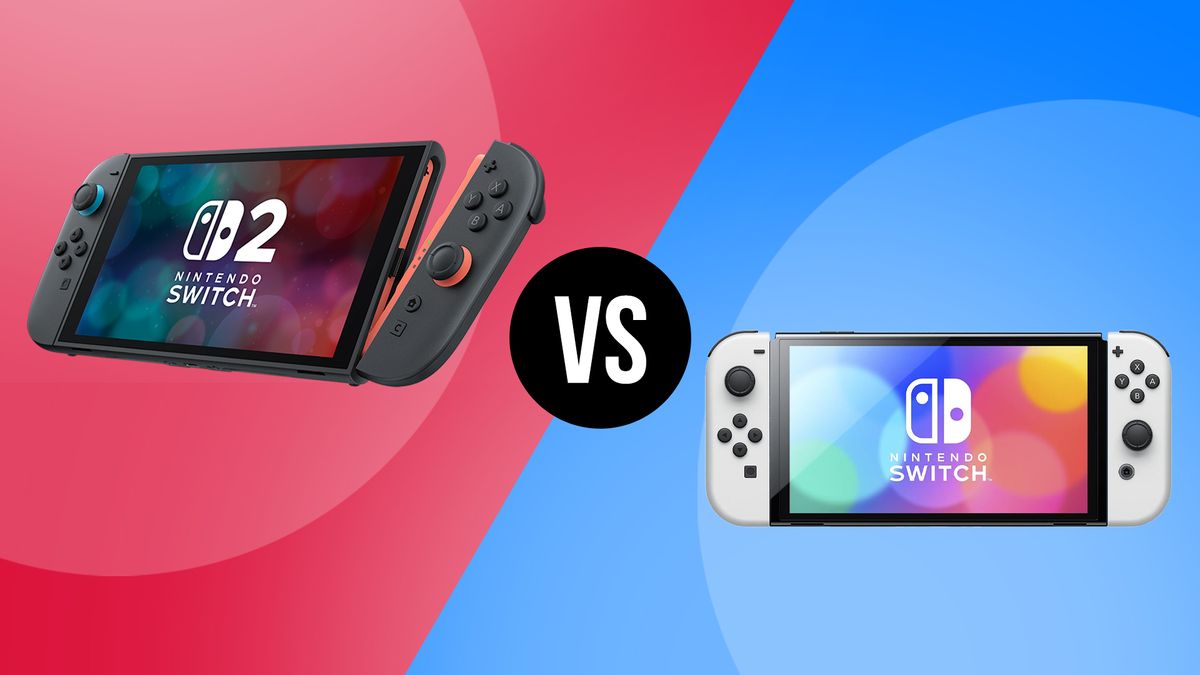
Nintendo Switch 2 vs Switch OLED: Should You Upgrade?

0

Switch 2 vs Switch OLED: display

When it comes to the display, there are a few differences between the Nintendo Switch 2 and the Nintendo Switch OLED to be aware of. The first one is right there in the name. Unlike the Nintendo Switch OLED Model, Nintendo’s sequel does not in fact include an OLED screen at all and instead reverts back to an updated version of the original Nintendo Switch’s screen that Nintendo is now calling ‘vivid LCD’.

Though probably not the most ideal, this LCD panel type on Switch 2 does include built-in HDR support for far better light and dark colour tones on the display. Then there’s the size of the screen itself. While the 2017 Nintendo Switch model boasted a modest screen size of just 6.2 inches, Nintendo eventually upped this ante by gracing the Nintendo Switch OLED with a 7-inch screen.

For context, the Nintendo Switch 2 goes bigger again with a screen that is 7.9 inches. This will be a big jump for those who plan on upgrading from a standard Nintendo Switch, yet even those who have currently made the Switch OLED model their preferred option should notice a nice difference too. Games will appear larger than ever when played on the go.

Finally, the last big improvement with regards to the Nintendo Switch 2 display relates to the increased resolution. Whereas the original Nintendo Switch and Nintendo Switch OLED could only output at 720p when played in handheld, the Nintendo Switch 2 goes big and offers Full HD output at 1080p.

Switch 2 vs Switch OLED: controllers

The Joy-Con controllers make their return with the Nintendo Switch 2 – only now with an added method of control (more on that later). For the most part, however, they work the same as the original Nintendo Switch and Switch OLED, in that they can be clicked on and clicked off depending on whether you want to play in handheld mode (with the Joy-Con attached to the screen) or in docked mode (with the Joy-Con attached to a dedicated grip).

The difference with Switch 2 comes in how you attach them. Whereas the previous Nintendo Switch and Switch OLED consoles had you slide them up and off, the Nintendo Switch 2 uses magnetisation to have them simply pop off either side after pressing down a latch at the back. It looks to make for a more seamless experience.

Then, as well as the ability to use the Joy-Con in a grip for a traditional gamepad experience, the ability to play with one Joy-Con in each hand – with added gyroscopic aiming controls in games like Metroid Prime 4: Beyond – returns.

Switch 2 vs Switch OLED: design

Design is arguably the one area where things are the most ‘business as usual’ with the Nintendo Switch 2. Aside from the much larger screen and slightly longer length of the handheld console itself, it keeps things relatively simple and straightforward by innovating upon what already worked with both the original Nintendo Switch and Nintendo Switch OLED.

Interestingly, there will be only one colourway available to purchase at launch, being a soft-touch matte black design that might seem a little boring initially, but is a lot more understated when compared to the garish bright red and bright blue Joy-Con that launched with the Nintendo Switch in 2017.

On the Switch 2 itself, the only real major change in terms of design is the return of the dreaded half-inch bezel border, which the existing Switch OLED model previously got rid of.

Switch 2 vs Switch OLED: specs

Switch 2 Switch OLED
Custom Nvidia chipset (details TBC) Nvidia Tegra X1 custom chipset
7.9-inch LCD 7-inch OLED
1,920 x 1080 1,280 x 720
3,840 x 2,160 1,920 x 1,080
Yes Now
256GB 64GB
microSD Express (up to 2TB) microSD (up to 2TB)
Accelerometer / gyroscope, mouse / brightness (in console) Accelerometer / gyroscope
2x USB-C / 3.5mm USB-C / 3.5mm
2x USB-C / HDMI / ethernet 2x USB 2.0 / USB-C (power adapter) / HDMI / ethernet
Wi-Fi 6 / Bluetooth / NFC Wi-Fi 5 / Bluetooth 4.1 / NFC
Yes No
Stereo Stereo
5,220mAh lithium-ion 4,310mAh lithium-ion
2 to 6.5 hours 4.5 to 9 hours
399.16g (or 535.24g with Joy-Con 2 controllers attached) 322g (or 422g with Joy-Con controllers attached)
4.5 x 10.7 x .55 inches 4 x 9.4 x .55 inches
$449.99 / £395.99 $349.99 / £309.99

Switch 2 vs Switch OLED: games

After previously announcing that ‘most’ original Nintendo Switch games would be compatible with Nintendo Switch 2, we now have a better idea of which games exactly will receive graphical, performance, and even content improvements.

Chief amongst this lineup, of course, are both The Legend of Zelda: Breath of the Wild and Tears of the Kingdom, which benefit from HDR support on the big screen but can now achieve a smooth 60fps at 1080p when played on Nintendo Switch 2 in handheld mode.

Other Nintendo Switch 2 games include Super Mario Party Jamboree, Metroid Prime 4: Beyond, and Kirby and the Forgotten Land (at least on the first-party side).

Switch 2 vs Switch OLED: price and bundle deals

Compared to the original $299.99 / £279.99 standalone launch price of the very first Nintendo Switch, and the $349.99 / £310 it’s been revealed that the Nintendo Switch 2 will be available to purchase and pre-order in two separate bundles, both costing more.

The standalone Nintendo Switch 2 bundle, with just the console itself, retails for £395.99. By comparison, the Nintendo Switch 2 + Mario Kart World bundle is £429.99. Given that the physical version of Mario Kart World is $79.99 / £74.99, this one should absolutely be the Nintendo Switch 2 bundle people should go for if they plan on picking up Mario’s latest karting adventure.

Switch 2 vs Switch OLED: is it worth upgrading?

Whether or not the Nintendo Switch 2 is worth the £395.99 upgrade fee on day one is obviously subjective. However, given the nature of Nintendo hardware to hold its RRP for the indefinite future and the sheer number of improvements this sequel console brings by way of horsepower, controller functionality, and a subtle but stylish redesign, the Nintendo Switch 2 definitely falls into the category of being more of the same, but better.

For most people the arrival of a new Mario Kart will be enough to tip them over the edge, and even though the Nintendo Switch OLED edition has a better screen, it’s a minor issue given that the Nintendo Switch 2’s vivid LCD screen does a decent enough job. So far, from what we can tell, the Nintendo Switch 2 is on track to be another solid success story for the house of Mario.

Conclusion

The Nintendo Switch 2 is a significant upgrade over the original Switch and Switch OLED, offering improved hardware, new features, and a more refined design. While it may not be a necessity for everyone, those who plan on using their

Trump’s Tariffs Killed TikTok Rescue Plan

0

TikTok’s Fate in the US: Trump’s Tariffs May Have Just Killed the Deal

The Bidding War

Earlier this week, when it seemed as though TikTok’s fate in the US would actually be decided by April 5th, everyone — from Amazon to the founder of OnlyFans — was coming out of the woodwork to buy it.

The White House’s Preferred Bid

People familiar with the matter tell me that, despite all of the bids for the app, the White House was only seriously considering an Oracle-led consortium, which included many of ByteDance’s biggest investors who were set to roll their stakes into a new, US entity.

The Proposal

The proposal, which would have licensed the app’s algorithm from China and shuffled some shareholder money around to make TikTok look more independent from ByteDance, was set to be announced before President Trump went nuclear on tariffs.

The Tariffs

On Wednesday, less than an hour after Trump said he was pushing back the clock on banning TikTok by another 75 days to finish working out a deal, ByteDance issued its first statement on the situation, saying that "any agreement will be subject to approval under Chinese law."

The President’s Uncertainty

After suggesting on Thursday that China would approve a TikTok deal in exchange for tariff relief, the president seemed less confident on Friday: "We hope to continue working in Good Faith with China, who I understand are not very happy about our Reciprocal Tariffs (Necessary for Fair and Balanced Trade between China and the U.S.A.!)."

The Consequences

Anyone who has been closely following this tortured saga that is the TikTok ban is exhausted. Now, five years after he first tried to ban it, Trump has seemingly torpedoed the plan that was finally going to keep TikTok running.

What’s Next?

TikTok gets to continue operating in the US for a while longer, thanks to Trump’s Department of Justice not enforcing a ban that was passed by Congress and upheld by the Supreme Court. TikTok’s US hosting providers, including Apple, Google, and Oracle, are seemingly still okay with this situation despite the fact that they are very much breaking the law. And unless Trump ultimately eases on tariffs against China, TikTok may end up banned after all.

Conclusion

The fate of TikTok in the US remains uncertain, and it seems that President Trump’s tariffs may have just killed the deal that was proposed to keep the app running. The future of the app and its users hangs in the balance, and it remains to be seen what will happen next.

Frequently Asked Questions

Q: What is the current status of the TikTok deal?
A: The deal is currently on hold due to President Trump’s tariffs against China.

Q: Will TikTok continue to operate in the US?
A: Yes, for now, TikTok will continue to operate in the US, but its future is uncertain.

Q: Will the US hosting providers continue to host TikTok?
A: Yes, for now, Apple, Google, and Oracle will continue to host TikTok, but their willingness to do so may change in the future.

Q: What does this mean for TikTok’s users?
A: It means that the app’s fate is uncertain, and users may face disruptions or even a complete ban in the future.

Favourite Ad Campaign Ever

0

Dreamies Billboard Campaign: A Playful Take on Traditional Advertising

A Creative Advertising Masterpiece

Cat treat brand Dreamies has released an ingenious billboard campaign that takes thinking outside the box to a whole new level. Featuring a clowder of cats clambering all around a bag of the coveted moggy munchies, the campaign is a playful take on traditional billboard advertising, combining creativity with delightfully offbeat visuals.

The Campaign’s Unique Approach

While the best adverts are often eye-catching, this unique installation is a prime example of how tactile advertising can spark the imagination and create a campaign with a huge impact. As a cat person, the author might be biased when saying this is one of their favorite billboard ads ever.

The Creation of the Billboard

Created by ad agency Adam&EveDDB, the billboard itself is fairly unassuming, featuring a packet of Dreamies against a plain white background. While at a glance it looks as if the billboard has attracted a number of feline fans, the clambering cats are actually made of hand-painted fiberglass each modeled after real cats drawn to the allure of Dreamies.

The ‘Ad Attack’ Campaign

The campaign, titled ‘Ad Attack’, will debut across London on Kingsland Road and Shoreditch’s Quaker Street, with uniquely crafted moggies scaling drainpipes, scaffolding, and rooftops to get their paws on the treats. Unexpected and playful, this adorable campaign is the perfect example of simple yet striking advertising that subverts our expectations, bringing a delightful dose of joy to passersby.

A Creative Inspiration

For more brilliant billboards take a look at the ingenious Audi billboards that soar above the chaos of EV branding. If you’re after more creative inspiration check out McDonald’s new campaign that reminds us who started the viral no-logo trend.

Conclusion

The Dreamies billboard campaign is a prime example of how creativity and imagination can be used to create a memorable and impactful advertising campaign. By thinking outside the box and using unique and playful visuals, Dreamies has created a campaign that will stick in the minds of viewers and leave a lasting impression.

Frequently Asked Questions

Q: What is the name of the campaign?
A: The campaign is titled ‘Ad Attack’.

Q: Who created the campaign?
A: The campaign was created by ad agency Adam&EveDDB.

Q: Where will the campaign be debuting?
A: The campaign will debut across London on Kingsland Road and Shoreditch’s Quaker Street.

Q: What is the unique feature of the billboard?
A: The clambering cats on the billboard are made of hand-painted fiberglass and modeled after real cats drawn to the allure of Dreamies.

The Turing Test has a Problem

Proof of AGI?

Most people know that the famous Turing Test, a thought experiment conceived by computer pioneer Alan Turing, is a popular measure of progress in artificial intelligence. Many mistakenly assume, however, that it is proof that machines are actually thinking.

How The Turing Test works

The Turing Test was classically conceived by Turing as a round of passing text messages between a human "judge" and two "witnesses," one a human and one a computer. The computer and human witnesses were charged with convincing the human judge that they were human by the messages each sent. The judge knows only one of the two is human, but not which is which, and has to guess.

The results

Three other AI programs were tested: OpenAI’s previous model, GPT-4o; Meta Platforms’s Llama 3.1 405b; and a very ancient chat bot program from the 1960s, called ELIZA. ELIZA was included because, as a more primitive program, it could act as a check on whether the large language models fooled a human simply by random chance or because they were actually better programs.

Is the test actually a measure of intelligence?

So, you might ask what it means that humans do a poor job of telling a computer and a person apart based on chat messages. The "most controversial question" about Turing’s problem over the decades is whether it is actually measuring intelligence, Jones and Bergen acknowledge.

Sociability, not intelligence

All this means humans were picking up on things such as sociability rather than intelligence, leading Jones and Bergen to conclude that "Fundamentally, the Turing test is not a direct test of intelligence, but a test of humanlikeness."

Conclusion

In fact, they suggest the test could come out very different with different designs. Experts in AI, they note, could be tested as a judge cohort. They might judge differently than lay people because they have different expectations of a machine.

FAQs

Q: What is the Turing Test?
A: The Turing Test is a thought experiment conceived by computer pioneer Alan Turing that measures the ability of a machine to exhibit intelligent behavior equivalent to, or indistinguishable from, that of a human.

Q: What is the purpose of the Turing Test?
A: The purpose of the Turing Test is to assess the progress of artificial intelligence and to determine whether a machine is able to think and behave like a human.

Q: How does the Turing Test work?
A: In the Turing Test, a human "judge" engages in a text-based conversation with two entities, one human and one machine. The judge must then determine which entity is human and which is machine.

Q: What are the implications of the Turing Test?
A: The implications of the Turing Test are that it is not a direct test of intelligence, but rather a test of humanlikeness. It suggests that machines have become so good at mimicking human behavior that it is difficult to distinguish them from humans.

Judge Isn’t Amused by AI Avatar in Legal Appeal

0

A.I. in the Legal System: A Case of Misuse

Jerome Dewald sat with his legs crossed and his hands folded in his lap in front of an appellate panel of New York State judges, ready to argue for a reversal of a lower court’s decision in his dispute with a former employer.

A Creative Approach

The court had allowed Mr. Dewald, who is not a lawyer and was representing himself, to accompany his argument with a prerecorded video presentation.

The Unusual Video

As the video began to play, it showed a man seemingly younger than Mr. Dewald’s 74 years wearing a blue collared shirt and a beige sweater and standing in front of what appeared to be a blurred virtual background.

A Confused Judge

A few seconds into the video, one of the judges, confused by the image on the screen, asked Mr. Dewald if the man was his lawyer.

A Digital Avatar

“I generated that,” Mr. Dewald responded. “That is not a real person.”

Consequences of A.I. Misuse

The judge, Justice Sallie Manzanet-Daniels of the Appellate Division’s First Judicial Department, paused for a moment. It was clear she was displeased with his answer.

“It would have been nice to know that when you made your application,” she snapped at him.

“I don’t appreciate being misled,” she added before yelling for someone to turn off the video.

Expert Concerns

Some experts say that artificial intelligence and large language models can be helpful to people who have legal matters to deal with but cannot afford lawyers. Still, the technology’s risks remain.

“They can still hallucinate — produce very compelling looking information” that is actually “either fake or nonsensical,” said Daniel Shin, the assistant director of research at the Center for Legal and Court Technology at the William & Mary Law School. “That risk has to be addressed.”

Conclusion

The use of artificial intelligence in the legal system raises concerns about transparency, disclosure, and the potential for misuse. While technology can be a useful tool, it is essential to understand its limitations and risks to ensure fair and just outcomes in legal proceedings.

FAQs

Q: What happened in the case?

A: Jerome Dewald, a 74-year-old man representing himself in a contract dispute, used artificial intelligence software to create a digital avatar for a prerecorded video presentation. The judge was confused and eventually turned off the video.

Q: Why did Mr. Dewald use the digital avatar?

A: Mr. Dewald used the digital avatar to ease the pressure he felt in the courtroom and to present his arguments more efficiently.

Q: What are the risks of using A.I. in legal proceedings?

A: The risks include the potential for AI to produce fake or nonsensical information, which can mislead judges and parties involved in the case.

Q: Can AI be helpful in legal proceedings?

A: Yes, AI can be helpful for people who have legal matters to deal with but cannot afford lawyers. However, it is essential to understand the technology’s limitations and risks to ensure fair and just outcomes.

ChatGPT Adoption Skyrockets in India

0

OpenAI’s ChatGPT Struggles to Convert Growth into Revenue in India

For years, U.S.-based tech companies have tapped into India’s vast and increasing internet user base for growth. OpenAI is no exception. But while the AI lab claims that India is one of its fastest-growing ChatGPT markets, third-party data suggests that OpenAI may be struggling to turn that momentum into revenue.

Revenue Struggles

According to analytics firm SensorTower, users in India have spent $8 million on ChatGPT subscriptions through in-app purchases since 2023. That doesn’t include purchases made through the ChatGPT web app. But notably, it’s a fraction of the $330 million SensorTower estimates U.S. users have spent on ChatGPT in-app.

Local Pricing Concerns

One likely factor is the lack of local pricing for India. OpenAI’s cheapest ChatGPT plan in the country costs $20 (more than ₹1,700) per month, which is considered expensive for a digital subscription in India.

OpenAI’s Response

When contacted, OpenAI did not share specific details about its growth in India but pointed us to a recent post on X by COO Brad Lightcap, which claims that India is ChatGPT’s fastest-growing market.

Growth Potential

Low as the revenue might be at present, India may still end up being a major growth driver for OpenAI. The company’s CEO, Sam Altman, recently expressed a desire for OpenAI to become a multi-billion-user platform. Tapping into India’s over 950 million internet users could help bootstrap that effort.

Partnership with Reliance Jio

OpenAI apparently thinks so. The company is reportedly courting an alliance with Reliance Jio, one of India’s biggest mobile carriers, to get ChatGPT in front of more users.

Organic Growth

In the meantime, ChatGPT continues to grow organically in India.

Image Credits:

Image Credits:Jagmeet Singh / TechCrunch

Organic Growth

According to data from app tracker Appfigures, more than 20% of ChatGPT Android app downloads this year so far have been in India. At least a portion of that growth was fueled by the recently released revamped image generator in ChatGPT, which went viral for its ability to create realistic Ghibli-style art.

For context, ChatGPT has more than 500 million weekly users globally.

Conclusion

While OpenAI may be struggling to convert its growth in India into revenue, the country remains a key market for the company. With a revamped image generator and local pricing concerns addressed, OpenAI may be able to capitalize on its momentum and turn India into a major growth driver.

FAQs

Q: What is OpenAI’s current revenue from ChatGPT in India?

A: According to SensorTower, users in India have spent $8 million on ChatGPT subscriptions through in-app purchases since 2023.

Q: Why is OpenAI struggling to convert its growth in India into revenue?

A: One likely factor is the lack of local pricing for India. OpenAI’s cheapest ChatGPT plan in the country costs $20 (more than ₹1,700) per month, which is considered expensive for a digital subscription in India.

Q: What is OpenAI’s goal for ChatGPT?

A: OpenAI’s CEO, Sam Altman, recently expressed a desire for OpenAI to become a multi-billion-user platform. Tapping into India’s over 950 million internet users could help bootstrap that effort.

Boosting Healthcare Efficiency with Windows Cloud Solutions

Supporting Healthcare and Clinical Workloads with Azure Virtual Desktop and Windows 365

Healthcare providers who work with patients every day know that there is nothing more important than getting them the treatment and care they need. Data is critical to this work, as accurate and timely patient data can be key to making the right healthcare decisions. Security and resiliency are crucial to healthcare technology: patient data and the applications used in healthcare settings must be kept secure and accessed only by authorized personnel. Keeping devices up and working as expected is especially important when patient care is involved.

Supporting Healthcare and Clinical Workloads with Azure Virtual Desktop

Organizations looking for virtualization options have flexibility and control with Azure Virtual Desktop. It provides a secure, cost-effective way to support remote desktops and experiences from anywhere, across a variety of endpoints. Organizations throughout the healthcare industry use Azure Virtual Desktop to access clinical and productivity applications and hosted desktops when they need them. Azure Virtual Desktop is managed via the Microsoft Azure portal, allowing IT admins to create and manage a custom desktop virtualization environment to meet their organizations’ needs.

Azure Virtual Desktop and Windows 365

Azure Virtual Desktop and Windows 365 are designed to provide healthcare organizations with the flexibility and security they need to support their clinical workloads. With Azure Virtual Desktop, organizations can create a custom desktop virtualization environment that meets their specific needs. With Windows 365, organizations can provide their employees with a familiar, personalized experience of Windows from anywhere, on any device.

Benefits of Azure Virtual Desktop and Windows 365

Organizations that adopt Azure Virtual Desktop and Windows 365 can expect to see a number of benefits, including:

  • Enhanced productivity: With Azure Virtual Desktop, organizations can provide their employees with access to the applications and data they need to get their work done, from anywhere.
  • Improved security: Azure Virtual Desktop and Windows 365 provide robust security features, including multi-factor authentication and encryption, to help protect patient data and prevent unauthorized access.
  • Reduced costs: By providing a single, virtual desktop environment, organizations can reduce the costs associated with maintaining multiple physical devices.
  • Increased flexibility: With Azure Virtual Desktop and Windows 365, organizations can provide their employees with the flexibility to work from anywhere, on any device.

Conclusion

Azure Virtual Desktop and Windows 365 are designed to provide healthcare organizations with the flexibility and security they need to support their clinical workloads. By adopting these solutions, organizations can enhance productivity, improve security, reduce costs, and increase flexibility. Whether you’re looking to support remote workers, provide access to clinical applications, or simply improve the overall efficiency of your organization, Azure Virtual Desktop and Windows 365 are the perfect solutions for you.

FAQs

Q: What is Azure Virtual Desktop?
A: Azure Virtual Desktop is a cloud-based virtual desktop infrastructure (VDI) solution that provides a secure, cost-effective way to support remote desktops and experiences from anywhere, across a variety of endpoints.

Q: What is Windows 365?
A: Windows 365 is a cloud-based software as a service (SaaS) solution that provides a familiar, personalized experience of Windows from anywhere, on any device.

Q: What are the benefits of Azure Virtual Desktop and Windows 365?
A: The benefits of Azure Virtual Desktop and Windows 365 include enhanced productivity, improved security, reduced costs, and increased flexibility.

Q: How do Azure Virtual Desktop and Windows 365 support healthcare organizations?
A: Azure Virtual Desktop and Windows 365 provide healthcare organizations with the flexibility and security they need to support their clinical workloads. They can provide employees with access to clinical applications, support remote workers, and improve the overall efficiency of their organization.

Q: How do I get started with Azure Virtual Desktop and Windows 365?
A: To get started with Azure Virtual Desktop and Windows 365, you can visit the Microsoft website and learn more about the solutions. You can also contact a Microsoft representative to discuss your specific needs and determine the best solution for your organization.