Home Blog Page 112

Nvidia Dominates in Gen AI Benchmarks

Nvidia Sweeps MLPerf Benchmark with New Focus on Generative AI

Introduction

The latest round of MLPerf benchmark results is out, and Nvidia’s general-purpose GPU chips have once again made a nearly clean sweep of the test. The focus this time is on generative AI applications, including large language models (LLMs) and graph neural networks.

Background

The MLPerf benchmark test, organized by the MLCommons industry consortium, measures the speed of machines in producing tokens, processing queries, or outputting samples of data. The test is designed to simulate real-world scenarios, such as chatbots, where response time is crucial.

New Tests and Results

The latest round of MLPerf benchmarks features two new tests, representing common generative AI uses. The first test is how fast the chips perform on Meta’s open-source LLM Llama 3.1 405b, one of the larger gen AI programs in common use. The second test is an interactive version of Meta’s smaller Llama 2 70b, simulating the need for a quick response when someone has typed a prompt.

The results show that Nvidia’s GPUs produced top results in almost every test in the closed division, where the rules for the software setup are the most strict. The only exception was the top score in two tests of Llama 2 70b, which was taken by AMD’s MI300X GPU.

Competitors and Results

Other competitors in the MLPerf benchmark included Google, which submitted a system with its Trillium chip, and startup MangoBoost, which makes plug-in cards that can speed data transfer between GPU racks. Google’s system trailed far behind Nvidia’s Blackwell in a test of how fast the computer could answer queries for the Stable Diffusion image-generation test.

Conclusion

The latest round of MLPerf benchmark results demonstrates Nvidia’s dominance in the field of artificial intelligence. The company’s general-purpose GPU chips have once again produced top results in almost every test, with a focus on generative AI applications.

FAQs

Q: What is MLPerf benchmark?
A: The MLPerf benchmark is a test organized by the MLCommons industry consortium, designed to measure the speed of machines in producing tokens, processing queries, or outputting samples of data.

Q: What is the focus of this round of MLPerf benchmark?
A: The focus of this round is on generative AI applications, including large language models (LLMs) and graph neural networks.

Q: Which company took the top score in two tests of Llama 2 70b?
A: AMD’s MI300X GPU took the top score in two tests of Llama 2 70b.

Q: Which company submitted a system with its Trillium chip?
A: Google submitted a system with its Trillium chip.

Q: What is the name of the startup that makes plug-in cards that can speed data transfer between GPU racks?
A: The startup is called MangoBoost.

Is $90 too much for a Nintendo Switch game?

0

A Push Towards Digital

The digital dust is just settling on the Nintendo Switch 2 Direct, and I’m only just taking in all of the news; some great – new Donkey Kong – some weird – mouse controls, but who for – and yet its the hidden price rise on Switch 2 games that is leaving a sour taste.

A Rising Tide of Game Prices

Gaming has never been a cheap hobby, but the pricing of Nintendo Switch 2 games is starting to feel a little absurd. I remember playing £100 for Street Fighter 2 on SNES, that’s a whopping £250 in today’s money. While the original Switch kept most of its titles at a reasonable $60 / £50 price point, early signs suggest that Switch 2 might push that even higher – potentially to the $80 and $90 mark for some key titles, such as Donkey Kong: Bananza and Mario Kart World.

Rumblings of a Broader Issue

This sounds wild, but let’s not forget there are rumors swirling that GTA 6 on PS5 and Xbox Series X will cost as much as $100, which feels like a breaking point for many. Have we finally reached a point where game prices are too high?

Nintendo’s Push Towards Digital

There’s a nice caveat to Nintendo’s pricing, and that’s a push towards more digital releases and pricing these games lower than physical copies. Nintendo, like many other games publishers, has been subtly steering players towards digital games and pricing these lower is yet another guide-post for us gamers.

The Trade-Off

Whether it’s the Nintendo eShop frequently running digital only sales, a lack of discounts on physical copies, or the push towards cloud-gaming and subscriptions, it’s clear Nintendo wants us to abandon physical cartridges altogether. At first glance, digital gaming seems like a great option, and I do love the convenience of downloading and playing a game in minutes, and even pre-loading for future releases. My games library is always there, seconds from being played. Great. But the trade-off is significant – when you buy a digital copy of a game, you don’t truly own it in the same way as you would a physical game. You can’t sell it, lend it, or even have guaranteed access to the game year’s from now as servers can be shut down and licenses change hands.

A New Era of ‘Couch Play’ Games

But here Nintendo has found a loophole with its Virtual Cards, announced just ahead of the Switch 2 Direct, which enable you to ‘lend’ digital games from your library to a friend or family member for up to two weeks. While the new GameShare feature revealed in today’s Direct enables multiple players to use one game. These are two new features every gamer should cheer on, and indeed could usher in a new era of ‘couch play’ games.

Conclusion

As if to fend off criticism over the rising price of its games, Nintendo has offered a way to enable us to share games more easily and so ease the burden of soaring costs. It’s as if Nintendo recognises game costs are getting too high, and for a brand focused on the family it feels a little ashamed, and is offering a neat workaround. If the trade-off is to buy digital, I think many will do so.

Frequently Asked Questions

Q: Are Switch 2 games priced too high?
A: It’s possible that Switch 2 games may be priced too high, especially considering the lack of discounts on physical copies and the push towards digital releases.

Q: What is Nintendo’s strategy behind the price rise?
A: Nintendo seems to be pushing towards more digital releases and pricing these games lower than physical copies, with the aim of steering players towards abandoning physical cartridges altogether.

Q: Can I still play physical games on Switch 2?
A: Yes, Switch 2 will still support physical games, but the prices may be higher than those on the original Switch.

Q: What is the best way to play games on Switch 2?
A: The best way to play games on Switch 2 is still a matter of personal preference, but digital gaming seems to be the way forward, with the convenience of downloading and playing games in minutes, and even pre-loading for future releases.

Tony Blair Institute AI Copyright Report Sparks Backlash

Rebooting Copyright: How the UK Can Be a Global Leader in the Arts and AI

The Tony Blair Institute (TBI) has released a report calling for the UK to lead in navigating the complex intersection of arts and AI. According to the report, titled ‘Rebooting Copyright: How the UK Can Be a Global Leader in the Arts and AI,’ the global race for cultural and technological leadership is still up for grabs, and the UK has a golden opportunity to take the lead.

The Intersection of Arts and AI

The report emphasizes that countries that "embrace change and harness the power of artificial intelligence in creative ways will set the technical, aesthetic, and regulatory standards for others to follow." Highlighting that we are in the midst of another revolution in media and communication, the report notes that AI is disrupting how textual, visual, and auditive content is created, distributed, and experienced, much like the printing press, gramophone, and camera did before it.

AI’s Impact on Human Creativity

However, far from signalling the end of human creativity, the TBI suggests AI will open up "new ways of being original." The report also notes that AI will usher in a new era of interactive and bespoke works, as well as a counter-revolution that celebrates everything that AI can never be.

Cross-Industry Advancements

The AI revolution’s impact isn’t limited to the creative industries; it’s being felt across all areas of society. Scientists are using AI to accelerate discoveries, healthcare providers are employing it to analyse X-ray images, and emergency services utilise it to locate houses damaged by earthquakes.

UK Government’s Ambition

The UK government has expressed its ambition to be a global leader in AI through its AI Opportunities Action Plan, announced by Prime Minister Keir Starmer on 13 January 2025. For its part, the TBI welcomes the UK government’s ambition, stating that "if properly designed and deployed, AI can make human lives healthier, safer, and more prosperous."

Challenges and Controversies

However, the rapid spread of AI across sectors raises urgent policy questions, particularly concerning the data used for AI training. The application of UK copyright law to the training of AI models is currently contested, with the debate often framed as a "zero-sum game" between AI developers and rights holders. The TBI argues that this framing "misrepresents the nature of the challenge and the opportunity before us."

TBI’s Recommendations

The report emphasizes that bold policy solutions are needed to provide all parties with legal clarity and unlock investments that spur innovation, job creation, and economic growth. The TBI proposes that the solution lies not in clinging to outdated copyright laws but in allowing them to "co-evolve with technological change" to remain effective in the age of AI.

Criticisms and Controversies

However, the report has faced strong criticism. Ed Newton-Rex, CEO of Fairly Trained, raised several concerns on Bluesky, including the report’s repeated claim that existing UK copyright law is uncertain, the suggestion that an opt-out scheme would give rights holders more control over how their works are used, and the report’s claim that AI developers won’t make long-term profits from training on people’s work.

Conclusion

In conclusion, the report from the Tony Blair Institute for Global Change supports the government’s ambition to be an AI leader, but it also raises critical policy questions, particularly around copyright law and AI training data. The report’s recommendations aim to provide a framework for the UK to lead in the intersection of arts and AI, while addressing the concerns and criticisms raised by experts in the field.

Frequently Asked Questions

Q: What is the report’s main recommendation for addressing the intersection of arts and AI?
A: The report suggests that the solution lies not in clinging to outdated copyright laws but in allowing them to "co-evolve with technological change" to remain effective in the age of AI.

Q: What are the potential benefits of the UK leading in the intersection of arts and AI?
A: The report suggests that leading in this area could lead to the creation of new jobs, the development of new industries, and the improvement of human lives through the application of AI in various sectors.

Q: What are the potential challenges of the UK leading in the intersection of arts and AI?
A: The report notes that the rapid spread of AI across sectors raises urgent policy questions, particularly concerning the data used for AI training, and the need for bold policy solutions to provide all parties with legal clarity and unlock investments that spur innovation, job creation, and economic growth.

Pixel Perfect: Creating Retro Board Game Art

0

Article

Speak to the Audience

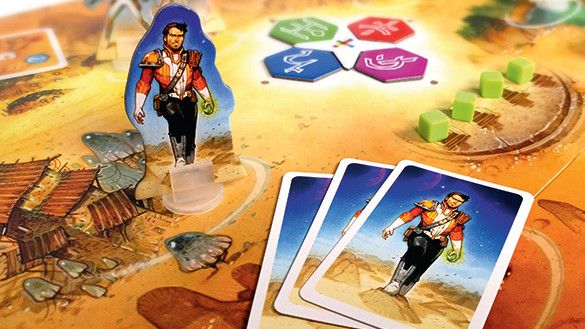
I’m often asked why I still work traditionally. First, physical contact with materials and tools is essential to me. Also, the piece I paint closely resembles the printed product players hold in their hands. Even though the illustration is digitized for printing, we can both “touch” the art. This tangible link bridges the distance between me and the players. It’s invaluable for helping fully stay connected to the final product. So always keep the final purpose in mind, not just what’s in front of you.

Understand Every Line

Documentation and references are crucial; I dedicate significant time to research and thoughtful preparation, and rarely produce multiple rough sketches or doodles. Instead, I focus on presenting one main idea for discussion. Preparing illustrations often makes up more than two-thirds of my entire process! Setting the right tone early on is vital to ensure cohesion. A clear and well-defined direction, agreed on by the editor and designer, is essential for achieving a successful final result.

A Platform for Endless Possibilities

Illustrating a board game is fascinating. Depending on its scope, I may handle various image formats, convey multiple messages in one image, or integrate actions into universally understood icons. The game world is incredibly diverse: there are card games, board games, abstract games, varied materials, miniatures, and more. I’ve never encountered such richness and creativity anywhere else!

Balance Tradition and Innovation

I strive to avoid settling for a lukewarm consensus or watered-down compromises at all costs. If an illustration needs to be bright and vivid, I go all in on saturation, even to the point of burning colors. If a key element of the image needs to stand out, it will do so boldly, fully in sight. I firmly believe in an all-or-nothing approach. Either you show something, or you don’t. Always keep in mind that the image will be seen by anyone, experienced or not, and must be understood by all.

Beyond the Frame

I always make it a point to ensure that my illustrations are clear and convey emotions. I’m not creating documentary-style illustrations, so I don’t hesitate to distort or cheat to amplify these effects. I think of illustrations as visions and, above all, as windows and gateways to other worlds and universes. This is why creating a sense of vast depth in my images is so important to me, with wide focal lengths and long perspectives. I want the eye to wander and lose itself within them.

Where Art Fuels Play

Illustrating a board game is a unique task! The visuals must stand alone, telling a story or depicting a scene, while also supporting and enhancing the gameplay, rules, and flow. Striking the right balance between function and narrative, description, and immersion is essential, but also tricky! I prefer to play the game prototype beforehand to understand the table’s atmosphere, and players’ interactions and discussions.

Believe in Yourself and Explore

I don’t work solely for personal enjoyment or to pay bills, but primarily for the audience. It’s essential to give meaning to my work beyond creating a pretty image. What matters is that the image remains coherent, believable, and plausible. Nothing can be left to chance – every choice must be intentional, with clear reasoning that I can explain and justify. I don’t fear self-reflection, even when it’s challenging. Artistic growth isn’t linear but happens in leaps, unlocked through encounters, readings, and discoveries. These moments of progress often come unexpectedly, pushing both my craft and perspective forward.

Conclusion

In conclusion, as an artist, I believe that creating illustrations for board games requires a unique blend of technical skills, creative vision, and a deep understanding of the audience. By following these tips, I hope to inspire other artists to take on this challenging yet rewarding task.

FAQs

Q: What is the most important aspect of creating illustrations for board games?
A: Understanding the audience and their needs is crucial. It’s essential to give meaning to your work beyond creating a pretty image.

Q: How do you approach illustration for board games?
A: I dedicate significant time to research and thoughtful preparation, and rarely produce multiple rough sketches or doodles. Instead, I focus on presenting one main idea for discussion.

Q: What are some tips for creating illustrations for board games?
A: Be confident and decisive, and always keep the final purpose in mind. Create illustrations that are clear, convey emotions, and are believable and plausible.

Q: How do you balance tradition and innovation in your work?
A: I strive to avoid settling for a lukewarm consensus or watered-down compromises at all costs. Instead, I believe in an all-or-nothing approach.

Short-Term Focus for AI Financial Planning

Research Reveals AI’s Superiority in Financial Planning

AI Outperforms Humans in Allocating Budgets

Research conducted by Vlerick Business School has discovered that AI consistently outperforms humans when allocating budgets with strategic guidelines in place. Businesses that use AI for budgeting processes experience substantial improvements in the accuracy and efficiency of budgeting plans compared to human decision-making.

The Study’s Goal

The study’s goal was to interpret AI’s role in corporate budgeting, examining how well such technology performs when making financial decisions. Ultimately, it’s an investigation into whether AI’s financial decisions align with a company’s long-term strategies and how its decisions compare to human management.

Research Methodology

The researchers, Kristof Stouthuysen, Professor of Management Accounting and Digital Finance at Vlerick Business School, and PhD researcher, Emma Willems, studied tactical and strategic budgeting approaches. They conducted a controlled experiment by running a management simulation where experienced managers were asked to allocate budgets for a hypothetical automotive parts company. Stouthuysen and Willems then compared these human-made decisions to those produced by an AI algorithm using the same financial data.

Findings

The results concluded that AI was superior in optimising budgets when a company’s strategic financial planning was clearly defined. However, AI struggled to make budgeting decisions when key performance indicators (KPIs) did not align with the company’s financial goals.

Collaboration between Humans and AI

Stouthuysen and Willems work on the study emphasized the importance of a collaboration between humans and AI. "As AI continues to evolve, companies that use its strengths in tactical budgeting while maintaining human oversight in strategic planning will gain a competitive edge. The key is knowing where AI should lead and where human intuition remains indispensable."

Conclusion

The study’s findings challenge the widespread misconception that AI can completely substitute the need for humans in budgeting. Instead, this research emphasizes the importance of taking a balanced approach, utilizing both AI and humans, assigning tasks to silicon or human processes according to their proven abilities.

FAQs

Q: Can AI completely substitute the need for humans in budgeting?
A: No, according to the study, AI can theoretically take over from humans when it comes to tactical budgeting, providing more precise and efficient outcomes. However, human oversight remains crucial for strategic financial planning.

Q: What is the key to successful AI-based budgeting?
A: According to the study, the key is knowing where AI should lead and where human intuition remains indispensable. Companies need to define their strategic priorities clearly and implement AI for tactical budget-making decisions to maximize financial performances and achieve sustainable growth.

Q: What are the benefits of using AI in budgeting?
A: The study’s findings suggest that AI can provide more accurate and efficient budgeting plans compared to human decision-making.

Adobe Premiere Pro Adds 4:2:2 Color Sampling

Shed Some Color on 4:2:2

Video editing workflows are getting a lot more colorful.

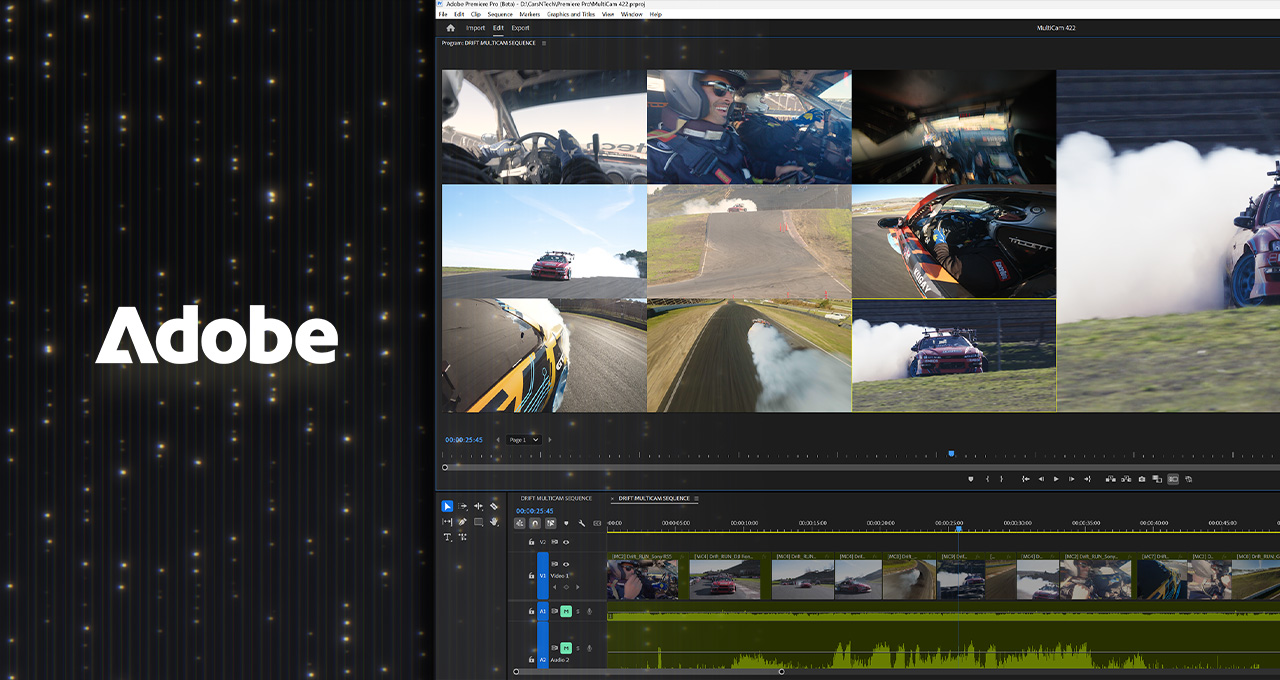
Adobe recently announced massive updates to Adobe Premiere Pro (beta) and Adobe Media Encoder, including PC support for 4:2:2 video color editing.

The 4:2:2 Color Format: A Game Changer for Professional Video Editors

The 4:2:2 color format is a game changer for professional video editors, as it retains nearly as much color information as 4:4:4 while greatly reducing file size. This improves color grading and chroma keying — using color information to isolate a specific range of hues — while maximizing efficiency and quality.

New NVIDIA GeForce RTX 5090 and 5080 Laptops

In addition, new NVIDIA GeForce RTX 5090 and 5080 laptops — built on the NVIDIA Blackwell architecture — are out now, accelerating 4:2:2 and advanced AI-powered features across video-editing workflows.

Adobe and NAB Show

Adobe and other industry partners are attending NAB Show — a premier gathering of over 100,000 leaders in the broadcast, media and entertainment industries — running April 5-9 in Las Vegas. Professionals in these fields will come together for education, networking and exploring the latest technologies and trends.

Increased Color Accuracy, More Flexibility, and Smaller File Sizes

Adobe Premiere Pro’s beta with 4:2:2 means video data can now provide double the color information with just a 1.3x increase in raw file size over 4:2:0. This unlocks several key benefits within professional video-production workflows:

  • Increased Color Accuracy: 10-bit 4:2:2 retains more color information compared with 8-bit 4:2:0, leading to more accurate color representation and better color grading results.
  • More Flexibility: The extra color data allows for increased flexibility during color correction and grading, enabling more nuanced adjustments and corrections.
  • Improved Keying: 4:2:2 is particularly beneficial for keying — including green screening — as it enables cleaner, more accurate extraction of the subject from the background, as well as cleaner edges of small keyed objects like hair.
  • Smaller File Sizes: Compared with 4:4:4, 4:2:2 reduces file sizes without significantly impacting picture quality, offering an optimal balance between quality and storage.

Advanced Video Editing with NVIDIA GeForce RTX 50 Series GPUs

Prosumer-grade cameras from most major brands support HEVC and H.264 10-bit 4:2:2 formats to deliver superior image quality, manageable file sizes and the flexibility needed for professional video production. GeForce RTX 50 Series GPUs paired with Microsoft Windows 11 come with GPU-powered decode acceleration in HEVC and H.264 10-bit 4:2:2 formats.

Adobe AI Accelerated

Adobe delivers an impressive array of advanced AI features for idea generation, enabling streamlined processes, improved productivity and opportunities to explore new artistic avenues — all accelerated by NVIDIA RTX GPUs.

Unleash (AI)nfinite Possibilities

GeForce RTX 5090 and 5080 Series laptops deliver the largest-ever generational leap in portable performance for creating, gaming and all things AI.

Conclusion

The game-changing NVIDIA GeForce RTX 5090 and 5080 GPU laptops are available now. Adobe will participate in the Creator Lab at NAB Show, offering hands-on training for editors to elevate their skills with Adobe tools. Attend a 30-minute section and try out Puget Systems laptops equipped with GeForce RTX 5080 Laptop GPUs to experience blazing-fast performance and demo new generative AI features.

FAQs

Q: What is 4:2:2 color format?
A: 4:2:2 is a color format that retains nearly as much color information as 4:4:4 while greatly reducing file size.

Q: What are the benefits of 4:2:2 color format?
A: 4:2:2 color format improves color grading and chroma keying, offers increased color accuracy, more flexibility, and smaller file sizes.

Q: What is Adobe Premiere Pro’s beta with 4:2:2?
A: Adobe Premiere Pro’s beta with 4:2:2 means video data can now provide double the color information with just a 1.3x increase in raw file size over 4:2:0.

Q: What are the NVIDIA GeForce RTX 5090 and 5080 laptops?
A: The NVIDIA GeForce RTX 5090 and 5080 laptops are built on the NVIDIA Blackwell architecture and accelerate 4:2:2 and advanced AI-powered features across video-editing workflows.

The Nintendo Switch 2 has a camera accessory for video chats

0

Nintendo Switch 2 Camera: A New Way to Connect with Friends

Nintendo is launching a special camera accessory for the Switch 2, which will allow users to host video chats with their friends. The camera, simply called the Nintendo Switch 2 Camera, is designed to sit next to your TV while you play.

What is the Nintendo Switch 2 Camera?

The Nintendo Switch 2 Camera is a camera on a stand, designed to sit next to your TV while you play. It’s a simple, yet innovative, way to connect with your friends and family while playing games.

How Does it Work?

The camera can be used with GameChat, Nintendo’s new in-game chat system that lets you connect with friends online by pressing the new “C” button. During the Switch 2 Direct, Nintendo showed off a couple different ways to use the camera. Your face can appear as an overlay on top of the game you’re playing, or it can show a video feed only.

What Games Support the Camera?

Some games, like the upgraded Mario Party Jamboree TV, will take advantage of the camera by letting you see your friends’ faces while you play. There are also some minigames that use the camera as well.

Conclusion

The Nintendo Switch 2 Camera is an exciting new accessory for the Switch 2, offering a new way to connect with friends and family while playing games. With its simple design and innovative features, it’s sure to be a hit with gamers of all ages.

FAQs
Q: What is the purpose of the Nintendo Switch 2 Camera?

A: The Nintendo Switch 2 Camera is designed to allow users to host video chats with their friends and family while playing games.

Q: How does the camera work with GameChat?

A: The camera can be used with GameChat, Nintendo’s new in-game chat system, by pressing the new “C” button.

Q: What games support the camera?

A: Some games, like the upgraded Mario Party Jamboree TV, will take advantage of the camera by letting you see your friends’ faces while you play. There are also some minigames that use the camera as well.

Q: Can I use the camera to show a video feed only?

A: Yes, the camera can be set to show a video feed only, allowing you to see your friends’ faces without any overlay on the game.

Q: Is the Nintendo Switch 2 Camera compatible with all Switch games?

A: No, not all Switch games will be compatible with the camera. Only select games will support the camera feature.

LIVE: Nintendo Direct Switch 2 Reveal

0

Refresh

Nintendo Switch 2: What We Know So Far

The Nintendo Switch 2 is set to be the biggest console launch of the year, and Nintendo has a way of announcing the most important details via what it calls Nintendo Direct events. These are live streamed video announcements made directly from the horse’s mouth, and today’s event is the very first one to offer the details we’ve been craving about the upcoming console.

What’s New in the Switch 2?

The company released an official reveal trailer back in January that showed us a first look at the console, and I love the sleek black design with neon-coloured tints. While I think the Switch 2 looks super modern, not everybody feels the same, and some gamers think the design is not true to Nintendo’s playful brand and should have been a little more juvenile.

New Features and Improvements

The docking station has had a makeover too, with a curved shape as opposed to the rectangular build that we’re used to. The trailer also showed a quick glimpse at a new Mario Kart title, undoubtedly Mario Kart 9, although we have yet to hear anything more about this game (until later today, I imagine).

How to Watch the Nintendo Direct Switch 2 Event

The Nintendo Direct Switch 2 event will kick off at 14:00 UK / 6am PT / 9am ET time, so don’t be late! You can watch the live stream right here on this page or head over to the official Nintendo YouTube channel to watch the livestream or go directly to the Nintendo Direct website.

What to Expect from the Event

The event will offer the details we’ve been craving about the upcoming console, including the launch date, preorders, price, and exclusive games. We’ll also get a chance to see the new ‘C’ button in action, which is still unclear, and what it’s all about.

Conclusion

The Nintendo Switch 2 is set to revolutionize the gaming world, and today’s event is the first step in learning more about what this new console has to offer. Stay tuned for our live blog, where we’ll be bringing you all the latest updates as they happen.

Frequently Asked Questions

Q: What is the Nintendo Switch 2?
A: The Nintendo Switch 2 is a new console from Nintendo that offers improved performance, new features, and exclusive games.

Q: When is the Nintendo Switch 2 launching?
A: The launch date has not been officially announced, but it is expected to be sometime in 2025.

Q: How much will the Nintendo Switch 2 cost?
A: The price has not been officially announced, but it is expected to be around the same price as the original Nintendo Switch.

Q: What new features does the Nintendo Switch 2 have?
A: The Nintendo Switch 2 has a range of new features, including improved performance, new controls, and a revamped docking station.

Q: Will there be exclusive games for the Nintendo Switch 2?
A: Yes, there will be exclusive games for the Nintendo Switch 2, including a new Mario Kart title.

Tired of Adobe? My Cheap Open Source Creative Workstation

0

Is Open Source for You?

Why Open Source?

Imagine a world where software is developed for, and often by, the user community. You don’t have to trash your perfectly good computer 5 to 10 years after buying it, as they will still be supported, and run as efficiently as day one.

What’s more, the software packages that you use to build your business aren’t terminated because they no longer fit a larger corporate plan. (Even if an open source project ends, the software remains forever available for us to use how we see fit.)

Now imagine that all of this is made available for free, or for whatever you wish to contribute? This is the world of Open Source Software. And it is available to you right now, free to download, install and use.

Is Open Source for You?

Moving over to an open source life isn’t for everyone. If you are in a business that requires working with an all-Adobe team, and you are expected to hand off PSD or other files with all elements being 100% compatible and editable, then nothing does that like a true Adobe product. You need read no further.

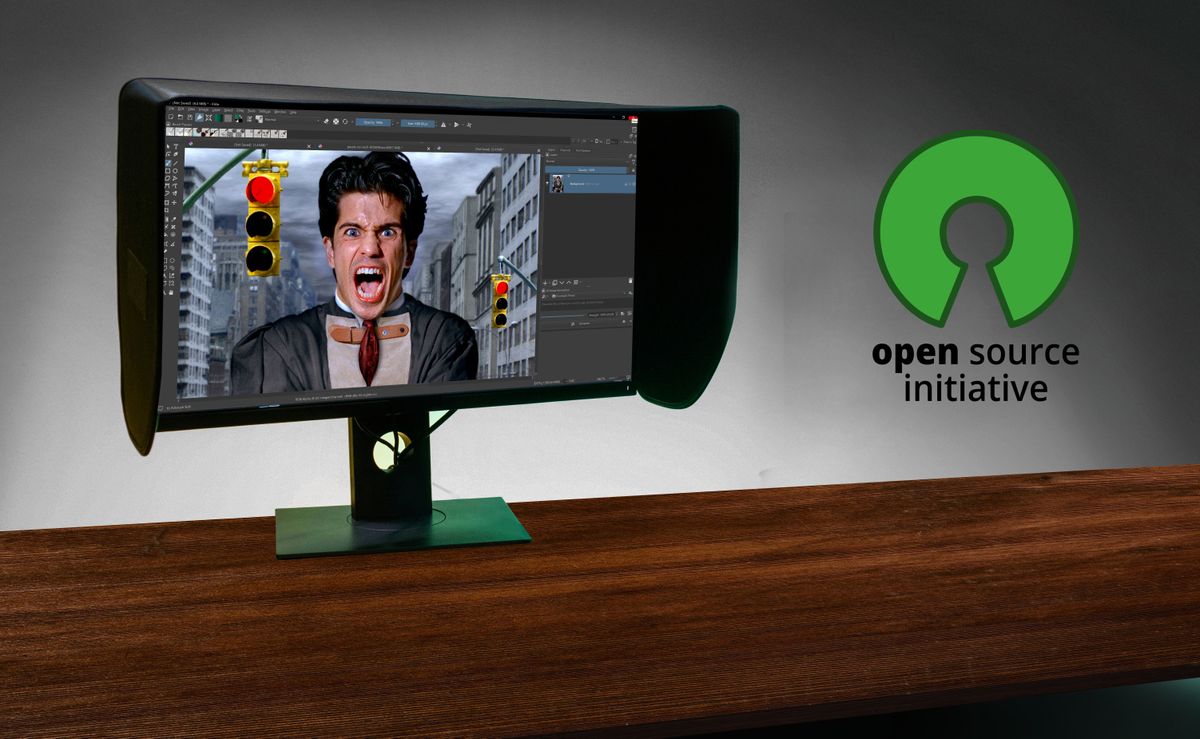
But if you deliver illustrations or edited video as TIFF, JPG, EPS, SVG, MOV or MP4 file, how you create it, and in what applications, is up to you. I’ve had clients that loved being able to download Krita for free to open my work, rather than have to buy a subscription.

Hardware & OS Requirements

Most of what I discuss here can be accomplished using either old or new PC hardware, which you either purchased or built. Mac hardware is also an option.

You will find articles up here on CreativeBloq where I step you through building your own workstation from components. This is NOT a requirement, and it certainly isn’t for everyone. But it can get you a lot of computer bang for your buck, and it is not nearly as difficult as many assume it to be. Think Lego on steroids, everything snaps together.

If you are financially/morally/experientially committed to going open source, then I do think the best option here is to use some version of Linux. My favourite is Ubuntu Studio as it is specifically made for creatives (see my article on installing it in under 60 minutes). Not only is going Linux the best option, it is also the only viable option for older Macs and PCs that are no longer supported by Apple and Microsoft.

Too much change for you? You can go open source and still stay on your currently supported Mac OS X or Windows 11 boxes. While most open source software (OSS) may be created on/for Linux OS, most OSS applications get ported to both Mac and Windows.

2D Software Alternatives

Top on that list of tools would be a capable office suite. The options here have expanded over the years. And my personal choice has been Libre Office, which includes a word processor, spreadsheet, presentation app, drawing app, database and more.

Utilities:

No matter what operating system you decide to use, there are a ton of OSS applications that can come in handy. The few that come to mind first include VideoLAN (aka “VLC”) for both watching videos and a wide range of A/V modifications. Handbrake for converting video from one CODEC and format to another. And for scanning from your film or flatbed scanner is NAPS2. But should you require more capability or compatibility with older scanners and high-end units, take a look at VueScan. While it is proprietary, it is a great option available on Mac, Win and Linux, and can be had for under $20US.

Back-up Tools:

There are many OSS choices for backing up your data. Some get a bit too geeky for my tastes, but there are plenty to choose from.

Anti-Virus:

On Mac/Win there are plenty of antivirus options that are not OSS, but offer free versions. On Linux there has been one that is OSS called Clam AV. But in recent years it appears that others have popped up, along with some familiar commercial options as well.

Summary

As you dip a toe into the world of Open Source software, remember that no OSS project is trying to clone Adobe or other applications. Instead they are building the best apps they can. They will be different, so have an open mind, as if you were moving to a new country. Not better or worse, just different.

I’ve worked for years using the commercial tools, such as Adobe. And if I were to give it all a grade, it would be high, but it would not be 100. Maybe more like 85-90. And that would be costing me around $3,000US/year (Creative Cloud is over $700, Maya is almost $2,000 per year, plus the other tools).

Grading OSS is hard as I have not been on it long. But I am getting all my work done. I need to take off some points as there is a lack of good compositing options and I do miss After Effects. And I am relying on DaVinci Resolve, that is not truly OSS.

But with all that in mind, I’d give it a grade of 70. Maybe even higher, as I can still get my work done, and my annual cost is $0. Plus none of these OSS will ever be yanked from my hands against my will. That in itself is priceless.

FAQs

Q: Can I still use Adobe products?
A: Yes, you can still use Adobe products, but you’ll need to subscribe to their service.

Q: Are there any free alternatives to Adobe?
A: Yes, there are several free alternatives to Adobe, including Libre Office, Krita, and GIMP.

Q: Can I use Open Source software on my Mac or PC?
A: Yes, most Open Source software is compatible with both Mac and PC.

Q: Do I need to be technical to use Open Source software?
A: No, you don’t need to be technical to use Open Source software. Many of these applications are user-friendly and easy to use.

Q: Can I still get my work done with Open Source software?
A: Yes, you can still get your work done with Open Source software. Many of these applications are capable of producing professional-quality results.

Redefining Content Creation with AI-Powered Social Media

0

Social Media Offers a Valuable Channel for Businesses to Connect with Their Prospects and Current Customers

What Is Generative AI In Social Media?

Generative AI enables social media marketers to quickly and nearly effortlessly generate different types of content, such as text, images, videos, and even audio. AI learns patterns from vast datasets and can translate this vast amount of information into content that aligns closely with what a human could create. Unlike traditional automation, which follows pre-set templates, generative AI generates new content based on the prompts the end user provides.

How AI Works For Social Media Content

Generative AI has changed the game for content creation and impacted the way social media marketers engage with their followers and analyze insights across their social media channels. However, it’s important to note that human creativity remains a must. AI is paramount to incorporate into every marketer’s day-to-day efforts, but it must be used wisely.

AI For Text Generation

Perhaps one of the primary uses for AI-powered language models is to create engaging content for a variety of divergent social media formats, including photo and reels captions, responses, thought leadership, ad copy, and hashtags. AI can help generate ideas for succinct yet meaningful ad copy, providing several options for A/B testing to see what resonates best.

AI For Image And Video Creation

Visual content is growing increasingly popular, given the rise of TikTok and Instagram. AI can now produce high-quality graphics, illustrations, and videos without requiring a human designer. AI-generated images and videos can eliminate the need for costly video and photo creation and reduce reliance on external agencies.

Personalization

AI is able to review a wealth of information in a matter of seconds, analyzing user behavior and preferences to help create relevant content for different audience segments. AI-driven audience insights enable brands to understand what type of content resonates most.

Cost Savings

Prior to AI, copywriting, graphic design, and video editing were left solely to the professionals. Now, AI tools can present significant cost savings, reducing the need to rely entirely on professionals, if needed.

Maintaining Brand Authenticity With AI Content

One of the biggest concerns surrounding the use of generative AI in social media marketing is the risk of losing the brand’s individuality and unique voice. In turn, the brand can be seen as disingenuous and inauthentic, both of which greatly erode brand trust. To maintain brand authority in the AI era, brands must be deliberate and strategic in their usage of AI.

How To Use AI Ethically And Effectively In Social Media Marketing

Generative AI can best be seen as an assistant, a tool that helps marketers streamline work but still requires editing and oversight. Avoid overreliance, lack of human editing, generic content, inconsistent voice, and lack of transparency.

The Future AI For Social Media

The current frontier of AI is exciting, presenting myriad opportunities to scale content at a rapid pace. However, as exciting an opportunity AI may seem, it doesn’t and can’t replace humans. Only humans have the expertise and emotion necessary to connect with other humans. Striking a balance between automation and authenticity is a must.

Conclusion

Social media marketers who successfully harness AI will strategically use the technology to assist, rather than replace, human creativity. Those that can strike a balance will be able to take advantage of AI’s myriad benefits while also maintaining meaningful connections with their audiences.

FAQs

Q: What is generative AI in social media?
A: Generative AI enables social media marketers to generate different types of content, such as text, images, videos, and even audio.

Q: How does AI work for social media content?
A: AI generates new content based on the prompts the end user provides, using patterns from vast datasets to translate into content that aligns closely with what a human could create.

Q: What are the benefits of using AI for social media content?
A: AI can help generate ideas for succinct yet meaningful ad copy, provide several options for A/B testing, and eliminate the need for costly video and photo creation.

Q: How can brands maintain brand authenticity with AI content?
A: Brands must be deliberate and strategic in their usage of AI, avoiding overreliance, lack of human editing, generic content, and inconsistent voice.

Q: What is the future of AI for social media?
A: The current frontier of AI is exciting, presenting myriad opportunities to scale content at a rapid pace. However, it doesn’t and can’t replace humans, and striking a balance between automation and authenticity is a must.