Home Blog Page 135

GFN Thursday: ‘inZOI’ on GeForce NOW

Cloud of Possibilities

A new resident is moving into the cloud — KRAFTON’s inZOI joins the 2,000+ games in the GeForce NOW cloud gaming library.

Cloud Streaming

Plus, members can get ready for an exclusive sneak peek as the Sunderfolk First Look Demo comes to the cloud. The demo is exclusively available for players on GeForce NOW until April 7, including Performance and Ultimate members as well as free users.

New Releases

And explore the world of Atomfall — part of 12 games joining the cloud this week.

inZOI

Live the life of your dreams in the cloud. In inZOI — a groundbreaking life simulation game by Krafton that pushes the genre’s boundaries — take on the role of an intern at AR COMPANY, managing virtual beings called “Zois” in a simulated city.

Dynamic Weather System and Open-World Environments

The game features over 400 mental elements influencing Zois’ behaviors. Experience the game’s dynamic weather system, open-world environments inspired by real locations and cinematic cut scenes for key life events — and even create in-game objects. inZOI lets players craft unique stories and live out their dreams in a meticulously designed virtual world.

Sunderfolk First Look Demo

Sunderfolk’s First Look Demo has arrived on GeForce NOW, offering a tantalizing look into the magical realm of the Sunderlands. Designed as a TV-first experience, this shared-turn-based tactical role-playing game (RPG) enables using a mobile phone as the gameplay controller. Up to four players can gather around the big screen and embark on a journey filled with strategic battles.

Atomfall

Enter a world where danger lurks in every shadow. Blending folk horror and intense combat, Atomfall is a survival-action game set in an alternate 1960s Britain, where the Windscale nuclear disaster has left Northern England a radioactive wasteland. Players explore eerie open zones filled with mutated creatures, cultists and Cold War mysteries while scavenging resources, crafting weapons and uncovering the truth behind the disaster.

New Releases This Week

Look for the following games available to stream in the cloud this week:

  • Sunderfolk First Look Demo (New release, March 25)
  • Atomfall (New release on Steam and Xbox available on PC Game Pass, March 27)
  • The First Berserker: Khazan (New release on Steam, March 27)
  • inZOI (New release on Steam, March 27)
  • Beholder (Epic Games Store)
  • Bus Simulator 21 (Epic Games Store)
  • Galacticare (Xbox, available on PC Game Pass)
  • Half-Life 2 RTX Demo (Steam)
  • The Legend of Heroes: Trails through Daybreak II (Steam)
  • One Lonely Outpost (Xbox, available on PC Game Pass)
  • Psychonauts (Xbox, available on PC Game Pass)
  • Undying (Epic Games Store)

Conclusion

Get ready to explore new worlds and experiences on GeForce NOW. With inZOI, Sunderfolk First Look Demo, and Atomfall joining the cloud, there’s something for every type of player. Whether you’re a fan of life simulation, RPGs, or survival-action, there’s never been a better time to experience the cloud.

FAQs

Q: What is inZOI?
A: inZOI is a life simulation game where players take on the role of an intern at AR COMPANY, managing virtual beings called “Zois” in a simulated city.

Q: What is Sunderfolk First Look Demo?
A: Sunderfolk’s First Look Demo is a shared-turn-based tactical role-playing game (RPG) that enables using a mobile phone as the gameplay controller.

Q: What is Atomfall?
A: Atomfall is a survival-action game set in an alternate 1960s Britain, where the Windscale nuclear disaster has left Northern England a radioactive wasteland.

Q: What games are available to stream in the cloud this week?
A: The following games are available to stream in the cloud this week: Sunderfolk First Look Demo, Atomfall, The First Berserker: Khazan, inZOI, Beholder, Bus Simulator 21, Galacticare, Half-Life 2 RTX Demo, The Legend of Heroes: Trails through Daybreak II, One Lonely Outpost, Psychonauts, and Undying.

Twin’s first AI agent is an invoice-retrieval agent for Qonto customers

0

Automation Agents: The Future of Repetitive Tasks

Introducing Twin: The AI-Powered Automation Agent

When Twin came out of stealth in January 2024, AI agents were more of a theoretical concept than a reality. Today, the Paris-based company is releasing an automation agent in partnership with Qonto, the fintech startup that offers business bank accounts to more than 500,000 customers across Europe.

Automation: The Current State of Affairs

If you want to automate repetitive tasks, there are already several ways to tackle these problems. Some companies use API-based, no-code or low-code automation products like Zapier. Others rely on RPA software, such as UiPath.

The Rise of AI-Powered Automation

With its team of nine people, Twin thinks there’s a much more efficient way to handle automation. As you may have guessed, it involves artificial intelligence and computer use models.

Invoice Operator: A Case in Point

Invoice Operator, Twin’s first product designed for Qonto, is a good example of why it makes sense to use artificial intelligence. Qonto handles millions of invoices per month. And customers spend several hours per month gathering invoices and uploading them to Qonto.

How It Works

Over the past three months, Twin has created an automatic invoice-retrieval tool that can speed up this process. When users launch Invoice Operator, Twin first fetches the list of transactions with missing invoices. It then shows the list of services that it needs to access to download invoices next to a browser window showing the agent’s actions.

The Power of AI

If you need to log in to a service to download invoices, the browser pauses and asks you to enter your credentials manually. Once you do this, you can click on a button to let the agent continue its work. After that, Twin’s Invoice Operator automatically finds your list of past transactions, downloads invoices, and attaches the PDFs to the transactions in your Qonto account.

The Limitations of RPA and API-Based Automation

"When you do that at the scale of Qonto, you basically need to cover a very, very long tail of services. Thousands, tens of thousands and soon hundreds of thousands of different services that everyone is using," Twin co-founder and CEO Hugo Mercier said during a demo of the product.

"And that would be completely impossible with RPA because you would need to create a single custom script per website and then every time the website changes, you would have to modify the script," he added.

The Rise of AI-Powered Automation

As for API-based automation products like Zapier, Mercier said that it took Zapier 10 years to support 8,000 applications on its platform. Twin already supports thousands of applications for its Invoice Operator just a couple of months after starting work on the product.

The Technology Behind Twin

Behind the scenes, Twin runs a Chromium-based web browser on a server. The startup uses OpenAI’s CUA (computer-using agent) model. In fact, Twin was one of the 15 companies that got to try CUA in beta.

The Future of Automation Agents

CUA is also the model that powers OpenAI’s Operator, its prosumer product that lets you enter a prompt to let an agent perform an action for you. In addition to better performance, Twin believes it should be easier to use agents that browse the web for you.

"We worked a lot on making the experience extremely simple. We are really targeting the end user, maybe people who are not tech-friendly. They don’t have to prompt or configure anything. You just log into your accounts, launch it, and it navigates to find the invoices," Mercier said.

Conclusion

Twin is pitching a future in which AI agents become cheaper, faster, and more accurate across a wide variety of tasks. Now let’s see if the startup can turn the core agent platform that powers Invoice Operator into a product that developers can start using in their own applications.

Frequently Asked Questions

Q: How does Invoice Operator work?
A: Invoice Operator uses an AI-powered agent to automatically retrieve and attach invoices to transactions in your Qonto account.

Q: Is RPA suitable for automating repetitive tasks?
A: RPA can be used, but it would require creating a single custom script per website and modifying the script every time the website changes.

Q: How does Twin’s AI-powered automation agent differ from other automation products?
A: Twin’s agent is more efficient and can support thousands of applications, whereas other products like Zapier took years to support 8,000 applications.

OpenAI Pulls Free GPT-4 Image Generator

OpenAI Pulls Back Free Tier Access to GPT-4o Image Generation Feature Amidst Viral Studio Ghibli-Style Art Phenomenon

Free Tier Access Delayed Due to Unexpected Surge in User-generated Content

OpenAI has decided to pull its upgraded image generation feature, powered by the advanced GPT-4o reasoning model, from the free tier of ChatGPT, just a day after its release. The move comes as a response to an unforeseen surge in users creating images in the distinctive style of renowned Japanese animation house, Studio Ghibli.

The GPT-4o Model: An Overview

The new model employs an "autoregressive approach" to image creation, building visuals from left to right and top to bottom. This technique is designed to improve the accuracy and lifelike quality of the imagery produced. Additionally, the model generates sharper and more coherent text within images, addressing a common shortcoming of previous AI models, which often resulted in blurry or nonsensical text. Post-launch training, guided by human feedback, was conducted to identify and rectify common errors in both text and image outputs.

The Unexpected Rise of Studio Ghibli-style Art

The public response to the image generation upgrade took an unexpected turn almost immediately after its release on ChatGPT. Users enthusiastically embraced the ability to create images in the iconic style of Studio Ghibli, sharing their imaginative creations across various social media platforms. These included reimagined scenes from classic films like "The Godfather" and "Star Wars," as well as popular internet memes such as "distracted boyfriend" and "disaster girl," all rendered with the aesthetic of the beloved animation studio.

OpenAI CEO’s Participation

Even OpenAI CEO Sam Altman joined in on the fun, changing his Twitter profile picture to a Studio Ghibli-esque rendition of himself.

The Decision to Delay Rollout

However, later that day, Altman posted an announcement on Twitter, stating that the rollout of the image generator update for free ChatGPT users would be temporarily delayed. While paid subscribers to ChatGPT Plus, Pro, and Team continue to have access to the feature, Altman provided no specific timeframe for when the functionality would return to the free tier.

Complexities of AI-generated Art and Intellectual Property Rights

The virality of the Studio Ghibli-style images seemingly prompted OpenAI to reconsider its rollout strategy. While the company had attempted to address ethical and legal considerations surrounding AI image generation, the sheer volume and nature of the user-generated content appear to have caught them off-guard. The intersection of AI-generated art and intellectual property rights is a complex and often debated area. Style is not historically considered protected by copyright law in the same respect as specific works.

Conclusion

OpenAI’s swift decision to withdraw the GPT-4o image generation feature from its free tier suggests a cautious approach. The company appears to be taking a step back to evaluate the situation and determine its next course of action in light of the unexpected popularity of Ghibli-inspired AI art.

Frequently Asked Questions

Q: Why did OpenAI delay the rollout of the GPT-4o image generation feature for free ChatGPT users?
A: OpenAI delayed the rollout due to an unforeseen surge in users creating images in the distinctive style of Studio Ghibli, which caught them off-guard.

Q: Will paid subscribers to ChatGPT Plus, Pro, and Team still have access to the GPT-4o image generation feature?
A: Yes, paid subscribers will continue to have access to the feature.

Q: Will OpenAI reconsider its rollout strategy for the GPT-4o image generation feature?
A: OpenAI’s decision to withdraw the feature from the free tier suggests a cautious approach, and the company may reevaluate its rollout strategy in light of the unexpected popularity of Ghibli-inspired AI art.

Intricate Illusions

0

Magic Eye Paintings Revamped: 3D Artworks that Conceal Hidden Images

A New Twist on an Old Favorite

Who loves Magic Eye paintings? I remember being a child and standing in front of an art shop window flabbergasted by the effect (and being totally rubbish at it, actually). A new challenge has presented itself in the form of some Blender-created artworks that conceal 3D models. The premise is the same, you ‘relax’ your eyes and wait for the hidden image to reveal itself – but this is created in a different way using 3D techniques. It’s some of my favourite 3D art to date.

How It Works

Created by artist lavaboosted, these works are technically ‘stereograms’ rather than magic eye paintings because they use two images in combination to create the work rather than one. The artist has created multiple 3D artworks that you can scroll through on the above Reddit thread, and has also shared their work on Reddit, provoking an enthusiastic discussion over how brilliant it is.

The Process

The artist shared the whole process via a set of instructions:

Creating the Artwork

  • Load model into Blender
  • Select it and tab into edit mode and add a ground plane + background plane
  • Select all and UV project from view
  • Add the UV image pattern
  • Object mode – add a material and make the base color the image. Select the image for the emission color as well. Then roughness all the way up and sheen any spectral to 0
  • Delete the light
  • Position the camera such that it looks disgust but not too camouflaged or it will be too hard to see (so move the camera from the spot where you projected the UV from view)
  • Render the left image. Use walk navigation to storage over to the right a bit and render the right image
  • Load the images into Excalidraw and line them up, crop them, export
  • Load the image into PhotoMosh to make them really pop

A Note on Stereoscopy Rendering

After all this, discover Stereoscopy rendering (still haven’t messed with that much yet tho)

Getting Started

If you want to make your own 3D artwork then download Blender – then for more, see our list of the best Blender tutorials.

Conclusion

These 3D artworks are a nostalgic throwback to the magic eye paintings of our childhood, but with a modern twist. With the ability to create these stunning images using Blender, the possibilities are endless. Try it out and see if you can spot the hidden 3D model!

FAQs

Q: What is the difference between Magic Eye paintings and these 3D artworks?
A: Magic Eye paintings use one image to create the hidden image, while these 3D artworks use two images in combination to create the work, making them technically stereograms.

Q: How do I create my own 3D artwork?
A: Follow the instructions provided by artist lavaboosted, or download Blender and explore its features to create your own 3D artwork.

Q: Why can’t I see the hidden 3D model?
A: It’s possible that the image is too complex or the images are not aligned properly. Try adjusting the images or using a different model to create the artwork.

Day 4: Java Data Types and Variables

Java Data Types and Variables

Primitive Data Types

There are eight primitive data types in Java, each serving a specific purpose:

  1. byte: Size: 8-bit, Range: -128 to 127, Usage: Memory-efficient storage in large arrays.
  2. short: Size: 16-bit, Range: -32,768 to 32,767, Usage: Suitable for saving memory in large arrays.
  3. int: Size: 32-bit, Range: -231 to 231-1, Usage: Default choice for integer values.
  4. long: Size: 64-bit, Range: -263 to 263-1, Usage: For large integer values.
  5. float: Size: 32-bit, Usage: For fractional numbers, with single precision.
  6. double: Size: 64-bit, Usage: For fractional numbers, with double precision.
  7. boolean: Values: true or false, Usage: For simple flags and conditions.
  8. char: Size: 16-bit, Range: 0 to 65,535 (Unicode characters), Usage: For storing characters.

Types of Variables in Java

In Java, variables are classified into three main types:

  1. Local Variables: Declared inside a method, constructor, or block. Scope is limited to the block where they are declared. Must be initialized before use.
  2. Instance Variables: Declared inside a class but outside any method. Belongs to an instance of the class (each object gets its own copy). Initialized with default values if not explicitly assigned.
  3. Static Variables (Class Variables): Declared using the static keyword inside a class but outside methods. Shared among all objects of the class (common memory). Initialized once at class loading.

Conclusion

In conclusion, Java provides a range of data types and variables that can be used to store and manipulate data. Understanding the types of variables and data types can help developers write more efficient and effective code.

FAQs

Q: What are the primitive data types in Java?
A: The primitive data types in Java are byte, short, int, long, float, double, boolean, and char.

Q: What is the difference between a local variable and an instance variable?
A: A local variable is declared inside a method, constructor, or block, while an instance variable is declared inside a class but outside any method.

Q: What is the purpose of static variables?
A: Static variables are shared among all objects of a class and are initialized once at class loading.

Q: What is the difference between a float and a double?
A: A float is a 32-bit floating-point number, while a double is a 64-bit floating-point number.

Cutting-Edge Tools to Elevate Your Brand

Why AI Image Generators Are Essential for Modern Branding

Have you ever wondered how big brands consistently produce eye-catching images that grab attention? The answer often lies in AI image generation. In fact, studies show that visual content is 40 times more likely to get shared on social media than other types of content. That’s why businesses are turning to the best AI image generators to stay ahead of the competition.

The Increasing Demand for Unique, High-Quality Visuals

  • Businesses need unique images to grab attention in a crowded market.
  • Consumers expect fresh and high-quality visuals across all platforms.
  • Brand consistency is key, and tools that use AI to generate images help ensure that businesses maintain a strong identity in every interaction.

Benefits of AI Tools: Speed, Affordability, and Creative Flexibility

AI-powered image generators are transforming the way brands create visuals. These tools produce high-quality designs in minutes, saving time and effort. They eliminate the need for expensive designers, making professional-looking images affordable for businesses of all sizes. With AI, brands can experiment with different styles and concepts instantly.

Benefit Traditional Methods AI Image Generators
Speed Time-consuming to create visuals Instant image creation
Affordability Expensive for high-quality visuals Lower costs, more options
Flexibility Limited creativity, more constraints Endless creative possibilities

How AI-Generated Visuals Enhance Brand Consistency and Appeal

  • Uniform Style Across Platforms – The best AI graphics generator ensures that your brand’s images match in style, colors, and themes, creating a strong and professional look.
  • High-Quality, Realistic Images – The best AI image generator platforms offer endless creative possibilities, from realistic photos to artistic illustrations.

Step 3: Evaluate the Tool’s Ease of Use, Pricing, and Scalability

An AI image generator should be simple to use, especially for non-designers. The best AI image generator apps offer drag-and-drop interfaces, one-click editing, and ready-to-use templates.

Factors to Consider:

  • User Experience – Does the tool have a simple interface, or does it require technical skills?
  • Pricing Model – Is it a one-time purchase, subscription-based, or free with limited features?
  • Scalability – Can it handle high-resolution images and bulk image generation?
  • Export Options – Does it support multiple file formats (JPEG, PNG, SVG, etc.)?
  • Integration – Does it connect with Photoshop, Canva, and social media platforms?

Step 4: Test Trial Versions or Demos to Find the Best Fit

Most AI image generators offer free trials or demo versions. Testing these tools helps businesses determine which one best meets their needs.

4 Scenarios Where Testing AI Image Generators is Helpful:

  • Scenario 1: E-Commerce Brand Needs Product Visuals
  • Scenario 2: A Startup Wants AI-Powered Social Media Posts
  • Scenario 3: A Freelancer Seeks a Cost-Effective AI Tool
  • Scenario 4: A Marketing Agency Needs High-Volume AI Image Generation

Final Thoughts

AI image generators have transformed the way businesses create and manage visuals. Whether you need high-quality marketing materials, product images, or brand assets, the best AI image generator helps save time and effort. These tools offer customization, affordability, and scalability, making them essential for businesses of all sizes.

Recap:

  • AI tools reduce design costs while ensuring consistent branding.
  • Businesses can select AI tools based on aesthetic style, ease of use, and pricing.
  • Testing trial versions helps find the best fit before investing in a paid plan.

Explore AI-powered design solutions today! If your business wants a custom AI-powered image generator, check out LITSLINK’s AI development services. Our team helps brands integrate AI into their design strategy for better efficiency, creativity, and brand consistency.

Start using AI for design today and elevate your brand’s visual identity!

Frequently Asked Questions

Q: How do AI image generators work?

A: AI image generators use machine learning algorithms to generate high-quality images based on user input, such as text or object recognition.

Q: What are the benefits of using AI image generators?

A: AI image generators offer speed, affordability, and creative flexibility, making them ideal for businesses of all sizes.

Q: How do I choose the best AI image generator for my business?

A: Test trial versions or demos to find the best fit based on aesthetic style, ease of use, pricing, and scalability.

Q: Can I use AI image generators to create high-quality marketing materials?

A: Yes, AI image generators can be used to create high-quality marketing materials, product images, and brand assets.

The Power of Employee Retention Analytics: From Reactive to Predictive

0

Employee turnover—especially unexpected turnover of top talent—disrupts workflows, drains institutional knowledge, and drives up replacement costs.

While some attrition is inevitable, losing top talent without understanding why can leave HR leaders scrambling for answers.

That’s where employee retention analytics make all the difference. Instead of reacting to turnover after it happens, predictive insights help HR teams identify risks early, uncover root causes, and take meaningful action before employees leave.


Retention analytics—like those that come from Quantum Workplace’s Retention Radar—transform employee retention efforts from a reactive process into a strategic advantage. Instead of relying on gut instinct or manual data analysis, HR leaders get clear, actionable insights that let them focus on people strategy and business impact.

With real-time flight risk data, you can pinpoint at-risk employees by department, team, or demographic group and prioritize high-impact employee retention strategies. No more last-minute scrambling or costly guesswork. A targeted and proactive approach ensures every dollar in your retention budget is spent wisely.

More importantly, retention analytics don’t just inform HR—they equip frontline leaders with the insights they need to take action.

Instead of reacting when employees have one foot out the door, managers gain real-time visibility into flight risks and can partner with HR on structured action plans to re-engage employees before it’s too late. This shared responsibility model ensures retention becomes a company-wide priority, not just an HR challenge.


Key metrics in employee retention analytics

Retaining top talent requires a strategic, data-driven approach. While countless data points exist, focusing on these core metrics builds the foundation for a proactive, high-impact retention strategy.

Turnover rate

Turnover rate measures how many employees leave over a specific period. It’s important to distinguish between voluntary turnover (employees choosing to leave) and involuntary turnover (terminations or layoffs). You might also distinguish between natural, strategic turnover (such as employees getting coached out or the organization) vs unwanted, regrettable turnover. Comparing turnover rates to industry benchmarks helps organizations gauge how well they retain talent.


Flight risk scores

Flight risk scores identify employees who may be at risk of leaving. Quantum Workplace’s Flight Risk model analyzes factors like tenure and engagement survey responses to flag potential departures. By identifying high-risk employees early, organizations can address concerns before they lead to turnover.
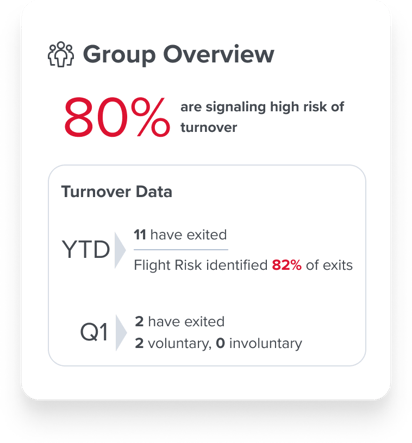
employee retention analytics flight risk prediction

Employee engagement trends

Employee engagement is a key driver of retention. Tracking engagement trends over time reveals shifts in belonging, career growth, and manager effectiveness. Pinpointing dips in engagement helps HR take action to boost morale and reduce turnover risks.
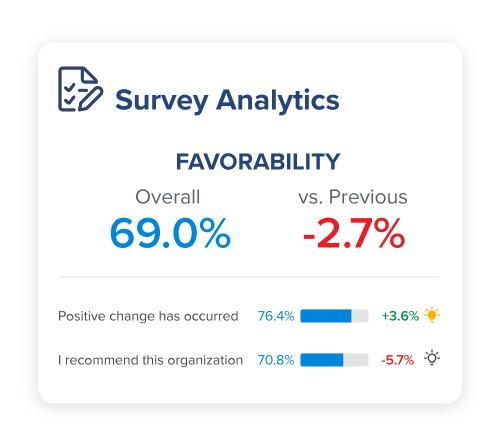
employee engagement analytics

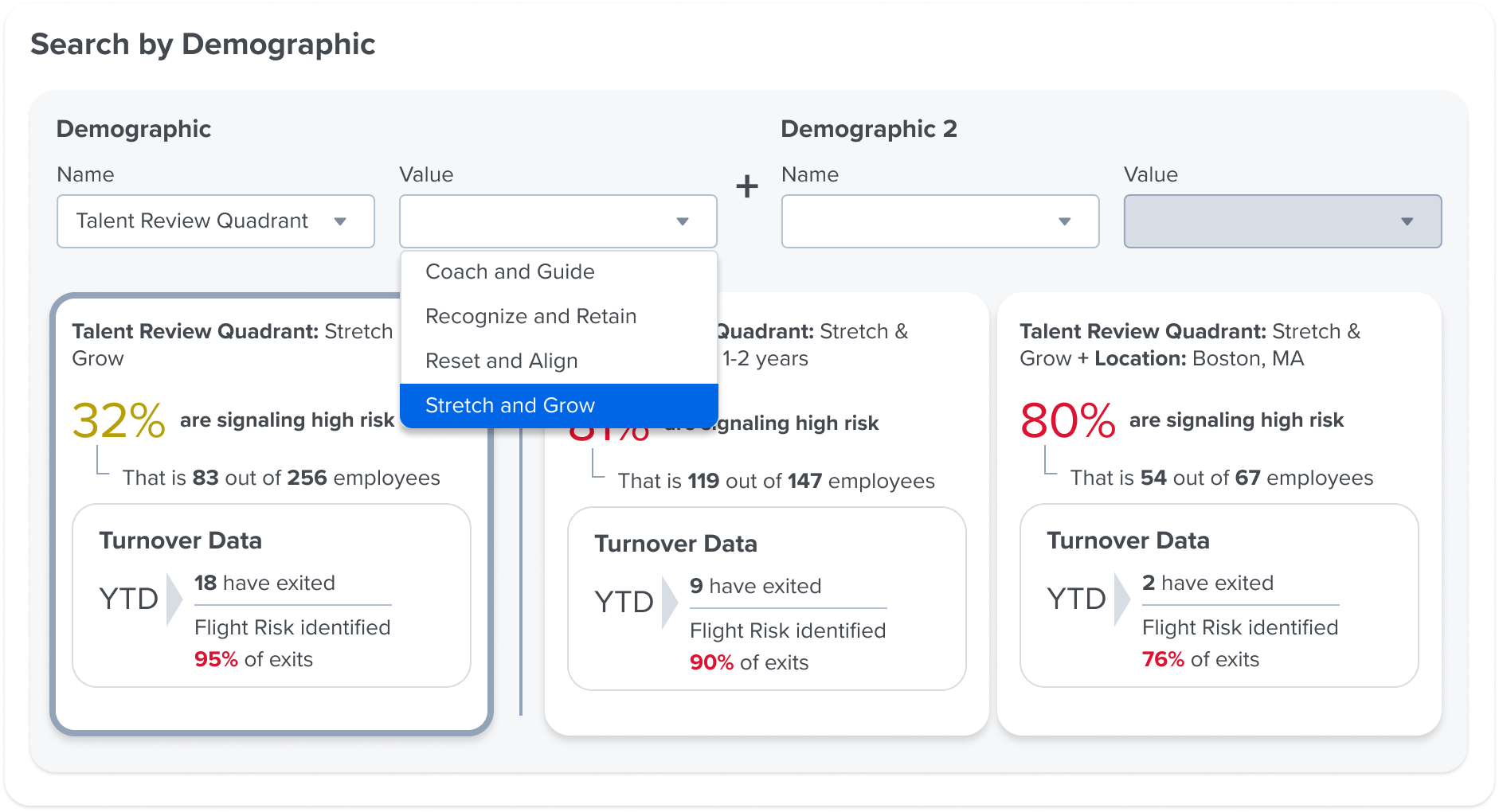
Employee retention by segment

Segmenting retention data by role, tenure, department, or demographics helps uncover specific retention challenges. This analysis allows HR teams to craft targeted strategies and allocate resources where they’re needed most.
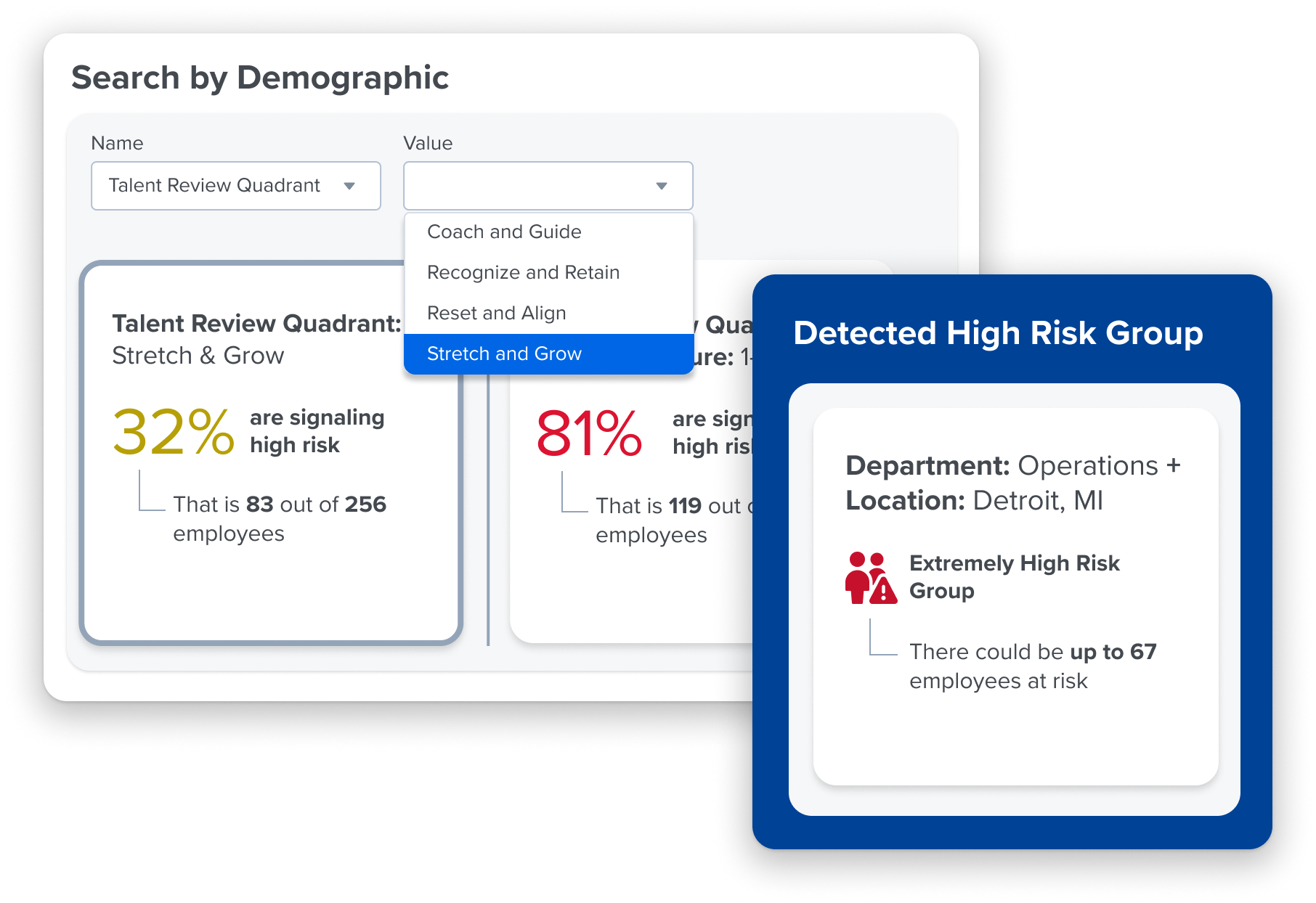
employee retention analytics by demographic


Traditional vs data-driven employee retention strategies

For years, organizations have relied on reactive retention strategies—exit interviews, compensation adjustments, or counteroffers—to address staff turnover. While these approaches can provide some insight into why employees leave, they do little to prevent turnover in the first place.

A data-driven employee retention approach flips the script. Instead of waiting for turnover to happen, predictive analytics and flight risk models help HR detect early signs of disengagement—giving organizations the opportunity to intervene before top talent walks away.

Instead of costly, reactive measures like retention bonuses or rushed counteroffers, data-driven retention strategies help HR teams pinpoint and address root causes—whether it’s career growth limitations, leadership concerns, cultural misalignment, or compensation issues.

A proactive, insight-driven approach not only reduces turnover costs but also builds a more engaged, stable workforce. When HR leaders use flight risk models and predictive analytics, they stay ahead of retention risks, implement timely interventions, and create a workplace where employees want to stay and grow.

Hear from our employee retention experts on how to shift from reactive to proactive retention strategies:


Watch the full discussion of HReal Talk: Retaining Critical Talent >>


Using data to solidify employee retention investments

Retaining top talent is critical to organizational success, yet securing leadership buy-in for retention initiatives can be challenging. Employee retention data and analytics help HR professionals build a compelling business case that directly connects retention strategies to financial and operational impact.

Quantify the cost of turnover

Use turnover cost analytics to highlight the true financial impact of losing top performers. This includes not just recruitment and onboarding expenses, but also lost productivity, institutional knowledge drain, and weakened team morale.

Leverage predictive analytics to prioritize efforts

Flight risk models and historical workforce data help HR teams identify which roles, teams, or demographics are at the highest risk of turnover. By focusing investments on high-impact areas, organizations can maximize retention ROI.

Tie retention to business performance

Retention isn’t just an HR initiative—it’s a business strategy. High retention rates correlate with happier customers, increased revenue, and more stable operations. Demonstrating these connections ensures leadership sees retention as a bottom-line priority.

Develop data-driven proposals

Effective retention strategies should be backed by engagement survey insights, flight risk predictions, and AI-powered recommendations. HR can craft clear, data-based proposals that outline expected benefits, costs, and implementation plans to secure leadership support.

By rooting retention investments in data and aligning them with business outcomes, HR leaders can elevate retention from an operational cost to a competitive advantage.


Using predictive analytics for increased employee retention

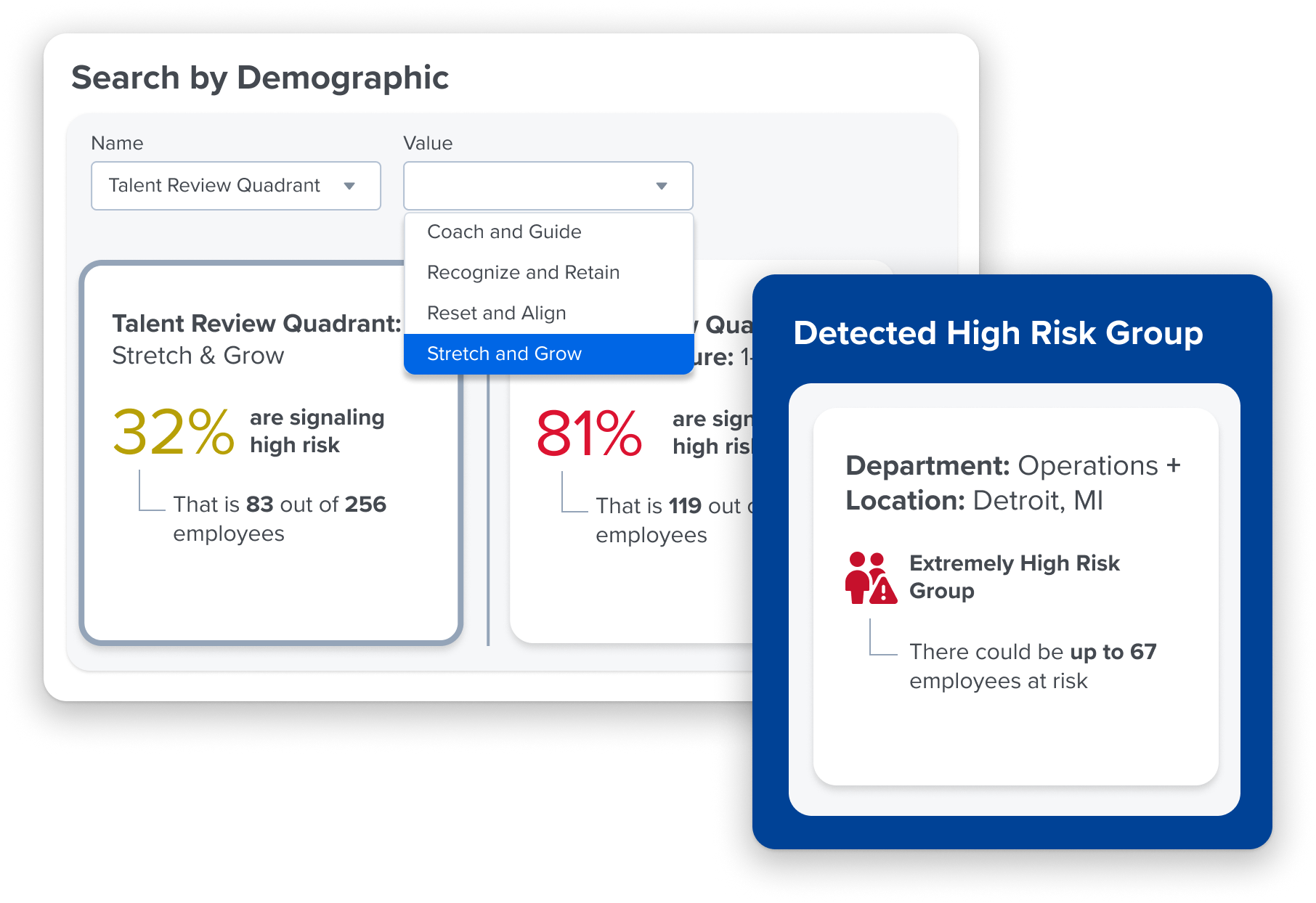
Predictive analytics are transforming how organizations tackle employee retention. By leveraging machine learning and historical workforce data, HR teams can spot early warning signs of staff turnover and take proactive measures before employees leave.

Advanced predictive models analyze patterns in employee engagement, tenure, and other key factors to identify flight risks. These models uncover subtle trends that managers might overlook, helping organizations focus their retention efforts toward maximum impact.

Predictive analytics can enhance your retention strategies by:
predictive analytics for employee retention


Identifying turnover patterns

Machine learning examines historical data on who left, why they left, and what factors contributed to their departure. By recognizing patterns across demographics, job roles, and tenure, organizations can predict which employees may be at risk.

Flagging at-risk employees

Flight risk models assess engagement trends, performance data, and workforce analytics to highlight employees showing signs of disengagement. Instead of relying on exit interviews, HR can intervene early with targeted support and retention strategies.
employee retention software


Turning insights into action

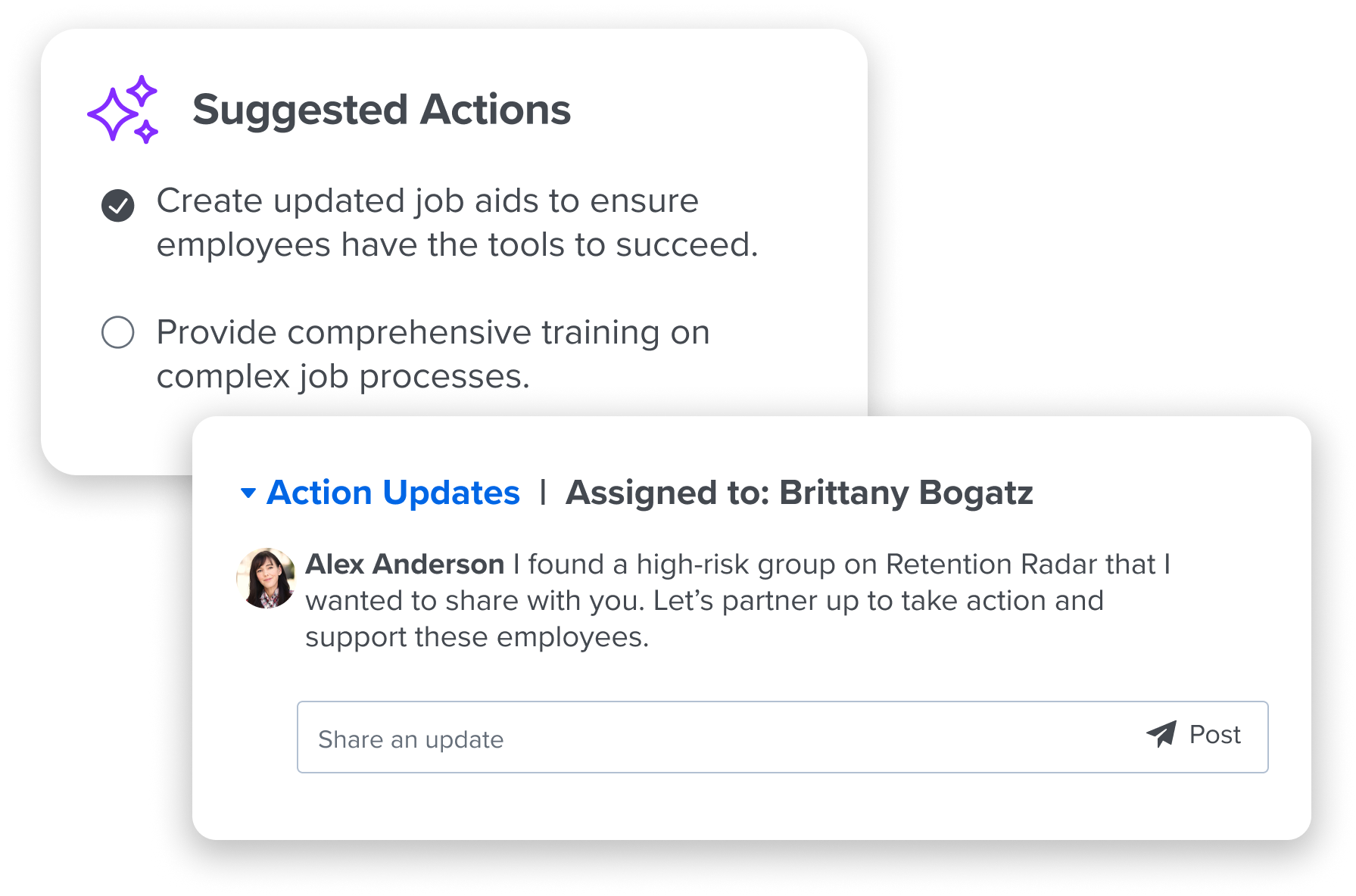
Predictive analytics doesn’t just surface risks—it guides HR teams on where to take action. By understanding retention drivers, organizations can adjust policies, improve career pathways, and strengthen manager-employee relationships to keep talent engaged.

Building a proactive, data-driven culture 

Becoming a more strategic HR partner starts with embedding data into everyday decision-making—not relying on instincts, gut feelings, or the loudest voices in the room. This shift requires equipping HR and business leaders with the right skills, tools, and mindset.

Strengthen HR’s data fluency

When HR teams can confidently interpret workforce data, they spot risks before they escalate and ask smarter, more strategic questions.

Make data literacy a leadership priority

Executives don’t need to be data scientists, but they should understand key retention metrics, flight risk insights, and engagement trends to make informed workforce decisions.

Foster a culture of evidence-based decision-making

Encourage teams to ask, “What does the data tell us?” before making retention or talent management decisions—creating an environment where assumptions are challenged with facts.

Emphasize adaptability

The best organizations don’t just collect data—they act on it. Retention strategies should evolve based on real-time insights, testing, measuring, and refining approaches to continuously improve outcomes.

By making data a foundational part of talent strategy, organizations shift from reactive problem-solving to proactive workforce planning—gaining a competitive edge in retaining top talent.

The importance of continuous employee listening

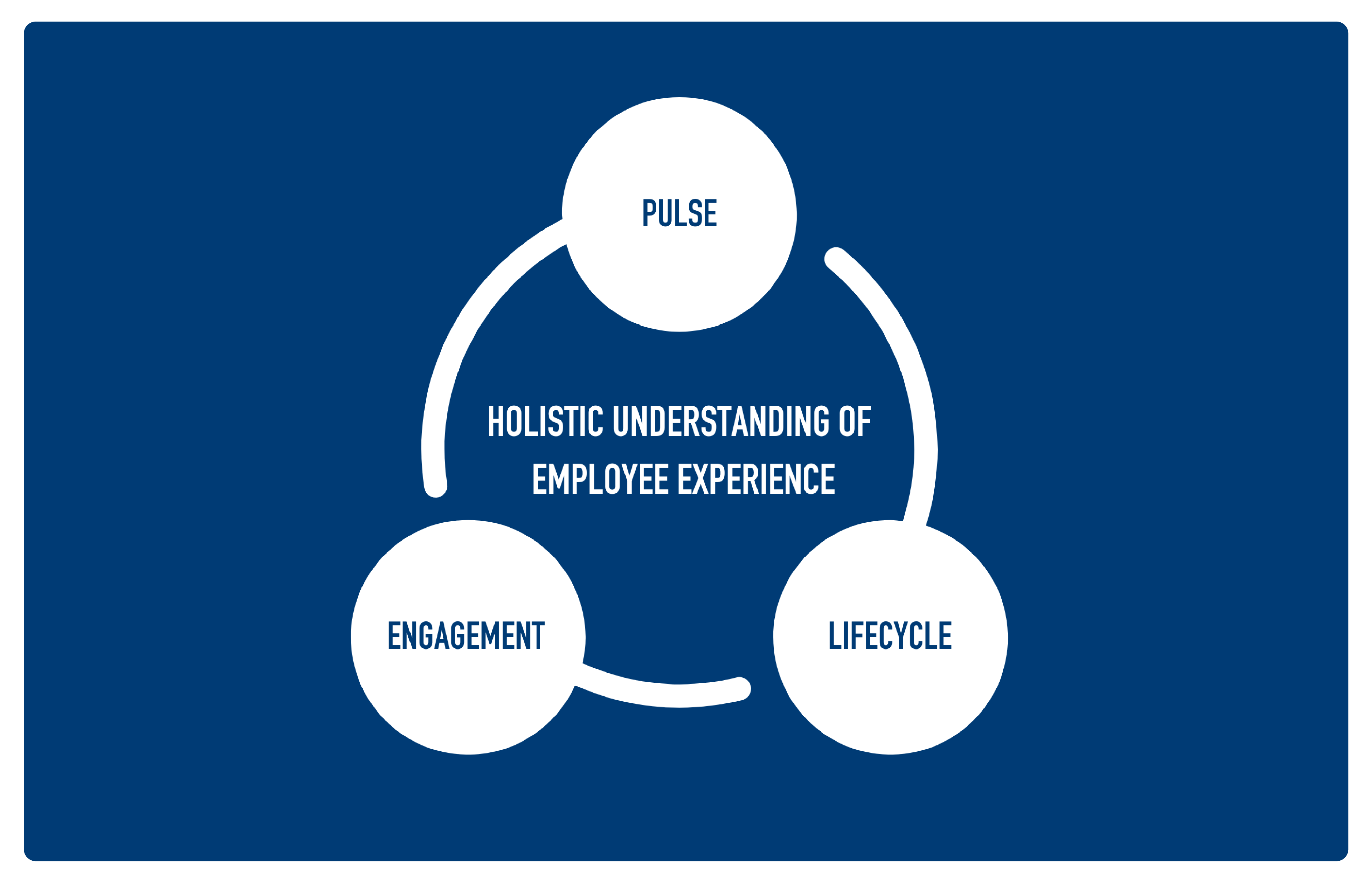
Employee feedback fuels your retention strategies. To keep your best talent, you need a continuous employee listening program that captures insights at every stage of the employee journey. 
employee listening strategy


Annual engagement surveys
 

An annual employee engagement survey helps establish a baseline for engagement trends and uncover macro-level insights. Even when competing priorities arise, these surveys provide critical data to guide retention efforts.

Targeted pulse & lifecycle surveys

Frequent, focused check-ins via pulse survey help HR monitor sentiment on key topics and spot engagement shifts before they lead to turnover. Use employee lifecycle surveys at pivotal moments, such as onboarding, promotions, and transitions.

Manager-led conversations

Encourage regular one-on-ones and team meetings to create a direct feedback loop. Personal connections often reveal issues that surveys miss and strengthen employee trust.

Exit interviews as learning opportunities

When employees leave, use their feedback to uncover hidden retention risks. These insights help refine engagement strategies and prevent future regrettable turnover.

By combining data-driven surveys with meaningful human interactions, organizations gain real-time insights into the employee experience and can take action before engagement issues escalate.

When employees see that their feedback leads to real change, they’re more likely to stay and thrive.

Act on turnover risk—before it’s too late—with Quantum Workplace’s Retention Radar

Retention Radar uses employee retention analytics to help organizations identify turnover risks early, uncover key drivers of attrition, and take meaningful action to retain top talent.

With predictive flight risk modeling, employee engagement analytics, and data-driven recommendations, Retention Radar equips HR teams with the right insights to proactively address retention challenges.
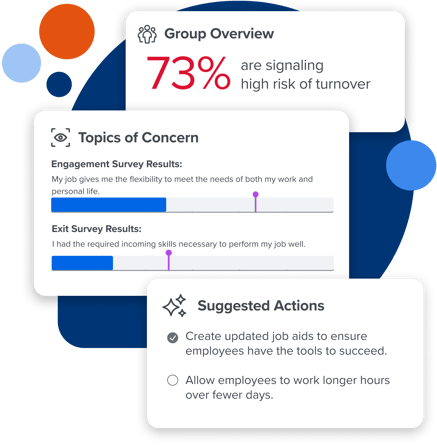
Quantum Workplace Retention Radar

Assess.

Spot early signs of turnover risk with our Flight Risk model, which analyzes employee surveys, demographic details, performance ratings, and past turnover data. By using logistic regression modeling, Retention Radar pinpoints the strongest predictors of flight risk—helping HR focus on high-impact issues that drive engagement and retention. 

Zero in on high-risk employee groups with ease and direct your retention efforts where they’re needed most. Our tool auto-detects at-risk groups and makes it easy to uncover trends with advanced search capabilities that reveal critical insights about your workforce.

Analyze.

Find out what’s driving turnover and get the details you need to take action, so you can take meaningful steps to boost engagement and retention. Our tool analyzes employee feedback from across the platform on key retention issues and elevates context that helps you take effective action.

Act.

Empower managers with tailored recommendations to tackle retention risks effectively. Retention Radar provides data-backed strategies—from recognition programs and development opportunities to manager coaching and targeted engagement initiatives—ensuring organizations take the right actions at the right time to retain key employees.

By shifting from reactive to proactive retention management, Retention Radar helps organizations reduce regrettable turnover, strengthen employee engagement, and create a more stable, high-performing workforce. Investing in data-driven retention strategies isn’t just smart business—it’s essential for long-term success.

Get a demo of Retention Radar >>


Overcoming challenges in employee retention analytics

While retention analytics provide powerful insights, organizations often face challenges in translating data into meaningful action. To maximize the impact of analytics, HR leaders must address key obstacles that can hinder retention efforts.

Staying in reactive mode

Organizations stuck in a cycle of backfilling roles without understanding why employees are struggling to make lasting improvements. Predictive analytics help shift from reaction to prevention by identifying turnover risks early and allowing HR to intervene before employees disengage.

Lacking context behind quantitative data

Turnover rates and flight risk scores are valuable but don’t always explain why employees leave. To fully understand retention risks, organizations must incorporate qualitative insights from employee feedback. Natural Language Processing (NLP) technology analyzes open-ended survey responses at scale, identifying themes and sentiment that reveal underlying concerns—such as manager issues, career stagnation, or workplace culture gaps.

Combining NLP insights with predictive analytics leads to more comprehensive, proactive retention strategies.

Failing to act

Even with access to flight risk models and predictive analytics, many organizations hesitate to act. Slow responses to early warning signs can result in losing top talent to competitors.

Establishing clear processes for turning insights into action—such as structured intervention plans and manager accountability—ensures retention efforts are timely and effective.

Leaving out your managers

HR teams may have access to retention analytics, but front-line managers play the biggest role in employee engagement and retention. Without holding leaders accountable for acting on insights, even the strongest retention strategies can fall flat.

Providing managers with real-time data, coaching tools, and structured action plans ensures they take ownership of retention efforts.

Using ineffective tools

Outdated systems, manual reporting, and fragmented data make it difficult to access real-time insights and apply retention analytics effectively. Organizations that invest in modern, user-friendly analytics platforms—including AI-powered dashboards, NLP-driven feedback analysis, and predictive modeling—can spot trends faster, streamline decision-making, and take a more proactive approach to retention.

By addressing these challenges, HR leaders can unlock the full potential of retention analytics—ensuring data leads to action, accountability, and measurable business impact.


Ready to unlock the potential of employee retention analytics?

See how Quantum Workplace’s Retention Radar can shake up your talent retention strategies. Schedule a demo today.


Frequently Asked Questions


What are the primary benefits of using employee retention analytics?

Employee retention analytics can really transform a workplace. Imagine cutting down those turnover rates significantly and saving heaps on hiring and training new staff. Plus, keeping top performers not only preserves valuable insights but also boosts productivity and sparks fresh ideas. It also gives organizations a competitive edge.

With the right data, organizations can craft effective talent management strategies. Think about focused retention plans, better pay, and opportunities for professional growth. By getting to know what drives employee engagement, companies can create programs that truly connect with their teams, fostering a positive atmosphere and building strong employee loyalty.


How does Quantum Workplace’s Retention Radar work?

Quantum Workplace’s Retention Radar is powered by three key technologies that make retention analytics easier and more engaging: our Flight Risk model, NLP technology, and AI recommendations. It has three key parts: Assess, Analyze, and Act.

The Assess function uses our Flight Risk model to spot early signs of turnover risk by looking at different employee engagement metrics. This helps generate accurate flight risk scores for each employee, giving a clear picture of who might be at risk.

Next up, the Analyze function uses NLP technology to shine a light on patterns in employee feedback, engagement, and talent data. Natural language processing identifies themes in open-ended comments that explain why certain groups might be at higher risk. User-friendly dashboards and visualizations provide these insights tailored to different roles, departments, or demographics, making it easy to understand what’s happening.

Finally, the Act function uses AI to give managers personalized recommendations to tackle retention challenges. This could mean implementing recognition programs, offering development opportunities, or providing coaching. AI-powered, practical solutions that keep top talent engaged and motivated to stay.


What are some key metrics to track in employee retention analytics?

Employee retention analytics rely on key metrics that can make a real difference. First up is the turnover rate, which includes both voluntary and involuntary departures. Then there are flight risk scores, created using our Flight Risk model that analyzes engagement surveys, talent ratings, compensation data, and how long employees have been around. Monitoring engagement trends is also crucial. This means paying attention to feelings of belonging, opportunities for career growth, and the effectiveness of managers. Lastly, looking at retention by segment helps break down retention rates across critical roles, different tenure groups, departments, and even demographics. By using these metrics, organizations can gain a clearer picture of retention challenges and craft effective, data-driven strategies that focus on keeping those valuable employees around.


How can organizations build a data-driven culture to improve retention?

It’s essential to educate HR teams and business leaders on how to interpret and act on retention insights from our Flight Risk model, NLP analysis, and AI recommendations. HR professionals can become savvy at analyzing retention data, metrics, and risk indicators, helping to identify patterns and tackle emerging issues. This doesn’t mean turning everyone into data scientists. Instead, it means building enough familiarity with key metrics that become part of their everyday thinking. Integrating retention analytics into the overall talent strategy and business processes means that leaders from all functions recognize its value. Regularly revisiting retention metrics during leadership meetings and strategy discussions allows for a deeper analysis of retention risk within the broader context of business goals. Fostering a culture that values curiosity, transparency, and adaptability to new information is key to making smarter, more informed workforce decisions.


What future trends in retention analytics should HR be aware of?

Employee retention analytics are incredibly exciting. Companies are embracing advanced Flight Risk models for predicting turnover and performing real-time risk assessments that reveal subtle patterns and early warning signs. Advanced tools for workforce planning now link retention data with strategic plans, making it easier to forecast talent needs and develop succession strategies. Plus, the focus on personalization is growing. 

Flight Risk model insights help tailor retention strategies for different talent segments. The rise of NLP technologies allows organizations to analyze unstructured data from employee feedback and exit interviews, while AI systems can recommend precise interventions based on these combined insights. With these innovative technologies, retention analytics are becoming more sophisticated, leading to smarter, data-driven talent management decisions.


Upgrade to Pro for Seamless Design

0

Why you can trust Creative Bloq

Our expert reviewers spend hours testing and comparing products and services so you can choose the best for you. Find out more about how we test.

Canva Pro review: Is it worth the upgrade?

Plenty of people will be happy enough to use the offerings available in the free forever version of Canva. But, if you’re using the graphics editor a lot and getting frustrated by the limitations of the free version, then it may make sense to upgrade to Canva Pro, which offers a plethora of additional features.

The Pro version will cost you $120 or £100 per year, for one person, and you can try a 30-day free trial before you commit.

Canva: specs/pricing

Price: $120/£100 per year
Company: Canva
OS: Windows and Mac, Android and iOS
Processor: 1 GHz processor/64-bit Intel or Apple M1
Free space: 1GB

Setup and getting started

As soon as you upgrade to Canva Pro, it’s ready to use – it’s as simple as selecting a free trial, or choosing how to pay, inputting your basic details and you’re set.

There’s an exceptionally helpful dedicated ‘Get started with Canva!’ section, which is definitely worth a look. ‘Learn the basics’ takes you through using templates, adding text, using drag and drop, adding color and video and making charts. ‘Crafting Presentations’ runs through using templates and recordings, creating animation and adding transitions. ‘Brush up on Social Media’ walks you through creating scroll-stopping posts and how to download and lastly ‘Set up your Brand’ shows how to set-up and design your brand kit, set up personalized templates and brand controls.

Features

The Pro version gets you unlimited premium templates, which is useful if you need a starting point to get designing. Those who want to create their own assets from scratch can do so with the drag-and-drop editor. As well as being more plentiful, the templates available with Canva Pro are generally nicer when compared to that of the free version.

User experience

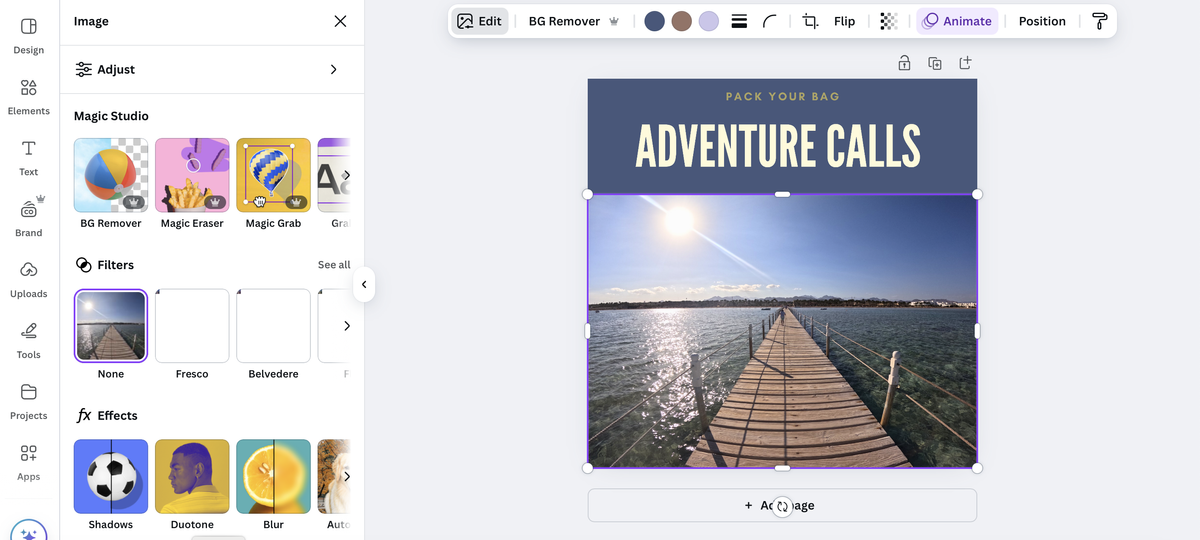
Canva Pro couldn’t really be any more intuitive to use. When you start a design project, everything you need is exactly where you’d expect to be, with additional features placed and labelled, so you get to know them. For example, when you add a photo to a project you get lots of options to edit including adding filters, removing backgrounds and using the magic eraser to get rid of distractions.

The homepage is the heart of the user experience – it shows all of your recent designs and it’s where you’ll begin new projects from, too. AI tools get their own section too, so you won’t forget to try them out!

Canva Pro offers lots of design tools powered by AI. The newest of these is Dream Lab, which uses AI to create an image for you based on any description you write. This is a fun feature to make bespoke images with, although these do tend to be a little on the cutesy side, which will obviously appeal to some people more than others.

The ‘Magic Eraser’ and ‘Magic Grab’ (where you can move different image elements about without ruining backgrounds) tools both work brilliantly and give professional-looking yet speedy photo edits. ‘Magic Edit’ is also very impressive – just type in the changes you’d like made to a photo and Canva Pro will do its best – results vary from project to project in testing, but impressive stuff nonetheless.

Scorecard

Set up & getting started Couldn’t be easier to start creating and we love the handy guides 5/5
User experience: Intuitive with everything where you’d expect and prompts to try new tools. 5/5
AI tools An excellent selection and useful for a whole host of different creative projects. 4/5

Buy it if:

  • You love the free version of Canva but feel frustrated by its limitations and often want to use the pro features.
  • You have an idea for a side hustle and need to hustle up a brand kit and get yourself a website and social media presence that matches.
  • You’re a small business owner or solopreneur who has several different projects on the go and once and needs to create design work specific to each new project – Canva templates and brand kits make this easy.

Don’t buy it if:

  • You’re already a design professional – you’ll be able to do everything Canva Pro does in your more sophisticated software.
  • You’re just starting out in design – use Canva free at first, get the free trial of Canva Pro, then upgrade later.


Q: What is Canva Pro?
A: Canva Pro is a paid version of the free design software Canva, offering additional features and templates.

Q: What are the key features of Canva Pro?
A: The key features of Canva Pro include unlimited premium templates, drag-and-drop editor, magic eraser, magic grab, and AI-powered design tools.

Q: How much does Canva Pro cost?
A: Canva Pro costs $120 or £100 per year for one person, with a 30-day free trial available.

Q: Is Canva Pro suitable for beginners?
A: Yes, Canva Pro is suitable for beginners, with a user-friendly interface and helpful guides to get started.

Q: Is Canva Pro worth the upgrade?
A: Canva Pro is worth the upgrade if you need more advanced features and templates, or if you’re a small business owner or solopreneur.

Pokémon Legends: Day/Night Cycle

0

Real-time Day/Night Cycles in Pokémon Legends: Z-A

A New Take on a Classic Mechanic

Real-time day/night cycles have been a staple in the Pokémon franchise since the Gold and Silver era, but Pokémon Legends: Z-A is set to take this classic mechanic in a bold new direction. The latest trailer for the game, revealed during the March Direct presentation, showcased several returning Pokémon and provided more insight into how battling will work in this new iteration.

Hunting Down Pokémon in the City

Unlike previous games, where you’d catch wild creatures in the wild, Pokémon Legends: Z-A involves hunting down Pokémon found throughout Lumiose City as it undergoes a massive redevelopment plan to make it more hospitable to both humans and Pokémon. The trailer suggests that daytime gameplay will focus on catching Pokémon, with NPC trainers not necessarily wanting to engage in battles on sight.

The Z-A Royale: A New Kind of Battle

At night, however, the city’s "aura" changes, and battle-hungry trainers flood its streets to participate in the Z-A Royale, a competition to determine who’s the best. Trainers participating in the Z-A Royale will be found in designated battle zones, where making eye contact is all it takes to initiate a battle.

Strategic Gameplay

Similar to the way you could get the jump on wild Pokémon in Legends: Arceus, players will also be able to surprise Z-A Royale battlers by sneaking up behind them and sending out a Pokémon to initiate a fight. Timing and dodging within the battle will be key to mastering Z-A.

A Game to Play Your Way

It’s clear that participating in the Z-A Royale and rising from Rank Z to Rank A will be necessary to complete the game’s story. However, the different gameplay experiences during day and night suggest that Nintendo wants this to be a Pokémon game you play how you want.

Conclusion

Pokémon Legends: Z-A is poised to revolutionize the classic day/night cycle mechanic, offering a fresh and exciting take on the franchise. With its unique blend of exploration, battling, and strategic gameplay, this game is sure to delight fans of the series and newcomers alike.

Frequently Asked Questions

Q: What is the main difference between Pokémon Legends: Z-A and other Pokémon games?
A: The main difference is the real-time day/night cycle, which changes the way you play and interact with the game world.

Q: How does battling work in Pokémon Legends: Z-A?
A: Battling will work in a new way, with different mechanics and strategies depending on the time of day and the type of battle you’re in (daytime catching, nighttime Z-A Royale).

Q: Can I play the game my way?
A: Yes, the game seems designed to be played in a way that suits your style, with different experiences during the day and night.

Q: Is the game’s story tied to the Z-A Royale?
A: Yes, participating in the Z-A Royale and rising through the ranks is necessary to complete the game’s story.

Mastering Hand Gesture Sketching

0

Draw Hands: A 4-Step Guide

01. Consider how hands work

The most important thing when drawing hands is to understand their anatomy. Look at your own hand – it (usually) comprises a palm, thumb, index finger, and the three remaining fingers that, even though they can be moved separately, work together when it comes to grabbing objects. Move your hand and notice how your fingers and thumb bend and move, and what happens to the palm in the process.

02. Find the right gesture

Before you start drawing a hand, make sure you pick an interesting gesture. Try to experiment a lot at this point. A well-drawn gesture can communicate more than 100 words. Why not be your own model and actor? Perform a gesture and notice what happens to your hand, then try to emulate those gestures in some fast and loose sketches.

03. Construct your sketch

Once you choose the gesture you want to draw, start sketching it in a more precise way. Ask someone to pose for you or observe your own non-drawing hand. Start off with bigger shapes, but don’t focus on small wrinkles or fingernails yet. A sturdy, well-constructed sketch will go a long way. Observe how the elements of the hand work together and what happens to the skin and muscles.

04. Work in the details

When you’re happy with the first sketch, begin refining it. Enhance the lines that are important and erase those that aren’t. Add wrinkles, fingernails, and veins if they’re visible. When drawing fingernails, remember that they aren’t pasted on top of the fingers, they are well-embedded in the tips of the fingers. Drawing them correctly is important.

Conclusion

By following these four steps, you can create a well-constructed and believable hand drawing. Remember to consider the anatomy, find the right gesture, construct your sketch, and work in the details. With practice and patience, you can master the art of drawing hands.

FAQs

Q: How do I get the proportions right when drawing hands?
A: Start by sketching the overall shape of the hand, then add the fingers and thumb. Pay attention to the proportions of the hand and fingers, and make adjustments as needed.

Q: What is the most important thing to consider when drawing hands?
A: Understanding the anatomy of the hand is crucial. Study the way the fingers and thumb work together, and how the palm and fingers move.

Q: How do I add detail to my hand drawing?
A: Start by adding the basic shapes and lines, then refine the drawing by adding wrinkles, fingernails, and veins. Pay attention to the skin and muscles of the hand, and add texture and shading as needed.