Home Blog Page 147

Providence’s Virtual Acute Care Program Continues to Thrive

The Challenge

Anyone caring for critically ill patients knows that access to specialists and high-demand providers within hospitals is essential to achieving good outcomes and supporting patients and caregivers. Scheduled and on-demand access to neurologists, infectious disease specialists, hospitalists, intensivists, and psychiatrists is proven to address these goals. However, the workforce crisis is making the job of staffing to need a tough battle.

The Proposal

To address these challenges, Providence has been developing the Providence Virtual Acute Care program over the last 10 years. "Here at Providence, we have been at the forefront of delivering virtual acute care services since the beginning – so we’ve been developing and learning what makes an effective program," said Sherene Schlegel, RN, COO and CNO, Virtual Care and Digital Health at Providence.

Meeting the Challenge

The Providence Virtual Acute Care service has evolved into a highly valuable, comprehensive, and scalable program that is meeting the needs of the health system’s hospitals and other hospitals in the referral networks. There are six core components to the program.

Components

  • Providers: The service starts with providers. "We don’t just integrate with Providence, we are Providence," Schlegel explained. "Our service was built by and for our hospitals and referral hospitals, and our providers are Providence employees who meet or exceed our standards for employment and service levels.
  • Clinical Quality Programs and Analytics: Staff layer on top of all of this a standards-based quality program that incorporates ongoing monitoring for adherence and reporting against established KPIs – including quality of patient care, programs, and physicians.
  • Customized Clinical Design: The hospital-specific clinical design process recognizes the unique service availability, referral preferences, and operational norms of a hospital and optimizes workflows accordingly. The system is deeply integrated into existing workflow, processes, and operations, while adhering to and supporting Providence standards of care, governance models, and mission.
  • One-Call-For-All Service: "Our unprecedented ‘one-call-for-all,’ real-time patient support manages immediate action for any hospital requirement or issue," Schlegel explained. "Our Digital Access Center ensures clinicians and stakeholders get the crucial assistance they need to perform at their best.
  • Cross-Providence Exam Technology: "We are equipped with high-definition cameras and integrated peripheral devices that allow the facilitation of comprehensive, remote examinations," Schlegel noted. "Our exam hardware and software are standardized across Providence to deliver a price, support, and experience advantage.
  • Telemedicine Resource Center: Last, we provide shared services that support our hospitals as they transition toward a virtual care augmented hospital. We provide learning and education opportunities for every level and function, helping the organizations we serve to manage the differences and complexities of telehealth operations.

Results

Virtual care at Providence is proving to be an important component of the health system’s care delivery. Today, the health system has more than 250 virtually enabled acute care clinicians delivering service in more than 100 sites in eight states, and delivers more than a million patient encounters every year.

Advice for Others

"I would emphasize the critical role virtual care plays in mitigating clinician shortages and allowing patients to have access to care regardless of their geographic location," Schlegel said. "Virtual care not only alleviates staffing constraints but also enhances patient outcomes by providing timely access to expert care – and is incredibly meaningful to families who are able to keep their loved ones close to home.

FAQs

Q: What is the goal of the Providence Virtual Acute Care program?
A: The goal is to provide high-quality, mission-based care to patients in a timely and cost-effective manner.

Q: How does the program meet the needs of the health system’s hospitals and other hospitals in the referral networks?
A: The program has six core components, including providers, clinical quality programs and analytics, customized clinical design, one-call-for-all service, cross-Providence exam technology, and telemedicine resource center.

Q: What are the benefits of the program?
A: The program provides timely access to expert care, alleviates staffing constraints, and enhances patient outcomes.

Q: How does the program support patients and caregivers?
A: The program provides access to care regardless of geographic location, allowing patients to keep their loved ones close to home.

Q: What is the future of healthcare, and how is Providence preparing for it?
A: The future of healthcare is flexibility, and Providence is preparing by embracing virtual care and providing learning and education opportunities for every level and function.

Apply to Speak at Disrupt 2025

0

Apply to Speak at TechCrunch Disrupt 2025

Calling all tech innovators, startup fanatics, marketing gurus, and emerging VCs – this is your moment! You’ve waited long enough, and now the time has come to step into the spotlight at TechCrunch Disrupt 2025, taking place October 27–29 in San Francisco. Share your expertise with over 10,000 eager attendees and make an impact by hosting a roundtable or breakout session.

Choose your topic and format

When submitting your application, you’ll choose one or both of the following formats and provide a title and description for your topic:

  • Breakout Session: A 30-minute presentation with up to four presenters (including a moderator) followed by a 20-minute Q&A, engaging up to 100 attendees. You can use visual aids and limited AV capabilities. Each presenter will host one breakout session at Disrupt.
  • Roundtable Discussion: Two speakers lead a 30-minute interactive discussion for up to 40 attendees. No presentation or AV is required – the emphasis is on organic conversation. You may have the opportunity to host this roundtable twice during Disrupt.

TechCrunch will review all applications, and finalists will move to the Audience Choice voting round. Topics, descriptions, and speakers will be published online for TechCrunch readers to vote. Winning sessions will be featured live at Disrupt 2025!

Shape the future of startups and tech at Disrupt 2025

This is your chance to make an impact in the startup ecosystem while establishing yourself as a thought leader. TechCrunch Disrupt 2025 is happening from October 27–29, but the application deadline for content is May 16. Don’t miss out – learn more and apply here!

Want even more brand visibility at Disrupt 2025?

Stand out at Disrupt 2025! Elevate your presence beyond the stage by exhibiting your brand to 10,000+ startup leaders and investors. Exhibit tables are in high demand – reserve yours now before they’re gone!

FAQs

Q: What is the application deadline for content?
A: May 16

Q: How many presenters can I have for a breakout session?
A: Up to four presenters (including a moderator)

Q: Can I host multiple roundtable discussions?
A: Yes, you may have the opportunity to host this roundtable twice during Disrupt.

Q: What is the format for a roundtable discussion?
A: Two speakers lead a 30-minute interactive discussion for up to 40 attendees, with no presentation or AV required.

Q: How do I apply to speak at Disrupt 2025?
A: Learn more and apply here!

Mastering the Basics: 10 Video Editing Tips and Tricks for Beginners

0

Launching Premiere Pro for the First Time: A Step-by-Step Guide

Try Premier Pro for Free

1. Import Footage

Importing footage is but a click away. Adobe projects all launch in a similar way, by presenting you with the app’s Home Page. From there, you can check the software’s latest features, open a project not shown in your list of recent ones, or create a new one from scratch, among others.

Clicking on ‘New Project’ reveals a smaller window through which you give your project a name, and choose where to save it. Once you’ve clicked on ‘Create’, you’re taken to the ‘Import’ space (you can’t edit without having imported clips first).

A sidebar to the left lets you navigate through your local and online devices. Should you not have some footage at hand, ‘Sample Media’ would be a good alternative. Locate the files you need, and click on them to select them. Once you’re happy with what you’ve got, click on ‘Import’ (lower right of the interface).

2. Add First Clip

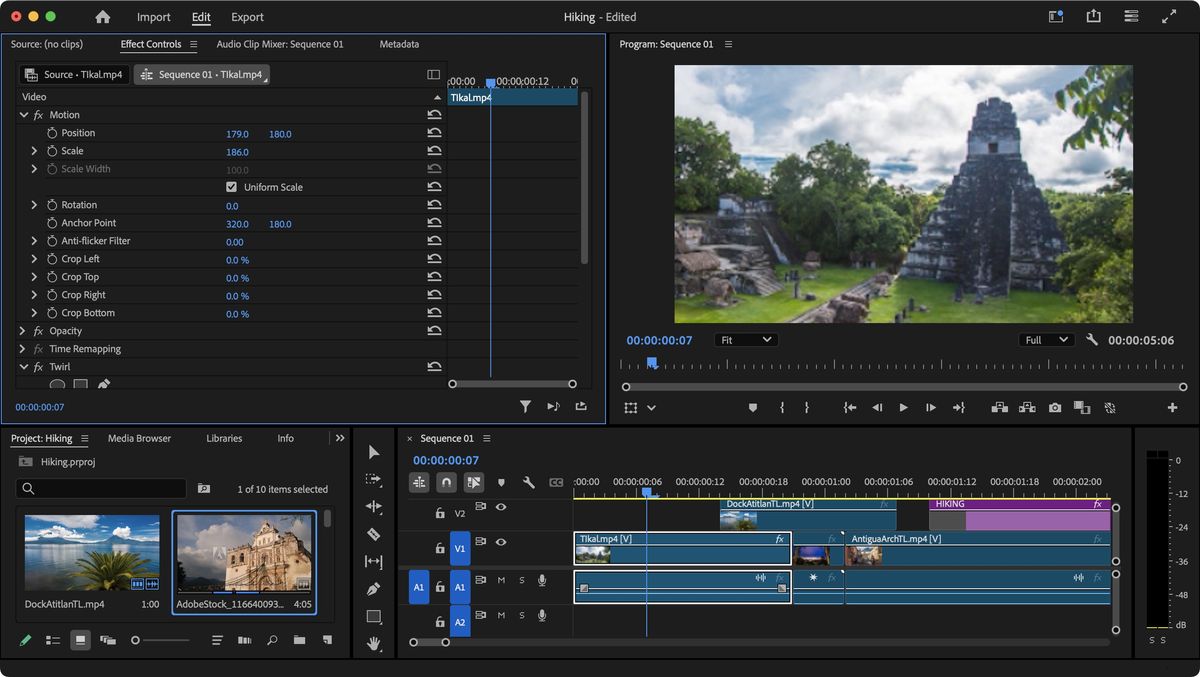
Now that your clips have been imported, you’re automatically taken into the ‘Edit’ space, with your imported clips lower left of the interface. You’ll notice that they’ve also all been automatically placed in your timeline (lower right).

For the purposes of this exercise, we don’t want clips in the timeline just yet, so click on one, go to Edit > Select All, and then Edit > Ripple Delete.

Mouse over one of your clips in your Library. As you do so, notice that you’re in fact scrolling through your footage. This is a great way to quickly preview your clip and make sure you’ve chosen the right one.

Most of the time, you only need part of a clip. To do this, as you mouse over, hit the ‘i’ key to set an ‘in point’, and the ‘o’ key, for the ‘out point’, then drag that clip’s thumbnail onto your Timeline.

3. Working the Timeline

Add additional clips to your project, one after the other, as we described in Step 2. This creates a very basic edit, but you can add a degree of complexity to your project by placing clips on different layers. If you look to the left of the Timeline, all your video clips should be on the ‘V1’ layer.

So this time, add a clip anywhere on ‘V2’. Any clip under this new one will be obstructed by it.

You could use this technique for instance to keep hearing what’s going on in V1 while changing the visual to what you placed in V2.

Your clips’ in and out points are not set in stone: check the clip on V2 and mouse over one of its edges. The cursor changes shape and turns red. You can then drag its edge in either direction to alter its edit point.

4. Adding Effects

As you build your edit, you may wish to alter the clips you’re using. You might want to zoom into the footage for instance. To do this, select a clip you’ve added in the timeline. This should reveal numerous parameters in the ‘Effects Control’ panel, top left of the interface. From there, locate ‘Scale’ which is currently set to ‘100’. You can either click on it to type in a new value, or click and drag left or right on the current value to gradually increase or decrease the clip’s size. You can do the same with ‘Position’ to change the part of the image you see in your timeline.

In the Lower Left panel, you’ll find an ‘Effects’ tab. Scroll through, find ‘Gaussian Blur’ for instance, and drag it to the ‘Effects Controls’ panel to add it to your selected clip (you can also drag it to the clip – or any other clip for that matter – in the Timeline), and manipulate it as above.

5. Adding Title

Adding a title is a tad more complicated as it involves changing your workspace to gain access to all available title templates. To do this, go to the main menu bar and select Window > Workspaces > Graphics. The whole interface will change. Top right, you’ll find the ‘Graphics Templates’ panel. Select it, and scroll down until you find one you’re happy with, then drag it to your timeline, above your existing clips.

Now you need to customise your title. To change the wording, simply double-click on it in the main preview window (top right).

Should you need to make additional changes to your title, click on the ‘Effects Controls’ panel (top left) and scroll down until you see ‘Text’. To its left is a chevron. Click on it to reveal all its changeable parameters.

6. Sharing Your Work

You’ve created a project, dragged various clips onto it, applied some effects and even added a title. Sounds like you’re ready to export your work.

To do this, click on the Export menu, top left of the interface (it’s the menu with a home icon to its left). The interface changes again, this time giving you all the tools you need to perform the action at hand.

The default setting is ‘Media File’ which will export your project at the same resolution and quality as you’ve been working on. This is great for archival purposes, but more often than not would create files that are too large to share on social media.

Thankfully, Premiere Pro allows you to share your work directly to various sites, such as Facebook, YouTube and TikTok. All you need to do is sign in to your accounts (you can export simultaneously to numerous platforms), trust the presets as they are, and click on ‘Export’ (lower right).

Conclusion

In this step-by-step guide, we’ve walked you through the basics of launching Premiere Pro, creating a new project, importing footage, adding clips, effects, and titles, and sharing your work. With these fundamental steps, you’re ready to start creating your own videos using Adobe Premiere Pro.

FAQs

Q: How do I import footage into Premiere Pro?
A: You can import footage by clicking on ‘New Project’ and selecting ‘Import’ from the drop-down menu.

Q: How do I add clips to my project?
A: You can add clips to your project by dragging and dropping them from the ‘Import’ window into the ‘Edit’ space.

Q: How do I add effects to my clips?
A: You can add effects to your clips by selecting them in the ‘Edit’ space and then dragging and dropping the desired effect from the ‘Effects’ tab in the Lower Left panel into the ‘Effects Controls’ panel.

Q: How do I add a title to my project?
A: You can add a title to your project by going to the ‘Graphics’ workspace and selecting a title template from the ‘Graphics Templates’ panel, then dragging it to your timeline.

Vibe Coding: Promise and Peril

Developers Speak Out on Vibe Coding

The internet and my inbox have been abuzz with buzz about vibe coding. Vibe coding, if you’ve been living under a rock for the past few weeks, is the practice of letting an AI guide your coding while you sit back, drink coffee, watch YouTube videos, and play Cities: Skylines 2, all while taking to Reddit and sharing your opinion on the ranking of Star Wars vs. Star Trek vs. Stargate.

For the record, it’s Stargate, then Star Trek, then Star Wars, but I digress. Seriously, vibe coding was a term coined by a former OpenAI founder and master programmer who waxed poetic about using an AI to do a lot of his coding’s more prosaic work. I went into substantial depth about that post and the definition of vibe coding in my previous article on the topic.

Developers Speak Out

I decided to reach out to real professional developers and ask their opinions. As you’re about to see, some like the concept and say that AIs are saving them a ton of time, but most are concerned that non-pro developers and junior coders might miss important coding considerations and thereby produce code that’s somewhere on the spectrum from junk to janky to downright dangerous.

Todd Olson, Co-Founder/CEO of Pendo

Vibe coding changes how we build, but not why we build. The goal isn’t to produce more software; it’s to create better software experiences. Without a clear understanding of user needs, vibe coding risks amplifying misalignment at scale.

Chris Reynolds, Developer Advocate and Software Engineer at Pantheon

The most important thing for me about vibe coding is that there needs to be a human operator who is actually smarter than the computer. One of the problems of using LLMs for development is they make stuff up that sounds feasible, and they only do deeper research or consider things like security or best practices if prompted.

Jamie Marsland, YouTube Manager and Developer at Automattic

We’re entering a new era where the web becomes a canvas for dynamic, app-like experiences. As AI, no-code tools, and automation remove technical barriers, creators of all kinds are free to build richer, more interactive digital worlds. The lines between websites and apps are blurring — and with it comes a surge of creativity that redefines what’s possible online.

Bill Salak, CTO of School Test Prep Service Brainly

In tech, vibe coding, we refine, restructure, and test the code, cutting down development time significantly. In a recent AI-powered session, I entered the requirements for a new product, switched back to my other work, and checked back a few minutes later. Within 20 minutes, I had a functional prototype ready for refinement and testing. AI has been a game-changer in our ability to quickly deliver features that customers want, and vibe coding has proven to be my go-to approach for rapidly building MVPs.

Leonardo Losoviz, Developer of WordPress Data Management Plugin Gato GraphQL

I’m currently integrating my plugin Gato GraphQL to use vibe coding to create extensions, with the goal of creating all the extensions that my customers are demanding in a couple of weeks (normally it’d take a few months).

John Campbell, Director of Content Engineering at Security Journey

Vibe coding is set to revolutionize software development by making developers more efficient and enabling individuals with limited technical expertise to expand their access to software tools. However, there are concerns. Just like a teenager experiencing the thrill of driving for the first time, that freedom would quickly turn to chaos without traffic laws, safety features, and guardrails.

Rhys Wynn, Freelance WordPress Developer

I think vibe coding is a phrase invented by people who think that AI-generated code is safe and secure, and want to position themselves in a market they maybe shouldn’t be in. Every single vibe coding project I’ve seen has been insecure, not able to answer a use case, or just emulating better things that exist already.

What Does it All Mean?

Some developers have seen rapid improvements in coding time using AI development tools. However, the prevailing opinion amongst nearly all the developers here is that (a) vibe coding is not for newbies, and (b) vibe coding could leave some problematic security and reliability problems.

Conclusion

Vibe coding, for a very experienced developer, is kind of like being in a flow state. A lot of work can be accomplished by being in flow. But the prevailing opinion amongst nearly all the developers here is that (a) vibe coding is not for newbies, and (b) vibe coding could leave some problematic security and reliability problems.

FAQs

Q: What is vibe coding?
A: Vibe coding is the practice of letting an AI guide your coding while you sit back and let the AI do the work for you.

Q: Is vibe coding safe?
A: Some developers are concerned that vibe coding could leave some problematic security and reliability problems.

Q: Is vibe coding for newbies?
A: No, the prevailing opinion amongst nearly all the developers here is that vibe coding is not for newbies.

Q: What are the benefits of vibe coding?
A: Some developers have seen rapid improvements in coding time using AI development tools.

Q: What are the risks of vibe coding?
A: The risks of vibe coding include problematic security and reliability problems.

Typographic Harmony: How MoMA, Paul Rand, and More Masterfully Combine Form and Function

0

The Silent Power of Typography

01. Mailchimp

Mailchimp is an all-in-one marketing platform primarily known for its email marketing services. Its typeface is Means (primary) and Graphik (secondary).

Why it works: An elegant serif infused with a quirky warmth, the primary brand typeface for Mailchimp, Means, projects trustworthiness, optimism, and sincerity. Graphik adds a touch of personality for headings and accents. This combination creates a welcoming and engaging experience for users. The difference lies in their purpose: the heading typeface injects a sense of whimsy and memorability, drawing attention and reinforcing Mailchimp’s distinctive branding, while the body text typeface prioritizes clarity, allowing users to easily digest information.

02. The New York Times

The New York Times website serves as the online presence of the renowned The New York Times newspaper and its typeface is Cheltenham (primary) and Franklin Gothic (secondary).

Why it works: The New York Times maintains its classic newspaper heritage with Cheltenham, conveying authority and trustworthiness. The addition of Franklin Gothic for headings and digital interfaces provides a modern edge and improves readability on screens. This contrast serves to establish a clear visual hierarchy: the serif headings command attention and signal the importance of the content, while the sans-serif body text ensures a comfortable and efficient reading experience for the extensive articles.

03. Uber

Uber is a technology platform that connects riders with drivers for transportation services. The mobile app is also an important artifact in the drivers and riders’ user journey and is used as the main digital touchpoint between the brand and the customers. It uses Uber Move, a custom typeface.

Why it works: Uber Move is a geometric sans-serif typeface designed specifically for the brand. Its clean lines and simple forms reflect efficiency and modernity, which are key aspects of the Uber brand. It’s optimized for legibility across various devices and supports multiple languages.

04. Medium

Medium is an online publishing platform where people can write and publish articles, and readers can discover and engage with content. Its typefaces are Charter (primary) and Sohne (secondary).

Why it works: Charter’s readability and slightly informal feel make it ideal for long-form reading, which is central to Medium’s platform. It creates a comfortable and inviting reading experience, encouraging users to engage with the content. This choice is paramount for a platform dedicated to in-depth articles and essays.

05. Resend

Resend provides an email API and platform that allows developers and businesses to reliably send transactional emails, such as password resets, order confirmations, and welcome messages, with a focus on ease of integrations. Its typeface is aBCFavorit (primary) and Inter (secondary).

Why it works: Resend.com utilizes clean, readable sans-serif typography, including monospaced fonts for code and Inter for body texts, to project a modern, reliable, and technically proficient brand image. This deliberate choice reinforces their core values of efficiency and trust. The typeface aBCFavorit, a grotesque sans-serif by Dinamo, offers a balance of geometric clarity and unique, slightly humorous details, making it versatile for titles and primary texts.

06. Oura

Oura has a smart ring and accompanying app that tracks various aspects of your health and sleep. It uses AkkuratLL and Editorial News as its typefaces.

Why it works: Oura primarily employs the clean and modern AkkuratLL sans-serif typeface for body text and headings, ensuring readability and a sleek aesthetic, complemented by a bolder, slightly more stylized sans-serif called Editorial News for key elements only. This pairing creates a great visual hierarchy, guiding the user’s eye and adding a touch of sophistication.

07. Inne

Inne.io provides a hormone tracking device and app that allows women to monitor their fertility and hormonal health at home by analyzing saliva samples. In terms of typefaces, it uses Oceanic Text (primary) and GT America Inne (secondary).

Why it works: Inne.io utilizes Oceanic Text for headings, a typeface with a condensed and technical feel, conveying precision and innovation. This contrasts with GT America Inne for body text, a variation from the classic and readable GT America font that prioritizes clarity and accessibility.

Conclusion

Typography is a subtle yet powerful tool that can shape a brand’s perception, convey its personality, and establish a strong visual identity. The brands featured in this article have successfully leveraged typography to create a consistent and recognizable visual language that strengthens their brand presence. By selecting typefaces that align with their aesthetic and integrating them across various platforms, these brands have created a cohesive user experience that fosters recognition and loyalty.

FAQs

Q: What is the importance of typography in branding?
A: Typography is a crucial aspect of branding as it can convey a brand’s personality, values, and tone, ultimately influencing how customers perceive the brand.

Q: What are some key considerations when selecting a typeface for a brand?
A: When selecting a typeface, consider the brand’s values, target audience, and overall aesthetic, as well as the typeface’s readability, legibility, and versatility.

Q: Can a typeface be a key differentiator for a brand?
A: Yes, a well-chosen typeface can be a key differentiator for a brand, setting it apart from competitors and establishing a unique visual identity.

Common React.js Low-Level Design (LLD) Interview Questions

How to Implement Advanced React Features

1. How to Implement Infinite Scrolling in React

  • Consider the approach for triggering additional data load when the user scrolls near the end of the page or a scrollable element.
  • How would you handle throttling, debouncing, or optimization to prevent excessive requests?
  • Discuss how to manage state for pagination and loading indicators.

2. How to Implement Filtering in React

  • Describe how to optimize the filtering process for large datasets.
  • How would you debounce user input to avoid unnecessary re-renders or API calls?
  • How would you manage the filtered results state and the interaction with an API?

3. How to Implement Dynamic Forms in React

  • How would you manage form validation, error handling, and state for dynamic inputs?
  • Would you use controlled or uncontrolled components for such a form?
    • How would you structure the form’s state for adding/removing dynamic fields?

4. How to Implement Multi-Step Forms in React

  • How would you ensure that data entered in each step of the form is stored properly and can be accessed across steps?
  • How would you manage navigation between steps and handle errors or validation for each step?

5. How to Use React Hooks

  • Discuss the structure of the hook for handling loading, error, and success states.
  • How would you use useEffect to trigger the API request and manage cleanup?
  • How would you ensure that the hook is reusable across different components?

6. How to Implement Lazy Loading in React

  • Explain how to use React.lazy and Suspense for loading components only when required.
  • How would you handle loading indicators or fallback UI during the loading process?
  • How would you manage this for multiple components or routes?

7. How to Implement Drag-and-Drop in React

  • Explain how to manage the drag-and-drop state and reordering of list items.
  • What would be your approach for handling the drag events, and how would you optimize performance?

8. How to Implement Authentication in React

  • How would you protect routes that require authentication and redirect users to the login page if they’re not authenticated?
  • How would you implement token-based authentication (e.g., JWT) and handle token expiry?

Conclusion

In this article, we have explored various advanced React features, including infinite scrolling, filtering, dynamic forms, multi-step forms, React hooks, lazy loading, drag-and-drop, and authentication. We have discussed the approaches and considerations for implementing these features in a React application.

FAQs

Q: How do I implement infinite scrolling in React?
A: You can implement infinite scrolling in React by using the window.onscroll event to detect when the user is near the end of the page or a scrollable element, and then triggering an API request to load more data.

Q: How do I debounce user input in a filtering component?
A: You can debounce user input in a filtering component by using a library like Lodash or by implementing a simple delay using setTimeout.

Q: How do I handle form validation in a dynamic form?
A: You can handle form validation in a dynamic form by using a library like React Hook Form or by implementing a custom validation function that checks the form state and returns an error message if necessary.

Q: How do I implement authentication in React?
A: You can implement authentication in React by using a library like Passport.js or by implementing a custom authentication system that uses tokens (e.g., JWT) to authenticate users.

Critics of UK’s AI copyright proposal must not ‘resist change’, says minister

UK Tech Secretary Urges Cooperation on AI Copyright Reform

Government weighs 11,000 responses to consultation on future of copyright and AI

UK technology secretary Peter Kyle has urged opponents of a new artificial intelligence copyright regime not to "resist change", as he prepares to rule on proposals that have enraged British musicians and filmmakers.

Background

Thousands of people working in the British creative and media industries have protested against the UK’s proposed system that would require every company, artist or author to opt out of their work being incorporated into AI systems by tech companies.

Government’s Position

Promising the UK’s Labour government will "prioritise… forward movement", Kyle stressed he did not want to set the country’s filmmakers and musicians against technology companies, but said they would "find a way through it".

"Just as in every other time there is change in society, there will be some people who will either resist change or try to make change too difficult to deliver," Kyle told the Financial Times. "That’s why it is important we have a government that will prioritise the forward movement of our society, economy and government itself, so all are fit to seize the opportunities of the future."

Consultation Response

Speaking on the sidelines of US chipmaker Nvidia’s GTC conference in the heart of Silicon Valley last week, Kyle said the Department for Science, Innovation and Technology was weighing more than 11,000 responses to its consultation on the future of copyright and AI, and planned to legislate "in due course".

Stakeholders’ Concerns

The copyright changes have become contentious among British media groups, with the co-chair of studio Working Title Films, Eric Fellner, calling them an "existential threat" to the country’s creative industries.

Government’s Plan

Kyle said the UK would "find a way through it and get both sectors facing the future and fit for the digital age, and fit for having the rights and protections and the ability to earn money in the digital age".

Data Centre Plans

The UK government is also planning to establish "AI growth zones" to attract investment for new data centres, with one potential site having close to 2 gigawatts of power available, which would be enough to support hundreds of thousands of the powerful Nvidia chips that tech companies rely upon to build and deploy cutting-edge AI systems.

Conclusion

As the UK government weighs the responses to its consultation on the future of copyright and AI, it is clear that the proposed system has sparked strong reactions from various stakeholders. While some have expressed concerns about the potential impact on the creative industries, others have emphasized the need for a more forward-thinking approach to copyright law in the age of AI. As the government moves forward with its plans, it will be interesting to see how it balances the interests of different stakeholders and ultimately shapes the future of copyright and AI in the UK.

FAQs

Q: What is the UK government’s position on AI copyright reform?
A: The UK government is committed to finding a way forward that balances the interests of different stakeholders, including the creative industries and technology companies.

Q: What is the current state of the consultation on the future of copyright and AI?
A: The consultation has received over 11,000 responses, and the government plans to legislate "in due course".

Q: What are the potential implications of the proposed copyright system for the creative industries?
A: The proposed system could have significant implications for the creative industries, including the need to opt out of work being incorporated into AI systems by tech companies.

Cyberattack Disrupts Train Ticket Sales in Ukraine

0

Cyberattack Hits Ukraine’s State-Owned Railway Operator

Disruption to Online Ticket Sales

Ukraine’s state-owned railway operator, Ukrzaliznytsia, has been hit by a large-scale cyberattack, affecting online ticket sales, including through its mobile app. According to the railway operator’s statement on its official Telegram channel, trains continue to operate normally, with no delays.

Passengers Faced Long Lines at Stations

Journalist Daryna Antoniuk reported from Kyiv’s central station, describing the scene as "unusually crowded" with dozens of people waiting in long lines to buy tickets for travel within Ukraine and abroad.

Ukrzaliznytsia’s Response

In its announcement, the railway operator assured customers that "the enemy failed to do the key thing: train traffic is stable, they run clearly, without delays, and all operational processes of traffic are set up in a backup format." The operator advised customers who cannot purchase tickets online or through the mobile app to go directly to the train as a last resort.

Business as Usual for Trains

Despite the cyberattack, Ukrzaliznytsia emphasized that train traffic remains stable, and all operational processes are functioning in a backup format. This means that passengers can continue to rely on the railway network for their travel needs.

FAQs

Q: How did the cyberattack affect Ukrzaliznytsia’s services?
A: The cyberattack affected online ticket sales, including through the mobile app.

Q: Were trains affected by the cyberattack?
A: No, trains continued to operate normally, with no delays.

Q: What did Ukrzaliznytsia advise customers who cannot purchase tickets online or through the mobile app?
A: The operator advised customers to go directly to the train as a last resort.

Q: Is the railway network still operational?
A: Yes, the railway network remains operational, with all operational processes functioning in a backup format.

Indiana Jones and the Great Circle

0

Microsoft and Bethesda Bring Indiana Jones and the Great Circle to PS5 on April 17th

Release Date and Preorder Details

Bethesda is set to release Indiana Jones and the Great Circle on PS5 on April 17th, 2023. The game was initially released on Xbox and PC on December 9th, 2022, and Microsoft promised a PS5 release for this spring. The game will be available in standard and premium versions, with the premium version offering two days of early access starting April 15th. Preorders for both versions are now available.

History of the Announcement

I originally reported last year that Microsoft was considering a PS5 release of Indiana Jones and the Great Circle, ahead of Bethesda’s announcement during Gamescom Opening Night Live in August. I also reported that Bethesda was targeting an April 2025 release for the game on PS5.

Broader Effort to Bring Xbox Games to Rival Platforms

The release of Indiana Jones and the Great Circle on PS5 is part of a broader effort from Microsoft to bring more Xbox games to rival platforms. Microsoft has been launching previous Xbox-exclusive titles like Hi-Fi Rush, Pentiment, Sea of Thieves, and Grounded on PS5 since last year, and 2025 will see even more titles appearing on both PS5 and Nintendo’s Switch 2.

Conclusion

Indiana Jones and the Great Circle’s release on PS5 marks an exciting development in the growing trend of Xbox games appearing on rival platforms. With preorders now available, fans of the series can look forward to experiencing the game on their preferred console. Whether you’re a seasoned gamer or a new fan of the franchise, Indiana Jones and the Great Circle is a title that’s sure to thrill.

FAQs

Q: When is Indiana Jones and the Great Circle releasing on PS5?
A: Indiana Jones and the Great Circle is releasing on PS5 on April 17th, 2023.

Q: What are the different versions of the game available?
A: The game is available in standard and premium versions, with the premium version offering two days of early access starting April 15th.

Q: When can I preorder the game?
A: Preorders for both versions of the game are now available.

Q: Why is Microsoft releasing Xbox games on rival platforms?
A: Microsoft is part of a broader effort to bring more Xbox games to rival platforms, including PS5 and Nintendo’s Switch 2.

Bizarre AI Tesla Cybertruck Ad Has the Internet Fooled

0

AI Video Generation: A New Era of Advertising or a Desperate Last Resort?

The Rise of AI-Generated Content

AI video generation has been rapidly advancing, with some impressive results. The technology has become so sophisticated that it’s now possible to create convincing AI-generated content that can be mistaken for real. A recent example of this is a fan-made AI-generated ad for Tesla’s Cybertruck, which has been circulating online.

The Ad

The ad was created by Justin Hounkpatin, who goes by the name Loop’n’Mix, for his YouTube channel AI Fiction Factory. The 2-minute video is a scripted piece that showcases the features and capabilities of the Cybertruck. The video quality is impressive, with smooth transitions and realistic visuals. However, the script is somewhat bland and lacks the excitement and enthusiasm one would expect from a real ad.

The Response

The ad has been shared on various online platforms, including social media and forums. Many people have been fooled into thinking it’s an official Tesla ad, with some even praising the ad’s creative direction. However, others have pointed out the ad’s limitations, noting that it lacks the emotional appeal and creativity of a professional ad.

The Verdict

The response to the ad has sparked debate about the future of advertising and the role of AI in the industry. On one hand, the ad demonstrates the rapid progress being made in AI video generation. On the other hand, it raises questions about the potential pitfalls of relying too heavily on AI-generated content.

Conclusion

The future of advertising is likely to be shaped by the intersection of AI and creative content. As AI technology continues to evolve, we can expect to see more sophisticated and convincing AI-generated content. However, it’s important for advertisers to remember that AI should be used as a tool, not a replacement for human creativity and expertise.

FAQs

Q: Is the ad officially endorsed by Tesla?
A: No, the ad was created by a fan and is not endorsed by Tesla.

Q: How long did it take to create the ad?
A: According to the creator, it took about three weeks to make, including a week spent on the script.

Q: What tools were used to create the ad?
A: The creator used a range of generative AI tools, including Google DeepMind’s Veo 2, Freepik’s Imagen 3, and LumaAI’s Ray 2.

Q: Is the ad available to watch?
A: Yes, the ad can be found on the YouTube channel AI Fiction Factory.