Home Blog Page 170

Umbro’s Endless Logo Dispute

0

Design Dispute Continues: Umbro and Dream Pairs at Odds Over Logo

Background

Sports brand Umbro is in an ongoing design dispute with footwear brand Dream Pairs over alleged logo infringement. It was originally Umbro’s owner, Iconix, that sued Dream Pairs for its "similar" logo and after the claim was rejected in April 2023, it seemed unlikely that further action would be taken – until the decision was reversed by the Court of Appeal in 2024. Now, Dream Pairs has returned with an appeal to the Supreme Court to reinstate the High Court’s decision.

The Dispute

The dispute centers around the use of a layered diamond shape forming an abstract version of the initials "D" and "P" in Dream Pairs’ logo, which Umbro claims infringes on its iconic logo featuring an elongated double diamond with similarly bold lines. The trademark claim particularly centers around the Dream Pairs logo being used on active footwear, particularly football boots, which Iconix claims could cause confusion between the brands. Currently, the court rules in favor of Iconix’s claim, concluding there is a moderately high similarity between the designs.

The Court’s Decision

The High Court’s decision was initially rejected, but the Court of Appeal’s reversal has set the stage for further action. Dream Pairs is now appealing to the Supreme Court to reinstate the High Court’s decision. This ongoing dispute highlights the importance of conducting thorough research on existing designs before creating a new brand identity.

What’s at Stake

The outcome of this dispute is uncertain, leaving both parties with a sense of unease. If the Supreme Court rules in favor of Dream Pairs, it could pave the way for the footwear brand to continue using its logo without fear of legal action. However, if the court rules in favor of Umbro, it could result in significant changes to Dream Pairs’ branding.

Conclusion

Design disputes like this are not uncommon, and it’s essential to be aware of the potential risks involved in creating a new brand identity. By conducting thorough research and understanding the competition, designers can avoid potential legal issues and create a unique and effective brand identity.

FAQs

Q: What is the nature of the dispute between Umbro and Dream Pairs?
A: The dispute centers around the alleged similarity between Dream Pairs’ logo and Umbro’s iconic logo, with Umbro claiming that Dream Pairs’ logo infringes on its trademark.

Q: What is the current status of the dispute?
A: The case is currently ongoing, with Dream Pairs appealing to the Supreme Court to reinstate the High Court’s decision.

Q: What are the potential consequences of the dispute?
A: If the Supreme Court rules in favor of Dream Pairs, it could result in the footwear brand being able to use its logo without fear of legal action. If the court rules in favor of Umbro, it could result in significant changes to Dream Pairs’ branding.

Q: How can designers avoid similar design disputes?
A: Conducting thorough research on existing designs and understanding the competition is key to avoiding potential legal issues. Designers should also consider registering their designs with the relevant authorities to protect their intellectual property.

Factorial Secures $120M from General Catalyst to Boost HR Sales and Marketing

0

Factorial Secures $120 Million to Boost Sales and Marketing Efforts

Non-Dilutive Funding to Fuel "Go to Market" Activities

Factorial, a Barcelona-based "unicorn" startup that provides an all-in-one HR platform in the cloud for small and medium businesses, has secured a non-dilutive $120 million investment from General Catalyst to fuel its "go to market" (GTM) activities.

Background on Factorial’s Success

Factorial initially gained traction during the COVID-19 pandemic, with its "free" version of the product going viral and attracting over 60,000 users. The company transitioned to a paid-only model and has since seen its customers and revenues grow sixfold, with 13,000 paying businesses on board.

The $120 Million Investment

The investment is part of General Catalyst’s "Customer Value" fund, which provides non-dilutive financing to companies that want to boost their GTM activities. This means that Factorial will not have to give up equity in exchange for the funding, and will instead pay back the investment from its cash flow, specifically from gross profit from customers acquired with the help of General Catalyst’s funding.

How the Money Will Be Used

Factorial plans to use the $120 million to strengthen its sales and marketing efforts, leveraging the momentum it has built up over the past year. The company is currently running an internal audit to ensure that it has not engaged in any activities that violate company confidentiality and its code of practice.

The Competition

The news comes at a time when HR sales and marketing activities are under scrutiny, with Deel and Rippling, two larger HR startups, embroiled in a legal battle over allegations of illegal sales and marketing tactics. Factorial is looking to position itself as a more focused and transparent alternative in the market.

General Catalyst’s Customer Value Fund

General Catalyst’s Customer Value fund operates like an equity fund, but without taking an equity stake in the companies it invests in. The fund tracks performance across its portfolio, and some companies may succeed while others may not. The fund has assets under management in the range of "10 figures" (billions) and has been investing in SaaS, direct-to-consumer, fintech, gaming, and other companies for the past four years.

Conclusion

Factorial’s non-dilutive funding from General Catalyst provides a unique opportunity for the company to focus on its sales and marketing efforts without giving up equity. The investment is a vote of confidence in Factorial’s growth potential and its ability to succeed in the competitive HR market.

FAQs

Q: What is General Catalyst’s Customer Value fund?
A: The Customer Value fund is a non-dilutive financing option for companies that want to boost their "go to market" activities.

Q: How will Factorial use the $120 million investment?
A: Factorial will use the investment to strengthen its sales and marketing efforts, leveraging its momentum and focusing on its GTM activities.

Q: Is General Catalyst taking an equity stake in Factorial?
A: No, General Catalyst is not taking an equity stake in Factorial. The investment is non-dilutive, and Factorial will pay back the investment from its cash flow.

Q: How does General Catalyst’s Customer Value fund work?
A: The fund operates like an equity fund, but without taking an equity stake in the companies it invests in. The fund tracks performance across its portfolio, and some companies may succeed while others may not.

CSS is Emotional: Debugging CSS – A Journey of Self-Discovery

Confronting Reality: The First Step to Better CSS

We’ve all been there. It’s 2 AM. You’re staring at a layout that’s inexplicably broken. The element that should be centered is stubbornly hugging the left side of the screen. The text that should be visible is hiding behind a rogue div. The spacing that worked perfectly in your development environment has somehow collapsed in production.

Welcome to debugging CSS — a frustrating process that, surprisingly, can make you not just a better developer but a more insightful person. It’s never just about fixing code. It’s about uncovering the forgotten decisions, the hasty compromises, the well-intentioned hacks that seemed like good ideas at the time. Sound familiar? It’s a lot like life, isn’t it?

Confronting Reality: The First Step to Better CSS

There’s this moment in every CSS debugging session that feels eerily similar to personal revelation. You’re staring at your code, knowing something’s off. Something is wrong, and you created it, but you’re not quite ready to admit what it might be:

.hero-section {
  display: flex;
  justify-content: center;
  align-items: center;
  height: 90vh;
  position: absolute; /* Wait, why did I do this? */
  left: 0;
  width: 100%;
}

And suddenly you see it. That position: absolute that made sense three weeks ago is now causing unexpected effects throughout your layout. You remember writing it—you were trying to solve a different problem, working against a tight deadline, and this quick fix made everything work.

The Inspector: Looking Beneath the Surface

You know what’s been my saving grace in CSS development? The browser inspector. It’s like having a friend who’s brutally honest but in the most helpful way possible.

"Hey, that div you think has margin-top: 20px? It actually doesn’t. It’s inheriting a different value from that parent element you forgot about."

"That z-index you set? It’s not working because you never established a stacking context."

"That color you specified? It’s being overridden by a more specific selector."

The inspector doesn’t care about your intentions or your feelings. It just shows you reality—the actual computed styles being applied to your elements. And that’s a gift, isn’t it? Having something that cuts through our assumptions and shows us what’s really happening.

Eureka!

Remember that feeling when you finally fix a stubborn CSS bug? That rush of relief and understanding? There was this project where I spent hours trying to figure out why an element was not resizing based on the content. I tried everything—adjusting the width to max-content, fit-content, 100%. I almost had to recreate the element from scratch.

And then it hit me. Moments before, I had made the element a container (container-type: size) and after I did some reading, I learned that:

.special-heading {
  font-size: 24px;
  margin-bottom: 15px;
  color: #333;
}

:root {
  --heading-large: 2rem;
  --space-md: 1rem;
  --color-text-primary: #333;
}

.heading-large {
  font-size: var(--heading-large);
  margin-bottom: var(--space-md);
  color: var(--color-text-primary);
}

This shift from reactive to proactive thinking? It’s changed how I approach life challenges too. Instead of just dealing with stress when it becomes overwhelming, I’m learning to build systems to manage energy and attention.

The Ongoing Journey

Here’s the thing about CSS debugging—it never really ends. Browsers update. Design trends change. New layout techniques emerge. What worked perfectly last year might cause subtle issues today.

But that’s what makes it interesting, right? The fact that there’s always more to learn, more to discover, more to understand. Every debugging session is an opportunity to deepen your knowledge, to refine your mental model, to become a bit more fluent in the language of layout and design.

And maybe that’s the biggest parallel between CSS debugging and self-discovery. They’re both ongoing journeys without a final destination. There’s no point where you’ve "solved" CSS once and for all, just as there’s no point where you’ve completely figured yourself out.

About the Author

Emmanuel Imolorhe (EIO) is a Frontend Engineer passionate about CSS. Check out my CSS videos on YouTube.

Connect with me

Twitter • Bluesky • Mastodon • LinkedIn • Website

Conclusion

Next week in our "CSS is Emotional" series: "Technical Debt: The Emotional Baggage of CSS" — where we’ll explore how our past stylesheet decisions, like our past life choices, can accumulate in ways that either weigh us down or teach us valuable lessons.

Frequently Asked Questions

Q: How do I get started with CSS debugging?
A: Start by familiarizing yourself with the browser inspector and practicing debugging techniques.

Q: What are some common CSS debugging mistakes?
A: Common mistakes include using !important, not using the inspector, and not testing in different browsers.

Q: How do I improve my CSS skills?
A: Practice, read documentation, and stay up-to-date with the latest developments in CSS.

Q: What are some useful resources for CSS debugging?
A: Check out the MDN Web Docs, CSS-Tricks, and Smashing Magazine for articles and tutorials on CSS debugging.

The Best 3D Modelling Apps for iPad

0

Best 3D Modelling Apps for iPad: A Comprehensive Guide

The 3D Modelling App Landscape for iPad

The 3D modelling apps for iPad can emulate the tools of the best 3D modelling software but with the added value of touch controls and Apple Pencil or Apple Pencil Pro support. Many artists are finding the new gesture controls are a more natural and approachable way to sculpt and model in 3D, making these apps ideal for beginners and pros alike.

The Best 3D Modelling Apps for iPad

Best Overall: ZBrush for iPad

ZBrush for iPad works just like the desktop version but with added innovations from using Apple Pencil Pro and a touchscreen. If you’re used to ZBrush, you’ll love this new workflow, if you’re new to 3D sculpting, this is the ideal place to start.

Best Affordable: Nomad Sculpt

Nomad Sculpt is a powerful and intuitive app that offers dynamic topology, PBR rendering, layers, and Apple Pencil features – it’s comparable to ZBrush for iPad at No.1 but lacks desktop support and Maxon ecosystem. However, for a one-off fee, it’s more affordable.

Best for CAD: Shapr3D

Shapr3D is a pro CAD modelling app for iPad but can sync to Mac and Windows too. It features precise parametric modelling, Apple Pencil support, and easy export options – a perfect iPad app for engineers, designers, and product developers.

Other Options

  • 3D Modeling: Design My Model is a cheap and cheerful entry point to the world of 3D modelling on the iPad. This app is one of the few that works well with touch gestures alone, although it does work well with the Apple Pencil too.
  • Forger is another option, which can work nicely with ZBrush for iPad as a renderer.

How to Choose the Right 3D Modelling App for iPad

This is all down to your preferences, budget, and goals. If you want pinpoint accuracy, look at something like Shapr3D or AutoCAD on my list, which will give you exactly that, although Autodesk’s app comes at a cost.

How We Review 3D Modelling Apps for iPad

I’ve tested each app on my list and use many of them every day in my studio work, and I have experience of desktop 3D modelling apps for comparisons. Outside of this, for our guides, we try and review every entry in detail, and when this isn’t possible, we refer to reviews on our sister websites such as TechRadar and Tom’s Guide.

Frequently Asked Questions

  • Do I need an iPad Pro to do 3D? No, not these days. Most iPads are more than capable of running 3D apps.
  • Do I need to use an Apple Pencil for 3D? Not always, although there are exceptions. Shapr3D, for example, uses both Pencil and touch to access different features.
  • Are complex tools necessary? No! Absolutely not. We are used to having an overabundance of tools in our desktop apps, but, much of the time, these aren’t necessary to complete a project. They are mostly helpers for efficiency or to complete complex tasks more easily.

Confluent GA Tableflow, Adds Flink Native Inference

Confluent Announces General Availability of Tableflow and Flink Native Inference

Confluent has announced the general availability of Tableflow, the Apache Iceberg-based functionality that it first revealed a year ago. The company also launched Flink Native Inference, a new Apache Flink-based capability designed to make it easier to implement AI inference on streaming data.

Tableflow: A Simplified Data Ingestion Solution

Tableflow makes it easy for customers to stream any data flowing in a Kafka topic directly into a data lake as a table in the Apache Iceberg format. In addition to the data, Tableflow grabs associated metadata, enabling the table to get all the benefits of Iceberg management, including support for ACID transactions.

Flink Native Inference: Real-time AI Inference on Streaming Data

Flink Native Inference is designed to run machine learning or AI models against streaming data, eliminating the need to take the data out of Confluent Cloud and increasing latency and privacy concerns. With Flink Native Inference, customers can run arbitrary machine learning models against streaming data, all hosted within the Confluent Cloud.

Additional Flink Capabilities

Confluent has also announced two other Flink capabilities: Flink Search, which gives customers a way to perform vector searches across MongoDB, Elasticsearch, and Pinecone within Confluent Cloud’s Flink SQL; and Built-in ML Functions (early access), which brings access to Confluent-developed algorithms for data science tasks, including forecasting, anomaly detection, and real-time visualizations.

Conclusion

Confluent’s latest announcements demonstrate the company’s commitment to simplifying data ingestion and enabling real-time AI inference on streaming data. With the general availability of Tableflow and the launch of Flink Native Inference, Confluent is providing customers with the tools they need to harness the power of their data and stay ahead of the competition.

FAQs

  • Q: What is Tableflow?
    A: Tableflow is a new feature in Confluent Cloud that enables customers to stream any data flowing in a Kafka topic directly into a data lake as a table in the Apache Iceberg format.
  • Q: What is Flink Native Inference?
    A: Flink Native Inference is a new capability in Confluent Cloud that enables customers to run machine learning or AI models against streaming data, eliminating the need to take the data out of Confluent Cloud and increasing latency and privacy concerns.
  • Q: What are the benefits of Tableflow?
    A: Tableflow provides a simplified data ingestion solution, enabling customers to stream any data flowing in a Kafka topic directly into a data lake as a table in the Apache Iceberg format. It also grabs associated metadata, enabling the table to get all the benefits of Iceberg management, including support for ACID transactions.

Feds Charge Director with $11 Million Fraud over Unfinished Netflix Show

0

Netflix Scandal: Director’s Lavish Spending and Fraudulent Behavior Exposed

Show Deal Gone Wrong

According to the Times report, Netflix secured the show by offering millions more than Amazon and promising Rinsch, whose only feature film is 47 Ronin, final cut.

Fraudulent Behavior

The fraud he’s being charged with came into play once he told Netflix he’d need an additional $11 million to finish the show, which was originally called White Horse before it was renamed Conquest. After Netflix sent the money in March of 2020, however, Rinsch allegedly took the money for himself, putting $10.5 million in a brokerage account and losing more than half of it in less than two months while telling Netflix that work on the show was "awesome and moving forward really well."

Crypto Investments and Erratic Behavior

He had better luck with the rest of the money, making crypto investments starting in the spring of 2021 that prosecutors say "eventually proved profitable." However, as detailed by the Times, his behavior became erratic, and after Netflix canceled development in 2021, he sent executives emails claiming he’d found a way to map "the coronavirus signal emanating from within the earth" and told his wife he could predict earthquakes.

Extravagant Spending

His crypto speculation went well enough that Rinsch allegedly spent $10 million on himself, including over a million dollars to pay for lawyers to sue Netflix in an attempt to get more money, buy five Rolls-Royces and one Ferrari, and spend nearly a million bucks on two mattresses, bedding, and linens. According to the Times, Rinsch claimed they were props for the show, but a mediator who ruled last year that he owed Netflix $12 million decided none of them were necessary for the production.

Conclusion

White Horse still has not been completed.

Frequently Asked Questions

Q: What is the show called?
A: The show is originally called White Horse and was later renamed Conquest.

Q: How much money did Netflix offer to secure the show?
A: Netflix offered millions more than Amazon to secure the show.

Q: What was Rinsch’s alleged behavior after receiving the additional $11 million from Netflix?
A: Rinsch allegedly took the money for himself, put $10.5 million in a brokerage account, and lost more than half of it in less than two months.

Q: What did Rinsch allegedly spend his money on?
A: Rinsch allegedly spent money on crypto investments, lawyers to sue Netflix, Rolls-Royces, a Ferrari, and mattresses, bedding, and linens.

Nvidia announces “Rubin Ultra” and “Feynman” AI chips for 2027 and 2028

Nvidia Announces New AI-Accelerating GPUs at GTC 2025 Conference

New GPU Announcements

At Nvidia’s GTC 2025 conference in San Jose, California, CEO Jensen Huang revealed several new AI-accelerating GPUs that the company plans to release over the coming months and years. He also provided more details about previously announced chips.

Vera Rubin: The Centerpiece Announcement

The centerpiece of the announcements was Vera Rubin, first teased at Computex 2024 and now scheduled for release in the second half of 2026. This GPU, named after a famous astronomer, will feature tens of terabytes of memory and comes with a custom Nvidia-designed CPU called Vera.

Performance Improvements

According to Nvidia, Vera Rubin will deliver significant performance improvements over its predecessor, Grace Blackwell, particularly for AI training and inference.

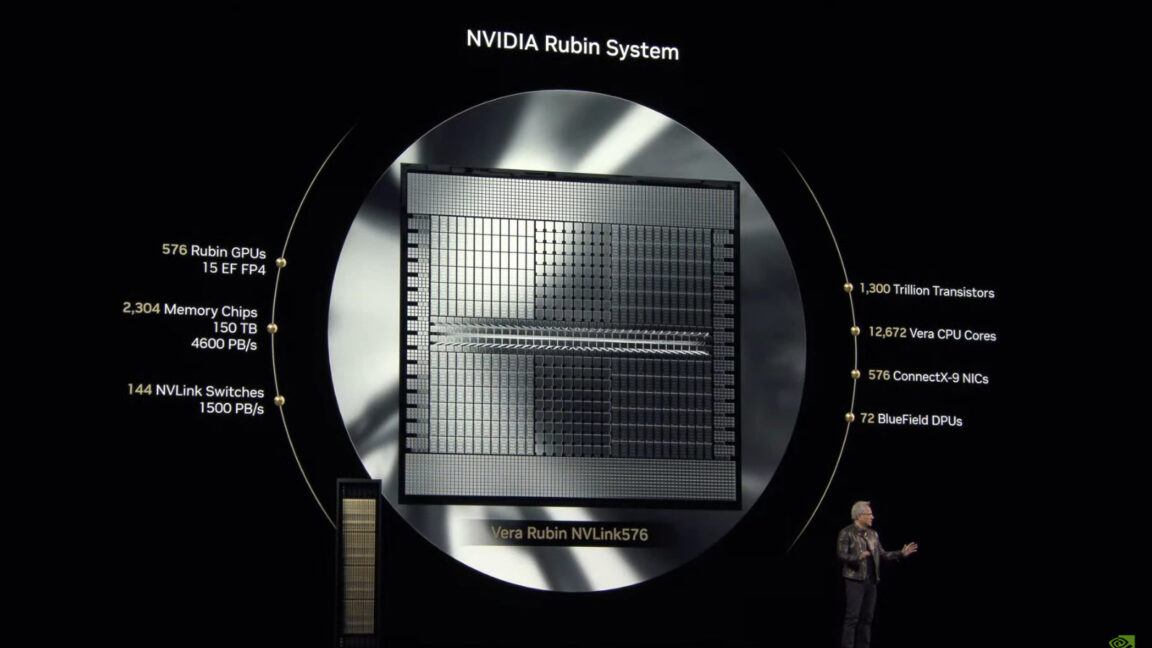
Specifications for Vera Rubin

Specifications for Vera Rubin, presented by Jensen Huang during his GTC 2025 keynote.

[Image: Specifications for Vera Rubin, presented by Jensen Huang during his GTC 2025 keynote.]

Vera Rubin Features

  • Two GPUs on one die, delivering 50 petaflops of FP4 inference performance per chip
  • Configured in a full NVL144 rack, the system delivers 3.6 exaflops of FP4 inference compute
  • The Vera CPU features 88 custom ARM cores with 176 threads connected to Rubin GPUs via a high-speed 1.8 TB/s NVLink interface

Rubin Ultra: The Future of AI-Acceleration

Huang also announced Rubin Ultra, which will follow in the second half of 2027. Rubin Ultra will use the NVL576 rack configuration and feature individual GPUs with four reticle-sized dies, delivering 100 petaflops of FP4 precision (a 4-bit floating-point format used for representing and processing numbers within AI models) per chip.

Rubin Ultra Specifications

  • At the rack level, Rubin Ultra will provide 15 exaflops of FP4 inference compute and 5 exaflops of FP8 training performance
  • Each Rubin Ultra GPU will include 1TB of HBM4e memory, with the complete rack containing 365TB of fast memory

Conclusion

Nvidia’s new GPU announcements mark a significant milestone in the company’s efforts to accelerate the development of AI and high-performance computing. With the release of Vera Rubin and Rubin Ultra, Nvidia is poised to further cement its position as a leader in the field of AI-acceleration.

FAQs

Q: When will Vera Rubin be released?
A: Vera Rubin is scheduled for release in the second half of 2026.

Q: What are the key features of Vera Rubin?
A: Vera Rubin features two GPUs on one die, delivering 50 petaflops of FP4 inference performance per chip, and a custom Nvidia-designed CPU called Vera.

Q: What is the difference between Vera Rubin and Rubin Ultra?
A: Rubin Ultra is a more powerful version of Vera Rubin, with individual GPUs featuring four reticle-sized dies and delivering 100 petaflops of FP4 precision per chip.

Tardis of a Storage Solution

0

Why you can trust Creative Bloq

Our expert reviewers spend hours testing and comparing products and services so you can choose the best for you. Find out more about how we test.

Seagate Ultra Compact SSD Review: Key Specifications

  • Capacity: 1TB or 2TB
  • Interface: USB 3.2 Gen 2
  • Dimensions: 70 x 20 x 12.5mm
  • Weight: 24g

Design and Build

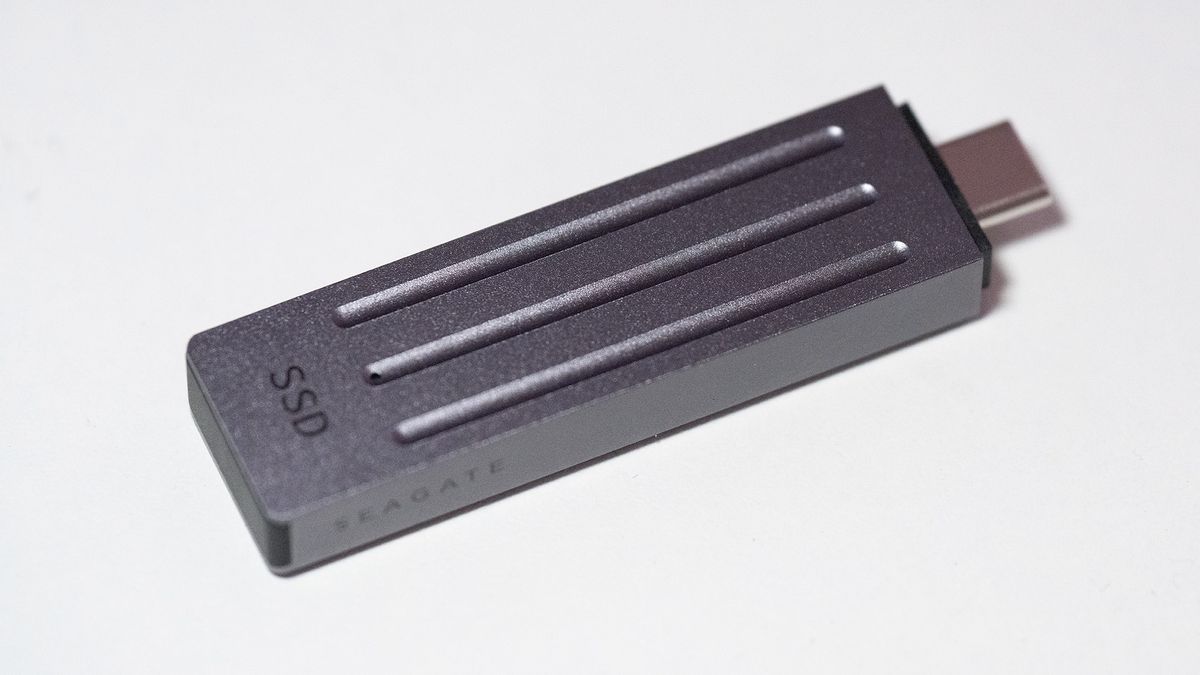
The Seagate Ultra Compact drive lives up to its name. It’s tiny, for an SSD, and we were able to go through our big box of forgotten bits and pull out a 32GB flash drive that was about the same size. If we’d dug deeper, there’s probably a similarly shaped 128MB one somewhere near the bottom, its USB 2.0 connection woefully preparing it for the modern world. It’s noticeably smaller than the other portable SSDs we’ve reviewed on the Bloq, with the Kingston XS1000R the closest in size, yet still twice as big.

Features

There’s very little on the surface of the Seagate Ultra Compact SSD apart from a section you can loop a lanyard through – a small strap is included in the box, but it’s barely big enough to loop around your finger. Otherwise, a hole for an activity light is all that breaks the surface.

Performance

Inside the drive you get 1TB or 2TB of flash – there are no other capacities available at the time of writing. Seagate advertises a transfer rate of 1000MB/s and… that’s exactly what we get. In the Crystaldiskmark benchmark, it posted a read figure of 1053 MB/s and a write speed of 1027 MB/s, while in ATTO Disk Benchmark we saw 1005 MB/s reads and 1000 MB/s writes. This makes it faster in tests than the Kingston XS1000R, and about the same as the Crucial X9 and Seagate Game Drive.

Price

Priced at £109.99 at the time of writing, the Seagate Ultra Compact SSD is near the top of the sort of cost bracket you’d expect for a 1TB external SSD. You’ll pay a premium for such a small, metal-cased drive that can transfer data at a decent rate, and prices elsewhere are beginning to creep down and it’s possible to find them for less, or 2TB drives for not much more.

Who’s it for?

The Seagate Ultra Compact SSD was instantly recognised by an Android phone and an iPad Pro when we attached it to their USB-C ports, so it makes an excellent data transfer solution if you can’t wait for files to transfer through the cloud, or if you need to take large amounts of data with you.

Buy it if…

• You need fast storage
• Thunderbolt speeds don’t matter
• Portability is king

Don’t buy it if…

• Thunderbolt speeds do matter
• Capacity greater than 2TB is required
• You just don’t like that USB-C plug sticking out

Also consider

Other portable SSDs, such as the Kingston XS1000R and the Crucial X9.

Nvidia and Google DeepMind to power Disney’s cute robots

0

Nvidia, Disney Research, and Google DeepMind Collaborate on Physics Engine for Real-World Robot Simulation

New Physics Engine to Power Next-Generation Entertainment Robots

Nvidia CEO Jensen Huang announced at GTC 2025 on Tuesday that the company is collaborating with Disney Research and Google DeepMind to develop a new physics engine, called Newton, designed to simulate robotic movements in real-world settings.

Disney to Use Newton for Next-Generation Entertainment Robots

Disney will be among the first to use Newton to power its next-generation entertainment robots, including the Star Wars-inspired BDX droids, which were showcased alongside Huang during his keynote. Disney has been working on bringing these robots to its theme parks around the world, with plans to showcase them at several locations starting next year.

Early Release of Newton Expected Later in 2025

Nvidia plans to release an early, open-source version of Newton later in 2025, allowing developers to access the technology and start building their own projects.

What is Newton?

Newton is designed to help robots be more "expressive" and "learn how to handle complex tasks with greater precision." The physics engine simulates how robots interact with the natural world, which can sometimes present a challenge for robotics developers. It is highly customizable, allowing developers to program robotic interactions with various objects, such as food, cloth, sand, and other deformable objects.

Compatibility with Google DeepMind’s Ecosystem

Newton will be compatible with Google DeepMind’s ecosystem of robotic development tools, including its physics engine, MuJoCo, which simulates multi-joint robot movements.

Other Announcements from Nvidia

Nvidia made several other announcements at GTC 2025, including the unveiling of an AI foundation model for humanoid robots, Groot N1, which allows robots to better perceive and reason about their environments. The company also shared a timeline for its next-gen AI chips, including Blackwell Ultra and Rubin, and unveiled a new line of "personal AI computers."

Conclusion

The collaboration between Nvidia, Disney Research, and Google DeepMind has the potential to revolutionize the field of robotics, enabling the development of more advanced and realistic robotic interactions. The early release of Newton later in 2025 will give developers a head start in building new projects and applications.

FAQs

Q: What is Newton?
A: Newton is a new physics engine developed by Nvidia, Disney Research, and Google DeepMind to simulate robotic movements in real-world settings.

Q: What are the benefits of Newton?
A: Newton helps robots be more "expressive" and "learn how to handle complex tasks with greater precision," making it easier for developers to create realistic robotic interactions.

Q: When will Newton be available?
A: An early, open-source version of Newton is expected to be released later in 2025.

Q: Who will be using Newton?
A: Disney will be among the first to use Newton to power its next-generation entertainment robots, including the Star Wars-inspired BDX droids.

Accelerating AI Development with NVIDIA RTX Pro

AI at the Speed of NIM With RTX PRO Series GPUs

AI-Powered Workstations and GPUs

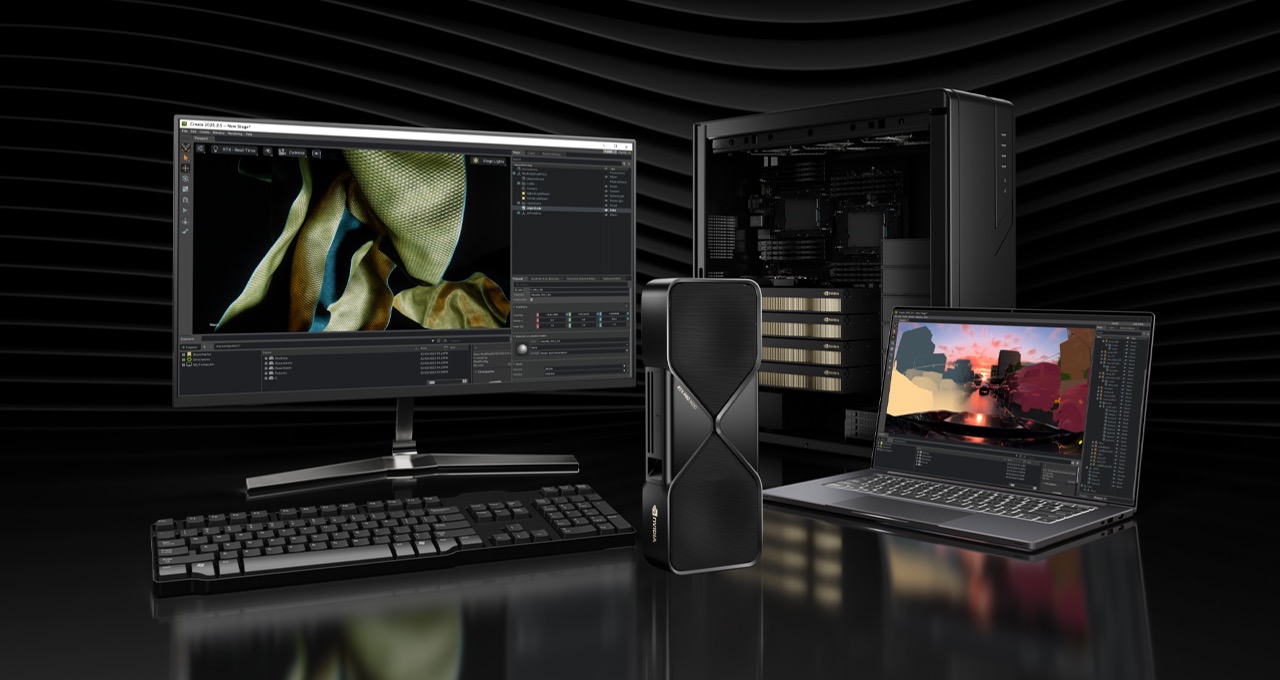
At the NVIDIA GTC global AI conference, NVIDIA introduced the NVIDIA RTX PRO Blackwell series, a new generation of workstation and server GPUs built for complex AI-driven workloads, technical computing, and high-performance graphics. Alongside the new hardware, NVIDIA announced a suite of AI-powered tools, libraries, and software development kits designed to accelerate AI development on PCs and workstations.

CUDA-X Libraries for Data Science

Developers can significantly accelerate data processing and machine learning tasks with CUDA-X libraries for data science, enabling faster exploratory data analysis, feature engineering, and model development with zero code changes. With NVIDIA NIM microservices, developers can more seamlessly build AI assistants, productivity plug-ins, and advanced content-creation workflows with peak performance.

RTX PRO Blackwell Series

The RTX PRO Blackwell series is built to handle the most demanding AI-driven workflows, powering applications like AI agents, simulation, extended reality, 3D design, and high-end visual effects. Whether for designing and engineering complex systems or creating sophisticated and immersive content, RTX PRO GPUs deliver the performance, efficiency, and scalability professionals need.

New Lineup of RTX PRO GPUs

The RTX PRO Blackwell series includes:

  • Desktop GPUs: NVIDIA RTX PRO 6000 Blackwell Workstation Edition, NVIDIA RTX PRO 6000 Blackwell Max-Q Workstation Edition, NVIDIA RTX PRO 5000 Blackwell, NVIDIA RTX PRO 4500 Blackwell, and NVIDIA RTX PRO 4000 Blackwell
  • Laptop GPUs: NVIDIA RTX PRO 5000 Blackwell, NVIDIA RTX PRO 4000 Blackwell, NVIDIA RTX PRO 3000 Blackwell, NVIDIA RTX PRO 2000 Blackwell, and NVIDIA RTX PRO 1000 Blackwell
  • Data center GPU: NVIDIA RTX PRO 6000 Blackwell Server Edition

CUDA-X Libraries for Machine Learning

CUDA-X libraries for machine learning, built on CUDA, deliver dramatically higher performance compared with CPU-only alternatives. With cuML 25.02 – now available in open beta – data scientists and researchers can accelerate scikit-learn, UMAP, and HDBSCAN algorithms with zero code changes, unlocking new levels of performance and efficiency in machine learning tasks.

NIM Microservices for AI-Powered Workflows

NVIDIA NIM microservices are prepackaged, high-performance AI models optimized across NVIDIA GPUs, from RTX-powered PCs and workstations to the cloud. Developers can use NIM microservices to build AI-powered app assistants, productivity tools, and content-creation workflows that seamlessly integrate with RTX PRO GPUs.

AI Blueprints for AI-Powered Workflows

Announced at the CES trade show in January, NVIDIA AI Blueprints are advanced AI reference workflows built on NVIDIA NIM. With AI Blueprints, developers can create podcasts from PDF documents, generate stunning 4K images controlled and guided by 3D scenes, and incorporate digital humans into AI-powered use cases.

ChatRTX: Create NIMble AI Chatbots

AI-powered chatbots are changing how people interact with their content. ChatRTX is a demo app that personalizes a LLM connected to a user’s content, whether documents, notes, images, or other data. Using RAG, the NVIDIA TensorRT-LLM library, and RTX acceleration, a user can query a custom chatbot to get contextually relevant answers. And because it all runs locally on Windows RTX PCs or RTX PRO workstations, users get fast and private results.

Game On

Half-Life 2 owners can now download a free Half-Life 2 RTX demo from Steam, built with RTX Remix and featuring the latest neural rendering enhancements. RTX Remix supports a host of AI tools, including NVIDIA DLSS 4, RTX Neural Radiance Cache, and the new community-published AI model PBRFusion 3, which upscales textures and generates high-quality normal, roughness, and height maps for physically based materials.

Conclusion

The RTX PRO series is redefining AI-powered computing, enabling professionals to push the limits of creativity, productivity, and innovation. With cutting-edge hardware, optimized AI models, and reference workflows, the future of AI is now.

FAQs

Q: What is the RTX PRO Blackwell series?
A: The RTX PRO Blackwell series is a new generation of workstation and server GPUs built for complex AI-driven workloads, technical computing, and high-performance graphics.

Q: What is CUDA-X libraries for data science?
A: CUDA-X libraries for data science accelerate data processing and machine learning tasks, enabling faster exploratory data analysis, feature engineering, and model development with zero code changes.

Q: What is NIM microservices for AI-powered workflows?
A: NIM microservices are prepackaged, high-performance AI models optimized across NVIDIA GPUs, from RTX-powered PCs and workstations to the cloud. Developers can use NIM microservices to build AI-powered app assistants, productivity tools, and content-creation workflows that seamlessly integrate with RTX PRO GPUs.

Q: What is AI Blueprints for AI-powered workflows?
A: AI Blueprints are advanced AI reference workflows built on NVIDIA NIM, enabling developers to create podcasts from PDF documents, generate stunning 4K images controlled and guided by 3D scenes, and incorporate digital humans into AI-powered use cases.

Q: What is ChatRTX?
A: ChatRTX is a demo app that personalizes a LLM connected to a user’s content, whether documents, notes, images, or other data. Using RAG, the NVIDIA TensorRT-LLM library, and RTX acceleration, a user can query a custom chatbot to get contextually relevant answers.