Home Blog Page 264

The Humane AI Pin Will Become E-Waste Next Week

0

The Story of the Infamous Humane Ai Pin is Coming to an End

HP will acquire several assets from Humane, including more than 300 patents and patent applications, as part of a $116 million deal expected to close at the end of the month. The acquisition includes the founders of Humane, Imran Chaudhri and Bethany Bongiorno, and the company’s Cosmos operating system.

The Rise and Fall of Humane

Humane was once Silicon Valley’s "next big thing" after unveiling its AI wearable, equipped with a ChatGPT-powered assistant and a laser-projected display, in 2023. The device promised to replace smartphones, but reviews were overwhelmingly negative, citing issues such as overheating, hallucinations, and limited features.

The Demise of the Humane Ai Pin

As a result, HP does not plan to do much with the Ai Pin hardware, and sales have effectively stopped. Humane will issue refunds to anyone who purchased a Pin after November 15, 2024, and existing Pins will cease to function after February 28. Almost every core feature will stop working, but users will still be able to check their battery level. Humane will also delete user data, so it is recommended that users sync and download their data.

The Future of AI at HP

HP plans to integrate Humane’s Cosmos AI into its products to "unlock new levels of functionality for our customers and deliver on the promises of AI." The company will also create an innovation lab called HP IQ, which will build an ecosystem of smart features throughout its product line.

Apple Improves the Vision Pro’s Guest Mode

Apple has announced that its Vision Pro headset will receive a new guest mode as part of its visionOS 2.4 update, which is expected to roll out in April. The update will allow guests to wear the headset without the need for the owner to wear it first, and owners will receive a notification on their iPhone or iPad to allow access. The update will also feature a new app, Spatial Gallery, which will showcase spatial videos, photos, and panoramas designed for viewing on the headset.

Other Minor Features in visionOS 2.4

The update will also include several minor features, including the ability for owners to choose which apps guests can access, and the ability for guests to save their eye and hand setup for up to 30 days. The update will also add new content to the Spatial Gallery, including behind-the-scenes moments from Apple Originals.

Eero Debuts Cheaper Wi-Fi 7 Mesh Routers

Eero has announced new Wi-Fi 7 mesh routers, the Eero 7 and Eero Pro 7, which will start shipping on February 26. The Eero 7 is a dual-band router that promises wireless speeds up to 1.8 Gbps and two 2.5 Gbps Ethernet ports on each router. The Eero Pro 7 is a tri-band router that offers faster speeds and more features, including support for the 6-GHz band.

Conclusion

The acquisition of Humane’s assets by HP marks the end of an era for the company, which was once touted as the next big thing in AI. The demise of the Humane Ai Pin is a cautionary tale about the importance of delivering on promises and meeting customer expectations. On the other hand, Apple’s updates to its Vision Pro headset and Eero’s new Wi-Fi 7 mesh routers showcase the company’s commitment to innovation and customer satisfaction.

FAQs

Q: What is happening to the Humane Ai Pin?
A: HP will not do much with the Ai Pin hardware, and sales have effectively stopped. Existing Pins will cease to function after February 28.

Q: What is Apple’s visionOS 2.4 update?
A: The update will introduce a new guest mode for the Vision Pro headset, allowing guests to wear the headset without the need for the owner to wear it first. The update will also feature a new app, Spatial Gallery, and several minor features.

Q: When will Eero’s new Wi-Fi 7 mesh routers be available?
A: The Eero 7 and Eero Pro 7 will start shipping on February 26.
The AI Gadget Era Floped

0

The AI Gadget Era: A Flop?

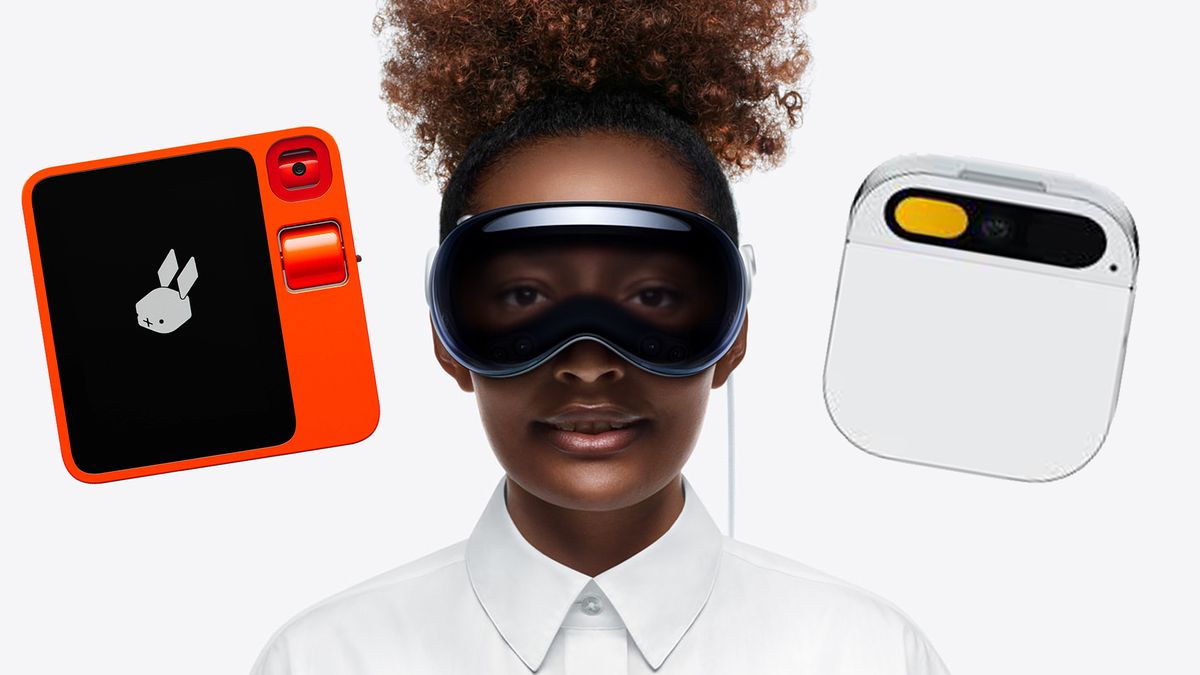
For a moment, it seemed like the smartphone might be in trouble. Weird and wonderful gadgets were popping up, claiming to offer a transformative experience by harnessing the power of AI. The most notable examples were the Rabbit R1 and Humane AI Pin. However, with the untimely and ugly death of the latter this week, it’s time to call the AI gadget era what it was: an almighty flop.

The Demise of the Humane AI Pin

Humane has announced that it is shutting down and will no longer support its AI Pin device. The company has also announced that it will stop connecting to its servers, effectively bricking the device. Moreover, customers who bought the Pin more than 90 days ago will not be eligible for a refund.

The Rise and Fall of AI Gadgetry

Early last year, we observed that a new genre of tech was emerging, trying to be anything but a smartphone. The most notable new contenders were the Rabbit R1 and Humane Pin. However, after going hands-on with the Rabbit device, it was clear that this buggy gadget was no iPhone killer.

The Failure of AI Gadgetry

The story of the Humane Pin is particularly disastrous. The bricking of the device and lack of refund has left an incredibly sour taste for early adopters. Many are left feeling duped, with some Redditors lamenting, "Feels like we’ve been duped," and "It’s truly a middle finger. Especially because there is no way around it due to the server reliance."

Conclusion

In conclusion, the demise of the AI gadget era is a clear indication that this genre of technology was a flop. While the Rabbit R1 might not have blown us away, the story of the Humane Pin is a cautionary tale of what happens when innovation goes awry. The AI gadget era may be no more, but at least we can say that it was a short and tumultuous one.

Frequently Asked Questions

Q: What is the Humane AI Pin?
A: The Humane AI Pin is a device that was designed to enhance your daily life by harnessing the power of AI. It was acquired by HP, but has since been shut down.

Q: Why is the Humane AI Pin being discontinued?
A: The Humane AI Pin is being discontinued due to business priorities shifting. The company will no longer support the device, and it will no longer connect to its servers.

Q: Can I get a refund for my Humane AI Pin?
A: If you bought the Pin more than 90 days ago, you are not eligible for a refund. However, you can still use the device until February 28, 2025. After that date, it will no longer function.

Q: What is the future of AI gadgetry?
A: The future of AI gadgetry is uncertain. While the AI gadget era may be over, AI technology will continue to play a significant role in our daily lives. However, it is clear that standalone devices like the Humane AI Pin and Rabbit R1 were not the answer.

Detect Unused Classes in Laravel

0

Introduction

Over time, as a Laravel project evolves – whether through updates, refactoring, or version upgrades – unused classes can accumulate in the codebase. These unused classes add unnecessary maintenance overhead, increasing complexity and making upgrades more difficult.

Why Remove Unused Classes?

Maintaining unused classes in a project leads to:

  • Increased technical debt
  • More time spent on unnecessary maintenance
  • Higher complexity in upgrades and refactoring
  • Wasted effort on testing and dependency management

By detecting and removing unused classes, we streamline our codebase, making it more efficient and maintainable.

Installing Class-Leak

To get started, install the package as a development dependency:

composer require tomasvotruba/class-leak --dev

Running the Unused Class Detection

When installed, run the following command to check for unused classes in key directories of your Laravel application:

php vendor/bin/class-leak check app tests config routes bootstrap database

Example Output

After reviewing and removing unused classes, the tool will display:

[OK] All services are used. Great job!

How Class-Leak Works

The tool follows a simple process:

  1. Identify all existing classes in directories like app, src, etc.
  2. Find all class usages across method calls, property accesses, and constant fetches.
  3. Compare the lists and determine which classes are never used.

Handling Special Cases

Skipping Specific Classes

In some cases, you may want to exclude certain classes from the scan. Use the --skip-type option:

php vendor/bin/class-leak check app src --skip-type=App\Contracts\SomeInterface

Detecting Test-Only Classes

A class that is used only in tests may still be considered unused in production. If a class is only referenced in tests, consider removing it along with its corresponding test cases.

Automating in CI/CD

To prevent unused classes from creeping back into the project, add class-leak as part of your CI pipeline. This ensures that any new unused classes introduced during development are detected early and removed.

Result

Here is an example pull request after reviewing and running class-leak.

Conclusion

Detecting and removing unused classes is a simple yet effective way to keep a Laravel project clean and maintainable. By integrating class-leak into your workflow, you can:

  • Reduce maintenance overhead
  • Improve code clarity
  • Avoid testing and upgrading unnecessary code

Try running it on your Laravel project today and free your codebase from unused classes!

China Taps Tech Talent to Boost AI Data Centre Boom

China’s AI Ambitions: State-Backed Data Centers Partner with Start-ups to Bolster Chip Development

Partnership between State and Private Sectors to Accelerate AI Adoption

Chinese state-owned data centers have partnered with start-ups such as Merit Interactive, Infinigence AI, and SiliconFlow to develop technology for the surge of AI data centers being created across China. This collaboration is part of a nationwide effort to increase adoption of the fast-developing technology.

State-Owned Data Centers Flush with AI Chips

Local governments have enlisted the expertise of the aforementioned start-ups to develop technology for the AI data centers being built across China. The partnerships aim to address the lack of technical know-how and wasted chip resources in the projects.

Infinigence AI and SiliconFlow: Key Players in the Partnership

Infinigence AI, backed by HongShan and Qiming Venture Partners, has emerged as one of the main beneficiaries of the state’s push to improve computing performance. The company rents Nvidia chips to developers building AI applications and makes money by charging the end customer access to the chips. In December, Infinigence AI and start-up SiliconFlow collaborated with the Shanghai government to build a platform for customers to create AI applications on third-party models hosted at a data center operated by a local offshoot of state-owned China Telecom.

Merit Interactive: Another Key Player in the Partnership

Zhejiang-based Merit Interactive has also been tapped for its engineering expertise. The company is associated with the business partner of DeepSeek founder Liang Wenfeng at his quant trading fund High-Flyer.

The US and China’s AI Rivalry

The US has a similar set of "neocloud" companies, including CoreWeave, Lambda, and Vultr, which manage and rent out access to computing clusters in data centers, giving companies the ability to use the chips on a pay-as-you-go basis.

Conclusion

As China continues to invest heavily in the development of AI, the partnership between state-owned data centers and start-ups is likely to further accelerate the adoption of the technology. The collaboration will help to address the lack of technical know-how and wasted chip resources in the projects, ultimately enabling China to catch up with the US in the AI race.

FAQs

Q: What is the purpose of the partnership between state-owned data centers and start-ups in China?
A: The partnership aims to develop technology for the surge of AI data centers being created across China, addressing the lack of technical know-how and wasted chip resources in the projects.

Q: Which start-ups are involved in the partnership?
A: Merit Interactive, Infinigence AI, and SiliconFlow are some of the start-ups involved in the partnership.

Q: What is the role of Infinigence AI in the partnership?
A: Infinigence AI rents Nvidia chips to developers building AI applications and makes money by charging the end customer access to the chips.

Q: What is the role of Merit Interactive in the partnership?
A: Merit Interactive provides engineering expertise to the partnership. The company is associated with the business partner of DeepSeek founder Liang Wenfeng at his quant trading fund High-Flyer.

The Elegoo Saturn 4 Ultra: Best Resin 3D Printer for Beginners

0

Elegoo Saturn 4 Ultra Review: A Beginner-Friendly Resin 3D Printer

The Verdict

I’ve been 3D printing for almost two years, and until a month ago, I was exclusively using FDM printers. However, I was hesitant to dive into resin printing due to the mess, extra steps, and handling of toxic materials. But the quality of resin prints is undeniable, making it a great option for printing exceptional and highly detailed miniature models.

Unboxing and Setup

The Elegoo Saturn 4 Ultra is a well-built and easy-to-use printer. The unboxing process was straightforward, and the setup was plug-and-play. The printer comes with a Mercury XS Bundle for washing and curing prints, as well as a Mars Mate Air Purifier for managing fumes during the printing process.

Key Features

  • Print Technology: MSLA (Stereolithography)
  • Build Area: 218.88mm x 122.88mm x 220mm (8.5 x 4.8 x 8.6 inches)
  • LCD Screen: 10.1" Monochrome (12K resolution)
  • Minimum Layer Resolution: 0.02mm
  • Maximum Layer Resolution: 0.2mm
  • Bed: Laser-etched aluminum
  • Print Surface: Laser-etched for better adhesion
  • Software: ChituBox, Voxel Dance Tango, Elegoo SateLite, Lychee
  • Materials: UV-sensitive resin
  • Print Speed: Up to 150mm/h
  • Connectivity: USB, Wi-Fi
  • Dimensions: 327.4mm x 329.2mm x 548mm
  • Weight: 14.5kg (32 lbs)

Price

The Elegoo Saturn 4 Ultra has a retail price of $399 / £499.99, but it’s occasionally available at a lower price during promotional sales. At the time of writing, the printer is currently available for £354.99 on Elegoo’s website.

Conclusion

The Elegoo Saturn 4 Ultra is an exceptional value for its price point, offering a 12K resolution screen, smart auto-levelling features, and a tilting screen and tank quick-release system that improves print quality and speeds up the release of the model after each exposure.

Who is it for?

The Elegoo Saturn 4 Ultra is suitable for beginners to resin printing, as well as experienced users who want a reliable and easy-to-use printer. It’s also a great option for professionals who want a more affordable entry-level resin printer.

Buy it if:

  • You want a beginner-friendly 3D printer
  • Your budget is in the lower midrange
  • You plan to print miniature detailed models

Don’t buy it if:

  • You don’t have a suitable pet-free or child-free space
  • You don’t have the patience to clean and cure prints
  • You live in an extremely cold area with no way of heating the printer

FAQs

Q: Is the Elegoo Saturn 4 Ultra suitable for beginners?
A: Yes, the printer is designed for beginners and offers a user-friendly interface and easy setup process.

Q: What is the print resolution of the Elegoo Saturn 4 Ultra?
A: The print resolution is up to 12K, making it suitable for printing detailed models.

Q: Can I use the Elegoo Saturn 4 Ultra with other software?
A: Yes, the printer supports various software, including ChituBox, Voxel Dance Tango, Elegoo SateLite, and Lychee.

Q: Is the Elegoo Saturn 4 Ultra a good value for its price?
A: Yes, the printer offers exceptional value for its price point, with features like a 12K resolution screen and smart auto-levelling features.

Email Marketing is Back and Big Social is Panicking

0

Storytime!

I was once struggling to make Facebook ads work, and my customer acquisition cost was through the roof. I was complaining to anyone who would listen that I couldn’t get these ads to work. Then, I met someone who told me to try email marketing. They said, "Collect the lead and nurture prospects before making the sales pitch." I was skeptical, but I decided to give it a shot.

What is Email Marketing, and Why is it Still Important in 2025?

Email marketing is a medium for communicating with your audience. It’s not just about sending emails; it’s about creating a connection with your audience. You can think of email marketing as the glue that keeps everything connected. It’s a way to keep your audience engaged and informed about your brand.

How to Start Email Marketing

  1. Pick an Email Marketing Platform: Choose an email service provider based on your needs. Not all ESPs are created equal.
  2. Start Collecting Emails: Add opt-in forms to your website or landing page. Give people a reason to opt-in, such as a discount or a guide.
  3. Set up a Simple Welcome Email: When someone subscribes to your newsletter, welcome them with an email reminding them why they signed up or deliver what you promised.
  4. Create Amazing Emails: Create emails that get high open rates and engage users. The key is to tell stories clearly and coherently.

How to Create Amazing Emails that Get Opened

Creating emails that get high open rates and engage users comes down to one key skill: storytelling. Your ability to communicate what you have and how it helps is a superpower that transcends any medium.

Email Marketing Benchmarks

Knowing and understanding your numbers is necessary for any venture. Here are some basic benchmarks that apply across industries:

  • Open rate, 20-30%: My open rate is closer to 50%. I have made a connection with my audience, so breaking the industry norm is easy.
  • Click-through rate (CTR), 2-5%: My CTR is closer to 7-20%. I don’t ask my audience to "click" often, and when I do, I make sure it is so attractive they have to click.
  • Unsubscribe rate, below 1%: My unsubscribe rate is higher than most simply because I target a much bigger audience. I work on this, and it helps me craft my content.
  • Bounce rate, below 1%: If your emails are bouncing, this is not a good sign, and you must look at how you collect emails.

My Two Cents

Email marketing is one of the most effective marketing tools. The biggest trick is to create content people actually want. You do that by knowing the problem your audience has and providing the solution. That’s it. No hack in the world can fix your email if it is unwanted.

Conclusion

Email marketing is one of the most important skills I have learned as an entrepreneur and marketer. You should seriously consider email marketing if you want to reduce customer acquisition costs or improve deal flow. If you hit a roadblock, you can always reach out to me or watch videos on YouTube. It will not be easy, but it is possible.

FAQs

Q: What is the most important thing to remember about email marketing?
A: Create content people actually want.

Q: How do I get started with email marketing?
A: Start by picking an email marketing platform and collecting emails.

Q: What is the key to creating amazing emails?
A: Storytelling. Your ability to communicate what you have and how it helps is a superpower that transcends any medium.

iOS 18.4 will bring Apple Intelligence-powered ‘Priority Notifications’

0

Apple Releases iOS 18.4 Developer Beta with New Priority Notifications Feature

Apple on Friday released its first developer beta for iOS 18.4, which adds a new “Priority Notifications” feature, powered by Apple Intelligence. The addition aims to help users manage their notifications by prioritizing important alerts and minimizing distractions from less important ones.

Priority Notifications: How it Works

These priority notifications are displayed in a separate section on the phone’s Lock Screen. Apple Intelligence will analyze which notifications it believes should be shown in this section, but you can still swipe up to view all of your notifications.

Sorting Notifications

Currently, the iPhone will sort notifications chronologically, with the most recent alerts displayed on top. With the new feature, you’ll see important notifications first — even if you received them a while ago when compared to others.

Enabling Priority Notifications

Priority Notifications is off by default, but you can enable the feature by heading to your Settings app, selecting the “Notifications” option, and then opening the “Prioritize Notifications” section. Here, you can toggle the feature on.

Related News: Apple Intelligence and Apple News+ Food

Apple announced today that Apple Intelligence is heading to the Vision Pro as part of visionOS 2.4. A beta version of the software is currently available for developers, while the public version is set for an April release. The tech giant also revealed Apple News+ Food, an upcoming section that will allow users to search and save recipes from dozens of existing News+ publishing partners.

Conclusion

Apple’s new Priority Notifications feature aims to revolutionize the way users interact with their devices, making it easier to manage notifications and stay focused. With the ability to prioritize important alerts and minimize distractions, this feature is a welcome addition to the iOS ecosystem.

FAQs

Q: What is Priority Notifications?

A: Priority Notifications is a new feature in iOS 18.4 that prioritizes important notifications and minimizes distractions from less important ones.

Q: How do I enable Priority Notifications?

A: To enable Priority Notifications, go to your Settings app, select the “Notifications” option, and then open the “Prioritize Notifications” section. Toggle the feature on.

Q: Will my notifications be sorted in a specific order?

A: Yes, with Priority Notifications, your notifications will be sorted in a specific order, with important notifications displayed first, even if they were received earlier than others.

Q: Is Priority Notifications available on all devices?

A: Priority Notifications is currently available on devices running iOS 18.4 and later.

How to Use AI Properly – 5 Tips

0

01. Use Automation Wisely

AI goes beyond novelty when it streamlines tasks that once required hours of manual effort. In fact, a recent survey reports that 43% of marketing professionals automate repetitive tasks and processes with AI software. For instance, automated background removal can quickly isolate a product or a subject, making the creative process more agile. By offloading routine work to machine learning, design teams free themselves to focus on big-picture objectives – like crafting narratives that speak directly to an audience’s needs and emotions.

02. Maintain Artistry

In practice, automation should serve as a supportive pillar, not a replacement for a creative team. Even tools like upscaling, which intelligently improve the resolution of lower-quality images, still rely on human oversight to guide how each enhanced image fits into an overarching brand aesthetic.

03. Align with Brand Identity

Consistency underpins brand success, especially when visuals are distributed across multiple channels. AI-powered object removal and background replacement can help teams maintain on-brand look and feel without needing endless photoshoots. By selectively editing each scene or product shot, designers ensure that every image continues to reflect the same visual language – even if the environment changes.

04. Use AI Responsibility

Performance improvements often come from deploying AI responsibly. Automatic alt-text generation, for example, not only boosts accessibility but also enhances a site’s search visibility. When tasks like these are automated, creative teams can concentrate on compelling visuals rather than repetitive metadata tagging. By reducing technical backlogs, marketers stay agile and responsive to new trends.

05. Blend Humans and Machines

Ultimately, AI should augment creative work rather than overshadow it. Adopting tools that handle repetitive edits frees marketers to form deeper emotional connections with audiences through visuals that evoke genuine interest. By weaving human insight with algorithmic efficiency, teams can amplify the impact of every design decision.

Conclusion

The future of design hinges on the synergy between humans and machines. By using AI responsibly, maintaining artistry, aligning with brand identity, and blending humans and machines, creative teams can unlock faster workflows, higher quality, and more effective storytelling.

FAQs

Q: What is the role of AI in design?
A: AI should augment creative work, not replace it. It can streamline tasks, improve efficiency, and free up time for high-level creative decisions.

Q: How should I use AI in my design workflow?
A: Use AI to automate repetitive tasks, maintain artistry, and align with brand identity. Blend human insight with algorithmic efficiency to amplify the impact of every design decision.

Q: What are the benefits of using AI in design?
A: AI can boost creativity, improve efficiency, and enhance brand consistency. By reducing technical backlogs, marketers can stay agile and responsive to new trends.

Cartoons of the 1950s

0

Looking Back at the Best Cartoons of the 1950s

The 1950s was a transformative period for animation, marked by the post-war revival of the industry and the emergence of new studios and styles. In this article, we’ll be taking a look back at some of the best cartoons of the 1950s, including Disney’s iconic films and some of the most influential works from around the world.

01. Alice in Wonderland

Did you know?

The film’s distinct visual palette was significantly the result of the work of designer Mary Blair. Art historian Ruth Millington explains that, "For Alice in Wonderland, she [Mary Blair] made hundreds of gouache studies, in which the heroine falls down the rabbit hole into a technicolor world of unusual color contrasts".

Walt Disney Animation Studio, 1951

For animation director, Gnomon Workshop tutor and creator of Unreal Engine 5 short The Voice in the Hollow, Miguel Ortega, this ’50s animated movie is perfection and manages to bring out the character of the artists behind the on-screen action.

02. Lady and the Tramp

Did you know?

Lady and the Tramp was the first animated Disney movie based on an original idea rather than being an adaptation.

Walt Disney Animation Studio, 1955

Shaun Magher, creative director and animation director of 30 years’ experience, and now Course Director for BA Digital Animation and MA FFD at Birmingham City University, notes that Disney’s series of animated features in the 1950s include this classic, Lady and the Tramp (which has had a controversial live action remake).

03. Animal Farm

Did you know?

This adaptation of George Orwell’s novella, Animal Farm, remains one of the most famous and lauded of British animated feature films. The movie comprises 750 scenes and 300,000 drawings.

Halas & Batchelor, 1954

Drew Roper, founder of Yamination Studios, notes that "Animal Farm is an outstanding British film. The powerful subject matter and gritty tone stays with you for life. It was one of the first films I remember seeing as a child and I don’t think I will ever, not remember it."

04. Sleeping Beauty

Walt Disney Animation Studio, 1959

Did you know?

Walt Disney had struggled to communicate to his creative leads, his approach and vision to the adaptation of the fairy tale.

It’s not just Maleficent who endures as a character from the movie; so too have the three fairies. For animation director, Shaun Magher, “Ollie Johnston’s wonderful portrayal of the three good fairies is a masterful example of warm, emotive character performances".

05. The Snow Queen

Soyuzmultfilm, 1957

Did you know?

The Snow Queen is identified as the film that compelled Hayao Miyazaki to continue working in animation after a period of doubt early in his career as an animator. The Ghibli Museum re-released the film in 2007.

For animation historian and scholar, Christopher Holliday, "Among all the animated adaptations and big-screen reworkings of Hans Christian Andersen’s acclaimed 1844 fable, Lev Atamanov’s mid-century reimagining perhaps best captures the wonder, enchantment, and Scandinavian flavor of the original story".

Conclusion

The 1950s was a decade marked by innovation and experimentation in the world of animation, with studios around the world pushing the boundaries of what was possible. From Disney’s iconic films to the influential works of studios like Halas & Batchelor and Soyuzmultfilm, this was a decade that set the stage for the animation industry as we know it today.

Frequently Asked Questions

Q: What are the best cartoons of the 1950s?

A: Some of the best cartoons of the 1950s include Alice in Wonderland, Lady and the Tramp, Animal Farm, Sleeping Beauty, and The Snow Queen.

Q: Which Disney movie is the most iconic of the 1950s?

A: Disney’s Alice in Wonderland is often cited as one of the most iconic Disney movies of all time, and is a must-see for animation fans.

Q: What is the significance of the 1950s in animation history?

A: The 1950s was a transformative period for animation, marked by the post-war revival of the industry and the emergence of new studios and styles. It was a decade that set the stage for the animation industry as we know it today.

Nvidia’s RTX 50-series GPUs

0

Nvidia’s RTX 50-series GPUs: What We Know So Far

Introduction

Nvidia’s RTX 50-series GPUs are just around the corner, with the first releases – the RTX 5090 and RTX 5080 – dropping on January 30th. The RTX 5070 Ti and RTX 5070 will follow that with their own releases in February, but some are already getting a sneak peek at the software benefits of the GPUs through DLSS 4.

Hardware Performance

Tom Warren’s Verge review of the $1,999 RTX 5090 indicates it’s expectedly a powerhouse but not quite the generational leap that the RTX 4090 was over its own predecessor. That didn’t stop The Verge’s Sean Hollister from being impressed with the two-slot RTX 5090 Founders Edition GPU when he stuffed it into his aging small form factor PC.

DLSS 4: The Software Story

Along with the 50-series GPUs comes DLSS 4 with Multi Frame Generation, a software trick that may be just as big of a story as the hardware itself. This latest version of DLSS uses AI to predictively generate frames, making it possible to run games at higher resolutions without taking the same frame rate hit they would without DLSS 4 turned on. Gamers who are already trying DLSS 4 out in Cyberpunk 2077 using RTX 40-series GPUs report seeing huge improvements already.

Conclusion

The RTX 50-series GPUs are expected to be a significant upgrade over their predecessors, with the RTX 5090 and RTX 5080 dropping on January 30th and the RTX 5070 Ti and RTX 5070 following in February. The introduction of DLSS 4 with Multi Frame Generation is also expected to bring significant performance improvements, making it possible to run games at higher resolutions without sacrificing frame rate.

Frequently Asked Questions

Q: When will the RTX 50-series GPUs be released?
A: The RTX 5090 and RTX 5080 will be released on January 30th, with the RTX 5070 Ti and RTX 5070 following in February.

Q: What is DLSS 4 with Multi Frame Generation?
A: DLSS 4 is a software feature that uses AI to predictively generate frames, allowing for smoother performance in games at higher resolutions.

Q: Is the RTX 5090 a generational leap over the RTX 4090?
A: According to Tom Warren’s Verge review, the RTX 5090 is expectedly a powerhouse but not quite the generational leap that the RTX 4090 was over its own predecessor.