Home Blog Page 269

OpenAI rolls out its AI agent, Operator, in several countries.

0

OpenAI Launches AI Agent, Operator, for ChatGPT Pro Subscribers

Global Rollout

OpenAI has announced that it is expanding its AI agent, Operator, to subscribers in nine new countries, including Australia, Brazil, Canada, India, Japan, Singapore, South Korea, the U.K., and more. This move follows the launch of Operator in the U.S. in January.

What is Operator?

Operator is a tool that can perform tasks on behalf of users, such as booking tickets, making restaurant reservations, filing expense reports, and shopping on e-commerce websites. It is one of several "AI agent" tools on the market, which can be instructed to complete various tasks.

Availability and Features

Operator is currently available to subscribers of the $200-per-month ChatGPT Pro plan. It can be accessed via a dedicated webpage, and users can take control of the browser window at any time. The company plans to make Operator available with all ChatGPT clients in the future.

Competition in the Market

The AI agent market is highly competitive, with companies like Google, Anthropic, and Rabbit building similar tools. However, Google’s project is still on a waitlist, Anthropic’s agentic interface is only available through an API, and Rabbit’s action model is only available to users who own its device.

Conclusion

OpenAI’s launch of Operator marks a significant step forward in the development of AI agents. With its global rollout, more users will have access to this technology, which has the potential to revolutionize the way we interact with the digital world. However, the competition in this space is fierce, and it remains to be seen how OpenAI’s Operator will differentiate itself from other similar tools.

FAQs

Q: What is Operator?
A: Operator is a tool that can perform tasks on behalf of users, such as booking tickets, making restaurant reservations, filing expense reports, and shopping on e-commerce websites.

Q: Who is eligible to use Operator?
A: Operator is currently available to subscribers of the $200-per-month ChatGPT Pro plan.

Q: How can I access Operator?
A: Operator can be accessed via a dedicated webpage, and users can take control of the browser window at any time.

Q: Is Operator available globally?
A: Yes, Operator is available in most places where ChatGPT is available, apart from the EU, Switzerland, Norway, Liechtenstein, and Iceland.

XTool’s Apparel Printer Takes on Cricut

0

XTool Enters Direct-to-Film (DTF) Market with New Apparel Printer

Price: $3,999 (early bird offer) – available on Kickstarter

XTool, a well-known manufacturer of laser cutters and engravers, has launched its new Direct-to-Film (DTF) printer, the XTool Apparel Printer. This all-in-one unit is designed to simplify the process of printing on fabrics, allowing fashion brands and businesses to produce high-quality, custom designs with ease.

All-in-One Process

The XTool Apparel Printer offers an automated process that can be completed in just a few clicks. The machine prints, applies powder, shakes, and cures the design in a single print cycle, taking around 8 minutes to complete. The output is a high-quality, photo-realistic design that can be heat-pressed onto various fabrics, including cotton, polyester, and more.

Key Features

  • Print width: 14 inches
  • Print resolution: 720×1800 DPI
  • Print speed: Up to 50 sq ft/hr
  • Print head: Dual Epson I1600
  • Camera: 16MP AI with intelligent recognition
  • Device care: Always-on 24/7 SmartCycle Maintenance System
  • Software: xTool Creative Space

How it Works

The XTool Apparel Printer uses a unique process that combines direct-to-film printing with the ability to produce complex, multi-colored designs. This eliminates the need for manual cleaning and offers higher quality output compared to traditional screen printing and sublimation methods.

Pricing and Profit Margin

The XTool Apparel Printer is available on Kickstarter at an early bird price of $3,999. The machine is expected to be a game-changer for fashion brands and businesses, offering a high-quality, cost-effective way to produce custom designs. With a profit margin of $14-$36 per shirt, this machine can be a lucrative investment for those in the fashion industry.

Conclusion

The XTool Apparel Printer is a revolutionary new product that simplifies the process of printing on fabrics. With its all-in-one design and automated process, it’s an ideal solution for fashion brands and businesses looking to produce high-quality, custom designs quickly and efficiently.

FAQs

Q: What is the price of the XTool Apparel Printer?
A: The price is $3,999 (early bird offer) on Kickstarter.

Q: What is the print resolution of the XTool Apparel Printer?
A: The print resolution is 720×1800 DPI.

Q: What is the print speed of the XTool Apparel Printer?
A: The print speed is up to 50 sq ft/hr.

Q: What is the device care system of the XTool Apparel Printer?
A: The device care system is an always-on 24/7 SmartCycle Maintenance System.

Q: What is the software used by the XTool Apparel Printer?
A: The software used is xTool Creative Space.

Paddington’s Honey Jar Hold the Secret

0

Paddington VFX Gets the Details Right

Paddington in Peru Remains a Labour of Love

Paddington In Peru remains a labour of love for the animation artists behind the live-action VFX movie. The latest film, the third one made in collaboration with the team at Framestore, is the most sophisticated entry to date; not only did Paddington return to the jungles of Peru, but it’s the first film in the series to be shot in 4K.

The Secret to Paddington’s Believability

I spoke with Sylvain Degrotte, VFX Supervisor at Framestore London, to discover the secret to Paddington’s believability – and it comes down to the eyes (and that hard stare).

Eyes are the Most Important Thing

"When Paddington looks around, not only do the eyeballs rotate but they are also reactive to light – for example, when Paddington closes his eyes, or when he does his famous hard stare," says Sylvain. "Paddington’s eyes are the most important thing, as the eyeballs are not a perfect sphere shape, they give a realistic behavior as they push the flesh around."

Facial Expressions

Sylvain also points out that Ben Whishaw’s (who performs Paddington’s voice) facial expressions were of great value: "Ben Whishaw has a headcam set, so we have close-ups of his facial expressions to use for reference. For the sections that are more action-centered, Pablo was recording himself (for facial reference) under the agreement with (director) Wilson of course. Pablo can act during dailies and show the animator the essence of the performance."

Paddington VFX Gets the Details Right

The issue of nuance was key to the work that Sylvain and his team were focused on and he explains that, “Over time, from the first Paddington film to now, we’ve made considerable updates to Paddington’s face. He’s capable of a wider range of face shapes, and the library of expressions we have to work with has increased. This means our animators have more tools with which to really tease out those emotions that are so important to Paddington as a character.”

The Importance of Details

Sylvain makes the point that because we the audience know Paddington so well, the illusion of his on-screen creation can easily be broken if some detail isn’t quite right. "Paddington is a character that can easily break," begins Sylvain. "As an animator you might be tempted to change something about Paddington’s appearance, but you have to be conscious that you’re basically walking on eggshells. For instance, when you’re testing how you might increase the density and richness of his fur, you have to make sure you’re not losing its features. It was the same when using another aspect of our improved groom system, which allows us to introduce slight variations in the type of hair, like you have with real animals: this expanded toolkit is amazing, but you have to make sure you don’t lose the essence of what makes Paddington, Paddington."

Conclusions

Paddington’s face has a specific asymmetric shape on the nose area, with a white and the brown pattern that gives him a subtle identity that may go unnoticed, until it’s not there, and the realism, the familiarity, would be broken. Other areas of focus were his eyelids and irises – which are lot more hi-res – and his lips, which started looking a bit too simplistic and plastic with the move to 4K. It still looked the same, but richer.

FAQs

  • What is the key to Paddington’s believability?
    • The eyes (and that hard stare).
  • How does the team ensure Paddington’s facial expressions are accurate?
    • By using close-ups of Ben Whishaw’s facial expressions and having Pablo record himself for facial reference.
  • What is the importance of details in the animation process?
    • Because we the audience know Paddington so well, the illusion of his on-screen creation can easily be broken if some detail isn’t quite right.

Fixing Google Photos’ AI Search

0

One Practical Use Case for AI Natural Language Processing: Searching Photos with Conversational Prompts

One practical use case for AI natural language processing is being able to search your photos with the ease of a conversational prompt. As a result, Google unveiled a feature called Ask Photos last year and started rolling out early access to users via Google Labs in September. The feature finally rolled out to me, and the results were surprising.

Search Terms vs. Conversational Prompts

I was excited to try it out for myself. Even though I am a long-time iPhone user, I’ve used Google Photos for about a decade for the additional photo storage and the impressive search interface. Even though the classic search experience isn’t marketed as an AI feature, it has always been super efficient and better than those found on alternatives like Apple Photos.

The Classic Search Experience

With the classic search in Google Photos, I could search terms like "cake," "hot dog," "red dress," or "beach trip," and it would filter through my many photos and find the results instantaneously. With Google Photos already setting such a high bar, I expected the AI-enhanced Ask Photos to exceed my expectations.

Ask Photos: A Promising but Flawed Feature

It did not. However, the feature has promise, and here are some ways Google can improve it. (I also include some tips on getting the most out of Ask Photos today.)

1. Differentiate it from the Classic Search Experience

To get started, in Ask Photos I searched "photos of me as a baby" and was met with the message, "I didn’t find any photos of you as a baby, but I might have missed them!" However, when I typed in the search "baby photos," much like the classic search, it was able to show me all the pictures of babies in my library, which included the ones of me I was looking for. Even though I was able to pull up the photos I wanted, to get there, I had to search the same key term I regularly do in classic search. The result was I wasted my time trying to use conversational terms rather than thinking of a keyword that populates what I was looking for.

2. Make Ask Photos Significantly Faster

Don’t let my first point dissuade you entirely from using Ask Photos. In some cases, it was actually helpful. For example, when I asked it to show my pictures of a Corgi, it pulled up all the pictures in my library of the dog and even told me his name and a bit about his activities. Similarly, when I asked it to show me pictures of the food I cooked, it brought up many homemade meals I’d made over the years. However, one issue remains even when Ask Photos displays the intended results — speed. Ask Photos lags a couple of seconds, even when populating the same results as a classic search in response to a simple query.

3. Expand the ‘Beyond Search’ Offerings

When the Ask Photos feature was launched, one of the selling points was being able to use it beyond search, for example, to create a highlight of special moments from your camera roll using a conversational prompt. Although this is a cute feature, and it worked when put to the test, it doesn’t seem like a significant enough win to convert users to Ask Photos. I think Google has many opportunities to leverage its other AI offerings to build more unique experiences. Perhaps a user could use the Ask Photos feature to ask Gemini to remove an element from the background, insert a new element, add a filter, etc. Most people probably will not have an everyday application for creating a video montage, but saving time editing a photo seems more practical.

How to Access and Un-Access Ask Photos

Ask Photos is still an experimental feature, so to get access you have to join the waitlist. You can join the waitlist by going to the Google Photos page, scrolling down to the Ask Photos section, entering your Gmail address, and clicking the "Join the waitlist" button. If you prefer the classic search, you can either temporarily revert back by clicking "Switch to classic search" on the Ask page. If you want to shut it off temporarily, you can click on your profile picture in the upper right-hand corner, Google Photos settings, Preferences, and Gemini features in Google Photos. Then toggle off the "Search with Ask Photos" feature.

Conclusion

Ask Photos is a promising feature, but it still has some significant limitations. To make it truly worth it for users, Google needs to differentiate it from the classic search experience, make it significantly faster, and expand its "beyond search" offerings.

FAQs

Q: How do I get access to Ask Photos?
A: You can join the waitlist by going to the Google Photos page, scrolling down to the Ask Photos section, entering your Gmail address, and clicking the "Join the waitlist" button.

Q: How do I un-access Ask Photos?
A: You can either temporarily revert back by clicking "Switch to classic search" on the Ask page or shut it off temporarily by clicking on your profile picture in the upper right-hand corner, Google Photos settings, Preferences, and Gemini features in Google Photos, then toggling off the "Search with Ask Photos" feature.

Q: Is Ask Photos available on all devices?
A: Ask Photos is currently only available on Android devices.

Elon Musk at CPAC 2025

0

Elon Musk Speaks at CPAC: A Transcript

The Interview

Elon Musk spoke at the Conservative Political Action Conference (CPAC) on Thursday, giving an on-stage interview to Newsmax presenter Rob Schmitt. The interview was characterized by Musk’s often inarticulate and illogical responses, as well as his tendency to wander off-topic and make humorous remarks.

The Setting

The interview began with Schmitt introducing Musk, who entered the stage to a cheering crowd. Musk was wearing a black MAGA baseball cap and sunglasses, which he wore throughout the interview. He was accompanied by Argentine President Javier Milei, who presented him with a chainsaw.

The Conversation

The interview began with Schmitt asking Musk about his views on the war in Ukraine, which Musk described as being fought by "40 and 50-year-old guys" because there were no younger soldiers left. He stated that the war needed to end, regardless of the cost, to prevent further loss of life.

Musk’s Philosophy

Schmitt then asked Musk about his thought process, describing it as a "storm." Musk responded that he had grown up in South Africa, where his morality was influenced by American values and comic books. He also mentioned playing Dungeons & Dragons and watching American TV shows, which he believed showed that America cared about doing the right thing.

Conclusion

The interview concluded with Schmitt thanking Musk and the crowd, who gave him a standing ovation. Musk was seen wandering off the stage, still holding the chainsaw and a large fan art painting of himself.

Frequently Asked Questions

Q: What was the purpose of the interview?
A: The interview was a conversation between Elon Musk and Newsmax presenter Rob Schmitt at the Conservative Political Action Conference (CPAC).

Q: What did Elon Musk talk about during the interview?
A: Musk discussed his views on the war in Ukraine, his personal philosophy, and his upbringing in South Africa.

Q: What was unusual about the interview?
A: The interview was characterized by Musk’s often inarticulate and illogical responses, as well as his tendency to wander off-topic and make humorous remarks.

Transforming Product Design Workflows with Generative AI

0

Traditional Design and Engineering Workflows

Traditional design and engineering workflows in the manufacturing industry have long been characterized by a sequential, iterative approach that is often time-consuming and resource-intensive. These conventional methods typically involve stages such as requirement gathering, conceptual design, detailed design, analysis, prototyping, and testing, with each phase dependent on the results of previous iterations.

While this structured approach provides control over complex projects, it comes with significant challenges. Engineers often face limitations in design exploration due to time constraints and resource availability, leading to prolonged project timelines and increased costs. The need for physical testing can result in extended development cycles and even higher costs, especially in industries like automotive and aerospace. Additionally, the sequential nature of traditional workflows can lead to inefficiencies, as errors and changes are only identified at later stages, causing costly revisions and delays.

Transforming Product Development with Generative Design

Generative design, powered by AI, is transforming the product development process in the manufacturing industry. This approach enables simultaneous exploration of numerous design concepts—sometimes hundreds of thousands—allowing for mass customization, faster design timelines, and more design options. Generative AI further enhances this process by leveraging natural language prompts to create innovative solutions, making the design process more intuitive and accessible.

Generative Design Process

The generative design process, enhanced by AI, consists of six key stages: Generate, Analyze, Rank, Evolve, Explore, and Integrate.

In the Generate stage, design options are created using algorithms and parameters specified by the designer. With generative AI, designers can now use conversational prompts to initiate and guide this process, allowing for more creative and diverse design possibilities to be driven by natural prose.

The Analyze stage evaluates these designs based on predefined goals, such as minimizing weight or maximizing strength. Generative AI can interpret complex performance criteria described in natural language, enabling more nuanced analysis to be easily achieved.

In the Rank stage, the designs are then ranked according to their performance, and generative AI can prioritize designs based on multiple criteria described by designers. In the Evolve stage, the best options are further refined, with generative AI understanding and implementing iterative improvements based on natural language feedback from designers. In the Explore stage, designers explore and validate the generated designs. During the final stage, the chosen design is integrated into the broader project.

Advancing Generative AI in Design with NVIDIA RTX AI Workstations

The use of NVIDIA RTX AI workstations in the design process has revolutionized workflows across industries like automotive, architecture, and product development. These powerful machines, equipped with NVIDIA RTX GPUs, offer unparalleled computational capabilities that significantly enhance design efficiency and creativity.

Get Started with Generative AI for Product Development

To use AI and generative AI for product development, begin by clearly defining your objectives and identifying areas in your workflow that could benefit from AI integration. Start small with user-friendly AI tools for ideation and concept generation. Experiment with different prompts and approaches, embracing a sense of curiosity and learning through trial and error. As you become more comfortable, gradually incorporate AI into other aspects of your product design process, such as user research, prototyping, and testing.

Stay informed about the latest AI advancements and best practices in product design, and continuously refine your AI integration strategy based on real-world results and user feedback. By taking a thoughtful, step-by-step approach, you can harness the power of AI to transform your product development process, leading to more innovative and user-centric designs.

FAQs

Q: What are the benefits of generative design?
A: Generative design enables simultaneous exploration of numerous design concepts, resulting in faster design timelines, more design options, and mass customization.

Q: How does generative AI work?
A: Generative AI uses algorithms and natural language prompts to create design options, analyze and rank them, and refine the best options based on user feedback.

Q: What are the key stages of the generative design process?
A: The generative design process consists of six stages: Generate, Analyze, Rank, Evolve, Explore, and Integrate.

Q: How can I get started with generative AI for product development?
A: Begin by defining your objectives and identifying areas for AI integration, and start with user-friendly AI tools for ideation and concept generation.

Q: What are the benefits of using NVIDIA RTX AI workstations for design?
A: NVIDIA RTX AI workstations offer unparalleled computational capabilities, enhancing design efficiency and creativity, and enabling the use of AI-driven generative design.

End of Disney and Pixar’s Box Office Dominance?

0

Highest Grossing Animated Film of All Time: A New Champion Emerge

A New Champion Emerges in the World of Animation

If you had to guess who made the highest grossing animated film of all time, you would probably say Disney and Pixar (basically Disney since its owned the latter since 2006). And until a few days ago, you would have been right. The top three highest grossing animations until this month were Inside Out 2 (2024), The Lion King (2019) and Frozen 2 (2019). But they’ve just been overtaken by the sequel to a film that will have completely passed by many film goers in the west. Chengdu Coco Cartoon’s Ne Zha 2 has grossed around $1.7 billion and counting since its release on 29 January.

The Original Ne Zha: A Success in Its Own Right

The films are based on a 16th century Chinese novel, The Investiture of the Gods, and tell the story of a boy hero with magic power who must save a fortress town. Both movies were directed by Yang Yu, also known as ‘Jiaozi’. The original Ne Zha didn’t do too badly at all, actually. It grossed $726 million, making it the 31st biggest selling animated film in history.

Ne Zha 2: A Global Phenomenon

According to data from ticketing platform Maoyan, Ne Zha 2 has already outstripped that massively thanks to sales over the Lunar New Year holiday. The movie has sparked something of a patriotic frenzy in China, with reports of factories shutting down so workers could go to see it. On social media, some are hailing Ne Zha 2 as a milestone moment marking the end to Hollywood’s hegemony over superhero movies.

Context is Key

Psychologically, there may be something in that. But the numbers should be put into some context. More than 99 per cent of Nezha 2’s box office takings come from mainland China alone, which contrasts starkly with the global income of Hollywood blockbusters. So far, Ne Zha 2 has not achieved the same level of export success that Disney/Pixar has for Hollywood.

Conclusion

Ne Zha 2 could still be remembered as a turning point. It was released in North America on 14 February, and has already taken over $8 million. The fact that it’s now set an international record, and the resulting media attention that generates, is enough to ensure that it will get a lot more viewers outside of China than it would have.

Frequently Asked Questions

Q: Who made the highest grossing animated film of all time?
A: Chengdu Coco Cartoon’s Ne Zha 2.

Q: What is the story of Ne Zha 2 based on?
A: The story is based on a 16th century Chinese novel, The Investiture of the Gods.

Q: How much did Ne Zha 2 gross in its first week in North America?
A: Ne Zha 2 grossed over $8 million in its first week in North America.

A.I. Is Prompting an Evolution, Not an Extinction, for Coders

0

A.I. Tools Revolutionize Software Development, Empowering Engineers

A New Era of Code Writing

Artificial Intelligence (A.I.) tools are transforming the way software is developed, placing software engineers at the forefront of the technology’s potential to disrupt the workforce. Microsoft and other companies are at the forefront of this revolution, offering innovative A.I.-powered solutions that are changing the way code is written.

Microsoft’s A.I.-Driven Tools

Microsoft’s A.I.-driven tools, such as Visual Studio IntelliCode and Visual Studio Code, are designed to assist software engineers in their day-to-day tasks. These tools use machine learning algorithms to analyze code and provide suggestions, making it easier for developers to write efficient and maintainable code. IntelliCode, for example, uses A.I. to identify and correct errors, while Visual Studio Code’s A.I.-powered features, such as IntelliSense, provide real-time suggestions for completing code.

Other Companies Join the A.I. Revolution

Other companies are also jumping into the A.I. revolution, offering their own A.I.-powered solutions for software development. For example, Google’s Cloud Code Debugger uses A.I. to identify and fix errors in code, while IBM’s Watson for Cloud Platform offers a range of A.I.-powered tools for developers. These tools use natural language processing and machine learning to analyze code and provide insights for improvement.

The Impact on the Workforce

The rise of A.I. in software development will have a significant impact on the workforce. While some may worry about job displacement, many experts believe that A.I. will actually increase the demand for skilled software engineers. A.I. will free up developers to focus on higher-level tasks, such as designing and building applications, rather than spending hours debugging code.

Conclusion

The future of software development is here, and it’s being shaped by A.I. tools like those offered by Microsoft and other companies. As A.I. continues to evolve, software engineers will be at the forefront of the technology’s potential to disrupt the workforce. By embracing A.I., developers will be able to focus on what they do best – creating innovative solutions that change the world.

FAQs

Q: Will A.I. replace software engineers?
A: No, A.I. will free up developers to focus on higher-level tasks, increasing the demand for skilled software engineers.

Q: How will A.I. impact the job market?
A: While some may worry about job displacement, many experts believe that A.I. will actually increase the demand for skilled software engineers, as A.I. frees up developers to focus on higher-level tasks.

Q: Can I use A.I. tools without being a developer?
A: Yes, A.I. tools like Visual Studio IntelliCode and Cloud Code Debugger are designed to be user-friendly, making it possible for non-developers to use them.

Q: What are the benefits of using A.I. in software development?
A: A.I. tools can increase productivity, improve code quality, and reduce errors, making it easier for developers to create efficient and maintainable code.

Shaping the Future of Humanoid Robots with OpenUSD and Synthetic Data

0

Advancing Humanoid Robots with Synthetic Data and OpenUSD

Editor’s note: This post is part of Into the Omniverse, a series focused on how developers, 3D practitioners, and enterprises can transform their workflows using the latest advances in OpenUSD and NVIDIA Omniverse.

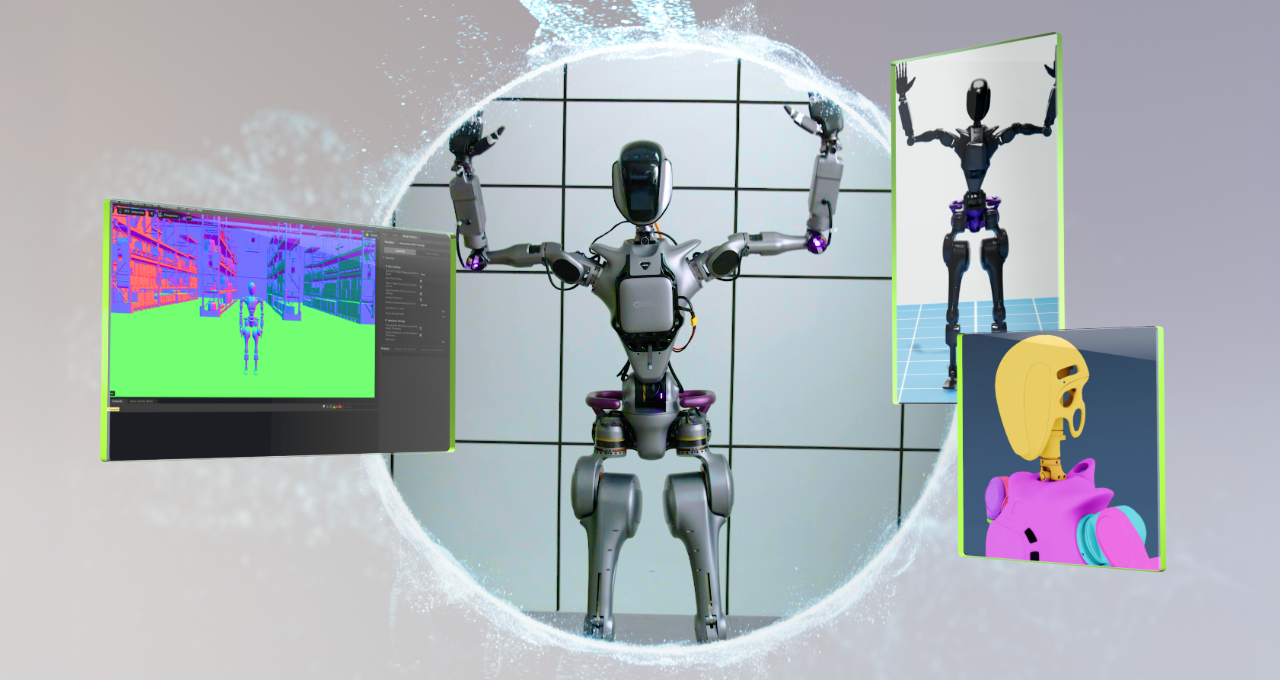
Humanoid robots are rapidly becoming a reality. Those built on NVIDIA Isaac GR00T are already learning to walk, manipulate objects, and otherwise interact with the real world. Gathering diverse and large datasets to train these sophisticated machines can be time-consuming and costly. Using synthetic data (SDG), generated from physically-accurate digital twins, researchers and developers can train and validate their AI models in simulation before deployment in the real world.

Universal Scene Description, aka OpenUSD, is a powerful framework that makes it easy to build these physically accurate virtual environments. Once 3D environments are built, OpenUSD allows teams to develop detailed, scalable simulations along with lifelike scenarios where robots can practice, learn, and improve their skills.

Advancing Robot Training with Synthetic Motion Data

At CES last month, NVIDIA announced the Isaac GR00T Blueprint for synthetic motion generation to help developers generate exponentially larger synthetic motion datasets to train humanoids using imitation learning.

Large-Scale Motion Data Generation: Uses simulation as well as generative AI techniques to generate exponentially large and diverse datasets of humanlike movements, speeding up the data collection process.

Faster Data Augmentation: NVIDIA Cosmos world foundation models generate photorealistic videos at scale using the ground-truth simulation from Omniverse. This equips developers to augment synthetic datasets faster, for training physical AI models, reducing the simulation-to-real gap.

Simulation-First Training: Instead of relying solely on real-world testing, developers can train robots in virtual environments, making the process faster and more cost-effective.

Bridging Virtual to Reality: The combination of real and synthetic data along with simulation-based training and testing allows developers to transfer the robots’ skills learned in the virtual world to the real-world seamlessly.

Simulating the Future of Robotics

Humanoid robots are enhancing efficiency, safety, and adaptability across industries like manufacturing, warehouse and logistics, and healthcare by automating complex tasks and increasing safety conditions for human workers.

Get Plugged Into the World of OpenUSD

Learn more about OpenUSD, humanoid robots, and the latest AI advancements at NVIDIA GTC, a global AI conference running March 17-21 in San Jose, California.

Conclusion

In conclusion, OpenUSD is paving the way for the development of humanoid robots that can seamlessly integrate into people’s daily lives. With the advent of synthetic data generation and OpenUSD, developers can create large-scale, physically accurate virtual environments to train and validate their AI models, reducing the need for real-world testing.

FAQs

Q: What is OpenUSD?
A: OpenUSD is a powerful framework for building physically accurate virtual environments.

Q: What is synthetic data generation?
A: Synthetic data generation is the process of generating large-scale, diverse datasets of humanlike movements using simulation and generative AI techniques.

Q: How can I learn more about OpenUSD?
A: You can learn more about OpenUSD by visiting the Alliance for OpenUSD forum and the AOUSD website. Additionally, you can take the self-paced "Learn OpenUSD" curriculum for 3D developers and practitioners, available for free through the NVIDIA Deep Learning Institute.

Introducing DeepSearcher

0

DeepSearcher: An Open-Source Agent for Research and Report Generation

In the previous post, "I Built a Deep Research with Open Source—and So Can You!", we explained some of the principles underlying research agents and constructed a simple prototype that generates detailed reports on a given topic or question. The article and corresponding notebook demonstrated the fundamental concepts of tool use, query decomposition, reasoning, and reflection. The example in our previous post, in contrast to OpenAI’s Deep Research, ran locally, using only open-source models and tools like Milvus and LangChain. (I encourage you to read the above article before continuing.)

DeepSearcher Architecture

The architecture of DeepSearcher follows our previous post by breaking the problem up into four steps – define/refine the question, research, analyze, synthesize – although this time with some overlap. We go through each step, highlighting DeepSearcher’s improvements.

Define and Refine the Question

Break down the original query into new sub-queries:

  • "How has the cultural impact and societal relevance of The Simpsons evolved from its debut to the present?"
  • "What changes in character development, humor, and storytelling styles have occurred across different seasons of The Simpsons?"
  • "How has the animation style and production technology of The Simpsons changed over time?"
  • "How have audience demographics, reception, and ratings of The Simpsons shifted throughout its run?"

Research and Analyze

Having broken down the query into sub-queries, the research portion of the agent begins. It has, roughly speaking, four steps: routing, search, reflection, and conditional repeat.

Routing

Our database contains multiple tables or collections from different sources. It would be more efficient if we could restrict our semantic search to only those sources that are relevant to the query at hand. A query router prompts an LLM to decide from which collections information should be retrieved.

Search

Having selected various database collections via the previous step, the search step performs a similarity search with Milvus. Much like the previous post, the source data has been specified in advance, chunked, embedded, and stored in the vector database. For DeepSearcher, the data sources, both local and online, must be manually specified. We leave online search for future work.

Reflection

Unlike the previous post, DeepSearcher illustrates a true form of agentic reflection, inputting the prior outputs as context into a prompt that "reflects" on whether the questions asked so far and the relevant retrieved chunks contain any informational gaps. This can be seen as an analysis step.

Conditional Repeat

Unlike our previous post, DeepSearcher illustrates conditional execution flow. After reflecting on whether the questions and answers so far are complete, if there are additional questions to be asked the agent repeats the above steps. Importantly, the execution flow (a while loop) is a function of the LLM output rather than being hard-coded. In this case, there is only a binary choice: repeat research or generate a report. In more complex agents, there may be several such as: follow hyperlink, retrieve chunks, store in memory, reflect, etc. In this way, the question continues to be refined as the agent sees fit until it decides to exit the loop and generate the report. In our Simpsons example, DeepSearcher performs two more rounds of filling the gaps with extra sub-queries.

Synthesize

Finally, the fully decomposed question and retrieved chunks are synthesized into a report with a single prompt.

Results

Here is a sample from the report generated by the query "How has The Simpsons changed over time?" with DeepSeek-R1 passing the Wikipedia page on The Simpsons as source material:

Report: The Evolution of The Simpsons (1989-2022)

  1. Cultural Impact and Societal Relevance
    The Simpsons debuted as a subversive critique of American middle-class life, gaining notoriety for its bold satire in the 1990s. Initially a countercultural phenomenon, it challenged norms with episodes tackling religion, politics, and consumerism. Over time, its cultural dominance waned as competitors like South Park and Family Guy pushed boundaries further. By the 2010s, the show transitioned from trendsetter to nostalgic institution, balancing legacy appeal with attempts to address modern issues like climate change and LGBTQ+ rights, albeit with less societal resonance.
    … Conclusion
    The Simpsons evolved from a radical satire to a television institution, navigating shifts in technology, politics, and audience expectations. While its golden-age brilliance remains unmatched, its adaptability—through streaming, updated humor, and global outreach—secures its place as a cultural touchstone. The show’s longevity reflects both nostalgia and a pragmatic embrace of change, even as it grapples with the challenges of relevance in a fragmented media landscape.

Discussion

We presented DeepSearcher, an agent for performing research and writing reports. Our system is built upon the idea in our previous article, adding features like conditional execution flow, query routing, and an improved interface. We switched from local inference with a small 4-bit quantized reasoning model to an online inference service for the massive DeepSeek-R1 model, qualitatively improving our output report. DeepSearcher works with most inference services like OpenAI, Gemini, DeepSeek, and Grok 3 (coming soon!).

Conclusion

DeepSearcher is a significant step forward in the development of research agents, and we are excited to share it with the community. We believe that this project has the potential to democratize research and reporting, making it more accessible to a wider range of people. We will continue to iterate on this work in future posts, examining additional agentic concepts and the design space of research agents. In the meantime, we invite everyone to try out DeepSearcher, star us on GitHub, and share your feedback!

FAQs

Q: What is DeepSearcher?
A: DeepSearcher is an open-source agent for performing research and writing reports.

Q: What is the architecture of DeepSearcher?
A: The architecture of DeepSearcher follows a four-step process: define/refine the question, research, analyze, and synthesize.

Q: What are the improvements of DeepSearcher over the previous post?
A: DeepSearcher adds features like conditional execution flow, query routing, and an improved interface.

Q: How does DeepSearcher generate reports?
A: DeepSearcher generates reports by synthesizing the fully decomposed question and retrieved chunks into a report with a single prompt.

Q: What are the limitations of DeepSearcher?
A: DeepSearcher is limited by its reliance on LLMs and online inference services, which may not always be available or reliable.