Home Blog Page 332

Gesture Drawing Essentials: 2 & 5 Minute Practice Methods

0

Gesture Drawing Basics

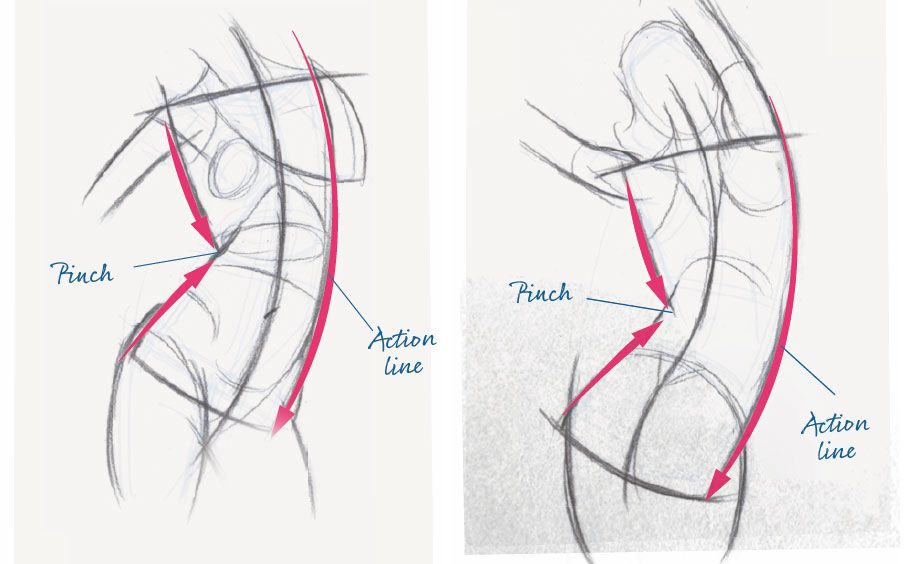
One of an artist’s greatest tools to communicate life in a drawing is gesture. It’s the movement from one form to another. That’s why it follows the natural flow of human anatomy. The first place to look is in the torso – where it is contracting and where it is relaxing. The relaxed or stretch side is the primary gesture – the ‘action line’.

What is Gesture?

When I draw figures, my first priority is to describe the movement. That’s what gesture does. It communicates what the figure or form is doing. Gesture also describes movement between separate forms of the body and how these forms relate to one another. When done right, gesture can help create the illusion of a living, breathing figure.

Where is Gesture?

Everything from the torso to the fingertips is connected by gesture. For example, gesture occurs on the outer edge of the figure and on the larger forms like the torso and leg. Gesture also occurs in smaller forms. For example, the arm, wrist, palm and fingers are all connected by gesture.

How to See Gesture

To see gesture, I first focus on the torso and then look for key anatomical landmarks such as the shoulder, outer hips (great trochanter), pit of the neck and groin. Connecting these points reveals the action line or the primary gesture of the pose, and also the contraction or pinch that happens on the opposing side of the action line.

Drawing Poses Under Two Minutes

Gestures on the inside of the figure are known as rhythms. Rhythms are naturally occurring lines that are often based on anatomy. For example, the neck flows to the shoulder, the chest flows into the arm, and the hips flow naturally to the thigh. I like to use rhythms to place anatomy and small details.

The Action Line

The most important gesture in any drawing is the action line, also known as the longest line or thrust. This line describes the primary movement in the pose and should be drawn as long and fluid as possible. I use it as the foundation of the entire drawing, and every mark I make either reinforces or complements the action line.

How to Make Good Marks

To make drawings clean and easy to read, I use only three marks: straight, C-curve or S-curve. For example, a C-curve is great for the stretch or elongated side of the torso. Straights quickly connect the shoulders and hips. For the action line, a long S-curve connects the head to the legs and feet.

Making Gesture Lines Longer

I draw gesture lines as long, smooth and uninterrupted as possible, especially the action line. To do this, I often look for the extremities like the fingers, toes, and the top of the head, and use gesture to connect these points. Within the body, I use and follow the anatomy to keep the gesture flowing.

Conclusion

By focusing on gesture, you can create dynamic and engaging drawings that capture the movement and energy of the human figure. Remember to look for the action line, use rhythms to place anatomy, and make good marks to keep your drawings clean and easy to read.

FAQs

Q: What is the primary gesture in a drawing?
A: The primary gesture is the action line, which describes the primary movement in the pose.

Q: Where do I look for gesture in the body?
A: Look for gesture in the torso, where it is contracting and relaxing, and also in the extremities like the fingers, toes, and the top of the head.

Q: How do I make good marks?
A: Use only three marks: straight, C-curve or S-curve. For example, a C-curve is great for the stretch or elongated side of the torso.

Q: How do I make gesture lines longer?
A: Look for the extremities and use gesture to connect these points. Within the body, use and follow the anatomy to keep the gesture flowing.

AI Startups Raised $8 Billion in 2024

0

Artificial Intelligence Summit: France’s Thriving AI Ecosystem

The Rise of AI in Europe

In just a few days, France will host the Artificial Intelligence Action Summit, with heads of state flocking to Paris to meet global tech leaders. They’ll likely announce big investments and diplomatic agreements focused on AI safety and environmental impact.

The French AI Report: Trends in the Tech Ecosystem

Ahead of the summit, early-stage VC firm Galion.exe, growth investment firm Revaia, and advisory firm Chausson Partners created the French AI Report, which examines current trends in the tech ecosystem.

A Boom in AI Startups in Europe

While the US and China dominate the AI landscape, there’s a significant boom in AI startups in Europe. In 2024, AI companies represented 20% of all VC funding in the region, with $8 billion in funding. Seventy percent of this capital was raised for seed to Series B rounds.

Top AI Startups in France

The French AI Report looked at the top 400 AI startups in France and identified rising stars. While Mistral AI and Poolside are familiar names, the majority of AI startups aren’t working on the next foundation model.

Infrastructure and Applications

Some companies are optimizing data workflows and pipelines, such as Linkup and Kestra, while others are improving inference performance, like ZML, or developing agents that can sift through large data sets and improve productivity. Dust is a good example of this.

Health and Climate: Key Areas of Focus

Two important areas for AI startups in France are health and climate. Owkin and its spin-off biotech company Bioptimus are leading the pack in health tech, with three big areas of interest: imaging tools, drug discovery, and medical treatment improvement.

Climate and Energy Management

Similarly, AI is being used to build the next-generation of climate startups. In addition to agritech, carbon and energy management seem to be a big focus. There are also a handful of promising new materials companies emerging, such as Altrove.

The Future of AI

The companies included in the list can be found here. You’ll also find AI companies working on one job function – sales, customer care, HR, or legal – and using AI to simplify common tasks.

Conclusion

The AI boom is more distributed than expected, with many countries and companies contributing to its growth. While some companies won’t be around in five years, many are growing rapidly. The AI revolution is still in its early stages, and its impact will be significant.

FAQs

Q: What is the Artificial Intelligence Action Summit?
A: The Artificial Intelligence Action Summit is a summit that will be held in Paris, France, where heads of state will meet global tech leaders to discuss AI safety and environmental impact.

Q: What is the French AI Report?
A: The French AI Report is a report created by Galion.exe, Revaia, and Chausson Partners, which examines current trends in the French AI ecosystem.

Q: How much funding was raised by AI companies in 2024?
A: AI companies raised $8 billion in funding in 2024, with 70% of this capital raised for seed to Series B rounds.

Q: What are the key areas of focus for AI startups in France?
A: Two key areas of focus for AI startups in France are health and climate, with AI being used to improve health care, drug discovery, and medical treatment, as well as to build the next-generation of climate startups.

We Need to Talk About Austen

0

Penguin’s ‘TikTok-ified’ Covers for Jane Austen’s Novels Spark Outrage

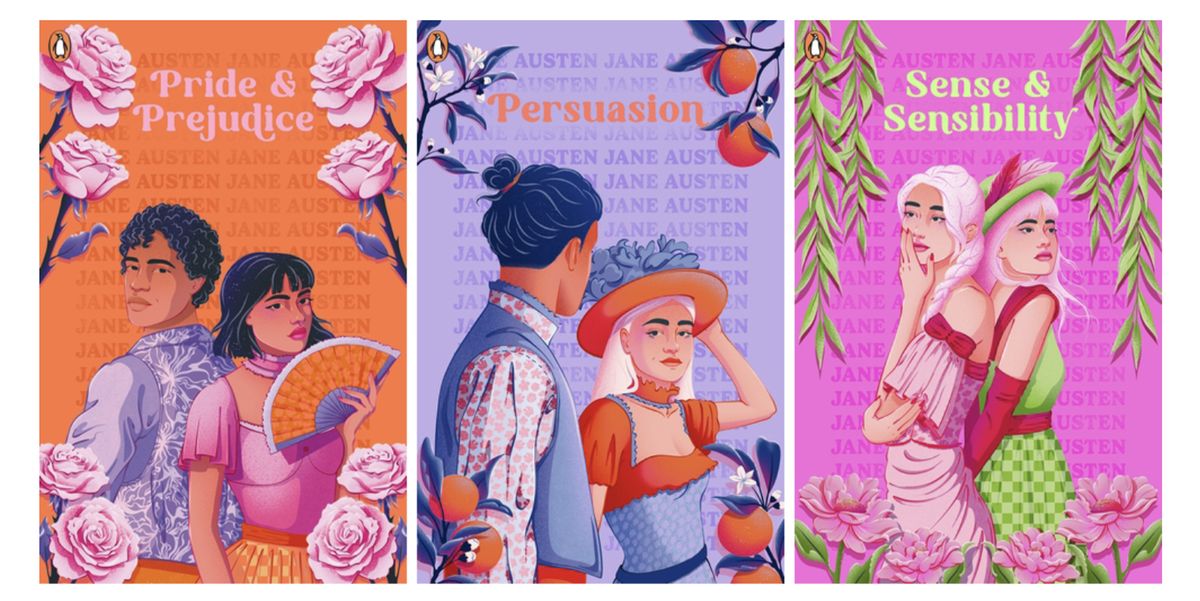
Publishers have long been accused of designing book covers with specific demographics in mind, and it seems that Penguin is the latest to face criticism for its new approach. The company has announced that it will be re-releasing all of Jane Austen’s novels under its children’s imprint, complete with introductions by "leading YA authors." The covers, designed to appeal to young "BookTok" fans, have been met with widespread disdain.

A "TikTok-ified" Take on Classic Literature

The new covers, part of Penguin’s First Impressions series, feature bright colors, bold fonts, and illustrations that seem more suited to a social media platform than a literary classic. The blurb for the series reads, "Fall head over heels for First Impressions, Puffin’s boldly designed new YA Jane Austen collection. Like all the best romcoms, Austen’s novels are full of meet-cutes, missed connections, and drama; they are masterclasses in the lost arts of stolen glances and breath-taking gestures."

A Critique of the Covers

But not everyone is convinced by Penguin’s approach. Reddit users have taken to the platform to express their disappointment and frustration with the new covers. "It feels a little bit patronising," one user wrote. "When I was young, back in the stone age, I used to hate it when things were written to be ‘cool’ and ‘let’s appeal to the kids’. I always felt I was being talked down to, and it made me cringe. In this case, I can’t help but feel that readers with absolutely no prior knowledge of Austen are going to feel a bit deceived. The vibe given by the cover of Mansfield Park is so radically different from the actual novel."

A Dumbing-Down of Austen’s Work?

Others have taken issue with the blurb’s framing of Austen’s novels as mere rom-coms. "It feels like a dumbing-down to encapsulate Austen within the confines of a ‘rom-com’," one Redditor said. "She in fact wrote partly as a reaction against excessive sensibility. Honestly, I think they do Austen herself a disservice, when she wrote about some of the most pressing issues of her day. She hints at patriarchy, the economic dependence of her sex, slavery, and so on; reducing them to ‘stolen glances and breath-taking gestures’ is to negate and ignore so much of her writing."

Conclusion

While it’s true that getting more people to read Austen can only be a good thing, the cynicism behind Penguin’s approach is undeniable. By rebranding Austen’s classics as TikTok-friendly rom-coms, the publisher is not only disrespecting the author’s work but also ignoring the complexity and depth of her writing.

Frequently Asked Questions

Q: What is the purpose of Penguin’s new covers?
A: The new covers are designed to appeal to young "BookTok" fans and rebrand Austen’s classics as TikTok-friendly rom-coms.

Q: What is the reaction to the new covers?
A: Many readers have expressed disappointment and frustration with the new covers, feeling that they are patronizing and disrespectful to Austen’s work.

Q: Are the new covers effective in getting more people to read Austen’s classics?
A: While getting more people to read Austen can only be a good thing, the cynicism behind Penguin’s approach is undeniable, and the new covers may not be effective in encouraging readers to engage with the complexity and depth of Austen’s writing.

Revamped ChatGPT: The Ultimate Messaging Revolution

New ChatGPT Experience in WhatsApp

On Monday, OpenAI announced that users can now upload images in the WhatsApp chat, just like they would when using the chatbot on the browser or app. This feature is helpful for multimodal assistance, where referencing a photo adds useful context that better informs ChatGPT’s response.

Enhanced Multimodal Assistance

For example, if you want to know the name of a plant or vegetable, you can simply upload the image and ask ChatGPT directly in WhatsApp. More elaborate tasks of that nature include taking a photo of a sign to ask for a translation or showing it fridge ingredients and asking for a recipe.

Audio Messages

To enhance ChatGPT’s multimodal assistance in WhatsApp even further, users can now send it audio messages in the chat and receive text responses, just like the regular Voice Mode experience available in ChatGPT.

Getting Started

The ChatGPT in WhatsApp experience is free, and to get started, all you have to do is download the app and message ChatGPT as you would any other contact. You can also scan the QR code below, which will walk you through the sign-up process.

Expanded Access

Typically, when accessing ChatGPT through WhatsApp, users were subject to the messaging limits of non-logged-in, free accounts, which included a limit of 15-minute ChatGPT calls per month. However, starting today, OpenAI is rolling out the ability for users to link their ChatGPT Plus, Free, or Pro accounts on WhatsApp, resulting in expanded access for all users within the app.

Advantages

Some advantages of using WhatsApp to access ChatGPT instead of other methods include not having to download an additional app or switch contexts from the platform you use to text your family and friends to message ChatGPT.

Conclusion

The new ChatGPT experience on WhatsApp provides users with a more convenient and efficient way to access the chatbot’s capabilities. With the ability to upload images, send audio messages, and link accounts, users can now enjoy a more seamless and expanded experience.

FAQs

Q: What is the new ChatGPT experience on WhatsApp?

A: The new experience allows users to upload images, send audio messages, and link their ChatGPT accounts to access expanded features and capabilities.

Q: How do I get started with the new ChatGPT experience on WhatsApp?

A: You can get started by downloading the WhatsApp app, messaging ChatGPT as you would any other contact, or scanning the QR code to sign up.

Q: What are the advantages of using WhatsApp to access ChatGPT?

A: Some advantages include not having to download an additional app or switch contexts from the platform you use to text your family and friends to message ChatGPT.

Pixelated Perfection: ASCII Art Revival

0

Amid all the fuss over DeepSeek, OpenAI has pushed out o3-mini, a new AI reasoning model available to all ChatGPT users.

There’s no shortage of ASCII art generators online, but product designer Mike Bespalov’s tool avoids the limitations of many of the basic converters and provides plenty of parameters to play with. Warning: you may become addicted.

Meet Monospace: An Image-to-ASCII Art Converter

Mike is the founder of the product UI-focused online library referodesign. Writing on X, he says it took him just an hour to build an image-to-ASCII art converter using Open AI’s new AI model “The exact tool I’ve always wanted. And it works so well,” Mike writes. Within a day, he had it online with the name Monospace, and people were sharing the images they created in the responses to his post.

The Power of o3-mini

Older AI models could already build a tool like Monospace, but the result would require rewrites, debugging. With o3, it took just a few prompts, and it worked off the bat.

How to Use Monospace

You can try the ASCII art generator online. You simply upload an image, and the tool will immediately convert it to ASCII art. You can then play with the contrast, brightness and blur level, invert the colours and change the dithering options and character set or enable edge detection.

About o3-mini

OpenAI o3-mini was designed to be faster and more accurate than the last iteration, o1-mini. It’s also the first time that OpenAI has given free access to a small reasoning LLM to all ChatGPT users.

How to Access o3-mini

To use o3-mini, select ‘Reason’ in the ChatGPT message composer. There are three options, low, medium and high. For more on AI, catch up with the US Copyright Office stance on AI art.

What is ASCII Art?

A descendant of typewriter art and line-printer art, ASCII art is a technique that uses printable characters instead of graphic marks. Traditionally, ASCII Standard and ASCII compliant characters would be used, although the term is now often used more loosely to refer to art using other character sets.

ASCII art was mainly invented to be able to produce art using early printers, and it was also used to mark divisions between print jobs. It would later be used in emails and text messages before it became possible to embed or send images. ASCII art can be created with any text editor, usually with a fixed-width font (see our pick of the best monospace fonts.

Conclusion

The release of o3-mini has opened up new possibilities for creative applications of AI. The image-to-ASCII art converter, Monospace, is a testament to the power of this new model. With its ability to produce high-quality ASCII art in just a few prompts, it’s no wonder that Mike Bespalov was able to build the tool in just an hour.

FAQs

Q: What is o3-mini?
A: o3-mini is a new AI reasoning model available to all ChatGPT users, designed to be faster and more accurate than the last iteration, o1-mini.

Q: What is ASCII art?
A: ASCII art is a technique that uses printable characters instead of graphic marks to create images.

Q: How do I use Monospace?
A: You can try the ASCII art generator online by uploading an image and playing with the contrast, brightness and blur level, invert the colours and change the dithering options and character set or enable edge detection.

Q: How do I access o3-mini?
A: To use o3-mini, select ‘Reason’ in the ChatGPT message composer and choose one of the three options, low, medium, or high.

Titanfall Battle Royale

0

A Surprising Turn: How Titanfall 3 Became Apex Legends

The Unexpected Shift

Instead of developing Titanfall 3, Respawn, the studio behind the Titanfall series, took a bold step in a different direction with Apex Legends. This free-to-play battle royale game combines elements of Overwatch and Fortnite, surprising fans and critics alike. The game’s launch was met with excitement and skepticism, but it has since become a massive hit, attracting tens of millions of players worldwide.

A New Kind of Battle Royale

Apex Legends is a departure from the traditional first-person shooter (FPS) genre, which is typically associated with the Titanfall series. The game’s battle royale mode pits players against each other in a struggle for survival, with a unique twist: players can choose from a variety of characters, each with their own unique abilities and playstyles. This blend of characters, abilities, and strategic gameplay has set Apex Legends apart from other battle royale games.

A License to Innovate

Respawn’s decision to pivot from Titanfall 3 allowed the studio to explore new creative avenues and take risks. The result is a game that is both familiar and innovative, with a unique blend of gameplay mechanics and a rich, immersive world to explore. The studio’s willingness to take a chance on a new direction has paid off, as Apex Legends has quickly become one of the most popular games in the world.

Where to Go from Here

As Apex Legends continues to grow and evolve, fans can expect new content, updates, and expansions to be added to the game. The community is active and engaged, with a strong focus on competitive play and esports. For those new to the game, there’s never been a better time to jump in and experience the thrill of Apex Legends for themselves.

Frequently Asked Questions

Q: Is Apex Legends a sequel to Titanfall?
A: No, Apex Legends is not a sequel to Titanfall. It is a new game developed by Respawn, the same studio behind the Titanfall series.

Q: Is Apex Legends a free-to-play game?
A: Yes, Apex Legends is a free-to-play game, with optional in-game purchases.

Q: Can I play Apex Legends on my console?
A: Yes, Apex Legends is available on PC, Xbox One, and PlayStation 4.

Q: Is Apex Legends a competitive esport?
A: Yes, Apex Legends has a growing competitive scene, with regular tournaments and events.

AI-Powered Skin Cancer Prevention

AI-Assisted Cancer Diagnosis: The Future of Skin Cancer Detection

Remarkable Achievements in AI-Assisted Cancer Diagnosis

In the past year, we’ve seen remarkable achievements across AI-assisted cancer diagnosis as more and more clinicians test, use, and integrate AI companions into daily practice.

AI Diagnostic Tools for Skin Cancer

Skin cancer is no exception, and we expect AI diagnostic tools to be widely implemented across this clinical arena in the future. A 2024 study led by researchers at Stanford Medicine compared the performance of clinicians diagnosing at least one skin cancer with and without deep learning-based AI assistance. In an experimental environment, clinicians without AI assistance achieved an average sensitivity of 74.8%, while for AI-assisted clinicians, sensitivity was around 81.1%.

AI for Skin Cancer: Impact on Behaviour Change

Cancer is on the rise among younger people. According to a study published in BMJ Oncology, the number of under-50s worldwide being diagnosed with cancer has risen by nearly 80% in three decades. And, over the last decade, melanoma skin cancer incidence rates have increased by almost two-fifths (38%) with Spain seeing a steady incidence increase of 2.4% during this time.

If detected early enough, skin cancer is easily treated and prognosis is very good. But busy lives and competing concerns mean fewer people are getting checked out, resulting in delays to diagnosis and treatment, which is dramatically changing the survival rates. Those who do, often wait to speak to a doctor. In fact, new research from Bupa, Attitudes Towards Digital Healthcare, indicates only 9% of people would immediately go to get a mole they were concerned about examined by a professional.

However, the same research found that if people were able to have a mole assessed by an AI-powered phone app at the time of their choosing, that percentage increases more than threefold (33%). This signifies emerging technology can have a significant impact on positive behaviour change in healthcare and improve clinical outcome of a potentially severe disease.

Bupa’s At-Home Dermatology Tool

At Bupa, we see lots of opportunities to use AI and are exploring its use to enhance patient care, improve operational efficiency, and help our customers to live longer, healthier, and happier lives. We know that people want their healthcare partner to be by their side, not just when they are sick, but supporting them constantly to keep them well.

That’s why we launched Blua, our digital healthcare service that’s available in over 200 countries. Blua provides access to three life-changing healthcare innovations that drive convenience and accessibility. They are virtual consultations so that a customer can connect to a health professional from wherever they choose. Digital health programs that allow customers to proactively manage their health and remote healthcare services such as prescription delivery and at-home monitoring equipment.

For customers in Spain, we offer an at-home dermatology assessment service through Blua. How does this work? Customers who’re worried about a skin lesion can take high-resolution photos of it using their smartphone. Once taken, the photos are uploaded to Blua and using AI are compared with a database of millions of other images of skin lesions to check for signs of malignancy.

The Future of Healthcare: Early Detection

Digital healthcare, together with AI, is going to play a crucial role in removing the barriers that stop people from getting health concerns like moles checked out in a timely manner, promoting positive behaviour change that can save lives. This is why Blua is especially useful in today’s fast-paced world where convenience is paramount and virtual consultations and at-home tests will empower individuals to prioritize their health, without the need to sacrifice their time.

Conclusion

AI-assisted cancer diagnosis is revolutionizing the way we detect and treat skin cancer. With AI-powered tools, clinicians can make more accurate diagnoses, and patients can take proactive steps to monitor their health. At Bupa, we’re committed to harnessing the power of AI to improve patient care and promote positive behaviour change.

FAQs

Q: What is AI-assisted cancer diagnosis?
A: AI-assisted cancer diagnosis is the use of artificial intelligence to aid clinicians in diagnosing and treating cancer.

Q: How does AI-assisted cancer diagnosis work?
A: AI-assisted cancer diagnosis uses machine learning algorithms to analyze medical images and data to identify patterns and make predictions about cancer diagnosis and treatment.

Q: What are the benefits of AI-assisted cancer diagnosis?
A: The benefits of AI-assisted cancer diagnosis include improved accuracy, faster diagnosis, and more effective treatment.

Q: How can I get an AI-assisted cancer diagnosis?
A: You can get an AI-assisted cancer diagnosis through a healthcare provider or a digital healthcare service like Blua.

ASUS Zenbook A14: A Certain ‘Air’ About It

0

The Thin and Light Laptop Has Met Its Match

The thin and light laptop has been a hotly contested sector of the market for years, and is the reason the MacBook Air exists. Apple’s 13.5in laptop has met its match (in lightness terms, at least) in the Zenbook A14, however, as while the Air weighs 1.24kg, the A14 tips the scales at a mere 0.98kg. It’s ridiculously light, perfect for taking with you. You might never notice it’s in your bag if you’re in the habit of having a book or two in there.

Key Specifications

CPU: Snapdragon X X1 26 100
NPU: Qualcomm Hexagon
Graphics: Qualcomm Adreno
Memory: 16GB LPDDR5X
Storage: 1TB PCIe 4.0 SSD
Screen size: 14in
Screen type: OLED
Resolution: 1920 x 1200
Refresh rate: 60Hz
Colour gamut (measured): 97% DCI-P3
Brightness (measured): 405 nits
Ports: 1x USB 3.2 Gen 2 Type-A, 2x USB 4.0 Gen 3 Type-C, 1x HDMI 2.1, 1x 3.5mm audio
Wireless connectivity: Wi-Fi 6E, Bluetooth 5.3
Dimensions: 31.07 x 21.39 x 1.59 cm
Weight: 0.98kg

Design, Build and Display

• Thin and light
• Good port selection
• Bit plasticky

Asus has set out here to build the lightest 14in laptop it can, taking advantage of a new low-end Snapdragon chip to provide the core of the machine, then creating a plastic chassis around it. It’s been spectacularly successful at this – we can’t remember when we last saw a PC that came in at less than a kilogram – though it has resulted in a slightly unexciting and perhaps cheap-feeling build.

Performance

The Zenbook A14 is a laptop that’s being sold on its size, weight, and convenience. In these categories, it’s a winner, and if you’re in the market for something that’s easily portable, doesn’t take up too much room, and can be easily tidied away but also has a bit of oomph and can connect to almost any peripherals then it’s a machine that could find its way into many studios and businesses, as well as being a convenient personal laptop for home workers.

Price

The ASUS Zenbook A14 currently costs from £1,099.99 on ASUS’ sales portal, which may be a problem for the A14. It’s the same price as the entry-level M3 MacBook Air 13in, which performs better, and if (when) a new M4 model comes out the gulf between them will widen. For now, the A14 has the benefit that it runs Windows, which has a wide appeal, and offers excellent battery life, but this isn’t going to be the only Air-adjacent PC to appear built around the Snapdragon X1, and it’s unlikely to be the cheapest.

Who is it for?

This isn’t a laptop that’s being sold on the basis of its enormous processing power, but on its size, weight, and convenience. In these categories, it’s a winner, and if you’re in the market for something that’s easily portable, doesn’t take up too much room, and can be easily tidied away but also has a bit of oomph and can connect to almost any peripherals then it’s a machine that could find its way into many studios and businesses, as well as being a convenient personal laptop for home workers.

Score Card

Attributes Notes Rating
Design: Generic looks, but slim and very light 4/5
Features: Good port selection 3/5
Performance:

Try Apple’s Invites App for Event Planning

When you’re inviting friends, family, or co-workers to an event, the most convenient option is to share the event details via text. However, this typically requires either individually texting everyone the details or creating a group chat with a bunch of people who don’t know each other — a recipe for disaster.

To Enhance Event Interactions

To enhance how those interactions take place, online invitation platforms like Partiful have become popular, enabling users to create and share invites all within one app. Today, Apple launched its version, an app called Invites that is integrated into the Apple ecosystem for a more seamless experience.

The Invite App

On Tuesday, Apple launched Invites, a standalone app for creating custom invitations, sharing them with a group of people, and RSVPing. Although similar apps already exist, Invites’ key advantage is its integration with other Apple apps.

For example, Invites users can collaborate on Apple Music Playlists, add photos to Shared Albums, leverage Maps within the invite to navigate to the event, and even get the forecast for the day through the Weather app.

"Apple Invites brings together capabilities our users already know and love across iPhone, iCloud, and Apple Music, making it easy to plan special events," said Brent Chiu-Watson, Apple’s senior director of Worldwide Product Marketing for Apps and iCloud.

Creating an Invite

Creating an invite is as simple as choosing a background, which can be an image from your photo library, or from the app’s gallery of backgrounds. Apple Intelligence can assist in making the invites, with the built-in Image Playground generator creating images from simple prompts to match your vision for the invite. Apple Intelligence’s Writing Tools can help generate the copy.

Sharing the Invite

Sharing the invite with others is simple: Users can share the invite via a link and manage the preview of what others see. Guests can RSVP using the iPhone app or the web even if they don’t have an Apple account or subscription.

How to Access

The Invites app is free to download from the App Store for all iPhone models running iOS 18 or later. The experience is also accessible from the web at the standalone site.

Conclusion

Apple’s Invites app offers a seamless and integrated way to create and share custom invitations, making it easy to plan special events. With its integration with other Apple apps, users can leverage their existing capabilities to create a more engaging and personalized experience.

FAQs

Q: Is the Invites app free to download?
A: Yes, the Invites app is free to download from the App Store for all iPhone models running iOS 18 or later.

Q: Can I access the Invites app from the web?
A: Yes, the experience is also accessible from the web at the standalone site.

Q: Do I need an Apple account or subscription to use the Invites app?
A: No, guests can RSVP using the iPhone app or the web even if they don’t have an Apple account or subscription.

Q: Can I customize the invite with my own images and text?
A: Yes, you can choose a background from your photo library or the app’s gallery of backgrounds, and use Apple Intelligence’s Writing Tools to generate the copy.

Declarative Pipelines for Data Teams

Declarative Data Pipelines: Moving from Code to Configuration

Jonathan Bhaskar ・ Feb 5

In today’s data-driven world, data pipelines play a crucial role in processing and analyzing large amounts of data. Traditional data pipelines rely on code-based solutions, which can be complex, time-consuming, and prone to errors. In this article, we’ll explore the concept of declarative data pipelines, a new approach that shifts the focus from code to configuration.

What are Declarative Data Pipelines?

Declarative data pipelines are built upon the idea of separating the logic of a data pipeline from its implementation. Instead of writing code to define the pipeline, you define the pipeline’s behavior in a configuration file. This approach allows for greater flexibility, scalability, and maintainability.

Benefits of Declarative Data Pipelines

Declarative data pipelines offer several benefits, including:

  • Simplified Data Processing: Declarative data pipelines eliminate the need for complex coding, making it easier to process and analyze large amounts of data.
  • Improved Scalability: With declarative data pipelines, you can scale your data processing capabilities without worrying about the underlying code.
  • Better Maintainability: Configuration files are easier to read and understand, making it simpler to maintain and update your data pipelines.

How to Implement Declarative Data Pipelines

Implementing declarative data pipelines requires a combination of tools and techniques. Here are the general steps to get started:

  1. Choose a Configuration Language: Select a configuration language, such as JSON or YAML, to define your data pipeline’s behavior.
  2. Define Your Pipeline: Create a configuration file that defines the pipeline’s input, processing, and output.
  3. Choose a Pipeline Engine: Select a pipeline engine, such as Apache Beam or AWS Glue, to execute your pipeline.

Conclusion

Declarative data pipelines offer a new approach to data processing, shifting the focus from code to configuration. By defining the pipeline’s behavior in a configuration file, you can simplify data processing, improve scalability, and enhance maintainability. Whether you’re working with small or large datasets, declarative data pipelines can help you streamline your data processing workflows.

FAQs

Q: What are the benefits of declarative data pipelines?
A: Declarative data pipelines offer simplified data processing, improved scalability, and better maintainability.

Q: What is the best way to implement declarative data pipelines?
A: Choose a configuration language, define your pipeline, and select a pipeline engine to get started.

Q: What are some popular pipeline engines for declarative data pipelines?
A: Apache Beam and AWS Glue are two popular pipeline engines for declarative data pipelines.