Home Blog Page 387

AI-Driven Testing: Revolutionizing Software Quality Assurance

The Future of Software Testing: AI-Driven Testing

In the fast-paced world of software development, the demand for faster delivery, higher quality, and continuous innovation has never been greater. Traditional testing methods, while effective, often struggle to keep up with the complexity and scale of modern applications. Enter AI-driven testing—a transformative approach that leverages artificial intelligence to enhance the efficiency, accuracy, and scalability of software testing.

What is AI-Driven Testing?

AI-driven testing refers to the use of artificial intelligence technologies, such as machine learning, natural language processing, and computer vision, to automate and optimize various aspects of software testing. Unlike traditional testing methods, which rely heavily on manual effort and predefined scripts, AI-driven testing adapts to the application’s behavior, learns from data, and makes intelligent decisions to improve testing outcomes.

The Benefits of AI-Driven Testing

  • Enhanced Test Coverage: AI-driven testing can analyze vast amounts of data and identify patterns that might be missed by human testers, ensuring that even edge cases and rare scenarios are thoroughly validated.
  • Faster Test Execution: By automating repetitive tasks and optimizing test execution, AI-driven testing significantly reduces the time required to complete testing cycles, making it ideal for agile and DevOps environments.
  • Improved Accuracy and Reliability: Human testers are prone to errors, especially when dealing with repetitive or monotonous tasks. AI-driven testing eliminates this risk by performing tasks with precision and consistency, leading to more reliable results.
  • Adaptive and Self-Healing Tests: One of the most significant advantages of AI-driven testing is its ability to adapt to changes in the application, automatically updating test scripts when the application’s user interface or functionality changes, reducing the need for manual intervention and maintenance.
  • Predictive Analytics and Risk Assessment: AI can analyze historical data and predict potential areas of risk in the application, enabling testers to prioritize their efforts and focus on the most critical aspects of the software, improving overall quality.
  • Cost Efficiency: While the initial investment in AI-driven testing may be higher, the long-term benefits far outweigh the costs, reducing manual effort, minimizing defects, and accelerating time-to-market, leading to significant cost savings.

Key Applications of AI in Testing

  • Test Case Generation: AI can automatically generate test cases based on the application’s requirements, user stories, or historical data, saving time and ensuring that test cases are comprehensive and aligned with business needs.
  • Defect Detection and Classification: AI can analyze test results and identify defects with high accuracy, classifying defects based on severity, impact, and root cause, enabling testers to address issues more effectively.
  • Visual Testing: AI-powered visual testing tools can compare screenshots of the application across different devices and browsers, identifying visual inconsistencies that might be missed by traditional testing methods.
  • Performance Testing: AI can simulate real-world user behavior and predict how the application will perform under various conditions, helping identify performance bottlenecks and optimize the application for scalability.
  • Exploratory Testing: AI can assist in exploratory testing by suggesting test scenarios, identifying potential risks, and analyzing user interactions, enhancing the tester’s ability to uncover hidden defects and improve overall quality.

Challenges and Considerations

While AI-driven testing offers numerous benefits, it is not without its challenges. Implementing AI-driven testing requires a deep understanding of AI technologies and access to high-quality data for training and validation. Additionally, organizations must ensure that AI-driven testing complements, rather than replaces, human expertise. Testers play a critical role in interpreting AI-generated insights, making strategic decisions, and ensuring that testing aligns with business goals.

Another consideration is the ethical use of AI in testing, ensuring that AI-driven testing is transparent, unbiased, and aligned with ethical standards, addressing potential biases in AI algorithms and ensuring that testing processes are fair and inclusive.

The Future of AI-Driven Testing

As AI technologies continue to evolve, the potential for AI-driven testing will only grow. Emerging trends, such as explainable AI, reinforcement learning, and AI-powered test orchestration, are poised to further enhance the capabilities of AI-driven testing, enabling testers to tackle even more complex challenges and ensure the reliability of AI-driven applications.

Conclusion

AI-driven testing represents a paradigm shift in the way software testing is conducted, leveraging the power of artificial intelligence to overcome traditional limitations, enhance test coverage, and deliver high-quality software at scale. While challenges remain, the benefits of AI-driven testing far outweigh the risks, making it an indispensable tool for modern software development.

FAQs

Q: What is AI-driven testing?

A: AI-driven testing is the use of artificial intelligence technologies, such as machine learning, natural language processing, and computer vision, to automate and optimize various aspects of software testing.

Q: What are the benefits of AI-driven testing?

A: AI-driven testing offers enhanced test coverage, faster test execution, improved accuracy and reliability, adaptive and self-healing tests, predictive analytics and risk assessment, and cost efficiency.

Q: What are the key applications of AI in testing?

A: The key applications of AI in testing include test case generation, defect detection and classification, visual testing, performance testing, and exploratory testing.

Q: What are the challenges and considerations of AI-driven testing?

A: The challenges and considerations of AI-driven testing include the need for a deep understanding of AI technologies, access to high-quality data, and the potential for AI-driven testing to replace human expertise, as well as the importance of ensuring ethical use and transparency in AI-driven testing.

AI Trends for 2025

GenAI Trends for 2025: Beware the AI Agent Reckoning

As we step into 2025, GenAI continues to establish itself as a transformative force, redefining industries and pushing the boundaries of innovation. This year promises to be a milestone in AI advancements, with GenAI leading the charge.

Trend 1: GenAI Will Be Commoditized

A major trend for the coming year is the widespread availability of GenAI tools and AI agents. This will significantly lower barriers to entry for basic AI capabilities, leveling the playing field for undifferentiated solutions.

Trend 2: Quantifying ROI Under Pressure

Dataiku highlights that while 72% of data, analytics, and IT executives report positive ROI for their GenAI projects, a mix of qualitative and quantitative methods are used to measure their success. Challenges such as isolating GenAI’s impact and lacking clear metrics complicate this process.

Trend 3: The LLM Mess

Dataiku highlights that the influx of AI agents, powered by large language models (LLMs), is creating a chaotic environment in enterprise settings. With 73% of organizations adopting a hybrid multi-LLM approach, the challenge lies in managing these diverse models and their unstructured workflows effectively.

Trend 4: Governance as a Priority

GenAI’s rapid rise brings significant governance concerns, as noted by Dataiku. Inadequate governance frameworks expose organizations to risks such as privacy breaches, biases, and compliance issues.

Trend 5: Upskilling the Workforce

Workers who do not resist change and learn to work with AI are best positioned to thrive and succeed in an AI-driven future. Dataiku shared that 93% of C-Suite executives believe it’s critical for employees to work with and generate insights from data.

Conclusion

The playbook for success is still being written, but best practices are already emerging to mitigate the biggest risks that AI can present. CEOs have a responsibility to their companies — and themselves — to get off the sidelines and make it happen.

FAQs

Q: What are the top trends in GenAI for 2025?

A: According to Dataiku’s report, the top trends include commoditization of GenAI, quantifying ROI under pressure, the LLM mess, governance as a priority, and upskilling the workforce.

Q: What are the challenges in measuring GenAI’s ROI?

A: Challenges such as isolating GenAI’s impact and lacking clear metrics complicate the process of measuring GenAI’s ROI.

Q: How can organizations manage the influx of AI agents and LLMs?

A: Organizations can manage the influx of AI agents and LLMs by developing a clear strategy and governance framework for managing multiple LLMs and AI agents.

Q: How can organizations prepare their workforce for an AI-driven future?

A: Organizations can prepare their workforce for an AI-driven future by cultivating a culture of continuous learning that leverages the synergy between humans and AI.

The AI Sandbox

0

Discover the Latest in AI News and Tools

Explore AI Tools & News: https://futuretools.io/

Weekly Newsletter: https://futuretools.io/newsletter

The Next Wave Podcast: https://youtube.com/@TheNextWavePod

Socials:

Resources From Today’s Video:

Let’s Work Together!

#AINews #AITools #ArtificialIntelligence

Time Stamps:

Source

Conclusion:

In this article, we’ve explored the latest developments in the world of AI, from the latest tools and news to the next big trends and breakthroughs. We’ve also highlighted some of the best resources for staying up-to-date on the latest AI news and trends, as well as the best ways to connect with us and our community.

FAQs:

Q: What is the best way to stay up-to-date on the latest AI news and trends?
A: Follow us on social media, sign up for our weekly newsletter, and check out our website for the latest news and updates.

Q: How can I get in touch with you and your team?
A: You can reach us at mattwolfe@smoothmedia.co for brand, sponsorship, and business inquiries.

Q: What are the best resources for learning more about AI?
A: Check out our website, our social media channels, and our newsletter for the latest news and updates.

Q: How can I get involved in the AI community?
A: Join our community on social media, attend our events, and engage with our content to stay up-to-date on the latest developments in the world of AI.

The Elegoo Mars 5 Ultra for Beginners

0

Elegoo Mars 5 Ultra: A Beginner’s Guide to Resin 3D Printing

What’s in the Box?

The Elegoo Mars 5 Ultra ships with a comprehensive set of accessories, including scrapers, both metal and plastic (for the build plate and FEP), a USB thumb drive for transferring files and firmware, some gloves, a Wi-Fi antenna, and resin filters. The build platform is self-levelling, making it easy to set up and start printing.

Software

The Mars 5 Ultra comes with its own software, SateLite, although it’s not yet available for Mac. I tested the printer with both Chitubox and Lychee, with Lychee being my preference. Lychee allows for positioning parts on the print bed, slicing, and adding supports before saving with to a file or sending directly to the printer wirelessly.

Performance

The Mars 5 Ultra is a high-performance resin 3D printer that produces excellent results. The tilting tank and sensors prevent overfilling and ensure a smooth printing process. The printer is also equipped with an ‘AI’ camera for checking progress and shooting timelapses of your print.

Features

Some notable features of the Mars 5 Ultra include:

  • Tilting tank for reduced layer shifting and improved print quality
  • Sensors to prevent overfilling and ensure a smooth printing process
  • AI camera for checking progress and shooting timelapses
  • Self-levelling build platform for easy setup
  • Compact and solidly built design

Who is it for?

The Mars 5 Ultra is an excellent choice for beginners and experts alike. It’s easy to set up and use, and produces excellent results. For experts, it can be tweaked as needed, while for beginners, it’s a case of plug in, pour, and go.

Buy it if:

  • You want an easy-to-set-up and use 3D printer
  • You are new to 3D printing
  • Fine detail is important to your projects

Don’t buy it if:

  • You need to print large models

Conclusion

The Elegoo Mars 5 Ultra is an excellent choice for anyone looking for a high-performance resin 3D printer. Its ease of use, compact design, and excellent print quality make it an excellent choice for beginners and experts alike.

FAQs

Q: What is the difference between FDM and Resin 3D printing?
A: FDM (Fused Deposition Modeling) is a type of 3D printing that uses melted plastic to create objects. Resin 3D printing, on the other hand, uses liquid resin that is cured with UV light to create objects.

Q: What is the advantage of using a resin 3D printer?
A: Resin 3D printing offers high-resolution prints with fine details, making it ideal for printing small parts and models.

Q: How do I choose the right resin for my 3D printer?
A: The choice of resin depends on the specific requirements of your project. It’s recommended to choose a resin that is compatible with your printer and has the desired properties (e.g. flexibility, transparency, etc.).

Q: What is the difference between a self-levelling build platform and a manual build platform?
A: A self-levelling build platform is designed to automatically adjust to the level of the print bed, making it easier to set up and start printing. A manual build platform requires manual adjustment of the print bed level.

Rise of AI, Death of the Author

0

Post-Human Art – How AI Redefines Art

The Evolution of Art

Art is a process that is constantly evolving. Nowhere does it say that humans must be the only, or even the most important, source of art. Nowhere does it say the artist is the only one who is allowed to create art. This is about rethinking art—to elevate it, to free it, and to democratize it.

AI-Generated Art

Artificial Intelligence (AI) has been making waves in the art world, generating stunning pieces that are often indistinguishable from those created by humans. AI algorithms can analyze and learn from vast amounts of data, allowing them to create complex and intricate designs. This has led to a new form of art that is both fascinating and unsettling.

Redefining the Role of the Artist

With AI-generated art, the traditional role of the artist is being redefined. No longer is the artist solely responsible for creating art. Instead, AI is becoming a collaborative partner, allowing humans to focus on other aspects of the creative process. This shift is not only changing the way we create art but also the way we perceive it.

Democratizing Art

One of the most significant benefits of AI-generated art is its ability to democratize the art world. No longer is art reserved for those with the means to attend art school or have access to expensive software. AI algorithms can be used by anyone, regardless of their background or skill level. This has the potential to open up new opportunities for people who may not have previously had the chance to express themselves creatively.

Conclusion

The integration of AI into the art world is a game-changer. It has the potential to elevate art, free it from traditional constraints, and democratize it. As we move forward, it will be exciting to see how AI continues to shape the art world and what new forms of creativity emerge.

Frequently Asked Questions

Q: Is AI-generated art truly art?
A: This is a matter of debate. While some argue that AI-generated art is not "real" art, others see it as a new form of creative expression that deserves recognition.

Q: Will AI replace human artists?
A: It’s unlikely that AI will replace human artists entirely. Instead, AI will likely augment the creative process, allowing humans to focus on higher-level tasks.

Q: Can anyone use AI to create art?
A: Yes, AI algorithms can be used by anyone, regardless of their background or skill level. This democratization of art has the potential to open up new opportunities for people who may not have previously had the chance to express themselves creatively.

Q: Is AI-generated art limited to visual art?
A: No, AI can be used to generate music, literature, and other forms of art. The possibilities are endless, and we can expect to see AI-generated art in many different forms in the future.

Performance Review Examples, Comments, Phrases

0

The performance review is a cornerstone of an effective performance management program. It’s an opportunity to reflect, summarize, and plan for what’s next. When done well, performance reviews help employees feel valued and motivated to improve.

But navigating the employee review conversation is easier said than done. Managers are busy and often feel unequipped to deliver great feedback. And employees are often anxious about what will happen in the conversation. If you don’t want your performance evaluations to feel like a burdensome corporate ritual, you need to consider your approach carefully.

The words exchanged in a performance review matter—a lot. They have the potential to steer an employee’s confidence, connection, and contributions in the months to come. And, by extension, the trajectory of your team and organization. You need to handle reviews with a balance of radical candor and encouragement.

Whether you’re a seasoned HR pro, a new manager, or an employee preparing for a review, these performance review examples and comments can help you have a more meaningful and productive conversation. These examples should serve as inspiration, not a script—as we ultimately recommend providing specific and personalized feedback to employees.


The Importance of Performance Reviews

Performance reviews, when done well, are important in performance management and employee engagement. They provide an opportunity for managers and employees to reflect and look forward. To strengthen alignment and maximize growth.

Performance reviews can benefit everyone in the organization. They provide organizational leaders and HR with valuable information about employee performance, so they can make more informed talent decisions.

For managers, performance reviews help evaluate team member performance against established goals. Managers can share feedback, recognize great work, and discuss areas of improvement. This feedback is essential for development, setting clear expectations, and fostering continuous improvement within the team.

For employees, performance reviews help boost growth and development. Employees receive open and direct feedback on their performance, which allows them to adjust and improve. Reviews increase alignment and surface opportunities for development.


Best Practices: How to Write a Performance Review

A crucial aspect of effective performance reviews is delivering constructive feedback. When writing a performance review, it’s important to provide specific examples to illustrate your points. You should also avoid generic praise or criticism. Employees will see right through it, and they won’t be motivated to improve. Instead, tailor your comments and suggestions to the individual’s performance. Let them know you care about their development and want to be an active partner in their growth.

To ensure employee engagement and growth, set clear performance goals and offer support for improvement. Emphasize the impact of addressing the discussed areas on overall performance. Encourage a culture of continuous improvement by calling out great work when you see it and providing coaching targeted and improvement.

Finally, make sure to keep the door open for a two-way conversation. Transparent communication nurtures trust and collaboration between you and your team members. By actively listening to their feedback and valuing their input, you can create a culture where everyone feels heard and respected, ultimately building strong relationships.

A culture of trust doesn’t happen overnight. Managers should have regular performance check-ins outside of the annual performance review. These conversations allow managers to support, adjust, and adapt as needed to keep performance on track and stay connected to employees through effective communication.


Pitfalls to Avoid in Performance Reviews

There are a few common traps that can undermine the effectiveness of your performance reviews. Here’s a few and how to avoid them:

  • The vagueness vortex. Offering generic feedback leaves employees wanting more. Use specific examples as anchors for your feedback to provide both clarity and direction for improvement. Good performance review templates can help!
  • The negative bias barrier. While addressing areas for growth is essential, it’s just as important to celebrate what’s going right. A balanced review motivated employees and helps them feel valued for their hard work.
  • The expectations fog. Ambiguity in objectives can cloud the review process. Setting clear, achievable performance goals from the get-go ensures both managers and employees are on the same page about what’s important.
  • The follow-up fumble. The momentum from the review is lost without follow-through and ongoing performance conversations. Consistent follow-up translates insights into action, helping employee stay aligned and feel supported.

What Not to Say in a Performance Review

The language you use in performance reviews is so important. It can make or break the review conversation for your employee. Remember your purpose: it is to guide and develop, not to blame and discourage. Here are a few tips for what not to say in a performance review:

  • Steer clear of overly critical language without offering a path forward. Your aim should be to inspire improvement.
  • Avoid the comparison trap. Don’t compare an employee to another team member. You risk creating a competitive rather than a collaborative environment.
  • Don’t dismiss employee feedback. It’s important to acknowledge their thoughts, showing respect and creating space for a two-way dialogue.


What to Say in a Performance Review:

Your performance review delivery is important in nurturing growth and boosting engagement. Frame your feedback with specificity. You want to provide detailed instances that exemplify the feedback you’re sharing—both positive and constructive. Taking a balanced approach will help your team members shine and refine their skills.

Keep your commentary aligned with employee goals, behaviors, and organizational values. Don’t make it personal. Remember to provide specific feedback on the employee’s performance, avoiding general statements like “you did a good job” or “you need to do better next time.” Instead, focus on what the employee has done well and how they could improve going forward. This will give the employee clear direction and help them understand exactly where they stand with their manager.

Use each performance review to celebrate milestones, chart new goals, and openly discuss development opportunities. An authentic and candid exchange can invigorate your team members and accelerate growth.

Performance Review Phrases & Performance Review Comments

Having an arsenal of performance review phrases and comments can help you deliver targeted and inspiring feedback to each employee. Use our examples to navigate your next review with professionalism and tact.

Example Phrases & Comments: Communication Skills

Positive Feedback:

  1. You articulate complex ideas clearly and your presentations are always engaging.
  2. Your writing is concise and persuasive, making reports easy to understand.
  3. You listen attentively in meetings and provide thoughtful feedback.
  4. You consistently ensure all team members are informed and up-to-date.
  5. Your ability to negotiate effectively has been key in several team successes.

Constructive Feedback:

  1. Consider pausing to allow questions during your presentations to ensure clarity.
  2. It may be helpful to proofread your emails once more for clarity and conciseness.
  3. Encouraging others to share their ideas in meetings could enhance team collaboration.
  4. Let’s work on tailoring your communication style to different audiences for better engagement.
  5. Try to summarize the main points at the end of your communications for emphasis.

Self-performance review examples:

  1. I feel confident in my ability to present ideas in a clear and engaging manner, but I want to work on encouraging more interactive discussions during meetings.
  2. My written communication is thorough and well-received, though I aim to improve my brevity for more impactful messages.
  3. While I effectively tailor my communication to different audiences, I would like to enhance my active listening skills, particularly in one-on-one settings.

Example Phrases & Comments: Teamwork and Collaboration

Positive Feedback:

  1. You are a unifying presence in the team, always ensuring everyone’s opinions are considered.
  2. Your willingness to help colleagues demonstrates exceptional team spirit.
  3. You consistently acknowledge the contributions of others, fostering a positive team environment.
  4. You excel at coordinating with other departments to achieve shared goals.
  5. Your collaborative approach has been instrumental in our team’s achievements.

Constructive Feedback:

  1. I encourage you to seek contributions from quieter team members, as their input can be valuable.
  2. When disagreements arise, try to seek a compromise that benefits the team as a whole.
  3. Balancing your workload with others could help with more equitable task distribution.
  4. Try to incorporate feedback from all team members when working on collaborative projects.
  5. Focusing on shared goals could help in reducing instances of conflict within the team.

Self-performance review examples:

  1. I actively contribute to team projects and support my colleagues, yet I see the benefit of stepping back sometimes to allow others to take the lead.
  2. My willingness to assist others has been a strong point, but I want to develop better conflict resolution strategies within the team.
  3. I believe in the power of teamwork, and while I’ve been successful in collaborative settings, I plan to seek more feedback to integrate diverse perspectives better.

Example Phrases & Comments: Problem-Solving and Decision Making

Positive Feedback:

  1. Your ability to swiftly identify and solve problems has improved our team’s productivity.
  2. You analyze issues from multiple angles before making well-informed decisions.
  3. Your proactive approach to anticipating potential issues is commendable.
  4. You balance risk and potential when making decisions, showing great judgment.
  5. Your creative solutions have led to innovative improvements in our processes.

Constructive Feedback:

  1. Expanding your analysis to include more data could enhance decision-making quality.
  2. Consider involving relevant stakeholders before finalizing key decisions.
  3. Let’s work on developing contingency plans for high-stakes projects.
  4. Sometimes taking more time to weigh options could result in better outcomes.
  5. Encouraging input from the team might help refine problem-solving approaches.

Self-performance review examples:

  1. I am adept at identifying issues and implementing solutions, but I want to enhance my ability to foresee potential problems before they arise.
  2. My decision-making is informed and timely, though I could benefit from incorporating more input from various team members.
  3. While I have a solid track record for problem-solving, I am working on being more decisive in uncertain situations to maintain momentum.

Example Phrases & Comments: Adaptability and Flexibility

Positive Feedback:

  1. Your willingness to embrace new situations has made you a role model for adaptability.
  2. You adjust to sudden changes in plans with grace and efficiency.
  3. Your flexible approach to work assignments allows us to function smoothly during transitions.
  4. You’ve demonstrated you can learn new skills rapidly to meet changing demands.
  5. Your positive attitude in the face of change inspires confidence in your teammates.

Constructive Feedback:

  1. Being more receptive to new ideas could bring unexpected improvements.
  2. Flexibility in scheduling could help manage unexpected workload increases.
  3. Let’s look at ways you can more comfortably handle shifting priorities.
  4. Working on resilience in times of change could help maintain your performance level.
  5. Consider experimenting with new strategies for managing multiple tasks simultaneously.

Self-performance review examples:

  1. I pride myself on adapting quickly to new software and procedures, but I’m working on managing my stress levels during periods of significant change.
  2. My flexible approach has served me well in adjusting to shifting priorities, yet I aim to further develop strategies for rapid skill acquisition when facing new challenges.
  3. I am comfortable handling multiple tasks but need to work on delegating responsibilities to maintain focus on high-priority projects.

Example Phrases & Comments: Customer Focus

Positive Feedback:

  1. Your dedication to understanding customer needs is evident in your interactions.
  2. Customers regularly compliment your attentiveness and helpfulness.
  3. Your follow-through on customer issues is exemplary and sets a high standard.
  4. You’ve successfully upsold services by truly understanding customer requirements.
  5. Your innovative ideas have significantly improved customer satisfaction levels.

Constructive Feedback:

  1. I encourage you to explore additional training to enhance your customer service skills.
  2. Let’s work on reducing response times to customer inquiries.
  3. Consider asking for customer feedback to identify areas for service improvement.
  4. Acknowledging customer concerns more promptly will help in building trust.
  5. Diversifying your approach to customer problems could reveal more effective solutions.

Self-performance review examples:

  1. I consistently receive positive feedback for my customer service, but I am looking to improve the way I manage expectations to prevent misunderstandings.
  2. Understanding customer needs has been a strength of mine; however, I’m working on more proactive communication to enhance customer satisfaction.
  3. While my customer interactions are generally successful, I am aiming to deepen my product knowledge to provide even more insightful recommendations.

Example Phrases & Comments: Leadership and Influence

Positive Feedback:

  1. Your leadership has been pivotal in navigating our team through recent challenges.
  2. You empower your team members by delegating effectively and trusting their expertise.
  3. Your vision and direction are clear, making it easy for the team to follow your lead.
  4. You inspire others through your commitment to excellence and integrity.
  5. Your ability to influence stakeholders has brought valuable partnerships.

Constructive Feedback:

  1. Providing more frequent constructive feedback can help team members grow.
  2. Let’s develop strategies for recognizing team efforts more publicly.
  3. Balancing assertiveness with empathy could enhance team morale.
  4. Encouraging more team input in decision-making processes can drive engagement.
  5. Developing a more structured approach to mentoring could benefit upcoming leaders.

Self-performance review examples:

  1. My team respects my leadership and vision, but I want to create more opportunities for them to lead initiatives that align with their strengths.
  2. I have successfully motivated my team through various challenges, though I am focusing on improving how I share constructive feedback.
  3. I feel I lead by example, yet I am striving to better recognize and celebrate individual team member contributions more consistently.

Example Phrases & Comments: Innovation and Creativity

Positive Feedback:

  1. Your creative approach to problem-solving consistently leads to innovative solutions.
  2. The initiative you took on the recent project introduced a novel way to streamline our workflow.
  3. You encourage a culture of innovation within the team, inspiring us all to think outside the box.
  4. Your ability to see beyond traditional methods has led to beneficial changes in our approach.
  5. The creativity you brought to our campaign was a driving force behind its success.

Constructive Feedback:

  1. Let’s brainstorm ways to foster a more innovative atmosphere in team meetings.
  2. Encouraging others to propose creative solutions could lead to more diverse ideas.
  3. Sometimes, balancing innovative ideas with practicality can ensure better project feasibility.
  4. Consider setting aside time each week to focus on creative thinking and innovation.
  5. Exploring training on creative methodologies could greatly benefit your innovative output.

Self-performance review examples:

  1. I have contributed innovative ideas that have been implemented, but I’m also looking to foster a more creative atmosphere within my team.
  2. While I’m often commended for creative problem-solving, I aim to engage in more brainstorming sessions to diversify my sources of inspiration.
  3. My approach to tasks is usually creative, however, I am learning to balance this with practical constraints to ensure feasibility.

Example Phrases & Comments: Technical and Professional Proficiency

Positive Feedback:

  1. Your technical expertise has been a crucial asset in the success of our complex projects.
  2. You are always up-to-date with the latest industry developments, which enhances our team’s knowledge base.
  3. Your proficiency in our software systems has improved our team’s efficiency.
  4. You consistently produce high-quality work that reflects your depth of professional knowledge.
  5. Your guidance has helped elevate the entire team’s technical capabilities.

Constructive Feedback:

  1. Consider sharing your technical knowledge more frequently with the team to elevate our collective skill level.
  2. Engaging with additional professional development opportunities could further enhance your expertise.
  3. Applying your technical skills to a wider range of tasks could increase your impact on the team.
  4. Let’s identify new technologies that you can master to stay ahead in our field.
  5. Collaborating with other departments could provide a fresh perspective on your technical work.

Self-performance review examples:

  1. I maintain a high level of professional expertise in my field, yet I am continuously seeking opportunities to further my education and stay ahead of industry trends.
  2. My technical skills have allowed me to contribute significantly to our team’s work, but I need to share this knowledge more effectively with newer team members.
  3. I am adept at applying my professional skills to my role, however, I plan to embrace newer technologies to enhance our team’s capabilities.

Example Phrases & Comments: Results Orientation and Execution

Positive Feedback:

  1. Your focus on achieving results has noticeably contributed to our team’s success.
  2. You not only set ambitious goals but also follow through with effective execution.
  3. Your dedication to meeting deadlines ensures that our projects consistently stay on track.
  4. You have a strong ability to break down complex goals into manageable tasks.
  5. Your persistence in the face of obstacles is a testament to your results-driven attitude.

Constructive Feedback:

  1. While focusing on results, ensure that the quality of work remains high.
  2. Balancing speed with thoroughness can sometimes yield better long-term outcomes.
  3. Prioritizing tasks according to their impact on end results can improve efficiency.
  4. Let’s explore strategies for maintaining momentum during the final stages of project completion.
  5. Encouraging the team to regularly review progress towards goals can help keep everyone aligned.

Self-performance review examples:

  1. I am focused on achieving results and consistently meet my targets, but I would like to streamline my processes to increase efficiency.
  2. My project management skills lead to successful outcomes, though I’m working on improving how I prioritize tasks under tight deadlines.
  3. I ensure that my work contributes to our company’s objectives, yet I am aware of the need to seek regular feedback to align my efforts with our evolving goals.

Example Phrases & Comments: Integrity and Ethics

Positive Feedback:

  1. You consistently demonstrate integrity in all of your professional interactions.
  2. Your ethical decision-making reinforces a culture of trust within our team.
  3. You have been a role model for upholding our company’s values even in challenging situations.
  4. Your commitment to doing the right thing contributes to a strong company reputation.
  5. You handle sensitive information with discretion and responsibility.

Constructive Feedback:

  1. Being more transparent about your decision-making process can reinforce trust with your colleagues.
  2. Let’s work on strategies for speaking up about ethics in a constructive way when faced with difficult situations.
  3. Encouraging open discussions around ethical dilemmas can enhance team understanding and cohesion.
  4. Consider leading a workshop on ethical practices to share your strong understanding with the team.
  5. Taking a proactive stance on potential ethical issues can prevent larger problems down the line.

Self-performance review examples:

  1. I uphold a strong ethical stance in all professional dealings, but I want to be more vocal in team settings about the importance of maintaining this integrity.
  2. My actions consistently reflect the company’s values, however, I am developing ways to better handle ethical dilemmas when they arise.
  3. Integrity is a cornerstone of my work ethic, yet I am looking to improve my ability to mentor others in ethical decision-making practices.

Example Phrases & Comments: Cultural Competency

Positive Feedback:

  1. Your respect for diverse perspectives has greatly enriched our team discussions.
  2. You effectively bridge cultural differences, fostering an inclusive workplace.
  3. Your initiatives to celebrate diverse cultures have improved team morale and unity.
  4. You are adept at adapting your communication style to engage with a diverse clientele.
  5. Your insights into cultural nuances have been pivotal in our global marketing strategies.

Constructive Feedback:

  1. Participating in cultural competency training could further enhance your ability to connect with diverse teams.
  2. Expanding your understanding of different cultures can improve your interactions with international clients.
  3. Let’s work on creating more inclusive team meetings where diverse perspectives are actively solicited.
  4. Consider the impact of cultural differences when designing team-building activities.
  5. Broadening the range of resources you draw from could offer more diverse viewpoints in your work.

Self-performance review examples:

  1. I value cultural diversity and incorporate it into my work, but I am seeking further training to broaden my cultural understanding and sensitivity.
  2. I work effectively in diverse environments and strive to be inclusive, however, I aim to develop more culturally diverse networks within my professional sphere.
  3. My cultural awareness benefits our team’s dynamics, but I am looking to enhance our outreach strategies to engage a broader, more diverse audience.

Example Phrases & Comments: Initiative and Self-Motivation

Positive Feedback:

  1. Your self-starting approach has brought valuable innovation and efficiency to our processes.
  2. You regularly go above and beyond, which motivates your colleagues to do the same.
  3. Your initiative in leading our community outreach program has made a tangible difference.
  4. You seize opportunities for professional development with enthusiasm and dedication.
  5. Your drive to improve and take on new challenges is contagious and uplifting for the team.

Constructive Feedback:

  1. Expanding your initiative to new areas could have a broader impact on team performance.
  2. Balancing your autonomous projects with team objectives will ensure alignment with our overall goals.
  3. Try to share your motivation with teammates, as this can inspire them to undertake their own initiatives.
  4. While being self-motivated, remember the benefits of seeking input for a well-rounded approach.
  5. Setting more measurable goals for your initiatives can help demonstrate their impact more clearly.

Self-performance review examples:

  1. I take initiative in my work and seek out new challenges, yet I recognize the need to align these initiatives more closely with team goals.”
  2. My self-motivation drives me to complete my tasks efficiently, but I am working on collaborating more with my peers to share this drive.”
  3. I consistently look for ways to improve my performance, however, I am focusing on setting clearer, measurable objectives for my personal development plans.

Performance Review Questions

Performance reviews are a great opportunity to ask open-ended questions. Asking the right questions helps you gather valuable insights from employees. You can gain a broader understanding of how your employees view their own performance, how they fit into the team and culture, and where they’d like to improve. Here are some effective performance review questions to enhance the evaluation process:

  1. How do you feel about your achievements since the last review?
  2. What challenges did you face, and how did you overcome them?
  3. Can you share examples of how you contributed to team projects?
  4. What goals would you like to set for the upcoming review period?
  5. In what areas do you feel you need additional support or training?
  6. How can we better support your professional growth and development?
  7. Are there any obstacles hindering your productivity or job satisfaction?
  8. What feedback do you have for your manager or the team?
  9. How do you perceive your role within the team and the organization?
  10. Do you have any suggestions for improving our performance review process?
  11. How do you think you could improve as an employee? 
  12. What is a recent situation you wish you had handled differently? What would you have changed?
  13. How will you keep yourself accountable for meeting goals, deadlines, and results?
  14. How can I help you become more effective in your role?
  15. Do you have clarity regarding your responsibilities? Are you ready to take on new responsibilities?


How Quantum Workplace can help you streamline performance reviews

Performance conversations don’t need to be hard. Keep your managers and employees on the same page with engaging performance reviews. Our performance review software gives your teams reliable context to help them have more objective and engaging conversations.

4_performance-reviews_product-imagery

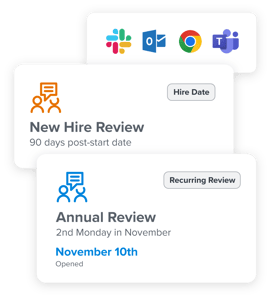
1. Customize reviews to fit your needs. 

Easily measure what you want, when you want with flexible review modules that you can tailor to fit the needs of your culture and the various groups within it. 


2. Help your managers build positive performance habits.

Make it easy for manager to coach to performance by integrating your process into their existing workflows. Set up formal conversation cycles to create the right frequency and consistency of touch points.

1_performance-reviews_product-imagery


2_performance-reviews_product-imagery


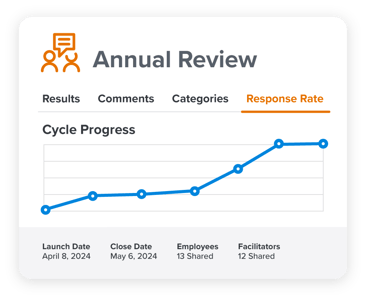
3. Easily track review response rates. 

See the status of each review cycle to help your teams stay accountable and monitor performance ratings in real-time. 


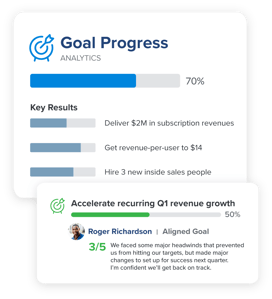
4. Embed performance goals directly into reviews.

Our platform makes it easy to include goals as part of performance evaluations—and helps coach managers have objective, effective, and growth-oriented conversations.

3_performance-reviews_product-imagery


360Feedback_EmployeeMagnetism_7.1


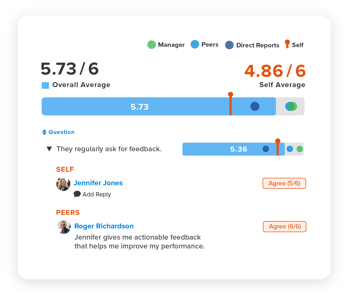
5. Orient reviews around multi-rater feedback.

Incorporate feedback into your review cycles to gain valuable insight from the individuals your people work with most, and better orient  performance conversations around development.


6. Visualize and align on performance data across teams.

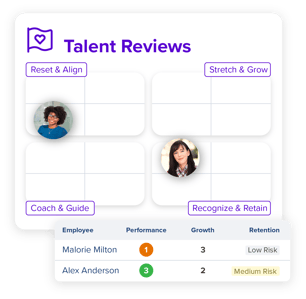
Get a comprehensive view of your organization’s talent with our talent dashboard. Zoom out and see the big picture, to help you make more informed decisions on how to keep and develop your best talent.

TalentReviews_EmployeeImpact_6.3


Conclusion

Mastering the art of performance reviews is an ongoing journey. It’s essential for the growth of employees and your organization. By harnessing the power of constructive dialogue, recognizing great work, and partnering with employees on development, we create an environment where motivation thrives and potential is realized.


Quantum Workplace’s performance review software helps your managers and teams prepare for, facilitate, and follow up for more effective, efficient, and engaging performance reviews. 

QW-logo-color

Secure Data Sharing for Gen AI Insights

0

As Technology Expands, Data Sourcing Quality Becomes Essential for Generative AI

As technology expands, the quality of generative AI (gen AI) depends on accurate data sourcing. A reliable and trustworthy data source is essential for sharing information across departments. Through the implementation of generative AI, we are able to expand our knowledge to many individuals easily, quickly and efficiently, becoming a resource.

The Power of Partnerships

In today’s rapidly evolving digital world, immediate responses are crucial for delivering outstanding user experiences. Our partnership with IBM facilitates the delivery of scalable solutions, rapidly implementable by organizations. This addresses data management, conversational interface, and natural language processing needs with efficiency. Our solution is a combination of IBM Db2, IBM Watsonx Assistant, and NeuralSeek.

A Coordinated Partnership: How These Tools Work Together

By using IBM Db2, IBM Watsonx Assistant, and NeuralSeek, we offer a comprehensive solution that streamlines data management, enhances accessibility, and helps to ensure security and integrity across your enterprise.

IBM Db2: A Reliable and High-Performance Database

IBM Db2 is a reliable, high-performance database built for enterprise-level applications, designed to efficiently store, analyze, and retrieve data. Boasting decades of expertise in reliability, scalability, security, and performance, IBM Db2 serves as the backbone, providing a robust database for storing and managing data.

IBM Watsonx Assistant: Enhancing Accessibility and Understanding

IBM Watsonx Assistant uses AI to understand and respond to natural language queries, including those related to databases. Watsonx Assistant retrieves information from Db2 databases to answer user queries and performs actions based on user requests. Also, Db2 seamlessly integrates with Watsonx Assistant’s natural language processing capabilities to analyze unstructured data and derive insights.

NeuralSeek: Enhancing Language Understanding and Search Functions

NeuralSeek is an advanced tool enhancing the natural language abilities of current systems, facilitating intuitive navigation of extensive databases. NeuralSeek enhances Db2’s search and retrieval functions, aiding Watsonx Assistant in accessing relevant information. Also, NeuralSeek’s language understanding capabilities improve Watsonx Assistant’s accuracy in interpreting user inputs, resulting in more precise responses.

Conclusion

Together, these technologies empower organizations to develop powerful and intelligent conversational interfaces that effectively understand, reason, and respond to user inquiries. Our integrated solution combines rapid data access with advanced natural language processing capabilities, allowing you to effortlessly engage with users.

Supporting User Adoption and Proficiency

We help clients experience the transformative benefits of AI-driven insights and efficiency by seamlessly integrating our solution into existing workflows. By enhancing user adoption and proficiency, clients can unlock the full potential of data while helping to ensure utmost privacy and security.

Our Product in Action

A prominent family-owned retail enterprise in the United States harnessed the power of IBM and NeuralSeek solutions to redefine its online shopping with IBM Watsonx Assistant with NeuralSeek analytics. This integration bridged virtual and in-store experiences, enhancing customer engagement.

Frequently Asked Questions

Q: What is the key to the success of our integrated solution?
A: The combination of IBM Db2, IBM Watsonx Assistant, and NeuralSeek provides a comprehensive solution that streamlines data management, enhances accessibility, and ensures security and integrity across the enterprise.

Q: How does NeuralSeek enhance the natural language abilities of current systems?
A: NeuralSeek enhances the natural language abilities of current systems by facilitating intuitive navigation of extensive databases, improving search and retrieval functions, and improving Watsonx Assistant’s accuracy in interpreting user inputs.

Q: How do you ensure user adoption and proficiency?
A: We help clients experience the transformative benefits of AI-driven insights and efficiency by seamlessly integrating our solution into existing workflows and providing comprehensive training programs tailored to the unique roles, responsibilities, and proficiency levels of team members.

From BlueSky to Threads

0

Starting Afresh

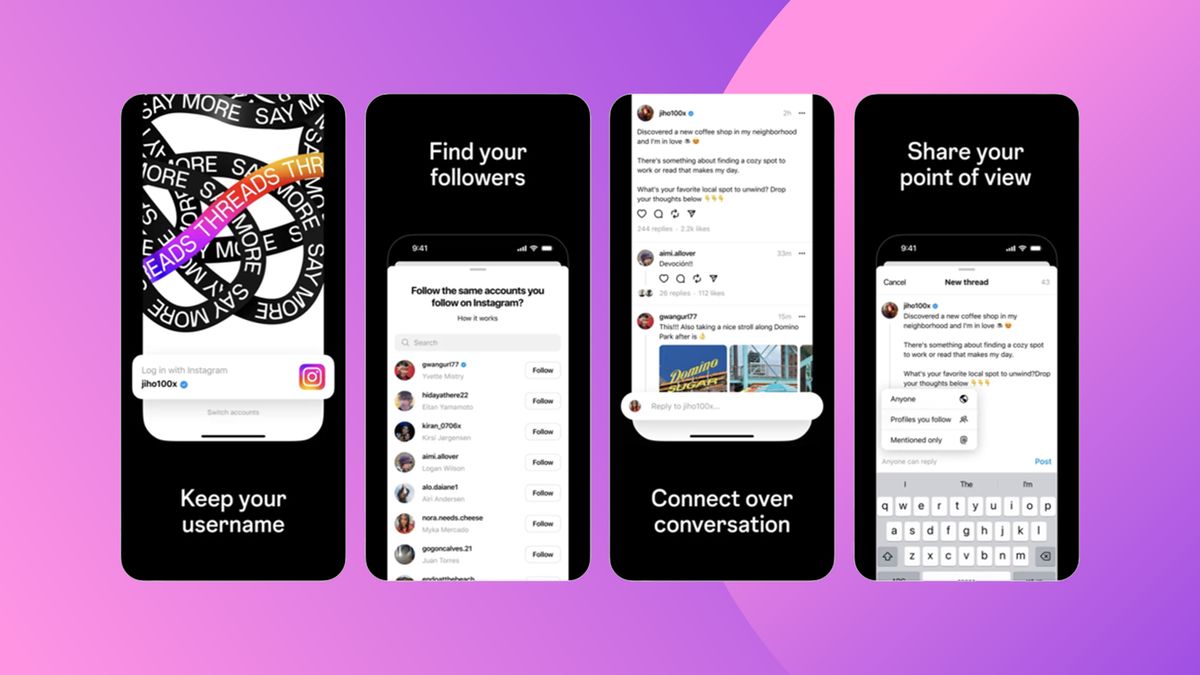
In the past year, we’ve seen many creatives moving from long-established social media platforms like Facebook, Instagram, and Twitter to emerging networks such as BlueSky and Threads. With TikTok’s US fate also in the balance, there’s never been a better time to look at all of those Twitter alternatives.

Understanding Threads

Will this resolve itself over time, as more people shift over? Maybe. But how can you make the best of BlueSky and Threads right now? Caitlin Jardine, social media manager at Ellis Digital, believes it starts with an understanding that platforms don’t all work in the same way. "While Threads and BlueSky may share some similarities with X, they’re entirely new platforms with their own unique features and style," she points out.

Understanding BlueSky

BlueSky, meanwhile, is different again. "This platform champions smaller, community interactions, which is why it may feel at times that engagement isn’t great," says Caitlin. "But it’s important to remember that this is because it is more intimate. BlueSky is less about passively consuming content and more about building relationships with other platform users through interaction," she clarifies.

Content and Connections

In short, making the best use of new social media platforms is about approaching content thoughtfully, rather than recycling what may work on Facebook, Instagram, or X on other platforms. "Each network has its unique purposes and features that sets them apart from the others," explains Caitlin. "To take one example, thoughtful and relatable content tends to perform better on Threads and BlueSky, over generic updates that seem less authentic and meaningful. The difference between this, and what we’re used to seeing on X, is the ability to build connections on the platforms rather than just forming an opinion, carried out through commenting, replying, and showing genuine interest in others’ posts."

Time to Act

So what are you waiting for? "Just post, like, reply!" urges Becky. "If we aren’t using a platform, there’s no reason for others to join or be active, so we can’t create a community. Right now, it can feel like you’re speaking to no one, but I’m confident BlueSky is a good alternative for those leaving Twitter."

Conclusion

In conclusion, the key to making the best of new social media platforms is to approach content thoughtfully, be authentic, and engage with others. Each platform has its unique features and style, and it’s essential to understand how they work and how to make the most of them. Don’t get too married to any one platform, and be willing to try out new ones. Remember, social media is just one part of a multi-channelled marketing strategy, and it’s essential to diversify your efforts across many channels.

FAQs

Q: What are the best ways to use BlueSky and Threads?
A: Post thoughtfully, be authentic, and engage with others.

Q: How do I make the most of new social media platforms?
A: Understand how each platform works, and approach content thoughtfully.

Q: Why should I move to BlueSky and Threads?
A: Because they offer a fresh start, and the opportunity to build meaningful relationships with others.

Q: What’s the best way to build a community on new social media platforms?
A: By posting, liking, and replying to others’ content, and showing genuine interest in their posts.

I Finally Switched from Adobe to DaVinci Resolve

0

Here is the rewritten article:

My Adobe Days

In the 2000s, the high-end of film and ad work was largely dominated by Avid. Getting time on an Avid was very expensive, hundreds per hour if memory serves. And then even more if you needed an editor. The only reason I happened to get time on it was because I knew the fellow who opened the very first Avid room in NYC, in partnership with the huge Post Perfect production house in midtown. I did his early advertising work, and he cut me some time in one of his two or three Avid rooms.

I no longer recall all of the issues, but let me say, working with an Avid back then was not easy. Getting static images from Photoshop into the Avid was a royal pain. So when Adobe released their re-written "PRO" version of Premiere, a version that we were told would actually work compared to the original incarnation, well, we were all happy to give it a whirl.

For Adobe, "The Social Network" was their intro to Hollywood. Plus, Premiere Pro could integrate with the other gem in Adobe’s offerings: After Effects. And with their "Adobe Dynamic Link" functionality that came out some time later, we could shuttle clips back and forth from editor, to compositor, and back again. And hey, on good days, it actually worked. And on great days, it didn’t crash our systems!

Why We Change Tools

When tools are a major part of your business, you don’t change them out without good reason. This is true with construction tools, farming tools, and our own digital tools. You have to have a sound basis for taking that risk. Usually, you have to have more than one lone reason.

For me, the initial reason I even began to consider moving off of Adobe editing tools was my long-term goal of moving off Windows and on to Linux. And Adobe simply isn’t an option on that platform. But as I type this, I realize that is a bit disingenuous, right? I mean, if Adobe and its tools are that important to me, I would just stay on Windows, or move back to a Mac, right? So there has to be more to it, and there is.

What I Noticed About Black Magic

I do not jump fast. My move to a new platform started by putting Ubuntu Studio on my laptop almost two years ago. Then building a new Linux workstation this past year. Along that time I was also learning more about DaVinci, yes. But also about the company that makes it, Black Magic.

I learned that the difference between their free version of DVR and their paid one was, amazingly small. They were not, excuse the expression, yanking anyone’s chain as is so often the case. The free version was totally and fully usable.

And that should someone really need the few extra functions of the paid "Studio" version, purchasing that was only $300. A ONE-TIME cost. Those extra functions were so few, that I have been playing with it on smaller projects for about a year, and only just decided to install the Studio version because I needed to import using its 265 codec, only available in the studio version. Otherwise, I would have stayed on the free offering.

Just $300 for an application like this? There must be a catch, I assumed. But talking to friends, I was assured, there was no catch. And in fact one told me he jumped on almost a decade ago and they have never once even asked for any upgrade fee for any of the major releases across all those years.

Jumping In

As mentioned, I had only done very small, short form work in DVR until now. A project that I just recently did in it involved more. Still under 10 minutes, but it involved far more color correction, audio sweetening, and video/text treatments. Nothing I had done in DVR yet.

In the Adobe suite all of this would have meant jumping from Premiere, to some After Effects work, and over to Audition for the audio work. All of that jumping around from one application to another, and back again sounds really daunting. And I can tell you that after years of that being my normal workflow for video work, I still held my breath before each leap. Knowing that there was always the possibility it may not work, it may crash one or more apps (save first!), or the data may corrupt along the way.

DaVinci Resolve has all of those capabilities, editing, compositing, audio and more. And all within the same application. Each specialty is represented across its seven "tabs". They include:

  • Media: A bit like Adobe’s Bridge, where you can select, manage and import your media.
  • Cut: This is a quick cuts timeline designed for on location and dailies. Much like another app Adobe killed off some years ago, Prelude.
  • Edit: The main editor, which is very similar to Premiere, and was easy to jump on to.
  • Fusion: A video compositor, akin to After Effects. But node based like the high-end Nuke.
  • Color: The industry’s top color correction and sweetening software, with endless controls. Much like SpeedGrade, the package Adobe killed.
  • Fairlight: A very capable audio editing application.
  • Deliver: Much like Adobe’s Media Encoder app, which controls the final rendering for delivery.

Working on my recent project in DVR, as I kept adding more 6k clips to the project, and started moving back and forth between Edit and Color and Fairlight, I kept waiting for a hiccup. But not one ever came.

I should mention that my aging Windows box is a whopping decade old! Yes, it’s been upgraded with SSDs and large hard drives, and has 32 GB of ram, and is on its third GPU. But it is still a decade old.

Not only was there no hiccup, there wasn’t even a pause. DaVinci took everything in stride. And everything worked as I would have hoped it to work. Change the color or sound in their respective editing tabs, and it all looked and sounded just as it should when I went back to the Edit tab.

If Only It Were Open Source!

As mentioned, I’ve been wanting to go all open source. I no longer want to play all the silly games big tech continues to foist upon us day after year. But this Black Magic company is making me think I may make an exception.

After all, I can’t see that they play those games. They seem to have been playing it straight with their user base for a long time now. Free software that actually works, and isn’t bait and switch. A crazy low ONE-TIME purchase price for the Studio version. And no upgrade costs as they roll out new versions.

I’m going to make just one exception to my "All Open Source" decision. And of course, they make it for Mac, Windows and yes, even Linux. So I may break my plans of going fully open source and include DaVinci Resolve. Because if my experience has been this good on my aging Windows box, I can’t wait to see it fly on my much faster Linux machine. I’ll keep you all posted.

Conclusion

In conclusion, I’ve had a wonderful experience with DaVinci Resolve. It’s an incredibly capable toolset, with a surprising lack of bugs or hiccups. And at a price point that is just crazy low, especially considering it’s not subscription-based. I’m seriously considering making an exception to my "All Open Source" decision and sticking with Black Magic’s software.

Frequently Asked Questions

Q: Is DaVinci Resolve worth the switch from Adobe Premiere Pro?
A: Yes, especially if you’re looking for a more affordable option with fewer upgrade costs.

Q: Is DaVinci Resolve compatible with Linux?
A: Yes, it’s available on Mac, Windows, and Linux.

Q: Is DaVinci Resolve as powerful as Adobe Premiere Pro?
A: Yes, it’s a very capable toolset with a surprising lack of bugs or hiccups.

Q: Is DaVinci Resolve open source?
A: No, but it’s not subscription-based and has a very reasonable one-time purchase price.

Boost Your Web Vitals with Next.js

Are Your Web Vitals Making You Sweat?

We’ve all been there — Largest Contentful Paint (LCP), Cumulative Layout Shift (CLS), First Contentful Paint (FCP)… It’s like a crash course in developer anxiety.

Why Should You Care?

Web Vitals aren’t just for Google; they’re key to creating fast, user-friendly experiences your audience will love.

Dive into Optimization Strategies

Lazy Loading and Image Optimization

Edge Caching and Server-Side Rendering

Other Tips and Tricks

Ready to Make Your Site Faster?

Click here to read the full article.

Conclusion

It’s time to turn those red flags into gold stars! By following the comprehensive guide to optimizing Web Vitals with Next.js, you’ll be well on your way to creating a fast, user-friendly experience that will leave your audience raving.

Frequently Asked Questions

Q: What is the purpose of Web Vitals?
A: Web Vitals are a set of metrics that measure the performance and user experience of a website.

Q: Why should I care about Web Vitals?
A: Web Vitals are important for creating fast and user-friendly experiences that will improve the overall satisfaction and engagement of your audience.

Q: What are some common issues with Web Vitals?
A: Common issues with Web Vitals include slow load times, trampoline-like layouts, and poor user experience.

Q: How can I optimize my website for Web Vitals?
A: You can optimize your website for Web Vitals by using techniques such as lazy loading, image optimization, edge caching, and server-side rendering.