Home Blog Page 450

Slick Design of Baby Name Trend Infographics

0

Data Visualization Meets Typography: A New Era of Infographic Creativity

The Power of Data Visualization

Karim Douieb, a data visualization designer and data scientist, has created a website that reveals the popularity of your name across the years. This innovative site combines sleek typography with data analysis, creating a dynamic visualization that uses the letters of your name to form a shapeshifting graph.

The Website’s Design and Functionality

The website’s design is a perfect blend of classic design and typographical innovation, making it a standout in the world of infographics. The site uses the Flexible Variable Font by Stéphane Mattern, which allows for adjustable height, weight, and size. This feature enables the website to create a unique and engaging visual representation of your name’s popularity over time.

How it Works

The website uses data from the 1930s to the present day to create an animated typography that warps to map the popularity of your name. Each letter’s height reflects the name’s yearly popularity, turning trends into a micro-visual story. As Karim explains, "This was an experiment combining typography and data using variable fonts. Each letter’s height reflects the name’s yearly popularity, turning trends into a micro-visual story. It’s amazing how fonts can bring data to life!"

A New Era of Infographic Creativity

The website’s simplicity and interactivity make it a perfect intersection between data and design, bringing us into a new era of infographic creativity. With its sleek design and engaging functionality, this website is a must-visit for anyone interested in data visualization, typography, or innovative design.

Conclusion

The website created by Karim Douieb is a testament to the power of data visualization and its ability to bring complex information to life. Its unique blend of typography and data analysis has raised the bar for infographics, pushing the boundaries of what is possible in the field. Whether you’re a design enthusiast, a data scientist, or simply someone interested in exploring your own name’s popularity, this website is a must-visit destination.

FAQs

Q: What is the website’s purpose?
A: The website reveals the popularity of your name across the years, using data from the 1930s to the present day.

Q: What font is used on the website?
A: The website uses the Flexible Variable Font by Stéphane Mattern, which allows for adjustable height, weight, and size.

Q: How does the website work?
A: The website uses animated typography to map the popularity of your name, with each letter’s height reflecting the name’s yearly popularity.

Q: What is the significance of this website?
A: The website represents a new era of infographic creativity, combining data visualization and typography to create engaging and interactive visualizations.

ComfyUI 2025: A Beginner’s Guide

0

Installing and Using ComfyUI

Despite my initial reservations, I switched to ComfyUI late 2023 and have never looked back. Thanks to the vast and rapidly growing adoption of this application, there have been vast improvements in functionality and features in 2024.

This post is here to help you get over any anxiety or fear of learning ComfyUI – because it’s incredibly powerful and has TONS of add-ons available (we’ll discuss these later).

Installing ComfyUI

Local Install

  • Method 1 – You can install ComfyUI as a prepackaged build for Windows via this Direct download link. Simply extract the zip file (using 7Zip) and run the run_nvidia_gpu.bat file to launch ComfyUI.
  • Method 2 – You can install Pinokio, a simple GUI application that has a one-click installation for many AI apps, including ComfyUI. Pinokio is available for Windows, Mac, and Linux.
  • Method 3 – Manual install from ComfyUI’s GitHub page.

RunPod Install – Cloud GPU

Alternative to running locally, this requires some initial funds to be spent to explore the ComfyUI space. The beauty is that you can start with as low as $0.40 per hour. Cloud GPU, such as those provided by RunPod, means that you are running an instance of ComfyUI in the cloud, and as long as your Pod is available, it will run, and at the end, you can delete the Pod; note that if you don’t delete, there may be some ongoing storage charges by RunPod, as you are still using disk space.

My Recommendation

Local is better, as there is no time limit, and ease of use is greater. I started with Method 1 and then moved to Method 2, so I would recommend this if your GPU is able to support it.

Running ComfyUI

Running ComfyUI is quite easy; simply launch via Command Prompt/Terminal: `python main.py`, which will start your ComfyUI interface, and you should get a link at the end of the script. Do not close the Command Prompt/Terminal window where you launch the script, or you will accidentally end the application.

Upon successful launch, you will receive a URL like http://127.0.0.1:7860.

Click on the URL to open the site in your favorite/default browser.

Understanding the ComfyUI Interface

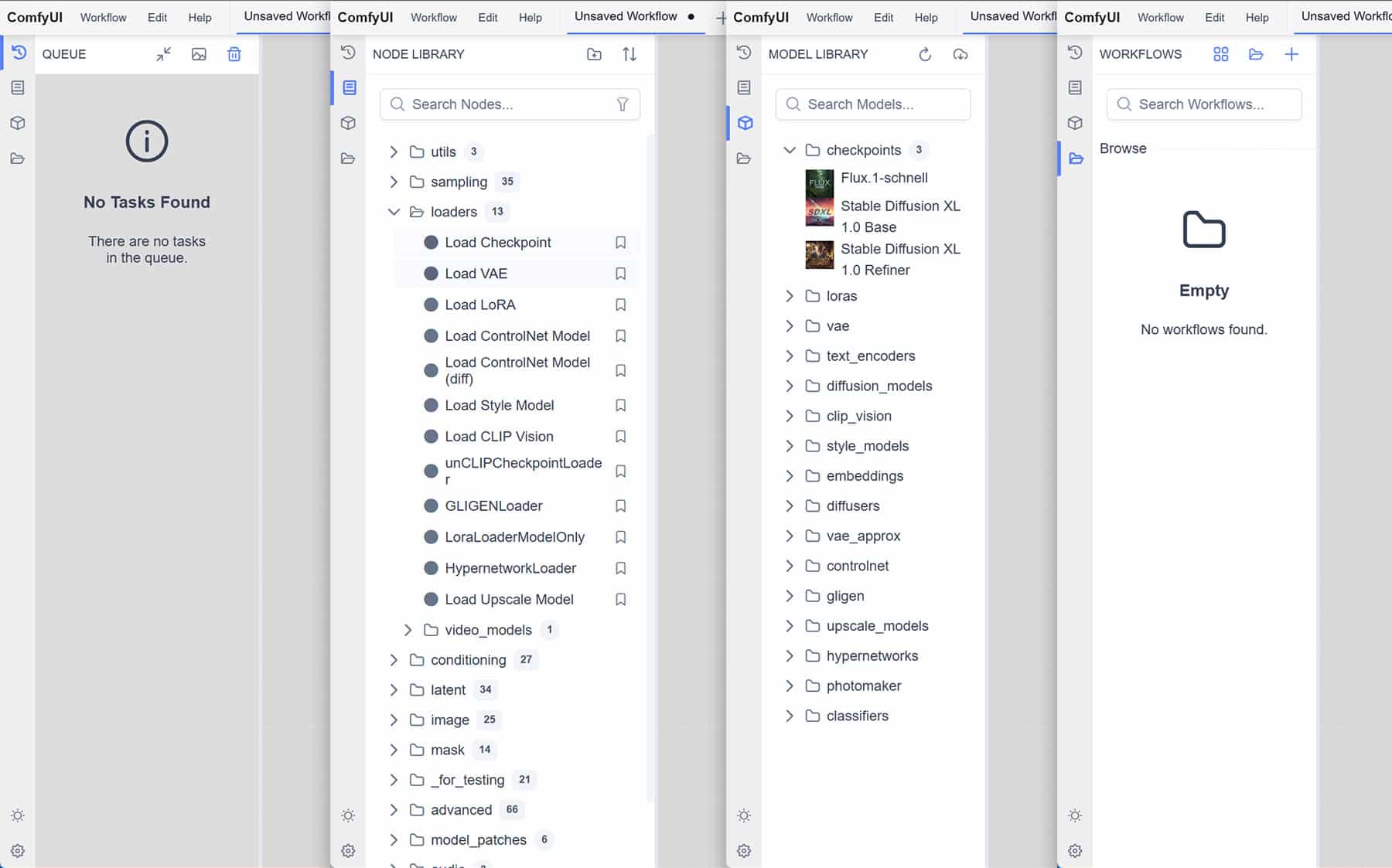
As I said in the intro, thanks to many developments in 2024, the interface is even more feature-rich and easy to follow. Study the below UX design as I cover the different buttons and features of a default interface.

Top Navigation bar

This top navigation bar comprises of ComfyUI menu, where you can save/open workflows, edit and clear workspace (that’s the gray area in the middle where the Workflow is), there is also a help menu when you need help. Next to that, you have tabs, where each workflow opened can be switched between. Towards the right of that, you have Toggle Bottom Panel, which shows you logs of ComfyUI as it runs your workflow, this is good to see what’s happening under the hood and also to see what’s gone wrong in case something does.

Finally, the burger icon ☰ as it’s often referred to as is a toggle switch which will toggle on/off all menus.

Left Navigation bar

This bar lets you browse into the Queue, Node Library, Model Library, Workflows.

  • Queue – this shows the current task and past tasks.
  • Node Library – this lets you browse the nodes that are used to build workflows. You can browse by category folders or search via the search bar.
  • Model Library – this lets you browse what model Checkpoints you have as well as download new ones, including other things like LoRAs, Controlnet, Clip Vission etc
  • Workflows – lets you browse your workflows folder so you can access your saved workflows as well as access some sample workflows included.

Towards the bottom end of this left navigation bar, you have the light/dark working mode of your environment. The gear icon is your typical Settings menu where you can fine-tune the settings of ComfyUI. Not something you need to delve into at the starting but certainly good to know where to find it.

Example Workflows

ComfyUI comes with an enormous amount of Workflow examples; a workflow is a set of ComfyUI nodes connected to accomplish a task, it’s like a recipe you create and can share with others.

You can search our site for various ComfyUI Workflows and also check out the many examples shared by the author of ComfyUI.

The workflows are typically exported in JSON format (text-based file) or PNG if an image is generated from the workflow. The PNG will have typically the workflow embedded inside it, again if you open the PNG in a text editor, you will see JSON format code at the start of the file.

This also makes it easy to export and share your workflows with others in the community.

Red Box Error in Workflow

Often when you download an example workflow from our site or other standard examples, you may find that the workflows loads but then you get a popup error stating “missing” nodes and after you acknowledge the error, you get something like this.

<img src="https://weirdwonderfulai.art/wp-content/uploads/2025/01/ComfyUI-2025-error.jpg" alt="" class="wp-image-12156" srcset="https://weirdwonderfulai.art/wp-content/uploads/2025/01/ComfyUI-2025-error.jpg 1800w, https://weirdwonderfulai.art/wp-content/uploads/2025/01/ComfyUI-2025-error-1280×821.jpg 1280w, https://weirdwonderfulai.art/wp-content/uploads/2025/01/ComfyUI-2025-error-980×628.jpg 980w, https://weirdwonderfulai.art/wp-content/uploads/2025/01/ComfyUI-2025-error-480×308.jpg 480w"

Increase Swap Memory in Ubuntu

Step-by-Step Guide to Increasing Swap Memory

Step 1: Check Current Swap Space

Before making any changes, check your current swap space using:

sudo swapon --show

Step 2: Check Available Disk Space

Ensure you have enough free disk space by running:

df -h

Step 3: Create a Swap File

Create a swap file with:

sudo fallocate -l 2G /swapfile

Step 4: Enable the Swap File

Set the correct permissions:

sudo chmod 600 /swapfile

Format the swap file:

sudo mkswap /swapfile

Enable the swap file immediately:

sudo swapon /swapfile

Step 5: Make the Swap File Permanent

Backup your fstab file:

sudo cp /etc/fstab /etc/fstab.bak

Add the swap file to fstab:

echo '/swapfile none swap sw 0 0' | sudo tee -a /etc/fstab

Step 6: Adjust Swappiness and Cache Pressure

Swappiness controls how often your system uses swap space. A lower value (e.g., 10) means the system prefers RAM over swap, while a higher value (e.g., 100) increases swap usage.

Adjust how often the system uses swap space:

sudo sysctl vm.swappiness=10

Cache pressure affects how the system manages cached files. A lower value (e.g., 50) reduces the frequency of cache regeneration.

Improve cache performance:

sudo sysctl vm.vfs_cache_pressure=50

To make Swappiness and Pressure permanent, add lines below at the bottom of /etc/sysctl.conf:

sudo nano /etc/sysctl.conf

# Add lines given below at bottom of /etc/sysctl.conf
vm.swappiness=10
vm.vfs_cache_pressure=50

Save and close the file.

Step 7: Removing Old Swap Files

Remove the entry from fstab and delete the file:

sudo swapoff /path/to/old/swapfile

Conclusion

Increasing swap memory can significantly improve your system’s performance, especially when running memory-intensive applications. Following these steps ensures your system has the resources it needs to run smoothly. Remember to monitor your memory usage and adjust settings as required for optimal performance.

FAQs

Q: What is swap memory?
A: Swap memory is a space on your hard drive that acts as an extension of your RAM.

Q: Why is increasing swap memory important?
A: Increasing swap memory can help prevent system crashes and improve performance when running memory-intensive applications.

Q: How do I monitor my memory usage?
A: You can monitor your memory usage by checking the system’s resource usage or using tools like htop or glances.

Q: Can I increase swap memory on a low-end system?
A: Yes, increasing swap memory can help improve performance on low-end systems, but be cautious not to overdo it, as it may impact overall system performance.

Lightweight Laptop is an Affordable Workhorse

0

HP Pavilion 16 Review: Key Specifications

CPU: Intel Core Ultra 7 155U
GPU: Nvidia GeForce MX570 A
RAM: 32GB DDR5
Screen: 16-inch, WUXGA, IPS-grade LCD
Resolution: 1920 x 1200
Refresh rate: 144Hz
Storage: 512GB PCIe Gen 4 NVMe SSD
Ports: 2 x USB-C 3.2 Gen 2, USB-A 3.2 Gen 1, USB-A 3.2 Gen 2, HDMI 2.1, 3.5 mm combo jack
Wireless connectivity: Wi-Fi 6E, Bluetooth 5.3
Dimensions: 14.08 x 10.03 x 0.70 inches
Weight: 1.8kg

Design, Build and Display

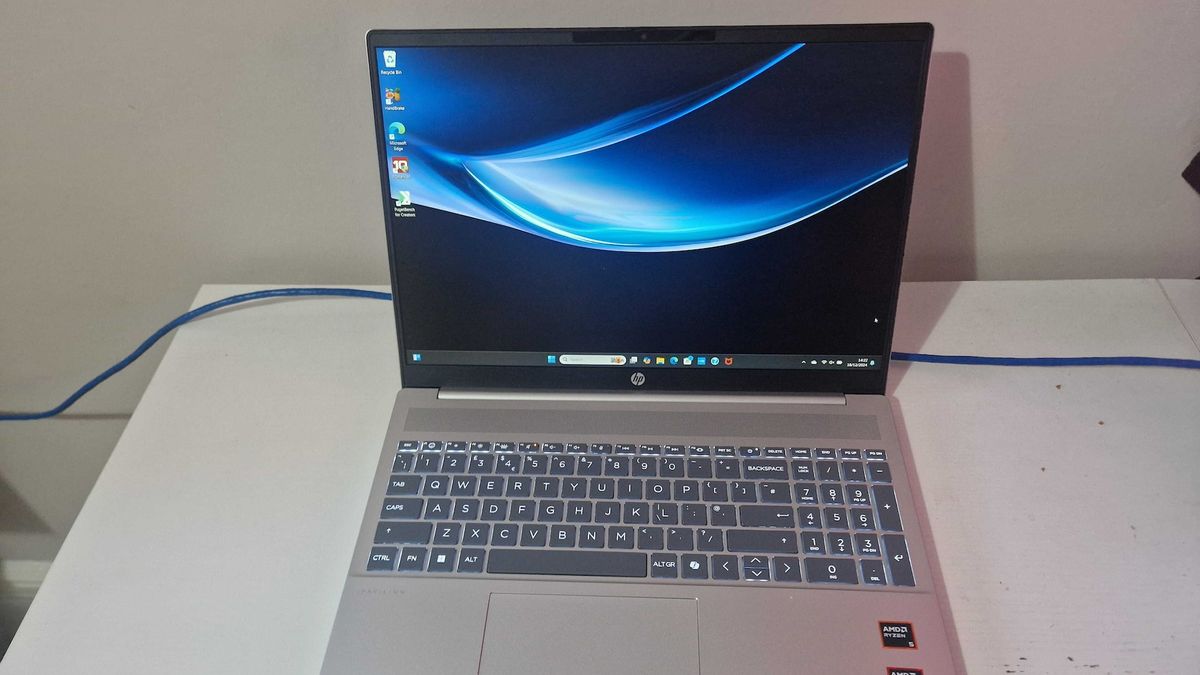
The HP Pavilion 16 nails it when it comes to comfort for use on the go. The keyboard is wide enough for smooth typing, and the slim case – being just 0.7 inches thick – means it’s lightweight enough to slip in a backpack and take out for the day. The trackpad is also easy to reach and wide enough to allow for precise touches, ideal for working on the move. It’s under 2kg, so it won’t weigh you down on busy days.

The screen is also impressive, with a 1920x1200p resolution offering impressive quality that, although it doesn’t stand out from the crowd at this price point, will do you just fine for watching movies, editing photos, spreadsheets, or whatever else you might need to do.

Features

The audio quality is similar to the display: no noticeable drawbacks but similarly nothing that helps it stand back. Still, that’s probably all you’re looking for. The dual speakers are both on the underside of the laptop and offer DTS:X Ultra, plenty enough quality for streaming or even work with audio.

The size of the keyboard has already been touched on, but the room has also allowed HP to include some surprisingly useful features, meaning you can easily attach accessories and access SD cards – something that shouldn’t be a rarity in modern laptops but somehow is. The ports are a little close together for comfort but if that’s the price we pay for the slim frame, we’ll take it.

Benchmark Scoring

Geekbench 6: CPU multi-core CPU single-core GPU OpenCL
8,628 2,420 12,450

Performance

A lot of lightweight or thin models struggle to compete with heavier models when it comes to performance, and with the Pavilion, it doesn’t blow you away. Day-to-day use didn’t reveal any issues, but closer testing on the review model revealed some gaps. In fact, a couple of standard tests, such as Cinebench 2024, weren’t possible due to insufficient system requirements.

When testing the CPU with Geekbench 6, it scored 2,420 single-score and 8,628 multi-core, which is below average when compared to other devices of a similar price point. Graphics-wise, it came in at a decent 12,450 but, once again, it’s nothing to write home about. However, if you don’t need to use plenty of programs all at once, it could still serve you well.

Price

Starting from £699.99, the quality and durability of the HP Pavilion 16 means you get a lot of bang for your buck. The extra features, like the touchscreen, are impressive enough that paying more for those added specs isn’t just tempting but smart.

Should I Buy the HP Pavilion 16?

There’s no need to break the bank to enjoy comfort, quality, and some fun features like AI functionality and touchscreen capabilities. The best products are the ones where you feel like you can really see where your money is going – and even better when you feel like you’re getting more than you pay for. For your next laptop upgrade for an all-round performer, look no further than the Pavilion 16.

FAQs

Q: Is the HP Pavilion 16 a good choice for gaming?
A: The Pavilion 16’s GPU is decent, but it’s not meant for heavy gaming. If you’re a gamer, you may want to look elsewhere.

Q: Can I upgrade the storage on the Pavilion 16?
A: Unfortunately, the storage on the Pavilion 16 is non-upgradable.

Q: How long does the battery life last on the Pavilion 16?
A: The battery life on the Pavilion 16 is around 8-10 hours, depending on usage.

Q: Is the Pavilion 16 a good choice for business use?
A: The Pavilion 16 is a solid choice for business use, thanks to its comfortable design, good display, and decent performance.

Revolutionary Gestures Unlocked

The Apple Magic Mouse: A Standout Option with a Flaw

The Apple Magic Mouse is a standout option for Apple users, thanks to its sleek finish, seamless integration into the company’s ecosystem, and trackpad-like touch gestures. However, since its launch, it has had a big flaw: the placement of its charging port on the bottom of the mouse.

A New, Redesigned Magic Mouse is on the Way

According to Apple insider Mark Gurman, the company is working on a new, redesigned Magic Mouse that tackles major criticisms. The new mouse will feature a full overhaul, including a new placement for the charging port.

However, don’t get your hopes up if you want a new mouse quickly. Gurman shares that the device will likely not be released for another 12 to 18 months. There will be months of work, such as hardware engineering and software development, before a final product is ready for consumers to purchase.

What to Expect from the New Magic Mouse

As first spotted by MacRumors, a new report from Korean leaker yeux1222 on Monday also revealed the next-gen Magic Mouse will combine touch, voice commands, and hand gestures. In response to this leak, Gurman has said the voice commands “make sense in light of AI,” suggesting the next-gen Magic Mouse will boast some AI features, too.

New Products on the Horizon

Apple is also apparently working on several other new products, including an AirTag with an ultra-wide chip that makes it findable at a longer distance range, which could be ready as early as next year; a foldable device similar to an iPad, which likely won’t come to market until 2028; and a hypertension feature for the Apple Watch, which has been in development for several years, according to the Gurman report.

Conclusion

The new, redesigned Magic Mouse promises to address the major criticisms of its predecessor, including the placement of the charging port. While it may be a while before the new mouse is released, Apple fans can look forward to a more innovative and user-friendly experience.

FAQs

Q: When will the new Magic Mouse be released?
A: According to Apple insider Mark Gurman, the device will likely not be released for another 12 to 18 months.

Q: What features will the new Magic Mouse have?
A: The new Magic Mouse will combine touch, voice commands, and hand gestures, and may boast some AI features.

Q: What other new products is Apple working on?
A: Apple is apparently working on several other new products, including an AirTag with an ultra-wide chip, a foldable device similar to an iPad, and a hypertension feature for the Apple Watch.

CES 2025: What to Expect

What is CES?

The Consumer Electronics Show, known as CES for short, is a tradeshow that features the biggest tech players from across the globe who will be showcasing their latest consumer technology with daily product launches, keynotes, activations, and demos. The annual event, which has found a permanent home at the Las Vegas Convention Center and other nearby hotels, has been taking place for decades, becoming a staple in the tech community.

When is CES 2025?

The official days of CES 2025 are Tuesday, January 7, to Friday, January 10. However, since January 5 and January 6 are media days, you can expect a lot of news to break before the conference starts. Once the conference kicks off officially on Tuesday and the show floor opens, you will start to see reports related to each exhibitor’s booths and demos.

Where will CES 2025 take place?

CES has been held in Las Vegas, NV, since 1978. While the main show floor is in the Las Vegas Convention Center, the conference is so massive that it expands to neighboring hotels comprised of two campuses: the Venetian campus and the C Space campus. The Venetian campus includes the Venetian, Palazzo, and Wynn, and the C Space Campus includes the Aria, Vdara, Cosmopolitan, and Park MGM. There are a total of 12 official venues, spanning over 2.5 million net square feet, according to the CES website.

Who can attend CES 2025?

Although it is a tradeshow that includes the term "consumer" in the title, it is not open to the general public. Per the CES website, "CES is a trade-only event for individuals 18 years of age or older and affiliated with the consumer technology industry." The three registration types are industry and media attendees and exhibitor personnel, and you have to meet a long list of registration requirements for each. Even if you meet the qualifications, you still have to pay to attend. There are two ticket tiers: the Exhibits Plus Pass, $350, and the Deluxe Conference Pass, $1,700. Full details on exactly who is eligible to attend and how to prove eligibility can be found on the CES registration page. In 2024, there were 135,000 or more attendees.

What companies will be at CES 2025?

The list of companies exhibiting at CES is extensive; CES 2024 featured more than 4,300 exhibitors, including about 1,400 startups, according to CES data. This year, the CES website advertises that exhibitors will include 309 of the Fortune 500 companies. Attendees include big names such as Qualcomm, Intel, Google, Samsung, and Panasonic. The full list is public, and you can review it here.

How can you tune into CES 2025?

The major companies will be holding live streams, so it is worth checking their YouTube pages and socials for the links. Some companies already including links include Nvidia, Samsung, and Sony. ZDNET will have a team covering the event on the ground, as well as one covering the event remotely to ensure you don’t miss a thing.

Conclusion

With the Consumer Electronics Show (CES) being less than a week away, you’re probably eager to stay up-to-date with the latest news and announcements. ZDNET will be on the ground, bringing you the latest updates, so you don’t miss a thing. Stay tuned for more information on the event and its participants, and get ready to be amazed by the latest innovations in the tech world.

Frequently Asked Questions

Q: What is CES?
A: CES is a tradeshow that features the biggest tech players from across the globe who will be showcasing their latest consumer technology with daily product launches, keynotes, activations, and demos.

Q: When is CES 2025?
A: The official days of CES 2025 are Tuesday, January 7, to Friday, January 10.

Q: Where will CES 2025 take place?
A: CES will take place in Las Vegas, NV, at the Las Vegas Convention Center and other nearby hotels.

Q: Who can attend CES 2025?
A: The event is open to individuals 18 years of age or older and affiliated with the consumer technology industry.

Q: How can I tune into CES 2025?
A: The major companies will be holding live streams, and ZDNET will have a team covering the event on the ground and remotely.

Nuclear Startup Secures AI Power Supply Deal

Unlock the Editor’s Digest for free

Roula Khalaf, Editor of the FT, selects her favourite stories in this weekly newsletter.

Oklo, a nuclear energy start-up, strikes major deal with Switch Inc

Oklo, a nuclear energy start-up chaired by Open AI’s Sam Altman, has struck a major corporate power supply deal with Switch Inc, a large privately held data centre operator.

20-year agreement to build reactors with a total capacity of 12 gigawatts

Under the 20-year agreement, Oklo will build reactors with a total capacity of up to 12 gigawatts, enough to power all 7.6mn households in New York state. The deal is considered one of the largest clean power deals in history, even though it is non-binding and the company’s technology is years from production.

Oklo’s CEO on the agreement: "We are entering a new world due to the size of the energy demand"

Oklo’s co-founder and CEO, Jacob DeWitte, said that if binding terms are reached, the deal could be worth multiple billions of dollars. He emphasized that nuclear energy is the only power source that can sustainably meet the massive energy demands of the AI revolution.

Big Tech’s bet on small reactors

Big Tech is increasingly betting on small reactors, new types of advanced nuclear plants with a capacity of 300 megawatts or less. No western company has yet successfully deployed the technology, but companies like Amazon, Google, and Microsoft are signing power deals with nuclear developers to provide low-carbon electricity to power their data centers.

Risks and challenges

DeWitte downplayed critics’ concerns about the risks inherent in nuclear energy, which is highly regulated and has been subject to delays and cost overruns. However, some analysts are skeptical that the new crop of nuclear start-ups will ever deliver.

Conclusion

The deal between Oklo and Switch Inc highlights the growing demand for high-wattage, low-carbon energy supplies to power the AI revolution. While there are risks and challenges associated with nuclear energy, the technology has the potential to play a significant role in meeting the energy needs of the future.

FAQs

Q: What is Oklo’s market capitalization?

A: Oklo’s market capitalization is $2.2 billion.

Q: Who are Oklo’s early investors?

A: Oklo’s early investors include technology entrepreneurs Sam Altman and Peter Thiel.

Q: Who is a director of Oklo?

A: Chris Wright, Donald Trump’s nominee to become US energy secretary, is a director of Oklo. He would step down from the board if confirmed by the US Senate.

Samsung Galaxy S25 to Get Major AI Upgrade for Free

0

Samsung Galaxy S25: Free Gemini Advanced Subscription Hinted in Latest Google App Teardown

New Design and Upgrades Expected in Upcoming Galaxy S25 Lineup

Samsung is set to unveil its Galaxy S25 lineup in less than a month, and rumors are swirling about what new features and upgrades to expect. Recent code analysis of the latest version of the Google app has revealed a potential surprise perk: a free subscription to Google’s Gemini Advanced, a paid AI service.

Free Gemini Advanced Subscription Hinted

During an APK teardown of the latest Google app, Android Authority discovered several lines of code that suggest the upcoming Galaxy S25 might include a one-year subscription to Gemini Advanced, valued at over $200. The code mentions different tiers for different phone models, including Samsung and Samsung S25. This is likely a promotion tied to the release of the new Galaxy S25 lineup.

What is Gemini Advanced?

Gemini Advanced is a paid upgrade of Google’s own AI service. For $20 per month, users can access a more powerful version of the AI, which can generate images, understand complex questions, provide better responses, and offer custom AI experts. It also provides previews of Google’s experimental models.

Other Details Emerge

The code analysis revealed mentions of "Samsung" and "Samsung S25" throughout the app, further linking this offer to Samsung’s upcoming release. It is unclear whether the different tiers of subscription are tied to different phone models.

Similar Offer for Pixel 9 Owners

Google previously offered a similar promotion to customers who purchased a Pixel 9. It is possible that Samsung is following suit with its new Galaxy S25 lineup.

Conclusion

The revelation of a potential free Gemini Advanced subscription with the Galaxy S25 lineup is an exciting development for Samsung fans. While we will have to wait until the official launch to confirm the details, this hint suggests that the new phone will bring more than just design and camera upgrades. Keep an eye on Samsung’s Galaxy Unpacked event on January 22 to learn more.

Frequently Asked Questions

Q: What is Gemini Advanced?
A: Gemini Advanced is a paid upgrade of Google’s own AI service, offering more advanced features and capabilities.

Q: How much does Gemini Advanced cost?
A: Typically, Gemini Advanced costs $20 per month.

Q: Is the free subscription tied to Google One?
A: No, there is no indication that the free subscription includes Google One, which typically includes additional features like 2TB of cloud storage and a VPN.

Q: When can we expect more information about the Galaxy S25 lineup?
A: Samsung’s Galaxy Unpacked event is scheduled for January 22.

Concorrência e Paralelismo em Java e Golang

0

Runtime vs. Kernel: Understanding the Difference in Go and Java

Golang

One of the main advantages of Go (or Golang), a language created by Google, is its concurrency management, or the ability to run multiple tasks at the same time.

Every modern language has tools for dealing with concurrency. The differentiator of Go is that the runtime abstracts most of the details of threads and parallelism for us, making this processing much simpler. It’s the runtime, not the kernel of the operating system, that defines how goroutines are mapped to system process threads and how they interact with available CPU cores.

Java

Other languages also offer tools for concurrency and parallelism, but the level of abstraction and simplicity varies. In Java, for example, we have the Concurrent API (java.util.concurrent) and tools like Thread, ExecutorService, and ForkJoinPool for managing concurrency and parallelism.

However, the developer must configure the thread pool manually or use specific tools like CompletableFuture to simplify asynchronous operations.

Java also allows parallel execution on multicore machines using thread pools. In contrast, however, Java threads are more heavyweight because they are mapped directly to system threads.

Runtime vs. Kernel

Threads in the system are managed by the kernel. This means that creating, destroying, and switching between threads are tasks that the kernel executes, introducing additional overhead. Each thread consumes a significant amount of memory (typically around 1MB in Java, due to stack allocation). When the system switches between threads, it needs to save and restore processor state (registers, stack, etc.), which is a costly process.

In contrast, Go’s runtime manages this. Go doesn’t create a system thread for each goroutine. Instead, the runtime manages multiple goroutines in a limited number of system threads, allowing you to have thousands or even millions of goroutines without overloading the system.

Conclusion

In conclusion, the difference lies in the level of abstraction and simplicity. Go’s runtime abstracts most of the details of threads and parallelism, making it easier to work with concurrency. Java, on the other hand, requires more manual configuration and specific tools.

FAQs

Q: Can any language be used for concurrency and parallelism?

A: Yes, every modern language has tools for dealing with concurrency and parallelism, but the level of abstraction and simplicity varies.

Q: What is the difference between Go and Java for concurrency and parallelism?

A: Go’s runtime abstracts most of the details of threads and parallelism, making it easier to work with concurrency, while Java requires more manual configuration and specific tools.

Q: Is Java’s concurrency and parallelism more complex than Go’s?

A: Yes, Java’s concurrency and parallelism require more manual configuration and specific tools, while Go’s runtime abstracts most of the details, making it simpler to work with.

Q: Can I use Java for high-performance, distributed applications?

A: Yes, Java can be used for high-performance, distributed applications, but it requires more manual configuration and specific tools.

Q: Can I use Go for high-performance, distributed applications?

A: Yes, Go can be used for high-performance, distributed applications, thanks to its concurrency management and parallelism capabilities.

What’s Next Could Be Better

0

Why the Merger Makes Sense

The reality is simple: Google can’t afford to cede the Arm-based laptop and tablet market to Apple. The iPad has been an undeniable juggernaut, and Apple’s M-series-powered MacBook Air set new expectations for what laptops under $800 can deliver. For years, I’ve watched Apple dominate this space with a mix of innovation and ecosystem synergy.

AI as the X-Factor

As I’ve watched the industry evolve, one thing has become clear: AI is becoming the defining differentiator in personal computing. Google knows this, and integrating Gemini across its product portfolio highlights how seriously it’s taking this shift. From Android to Workspace and beyond, Gemini powers everything from conversational AI to productivity-enhancing features, seamlessly embedded into Google’s ecosystem.

The Arm-Qualcomm Dispute: Ripples in the Ecosystem

While Apple continues its dominance in the Arm space, I’ve closely monitored Qualcomm’s legal battle with Arm Holdings. The stakes in this dispute could reshape the entire Arm ecosystem. Arm’s claim that Qualcomm’s acquisition of Nuvia invalidates its architecture license – and Qualcomm’s insistence otherwise – has created significant uncertainty.

Google’s Custom Silicon: The Long Road Ahead

Google’s efforts to build custom silicon have been fascinating to watch. The upcoming Tensor G5, expected alongside the Pixel 10 in 2025, represents a critical step in its journey. Designed using TSMC’s second-generation 3nm process and InFO-POP packaging, the Tensor G5 is expected to bring improved thermal efficiency, smaller chip size, and better power management – all key elements for next-gen Arm laptops.

A Pivotal Moment for Google

For years, I’ve seen Google’s hardware efforts oscillate between bold ambition and strategic missteps. The merger of ChromeOS and Android feels like a turning point – a chance for Google to address long-standing flaws and redefine its vision for personal computing.

Conclusion

The merger of ChromeOS and Android is a pivotal moment for Google. If executed flawlessly and innovated in ways that differentiate its products from those of its competitors, Google could finally deliver an Arm-powered laptop that stands out in a crowded market. However, success is not guaranteed, and Google must prove itself in the highly competitive Arm laptop market.

FAQs

Q: Why is Google merging ChromeOS and Android?
A: The merger is a strategic move to address long-standing flaws and redefine Google’s vision for personal computing.

Q: What are the benefits of the merger?
A: The merger will allow Google to leverage the strengths of both ChromeOS and Android, creating a more comprehensive and integrated ecosystem.

Q: How will the merger impact the Arm laptop market?
A: The merger could lead to the creation of a new era for Android-powered laptops, but it will depend on Google’s execution and innovation.

Q: What is Gemini, and how will it impact the merger?
A: Gemini is Google’s AI-powered technology that will be integrated across its product portfolio, including ChromeOS and Android. It will enhance productivity and provide a unique user experience.

Q: What are the challenges facing Google in the Arm laptop market?
A: Google faces stiff competition from Apple and Microsoft, and must execute flawlessly and innovate in ways that differentiate its products from those of its competitors.