Home Blog Page 467

Satisfying Visuals

0

A New Way to Present AI Image Generators: Venngen

There are already more AI image generators than the world could possibly ever need, even if AI art does become the norm. But that’s not stopping people from experimenting with new ways to present them.

A Simple and Addictive UI

Super Random Studio has come up with a clever UI design to allow styles to be quickly changed and compared along with environments. The interface, dubbed Venngen, is incredibly simple and easy to use. There’s a box to type in a text prompt describing the image that you want to generate, and two overlapping circles in which you can scroll up and down to change the style modifier (on the left) and the environment modifier on the right.

How it Works

Click the arrow and the AI will generate an image combining the prompt and the two modifiers in the area where the two circles overlap. You can hover the cursor over the centre of the Venn to see the complete image, and you can click download if you like it.

A Unique and Engaging Experience

The UI is actually slightly addictive since it’s so easy to scroll through different combinations to see what comes out, so it could potentially be interesting for anyone wanting ideas for settings.

Limitations and Future of AI Art

Of course, this isn’t how Venn diagrams work. The AI image generation isn’t great either: all of the styles look fairly cartoony and distinctly AI, and it turns out plenty of six-finger hands. The highlight is the UI since it’s so clean and simple.

For now, using AI art for finished assets remains controversial and tends to trigger a public backlash – just see the reaction to the Coca-Cola AI Christmas ad.

Conclusion

Venngen is an innovative way to present AI image generators, offering a simple and engaging experience. While the AI image generation itself may not be perfect, the UI is a great showcase of what’s possible with this technology.

FAQs

Q: What is Venngen?
A: Venngen is a UI design for AI image generators that allows users to quickly change and compare styles and environments.

Q: How does Venngen work?
A: Users type in a text prompt, scroll through style and environment modifiers, and click the arrow to generate an image.

Q: Is the AI image generation perfect?
A: No, the AI image generation is not perfect and may produce cartoony or distinctly AI results.

Q: Is using AI art for finished assets controversial?
A: Yes, using AI art for finished assets remains controversial and can trigger public backlash.

Advancing Quantum Algorithm Design with GPTs

0

AI Techniques Like Large Language Models Are Rapidly Transforming Many Scientific Disciplines

A collaboration between NVIDIA, the University of Toronto, and Saint Jude Children’s Research Hospital is bringing generative pre-trained transformers (GPTs) to the design of new quantum algorithms, including the Generative Quantum Eigensolver (GQE) technique.

The GQE Technique Is the Latest in a Wave of So-Called AI for Quantum Techniques

Developed with the NVIDIA CUDA-Q platform, GQE is the first method enabling you to use your own GPT model for creating complex quantum circuits.

Learning the Grammar of Quantum Circuits

Conventional LLMs can be a useful analogy for understanding GQE. In general, the goal of an LLM is to take a vocabulary of many words; train a transformer model with text samples to understand things like meaning, context, and grammar; and then sample the trained model to produce words, which are then strung together to generate a new document.

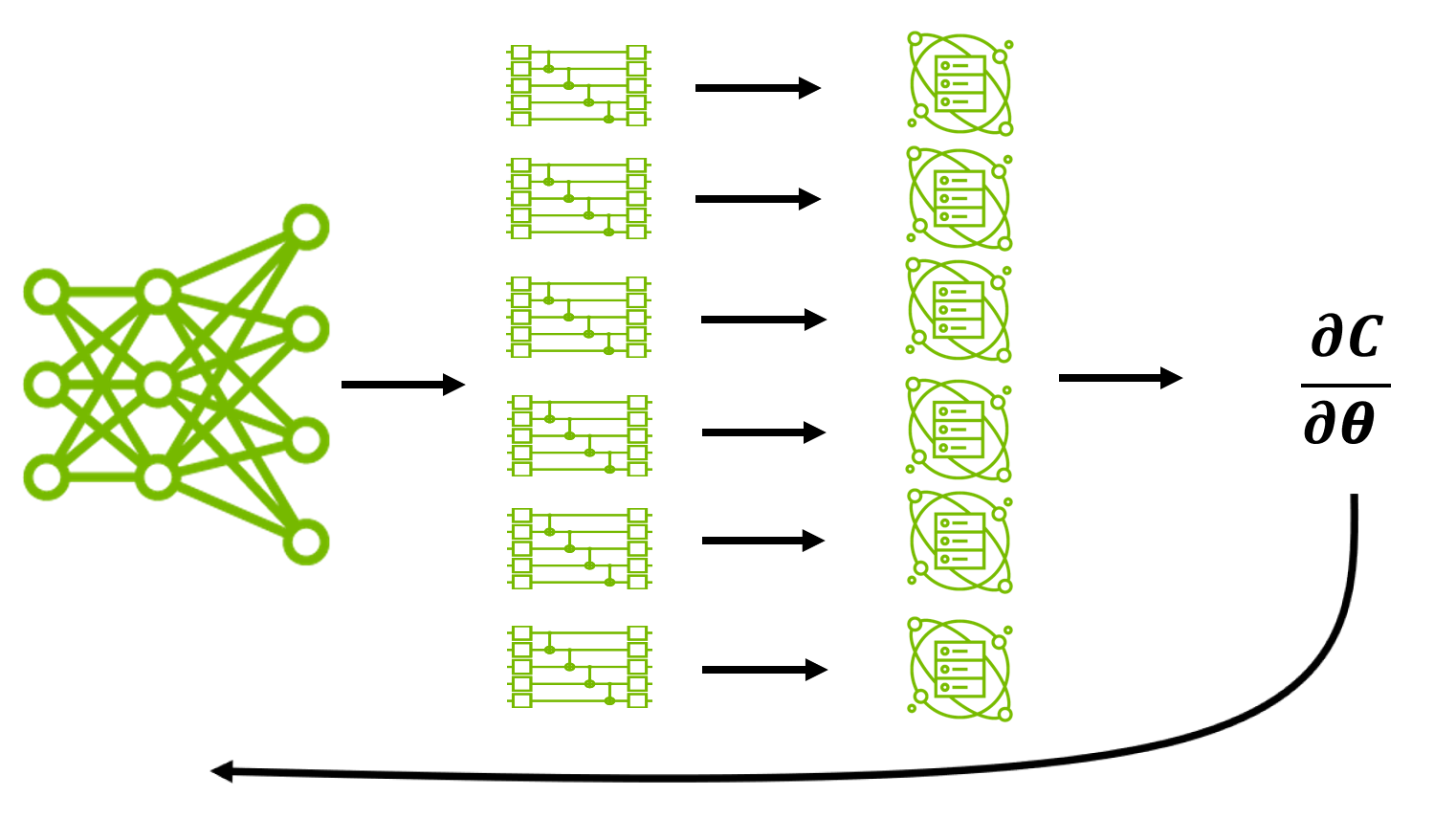
Where LLMs deal with words, GQE deals with quantum circuit operations. GQE takes a pool of unitary operations (vocabulary) and trains a transformer model to generate a sequence of indices corresponding to unitary operations (words) that define a resulting quantum circuit (document). The grammar for generating these indices is a set of rules trained by minimizing a cost function, which is evaluated by computing expectation values using previously generated circuits.

GQE-Enabled Algorithms

In the era of noisy, small-scale quantum (NISQ) computers, quantum algorithms are limited by several hardware constraints. This has motivated the development of hybrid quantum-classical algorithms like the Variational Quantum Eigensolver (VQE), which attempts to circumvent these limitations by offloading onerous tasks to a conventional computer.

The GQE method is the first hybrid quantum-classical algorithm leveraging the power of AI to accelerate NISQ applications. GQE extends NISQ algorithms in several ways:

  • Ease of optimization: GQE builds quantum circuits without quantum variational parameters.
  • Quantum resource efficiency: By replacing quantum gradient evaluation with sampling and backpropagation, GQE is expected to provide greater utility with fewer quantum circuit evaluations.
  • Customizability: The GQE is very flexible and can be modified to incorporate a priori domain knowledge, or applied to target applications outside of chemistry.
  • Pretrainability: The GQE transformer can be pretrained, eliminating the need for additional quantum circuit evaluations.

Results from GPT-QE

For the inaugural application of GQE, the authors built a specific model inspired by GPT-2 (referred to explicitly as GPT-QE) and used it to estimate the ground state energies of a set of small molecules.

The operator pool of vocabulary was built from chemically inspired operations such as excitations and time evolution steps that were derived from a standard ansatz known as ‘unitary coupled-clusters with single and double excitations’ (UCCSD). An ansatz is an approach to parameterizing quantum circuits.

Opportunities to Extend the GQE Framework

This collaboration is a first step towards understanding the broad opportunities for how GPT models can enable quantum supercomputing applications.

Future research will hone exploring different operator pools for GQE and optimal strategies for training. This includes a focus on pretraining, a process where existing datasets can be used to either make the transformer training more efficient or aid in the convergence of the training process.

Conclusion

The GQE is a novel example of how GPT models and AI in general can be used to enable many aspects of quantum computing.

Frequently Asked Questions (FAQs)

Q: What is the GQE technique?
A: The GQE technique is a novel method for designing quantum algorithms using generative pre-trained transformers (GPTs).

Q: What is the CUDA-Q platform?
A: The CUDA-Q platform is a hybrid computing environment that enables accelerated quantum supercomputing.

Q: What are the benefits of using GQE?
A: GQE offers several benefits, including ease of optimization, quantum resource efficiency, customizability, and pretrainability.

Q: What are the potential applications of GQE?
A: GQE has the potential to be applied to a wide range of quantum computing applications, including quantum chemistry and geometric quantum machine learning.

Linux and Open-Source Stories of 2024: AI Arguments and Security Close Calls

0

The Best of Times and the Worst of Times for Linux and Open-Source Software in 2024

1. Businesses Dump Open Source in Search of Profits

Company after company has abandoned their open-source roots to seek money with prosperity licenses and trademarks. For all practical purposes, all software is built using open source. By Synopsys’ count, 96% of all codebases contain open-source software. But all too often in recent years, once a business has established itself with open-source, it dumps its code’s open-source licenses for semi-proprietary licenses such as the Server Side Public License (SSPL) and the Business Source License (BSL) 1.1.

2. Major Linux Security Vulnerabilities Avoided

On a more positive note, a potentially catastrophic security breach was narrowly avoided when Microsoft developer Andres Freund discovered a backdoor in XZ Utils, a widely used Linux data compression utility. The backdoor, which could have compromised millions of computers, was inserted by a malicious actor who had spent years gaining trust within the open-source community. This incident highlighted the sophisticated threats facing open-source projects and the importance of vigilant code review.

3. CentOS Replacements Gain Traction and Linux Continues to Rule

Following Red Hat’s withdrawal of support for CentOS, a host of CentOS replacements has arisen. In 2024, they came of age. AlmaLinux and Rocky Linux emerged as prominent replacements for the numerous businesses that had relied on CentOS. These businesses have filled the void left by CentOS by providing stable, community-driven enterprise Linux distributions.

4. AI and Open Source Go Together like Bread and Butter

Without open source, there is no AI. It’s that simple. In their search for profits, though, AI companies — with the notable exception of IBM with its Granite models — like to give open source a lot more lip service than they do to releasing their code and models under an open-source license. Yes, I’m looking at you, Meta, with your Llama.

5. Real-Time Linux Made it into Mainstream Linux

It took 20 years — no, really! — but Real-Time Linux (PREEMPT_RT) is finally in the mainline kernel.

Conclusion

In conclusion, 2024 was a year of both progress and regression in the world of Linux and open-source software. While some companies abandoned their open-source roots in search of profits, others continued to thrive by providing stable and reliable community-driven enterprise Linux distributions. The importance of open source in AI development was also evident, as many AI companies rely on open-source programs to power their technology. As we look ahead, it is my sincere hope that the trends that emerged in 2024 will ultimately work out for the best.

FAQs

Q: What is the trend of companies abandoning open-source software?
A: Companies are abandoning their open-source roots in search of profits, often switching to semi-proprietary licenses.

Q: What are some examples of companies that have abandoned open-source licenses?
A: Companies such as Cockroach Labs, Confluent, MongoDB, Elastic, MariaDB, Redis Labs, and HashiCorp have all abandoned their open-source licenses.

Q: What is the impact of companies abandoning open-source licenses?
A: This trend has raised concerns about the future of open-source software and its potential to become less accessible and less community-driven.

Q: What is the importance of open source in AI development?
A: Open source is essential for AI development, as many AI companies rely on open-source programs to power their technology.

Q: What is the Open Source Consumption Manifesto?
A: The Open Source Consumption Manifesto is a guide for establishing a secure approach to open-source software development.

Q: What is the Open Enterprise Linux Association (OpenELA)?
A: OpenELA is a project that aims to create a truly open-source enterprise Linux distribution compatible with Red Hat Enterprise Linux (RHEL).

ASUS ProArt Display PA27JCV: Your Next Must-Buy for Graphic Design

0

Design & Build

The ASUS ProArt Display PA27JCV is a 27-inch monitor with a slim chassis and black bezels. The design is not overly flashy, but it’s functional and easy to use. The OSD has buttons on the front of the frame, making it easy to adjust settings like brightness and display mode. The monitor also has a simple kettle lead plug and an on/off switch, which makes it easy to use and reduces clutter on the desk.

Key Specs

  • Screen size: 27in
  • Screen type: IPS Black, LED backlight
  • Resolution: 5120×2880
  • Colour gamut (stated): 100% sRGB
  • Inputs: 1x HDMI 2.1, 1x DisplayPort 1.4, 2x USB-C, 3x USB-A, headphones
  • HDR: HDR10, DisplayHDR 500
  • Webcam: No
  • Features: USB KVM, VRR adaptive sync, 96W power delivery
  • Speakers: 2x 2W
  • Dimensions: 61.22 x 53.81 x 21.50 cm
  • Weight: 5.91kg

Features & Performance

The ProArt comes with various colour presets aimed at different gamuts. In its native mode, you can expect 100% sRGB, 86% Adobe RGB, and 97% P3. You can also fine-tune the response by selecting the appropriate preset or doing a complete custom calibration with the two user modes. Brightness is not bad, at 380 nits, and there’s a power-saving warning that prevents you from going over 50% brightness without confirming that you really want to do it.

Price

At the time of writing, the retail price of the ASUS ProArt Display PA27JCV was a little hard to pin down, but we expect it to sell for somewhere in the $800/£800 range. This is excellent value for such a screen, undercutting the Apple Studio Display and coming in at considerably less than pro-grade monitors from multiple manufacturers, with 4K OLED screens proving much more expensive.

Who is it for?

There’s very little reason to get a 5K screen unless you need the high-res visuals. Gamers will look for a higher refresh rate, and most play games at 1080p or 1440p anyway. While 5K is a good choice for video editing, the refresh rate may become a limit there too. It is, however, an absolutely beautiful screen for photo editing and graphic design, which is where we expect the majority of its users to come from.

Buy it if…

  • You want a high resolution
  • You want good colour response
  • You don’t need a high refresh rate

Don’t buy it if…

  • You want a gaming monitor
  • You want an OLED
  • You don’t need 5K

Also consider

  • Other 5K monitors with higher refresh rates
  • 4K OLED monitors for gaming and video editing
  • 27-inch monitors with higher colour gamuts

Conclusion

The ASUS ProArt Display PA27JCV is an excellent choice for graphic designers and photo editors who need a high-resolution screen with good colour response. Its 5K resolution and IPS Black panel make it ideal for colour-critical work, and its USB KVM and VRR adaptive sync features make it a great choice for those who need to share peripherals and switch between multiple computers. While it may not be the best choice for gamers or those who need an OLED screen, it’s an excellent value for those who need a high-resolution monitor for their work.

FAQs

Q: What is the resolution of the ASUS ProArt Display PA27JCV?
A: The resolution is 5120×2880.

Q: What is the colour gamut of the ASUS ProArt Display PA27JCV?
A: The colour gamut is 100% sRGB, 86% Adobe RGB, and 97% P3.

Q: Does the ASUS ProArt Display PA27JCV have a webcam?
A: No, it does not have a webcam.

Q: What is the refresh rate of the ASUS ProArt Display PA27JCV?
A: The refresh rate is 60Hz.

Q: Is the ASUS ProArt Display PA27JCV suitable for gaming?
A: No, it is not suitable for gaming due to its low refresh rate and lack of features such as G-Sync or FreeSync.

5 Hidden Chrome DevTools Features Every Developer Should Know

0

Do you want to enhance your developer workflow and optimize your debugging process? Discover five underrated Chrome DevTools features that can make your life as a developer so much easier!

Feature 1: Design Mode

Skip the hassle of diving into messy HTML structures for quick edits! Design Mode allows you to edit a webpage visually—directly in your browser. Activate it by running:

document.designMode="on";

in the Console tab. This feature is perfect for making live changes without dealing with deeply nested HTML.

Feature 2: Logpoints

Replace excessive console.log() clutter with Logpoints. This feature logs expressions directly in the console without modifying your codebase. Right-click on a line in the Sources panel, choose "Add Logpoint," type your message, and let Chrome handle the rest. Debugging has never been cleaner!

Feature 3: Interactive Color Picker

Experiment with colors like a pro! In the Styles tab, click on a color property to open the color picker tool. Adjust transparency, switch between color formats, or even pick colors directly from the page. Designing in the browser just got way more intuitive.

Feature 4: Snippets

Save time by creating reusable scripts directly in Chrome DevTools. Head to the Sources panel, open the Snippets tab, and create a new snippet. From logging all page colors to debugging images with incorrect attributes, snippets make repetitive tasks a breeze. Try this example to log all CSS colors on a page: All Colors Snippet on GitHub

Feature 5: Lighthouse Performance Reports

Want to boost your website’s performance? Use the Lighthouse tab to generate a detailed performance report. Customize the audit settings, hit "Generate Report," and get actionable insights for improving your site’s SEO, speed, and user experience.

Wrapping Up

Chrome DevTools is packed with features that can significantly improve your workflow, whether you’re debugging, testing, or optimizing your projects. Explore these hidden gems and take your web development game to the next level!

Conclusion

By incorporating these five underrated Chrome DevTools features into your workflow, you’ll be able to streamline your debugging process, optimize your development time, and deliver high-quality projects. Don’t miss out on these game-changing tools!

Frequently Asked Questions

Q: What is Design Mode in Chrome DevTools?

A: Design Mode is a feature that allows you to edit a webpage visually—directly in your browser. It skips the hassle of diving into messy HTML structures for quick edits.

Q: How do I add Logpoints in Chrome DevTools?

A: Right-click on a line in the Sources panel, choose "Add Logpoint," type your message, and let Chrome handle the rest.

Q: What is the Interactive Color Picker in Chrome DevTools?

A: The Interactive Color Picker is a tool that allows you to experiment with colors like a pro. It adjusts transparency, switches between color formats, or even picks colors directly from the page.

Q: How do I create Snippets in Chrome DevTools?

A: Head to the Sources panel, open the Snippets tab, and create a new snippet. From logging all page colors to debugging images with incorrect attributes, snippets make repetitive tasks a breeze.

Q: What is Lighthouse Performance Reports in Chrome DevTools?

A: Lighthouse Performance Reports is a feature that generates a detailed performance report. It customizes the audit settings, hits "Generate Report," and gets actionable insights for improving your site’s SEO, speed, and user experience.

Microsoft’s Copilot AI on Linux

0

How to use Copilot AI on Linux

Microsoft Copilot is one of the easier AI tools to use on Microsoft Windows. You can access it from the desktop or the web browser. However, if you use Linux, you’ll find that Microsoft has yet to release an official Copilot app that can be installed on your distribution of choice.

Never fear, as there are ways to get Copilot on your desktop. Let me show you two such ways.

Option one: Use the Copilot extension for Chrome

What you’ll need for this option: The only things you’ll need for this method are a Chromium-based web browser and a valid Microsoft account.

The first thing to do is open your Chromium-based web browser and point it to this unofficial Copilot extension in the Chrome Web Store.

Installing the Copilot extension on Opera.

Jack Wallen/ZDNET

On the extension page, click Add to Chrome (or Opera, or whatever Chromium-based browser you use). Allow the extension to install.

The Opera extension pop-up menu.

You don’t have to pin the extension but it certainly makes it easier to access.

Jack Wallen/ZDNET

If your browser allows it, click the Extension icon in the toolbar and, from the drop-down, click the pin icon for the Copilot extension. This will make sure the Copilot extension is easily accessed from the browser toolbar.

When the Copilot window opens, if you haven’t already logged into your Microsoft account, do so now.

The Microsoft Copilot pop-up on Pop!_OS Linux.

Jack Wallen/ZDNET

You should now have a small window open with Copilot. You can then use the AI service as needed. When you’re finished, close the Copilot window.

Option 2: Use Copilot’s web app

The next option creates a Copilot web app that can be opened from your desktop menu. Again, you’ll need a Chromium-based browser and a valid Microsoft account.

Getting ready to install Copilot as an app on Linux.

The Chromium menu.

Jack Wallen/ZDNET

After Copilot loads, click the browser menu and then click “Cast, save, and share” > “Install page as app.” Depending on the browser you use, that menu entry may be named something different. I’m demonstrating on Chromium.

The Chromium web app Install pop-up.

You can name the app anything you want.

Jack Wallen/ZDNET

On the resulting pop-up, give the app a name and click Install.

The Copilot web app installed on Linux.

I actually prefer the extension version but this option can be accessed without the browser open.

Jack Wallen/ZDNET

If you click on your desktop menu, you should now see an entry for Copilot. Click that entry and Copilot will open in a single, minimal window without the usual browser toolbars and other features, so it looks like a native app on your desktop.

Conclusion

And that’s all there is to getting Microsoft Copilot on Linux. You now have two options to choose from, both of which will allow you to access the AI service without having to use a Windows machine.

FAQs

Q: Do I need a Chromium-based browser to use Copilot on Linux?
A: Yes, you will need a Chromium-based browser to use Copilot on Linux.

Q: Can I use Copilot on any Linux distribution?
A: Yes, Copilot can be used on any Linux distribution that supports Chromium-based browsers.

Q: Is Copilot available for free?
A: Yes, Copilot is available for free, but you will need a valid Microsoft account to use it.

Q: Can I use Copilot on multiple devices?
A: Yes, you can use Copilot on multiple devices, as long as you have a valid Microsoft account and a Chromium-based browser installed on each device.

Building a Data-Driven Business: Start with Good Governance

The Exchange of Mass Amounts of Data: Ensuring Well-Governed Data Distribution

The exchange of mass amounts of data is critical for the majority of business processes today, enabling innovative customer experiences at scale. But quickly getting pristinely-clean, high-quality data where it needs to be—whether to an in-house system or to external partners—is a big challenge for data teams. And to do so in real time is even more complex. Moving data securely, reliably, and quickly requires good data governance—but what kind of frameworks are required to ensure data is well-governed through real-time distribution within the organization?

Build a Central, Self-Service Portal

To ensure data remains well-governed throughout its lifecycle, start by building a central hub where data from all your separate repositories can be accessed in one place. From here, you can set up multiple pipelines with rules, restrictions, and policies dictating data accessibility, data velocity (e.g., whether data is streamed or not), schema enforcement, data quality, and more. This self-service portal should allow your organization to virtualize all data sources into a single, unified data layer. This provides a bird’s-eye view of your data landscape, making it easier for users to access and use while implementing governance controls around data access, privacy, security, and more. Having this centralized self-service portal is key to federating data out across the company.

Establish Quality-of-Service Governance

Whether data will be shared in real-time or asynchronously, it’s important to ensure that all data adheres to the governance defined based on its sensitivity and value. Even data that may not seem necessary to access in real-time today could become critical in the future. From the onset, you should apply varying levels of governance and controls around access and security depending on the data. This means applying rigor around governance at the beginning of the data lifecycle, which might include robust data quality monitoring, lineage tracking, and security controls, depending on value and sensitivity of the data. That way, any dataset can easily be surfaced and shared as requirements evolve, without costly refactoring later on.

Publish Once, Publish Right

When data moves in milliseconds, strong governance ensures that it flows to the right places through the right rules at the right time. Make sure to establish rules about when and where data is published, and to which applications it becomes available, but also to establish monitoring and observability. Teams need confidence their data will be available for specific critical use cases exactly when they need it, whether that’s in real time or asynchronous. At Capital One, the use of real-time data helps detect fraud and enable fast, secure transactions—but batch data is still needed to power use cases and drive AI/ML at scale.

Make Data Traceable and Auditable

Transparency is critical when setting up a data governance structure. Teams need to be able to monitor and audit all data flows to ensure compliance with governance frameworks, identify potential issues, ensure data security, and improve overall efficiency.

Invest in the Right Storage

To make wide-scale data sharing possible, companies need to invest heavily in the right storage and infrastructure. Most data lakes and warehouses also allow users to toggle levels of access and monitoring for specific datasets. Make sure to check on the level of controls and monitoring offered by your vendors of choice. Not all data needs to be stored in the highest performance (and highest cost) warehouses all the time — some data can be stored more economically in data lakes if it doesn’t need to be accessed and shared in real-time. Even within the context of real-time data, there are mechanisms to trade off cost and performance. The key is to establish smart governance mechanisms to intelligently move data across storage tiers based on access requirements and use cases through the establishment of quality of service and SLAs that define latency, retention, and cost tolerance.

Conclusion

By taking a strategic approach to data governance upfront, an enterprise can unlock the full potential of their data at scale. Users can find, access, and use data quickly, securely, and reliably to power real-time applications and critical decision-making. While implementing robust data governance is a significant investment—and tight cooperation between data, business, and leadership teams—the competitive advantages of being a truly data-driven organization make the effort worthwhile.

Frequently Asked Questions

Q: What is the main challenge in implementing data governance?
A: The main challenge is ensuring that data is well-governed throughout its lifecycle, while also providing users with fast and secure access to data.

Q: What are the key components of a data governance framework?
A: The key components are a central self-service portal, quality-of-service governance, publish once, publish right, make data traceable and auditable, and invest in the right storage.

Q: How can organizations ensure data quality and security?
A: Organizations can ensure data quality and security by implementing robust data quality monitoring, lineage tracking, and security controls, and by applying varying levels of governance and controls around access and security depending on the data.

Q: What is the importance of transparency in data governance?
A: Transparency is critical in data governance, as it allows teams to monitor and audit all data flows, ensure compliance with governance frameworks, identify potential issues, and improve overall efficiency.


Rewarding Human Feedback: Leaderboard-Topping Reinforcement Learning Model

0

High-Quality Training Data Generation with Llama 3.1 Nemotron 70B Reward Model

Overview

The Llama 3.1 Nemotron 70B Reward model is a cutting-edge technology that helps generate high-quality training data that aligns with human preferences for various industries such as finance, retail, healthcare, scientific research, telecommunications, and sovereign AI. This model is designed to provide accurate and relevant data for machine learning applications, ensuring that AI systems are trained on reliable and accurate information.

Key Features

The Llama 3.1 Nemotron 70B Reward model is equipped with several key features that make it an ideal solution for generating high-quality training data. Some of its key features include:

  • Human-in-the-Loop (HITL) Labeling: This feature allows for human oversight and feedback, ensuring that the generated data is accurate and relevant.
  • Active Learning: This feature enables the model to select the most informative and uncertain samples, reducing the need for human labeling and increasing efficiency.
  • Reward Function: This feature allows for the optimization of the data generation process, ensuring that the generated data meets the desired quality and relevance standards.

Industries Served

The Llama 3.1 Nemotron 70B Reward model is designed to serve various industries, including:

  • Finance: Generating high-quality training data for trading algorithms, financial forecasting, and risk management.
  • Retail: Creating personalized product recommendations, customer segmentation, and inventory optimization.
  • Healthcare: Developing medical diagnosis, treatment, and patient outcomes prediction models.
  • Scientific Research: Generating high-quality training data for scientific research, such as medical imaging, natural language processing, and computer vision.
  • Telecommunications: Developing predictive maintenance, network optimization, and customer service systems.
  • Sovereign AI: Generating high-quality training data for AI applications, such as national security, defense, and government services.

Benefits

The Llama 3.1 Nemotron 70B Reward model offers several benefits, including:

  • Improved Data Quality: High-quality training data ensures that AI systems are trained on accurate and relevant information, reducing errors and improving performance.
  • Increased Efficiency: Active learning and HITL labeling reduce the need for human labeling, increasing efficiency and reducing costs.
  • Scalability: The model can handle large volumes of data, making it ideal for big data applications.

Conclusion

The Llama 3.1 Nemotron 70B Reward model is a powerful tool for generating high-quality training data that aligns with human preferences for various industries. Its key features, such as HITL labeling, active learning, and reward function, make it an ideal solution for industries that require accurate and relevant data for AI applications.

FAQs

Q: What is the Llama 3.1 Nemotron 70B Reward model?
A: The Llama 3.1 Nemotron 70B Reward model is a technology that generates high-quality training data that aligns with human preferences for various industries.

Q: What are the key features of the Llama 3.1 Nemotron 70B Reward model?
A: The key features include HITL labeling, active learning, and reward function.

Q: Which industries is the Llama 3.1 Nemotron 70B Reward model designed to serve?
A: The model is designed to serve finance, retail, healthcare, scientific research, telecommunications, and sovereign AI industries.

Q: What are the benefits of using the Llama 3.1 Nemotron 70B Reward model?
A: The benefits include improved data quality, increased efficiency, and scalability.

Revolutionizing Web Browsing with AI

0

Accessing Deep Research in the Gemini App

The Web: A Sea of Information, but Where to Start?

The web is filled with resources, making it possible to find all the answers you need in one place. However, this abundance of information can also make finding exactly what you need a long and overwhelming process. Google’s new Deep Research offering aims to help you manage that process.

Introducing Deep Research

Recently, Google announced several AI advancements and releases. One of the biggest standouts for everyday users is Deep Research, an agentic feature for Gemini Advanced that can conduct thorough research on your behalf.

How Deep Research Works

With Deep Research, you can pose a question about the topic you want to learn more about. The agentic feature will create a multi-step research plan, which you can approve or disapprove. If the plan is approved, it will browse the web for you for a few minutes.

The Deep Research process mimics what humans do when engaging in research processes, such as browsing the web, making new searches with their findings, and continuing the process multiple times until it has collected sufficient information to answer your question.

The Results

The findings are then used to create a comprehensive report, organized with links to the original sources so that you can dive deeper into a particular area of interest. That report can be refined with follow-up questions, and once you are happy with the result, you can export it into Google Docs.

Getting Started with Deep Research

The experience is now live for all Gemini Advanced users on the desktop and mobile web – with plans to roll out to the app in early 2025. To use it, just select "1.5 pro with Deep Research" from the model toggle picker under the Gemini Advanced logo in the upper left-hand corner.

About Gemini Advanced and Google One AI Premium

Gemini Advanced is part of the Google One AI Premium plan, costing users $20 per month. Other perks of the plan include 2TB of storage, Google Photos editing features, 10% back in Google Store rewards, Google Meet premium video calling features, and Gemini for Workspace. Google also offers users a two-month free trial as part of the new plan.

Frequently Asked Questions

Q: What is Deep Research?
A: Deep Research is an agentic feature for Gemini Advanced that conducts thorough research on your behalf.

Q: How does Deep Research work?
A: You pose a question, and the feature creates a multi-step research plan, which you can approve or disapprove. If approved, it browses the web for you and creates a comprehensive report.

Q: What are the benefits of using Deep Research?
A: It saves time, reduces the need to manually search the web, and provides a comprehensive report with links to original sources.

Q: Is Deep Research available on all devices?
A: Yes, it is available on desktop and mobile web, with plans to roll out to the app in early 2025.

Q: How much does Google One AI Premium cost?
A: $20 per month, with a two-month free trial.

Next-Generation Web Browsing

0

AI-Powered Search Assistant: Microsoft’s Copilot Vision

Decades ago, if you wanted information on anything, you would go to the library and open a book. That changed with the emergence of the web and search engines, where now all you have to do is type in a search query and get all the information you could ever want. As if that wasn’t easy enough, artificial intelligence (AI) is here to make information gathering even more hands-off.

Introducing Copilot Vision

Earlier this month, Microsoft launched Copilot Vision, an experience that allows Copilot to view and understand the context of what you’re doing online to provide verbal real-time assistance. The idea is that when you need feedback or advice while browsing, you can tap into a live assistant for help.

Hands-on Experience

I got early access to Copilot Vision and put it to the test. The experience lives in Microsoft Edge and is available in preview for a select group of Copilot Pro subscribers with the $20-per-month subscription through Copilot Labs and US Copilot Pro subscribers on Windows.

Use Cases

In theory, searching the web is pretty self-explanatory, so getting help with it may seem superfluous. However, when I went through the onboarding demo experience, I got pretty excited, as the applications seemed genuinely useful. Example use cases included having several pictures on my screen and asking Copilot Vision to help sort through them. In one instance, there were many pictures of various dog breeds, and I was prompted to ask Copilot Vision to tell me more about them verbally. The assistant reviewed each picture and told me more about each breed — despite there being no text on the screen.

Limitations

However, when I started using it on my own websites, I was slightly disappointed. Copilot Vision can access a limited number of sites, including Wikipedia, Tripadvisor, Amazon, Target, OpenTable, Wayfair, Food & Wine, Williams Sonoma, and GeoGuessr. The majority of these are shopping websites, and my experience was that there isn’t much meaningful assistance that can happen when doing online shopping.

Security Concerns

Naturally, with having an AI model looking at your screen comes concerns about it looking at your data. To address these, Microsoft has a robust Q&A that answers people’s most burning questions. According to the company, Copilot’s responses are only logged to monitor unsafe interactions, but user inputs, including text, images, and contexts, are never stored. Furthermore, a user’s input data is deleted once a session ends.

Is it Worth it?

Right now, getting Copilot Pro just for Copilot Vision would not be worth it, especially because access is not guaranteed. However, with the $20-per-month subscription, users also gain access to other perks, such as priority access to the latest models and Copilot in select Microsoft 365 apps, including Word, Excel, PowerPoint, OneNote, and Outlook. This makes it a fun bonus to tinker with if you’re already a Copilot power user and could benefit from these other perks.

Frequently Asked Questions

Q: What is Copilot Vision?
A: Copilot Vision is an AI-powered search assistant that views and understands the context of what you’re doing online to provide verbal real-time assistance.

Q: What are the limitations of Copilot Vision?
A: Copilot Vision can access a limited number of sites, including Wikipedia, Tripadvisor, Amazon, Target, OpenTable, Wayfair, Food & Wine, Williams Sonoma, and GeoGuessr. It may not be very helpful for online shopping, but shows promise for research and summarizing content.

Q: Is Copilot Vision secure?
A: Yes, Microsoft has a robust Q&A that addresses people’s most burning questions about security. Copilot’s responses are only logged to monitor unsafe interactions, and user inputs are never stored.