Home Blog Page 51

Performance Goals: Definition, Importance, Examples, and Best Practices

0

Setting clear performance goals is one of the most effective ways to support employee growth and drive business outcomes. When goals are well-defined, employees understand what’s expected of them, how their work connects to larger priorities, and where to focus their efforts.

Definition, Best Practices, Examples & How to Use It

0

Sharing upward feedback can be a powerful way to strengthen relationships and foster leadership growth—but it needs to be approached with intention, clarity, and professionalism.

Before giving feedback to a manager, senior leader, or executive, consider the following best practices to ensure your message is constructive and well-received:

  • Speak from your own experience. Focus on your personal interactions and observations—avoid sharing secondhand feedback or representing others’ opinions as your own.

  • Lead with respect. Even when offering constructive criticism, your tone should reflect professionalism, empathy, and a shared goal of improvement.

  • Be specific and objective. General statements like “you’re not supportive” are easy to dismiss. Instead, point to specific situations or behaviors that illustrate your feedback.

  • Clarify your expectations. Don’t just name the issue—explain how your leader can support you more effectively. Clear feedback is a two-way conversation, not a guessing game.

  • Pair feedback with a solution. Constructive feedback is most valuable when paired with a path forward. Share ideas or approaches that could help improve the situation.

  • Balance critique with appreciation. Recognize what’s working. When leaders know their efforts are seen and valued, they’re more open to growth—and more likely to act on your input.

Below, you’ll find 12 examples of upward feedback that reflect a healthy balance of praise and constructive insight. While these are sample phrases, they should be customized to reflect your unique relationship, communication style, and workplace context.


Upward feedback examples

Upward feedback can be a valuable tool for strengthening leadership, improving communication, and building a culture of trust. Below are six practical examples of upward feedback—each offering one phrase of positive reinforcement and one for constructive insight. These examples are intended to guide more thoughtful, balanced conversations and can be tailored to your own leadership relationships.

1. Workload

Praise: I really appreciate how you’ve helped me maintain a healthy work-life balance. You’ve done a great job delegating responsibilities and helping me prioritize effectively. It means a lot that you keep my personal and family needs in mind when assigning tasks.

Constructive Feedback: I understand this is a busy season, but my workload has become increasingly difficult to manage. I’d appreciate a conversation about how we might reprioritize or redistribute tasks to ensure deadlines are realistic and the workload stays sustainable.

2. Communication

Praise: Your expectations are always clear, and I leave our one-on-ones with actionable next steps. When I do have questions, you respond quickly and provide just the right level of detail.

Constructive Feedback: I know you’ve had a lot on your plate lately, but I’ve found it harder to get clarity on what’s needed for some of my upcoming projects. I’d like to propose a short weekly check-in to align on priorities and ensure I’m focused on what matters most.

3. Coaching and Development

Praise: Thank you for being so intentional about supporting my development. You’ve taken the time to coach me through challenges, highlight strengths, and talk through career goals. Our check-ins strike a great balance between recognition and growth.

Constructive Feedback: I recognize how demanding your role is, but I’d really value more regular conversations about my growth. I’m feeling a bit stalled professionally and would appreciate your guidance on how to move forward in my development path.

4. Team Morale and Culture

Praise: You’ve created an environment of trust, respect, and accountability on our team. I really admire how you bring us together around company priorities while also encouraging individual voices and contributions.

Constructive Feedback: Since the recent org changes, morale seems lower across the team. I’ve noticed less communication and a rise in stress. It might be helpful to plan a team-building session or group check-in to realign and rebuild energy. Your leadership could really help refocus us.

5. Management Style

Praise: Your leadership style has created a positive environment for our team. I appreciate the autonomy you provide, which allows us to take initiative, learn through experience, and grow. I also feel recognized and supported—it’s clear that you value open communication and are approachable when questions or concerns arise.

Constructive Feedback: I want to share some feedback on how your management style may be coming across. Lately, I’ve felt like my work is being closely monitored, and I worry that small mistakes will lead to negative consequences. This has made it harder to work confidently and has increased my stress levels. I’d appreciate a conversation about how we can build mutual trust and transparency around deliverables—perhaps with more proactive check-ins that don’t feel overly scrutinizing.

6. Delegation of Tasks

Praise: Thank you for being intentional in how you assign work. It’s clear you understand our individual strengths, and I’ve felt both challenged and fulfilled by the projects you’ve given me. Even during busy times, I’ve been able to manage the workload in a way that feels balanced and aligned with what I do best.

Constructive Feedback: I’ve noticed that certain high-performing team members, myself included, seem to be carrying a heavier portion of critical tasks. While I’m proud to contribute and appreciate your confidence in me, the distribution has started to feel a bit unbalanced. I’d value a conversation around how we can more equitably delegate work across the team while still honoring each person’s strengths.

The Top 20 Performance Evaluation Pitfalls—and How to Avoid Them

0

Despite their importance, performance reviews are often plagued by familiar challenges—many of which stem from misaligned expectations and unclear processes.

Below, we’ve outlined 20 of the most common issues, grouped into five categories. Let’s start with challenges related to performance clarity.

Performance clarity issues

Performance reviews can’t be meaningful if employees don’t understand what’s expected of them. Unfortunately, that’s all too common.

1. Unclear performance objectives.

Too often, objectives are too broad, inconsistently defined, or never communicated at all. Employees walk into a review only to discover they’ve missed the mark—on targets they didn’t know existed. That creates confusion and erodes trust in the process.

2. Vague or missing goals.

Without clear, measurable goals, both employees and managers are left in the dark. Employees don’t know what success looks like, and managers don’t have a strong foundation for coaching or evaluation.

3. No focus on core values or behaviors.

Performance isn’t just about what gets done—it’s also about how it gets done. Yet many review processes ignore core values and workplace behaviors altogether. This opens the door to rewarding high performers who undermine culture, or overlooking team members who live your values but aren’t yet hitting every metric. When organizations fail to evaluate values alongside results, they risk elevating the wrong behaviors.


Communication breakdowns

Even the best performance processes fall flat without strong, consistent communication. When expectations go unspoken and feedback is sporadic, reviews feel like a surprise—not a reflection of reality. These are the most common communication pitfalls:

4. Lack of continuous feedback

Employees don’t want to wait six or twelve months to hear how they’re doing—and they shouldn’t have to. When managers offer regular feedback in weekly or monthly check-ins, performance reviews become a natural summary of those conversations—not a shock to the system. Without that ongoing dialogue, employees feel blindsided and disconnected from their development.

5. No employee voice in the process

Performance reviews shouldn’t be a one-way conversation. When organizations skip self-assessments or fail to invite employee input, reviews feel like something done to employees, not with them. That dynamic creates defensiveness, erodes trust, and limits valuable context that only the employee can provide.

6. Lack of alignment

Alignment doesn’t happen by accident. At the beginning of every review cycle, managers should clearly define what success looks like and how it will be measured. Without that foundational conversation, employees and managers operate with different assumptions—leading to misaligned evaluations and missed opportunities for growth.


Flawed assessment practices

A performance review should be a strategic tool—not a time-wasting checkbox. But too often, outdated or inconsistent assessment practices result in biased ratings, incomplete data, and missed opportunities to fuel improvement. Here are some of the most common pitfalls:

7. Unclear or inconsistent rating scales.

When rating scales aren’t clearly defined, fairness flies out the window. One manager might give a “5” for solid performance, while another reserves it for extraordinary achievement. That inconsistency leads to confusion, undermines employee trust, and creates unreliable performance data. Clear definitions are essential for equitable evaluation and calibration.

8. Single-source feedback

Great performance isn’t one-dimensional, and reviews shouldn’t be either. When assessments lack peer, upward, or cross-functional input, they miss valuable context. Incorporating 360-degree feedback—when appropriate—helps paint a more complete picture of an employee’s strengths and development opportunities.

9. Missing historical data

Relying on spreadsheets, static documents, or memory leads to disjointed reviews. Without a reliable system to document and track performance over time, managers are more likely to forget key wins—or overweigh recent challenges. A centralized platform keeps the process consistent, transparent, and rooted in data.

10. Disconnection from recognition & rewards

When performance reviews are siloed from recognition, promotions, or compensation conversations, employees may struggle to see the “why” behind the process. While not every review needs to tie directly to a raise, connecting performance to meaningful rewards—whether financial or cultural—keeps employees motivated and aligned to company goals.

11. Lack of documentation & calibration

Without detailed notes, reviews can become biased or vague. Worse, they may rely too heavily on recency or gut feeling. Formal documentation creates accountability and allows HR teams to identify trends, surface disparities, and support better talent decisions across the business.

12. Limited visibility across teams

While individual performance should be the focus, comparing assessments across teams and departments helps ensure consistency. Team-level insights reveal whether expectations are being applied fairly—and can inform future investments in coaching, development, and workforce planning.

13. No connection to employee engagement

If you’re not asking employees how they feel about their work and their company, you’re missing a vital piece of the puzzle. The best performance conversations explore what’s helping or hindering great work—linking performance with engagement to uncover deeper insights and drive meaningful change.


Manager-led challenges

Managers play a central role in shaping the performance review experience. But too often, they’re promoted for their technical skills—not their ability to lead people. Without training, tools, or support, even well-meaning managers can struggle to deliver reviews that are fair, meaningful, and motivating. Here are some of the most common challenges rooted in management practices:

14. Lack of training & support

For most managers, performance reviews make up a small fraction of their role—but they carry a big impact. Yet many managers are left to figure it out on their own. Without even basic training on how to lead fair and constructive review conversations, they often feel unprepared—resulting in vague feedback, missed coaching moments, and diminished trust with their teams.

15. Subjective or inconsistent evaluations

When there are no clear standards for performance, managers rely on their personal judgment. Some are overly critical; others avoid tough conversations entirely. This inconsistency fuels perceptions of unfairness and can reinforce bias. Standardized frameworks and rubrics are critical to ensuring all employees are held to the same expectations.

16. Recency bias

Managers who fail to document performance throughout the year often default to what’s freshest in their mind. That might mean overemphasizing a recent win—or unfairly penalizing a short-term setback. A review should reflect the full arc of an employee’s contributions, not just the final chapter. Ongoing feedback and reliable documentation help managers zoom out and evaluate the big picture.

17. Lack of accountability & follow-through

One of the most common HR headaches? Chasing down overdue manager reviews. When accountability is low, employees who take the process seriously are left waiting—or worse, forgotten. That not only undermines the purpose of the review but sends a damaging message about how much the organization values their growth.


Broken performance review processes

The performance review process isn’t just a formality—it’s a critical part of the employee experience. But when systems are clunky, disconnected, or lack follow-through, the process loses credibility and momentum. Here are some of the most common process-level breakdowns:

18. Manual, outdated systems

When performance reviews rely on spreadsheets, PDFs, or outdated platforms, they waste time and energy. Employees and managers grow frustrated trying to navigate inefficient workflows—often at the expense of more strategic work. Clunky tools don’t just slow things down—they signal that development isn’t a priority.

19. No single source of truth

Without a centralized system for tracking goals, feedback, and past reviews, managers and HR teams are forced to hunt for scattered information across documents and systems. That not only eats up valuable time but increases the risk of lost data—and lost trust.

20. Feedback with no follow-through

One of the biggest frustrations employees report is going through the motions of a review, only to see no real change afterward. If feedback isn’t acted on—or doesn’t translate into clear next steps—the entire process feels performative. A great review experience connects the dots between what’s discussed and what happens next, turning feedback into forward momentum.


How Quantum Workplace Solves These Performance Review Challenges

Performance reviews should be more than a formality—they should inspire better work, stronger teams, and smarter decisions. Our performance review software is built for today’s workplace realities.

Here’s how we help you overcome common review challenges and turn performance conversations into a business advantage:


✨ Flexible, intuitive workflows

You shouldn’t have to choose between structure and flexibility. Our software lets you tailor review cycles to fit your culture and cadence—whether that’s annual, quarterly, or continuous. Built-in guidance (powered in part by AI) helps managers deliver fair, focused feedback without the headache.

📈 Real-time visibility and accountability

HR shouldn’t be chasing down reviews. Our real-time dashboards show you who’s submitted what—and who needs a nudge—so nothing falls through the cracks. You’ll get the transparency and oversight you need to keep the process moving and meaningful.

🧠 Integrated goals and feedback

Tie reviews to the work that matters. Our software pulls in goals, feedback, and recognition—plus delivers AI-powered prompts and summaries to help managers write clearer, more actionable comments. That means more accurate evaluations, better coaching, and stronger alignment to priorities.

🗣️ Employee voice at the center

When employees are part of the process, reviews become more impactful. Self-assessments, 360 feedback, and clearly defined expectations ensure reviews are a two-way conversation—not a top-down critique.

📊 Actionable insights for better decisions

With all your review data in one place, it’s easy to calibrate results, identify top performers, and uncover trends. AI-enhanced analytics help leaders move beyond gut feel and make confident, data-informed talent decisions.

💡 A platform people actually use

Designed with simplicity in mind, our software fits naturally into the flow of work. That means higher adoption, better experiences, and less time spent wrangling spreadsheets or outdated tools.

The Right Performance Review Partner Makes All the Difference

Nearly every challenge in performance management can be traced back to outdated tools and unclear processes. But with the right performance review platform, it’s possible to turn performance reviews into a powerful driver of engagement, accountability, and results.

Quantum Workplace empowers organizations to build performance review processes that actually work—for HR, for managers, and most importantly, for employees. Our intuitive, flexible software helps you create clarity around expectations, foster ongoing conversations, and deliver feedback that fuels growth.

Whether you’re refining an existing process or starting fresh, we’ll help you tackle your biggest review challenges and build a high-performing culture where employees thrive—and stay.

👉 Ready to reimagine your performance reviews? Learn more about our performance review software or schedule a demo to see it in action.

Generate single title from this title You’re using ChatGPT? A true story about why AI literacy starts with us in 100 -150 characters. And it must return only title i dont want any extra information or introductory text with title e.g: ” Here is a single title:”

Write an article about

Key points:

I was recently called into a Grade 10 Math class to cover for a teacher who had to step out for an emergency. Math isn’t my strongest subject, and when a student asked me to help solve an equation involving angles, I hesitated. Rather than guessing, I pulled out my phone and said, “Let’s ask ChatGPT.”

The room fell silent. Students exchanged surprised glances, and I heard one whisper, almost in disbelief, “She’s using ChatGPT.” It wasn’t just curiosity in their voices, it was a kind of quiet shock. They didn’t expect a teacher to use the same tool they’d been experimenting with themselves. Later, I learned that many students were already using a math-solving app called Gauth AI, but discreetly. Seeing an adult use AI out loud and without shame broke some kind of invisible rule.

That moment opened my eyes. Our students are already using AI. The question is: Are we helping them use it safely, ethically, and effectively, or are we leaving them to figure it out on their own?

Why AI literacy matters now

In today’s classrooms, AI is no longer a future issue, it’s here. Research shows that nearly 50 percent of K-12 students already use tools like ChatGPT weekly. Meanwhile, 62 percent of employers are seeking AI skills in new hires, and over 78 percent of organizations report using AI technologies in 2024, up from 55 percent the year before.

Despite these numbers, families often feel left out of the conversation. Many parents aren’t sure what generative AI even is. Many schools haven’t clearly communicated guidelines for AI use in classrooms. Students, caught in the middle, are learning about AI in silence, experimenting without guidance, absorbing misinformation, or internalizing the idea that AI is something to be hidden.

That’s why AI literacy is essential–not just for students, but for families and schools as well.

Teaching AI literacy: SEE it, model it, practice it

AI literacy isn’t about coding or programming; it’s about understanding how to use AI safely, ethically, and effectively. That’s where the SEE Framework comes in:

Safely: Understand privacy concerns and avoid unsafe tools or prompts.

Ethically: Know when AI use is appropriate and how to avoid misuse (like plagiarism or cheating).

Effectively: Use AI to enhance learning, not replace it–whether for brainstorming, exploring questions, or reinforcing concepts.

When students internalize these values, AI becomes a tool for empowerment, not a shortcut for evasion.

To reinforce SEE principles at home and school, consider the following steps:

1. Start the conversation: Ask students what they already know or do with AI. Don’t start with warnings–start with curiosity.

2. Model transparency: Demonstrate how to ask the right questions, check for accuracy, and reflect on results.

3. Set shared boundaries: Clarify when and how AI can be used for schoolwork. Emphasize AI as a support tool, not a replacement.

4. Encourage co-learning: Parents, teachers, and students can learn together by exploring tools and discussing their uses.

But what if they misuse it? Balancing trust and caution

One of the most common concerns teachers and parents express is: What if students misuse AI? These are valid questions, but the truth is, we can’t guarantee perfect use.

The risks of avoiding AI far outweigh the risks of introducing it. Avoidance allows misuse to happen in silence.

Just as we teach responsible use of the internet and social media, we must teach responsible use of AI. This includes:

Verifying AI responses with trusted sources

Asking students to explain how AI supported their thinking

Designing assignments that prioritize reflection and originality

Yes, students might misuse it. But they’ll also learn from it–if we give them the chance.

The accuracy question: Can we trust AI’s answers?

Another critical issue is accuracy. AI tools, including ChatGPT, can sometimes provide wrong or misleading answers–known as ‘hallucinations.’

This makes critical thinking more important than ever. Students should be taught to question AI’s output:

Does this make sense?

Can I find this fact somewhere else?

What’s the source behind this answer?

Instead of fearing AI’s flaws, we can use them as teachable moments. That’s not just AI literacy, it’s life literacy.

AI literacy is human literacy

Ultimately, teaching students how to use AI responsibly is not just about the technology. It’s about fostering curiosity, judgment, integrity, and communication–skills they’ll need no matter what tools the future holds.

So when a student whispers, “She’s using ChatGPT,” it should no longer be a moment of surprise–it should be a sign that we’re finally having the right conversations.

If we’re honest, collaborative, and clear about what AI can (and can’t) do, we can help students move from secrecy to self-awareness, and from passive users to responsible thinkers.

Nesren El-Baz, ESL Educator

Nesren El-Baz is an ESL educator with over 20 years of experience, and is a certified bilingual teacher with a Master’s in Curriculum and Instruction. El-Baz is currently based in the UK, holds a Masters degree in Curriculum and Instruction from Houston Christian University, and specializes in developing in innovative strategies for English Learners and Bilingual education.

Latest posts by eSchool Media Contributors (see all)

.Organize the content with appropriate headings and subheadings ( h2, h3, h4, h5, h6). Include conclusion section and FAQs section with Proper questions and answers at the end. do not include the title. it must return only article i dont want any extra information or introductory text with article e.g: ” Here is rewritten article:” or “Here is the rewritten content:”

A Smarter Approach to Evaluating Performance & Potential

0

The 9-box grid is one of the most widely used tools in talent management—and for good reason. It’s a simple yet powerful framework that helps leaders assess employees based on performance and potential, identify top talent, and make more strategic decisions around development, succession, and retention.

But not all 9-box tools are created equal.

At Quantum Workplace, we believe talent reviews should be more than a one-time event or spreadsheet exercise. We’ve modernized the 9-box grid by embedding it into a collaborative, data-rich, and repeatable talent review process—helping organizations evaluate talent fairly and act with confidence.

The 9-box grid is a visual matrix that typically maps employees across two axes:

  • Performance: How well an employee is executing their current role.
  • Potential: Their ability to take on broader, more complex responsibilities in the future.

Each employee is placed into one of nine boxes based on their current performance and future potential, ranging from “low performance/low potential” to “high performance/high potential.”

Each box corresponds to typical talent strategies—like employee development, coaching, recognition, or succession planning.

Advantages of the 9 Box Grid

When done well, talent reviews are a powerful lever for building high-performing, future-ready teams. The 9-box grid helps HR teams and leaders evaluate employees more effectively—balancing performance and potential to drive smarter development, succession, and retention strategies. Here’s how it adds value:

1. Accelerates leadership development.

The 9-box grid makes it easy to visualize who’s excelling today and who’s ready to grow into tomorrow’s leadership roles. By mapping employees based on performance and potential, you can quickly identify high-impact talent and provide the right coaching and development to keep them engaged—and advancing.

2. Promotes fair, data-informed decisions.

Too often, succession planning is influenced by gut feel, favoritism, or tenure. The 9-box grid brings structure and clarity to the process. When paired with performance data and meaningful manager conversations, it helps reduce bias and focus attention on the employees most aligned with your future needs.

3. Uncovers targeted coaching needs.

Not every employee is a ready-now leader—but many have untapped potential. The 9-box framework helps managers pinpoint where support is needed, whether that’s skill building, clearer expectations, or additional stretch opportunities. It sparks productive, forward-looking coaching conversations.

4. Drives consistency and accountability.

The 9-box isn’t just a tool—it’s a conversation starter. Defining what performance and potential mean in your organization ensures more consistent evaluations and better alignment across teams. Cross-functional discussions around placements foster shared ownership in developing talent and growing your bench strength.

How to use the 9-box grid in talent reviews

The 9-box grid is a go-to tool for visualizing talent and guiding performance conversations—but how it’s used makes all the difference.

What’s Typically Done

Most organizations use the 9-box grid to plot employees along two dimensions:

  • Performance: Based on past results—whether an employee has met, exceeded, or fallen short of expectations. This usually comes from performance review scores or manager assessments.

  • Potential: A subjective measure of whether an employee is likely to succeed in future leadership roles, often based on observed traits or leadership competencies.

These conversations typically aim to:

  • Identify high-potential future leaders

  • Pinpoint flight risks or performance concerns

  • Calibrate manager feedback

  • Guide succession and development plans

When done well, this approach can help leaders move from gut instinct to more structured, consistent talent decisions. But it often falls short—especially when “potential” lacks definition or is overly focused on leadership readiness alone.

The Quantum Workplace Difference

At Quantum Workplace, we believe today’s talent landscape requires a more modern lens—one that looks beyond static measures and toward what truly drives engagement, performance, and retention.

That’s why our framework reimagines the 9-box grid using three essential dimensions:

  • Employee Impact: A forward-looking view of how an employee contributes to team and business success—not just whether they hit goals, but how they elevate those around them.

  • Growth Trajectory: An employee’s readiness and desire to take on more—whether through leadership, skill-building, or broader responsibilities.

  • Retention Risk: Insight into how likely an employee is to stay, factoring in engagement, sentiment, and external opportunities.

This evolution of the 9-box gives HR and business leaders a more actionable, people-centered view of talent—so they can coach with intention, invest in the right employees, and proactively reduce turnover.

👉 Learn more about Quantum Workplace Talent Reviews >>

The limitations of traditional 9-box tools

Despite its popularity, the traditional 9-box grid often falls short in practice. Why? Because the tool alone isn’t enough—it’s how you use it that matters.

Many organizations struggle to get real value from their 9-box process due to a few common challenges:

  • It’s treated as a one-time event.
    Talent reviews become an annual checkbox activity, disconnected from the rhythm of business. When the 9-box isn’t revisited regularly, insights quickly become outdated and irrelevant.

  • Assessments lack structure—and open the door to bias.
    Without clear definitions of performance and potential, placements often reflect subjective opinions instead of consistent criteria. This leads to misalignment across teams and erodes trust in the process.

  • Insights live in static spreadsheets.
    Traditional 9-box tools are hard to scale. With data scattered across disconnected files and systems, it’s difficult to collaborate, take action, or integrate findings into broader talent strategies.

  • There’s no clear link between placement and next steps.
    Employees get labeled, but not led. Without actionable follow-through—like coaching plans, growth opportunities, or retention strategies—the grid becomes a snapshot, not a springboard.

That’s where Quantum Workplace comes in.

We take the best of the 9-box concept and power it with dynamic tools, meaningful data, and guided workflows—turning talent reviews into an ongoing, insight-driven strategy for developing and retaining your most valuable people.


Quantum Workplace’s modern take on the 9-box grid

We believe the 9-box grid is most valuable when embedded in a comprehensive, repeatable Talent Reviews process that’s designed for action—not just analysis.

Here’s how Quantum Workplace enhances the traditional 9-box:

1. Structured input from managers.

Managers complete a quick talent review for each employee by answering three key questions—about employee impact, growth trajectory, and retention risk. This structured approach helps reduce bias and create consistency across teams.

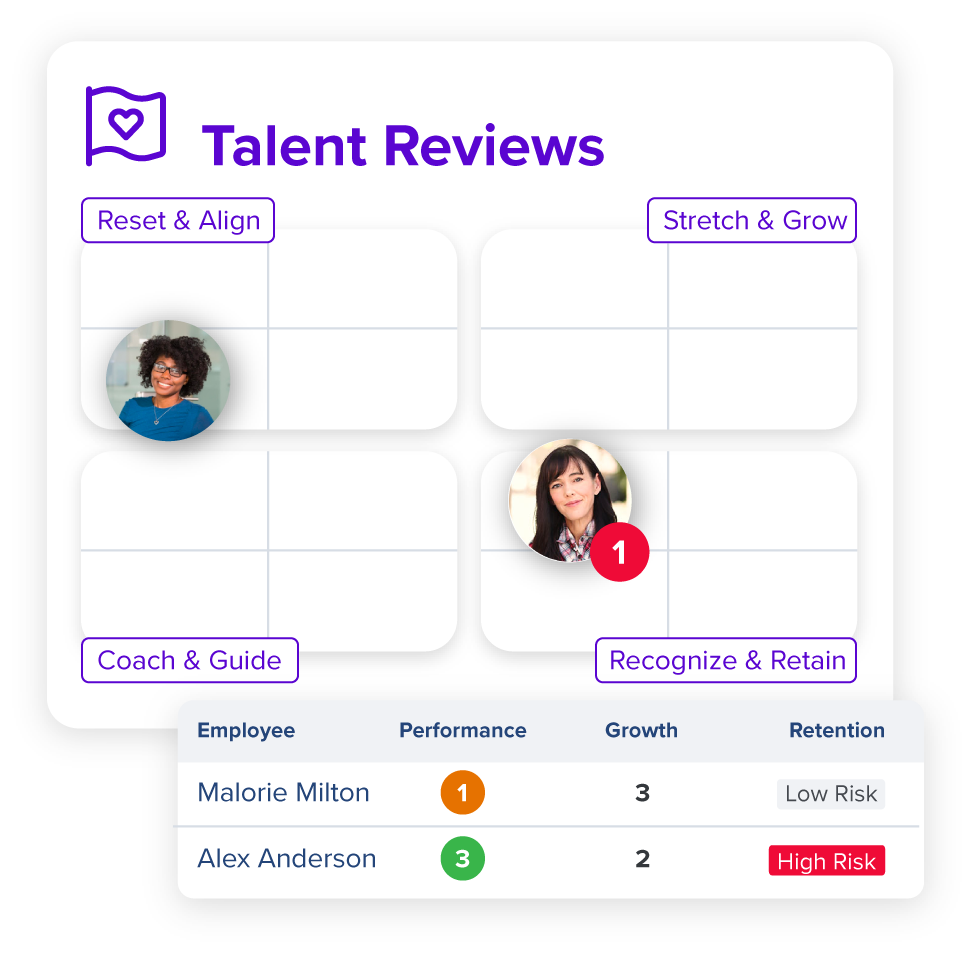
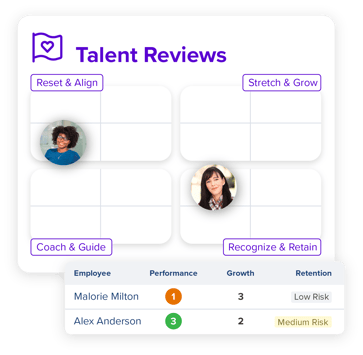
TalentReviews_EmployeeImpact_6.3

2. Simplified 4-quadrant grid view

Traditional 9-box grids can get overly complex—making it harder, not easier, to have meaningful talent conversations.

That’s why Quantum Workplace starts with a streamlined 4-quadrant view, helping leaders quickly see who’s thriving, who’s at risk, and where to focus development.

Our simplified model is designed to drive clarity, consistency, and action. But it’s also flexible. If your organization prefers a more detailed view—like a traditional 9-box or a 16-box grid—we can easily configure the experience to match your approach.

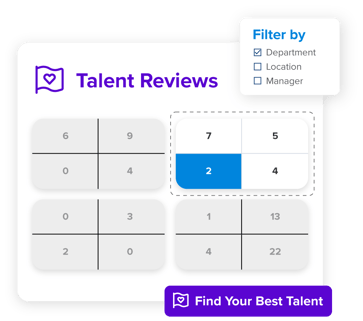
TalentReviews_ToolPage_FocusOnSpecificTalent@2x


3. Real-time visualization and filtering

Talent ratings are automatically plotted into your chosen grid format—giving you instant visibility into trends across the organization. Built-in filters let you explore the grid by team, role, location, or cycle date.

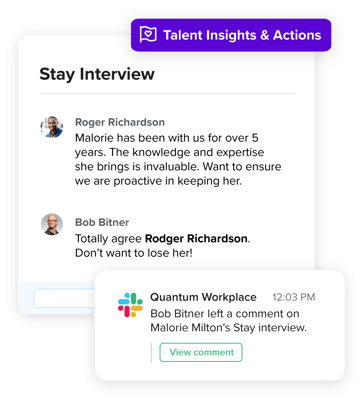
TalentReviews_ToolPage_CollaborateAnCommunicate@2x

4. Multi-rater and calibration support

You can invite multiple reviewers—such as matrix managers, mentors, or skip-level leaders—to ensure a more well-rounded assessment. Calibration tools help teams align on criteria and remove blind spots.

5. Built-in action planning.

Each box or quadrant can be connected to key talent strategies. Whether it’s launching coaching plans, initiating succession conversations, or recognizing high performers, Quantum Workplace turns 9-box insights into action.

 
Best practices for using the 9-box grid effectively

To get the most out of your 9-box grid, consider the following:

Conduct talent reviews frequently.

Move away from the once-a-year approach. Quarterly or semiannual cycles help capture performance shifts, changing risk factors, and emerging potential.

Evaluate across the organization.

Don’t limit reviews to leadership roles. Reviewing talent across all levels helps uncover rising stars and reduce turnover in critical roles.

Ensure transparency and calibration.

Encourage consistency by aligning reviewers on what each rating means. Use calibration sessions and multi-rater input to minimize bias.

Connect talent review ratings to development.

Each 9-box placement should have a clear next step. Turn insight into action through targeted development plans, retention strategies, or growth opportunities.

Bringing it all together 

When used well, the 9-box grid is more than a chart—it’s a decision-making engine. With Quantum Workplace, you’re not just plotting employees on a grid. You’re building a repeatable, strategic process for identifying, developing, and retaining your best talent.

Our Talent Reviews solution helps you:

  • Create structure and fairness in evaluations
  • Gain deeper visibility into organizational talent
  • Align talent decisions with business strategy
  • Take action that drives real impact

Ready to transform your talent review process?

Let’s reimagine the 9-box grid—backed by data, supported by collaboration, and built for action.

👉 [Explore Talent Reviews]

👉 [Book a Demo]

Generate single title from this title Enterprise AI is changing education in 100 -150 characters. And it must return only title i dont want any extra information or introductory text with title e.g: ” Here is a single title:”

Write an article about

Key points:

AI is poised to reshape education, impacting everything from administrative tasks and assessments to how students navigate research and develop critical thinking skills.

While AI seems like a relatively new development, it’s been around for quite some time, and is changing very quickly within the education space.

“We’re keeping an eye on usage in the U.S., where it’s happening, and how we can leverage that for teaching and learning,” said Kellie Ady, Senior Director of Education Strategy and Government Relations for PowerSchool.

It’s critical to think about how to better support educators who are using AI, including creating AI policies and guidelines in schools and districts.

Connected data system are also important for AI. “AI relies upon data, and if we have data living in different systems, it makes it a challenge for AI to do what it can do and do it well,” Ady said. “If we can remove data silos and make sure AI is leveraging a really powerful set of data, that changes the story of what it can do.”

Colorado Springs School District 11 is leveraging PowerSchool’s AI-powered solution, PowerBuddy for Learning, to help educators spend more time teaching to create a more engaging, personalized experience for students.

Take a deep dive into the district’s experience and discover how PowerBuddy for Learning:

  • Delivers scalable, enterprise-grade AI tailored specifically for K-12 districts
  • Saves teachers time and enhances instructional materials, enabling greater focus on student needs
  • Supports a more interactive and individualized learning environment with an always-available AI assistant

Laura Ascione is the Editorial Director at eSchool Media. She is a graduate of the University of Maryland’s prestigious Philip Merrill College of Journalism.

Laura AscioneLatest posts by Laura Ascione (see all)

.Organize the content with appropriate headings and subheadings ( h2, h3, h4, h5, h6). Include conclusion section and FAQs section with Proper questions and answers at the end. do not include the title. it must return only article i dont want any extra information or introductory text with article e.g: ” Here is rewritten article:” or “Here is the rewritten content:”

Generate single title from this title Unlock the other 99% of your data – now ready for AI in 100 -150 characters. And it must return only title i dont want any extra information or introductory text with title e.g: ” Here is a single title:”

Write an article about

For decades, companies of all sizes have recognized that the data available to them holds significant value, for improving user and customer experiences and for developing strategic plans based on empirical evidence.

As AI becomes increasingly accessible and practical for real-world business applications, the potential value of available data has grown exponentially. Successfully adopting AI requires significant effort in data collection, curation, and preprocessing. Moreover, important aspects such as data governance, privacy, anonymization, regulatory compliance, and security must be addressed carefully from the outset.

In a conversation with Henrique Lemes, Americas Data Platform Leader at IBM, we explored the challenges enterprises face in implementing practical AI in a range of use cases. We began by examining the nature of data itself, its various types, and its role in enabling effective AI-powered applications.

Henrique highlighted that referring to all enterprise information simply as ‘data’ understates its complexity. The modern enterprise navigates a fragmented landscape of diverse data types and inconsistent quality, particularly between structured and unstructured sources.

In simple terms, structured data refers to information that is organized in a standardized and easily searchable format, one that enables efficient processing and analysis by software systems.

Unstructured data is information that does not follow a predefined format nor organizational model, making it more complex to process and analyze. Unlike structured data, it includes diverse formats like emails, social media posts, videos, images, documents, and audio files. While it lacks the clear organization of structured data, unstructured data holds valuable insights that, when effectively managed through advanced analytics and AI, can drive innovation and inform strategic business decisions.

Henrique stated, “Currently, less than 1% of enterprise data is utilized by generative AI, and over 90% of that data is unstructured, which directly affects trust and quality”.

The element of trust in terms of data is an important one. Decision-makers in an organization need firm belief (trust) that the information at their fingertips is complete, reliable, and properly obtained. But there is evidence that states less than half of data available to businesses is used for AI, with unstructured data often going ignored or sidelined due to the complexity of processing it and examining it for compliance – especially at scale.

To open the way to better decisions that are based on a fuller set of empirical data, the trickle of easily consumed information needs to be turned into a firehose. Automated ingestion is the answer in this respect, Henrique said, but the governance rules and data policies still must be applied – to unstructured and structured data alike.

Henrique set out the three processes that let enterprises leverage the inherent value of their data. “Firstly, ingestion at scale. It’s important to automate this process. Second, curation and data governance. And the third [is when] you make this available for generative AI. We achieve over 40% of ROI over any conventional RAG use-case.”

IBM provides a unified strategy, rooted in a deep understanding of the enterprise’s AI journey, combined with advanced software solutions and domain expertise. This enables organizations to efficiently and securely transform both structured and unstructured data into AI-ready assets, all within the boundaries of existing governance and compliance frameworks.

“We bring together the people, processes, and tools. It’s not inherently simple, but we simplify it by aligning all the essential resources,” he said.

As businesses scale and transform, the diversity and volume of their data increase. To keep up, AI data ingestion process must be both scalable and flexible.

“[Companies] encounter difficulties when scaling because their AI solutions were initially built for specific tasks. When they attempt to broaden their scope, they often aren’t ready, the data pipelines grow more complex, and managing unstructured data becomes essential. This drives an increased demand for effective data governance,” he said.

IBM’s approach is to thoroughly understand each client’s AI journey, creating a clear roadmap to achieve ROI through effective AI implementation. “We prioritize data accuracy, whether structured or unstructured, along with data ingestion, lineage, governance, compliance with industry-specific regulations, and the necessary observability. These capabilities enable our clients to scale across multiple use cases and fully capitalize on the value of their data,” Henrique said.

Like anything worthwhile in technology implementation, it takes time to put the right processes in place, gravitate to the right tools, and have the necessary vision of how any data solution might need to evolve.

IBM offers enterprises a range of options and tooling to enable AI workloads in even the most regulated industries, at any scale. With international banks, finance houses, and global multinationals among its client roster, there are few substitutes for Big Blue in this context.

To find out more about enabling data pipelines for AI that drive business and offer fast, significant ROI, head over to this page.

.Organize the content with appropriate headings and subheadings ( h2, h3, h4, h5, h6). Include conclusion section and FAQs section with Proper questions and answers at the end. do not include the title. it must return only article i dont want any extra information or introductory text with article e.g: ” Here is rewritten article:” or “Here is the rewritten content:”

Researchers present bold ideas for AI at MIT Generative AI Impact Consortium kickoff event | MIT News

0

Launched in February of this year, the MIT Generative AI Impact Consortium (MGAIC), a presidential initiative led by MIT’s Office of Innovation and Strategy and administered by the MIT Stephen A. Schwarzman College of Computing, issued a call for proposals, inviting researchers from across MIT to submit ideas for innovative projects studying high-impact uses of generative AI models.

The call received 180 submissions from nearly 250 faculty members, spanning all of MIT’s five schools and the college. The overwhelming response across the Institute exemplifies the growing interest in AI and follows in the wake of MIT’s Generative AI Week and call for impact papers. Fifty-five proposals were selected for MGAIC’s inaugural seed grants, with several more selected to be funded by the consortium’s founding company members.

Over 30 funding recipients presented their proposals to the greater MIT community at a kickoff event on May 13. Anantha P. Chandrakasan, chief innovation and strategy officer and dean of the School of Engineering who is head of the consortium, welcomed the attendees and thanked the consortium’s founding industry members.

“The amazing response to our call for proposals is an incredible testament to the energy and creativity that MGAIC has sparked at MIT. We are especially grateful to our founding members, whose support and vision helped bring this endeavor to life,” adds Chandrakasan. “One of the things that has been most remarkable about MGAIC is that this is a truly cross-Institute initiative. Deans from all five schools and the college collaborated in shaping and implementing it.”

Vivek F. Farias, the Patrick J. McGovern (1959) Professor at the MIT Sloan School of Management and co-faculty director of the consortium with Tim Kraska, associate professor of electrical engineering and computer science in the MIT Computer Science and Artificial Intelligence Laboratory (CSAIL), emceed the afternoon of five-minute lightning presentations.

Presentation highlights include:

“AI-Driven Tutors and Open Datasets for Early Literacy Education,” presented by Ola Ozernov-Palchik, a research scientist at the McGovern Institute for Brain Research, proposed a refinement for AI-tutors for pK-7 students to potentially decrease literacy disparities.

“Developing jam_bots: Real-Time Collaborative Agents for Live Human-AI Musical Improvisation,” presented by Anna Huang, assistant professor of music and assistant professor of electrical engineering and computer science, and Joe Paradiso, the Alexander W. Dreyfoos (1954) Professor in Media Arts and Sciences at the MIT Media Lab, aims to enhance human-AI musical collaboration in real-time for live concert improvisation.

“GENIUS: GENerative Intelligence for Urban Sustainability,” presented by Norhan Bayomi, a postdoc at the MIT Environmental Solutions Initiative and a research assistant in the Urban Metabolism Group, which aims to address the critical gap of a standardized approach in evaluating and benchmarking cities’ climate policies.

Georgia Perakis, the John C Head III Dean (Interim) of the MIT Sloan School of Management and professor of operations management, operations research, and statistics, who serves as co-chair of the GenAI Dean’s oversight group with Dan Huttenlocher, dean of the MIT Schwarzman College of Computing, ended the event with closing remarks that emphasized “the readiness and eagerness of our community to lead in this space.”

“This is only the beginning,” he continued. “We are at the front edge of a historic moment — one where MIT has the opportunity, and the responsibility, to shape the future of generative AI with purpose, with excellence, and with care.”

Generate single title from this title Run Multimodal Extraction for More Efficient AI Pipelines Using One GPU in 100 -150 characters. And it must return only title i dont want any extra information or introductory text with title e.g: ” Here is a single title:”

0

Write an article about

As enterprises generate and consume increasing volumes of diverse data, extracting insights from multimodal documents, like PDFs and presentations, has become a major challenge. Traditional text-only extraction and basic retrieval-augmented generation (RAG) pipelines fall short, failing to capture the full value of these complex documents. The result? Missed insights, inefficient workflows, and rising operational costs.

In this blog post, we’ll dive into the key components of building an effective multimodal extraction pipeline, with code examples and one GPU, using NVIDIA NeMo Retriever microservices.

NeMo Retriever extraction is an example architecture for a multimodal document processing pipeline. It uses microservices to efficiently extract information from different file types across millions of documents. Paired with NeMo Retriever embedding and reranking models, it forms a complete, scalable RAG solution as showcased in NVIDIA AI Blueprint for RAG (described in Figure 1).

Figure 1. A diagram of the extraction pipeline as part of the Build an Enterprise RAG NVIDIA AI Blueprint

 In the next section, we’ll take a simple use case that shows the step-by-step NeMo Retriever extraction pipeline, together with other NeMo Retriever components, to use the ingested data.

Completing a business task with multimodal document understanding

For this purpose, we’ll consider an organizational shared folder containing product resources about NVIDIA Blackwell GPUs. The files include text, images, charts, and tables in different types such as PDFs, PPTXs, and JPEGs.

In this example, a customer support engineer is asking for an NVIDIA Blackwell performance comparison to support a partner.

This type of request can be sent by any application, such as a chat user interface or an automatic content generator. Here, we’ll demonstrate it using direct prompting with the pipeline’s Python client.

Step 1: Spin up the pipeline with one GPU

Deploy the blueprint using Docker on an on-prem or cloud machine. See the deployment guide available in the NeMo Retriever extraction quickstart guide on NVIDIA docs. 

In this example, the entire pipeline was deployed on an AWS g6e.xlarge machine (L40S GPU, 48 GB). Verify all deployed services for your desired profile are up and running.

An image of deployed services of NeMo Retriever Extraction, which includes all pipeline models, serving, and observability tools.Figure 2. NVIDIA NeMo Retriever extraction deployed services

The pipeline services include the visual elements recognition and OCR (optical character recognition) models, the embedding model, Milvus DB, and the observability tools (Prometheus and Grafana, Attu, Zipkin, and more).

Note: for prototyping purposes, the pipeline source code can be accessed at the blueprint page, Build an Enterprise RAG pipeline. 

Step 2: Submit ingestion job for files in storage

Once all services are up, we can submit ingestion jobs either by Python client or through CLI (command line interface).

We’ll show the Python client usage. 

In this example, we pass the path for the files in our collection and define the tasks we want to be included in the job (i.e., extract, split, and embed‌). We set the extraction task to include all modalities types, and the split task to chunk text to a size of 1,024 tokens.

from nv_ingest_client.client import Ingestor

demo_files = “demo_files/*”

ingestor = (
Ingestor(message_client_hostname=”localhost”)
.files(demo_files)
.extract(
extract_text=True,
extract_tables=True,
extract_charts=True,
extract_images=True,
text_depth=”page”,
)
.dedup()
.split(
tokenizer=”meta-llama/Llama-3.2-1B”,
chunk_size=1024,
)
.embed()
.vdb_upload()
)

result = ingestor.ingest()

Step 3: Analyze the job results 

Once the ingestion job is completed, we can analyze the structure of the results (Figure 3):

import pandas as pd

df = pd.DataFrame([])
for doc in result:
for obj in doc:
df = pd.concat([df,pd.json_normalize(obj)])

display(df)

A screenshot showing extraction job results structure.Figure 3. Extraction job results

The job extraction resulted in several objects from different modalities for each of our documents. These include text, images, and structured objects that refer to charts and tables.

For example, we can see a text object that was extracted:

# print a random text object that was extracted.

print(df[df[‘document_type’]==’text’].sample(1)[‘metadata.content’][0])

# Output:
# NVIDIA GB200 NVL72 | Datasheet | 1
# NVIDIA GB200 NVL72
# Powering the new era of computing.
# Unlocking Real-Time Trillion-Parameter Models
# NVIDIA GB200 NVL72 connects 36 Grace CPUs and 72 Blackwell GPUs in an NVIDIA®
# NVLink®-connected, liquid-cooled, rack-scale design. Acting as a single, massive GPU, it
# delivers 30X faster real-time trillion-parameter large language model (LLM) inference.
# The GB200 Grace Blackwell Superchip is a key component of the NVIDIA GB200
# NVL72, connecting two high-performance NVIDIA Blackwell GPUs and an NVIDIA…

The text can also be split into smaller chunks. We can control the chunking strategy in our split configuration of the Ingestor.

This is an example of  a random table that was extracted:

# detected chart
from base64 import b64decode
from IPython import display

rand_extracted_object = df[df[‘document_type’]==’structured’].sample(1)

display.Image(b64decode(rand_extracted_object[‘metadata.content’][0]))

An image of a table object that was extracted by the ingestion job, aligned and bounded correctly.Figure 4. A table extracted by the ingestion job

In addition to the visual object extraction, the textual content of it is saved as well:

# table textual content
rand_extracted_object[‘metadata.table_metadata.table_content’][0]

# Output:
# ” | Product Specifications’ |\n| The NVIDIA GB200 Grace Blackwell Superchip comes in two configurations: GB200 NVL72 and GB200 NVL2 |\n| Feature | GB200 NVL72 | GB200NVL2 | GB200 Grace Blackwell | Superchip |\n| Configuration | 36 Grace CPUs, | 2 Grace CPUs, | 1 Grace CPU, |\n| 72 Blackwell GPUs, | 2 Blackwell GPUs | 2 Blackwell GPUs ….

These objects were chunked and embedded automatically by the job. We can track the vector embeddings in the Milvus collection created automatically by the pipeline through the Milvus client or Attu (web user interface for Milvus) service that was deployed with the rest of the services bundle in step 1.

A screenshot of an Attu dashboard showing the created Milvus collection.Figure 5. The Milvus collection was automatically created by the NVIDIA NeMo Retriever extraction pipeline

Step 4: Retrieval

We’ll demonstrate building a retrieval component based on the NeMo Retriever extraction pipeline, ingested data, and NeMo Retriever embedding. First, define the NVIDIA client for the embedding and the generator LLM microservices.

from openai import OpenAI

nvidia_client = OpenAI(
api_key=”…”,
base_url=”https://integrate.api.nvidia.com/v1″
)

Embed the user query (using the same embedding model used in the ingestion)

user_query = “I am a customer support engineering asking for my client – What is the main difference between the two configurations of grace blackwell?”

# embed user query
response = nvidia_client.embeddings.create(
input=user_query,
model=”nvidia/nv-embedqa-e5-v5″,
encoding_format=”float”,
extra_body={“input_type”: “query”, “truncate”: “NONE”}
)
user_query_vector=response.data[0].embedding

Get top similar results to the user’s query using NeMo Retriever extraction Python client retriever:

from nv_ingest_client.util.milvus import nvingest_retrieval

query_results = nvingest_retrieval(
[user_query],
“nv_ingest_collection”,
hybrid=False,
embedding_endpoint=”http://localhost:8012/v1″,
model_name=”nvidia/llama-3.2-nv-embedqa-1b-v2″,
top_k=1,
gpu_search=True,
)

top_result = query_results[0][0][‘entity’][‘text’]

Create a relevant prompt for the generator LLM and get the response:

prompt = “””Based on the following context answer the user query:

context:
{}

user query:
{}

“””.format(top_result, user_query)

completion = nvidia_client.chat.completions.create(
model=”meta/llama-3.2-3b-instruct”,
messages=[{“role”:”user”,”content”:prompt}],
temperature=0.2,
top_p=0.7,
max_tokens=200,
stream=True
)

for chunk in completion:
if chunk.choices[0].delta.content is not None:
print(chunk.choices[0].delta.content, end=””)

# Output:
# Based on the provided context, the main difference between the two configurations of the NVIDIA GB200 Grace Blackwell Superchip is the number of Grace CPUs and Blackwell GPUs.
#
# The two configurations are:
# 1. GB200 NVL72: 36 Grace CPUs, 72 Blackwell GPUs
# 2. GB200 NVL2: 2 Grace CPUs, 2 Blackwell GPUs
#
# This difference affects the overall performance and capabilities of the system, with the NVL72 configuration having more processing power and memory bandwidth due to the higher number of Grace CPUs and Blackwell GPUs.

We retrieved a highly relevant chunk that didn’t require any direct search and review of the original file.

This simple use case shows how, with a quick deployment setup, we can perform automatic contextual understanding of multimodal enterprise source files. 

Conclusion

The NeMo Retriever extraction pipeline addresses the challenges of multimodal document processing by automatically handling different file types, such as PDFs, presentations, and spreadsheets.t extracts meaningful content from text, images, tables, and charts, changing previously siloed information into accessible, structured data. This enables organizations to unlock deeper insights from their existing knowledge repositories.

The architecture behind this solution brings together advanced components like object detection, chart parsing, and vector embeddings to enable efficient, context-aware retrieval. By preserving relationships across modalities and surfacing them through semantic search, the pipeline delivers a comprehensive approach to document understanding. Implementing this end-to-end pipeline with NeMo Retriever marks a major advancement in enterprise knowledge management, turning static, underutilized documents into high-value assets that can fuel generative AI applications and smarter decision-making.

By continuously extracting and using new data, NeMo Retriever can also help organizations create a data flywheel, where improved data quality leads to better AI models, which in turn generate even more valuable data.

Get started with the NeMo Retriever extraction pipeline using the NVIDIA AI blueprint for RAG, or try the individual NeMo Retriever microservices for extraction, embedding, and reranking on build.nvidia.com. 

.Organize the content with appropriate headings and subheadings ( h2, h3, h4, h5, h6). Include conclusion section and FAQs section with Proper questions and answers at the end. do not include the title. it must return only article i dont want any extra information or introductory text with article e.g: ” Here is rewritten article:” or “Here is the rewritten content:”


Generate single title from this title WEKA Launches NeuralMesh to Serve Needs of Emerging AI Workloads in 100 -150 characters. And it must return only title i dont want any extra information or introductory text with title e.g: ” Here is a single title:”

Write an article about

WEKA today pulled the cover off its latest product, NeuralMesh, which is a re-imagining of its distributed file system that’s designed to handle the expanding storage and serving needs–as well as the tighter latency and resiliency requirements–of today’s enterprise AI deployments.

WEKA described NeuralMesh as “a fully containerized, mesh-based architecture that seamlessly connects data, storage, compute, and AI services.” It’s designed to support the data needs of large-scale AI deployments, such as AI factories and token warehouses, particularly for emerging AI agent workloads that utilize the latest reasoning techniques, the company said.

These agentic workloads have different requirements than traditional AI systems, including a need for faster response times and a different overall workflow that’s not based on data but on service demands. Without the types of changes that WEKA has built into NeuralMesh, traditional data architectures will burden organizations with slow and inefficient agentic AI workflows.

Liran Zvibel is the CEO and Cofounder of WEKA

“This new generation of AI workload is completely different than anything we’ve seen before,” Liran Zvibel, cofounder and CEO at WEKA, said in a video posted to his company’s website. “Traditional high performance storage systems are reaching the breaking point. What used to work great in legacy HPC now creates bottlenecks. Expensive GPUs are sitting idle waiting for data or needlessly computing the same tokens over and over again.”

With NeuralMesh, WEKA is developing a new data infrastructure layer that’s service-oriented, modular, and composable, Zvibel said. “Think of it as a software-defined fabric that interconnects data, compute, and AI services across any environment with extreme precision and efficiency.”

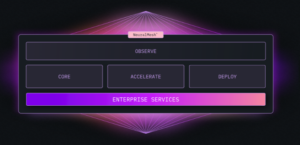
From an architectural point of view, NeuralMesh has five components. They include Core, which provides the foundational software-defined storage environment; Accelerate, which creates direct paths between data and applications and distributes metadata across the cluster; Deploy, which ensure the system can be run anywhere, from virtual machines and bare metal to clouds and on-prem systems; Observe, which provides manageability and monitoring of the system; and Enterprise Services, which provides security, access control, and data protection.

According to WEKA, NeuralMesh adopts computer clustering and data mesh concepts. It utilizes multiple parallelized paths between applications and data, and distributes data and metadata “intelligently,” the company said. It works with clusters running CPUs, GPUs, and TPUs, running on prem, in the cloud, or anywhere in between.

Data access times on NeuralMesh are measured in microseconds rather than milliseconds, the company claimed. The new offering “dynamically adapts to the variable needs of AI workflows” through the use of microservices that handle various functions, such as data access, metadata, auditing, observability, and protocol communication. These microservices run independently and are coordinated through APIs.

WEKA claimed NeuralMesh actually gets faster and more resilient as data and AI workloads increase, the company claims. It achieves this feat in part due to the data striping routines that it uses to protect data. As the number of nodes in a NeuralMesh cluster goes up, the data is striped more broadly to more nodes, reducing the odds of data loss. As far as scalability goes, NeuralMesh can scale upwards from petabytes to exabytes of storage.

“Nearly every layer of the modern data center has embraced a service-oriented architecture,” WEKA’s Chief Product Officer Ajay Singh wrote in a blog. “Compute is delivered through containers and serverless functions. Networking is managed by software-defined platforms and service meshes. Observability, identity, security, and even AI inference pipelines run as modular, scalable services. Databases and caching layers are offered as fully managed, distributed systems. This is the architecture the rest of your stack already uses. It’s time for your storage to catch up.”

Related Items:

WEKA Keeps GPUs Fed with Speedy New Appliances

Legacy Data Architectures Holding GenAI Back, WEKA Report Finds

How to Capitalize on Software Defined Storage, Securely and Compliantly

.Organize the content with appropriate headings and subheadings ( h2, h3, h4, h5, h6). Include conclusion section and FAQs section with Proper questions and answers at the end. do not include the title. it must return only article i dont want any extra information or introductory text with article e.g: ” Here is rewritten article:” or “Here is the rewritten content:”