Home Blog Page 582

Big tech’s AI spending hits new heights

0

Big Tech’s AI Bonanza: $240 Billion Spent in 2024

In 2024, Big Tech is all-in on artificial intelligence, with companies like Microsoft, Amazon, Alphabet, and Meta leading the way. Their combined spending on AI is projected to exceed a jaw-dropping $240 billion.

Why So Much Spending?

AI’s potential is immense, and companies are making sure they’re positioned to reap the rewards.

  • A growing market: AI is projected to create $20 trillion in global economic impact by 2030. In countries like India, AI could contribute $500 billion to GDP by 2025. With stakes this high, big tech isn’t hesitating to invest heavily.
  • Infrastructure demands: Training and running AI models require massive investment in infrastructure, from data centres to high-performance GPUs. Alphabet increased its capital expenditures by 62% last quarter compared to the previous year, even as it cut its workforce by 9,000 employees to manage costs.
  • Revenue potential: AI is already proving its value. Microsoft’s AI products are expected to generate $10 billion annually—the fastest-growing segment in the company’s history. Alphabet, meanwhile, uses AI to write over 25% of its new code, streamlining operations.

Supporting Revenue Streams

What keeps the massive investments coming is the strength of big tech’s core businesses. Last quarter, Alphabet’s digital advertising machine, which is powered by Google’s search engine, generated $49.39 billion in ad revenue, a 12% year-over-year increase. This solid foundation allows Alphabet to pour resources into building out its AI arsenal without destabilising the bottom line.

Microsoft’s diversified revenue streams are another example. While the company spent $20 billion on AI and cloud infrastructure last quarter, its productivity segment, which includes Office, grew by 12% to $28.3 billion, and its personal computing business, boosted by Xbox and the Activision Blizzard acquisition, grew 17% to $13.2 billion. These successes demonstrate how AI investments can support broader growth strategies.

The Financial Payoff

Big tech is already seeing the benefits of its heavy spending. Microsoft’s Azure platform has seen substantial growth, with its AI income approaching $6 billion. Amazon’s AI business is growing at triple-digit rates, and Alphabet reported a 34% jump in profits last quarter, with cloud revenue playing a major role.

Meta, while primarily focused on advertising, is leveraging AI to make its platforms more engaging. AI-driven tools, such as improved feeds and search features, keep users on its platforms longer, resulting in new revenue growth.

Conclusion

For the time being, the focus is on scaling up infrastructure and meeting demand. However, the real transformation will come when big tech unlocks AI’s full potential, transforming industries and redefining how we work and live.

Frequently Asked Questions

Q: Why are big tech companies investing so heavily in AI?
A: Big tech companies are investing in AI because of its immense potential to create value and drive growth. AI is projected to create $20 trillion in global economic impact by 2030, and companies are positioning themselves to reap the rewards.

Q: What are the main drivers of AI adoption?
A: The main drivers of AI adoption are the growing market, infrastructure demands, and revenue potential. AI is already proving its value in various industries, and companies are investing to stay ahead of the competition.

Q: What are the benefits of AI for big tech companies?
A: The benefits of AI for big tech companies include increased revenue, improved operations, and a competitive edge. AI-driven tools can streamline processes, improve decision-making, and drive innovation, ultimately leading to long-term growth and success.

7 Hidden Use Cases

Why Consider NLP in Healthcare?

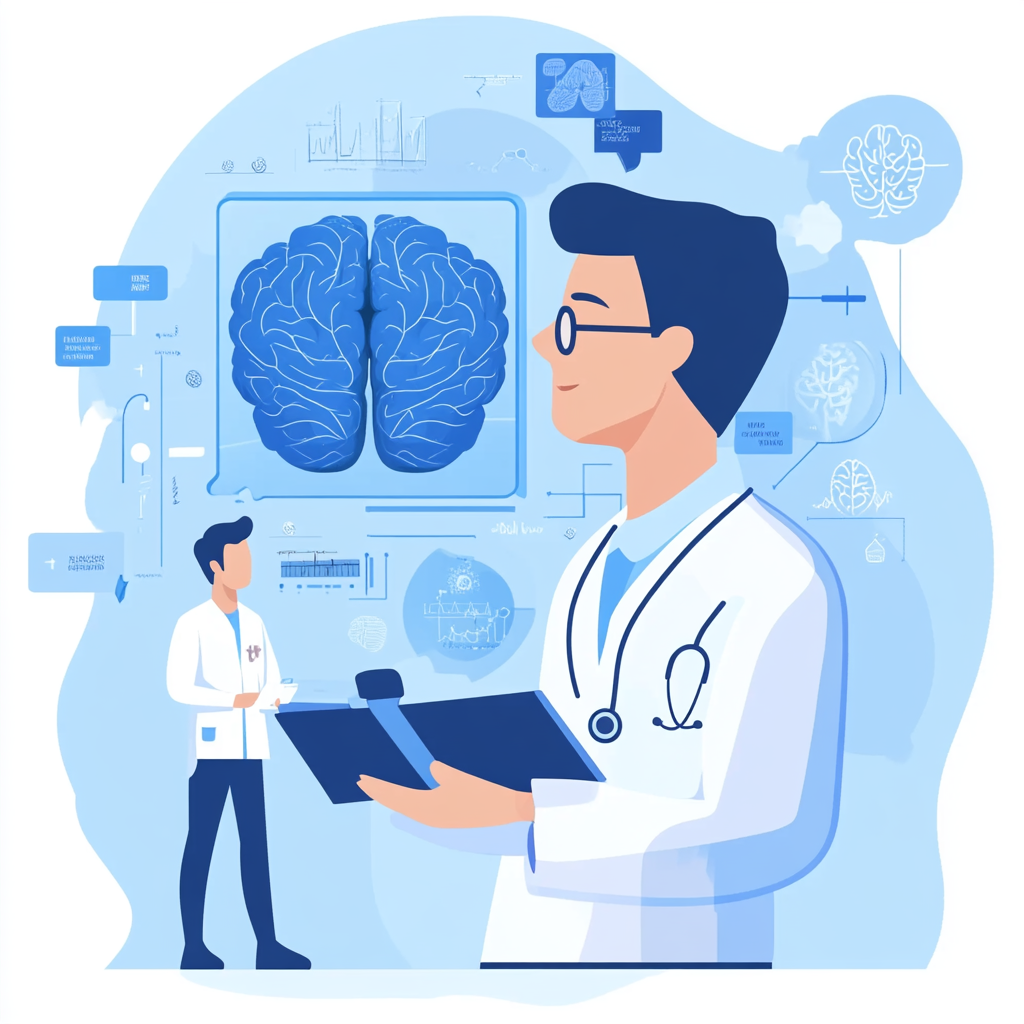
Before we dive into the use cases, let’s first answer the question, "What is NLP in healthcare?" Natural Language Processing is a branch of artificial intelligence that enables computers to comprehend, interpret, and produce human language. By analyzing speech and text, it aids in the conversion of unstructured data into structured ones. When used in the healthcare industry, NLP makes it easier for healthcare experts to extract necessary insights from large amounts of medical data.

Challenges that NLP Solves

Since its adoption in healthcare, NLP has proven incredibly beneficial in addressing challenges with patient records, massive unstructured datasets produced from clinical notes, and documentation.

Benefits of NLP

There are numerous benefits of Natural Language Processing integration in healthcare. From enabling quick analysis of large datasets to quick decision-making, NLP helps in all areas of the industry. Besides, it also aids in improving communication between healthcare providers and patients through virtual assistants and chatbots that can respond immediately.

7 NLP Use Cases in Healthcare: An Overview

Below is an overview of the use cases we will cover in this blog.

1. Clinical Documentation Automation

The Challenge
Clinical documentation is an extremely time-consuming process. However, since it is vital to ensure the continuity of care, healthcare professionals place major emphasis on it, significantly increasing their burden.

How Can NLP Help?
NLP aids in streamlining the process by automating clinical documentation. Advanced NLP for healthcare tools can transcribe and interpret clinician-patient interactions and convert unstructured text or speech into structured data in EHR systems.

2. Disease Progression Prediction

The Challenge
Chronic diseases like Alzheimer’s, cardiovascular disease, and diabetes need continuous monitoring. Disease progression prediction is vital to customize treatment plans and prevent complications. However, conventional methods generally depend on periodic check-ups and subjective assessments. This may result in missed opportunities for early, timely intervention.

How Can NLP Help?
NLP technologies analyze large amounts of patient information, including doctor’s notes, lab results, and medical histories. This helps in predicting how the disease may progress further. By extracting the necessary data from unstructured and structured datasets, NLP tools can determine early warning signs and provide physicians with predictive data to help navigate treatment plans.

3. Medical Literature Review

The Challenge
Healthcare researchers, as well as professionals, must stay up-to-date with medical literature. However, it can be challenging with so much existing literature and new research being published daily. Manually reviewing this vast amount of information can result in suboptimal care, reduced patient satisfaction, and confusion.

How Can NLP Help?
NLP-powered virtual assistants and chatbots can help bridge the communication gap between patients and healthcare providers. They can understand patient queries, offer customized health information, and even guide them in booking appointments or managing their treatment plans.

4. Identifying Social Health Determinants

The Challenge
Social determinants of health or SDOH, such as housing, access to food, and income, largely influence people’s health outcomes. However, these are not adequately noted in usual clinical assessments. This can lead to less effective care.

How Can NLP Help?
NLP medical records can analyze unstructured data like clinical notes and patient records to determine social factors affecting health. For instance, they can flag issues like poor housing situations. Once identified, healthcare professionals can provide comprehensive care that addresses the leading causes of their health issues.

5. Drug Adherence and Medication Management

The Challenge
Non-adherence to medications according to prescriptions is a significant problem that affects the outcomes of the treatment adversely. Nearly 50% of patients do not take their medications as prescribed, which increases rates of hospital readmissions and complexities in chronic illness management.

How Can NLP Help?
NLP addresses medication non-adherence by analyzing the patient’s medical records and communications. By identifying signs and patterns of non-adherence, NLP can inform healthcare professionals about which individuals need targeted interventions like educational support or reminders.

6. Fraud Detection & Billing Accuracy

The Challenge
Billing inaccuracies and fraud are major problems in the healthcare industry, costing billions of dollars annually. They affect not only financial resources but also the integrity of the healthcare system.

How Can NLP Help?
Among the key NLP applications in healthcare is the technology’s ability to fight these challenges by analyzing Electronic Health Record data, insurance claims, and billing codes to highlight discrepancies and determine potential fraud.

7. Conclusion

Now that you know what natural language processing is in healthcare and NLP use cases in healthcare, you probably already understand how it has transformed the way we approach medical research, administrative efficiency, and patient care. Even though NLP use cases like chatbots are well-renowned, the lesser-known ones are equally effective.

From improving patient-provider communication to enhancing disease progression predictions, NLP is highly beneficial for addressing some of the key challenges of the healthcare sector. If you are part of the healthcare industry and want to integrate NLP into your current processes, consider hiring LITSLINK’s AI software engineers. Our team of professionals will provide you with tailored solutions that meet your requirements.

With natural language processing, the future of the healthcare industry is not just driven by data — it’s more personalized and smarter than ever before.

FAQs

Q: What is NLP in healthcare?
A: NLP is a branch of artificial intelligence that enables computers to comprehend, interpret, and produce human language.

Q: What are some benefits of NLP in healthcare?
A: NLP enables quick analysis of large datasets, quick decision-making, and improves communication between healthcare providers and patients.

Q: What are some use cases of NLP in healthcare?
A: Some use cases of NLP in healthcare include clinical documentation automation, disease progression prediction, medical literature review, identifying social health determinants, drug adherence and medication management, and fraud detection & billing accuracy.

Q: How can NLP be integrated into current healthcare processes?
A: NLP can be integrated into current healthcare processes by hiring AI software engineers like LITSLINK’s team of professionals, who can provide tailored solutions that meet your requirements.

I’ve found some standout Nintendo Switch deals

0

Refresh

Nintendo Switch 2: What We Know So Far

The Switch 2 is coming next year, after a lot of anticipation. We don’t know tons about it, but we do know it’ll be a Pro version of the current Switch OLED.

Black Friday Deals

We saw some marvellous concept of what it could look like, which began flooding in years ago. We sort of gave up hoping for a while and then the announcement was made a couple of months ago. Since then we’ve been on tenterhooks and have known this Black Friday was going to be a little different for deals.

Best Nintendo Switch Games Deals

It looks like Amazon has the best deals on Nintendo Switch games so far, with up to 38% off some genuinely brilliant titles. You should explore them all here:

… and we’ll find some more to highlight.

Nintendo Switch Bundle Deals

Nintendo released some special bundles recently, which get you the console and Mario Kart Deluxe 8 for a knockdown price. You’ll save around $70 by buying them this way – certainly not to be turned down if you’re a console-less Mario fan. These bundles are from $299.99 at many retailers.

Nintendo Switch OLED Deals

Hello! Happy Black Friday isn’t it? But deals are coming thick and fast already, which is great news for everyone. We’re kicking things off with a couple of brilliant deals on OLED consoles – one for the UK and the other US. Hurrah!

Best Nintendo Switch Deals of the Day

Nintendo Switch deals are notoriously difficult to find. But we are experts so worry no more, if there’s a deal to be found, we’ll find it. We’ve also got our eyes on games and have found a wonderful deal on the Bluey game. Yup, maybe a weird one to start with but with children in the house this could be a great Christmas present for the family – it’s now only $20 at Amazon, reduced from almost $40.

Conclusion

Black Friday has started and we’re already seeing some great deals on Nintendo Switch games and consoles. Make sure to check out our coverage of the Nintendo Switch 2 and keep an eye on our deals page for more updates.

Frequently Asked Questions

Q: When is the Nintendo Switch 2 coming?
A: The Nintendo Switch 2 is coming next year.

Q: What is the Nintendo Switch 2?
A: The Switch 2 is a Pro version of the current Switch OLED.

Q: What are the best Nintendo Switch games deals?
A: Amazon has the best deals on Nintendo Switch games, with up to 38% off some titles.

Q: What are the best Nintendo Switch bundle deals?
A: Nintendo released some special bundles recently, which get you the console and Mario Kart Deluxe 8 for a knockdown price.

Q: Where can I find the best Nintendo Switch deals?
A: We are experts so worry no more, if there’s a deal to be found, we’ll find it.

Flux Revolution

0

Discover the Latest Flux Tools and Resources

Get Started with Flux Tools

Check out the new Flux Tools at https://blackforestlabs.ai and https://blackforestlabs.ai/flux-1-tools to explore the latest developments in AI art generation.

Stay Up-to-Date with Guides and Tutorials

For more in-depth guides and tutorials, head over to https://www.patreon.com/sebastiankamph, where you can access a wealth of resources to help you master the art of AI art creation.

Join the Community

Join the conversation and connect with other AI art enthusiasts in our community Discord server: https://discord.gg/dFB7zuXyFY.

Explore the World of AI Art

Stable Diffusion for Beginners Playlist

Check out our Stable Diffusion for Beginners playlist on YouTube: https://www.youtube.com/playlist?list=PLXS4AwfYDUi5sbsxZmDQWxOQTml9Uqyd2

Weekly AI Art Challenges

Participate in our Weekly AI Art Challenges on YouTube: https://www.youtube.com/playlist?list=PLXS4AwfYDUi7RvFm4K6lKBH_acaZQMKY4

Master the Art of AI Art

Watch our tutorial on "My Stable Diffusion Workflow to Perfect Images": https://youtu.be/4u-Ytioi3DM

Unlock the Power of ControlNet

Check out our ControlNet tutorial and install guide: https://youtu.be/vFZgPyCJflE

Experience the Magic of ControlNet

Watch "Famous Scenes Remade by ControlNet AI": https://youtu.be/wVbWZ-Ph9lE

Frequently Asked Questions

Q: What are the Flux Tools?
A: The Flux Tools are a set of tools for creating and manipulating AI-generated art.

Q: Where can I find more resources for learning AI art?
A: You can find more resources and guides on https://www.patreon.com/sebastiankamph.

Q: How do I join the community?
A: Join the community Discord server: https://discord.gg/dFB7zuXyFY.

Google’s Suggested Uses of Gemini Live

0

A Human-Like Voice Assistant That Speaks to You

A human-like voice assistant that speaks to you sounds like something from a sci-fi movie. However, the technology is already here, with AI-powered voice assistants like Gemini Live easily accessible from your phone. So, how can these assistants help with your everyday life?

Five Ways Gemini Live Can Make Your Life Easier

To help, Google has released a list of five ways Gemini Live can make users’ lives easier, and I tested each one. Below, you can find their list, ranked by the ones I found the most to least helpful, as well as a recap of my experiences.

1. Creating a To-Do List

One of my favorite ways to use ChatGPT is to develop basic lists, such as what to buy at the grocery store and what to take on vacation. Typically, when I use this feature, I type my request into the chatbot. However, with Gemini Live or the Advanced Voice Mode, you only have to ask in conversation and have the assistant output your list.

The biggest pro with this approach is that, similarly to having a normal conversation with a human, you can stop and ask the AI to elaborate, add something else, restart, remove something, or tailor the list more to your liking. Depending on your situation, the bot will suggest things to add or other to-do lists.

2. Directed Breathing Exercises

Although this suggested use case got the number two slot, it was a close runner-up for one. In the busy hustle and bustle of life, finding time to take a step back and relax or prioritize mindfulness is key. For that reason, most mornings I start my days with an affirmation session — including breathing exercises led by someone on YouTube. However, these experiences aren’t tailored to me and can get repetitive; that’s where Gemini Live can help.

I asked the bot, “Can you lead me in affirmations for the morning for success?” Without skipping a beat, the AI generated a few affirmations I could dictate to get started.

3. Rehearsing a Presentation

Some things can objectively improve a presentation, including the pace at which you speak, your conciseness, and the engagement of your script. For that reason, Gemini Live can listen to your presentation and advise on how to improve. It can also be helpful to rehearse in the privacy of your own space without having to use another human to shake off the nerves.

However, I found the experience a bit unnatural. I still think a human can give better advice as other factors that affect a presentation include posture, facial expressions, movement, and, most importantly, the presentation itself. If you have a terrible slide deck, not much can save you. If your goal is to improve speech, then this feature is fine — that’s about it, though.

4. Roleplaying

As one of the use cases, Google encourages users to leverage Gemini Live to have a mock difficult conversation. All a user has to do is explain the situation briefly to Gemini Live and start the conversation, receiving feedback along the way.

For my case scenario, I said, “Can you help me role-play a situation in which I tell my best friend I don’t like her shoes?” The bot asked about her name and gave me a sample sentence I could use to tell her, but I don’t think the conversation would have landed well if I had used it.

5. Picking What to Wear

Gemini Live does not yet have multimodal abilities (where it can see your surroundings). For that reason, this use case finishes last. In my opinion, it is completely useless. Moreover, for the bot to help you pick out your wardrobe, you need to describe your outfit in detail, and many different factors need to be considered, such as texture, patterns, and fits, which can really only be described visually.

Conclusion

While Gemini Live has some useful features, it’s essential to understand its limitations. For instance, roleplaying and picking what to wear are not yet feasible with this technology. However, creating a to-do list, directed breathing exercises, and rehearsing a presentation can be helpful in specific situations.

FAQs

Q: How can I access Gemini Live?
A: You can access Gemini Live for free via the Gemini app on both iOS and Android. Once you’ve downloaded the app, sign in to your Google account, click the waveform icon, and start chatting.

Q: Is Gemini Live available on all devices?
A: Gemini Live is available on both iOS and Android devices, but it’s not available on all devices. Make sure to check the app’s compatibility with your device before downloading.

Q: Can I use Gemini Live for free?
A: Yes, Gemini Live is available for free, but it’s essential to note that some features might require a subscription or a one-time payment.

Q: Can I use Gemini Live offline?
A: No, Gemini Live requires an internet connection to function. You can’t use it offline.

Q: Can I customize my experience with Gemini Live?
A: Yes, you can customize your experience with Gemini Live by adjusting the settings and preferences within the app.

Gloriously Gloomy Heart of Chornobyl

0

Stalker 2: Heart of Chornobyl

Publisher: GSC Game World / Microsoft

Developer: GSC Game World

Format: PC, Xbox Series X/S (reviewed)

Platform: Unreal Engine 5

Release date: Out now

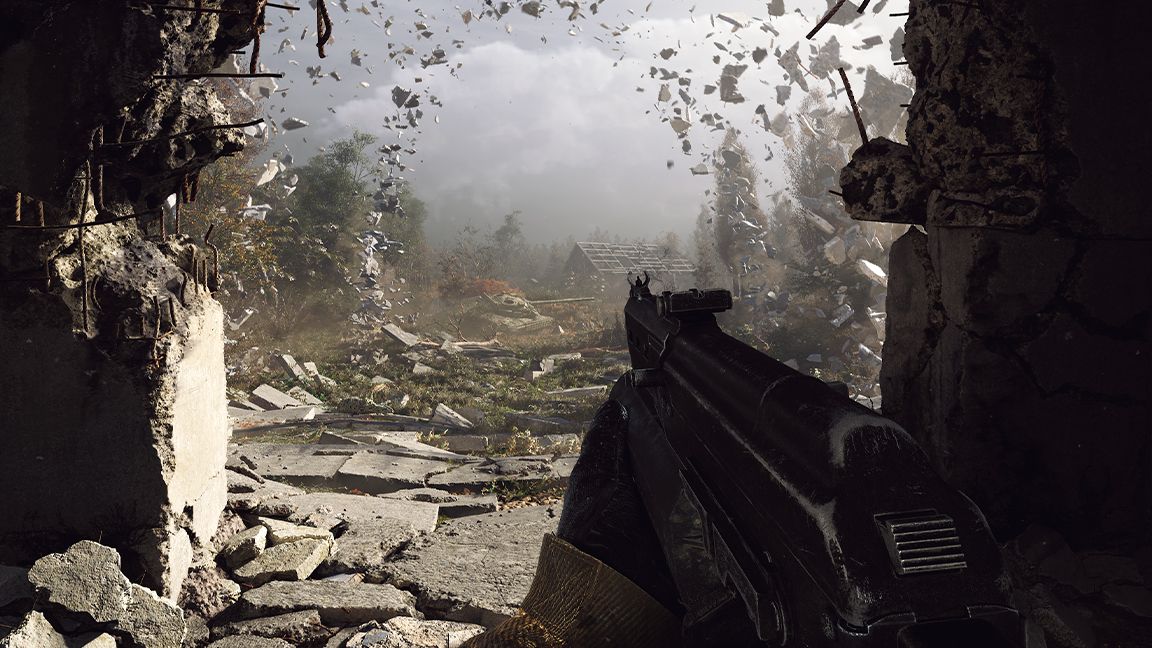
I would argue that Stalker 2: Heart of Chornobyl is more than a mere video game: it’s a full-blown cultural artefact. That’s certainly true for anyone who comes from developer GSC Game World’s homeland of Ukraine. 2007’s original Stalker game, a survival-shooter set in the Exclusion Zone around the Chornobyl nuclear reactor, became a touchstone of Ukrainian culture as the country forged an independent identity when the USSR collapsed shortly after the Chornobyl disaster.

Stalker 2 is offers proper survival-shooting

This game (I’m reviewing on Xbox Series X) is very much a modern-technology sequel to the original game: although a first-person shooter, it casts players as Skif, an ordinary guy who becomes a Stalker – a drifter aiming to survive and make his name in the Chornobyl Exclusion Zone. Although Skif acquires more sophisticated armour and weaponry as he traverses the game, he never acquires any superhuman attributes. Stalker 2 is an unforgiving game that requires frequent saves and a self-preservation-heavy approach.

Stalker 2’s distinctive use of Unreal Engine 5

Stalker 2 was built in Unreal Engine 5, whereas the original game used GSC Game World’s proprietary X-Ray engine. Undoubtedly, using such a popular engine helped them to get the game out in the face of such adversity. Aesthetically speaking, Stalker 2’s use of Unreal Engine 5 is, shall we say, interesting.

Exemplary survival combat

As in the original game, Stalker 2’s first-person shooting is exemplary. At first, Skif – after a short but handy tutorial – is left with just a handgun and no equipment, but his early missions bring some more useful weaponry, although ammo for that is enormously scarce. It really is a survival game, poles apart from more military-inclined shooters. Eventually, as Skif moves deeper into the Zone, in pursuit of Solder, who he perceives as betraying him, and the scanner with which he was entrusted in the tutorial (which plays a central part in the story), he amasses a vast array of shotguns, snipers and automatic weapons of all conceivable types.

Conclusion

Unsurprisingly, given the difficulties that GSC Game World experienced when making it, it isn’t perfect. It has one of the biggest ever game-worlds, and a number of systems (weather, random packs of dogs and rats, patrolling factions and the like) layered on top of each other, so it’s never going to be as polished as a scripted single-path game. But crash-bugs, as experienced a few months ago in a preview session, appear to have been eliminated, and a general air of unpredictability is very much in keeping with Stalker 2’s general vibe.

FAQs

Q: Is Stalker 2 a horror game?
A: No, it wouldn’t call itself a horror game, but it throws up a steady stream of genuinely chilling moments.

Q: Can I play Stalker 2 on PC?
A: Yes, Stalker 2 is available on PC, as well as Xbox Series X/S.

Q: Is Stalker 2 a survival game?
A: Yes, it’s a survival game that requires frequent saves and a self-preservation-heavy approach.

Q: Is Stalker 2 a sequel to the original Stalker game?
A: Yes, it’s a sequel to the original Stalker game, set in the same Exclusion Zone around the Chornobyl nuclear reactor.

How to Create 3D Text in Photoshop

0

Here is the rewritten article:

01. Create your text layer

In a fresh Photoshop document, create a new layer. You can do this by pressing cmd, shift and N, and then pressing ‘enter’. Then click on the text tool – the ‘T’ icon in the left-hand side toolbar, drag the mouse across the screen to create a text box and type in your text.

02. Choose your font

A geometric, sans serif font such as Avenir, Bebas or Helvetica is best when first trying this method. If you’re more experienced with using Photoshop, a cursive font will also work. In this example, we’ve gone with Avenir in ‘black oblique’. You can select your font in the box at the top of the screen in the right-hand corner.

03. Create the text’s initial background

To start adding some depth, you’ll need to duplicate your text. You can do this by selecting your text layer, pressing cmd and C, and then pressing cmd and V. This will come up as an identical layer. You’ll then need to change the colour of the duplicate text to a much darker shade. This shouldn’t be quite black, but it should be close. Then, in the ‘layers’ panel, you’ll need to drag your duplicate text layer underneath the original layer.

04. Copy the background text’s hex code

Double click on the second text layer, and then click on the colour ‘fill’ button to bring up the ‘colour picker’ window. This will tell you the exact hex code of the darker colour you have chosen. Select this hex code and press cmd and C to copy it. We will be needing this same colour in a moment.

05. Prep your pen tool

Select the Satin effect. Keep the blend mode as Normal and keep the colour as it already is. Set the rest of the specifications to those below.

Opacity: 84%
Angle: 90%
Distance: 1 px
Size: 202 px
Anti-aliased: Ticked
Invert: Ticked

06. Add a gradient overlay

Now you will need to add a gradient overlay, but it is important to choose the right gradient. It usually works best to pick a colour within the colour family of your text, but on the opposite tonal side. As the text in our example is dark pink, we have chosen a light pink gradient to complement it. The gradient overlay will be subtle but will help create variation that makes your 3D effect convincing. Set the rest of the specifications to those below.

Blend mode: Normal
Opacity: 77%
Reverse: Ticked
Align with layer: Ticked
Style: Linear
Angle: 90°
Scale: 71%
Method: Classic

07. Add an outer glow

For your penultimate effect, you can add an outer glow. This is optional depending on the tone of the typography you are creating, but it can help to make it stand out if the text is against a darker background. You’ll need to make the outer glow a darker tone of your text colour, which you can do in the colour fill box in the Outer Glow adjustments panel. Set the rest of the specifications to those below.

Blend mode: Normal
Opacity: 53%
Noise: 0%
Technique: Softer
Spread: 0%
Size: 25 px
Anti-aliased: Unticked
Range: 50%
Jitter: 0%

08. Finally, add a drop shadow

For the final touch, add a drop shadow. Keep the colour of the drop shadow black, and set the opacity to 50%. Play around with the Distance and Range to find out what works best for the tone of your typography. Once you’re done, click Ok or press Enter.

09. Explore and adjust

You’ve now created your 3D text! Now that you’ve got to grips with some of the effect options available to you in Photoshop, have a play around in the Effect Controls panel and explore more options for your typography. As artists, all our best creations are made from exploring unfamiliar territories, so explore the effects we’ve touched on in this article that you might not be as familiar with and adjust some of the specifications until you create something unique.

Conclusion

In this article, we’ve shown you how to create 3D text in Photoshop using the Effect Controls panel. We’ve covered the basics of creating a text layer, choosing a font, creating a background, and adding various effects to create depth and dimension. With these steps, you should be able to create your own unique 3D typography that adds a new dimension to your designs.

FAQs

Q: Why did Adobe remove the 3D panel from Photoshop?
A: Adobe removed the 3D panel from Photoshop to encourage users to use Adobe Substance 3D for 3D file editing.

Q: Can I use other fonts for 3D text?
A: Yes, you can use any font you like for 3D text, but geometric and sans serif fonts tend to work best.

Q: How do I adjust the effects to get the desired look?
A: Experiment with different effect settings and specifications to get the desired look. You can also try different fonts and colours to see what works best for your design.

This Forgotten Retro Graphics Tablet

0

Technology for Digital Art: A Blast from the Past

A Retro Revival

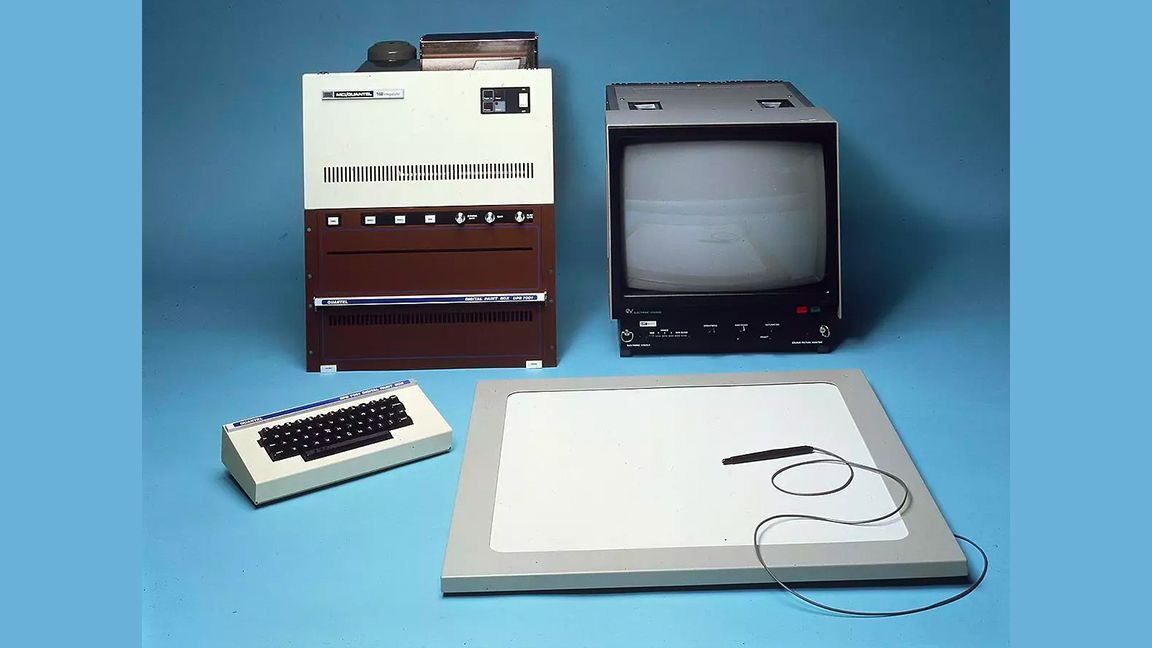
Technology for digital art has come a long way since the 1980s. But in these days of AI-driven software, a surprisingly retro tool is making a bit of a comeback. Launched in 1981, the Quantel Paintbox was an all-in-one machine comprising a tablet, pressure-sensitive pen, a display and its own proprietary software. Priced at $250,000 (over $800,000 today), it was a lot more expensive than a Creative Cloud subscription with the epic Adobe Black Friday sale. But this groundbreaking tech revolutionized television graphics in the 1980s.

The Impact of the Quantel Paintbox

The Quantel Paintbox was mainly used by big TV networks – including to create the iconic MTV logo. But it was also used to make the first CGI music video, "Money for Nothing" by Dire Straits, iconic album covers like Nirvana’s "Nevermind" and movie posters for "The Silence of the Lambs", "Pulp Fiction", and "JFK". Keith Haring experimented with the Paintbox in 1985. And in 1987, the BBC commissioned artists like David Hockney, Howard Hodgkin, and Richard Hamilton to create digital artworks using the Paintbox for the "Painting with Light" documentary series.

The Paintboxed – Tezos World Tour

ArtMeta, an art fair for digital art and NFTs, has now announced the Paintboxed – Tezos World Tour, a series of interactive events that will kick off with PepeFest Presents: Fake Basel 2024 at Modern Art Theory during Art Basel Miami Beach from 5 to 7 December. Selected artists will be invited to create new digital artworks using one of the few remaining Paintbox devices in existence. These will subsequently be minted as NFTs on objkt.com, powered by the Tezos blockchain. Following Miami, the tour will make stops in Paris, London, and New York. It will culminate in Basel, Switzerland in June 2025, where ArtMeta will host a retrospective as part of the Digital Art Mile art fair.

Conclusion

The Quantel Paintbox was a groundbreaking innovation in the 1980s, and its influence can still be seen in the digital art world today. The Paintboxed – Tezos World Tour is a celebration of this technology’s impact on the art world, and a chance to experience its capabilities firsthand. Whether you’re an artist, a collector, or simply a fan of digital art, this event is not to be missed.

FAQs

Q: What is the Quantel Paintbox?
A: The Quantel Paintbox was an all-in-one machine comprising a tablet, pressure-sensitive pen, a display, and its own proprietary software.

Q: What was the Paintbox used for?
A: The Paintbox was used by big TV networks for creating television graphics, and by artists for creating digital artworks.

Q: Who used the Paintbox?
A: The Paintbox was used by artists like Keith Haring, David Hockney, Howard Hodgkin, and Richard Hamilton, among others.

Q: What is the Paintboxed – Tezos World Tour?
A: The Paintboxed – Tezos World Tour is a series of interactive events that will showcase the capabilities of the Quantel Paintbox and its impact on the art world.

Q: How can I experience the Paintboxed – Tezos World Tour?
A: The tour will kick off in Miami, followed by stops in Paris, London, and New York, and culminate in Basel, Switzerland in June 2025.

Brave New Words: Salman Khan’s Vision of AI-Enhanced Education

Key Points

Introduction

Salman Khan’s "Brave New Words: How AI Will Revolutionize Education (and Why That’s a Good Thing)" presents an invigorating and forward-looking vision of the potential for artificial intelligence (AI) in education. Khan, the founder of Khan Academy, utilizes his extensive experience to argue that AI can democratize education, personalize learning, and ultimately transform the educational landscape.

The Potential of AI in Education

Khan introduces Khanmigo, an AI-powered tutor developed by Khan Academy, to illustrate how AI can be integrated into education effectively. Khanmigo is designed to provide personalized, one-on-one tutoring that adapts to each student’s learning pace and style. This approach mirrors the benefits historically associated with private tutoring, which has been shown to significantly improve learning outcomes.

Balanced View of AI’s Potential and Pitfalls

One of the book’s strengths is Khan’s balanced view of AI’s potential and its pitfalls. He discusses the importance of implementing safeguards to prevent misuse and ensure the technology is used ethically. For instance, OpenAI, the developer of ChatGPT, has invested in safety measures to prevent the AI from engaging in inappropriate conversations or sharing harmful content.

Future of AI in Education

Khan’s optimism about AI’s potential is infectious. He envisions a future where AI not only aids in academic learning but also supports emotional and social development. AI tutors can provide instant feedback, adapt to individual learning needs, and offer personalized guidance. This can help bridge educational gaps, particularly for students in underserved or remote areas.

Conclusion

In conclusion, "Brave New Words" by Salman Khan is a thought-provoking and timely exploration of AI’s potential in education. His insights are both hopeful and pragmatic, offering a roadmap for integrating AI into education in ways that enhance learning while addressing ethical and practical concerns.

Frequently Asked Questions

Q: What are the potential downsides of AI in education?

A: Khan acknowledges the legitimate concerns about AI tools like ChatGPT, such as their potential to encourage cheating, diminish critical thinking, and exacerbate screen time issues.

Q: How can educators ensure the responsible use of AI in education?

A: Khan emphasizes the need for continuous human oversight to prevent AI from perpetuating biases or misinformation.

Q: What are the potential benefits of AI in education?

A: Khan argues that AI can democratize education, personalize learning, and ultimately transform the educational landscape.

Q: How can AI support emotional and social development in students?

A: Khan suggests that AI tutors can provide instant feedback, adapt to individual learning needs, and offer personalized guidance, which can help bridge educational gaps and support students’ emotional and social development.

Unlocking the Power of Robotics Simulation

0

Physical AI and Robotics Simulation: Enabling Enhanced Automation

Robotics is revolutionizing various industries by bringing enhanced automation to use cases across multiple sectors. Two key elements contribute to their success: Physical AI and robotics simulation.

Physical AI: The Next Wave of Autonomous Machines

Physical AI embodies the next wave of autonomous machines and robots, including self-driving cars, industrial manipulators, mobile robots, humanoids, and even robot-run infrastructure like factories and warehouses. With virtual commissioning of robots in digital worlds, robots are first trained using robotic simulation software before they are deployed for real-world use cases.

Robotics Simulation: Facilitating Robot Learning and Testing

Robotic simulation software facilitates robot learning and testing of virtual robots without requiring the physical robot. By applying physics principles and replicating real-world conditions, these simulators generate synthetic datasets to train machine learning models for deployment on physical robots.

NVIDIA Isaac Sim and Robotics Simulation

NVIDIA Isaac Sim is an advanced robotics simulator that provides accurate visualizations and supports Universal Scene Description (OpenUSD)-based workflows for advanced robot simulation and validation. It is built on the NVIDIA Omniverse platform, which enables developers to import computer-aided design (CAD) models and build virtual scenes.

Three Computers for Robot Technology

Only after adequate training in simulated environments can physical robots be commissioned. A supercomputer is needed to train and fine-tune powerful foundation and generative AI models. A development platform is required for robotics simulation and testing, and an onboard runtime computer deploys trained models to physical robots.

Who Uses Robotics Simulation?

Many companies and startups are already using robotics simulation to enhance their operations. Examples include Delta Electronics, Wandelbots, Boston Dynamics, Fourier, and Galbot.

Using Robotics Simulation for Planning and Control Outcomes

Robotics simulation is evolving to integrate digital twins, enhancing planning, control, and learning outcomes. Developers can import CAD models into a robotics simulator to build virtual scenes and employ algorithms to create the robot operating system and enable task and motion planning.

High-Fidelity, Physics-Based Simulation Breakthroughs

High-fidelity, physics-based simulations have supercharged industrial robotics through real-world experimentation in virtual environments. NVIDIA PhysX, integrated into Omniverse and Isaac Sim, enables roboticists to develop fine- and gross-motor skills for robot manipulators.

Teaching Collision-Free Motion for Autonomy

Industrial robot training often occurs in specific settings, where simulations help address challenges related to various robot types and chaotic environments. Traditional motion planning approaches can come up short in unknown or dynamic environments. The NVIDIA Robotics research team has developed Motion Policy Networks (MπNets), an end-to-end neural policy that generates real-time, collision-free motion using a single fixed camera’s data stream.

How Developers Can Get Started Building Robotic Simulators

Developers can get started by visiting the NVIDIA Robotics simulation use case page, where they can find technical resources, reference applications, and other solutions for developing physically accurate simulation pipelines.

Conclusion

Robotics simulation is a crucial element in the development of autonomous robots, enabling them to interact with the physical world with precision and accuracy. With NVIDIA Isaac Sim and the NVIDIA Omniverse platform, developers can create realistic simulation environments that mimic real-world scenarios, allowing them to train and test their robots in a safe and efficient manner.

FAQs

Q: What is Physical AI?
A: Physical AI refers to AI models that can understand and interact with the physical world.

Q: What is Robotics Simulation?
A: Robotics simulation is the process of simulating robots and their interactions with the environment using software.

Q: Why is Robotics Simulation Important?
A: Robotics simulation is important because it enables developers to train and test robots in a safe and efficient manner, reducing the risk of damage or injury.

Q: What is NVIDIA Isaac Sim?
A: NVIDIA Isaac Sim is an advanced robotics simulator that provides accurate visualizations and supports Universal Scene Description (OpenUSD)-based workflows for advanced robot simulation and validation.

Q: Can I use NVIDIA Isaac Sim for my robotics project?
A: Yes, developers can use NVIDIA Isaac Sim for their robotics projects to create realistic simulation environments and train and test their robots.