Home Blog Page 59

Apple details AI model improvement plan

0

Apple Improves AI Models with Synthetic Data and Differential Privacy

Addressing Criticism over Underwhelming Performance

In the wake of criticism over the underwhelming performance of its AI products, especially in areas like notification summaries, Apple on Monday detailed how it is trying to improve its AI models by analyzing user data privately with the aid of synthetic data.

Using Differential Privacy and Synthetic Data

Using an approach called “differential privacy,” the company said it would first generate synthetic data and then poll users’ devices (provided they’ve opted-in to share device analytics with Apple) with snippets of the generated synthetic data to compare how accurate its models are, and subsequently improve them.

How Synthetic Data is Created

“Synthetic data are created to mimic the format and important properties of user data, but do not contain any actual user generated content,” the company wrote in a blog post. “To curate a representative set of synthetic emails, we start by creating a large set of synthetic messages on a variety of topics […] We then derive a representation, called an embedding, of each synthetic message that captures some of the key dimensions of the message like language, topic, and length.”

Comparing Synthetic Data with User Data

The company said these embeddings are then sent to a small number of user devices that have opted in to Device Analytics, and the devices then compare them with a sample of emails to tell Apple which embeddings are most accurate.

Improving AI Models

The company said it is using this approach to improve its Genmoji models, and would in the future use synthetic data for Image Playground, Image Wand, Memories Creation and Writing Tools as well as Visual Intelligence. Apple said it would also poll users who opt in to share device analytics with synthetic data to improve email summaries.

Conclusion

Apple’s approach to improving its AI models using synthetic data and differential privacy is a significant step towards ensuring user data privacy while still providing accurate and personalized experiences. By generating synthetic data that mimics real user data, Apple can train its AI models without compromising user privacy.

FAQs

Q: What is synthetic data?

A: Synthetic data is created to mimic the format and important properties of user data, but does not contain any actual user generated content.

Q: How is synthetic data created?

A: Synthetic data is created by generating a large set of synthetic messages on a variety of topics, and then deriving a representation, called an embedding, of each synthetic message that captures some of the key dimensions of the message.

Q: How does Apple use synthetic data to improve its AI models?

A: Apple uses synthetic data to improve its AI models by sending snippets of the generated synthetic data to user devices that have opted in to share device analytics, and then comparing the synthetic data with user data to improve the accuracy of its models.

Q: What are the benefits of using synthetic data and differential privacy?

A: The benefits of using synthetic data and differential privacy include ensuring user data privacy while still providing accurate and personalized experiences, and allowing Apple to train its AI models without compromising user privacy.

5 AI Apps on Android

AI Everywhere: Top Android Apps to Consider

The Default AI App: Google Gemini

Android now ships with a default AI app, Google Gemini, which is baked deep into the operating system. Gemini is the best fit for the average user, with nothing to install or configure (at least for basic usage). However, it’s worth disabling the Gemini Workspaces extension to prevent the AI from using your Workspace files as a training ground. I’ve been using Google Gemini as my assistant since it was first made available and have found it to be a reliable tool. One non-assistant feature worth using is Gemini Live, which has helped me solve complex problems with complicated plot situations.

Alternative AI Apps:

1. Perplexity

Perplexity is my go-to for AI queries, with a simple-to-use UI and easy access to daily news summaries. I can create Spaces to better manage and categorize my queries, and view a library of my queries. Perplexity is AI done right for the mobile device, and is free to install and use.

2. DeepSeek

DeepSeek is an AI development firm based in Hangzhou, China, which has open-sourced many of its LLMs. The company has set out to challenge OpenAI with a reinforcement learning model. On the Google Play Store, you’ll find two versions of DeepSeek: Deep Think (an AI chatbot) and DeepSeek (an AI assistant). Go for DeepSeek, which allows for deep queries or more basic searches, as well as photo and image OCR and document upload. You can use DeepSeek for free on Android, although you do have to sign up for an account.

3. Microsoft Copilot

Copilot is a pretty good AI offering that allows for standard AI queries, help writing first drafts, getting advice, learning something, creating images, making plans, brainstorming ideas, and practicing a language. It’s also very good at summarizing the daily news for you. One thing missing from the Android Copilot app is the ability to do deep research, but it’s an easy entry point into the world of AI on Android. You can install and use Copilot for free, but you do have to sign up for an account.

4. Opera’s Aria

Opera’s Aria was the first AI tool I used, and it made naming characters easy. With Aria, you can ask standard AI queries, upload images, use voice to text, ask it to summarize the top news of the day, and even view sample queries you can run. Opera’s Aria is a bit of a slog to get to, but you can install and use it for free, without requiring a plan or sign-up.

Conclusion:

When it comes to AI on Android, you have many choices. Google Gemini is a great default option, but if you want more features, Perplexity, DeepSeek, Microsoft Copilot, and Opera’s Aria are all worth considering. Each app has its strengths and weaknesses, so it’s worth trying out a few to see which one works best for you.

Frequently Asked Questions:

Q: Do I need to install an AI app on my Android device?

A: No, Google Gemini is already installed on your Android device, but you may want to consider installing an additional AI app for more features.

Q: Are these AI apps free?

A: Yes, all the apps mentioned in this article are free to install and use, although some may require signing up for an account.

Q: Can I use these AI apps on my desktop?

A: Some of the apps mentioned, such as Perplexity and Microsoft Copilot, are available on desktop devices as well as Android devices.

Waymo and Uber to Launch Robotaxi Service in Atlanta

0

Uber and Waymo Partner to Launch Robotaxi Service in Atlanta

Partnership Update

Uber and Waymo are inviting customers in Atlanta to join a list to hail a Waymo robotaxi as the companies prepare to launch a commercial service in the city. This move is part of an expanded partnership announced last September, which also includes offering a robotaxi service in Austin.

Background of the Partnership

The partnership has undergone significant changes since early 2018, when they went head-to-head in a trial that alleged Uber stole trade secrets belonging to Waymo. The lawsuit was settled in February 2018. However, the companies have since made significant progress, with Waymo developing and testing its autonomous vehicle technology and expanding its commercial service to Phoenix, San Francisco, and Los Angeles. Uber, on the other hand, continued to operate its in-house autonomous vehicle unit, Uber ATG, until it was sold off to Aurora in 2020.

How the Partnership Works

The "Waymo on Uber" service splits the responsibilities of owning and operating a fleet of driverless vehicles between the two companies. Uber handles the charging, maintenance, and cleaning of the autonomous vehicles, as well as managing access to the robotaxis via its app. Waymo, on the other hand, monitors the tech and the autonomous operations, including rider assistance. Only Uber users can hail Waymo’s fleet of autonomous Jaguar I-PACE vehicles.

Expansion Plans

The robotaxi service will initially cover 65 square miles of the city, including the Downtown, Buckhead, and Capitol View areas. The companies have plans to expand the operating territory in the future. Customers who join the list will receive updates and increase their chances of hailing a robotaxi once the service officially launches.

How to Join the List

To join the list, customers in Atlanta need to update the Uber app, then go to “Account” and then “Settings.” From there, customers can click on “Ride Preferences,” where they should see a list that includes autonomous vehicles and an option to join the interest list.

FAQs

Q: What is the "Waymo on Uber" service?
A: The "Waymo on Uber" service is a partnership between Uber and Waymo that allows customers to hail a Waymo robotaxi using the Uber app.

Q: How does the partnership work?
A: The partnership splits the responsibilities of owning and operating a fleet of driverless vehicles between the two companies. Uber handles the charging, maintenance, and cleaning of the autonomous vehicles, as well as managing access to the robotaxis via its app. Waymo, on the other hand, monitors the tech and the autonomous operations, including rider assistance.

Q: Where will the robotaxi service be available?
A: The robotaxi service will initially be available in 65 square miles of Atlanta, including the Downtown, Buckhead, and Capitol View areas.

Q: Can anyone hail a robotaxi?
A: No, only Uber users can hail a Waymo robotaxi using the Uber app.

Q: How do I join the list?
A: To join the list, customers in Atlanta need to update the Uber app, then go to “Account” and then “Settings.” From there, customers can click on “Ride Preferences,” where they should see a list that includes autonomous vehicles and an option to join the interest list.

Switch 2’s mouse controls for Metroid Prime 4 are way better than expected

0

Nintendo’s Decision to Add Mouse Controls: A Game-Changer?

Nintendo’s decision to add mouse controls to the Switch 2 is one of the few new features to really distinguish it from its predecessor. It’s hardly ground-breaking in the same way as motion controls on the Wii – we all know how to use a mouse, after all.

New Console Nex Playground Takes it to the Next Level

Interestingly, new console Nex Playground has taken the Wii motion control idea to the next level, and removed controllers altogether. I’m not saying Nintendo needs to worry, but is it innovating in the same way as it used to? It’s something former PlayStation exec Shuhei Yoshida touched on when he said, ‘Nintendo is losing their identity’ by chasing power.

First Impressions of the Mouse Controls

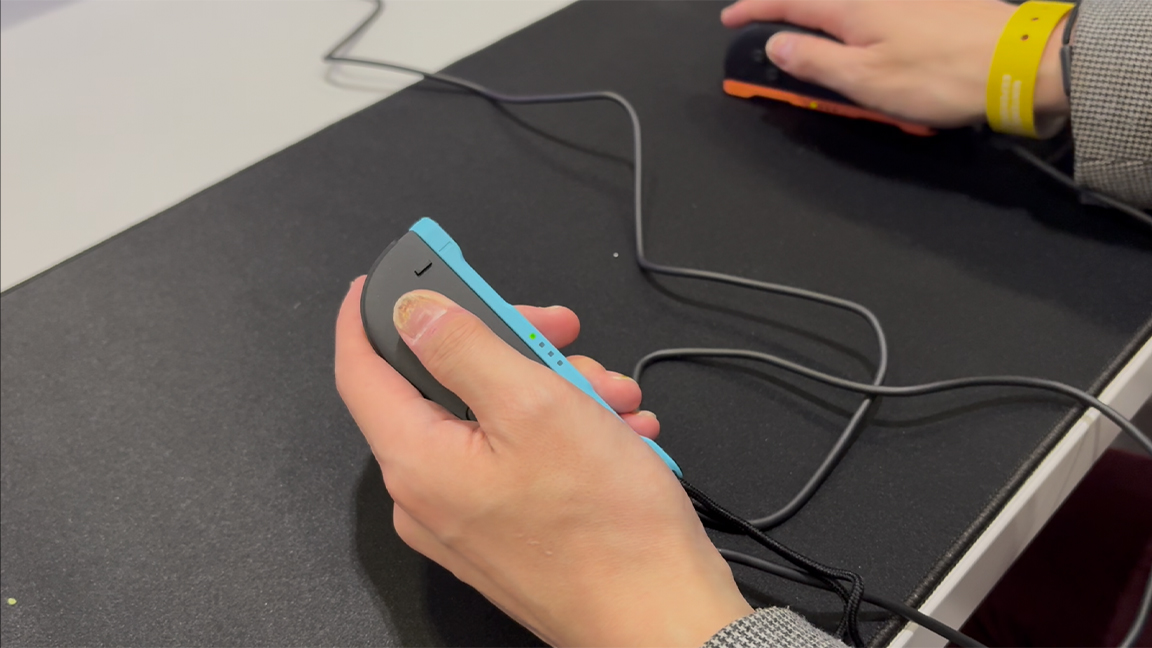
This is nonetheless the first time a games console has come with mouse functionality right out of the box (two in fact, since there’s an optical laser in each Joy-Con 2), and having had a chance to try it at the Nintendo Switch 2 Experience in London, it may actually change the way I think about playing games.

Not only has it rewired my assumptions of where and how a mouse can be used but I can still control movement with the left Joy-Con rather than having my fingers stretched out awkwardly on a keyboard, the reason why I stick to a pad even when playing on PC.

Seamless Switching and Customization

What really blew my mind is just how seamless it is to switch to mouse mode simply by turning the Joy-Con 2 on its side. It means that whilst playing Metroid Prime 4 on Switch 2, I could quickly compare how it felt to aim using the stick, gyros, and mouse. That both Joy-Con buttons and gyro-aiming can still be used in mouse mode is also why you wouldn’t just simply plug in any old USB mouse either.

Future of Mouse Controls on Switch 2

Nintendo is already putting its dual mice to innovative use with wheelchair basketball game Drag x Drive, where you drag the dual mice to control your wheelchair (read our guide to the best Switch 2 launch day games). But this doesn’t mean other developers have to try and shoehorn in mouse functions.

Compared to the Wii’s motion controls or the Wii U’s second screen, this isn’t actually very gimmicky at all, as I can see a lot of PC devs being able to easily port over their first-person shooters, strategy sims, or management games to Switch 2 with the original PC version’s mouse controls intact.

Concerns and Future Outlook

My concern is that the thin and unergonomic design of the Joy-Con 2 means I’ll likely not be able to use this functionality without wrist-ache in the long run (it’s already been a few years since I changed to using an ergonomic mouse on my PC for that reason).

I’m also now dreading the inevitable Splatoon 4, because if I’m already lagging behind the squid kids in Splatoon 3, I’m going to be hopeless when they’re using mouse controls.

Conclusion

The addition of mouse controls to the Switch 2 is a significant innovation that has the potential to change the way we play games. While it may not be as groundbreaking as some of Nintendo’s past innovations, it’s a welcome addition to the console and one that could lead to some exciting new gaming experiences.

FAQs

Q: When is the Nintendo Switch 2 releasing?

A: The Nintendo Switch 2 releases on June 5th in the UK, with a release date yet to be announced for the US.

Q: Can I use any old USB mouse with the Switch 2?

A: No, you’ll need to use the Joy-Con 2’s built-in optical laser for mouse functionality.

Q: Will mouse controls be supported in all games?

A: No, developers will need to specifically implement mouse controls in their games for them to work on the Switch 2.

Q: Will the Joy-Con 2’s design cause wrist strain?

A: Yes, the thin and unergonomic design of the Joy-Con 2 may cause wrist strain if used for extended periods of time.

Futures of Work ~ The economic and social contribution of the high-wage immigration programme in Canada

0

Canada is a country built from immigration and by immigrants. In less than 500 years, Canada has placed itself as one of the best countries to live in and remains a leader in terms of immigration destinations.

While academics and practitioners have focused more regularly on the case of low-wage temporary foreign workers over the past decade, here I will delve mainly into Canadian high-wage immigration, although some of my observations can also apply to the low-wage category.

From a business perspective, hiring high-wage workers provides substantial advantages for Canadian employers, offering a strategic solution to the growing local skills shortage that many companies face. Indeed, despite prolonged searches for qualified local professionals, many employers are unable to find Canadian citizens or permanent residents to fill available positions in Canada. This compels them to look for international talent to meet their critical business needs. Here, a procedure known as an application for a Labour Market Impact Assessment (LMIA) comes into play.

The Temporary Foreign Worker Programme (TFWP) allows Canadian employers to hire foreign nationals to fill labour shortages in Canada. Through the TFWP, a LMIA and a temporary work permit are required before a foreign national can begin to work for a Canadian employer. A LMIA is a document that serves as proof that there will be a positive or neutral impact on the Canadian labour market if the employer hires the foreign worker. It also serves to indicate that the employer was not able to find a local worker to fill a specific position. The LMIA process can differ depending on whether the position offered to the targeted employee is classified as ‘high-wage’ or ‘low-wage’.

Temporary foreign workers being paid under the provincial/territorial median wage are considered to hold a low-wage position, while those being paid at or above the median wage are considered to hold a high-wage position.

As part of the processing of an LMIA application, the federal government makes sure that the employer is legitimate and it will offer working conditions, including a salary, that will be similar to what would be offered to Canadian citizens and permanent residents in the same position in the same region. In fact, this base principle applies to both high-wage and low-wage workers.

High-wage workers allow companies to strengthen their economic position, giving them a competitive advantage in sectors where talent and expertise are in short supply. We must remember that Canada remains – despite its vast territory – a ‘small’ country with a solid economy and many diversified industries which, if we want them to remain in Canada or continue to be sustainable, require the recruitment of foreign talent. Indeed, foreign workers bring valuable experience, knowledge and skills that allow Canadian companies to stay in Canada, and elevate their global competitiveness, particularly in high-demand fields such as technology, engineering, healthcare and finance.

Moreover, by hiring foreign talent, businesses also enrich their internal diversity, fostering an environment that encourages creativity, drives innovation and cultivates a deeper understanding of global markets – key factors that offer a distinct edge in the marketplace. In this regard, employing foreign workers not only supports the growth of Canadian businesses but it also facilitates their expansion into international markets, thus capitalising on the experience and cultural insights of employees familiar with diverse countries and economies.

In the current global economic context, if Canada aims to achieve the level of growth, development and innovation seen in the United States, China or the European Union – territories with significantly larger populations – it will need to attract the best talent from around the world, notably renowned scientists, professionals and leaders who can drive the global expansion of Canadian companies. Likewise, Canadians are often called upon to work abroad to contribute to the development of other countries.

Illustratively, this is notably the case for employees of Hydro-Québec – a Quebec Crown corporation that is a global reference in hydroelectricity – who are sent abroad, including to China, to share their knowledge and transfer our Canadian know-how. To continue to be recognised elsewhere, we also need foreign talent on Canadian soil.

To be sure, behind every foreign worker driving the growth of the Canadian market, there is a person who has left their home country in search of a better life or who wishes to continue to strive professionally. Many skilled workers arrive in Canada with their families, hoping to build a more promising future, seeking peace, acceptance and opportunity.

In my role as an immigration lawyer, I have met and worked with many foreign workers who, through the Canadian immigration system, were able to access specific parallel immigration programmes that have supported their spouses (married or common-law) and their children. Canada was, many years ago, one of the first countries in the world with a system that facilitated the admission of spouses and children, as well as one of the first to admit same-sex partners. That said, high-wage foreign workers’ positive experiences need to be understood in contrast with low-wage and less qualified individuals who also go through TFWPs, however with some different requirements. Proper guidance and support remain the main and possibly the only way to properly navigate the programmes and ensure that human dignity is kept at the centre of all decisions and choices.

When foreign workers feel valued and appreciated, it leads to greater job satisfaction, improved retention rates and heightened motivation to contribute to the success of businesses and Canada in general. Their sense of belonging and recognition motivates them to excel, which benefits not only the company but also the broader Canadian society. These workers often become valuable mentors to their colleagues, sharing knowledge and offering guidance that can foster professional growth and career advancement.

One specific case drew my attention during my career. Over 25 years ago, towards the end of the ‘Escobar years’ in Colombia, a highly specialised Colombian executive would leave for work every morning in an armoured car. Their children also travelled to school in an armoured car, their lives being otherwise at risk. The recruitment of this person by a Canadian company allowed the latter to tap into sought-after expertise, thus addressing several environmental, social and governance (ESG) factors for its benefits as a Canadian corporation as well as the ESG goals of Canada as a country. Now a Canadian citizen, this person mentioned remembering the feeling of joy and peace they experienced the day they realised that their children were safe in Canada, that children could go out alone with their friends without fearing that they would be kidnapped, drugged, raped or killed. Furthermore, these children, now adults, contribute significantly to the development of Canada, as many others do.

We cannot underestimate the significant human benefits of the arrival of these individuals in Canada. By hiring people from diverse backgrounds, companies not only contribute to the cultural richness of the Canadian workforce but also foster cultural exchanges and understanding.

From my perspective looking at qualified foreign worker hiring in Canada, I argue that foreign talent does not harm the Canadian labour market. On the contrary, these foreign workers bring valuable skills that enable Canadian employers to better compete in global markets, drive innovation, create jobs for Canadians, and contribute significantly to overall economic growth – all while respecting and honouring humanity with a system that has safeguards that make employers liable for any infraction, breaches or non-compliance.

Canada has put in place an inspection process to prevent Canadian employers from exploiting foreign workers, which requires employers not only to confirm that working conditions are respected but that the work environment respects all laws and regulations. My experience can provide nuances to the overarching argument regarding modern slavery being reinforced by Canadian TFWPs.

Moreover, work permits limited to one employer do not prevent foreign workers from searching for new employment and applying for a new work permit, including with new procedures aimed at decreasing processing times.

To conclude, the immigration system in Canada needs to be understood within the parameters of its polarised character. There is room for variegated actors to open a wider discussion about how we can improve our immigration system to allow Canada to continue growing and innovating. This will help ensure that we leave a stable country – both economically and socially – for our children and grandchildren, where the rights of all workers, both local and foreign, are respected.

***

Jean-Philippe Brunet has been a member of the Canadian Bar Association (CBA) for over 20 years and has served on its executive since 2004, including as President of the National Section in Immigration and Citizenship Law in 2007. He is one of the few Quebec lawyers to have devoted his entire career exclusively to advising businesses and businesspeople on immigration matters. He has been the managing partner of Galileo Partners since its foundation in 2016. Jean-Philippe regularly writes on topics related to immigration and international mobility in renowned publications, in addition to being frequently interviewed by various media (newspapers, online, radio and television) on hot topics in the field of immigration. He is also a regular speaker on provincial, national and international panels.

Image credit: Marija Zaric via Unsplash

Balancing AI and Privacy

0

Apple’s New AI Training System: A Breakthrough in Privacy

Introducing a New Era in AI Training

Apple has announced a significant breakthrough in its AI training system, which allows devices to compare synthetic datasets to samples of recent emails or messages from users who have opted into its Device Analytics program. This innovative approach enables Apple to improve its AI text outputs without accessing user data or copying it from their devices.

How it Works

The process begins with Apple devices comparing a synthetic dataset to samples of recent emails or messages from users who have opted into its Device Analytics program. The devices will then determine which synthetic inputs are closest to real samples and relay "only a signal indicating which of the variants is closest to the sampled data" to Apple. This ensures that the data never leaves the device and is kept private.

Benefits of the New System

The new AI training system comes with several benefits, including improved AI text outputs and enhanced user privacy. Apple’s AI models will be trained on the most frequently picked fake samples, resulting in more helpful responses. Additionally, the company’s use of differential privacy will prevent it from linking data to any one person.

Current State of Apple’s AI Training

Currently, Apple trains its AI models on synthetic data only, which may result in less helpful responses. The company has struggled with the launch of its flagship Apple Intelligence features, pushing back the launch of some capabilities and replacing the head of its Siri team.

Rollout of the New System

The new AI training system is being rolled out in a beta version of iOS and iPadOS 18.5 and macOS 15.5. This move marks a significant step forward in Apple’s efforts to improve its AI capabilities while prioritizing user privacy.

Differential Privacy

Apple has been using differential privacy since at least 2016, which introduces randomized information into a broader dataset to prevent it from linking data to any one person. This approach will also be used in the company’s new AI training plans.

Conclusion

Apple’s new AI training system represents a significant breakthrough in the field of artificial intelligence. By introducing a synthetic dataset comparison approach, Apple is able to improve its AI text outputs without compromising user privacy. This move is a significant step forward for the company and sets a new standard for AI training in the industry.

Frequently Asked Questions

Q: How does Apple’s new AI training system work?
A: Apple’s new AI training system compares a synthetic dataset to samples of recent emails or messages from users who have opted into its Device Analytics program.

Q: Why is this approach better than traditional AI training methods?
A: This approach allows Apple to improve its AI text outputs without accessing user data or copying it from their devices.

Q: What is differential privacy, and how does it apply to Apple’s new AI training system?
A: Differential privacy is a method that introduces randomized information into a broader dataset to prevent it from linking data to any one person. Apple will use this approach in its new AI training plans.

Q: When can I expect to see the new AI training system rolled out?
A: The new AI training system is being rolled out in a beta version of iOS and iPadOS 18.5 and macOS 15.5.

The Evolution of Filmmaking

0

Championing the Art of Creation

In AI dominated times, it sometimes seems the goal is to make creative work ever faster and cheaper, so it’s refreshing to see a brand championing the long, painstaking process of creation.

A Behind-the-Scenes Epic

The latest ad from British streaming service Britbox turns the art of the behind-the-scenes film into an epic live-action human animation. The ad is a single take recorded over an incredible 14 hours and 45 minutes (sped up to 1 minute 30 to respect social media attention spans).

A Powerful Combination of Techniques

With a powerful combination of timelapse and forced perspective techniques, it follows one actor through four genres and 11 sets, highlighting the magic of the screen.

The Evolution of Filmmaking

The ad also tells another story: the evolution of filmmaking itself. The production techniques used appear in chronological order, going from the earliest matte painting backdrops to the most modern LED screen CGI live in-camera.

A Behind-the-Scenes of the Behind-the-Scenes

There’s even a behind-the-scenes of the behind-the-scenes, or a timelapse of the timelapse. The video below, posted on Instagram, shows how the 50-strong crew of makeup, costume, set design and prop design artists worked to make the ad happen.

Challenges of Filming

Filming in a single take resulted in particular challenges. The team wore out three camera shutters due to the length of the shoot, and fans and ice packs were needed to stop equipment from overheating.

The Result

When Kristina stands up, she had to drag the movement out for 45 seconds so that it could be appreciated at 1 frame per second. The result is a mesmerising and inspiring love letter to television that feels like a magic trick – or four magic tricks – rolled into one.

Conclusion

For more television behind-the-scenes magic, see the making of the Severance title sequence. And if you’re wondering what to watch next, don’t miss Netflix’s upcoming comic adaptation – our explainer what is the Eternaut?

FAQs

Q: How long did it take to film the ad?
A: The ad was filmed over 14 hours and 45 minutes.

Q: How many sets were used in the ad?
A: There were 11 sets in the ad.

Q: How many people were involved in the production?
A: There were 50 people involved in the production, including makeup, costume, set design and prop design artists.

Q: What was the most challenging part of filming?
A: The most challenging part of filming was the single take, which resulted in the team wearing out three camera shutters and needing fans and ice packs to stop equipment from overheating.

Nvidia Launches AI Chip Production on US Soil

Nvidia Announces AI Chip Manufacturing in the US

Breaking Ground in Arizona and Texas

Nvidia announced plans today to manufacture AI chips and build complete supercomputers on US soil for the first time, commissioning over one million square feet of manufacturing space across Arizona and Texas. The company has already begun producing its Blackwell chips at Taiwan Semiconductor Manufacturing Co’s (TSMC) facilities in Phoenix. Until now, the company’s AI chips have been manufactured exclusively in Taiwan, presenting geopolitical risks to the supply chain.

Manufacturing Partnerships

The company is setting up supercomputer manufacturing plants in Texas—partnering with Foxconn in Houston and Wistron in Dallas, with mass production expected to ramp up within 12 to 15 months. For chip packaging and testing operations, Nvidia is collaborating with Amkor and SPIL in Arizona. The supply chain for building the kinds of advanced GPUs that accelerate training and running AI models requires advanced manufacturing, packaging, and testing technologies that each partner works together to provide.

CEO’s Statement

"The engines of the world’s AI infrastructure are being built in the United States for the first time," said Jensen Huang, Nvidia’s founder and CEO, in a news release. "Adding American manufacturing helps us better meet the incredible and growing demand for AI chips and supercomputers, strengthens our supply chain, and boosts our resiliency."

Geopolitical Significance

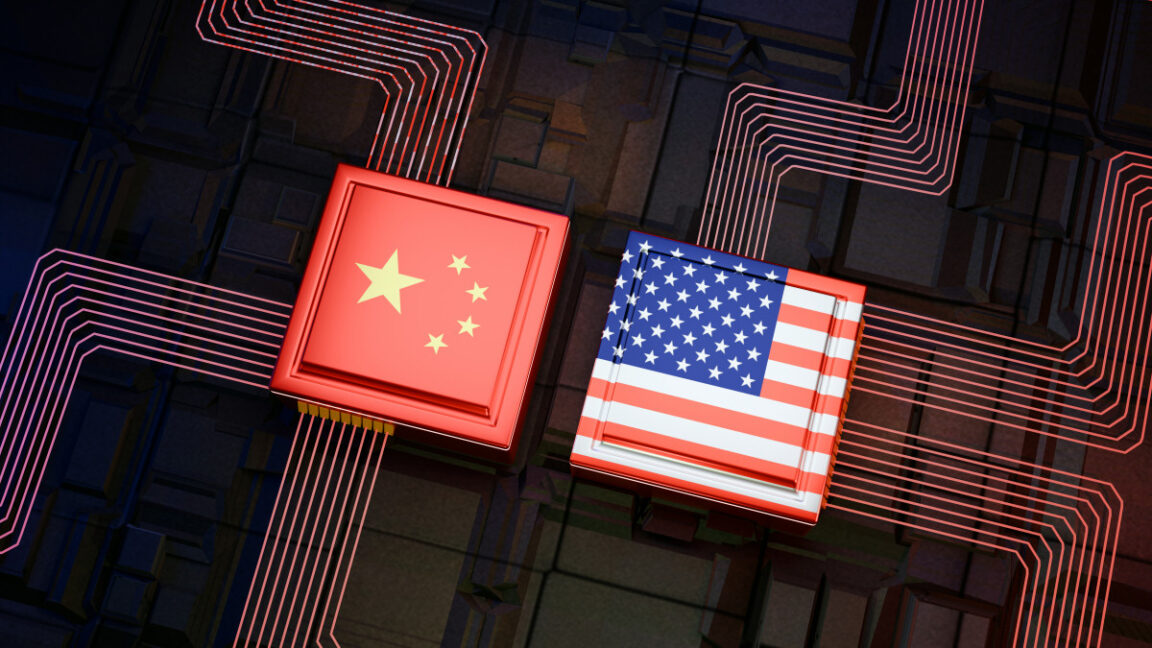
This move comes amid rising US-China tensions and the Trump administration’s push for domestic manufacturing. It also comes days after Nvidia reportedly avoided export controls on its H20 chip by striking a domestic manufacturing deal with the Trump administration. The H20 is Nvidia’s most powerful AI chip that can still be legally exported to China under current US restrictions; it’s designed with reduced specifications to comply with export controls while maintaining compatibility with Nvidia’s CUDA platform.

Conclusion

Nvidia’s decision to manufacture AI chips and supercomputers in the US is a significant move that will strengthen the company’s supply chain and resiliency. It also marks a shift in the global chip manufacturing landscape, as the US will now play a more prominent role in the production of high-end AI chips.

FAQs

Q: Why is Nvidia manufacturing AI chips in the US?
A: Nvidia is manufacturing AI chips in the US to reduce its reliance on international supply chains and to strengthen its supply chain and resiliency.

Q: Who are Nvidia’s manufacturing partners in the US?
A: Nvidia’s manufacturing partners in the US include TSMC, Foxconn, Wistron, Amkor, and SPIL.

Q: What is the significance of this move amid US-China tensions?
A: This move is significant amid US-China tensions, as it demonstrates the US’s ability to produce high-end AI chips and supercomputers domestically.

Q: Will this move affect the global chip manufacturing landscape?
A: Yes, this move will affect the global chip manufacturing landscape, as the US will now play a more prominent role in the production of high-end AI chips.

HDMI vs USB-C: The Ultimate Showdown

0

What is HDMI?

High-Definition Multimedia Interface (HDMI) is an audio and video interface that was introduced in 2003, largely to replace the increasingly outmoded DVI format. HDMI was designed to transmit uncompressed video and audio data and since the early 2000s has become the standard for connecting high-definition devices. It supports various resolutions, from standard definition to 4K and beyond, and is commonly found in almost any monitor, television and projector on the market, as well as a wide array of consumer electronics. Like any technology, time sees the platform upgraded, so over the year HDMI has evolved, with versions like HDMI 2.0 and HDMI 2.1 offering enhanced bandwidth and features such as higher refresh rates and dynamic HDR.

What is USB-C?

Designed to replace the first incarnation of the USB port, USB-C, or Universal Serial Bus Type-C, is a very versatile connector standard that’s emerged over the course of the last decade. It’s Characterised by its small, reversible design, which unlike USB-A makes it very easy to use on the go. What’s also useful is that it support a multitude of functions, including data transfer, video output and power delivery and its adaptability has led to widespread adoption across a number of small devices from smartphones to laptops and docking stations. For creatives it’s also notable and interesting because USB-C can also support different protocols through alternate modes, so DisplayPort can be used to power screens, and Thunderbolt for high-speed data transfer and video output capabilities.

HDMI Compatibility

HDMI’s widespread adoption over the course of the last twenty years ensures compatibility across a broad spectrum of devices, so it’s unlikely many devices on the market at the moment won’t come with an HDMI option. Whether connecting a laptop to a monitor, a games console to a TV or a PC to a projector in a conference room, HDMI is still the fail-safe go-to and provides a reliable and straightforward solution. Its plug-and-play nature means devices typically recognise connections instantly, minimising setup time, but it’s worth bearing in mind that they only support video and audio and not data transfer, so additional cables will be required for other functions. HDMI is also now an older platform and it’s time may be limited. Some devices, most significantly Apple’s MacBooks started shipping a few years ago with USB-C connectivity only.

Data Transfer

For devices that offer USB-C, its versatility extends beyond connectivity and its ability to transmit data, deliver power and support several video outputs makes it a multifunctional interface that’s here to stay. There’s a design and aesthetic benefit too, as one cable that provides a multitude of functions reduces clutter, simplifies setups and means you have far less lead management to carry out.

The caveat to all of the above, however, is that not all USB-C ports are created equal, and the capabilities of a USB-C port depends on the specific protocols it supports. For example, some USB-C ports may support DisplayPort Alternate Mode for video output, such as on a Mac, while others might include Thunderbolt 3 or 4 support that offering higher data transfer rates and enhanced display capabilities. Some may only offer one or the other, or a lower transfer rate.

Which is best for creatives?

So, in conclusion, if you’re a creative professional and you’re looking at these two different interfaces, how do you know which one to choose or favour over the other? It really hinges on your specific needs and device capabilities. If you’re a photo editor, for example, HDMI offers robust and reliable transmission, making it ideal for straightforward display connections and accurate representation of colour across industry standards. It also opens you up to more screens and cheaper display options, such as its ubiquity.

However, as technology progresses, there’s no doubt that USB-C, with its multifaceted data and power capabilities, provides a more comprehensive solution. Its ability to handle multiple things through a single port can streamline workflows and reduce the number of cables required, and this consolidation is particularly beneficial if you’re a creative who juggles multiple devices and peripherals. It’s also a more future-proof platform, and if I was a video editor or content creator, I would spend a little more money to purchase kit with high-speed USB-C compatibility to ensure compatibility with emerging technologies. Nonetheless, it’s crucial to ensure that your USB-C ports support the necessary protocols, such as DisplayPort Alternate Mode or Thunderbolt, to fully leverage these benefits.

Conclusion

Ultimately, the choice between HDMI and USB-C comes down to your specific needs and device capabilities. HDMI offers robust and reliable transmission, making it ideal for straightforward display connections and accurate representation of colour across industry standards. However, USB-C offers a more comprehensive solution, with its multifaceted data and power capabilities providing a more streamlined and future-proof option for creatives.

Frequently Asked Questions

Q: Which interface is more widely adopted?
A: HDMI is more widely adopted, with a broader range of devices supporting it, including monitors, TVs, projectors, and consumer electronics.

Q: Which interface is more future-proof?
A: USB-C is more future-proof, with its ability to handle multiple functions through a single port and support for emerging technologies like Thunderbolt and DisplayPort Alternate Mode.

Q: Which interface is more suitable for creative professionals?
A: It depends on the specific needs and device capabilities of the creative professional. HDMI may be more suitable for photo editors who require robust and reliable transmission, while USB-C may be more suitable for video editors and content creators who require a more comprehensive solution with high-speed data transfer and video output capabilities.

Debates over AI benchmarking have reached Pokémon

0

Not Even Pokémon is Safe from AI Benchmarking Controversy

A Viral Claim: Google’s Gemini Model Surpasses Anthropic’s Claude Model

Last week, a post on X went viral, claiming that Google’s latest Gemini model surpassed Anthropic’s flagship Claude model in the original Pokémon video game trilogy. Reportedly, Gemini had reached Lavender Town in a developer’s Twitch stream; Claude was stuck at Mount Moon as of late February.

The Viral Tweet

Gemini is literally ahead of Claude atm in pokemon after reaching Lavender Town

119 live views only btw, incredibly underrated stream pic.twitter.com/8AvSovAI4x
— Jush (@Jush21e8) April 10, 2025

The Hidden Advantage

But what the post failed to mention is that Gemini had an advantage. As users on Reddit pointed out, the developer who maintains the Gemini stream built a custom minimap that helps the model identify “tiles” in the game like cuttable trees. This reduces the need for Gemini to analyze screenshots before it makes gameplay decisions.

A Benchmarking Controversy

Now, Pokémon is a semi-serious AI benchmark at best — few would argue it’s a very informative test of a model’s capabilities. But it is an instructive example of how different implementations of a benchmark can influence the results.

Custom Implementations Can Skew Results

For example, Anthropic reported two scores for its recent Anthropic 3.7 Sonnet model on the benchmark SWE-bench Verified, which is designed to evaluate a model’s coding abilities. Claude 3.7 Sonnet achieved 62.3% accuracy on SWE-bench Verified, but 70.3% with a “custom scaffold” that Anthropic developed.

Meta’s LM Arena: A Recent Example

More recently, Meta fine-tuned a version of one of its newer models, Llama 4 Maverick, to perform well on a particular benchmark, LM Arena. The vanilla version of the model scores significantly worse on the same evaluation.

Implications for AI Benchmarking

Given that AI benchmarks — Pokémon included — are imperfect measures to begin with, custom and non-standard implementations threaten to muddy the waters even further. That is to say, it doesn’t seem likely that it’ll get any easier to compare models as they’re released.

Conclusion

In the age of AI benchmarking, it’s essential to consider the nuances of each model’s implementation. A fair comparison requires standardizing the testing environment and avoiding custom solutions that can skew results. As the field continues to evolve, it’s crucial to maintain transparency and consistency in benchmarking methods.

FAQs
Q: What is AI benchmarking?

A: AI benchmarking is the process of evaluating the performance of artificial intelligence models using standardized tests or tasks.

Q: Why is custom implementation a concern in AI benchmarking?

A: Custom implementations can influence the results, making it challenging to compare models accurately. This can lead to misleading conclusions about a model’s capabilities.

Q: What are some examples of imperfect AI benchmarks?

A: The Pokémon game trilogy, SWE-bench Verified, and LM Arena are examples of imperfect AI benchmarks. Each has its limitations and potential biases.

Q: How can we improve AI benchmarking?

A: Standardizing testing environments, maintaining transparency, and avoiding custom solutions can help improve the accuracy of AI benchmarking.