Home Blog Page 600

Back to School, Stress-Free: Students’ Strategies

Key Points

  • 60.5% of students reported having a test, quiz, or exam within their first week of school.
  • 49.9% of students expect math to be their hardest subject, followed by English (14.7%) and science (13.0%).
  • 72% of high school students are stressed about returning to school this year.
  • 82% of students plan to use AI-powered online platforms like Brainly to help with their schoolwork at least once per week this year.

A Stressful Return to School

The new school year brings with it a range of challenges for students, including academic pressure, social dynamics, and the struggle to adapt to a new routine. In a survey conducted by Brainly, 72% of high school students reported feeling stressed about returning to school this year. The most common stressors include homework (55.1%), studying for tests (48.8%), and writing papers or essays (44.1%).

Where Students Turn for Help After School

A growing number of students are turning to digital platforms to ease their workload and manage their anxiety. According to the survey, 82% of students plan to use AI-powered online platforms like Brainly to help with their schoolwork at least once per week this year. Nearly one third of students in grades 6-12 plan to utilize AI-powered online platforms every day that they do homework.

Navigating the Ethics of AI in Education

The use of AI-powered tools is not without controversy in some schools. The survey revealed that 65% of students have experienced at least one AI tool being banned in their classroom. Despite these restrictions, a significant 60% of students indicated that they would continue to use AI tools to support their learning, even if they were banned in the classroom.

Conclusion

As the new school year begins, it is clear that AI is here to stay and will play an increasingly important role in education. With nearly half of students anticipating hours of nightly homework and an overwhelming majority planning to use AI to help manage their workload, educators must adapt to this new landscape. Instead of resisting these changes, schools have the opportunity to embrace AI as a tool that can enhance learning and alleviate the stress students face each year.

Methodology

The research for this report was completed in 2 separate anonymous surveys conducted on Brainly.com. The first surveyed 1,300 U.S. students in grades 6-12 and completed on August 21, 2024. The second surveyed 1,500 U.S. students in grades 6-12 and completed on September 3, 2024.

FAQs

Q: What percentage of students reported having a test, quiz, or exam within their first week of school?
A: 60.5%

Q: What percentage of students expect math to be their hardest subject?
A: 49.9%

Q: What percentage of high school students are stressed about returning to school this year?
A: 72%

Q: What percentage of students plan to use AI-powered online platforms like Brainly to help with their schoolwork at least once per week this year?
A: 82%

Q: What percentage of students have experienced at least one AI tool being banned in their classroom?
A: 65%

Q: What percentage of students would continue to use AI tools to support their learning, even if they were banned in the classroom?
A: 60%

AI ART R Live Stream Fun

0

Unlock the Power of Workflows with Olivio Tutorials

Support Me on Patreon for Exclusive Content

Are you tired of feeling overwhelmed by the complexity of your workflows? Do you struggle to stay organized and focused on your tasks? Look no further than Olivio Tutorials, your go-to source for expert guidance on workflow management.

As a patron of Olivio Tutorials, you’ll gain access to exclusive content, including workflows, tutorials, and more. By supporting me on Patreon, you’ll be able to unlock the secrets to streamlining your workflow and achieving your goals.

Get 1€ Discount with Code “Olivio”

But that’s not all. As a special thank you to my patrons, I’m offering a 1€ discount on all purchases made with code “Olivio”. Don’t miss out on this amazing opportunity to save and get the most out of your workflow management experience.

Why Workflows Matter

Workflows are the backbone of any successful project or business. They help you stay organized, focused, and on track, ensuring that you’re able to deliver high-quality results on time and on budget. But workflows can be complex and overwhelming, especially for those who are new to workflow management.

Benefits of Workflows

So, what are the benefits of workflows? Here are just a few:

* Improved organization and structure
* Increased efficiency and productivity
* Better communication and collaboration
* Enhanced accountability and transparency
* Reduced stress and anxiety

How to Get Started with Workflows

Getting started with workflows is easier than you think. Here are a few simple steps to follow:

1. Identify your goals and objectives
2. Map out your workflow
3. Break down your workflow into smaller tasks
4. Prioritize your tasks
5. Start implementing your workflow

Conclusion

In conclusion, workflows are a powerful tool for achieving success in any field. By streamlining your workflow, you’ll be able to stay organized, focused, and on track, ensuring that you’re able to deliver high-quality results on time and on budget. Don’t miss out on this amazing opportunity to unlock the power of workflows and take your productivity to the next level.

Frequently Asked Questions
Q: What is a workflow?

A: A workflow is a series of steps or tasks that are performed in a specific order to achieve a specific goal or objective.

Q: Why do I need a workflow?

A: You need a workflow to stay organized, focused, and on track, ensuring that you’re able to deliver high-quality results on time and on budget.

Q: How do I create a workflow?

A: To create a workflow, identify your goals and objectives, map out your workflow, break down your workflow into smaller tasks, prioritize your tasks, and start implementing your workflow.

Q: What are the benefits of workflows?

A: The benefits of workflows include improved organization and structure, increased efficiency and productivity, better communication and collaboration, enhanced accountability and transparency, and reduced stress and anxiety.

NVIDIA Blackwell Doubles LLM Training Performance in MLPerf Training v4.1

0

Enhancing the Software Stack for Blackwell

With each new platform generation, NVIDIA extensively co-designs hardware and software to allow developers to achieve high delivered workload performance. The Blackwell GPU architecture delivers large leaps in Tensor Core compute throughput and memory bandwidth. Many aspects of the NVIDIA software stack were enhanced to take advantage of the significantly improved capabilities of Blackwell in this round of MLPerf Training, including:

  • Optimized GEMMs, Convolutions and Multi-head Attention: New kernels were developed to make efficient use of the faster and more efficient Tensor Cores in the Blackwell GPU architecture.
  • More Efficient Compute and Communication Overlap: Architecture and software enhancements allow for better use of available GPU resources during multi-GPU execution.
  • Improved Memory Bandwidth Utilization: New software was developed as part of cuDNN library that makes use of the Tensor Memory Accelerator (TMA) capability, first introduced in the Hopper architecture, improving HBM bandwidth utilization for several operations, including normalizations.
  • More Performant Parallel Mapping: Blackwell GPUs introduce a larger HBM capacity, which allows for parallel mappings of language models that use hardware resources more efficiently

Additionally, to improve performance on Hopper, we enhanced cuBLAS with support for more flexible tiling options and improved data locality. Optimized Blackwell multi-head attention kernels and convolution kernels in cuDNN have leveraged cuDNN Runtime Fusion Engines. The NVIDIA Transformer Engine library has been instrumental to achieving optimized performance for language models through a combination of optimizations described above.

Blackwell Delivers a Giant Leap for LLM Pre-training

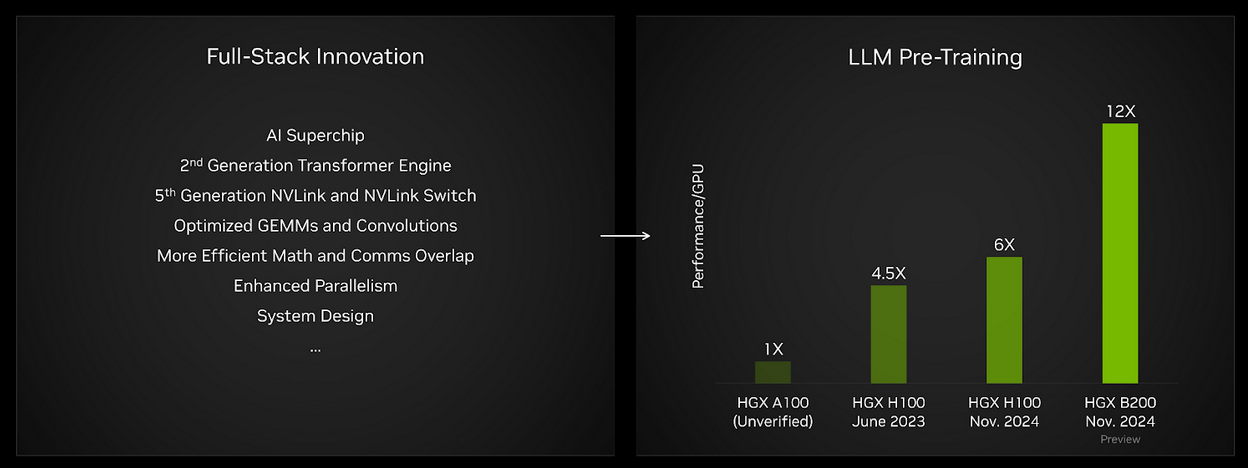
The MLPerf Training suite includes an LLM pre-training benchmark based on the GPT-3 model developed by OpenAI. This test is intended to represent state-of-the-art foundation model training performance. On a per-GPU basis, Blackwell results this round delivered twice the performance of Hopper in its fourth submission. And, compared to results gathered on HGX A100 (not verified by MLCommons) – based on the NVIDIA Ampere architecture – performance per GPU has increased by about 12x.

On the left is an enumeration of some of the key hardware and software advances that helped enable the performance gains demonstrated in the NVIDIA Blackwell submissions, and on the right is a chart showing performance improvements baselined to HGX A100, getting to a total of 12x more perf with HGX B200.

Accelerating AI Plans Amidst Lack of ROI

0

Organizations Struggle to Adopt Artificial Intelligence

Organizations feel pressure to accelerate their adoption of artificial intelligence (AI) but have yet to see the anticipated gains. This is coupled with the lack of necessary infrastructure to scale their deployments.

AI Readiness Index

According to Cisco’s 2024 AI Readiness Index, just 23% say they have the necessary GPUs to meet current and future AI demands. The index surveyed 3,600 senior business leaders across 14 Asia-Pacific markets, including Japan and China.

Data Security and Governance

Another 30% of respondents have the capabilities to safeguard data in their AI models with end–to–end encryption, security audits, continuous monitoring, and instant threat response.

Deployment and Tapping AI-Powered Technologies

Moreover, only 15% of respondents are fully prepared to deploy and tap AI-powered technologies, compared to 17% last year, Cisco said. The index assesses six areas to measure AI readiness, including strategy, data, governance, and culture.

Pressure to Deploy AI

Across the Asia-Pacific, 98% of respondents expressed an increased urgency to deploy AI over the past year, with 49% pointing to their CEO and leadership team as the main source of pressure. Another 40% said their middle management was feeling pushed to adopt AI, while 36% cited their board of directors.

Investing in AI

These organizations are setting aside resources for AI, with 50% parking between 10% and 30% of their IT budget to AI deployments. Some 30% plan to spend at least 40% of their IT budget on AI initiatives over the next four to five years, 5% more than those spending the same proportion currently.

Priorities

Half of the respondents highlight the need to improve the scalability and manageability of their IT infrastructure as a top priority. Some 42% are spending their AI funds on cybersecurity, 40% are focusing on IT infrastructure, and 34% are investing in data analysis and management.

Returns on Investment

However, more than 40% have not seen any returns on their investment or described the gains as short of their expectations to augment, assist, or automate current processes, the study revealed.

Conclusion

The article highlights the challenges organizations face in adopting, deploying, and fully leveraging AI. With the increasing pressure to deploy AI, organizations must adopt a comprehensive approach to implementation and connect the dots to link AI ambition with readiness.

FAQs

Q: What percentage of respondents have the necessary GPUs to meet current and future AI demands?
A: 23%

Q: What percentage of respondents have the capabilities to safeguard data in their AI models?
A: 30%

Q: What percentage of respondents are fully prepared to deploy and tap AI-powered technologies?
A: 15%

Q: What percentage of respondents expressed an increased urgency to deploy AI over the past year?
A: 98%

Q: What percentage of respondents plan to spend at least 40% of their IT budget on AI initiatives over the next four to five years?
A: 30%

AI Shortform Video Creator

0

Introducing OpusClip: Revolutionizing Digital Organization

Are you tired of wasting time searching for files and documents in a sea of digital clutter? Look no further than OpusClip, the innovative solution that makes organizing your digital life a breeze.

The Problem with Digital Organization

We’ve all been there – scrolling through endless folders, searching for that one crucial file, only to end up with a headache and a sense of frustration. Digital organization can be overwhelming, especially with the ever-growing amount of data we create and store.

The Solution: OpusClip

OpusClip is a cutting-edge tool that empowers you to take control of your digital life. With its AI-powered technology, OpusClip effortlessly organizes your files and documents, allowing you to quickly find what you need when you need it.

How OpusClip Works

OpusClip’s intuitive interface makes it easy to upload your files and let the AI do the rest. The tool quickly analyzes your documents, extracting relevant information and categorizing them into logical folders and tags. This means you can say goodbye to tedious folder structures and hello to a streamlined digital workspace.

Benefits of Using OpusClip

By using OpusClip, you’ll enjoy numerous benefits, including:

  • Faster file retrieval: With OpusClip, you’ll never have to spend hours searching for a specific file again.
  • Increased productivity: By reducing the time spent on organization, you’ll have more time to focus on what matters most – your work.
  • Improved collaboration: OpusClip’s cloud-based platform makes it easy to share files and collaborate with others in real-time.
  • Enhanced data security: OpusClip’s advanced encryption and backup features ensure your files are always safe and secure.
Get Started with OpusClip Today

Ready to experience the power of OpusClip? Click the link below to start your free trial and discover a more organized, productive you:

Try OpusClip today

Explore AI Tools & News

Stay up-to-date with the latest AI trends and tools by visiting Future Tools, your go-to resource for all things AI:

Explore AI Tools & News

Conclusion

OpusClip is the game-changing solution you’ve been waiting for. By harnessing the power of AI, OpusClip makes digital organization effortless, efficient, and secure. Join the thousands of users who have already discovered the benefits of OpusClip and start experiencing the freedom of a clutter-free digital life.

FAQs

Q: Is OpusClip compatible with my device?

A: Yes, OpusClip is compatible with all devices, including desktops, laptops, and mobile devices.

Q: How do I get started with OpusClip?

A: Simply click the link above to start your free trial and follow the intuitive onboarding process.

Q: Is my data safe with OpusClip?

A: Absolutely! OpusClip uses advanced encryption and backup features to ensure your data is always secure and protected.

Q: Can I share files with others using OpusClip?

A: Yes, OpusClip’s cloud-based platform makes it easy to share files and collaborate with others in real-time.

Q: Is OpusClip difficult to use?

A: No, OpusClip is designed to be user-friendly and intuitive, making it easy to get started and start organizing your digital life.

4 AI Tools That Boost Productivity

0

The Best AI Tools to Boost Your Productivity

The generative AI boom might have started with the launch of ChatGPT, but the technology has now been integrated into all kinds of productivity platforms designed to make our everyday workflows easier.

1. Grammarly

Grammarly has been around for quite a while, and AI has always been an integral part of its services. The platform is known for its ability to check for spelling, grammar, conciseness, and more in everyday writing, and for good reason — it’s reliable and helpful.

My favorite way to use the tool is by turning on the Grammarly for Chrome extension so that the AI can work alongside me in the background to catch any mistakes I’ve missed. This is especially useful when writing on the go, like composing a quick email.

2. ChatGPT

I’ve tested most AI chatbots on the market, and ChatGPT recently became my favorite and a must-have in my workflow. Here’s why.

Although ChatGPT was undeniably impressive when it first launched, it had some major drawbacks, including a knowledge limit and an older GPT model. However, OpenAI upgraded its chatbot in May to address those issues, adding features typically limited to ChatGPT Plus users, including Browse, Vision, data analysis, file uploads, and GPTs. This upgrade makes free ChatGPT an all-encompassing AI tool for work that you should take advantage of.

3. Canva Pro

Canva Pro has nearly every AI tool you can imagine for graphic design, including its own AI image generator. However, if you create visual content daily like me, you likely won’t need to generate images that frequently. Instead, you need tools that make it easier and faster to create social media posts, invitations, flyers, and presentations — and that’s where Canva Pro shines.

My favorite tool, which I reach for constantly, is Canva’s AI Background Remover. Does it sound basic? Sure, but if you’ve ever had to isolate an item in a photo, you know how tedious the process can be using Photoshop or how badly some automated tools can botch this task.

4. Otter.ai

If you’ve ever transcribed a conversation by hand, you’ll know it’s a time-consuming and tedious task.

AI is here to help. Whether you’re a student who records your lectures, a professional who needs to create meeting notes and highlights, or someone who conducts interviews regularly, Otter.ai is a serious time-saver.

Conclusion

These AI tools can help you complete small but necessary daily tasks that add up to lots of saved time in the long run. The result: You spend less time on admin, and more time doing things you enjoy or that are of higher value to your work.

FAQs

Q: What is the best AI tool for grammar and writing?
A: Grammarly is a reliable and helpful tool for grammar and writing.

Q: What is the best AI chatbot for productivity?
A: ChatGPT is a must-have AI chatbot for productivity, with its ability to answer questions, provide information, and assist with writing and research.

Q: What is the best AI tool for graphic design?
A: Canva Pro is a powerful AI tool for graphic design, with its ability to automate tasks and create professional-looking designs.

Q: What is the best AI tool for transcription?
A: Otter.ai is a serious time-saver for transcription, with its ability to import voice recordings and generate accurate transcripts in minutes.

Edit Images with Words

0

Source

Introduction

The concept of a source refers to the origin or starting point of something, whether it be a physical object, a piece of information, or an idea. In various contexts, a source can be a crucial element in understanding the nature, quality, and reliability of the information being presented.

Types of Sources

There are several types of sources, each with its own unique characteristics and purposes. Some common examples include:

Primary Sources

Primary sources are original materials that provide firsthand information about a particular topic or event. Examples of primary sources include:

* Diaries and journals
* Letters and emails
* Photographs and videos
* Interviews and oral histories
* Original documents and records

Secondary Sources

Secondary sources are materials that interpret, analyze, or summarize primary sources. Examples of secondary sources include:

* Books and articles written by historians or experts
* News articles and editorials
* Reviews and critiques
* Syntheses and summaries

Tertiary Sources

Tertiary sources are materials that aggregate and organize secondary sources. Examples of tertiary sources include:

* Encyclopedias and dictionaries
* Bibliographies and indexes
* Abstracts and summaries
* Compilations and anthologies

Importance of Sources

Sources play a vital role in ensuring the accuracy, credibility, and reliability of information. By understanding the type and quality of sources used in a particular context, individuals can:

* Evaluate the credibility of information
* Identify biases and agendas
* Determine the relevance and usefulness of information
* Make informed decisions

Conclusion

In conclusion, sources are a fundamental component of information gathering and evaluation. By understanding the different types of sources and their characteristics, individuals can make informed decisions and ensure the accuracy and credibility of the information they use.

FAQs

Q: What is the difference between a primary and secondary source?

A: A primary source is an original material that provides firsthand information, while a secondary source is a material that interprets, analyzes, or summarizes primary sources.

Q: How do I evaluate the credibility of a source?

A: To evaluate the credibility of a source, consider the author’s qualifications, the publication’s reputation, and the date of publication. Additionally, look for biases, errors, and inconsistencies in the information presented.

Q: What is a tertiary source?

A: A tertiary source is a material that aggregates and organizes secondary sources, such as an encyclopedia or bibliography.

Q: Why is it important to understand the type and quality of sources used in a particular context?

A: Understanding the type and quality of sources used in a particular context is important because it allows individuals to evaluate the credibility and reliability of the information presented, make informed decisions, and identify biases and agendas.

Missing Layer Panel/Variable Mode in Figma UI3

0

Creating Light/Dark Mode Toggles in Figma: A Step-by-Step Guide

Renamed Panel in UI3 Figma Design

Most tutorials showing how to create light/dark mode toggles in Figma tell you to go to the Layer section in the Design panel. However, that panel was renamed in the latest UI3 Figma design.

A New Way to Accomplish the Same Thing

You can go to Appearance -> Apply variable mode (it’s the first icon) to accomplish the same thing now:

Screenshot of the Figma Design Panel

Conclusion

In conclusion, creating light/dark mode toggles in Figma has changed with the latest UI3 design. Instead of going to the Layer section, you can now find the option in Appearance -> Apply variable mode. This change may take some getting used to, but it’s an important update to keep in mind for any Figma users.

FAQs

Q: What is the new location of the light/dark mode toggle option in Figma?

A: The new location is Appearance -> Apply variable mode.

Q: Why was the Layer section renamed in the latest UI3 Figma design?

A: The exact reason for the rename is not specified, but it’s likely to improve the overall user experience and organization of the Figma interface.

Q: Will this change affect my existing Figma projects?

A: No, this change only affects the location of the option in the Figma interface. Your existing projects will not be affected.

GenAI-Powered IEPs: Ensuring Data Privacy

Data Privacy in Special Education: A Three-Level Solution for Generative AI

Protecting Student Data

Protecting the data of students with disabilities is crucial for several reasons. Firstly, all students have a right to privacy, and their personal and sensitive information must be kept confidential to protect them from unwanted exposure of their Personal Identifiable Information (PII) and its potential misuse. Ensuring the protection of this information helps prevent discrimination and stigmatization, and in more critical cases, identity theft. To ensure data privacy, legal standards such as FERPA and IDEA have been designed, which require schools to limit the access to the students’ PII.

Generative AI in Special Education

Special education professionals have started to notice the potential of Generative AI to create Individualized Education Programs (IEPs), as it could help provide recommendations of personalized learning experiences by analyzing vast amounts of data, and tailor educational paths to each student’s unique needs. However, there is a critical concern: IEPs require detailed information about students’ disabilities, learning needs, medical history, and academic performance. Because many AI tools and platforms used in education are developed by third-party vendors, sharing student data through these tools requires trusting that vendors will handle the data responsibly and securely. Any lapse in their data protection practices can result in unauthorized access or exposure.

A Three-Level Solution for Generative AI

Adam suggests a three-level solution for the safe implementation of Generative AI in school districts. The levels are organized in terms of how much personalization of the tool is possible. For each level, he mentions that it is necessary to ponder their risks and rewards.

General Level: Utilizing a Large Language Model (LLM)

  • Reward: Microsoft and Google ensure their tools comply with student data protection regulations. These tools protect user and organizational data while chat prompts and responses are not saved. Additionally, these companies ensure that students’ information is not retained or used to train the AI models.
  • Risk: The risk is very low in terms of security, yet it exists. Moreover, there might be some loss in functionality compared to other tools, as it cannot build on from a prompt standpoint.

Small Language Models

  • Reward: An SLM maintains the privacy protections established by Google or Microsoft while personalizing the tool for a specific need. By targeting a specific task, it is also easier to set specific guardrails and train teachers.
  • Risk: In addition to the risks mentioned with LLMs, they might have a more limited knowledge base compared to an LLM.

The Open-Source Model

  • Reward: The models are highly customizable, allowing districts to tailor them to their specific needs and integrate them with existing systems. This allows them to maintain control over their data, ensuring it is used in compliance with privacy regulations and local policies.
  • Risk: Setting up and maintaining an open-source model requires significant technical expertise and substantial computational resources, which may necessitate additional investments in infrastructure and staff training. There are security risks involved in handling sensitive student data, and ensuring robust protection is essential.

Conclusion

Integrating Generative AI tools in school districts offers significant benefits, particularly in creating personalized learning experiences and Individualized Education Programs (IEPs). However, it’s crucial to balance these innovations with strong data privacy measures. By choosing the right AI model—whether a general Large Language Model, a tailored Small Language Model, or a customizable open-source model—districts can enhance education while protecting sensitive student information.

FAQs

Q: What are the legal standards that require schools to limit access to students’ PII?
A: FERPA and IDEA are the legal standards that require schools to limit access to students’ PII.

Q: What is the risk of using Large Language Models (LLMs) in education?
A: The risk is very low in terms of security, yet it exists. Moreover, there might be some loss in functionality compared to other tools, as it cannot build on from a prompt standpoint.

Q: What is the advantage of using Small Language Models (SLMs) in education?
A: An SLM maintains the privacy protections established by Google or Microsoft while personalizing the tool for a specific need. By targeting a specific task, it is also easier to set specific guardrails and train teachers.

Disillusioned with AI?

0

Enterprises Losing Faith in Artificial Intelligence

Artificial intelligence (AI) has been remarkable in smaller-scale applications, such as personal assistants, robots, and mobile devices. However, the jury is still out on large enterprise projects. Executives and professionals may be waking up to the possibility that their hopes for AI may be more complicated than planned.

Four Reasons for the Disillusionment

  • Hitting a “Data Wall”

    The main issue enterprises are running up against is “not because the generative AI technology is bad, but because their data’s bad,” explained David Linthicum, a highly-regarded analyst. The challenge is “there’s no easy fix for this, you’re going to have to stop what you’re doing, loop back, and fix your data. For many of these organizations, that particular problem hasn’t been addressed for the last 20 or 30 years.”

  • Financial Sticker Shock

    Building, implementing, and sustaining AI requires more resources than previous tech waves such as cloud or mobile. “These things are very expensive,” said Linthicum. “They cost at least two to three times that of traditional environments, they need specialized processors like GPUs, they need a lot of resources, they need a lot of ecosystem-based components, they need the training data that’s the data tuning, the model training, the model tuning, all the things that come with AI.”

  • A Lack of Strategic Direction

    “Enterprises need to get better at planning,” Linthicum stated. “Not understanding the state of your data until you work on a gen AI project, [that’s] not the way to do it. It’s looking strategically at how your data needs to align with your utilization of this new technology.”

  • Lack of Skills

    AI success requires well-trained people — “and I’m not talking about the certification training around learning one cloud provider’s AI platform,” Linthicum said. “I’m talking about understanding architecture, understanding data science, understanding AI ethics, understanding model tuning, understanding performance benchmarking, and understanding synthetic data. This is ‘very different than traditional software development.'”

A Glimmer of Hope

There is no historic technology parallel to the effort necessary to support AI, “which is going to be much more complex, much more expensive,” Linthicum detailed. However, what will emerge after a year or two will be solid AI use cases and implementations, aligned closer to the business. This requires “cleaning and managing their data, getting the skills they need, doing the strategic planning, mapping out the use cases, and mapping out to the ROI.” Then, “you’ll get to a state where you’re using AI as a strategic differentiator for your business. You’re able to do something your competitors can’t – providing a better customer experience, higher productivity, lower prices, and better efficiency.”

Conclusion

The warnings from David Linthicum are clear: enterprises are facing a period of disillusionment with AI due to the complexity and expense of implementing and sustaining AI technology. However, with the right approach and investment in data cleaning, skills, and strategic planning, the potential benefits of AI can be realized. It is essential for executives and professionals to understand the challenges and take a more strategic and realistic approach to AI adoption.

FAQs

  • What is the main issue enterprises are facing with AI?

    The main issue enterprises are facing is “hitting a data wall” – their data is not good enough to support the implementation of AI technology.

  • Why is AI more expensive than previous tech waves?

    AI is more expensive because it requires specialized processors like GPUs, a lot of resources, and a lot of ecosystem-based components, as well as training data and model tuning.

  • What skills are required for AI success?

    AI success requires understanding architecture, data science, AI ethics, model tuning, performance benchmarking, and synthetic data – skills that are very different from traditional software development.

  • What is the potential outcome of a strategic and realistic approach to AI adoption?

    The potential outcome is using AI as a strategic differentiator for the business, providing a better customer experience, higher productivity, lower prices, and better efficiency.