Home Blog Page 615

Stream Insights: AI-Powered Transcription and Summarization

0

Solution Overview

The solution is powered by two AWS AI services, Amazon Transcribe and Amazon Translate, along with Amazon Bedrock, a fully managed service that allows you to build generative AI applications. The solution also uses Amazon Cognito user pools and identity pools for managing authentication and authorization of users, Amazon API Gateway REST APIs, AWS Lambda functions, and an Amazon Simple Storage Service (Amazon S3) bucket.

Features

  • Live transcription and translation – The Chrome extension transcribes and translates audio streams for you in real time using Amazon Transcribe, an automatic speech recognition service.
  • Summarization – The Chrome extension uses FMs such as Anthropic’s Claude 3 models on Amazon Bedrock to summarize content being transcribed, so you can grasp key ideas of your live stream by reading the summary.

Live Transcription and Translation

Live transcription is currently available in over 50 languages currently supported by Amazon Transcribe streaming (Chinese, English, French, German, Hindi, Italian, Japanese, Korean, Brazilian Portuguese, Spanish, and Thai), while translation is available in over 75 languages currently supported by Amazon Translate.

Architecture

The solution workflow includes the following steps:

  1. A Chrome browser is used to access the desired live streamed content, and the extension is activated and displayed as a side panel.
  2. The user signs in by entering a user name and a password. Authentication is performed against the Amazon Cognito user pool.
  3. The extension interacts with Amazon Transcribe (StartStreamTranscription operation), Amazon Translate (TranslateText operation), and Amazon Bedrock (InvokeModel operation).
  4. Interactions with Amazon Bedrock are handled by a Lambda function, which implements the application logic underlying an API made available using API Gateway.
  5. The user is provided with the transcription, translation, and summary of the content playing inside the browser tab.

Prerequisites

For this walkthrough, you should have the following prerequisites:

  • Deploy the backend
  • Create a new Amazon Cognito user

Deploy the Backend

The first step consists of deploying an AWS Cloud Development Kit (AWS CDK) application that automatically provisions and configures the required AWS resources, including:

  • An Amazon Cognito user pool and identity pool that allow user authentication
  • An S3 bucket, where transcription summaries are stored
  • Lambda functions that interact with Amazon Bedrock to perform content summarization
  • IAM roles that are associated with the identity pool and have permissions required to access AWS services

Use the Extension

Now that the extension is set up, you can interact with it by completing the following steps:

  1. On the browser tab, choose the Extensions.
  2. Choose (right-click) on the Transcribe, translate and summarize live streams (powered by AWS) extension and choose Open side panel.
  3. Log in using the credentials created in the Amazon Cognito user pool from the previous step.
  4. Close the side panel.

Troubleshooting

If you receive the error “Extension has not been invoked for the current page (see activeTab permission). Chrome pages cannot be captured.”, check the following:

  • Make sure you’re using the extension on the tab where you first opened the side pane.
  • Make sure you have given permissions for audio recording in the web browser.

Conclusion

In this post, we showed you how to deploy a code sample that uses AWS AI and generative AI services to access features such as live transcription, translation, and summarization. You can follow the steps we provided to start experimenting with the browser extension.

FAQs

Q: What are the prerequisites for this walkthrough?
A: You should have the following prerequisites: deploy the backend and create a new Amazon Cognito user.

Q: How do I deploy the backend?
A: You can deploy the backend by following the steps provided in the Prerequisites section.

Q: What are the features of the Chrome extension?
A: The Chrome extension provides live transcription and translation, as well as summarization of live streams.

Q: How do I troubleshoot issues with the extension?
A: You can troubleshoot issues with the extension by checking the troubleshooting section provided in the article.

Q: Can I change the language of the transcript and summary after the recording has started?
A: No, you cannot change the language of the transcript and summary after the recording has started. You must choose the language before starting the recording.

Weight Visualizations

0

This article is part of the Circuits thread, an experimental format collecting invited short articles and critical commentary delving into the inner workings of neural networks.

Curve Circuits
Branch Specialization

Introduction

The problem of understanding a neural network is a little bit like reverse engineering a large compiled binary of a computer program. In this analogy, the weights of the neural network are the compiled assembly instructions. At the end of the day, the weights are the fundamental thing you want to understand: how does this sequence of convolutions and matrix multiplications give rise to model behavior?

Trying to understand artificial neural networks also has a lot in common with neuroscience, which tries to understand biological neural networks. As you may know, one major endeavor in modern neuroscience is mapping the connectomes of biological neural networks: which neurons connect to which. These connections, however, will only tell neuroscientists which weights are non-zero. Getting the weights – knowing whether a connection excites or inhibits, and by how much – would be a significant further step.

And so, it’s rather surprising how little attention we actually give to looking at the weights of neural networks. There are a few exceptions to this, of course. It’s quite common for researchers to show pictures of the first layer weights in vision models, (these are directly connected to RGB channels, so they’re easy to understand as images). In some work, especially historically, we see researchers reason about the weights of toy neural networks by hand. And we quite often see researchers discuss aggregate statistics of weights. But actually looking at the weights of a neural network other than the first layer is quite uncommon – to the best of our knowledge, mapping weights between hidden layers to meaningful algorithms is novel to the circuits project.

What’s the difference between visualizing activations, weights, and attributions?

In this article, we’re focusing on visualizing weights. But people often visualize activations, attributions, gradients, and much more. How should we think about the meaning of visualizing these different objects?

  • Activations: We generally think of these as being “what” the network saw. If understanding a neural network is like reverse compiling a computer program, the neurons are the variables, and the activations are the values of those variables.
  • Weights: We generally think of these as being “how” the neural network computes one layer from the previous one. In the reverse engineering analogy, these are compiled assembly instructions.
  • Attributions: Attributions try to tell us the extent to which one neuron influenced a later neuron.1,2We often think of this as “why” the neuron fired. We need to be careful with attributions, because they’re a human-defined object on top of a neural network rather than a fundamental object. They aren’t always well defined, and people mean different things by them. (They are very well defined if you are only operating across adjacent layers!)

Why it’s non-trivial to study weights in hidden layers

It seems to us that there are three main barriers to making sense of the weights in neural networks, which may have contributed to researchers tending to not directly inspect them:

  • Lack of Contextualization: Researchers often visualize weights in the first layer, because they are linked to RGB values that we understand. That connection makes weights in the first layer meaningful. But weights between hidden layers are meaningless by default: knowing nothing about either the source or the destination, how can we make sense of them?
  • Indirect Interaction: Sometimes, the meaningful weight interactions are between neurons which aren’t literally adjacent in a neural network. For example, in a residual network, the output of one neuron can pass through the additive residual stream and linearly interact with a neuron much later in the network. In other cases, neurons may interact through intermediate neurons without significant nonlinear interactions. How can we efficiently reason about these interactions?
  • Dimensionality and Scale: Neural networks have lots of neurons. Those neurons connect to lots of other neurons. There’s a lot of data to display! How can we reduce it to a human-scale amount of information?

Aside: One Simple Trick

Interpretability methods often fail to take off because they’re hard to use. So before diving into sophisticated approaches, we wanted to offer a simple, easy to apply method.

In a convolutional network, the input weights for a given neuron have shape [width, height, input_channels]. Unless this is the first convolutional layer, this probably can’t be easily visualized because input_channels is large. (If this is the first convolutional layer, visualize it as is!) However, one can use dimensionality reduction to collapse input_channels down to 3 dimensions. We find one-sided NMF especially effective for this.

1:
NMF of input weights in InceptionV1 mixed4d_5x5, for a selection of ten neurons. The red, green, and blue channels on each grid indicate the weights for each of the 3 NMF factors.

Dimensionality and Scale

So far, we’ve addressed the challenges of contextualization and indirection interactions. But we’ve only given a bit of attention to our third challenge of dimensionality and scale. Neural networks contain many neurons and each one connects to many others, creating a huge amount of weights. How do we pick which connections between neurons to look at?

For the purposes of this article, we’ll put the question of which neurons we want to study outside of our scope, and only discuss the problem of picking which connections to study. (We may be trying to comprehensively study a model, in which case we want to study all neurons. But we might also, for example, be trying to study neurons we’ve determined related to some narrower aspect of model behavior.)

Generally, we chose to look at the largest weights, as we did at the beginning of the section on contextualization. Unfortunately, there tends to be a long tail of small weights, and at some point it generally gets impractical to look at these. How much of the story is really hiding in these small weights? We don’t know, but polysemantic neurons suggest there could be a very important and subtle story hiding here! There’s some hope that sparse neural networks might make this much better, by getting rid of small weights, but whether such conclusions can be drawn about non-sparse networks is presently speculative.

An alternative strategy that we’ve brushed on a few times is to reduce your weights into a few components and then study those factors (for example, with NMF). Often, a very small number of components can explain much of the variance. In fact, sometimes a small number of factors can explain the weights of an entire set of neurons! Prominent examples of this are high-low frequency detectors (as we saw earlier) and black and white vs color detectors.

However, this approach also has downsides. Firstly, these components can be harder to understand and even polysemantic. For example, if you apply the basic version of this method to a boundary detector, one component will contain both high-to-low and low-to-high frequency detectors which will make it hard to analyze. Secondly, your factors no longer align with activation functions, which makes analysis much messier. Finally, because you will be reasoning about every neuron in a different basis, it is difficult to build a bigger picture view of the model unless you convert your components back to neurons.

Conclusion

In this article, we’ve discussed three main barriers to making sense of the weights in hidden layers: lack of contextualization, indirect interaction, and dimensionality and scale. We’ve also seen that even simple methods for visualizing weights can give us new insights into their behavior. However, our understanding of the weights remains incomplete, and there’s still much work to be done in this area. We hope that this article will inspire further research in this direction.

FAQs

Q: What is the main challenge in studying the weights of neural

Four AI Tools for Faster Productivity

0

Growth Illustration

The generative AI boom might have started with the launch of ChatGPT, but the technology has now been integrated into all kinds of productivity platforms designed to make our everyday workflows easier.

A fear many people have when they hear about AI use in the workplace is that the technology will replace them. However, the tools I’m talking about here won’t do the work for you — rather, they can increase your work productivity.

1. Grammarly

Grammarly has been around for quite a while, and AI has always been an integral part of its services. The platform is known for its ability to check for spelling, grammar, conciseness, and more in everyday writing, and for good reason — it’s reliable and helpful.

My favorite way to use the tool is by turning on the Grammarly for Chrome extension so that the AI can work alongside me in the background to catch any mistakes I’ve missed. This is especially useful when writing on the go, like composing a quick email.

Advanced Features

In addition to basic grammar assistance, the tool can offer other more advanced help, thanks to its integration of generative AI features that provide shortcuts to regular tasks.

For example, you can use Grammarly to create or rewrite text, provide ideas, identify gaps in your writing, change the tone of your text, generate quick replies, make outlines, and more. You can even select a voice, which includes options for formality and tone, to help compose messages for different platforms, such as LinkedIn or email.

2. ChatGPT

I’ve tested most AI chatbots on the market, and ChatGPT recently became my favorite and a must-have in my workflow. Here’s why.

Although ChatGPT was undeniably impressive when it first launched, it had some major drawbacks, including a knowledge limit and an older GPT model. However, OpenAI upgraded its chatbot in May to address those issues, adding features typically limited to ChatGPT Plus users, including Browse, Vision, data analysis, file uploads, and GPTs. This upgrade makes free ChatGPT an all-encompassing AI tool for work that you should take advantage of.

New Features

Then in November, OpenAI officially added a search feature to the chatbot which allows users to search the web directly within ChatGPT for timely, up-to-date information, complete with citations linked to sources.

I primarily use the tool as a more conversational search engine. If I have a question about anything, I turn to ChatGPT rather than Google because instead of filtering through hundreds of results as I would following a Google query, I get one simple, conversational answer that addresses my question directly.

3. Canva Pro

Canva has nearly every AI tool you can imagine for graphic design, including its own AI image generator. However, if you create visual content daily like me, you likely won’t need to generate images that frequently. Instead, you need tools that make it easier and faster to create social media posts, invitations, flyers, and presentations — and that’s where Canva Pro shines.

Magic Edit

My favorite tool, which I reach for constantly, is Canva’s AI Background Remover. Does it sound basic? Sure, but if you’ve ever had to isolate an item in a photo, you know how tedious the process can be using Photoshop or how badly some automated tools can botch this task.

With Canva, all it takes is the touch of a button to isolate an image, and the AI produces accurate results every time. The best part is that I don’t have to open a new photo or video editor to then make a graphic with the PNG, saving me time. I use this feature regularly to create images for my articles, product images for ZDNET best lists, and even Instagram posts.

4. Otter.ai

If you’ve ever transcribed a conversation by hand, you’ll know it’s a time-consuming and tedious task.

AI is here to help. Whether you’re a student who records your lectures, a professional who needs to create meeting notes and highlights, or someone who conducts interviews regularly, Otter.ai is a serious time-saver.

Transcription

With Otter.ai, you can import a voice recording and have it transcribe the conversation in minutes. The AI assistant includes speaker designations, time stamps, and a reasonably accurate transcription. Otter can also record and transcribe conversations in real time.

Conclusion

These AI tools can help you complete small but necessary daily tasks that add up to lots of saved time in the long run. The result: You spend less time on admin, and more time doing things you enjoy or that are of higher value to your work.

FAQs

Q: What is the purpose of these AI tools?
A: These AI tools are designed to make your everyday workflow easier by automating small but necessary tasks, saving you time and increasing your productivity.

Q: How do these tools work?
A: These tools use generative AI technology to assist with tasks such as grammar checking, image editing, and transcription, providing shortcuts to regular tasks and making it easier to complete daily tasks.

Q: Are these tools free?
A: Some of these tools offer free plans, while others require a subscription or a one-time payment. Be sure to check the pricing and features of each tool before signing up.

Q: How can I get started with these tools?
A: You can start using these tools by signing up for a free trial or purchasing a subscription. Most of these tools offer user-friendly interfaces and tutorials to help you get started quickly.

Piglet’s Fearsome Fixation

0

Gaming in the Early 2000s: Unintentional Horror in Piglet’s Big Game

Retro Gaming at Its Best

Gaming in the early 2000s was a completely different world compared to the hyper-detailed AAA releases we’re used to nowadays. Retro game consoles brought us janky gameplay and questionable graphics tinged with an unintentionally creepy nostalgia, and nothing demonstrates this better than Piglet’s Big Game.

A Haunting Adventure

Made for the PS2, Piglet’s Big Game was a 2003 ‘adventure’ game loosely based on the cinematic masterpiece Piglet’s Big Movie. Despite its wholesome Disney origins, the game was more akin to a Silent Hill-esque hellscape thanks to its bleak environments and terrifying soundtrack, leading it to become the internet’s latest unexpected gaming obsession.

A Creepy Nightmare

The game follows Piglet as he traverses his friends’ dreams, encountering surprisingly creepy enemies like sentient mirrors, talking doors, and spooky trees. Despite the game’s 3+ age rating, gameplay screenshots reveal how terrifying the nightmarish environments truly are, with horror game-style Dutch camera angles, eerie lighting, and spine-chilling sound design. To add to the terror, as Piglet takes more damage, he appears increasingly distressed during loading screens, only increasing the tension and emotional turmoil.

The Game’s Dark Secret

The game soon started to gain traction online as gamers shared footage of the horrifying gameplay. "So glad people are discovering the terrifying atmosphere of Piglet’s Big Game. Could never finish it as a kid because it was too tense for me," one X user shared. "The more I learn about the Piglet game the more it becomes abundantly clear that the devs were dead set on making an atmospheric horror game and didn’t care if it was going to be set in the Winnie the Pooh universe," another added.

The Impact of the Game

The horror game comparisons aren’t just because of the terrifying visuals – X user @jaxonloid shared a soundtrack snippet titled ‘Foreboding 1’, which some gamers think resembles ‘Chthonic Symphony’ from the Silent Hill 2 soundtrack. The unexpected rediscovery of the game has caused such a stir online that copies have been selling out online, with prices steeply increasing on eBay.

Conclusion

Despite the release of the highly anticipated Pooh’s Monsters Assemble movie next year, I think the producers will be hard-pressed to match the palpable terror of Piglet’s Big Game. The unintentional horror is just as hilarious as it is terrifying, and I’m so glad it’s getting the recognition it deserves (albeit for the wrong gaming genre).

FAQs

Q: What is Piglet’s Big Game?
A: Piglet’s Big Game is a 2003 adventure game for the PS2 loosely based on the cinematic masterpiece Piglet’s Big Movie.

Q: Why is the game so terrifying?
A: The game’s bleak environments, Dutch camera angles, eerie lighting, and spine-chilling sound design create a terrifying atmosphere, making it a Silent Hill-esque experience.

Q: Why are people rediscovering the game?
A: The game’s unexpected horror elements, combined with its retro gaming charm, have caused it to become the internet’s latest unexpected gaming obsession.

Q: Are copies of the game still available?
A: Due to its newfound popularity, copies of the game have been selling out online, with prices steeply increasing on eBay.

Engineering household robots to have a little common sense | MIT News

0

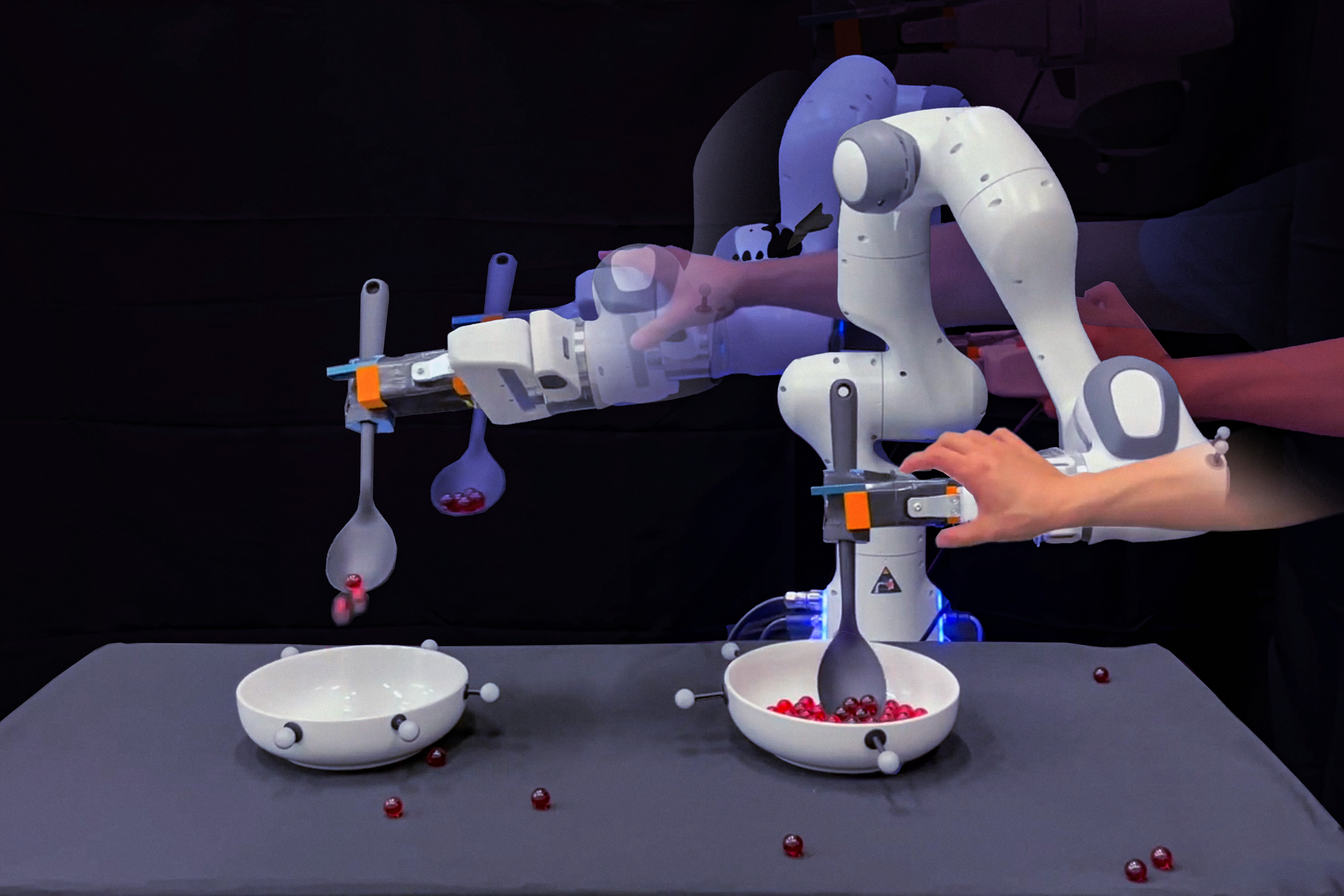
From wiping up spills to serving up food, robots are being taught to carry out increasingly complicated household tasks. Many such home-bot trainees are learning through imitation; they are programmed to copy the motions that a human physically guides them through.

It turns out that robots are excellent mimics. But unless engineers also program them to adjust to every possible bump and nudge, robots don’t necessarily know how to handle these situations, short of starting their task from the top.

Now MIT engineers are aiming to give robots a bit of common sense when faced with situations that push them off their trained path. They’ve developed a method that connects robot motion data with the “common sense knowledge” of large language models, or LLMs.

Their approach enables a robot to logically parse many given household task into subtasks, and to physically adjust to disruptions within a subtask so that the robot can move on without having to go back and start a task from scratch — and without engineers having to explicitly program fixes for every possible failure along the way.   


Image courtesy of the researchers.

“Imitation learning is a mainstream approach enabling household robots. But if a robot is blindly mimicking a human’s motion trajectories, tiny errors can accumulate and eventually derail the rest of the execution,” says Yanwei Wang, a graduate student in MIT’s Department of Electrical Engineering and Computer Science (EECS). “With our method, a robot can self-correct execution errors and improve overall task success.”

Wang and his colleagues detail their new approach in a study they will present at the International Conference on Learning Representations (ICLR) in May. The study’s co-authors include EECS graduate students Tsun-Hsuan Wang and Jiayuan Mao, Michael Hagenow, a postdoc in MIT’s Department of Aeronautics and Astronautics (AeroAstro), and Julie Shah, the H.N. Slater Professor in Aeronautics and Astronautics at MIT.

Language task

The researchers illustrate their new approach with a simple chore: scooping marbles from one bowl and pouring them into another. To accomplish this task, engineers would typically move a robot through the motions of scooping and pouring — all in one fluid trajectory. They might do this multiple times, to give the robot a number of human demonstrations to mimic.

“But the human demonstration is one long, continuous trajectory,” Wang says.

The team realized that, while a human might demonstrate a single task in one go, that task depends on a sequence of subtasks, or trajectories. For instance, the robot has to first reach into a bowl before it can scoop, and it must scoop up marbles before moving to the empty bowl, and so forth. If a robot is pushed or nudged to make a mistake during any of these subtasks, its only recourse is to stop and start from the beginning, unless engineers were to explicitly label each subtask and program or collect new demonstrations for the robot to recover from the said failure, to enable a robot to self-correct in the moment.

“That level of planning is very tedious,” Wang says.

Instead, he and his colleagues found some of this work could be done automatically by LLMs. These deep learning models process immense libraries of text, which they use to establish connections between words, sentences, and paragraphs. Through these connections, an LLM can then generate new sentences based on what it has learned about the kind of word that is likely to follow the last.

For their part, the researchers found that in addition to sentences and paragraphs, an LLM can be prompted to produce a logical list of subtasks that would be involved in a given task. For instance, if queried to list the actions involved in scooping marbles from one bowl into another, an LLM might produce a sequence of verbs such as “reach,” “scoop,” “transport,” and “pour.”

“LLMs have a way to tell you how to do each step of a task, in natural language. A human’s continuous demonstration is the embodiment of those steps, in physical space,” Wang says. “And we wanted to connect the two, so that a robot would automatically know what stage it is in a task, and be able to replan and recover on its own.”

Mapping marbles

For their new approach, the team developed an algorithm to automatically connect an LLM’s natural language label for a particular subtask with a robot’s position in physical space or an image that encodes the robot state. Mapping a robot’s physical coordinates, or an image of the robot state, to a natural language label is known as “grounding.” The team’s new algorithm is designed to learn a grounding “classifier,” meaning that it learns to automatically identify what semantic subtask a robot is in — for example, “reach” versus “scoop” — given its physical coordinates or an image view.

“The grounding classifier facilitates this dialogue between what the robot is doing in the physical space and what the LLM knows about the subtasks, and the constraints you have to pay attention to within each subtask,” Wang explains.

The team demonstrated the approach in experiments with a robotic arm that they trained on a marble-scooping task. Experimenters trained the robot by physically guiding it through the task of first reaching into a bowl, scooping up marbles, transporting them over an empty bowl, and pouring them in. After a few demonstrations, the team then used a pretrained LLM and asked the model to list the steps involved in scooping marbles from one bowl to another. The researchers then used their new algorithm to connect the LLM’s defined subtasks with the robot’s motion trajectory data. The algorithm automatically learned to map the robot’s physical coordinates in the trajectories and the corresponding image view to a given subtask.

The team then let the robot carry out the scooping task on its own, using the newly learned grounding classifiers. As the robot moved through the steps of the task, the experimenters pushed and nudged the bot off its path, and knocked marbles off its spoon at various points. Rather than stop and start from the beginning again, or continue blindly with no marbles on its spoon, the bot was able to self-correct, and completed each subtask before moving on to the next. (For instance, it would make sure that it successfully scooped marbles before transporting them to the empty bowl.)

“With our method, when the robot is making mistakes, we don’t need to ask humans to program or give extra demonstrations of how to recover from failures,” Wang says. “That’s super exciting because there’s a huge effort now toward training household robots with data collected on teleoperation systems. Our algorithm can now convert that training data into robust robot behavior that can do complex tasks, despite external perturbations.”

MIT engineers design flexible “skeletons” for soft, muscle-powered robots | MIT News

0

Our muscles are nature’s perfect actuators — devices that turn energy into motion. For their size, muscle fibers are more powerful and precise than most synthetic actuators. They can even heal from damage and grow stronger with exercise.

For these reasons, engineers are exploring ways to power robots with natural muscles. They’ve demonstrated a handful of “biohybrid” robots that use muscle-based actuators to power artificial skeletons that walk, swim, pump, and grip. But for every bot, there’s a very different build, and no general blueprint for how to get the most out of muscles for any given robot design.

Now, MIT engineers have developed a spring-like device that could be used as a basic skeleton-like module for almost any muscle-bound bot. The new spring, or “flexure,” is designed to get the most work out of any attached muscle tissues. Like a leg press that’s fit with just the right amount of weight, the device maximizes the amount of movement that a muscle can naturally produce.

The researchers found that when they fit a ring of muscle tissue onto the device, much like a rubber band stretched around two posts, the muscle pulled on the spring, reliably and repeatedly, and stretched it five times more, compared with other previous device designs.

The team sees the flexure design as a new building block that can be combined with other flexures to build any configuration of artificial skeletons. Engineers can then fit the skeletons with muscle tissues to power their movements.

“These flexures are like a skeleton that people can now use to turn muscle actuation into multiple degrees of freedom of motion in a very predictable way,” says Ritu Raman, the Brit and Alex d’Arbeloff Career Development Professor in Engineering Design at MIT. “We are giving roboticists a new set of rules to make powerful and precise muscle-powered robots that do interesting things.”

Raman and her colleagues report the details of the new flexure design in a paper appearing today in the journal Advanced Intelligent Systems. The study’s MIT co-authors include Naomi Lynch ’12, SM ’23; undergraduate Tara Sheehan; graduate students Nicolas Castro, Laura Rosado, and Brandon Rios; and professor of mechanical engineering Martin Culpepper.

Muscle pull

When left alone in a petri dish in favorable conditions, muscle tissue will contract on its own but in directions that are not entirely predictable or of much use.

“If muscle is not attached to anything, it will move a lot, but with huge variability, where it’s just flailing around in liquid,” Raman says.

To get a muscle to work like a mechanical actuator, engineers typically attach a band of muscle tissue between two small, flexible posts. As the muscle band naturally contracts, it can bend the posts and pull them together, producing some movement that would ideally power part of a robotic skeleton. But in these designs, muscles have produced limited movement, mainly because the tissues are so variable in how they contact the posts. Depending on where the muscles are placed on the posts, and how much of the muscle surface is touching the post, the muscles may succeed in pulling the posts together but at other times may wobble around in uncontrollable ways.

Raman’s group looked to design a skeleton that focuses and maximizes a muscle’s contractions regardless of exactly where and how it is placed on a skeleton, to generate the most movement in a predictable, reliable way.

“The question is: How do we design a skeleton that most efficiently uses the force the muscle is generating?” Raman says.

The researchers first considered the multiple directions that a muscle can naturally move. They reasoned that if a muscle is to pull two posts together along a specific direction, the posts should be connected to a spring that only allows them to move in that direction when pulled.

“We need a device that is very soft and flexible in one direction, and very stiff in all other directions, so that when a muscle contracts, all that force gets efficiently converted into motion in one direction,” Raman says.

Soft flex

As it turns out, Raman found many such devices in Professor Martin Culpepper’s lab. Culpepper’s group at MIT specializes in the design and fabrication of machine elements such as miniature actuators, bearings, and other mechanisms, that can be built into machines and systems to enable ultraprecise movement, measurement, and control, for a wide variety of applications. Among the group’s precision machined elements are flexures — spring-like devices, often made from parallel beams, that can flex and stretch with nanometer precision.

“Depending on how thin and far apart the beams are, you can change how stiff the spring appears to be,” Raman says.

She and Culpepper teamed up to design a flexure specifically tailored with a configuration and stiffness to enable muscle tissue to naturally contract and maximally stretch the spring. The team designed the device’s configuration and dimensions based on numerous calculations they carried out to relate a muscle’s natural forces with a flexure’s stiffness and degree of movement.

The flexure they ultimately designed is 1/100 the stiffness of muscle tissue itself. The device resembles a miniature, accordion-like structure, the corners of which are pinned to an underlying base by a small post, which sits near a neighboring post that is fit directly onto the base. Raman then wrapped a band of muscle around the two corner posts (the team molded the bands from live muscle fibers that they grew from mouse cells), and measured how close the posts were pulled together as the muscle band contracted.

The team found that the flexure’s configuration enabled the muscle band to contract mostly along the direction between the two posts. This focused contraction allowed the muscle to pull the posts much closer together — five times closer — compared with previous muscle actuator designs.

“The flexure is a skeleton that we designed to be very soft and flexible in one direction, and very stiff in all other directions,” Raman says. “When the muscle contracts, all the force is converted into movement in that direction. It’s a huge magnification.”

The team found they could use the device to precisely measure muscle performance and endurance. When they varied the frequency of muscle contractions (for instance, stimulating the bands to contract once versus four times per second), they observed that the muscles “grew tired” at higher frequencies, and didn’t generate as much pull.

“Looking at how quickly our muscles get tired, and how we can exercise them to have high-endurance responses — this is what we can uncover with this platform,” Raman says.

The researchers are now adapting and combining flexures to build precise, articulated, and reliable robots, powered by natural muscles.

“An example of a robot we are trying to build in the future is a surgical robot that can perform minimally invasive procedures inside the body,” Raman says. “Technically, muscles can power robots of any size, but we are particularly excited in making small robots, as this is where biological actuators excel in terms of strength, efficiency, and adaptability.”

Tablet, Laptop, or Something in Between?

0

Huawei MatePad Pro Papermatte Edition Review

Design & Build

If you’re used to handling a tablet, the weight of the MatePad Pro can come as a surprise. It’s lighter than you think it’s going to be, something that comes down to a couple of design decisions. One is the OLED screen – these can be thinner and lighter than multi-layered LCD designs – and the other is the battery. By running a smaller battery at a higher voltage, Huawei claims to get extra capacity out of it. It has a thin profile with rounded edges, and while you’ll definitely notice it’s there, it’s easy to slip into a bag.

Features & Performance

The Kirin T91 is an eight-core chipset that’s strangely anonymous, with little information about it available online. We do know it’s using the Arm-A510 architecture from the Snapdragon 8, in three clusters with a prime core that runs up to 2.19GHz. This, combined with the 12GB of RAM, provides ample performance for most applications and the ability to swap smoothly between them too.

Screen

The screen is a dual-layer OLED with Huawei’s anti-reflection Papermatte coating over it, and this makes it an excellent thing to read or draw on. There’s a certain graininess to the display if you look closely enough, but the pixel density is high enough for that not to matter much. The screen also picks up fingerprints easily – there’s even a cleaning cloth in the box – so being able to keep your sticky paws away from it helps keep the device looking neat.

Software

The software is always something worth looking at on Huawei devices, as the Chinese company’s implementation of Android – HarmonyOS – diverges from stock and includes some interesting ideas along with one big issue, the lack of the Google Play Store. There are ways around this, and it’s a lot easier than sideloading apps on something like a Kindle Fire, but if you’re invested in the Google ecosystem then this might not be the Android tablet for you. One thing to watch out for is that, the first time you open the App Gallery (Huawei’s app store), it asks to install a lot of bloatware and other unnecessary apps. Happily, there’s a ‘no’ button.

Battery Life

Battery life is hard to gauge, as the PCMark test we usually use in the Cupboard of Heck wouldn’t run. The tablet’s internal estimation – 64 hours in performance mode, and 87 with battery saver activated – seems a tiny bit inflated to us, but we had no problems with keeping it going all day, with power left over.

Price

The Huawei MatePad Pro Papermatte retails for £799 on Huawei’s online store. You can get an iPad Air, or a OnePlus Tab 2 with a load of accessories, for the price of the MatePad Pro. This high price may be its downfall, as despite the excellent screen, and the easy way its keyboard case and stylus work with the core machine, the sheer number of competing tablets in the same or lower price category will temp potential users away. However, for a hyper-portable laptop replacement with creative potential, it may be worth the price to some.

Conclusion

The Huawei MatePad Pro Papermatte Edition is an excellent Android tablet with a standout screen and great performance. While its software limitations may be a drawback for some, it’s an excellent option for those looking for a hyper-portable laptop replacement with creative potential.

FAQs

Q: Is the Huawei MatePad Pro Papermatte Edition worth the price?
A: It depends on your needs and preferences. If you’re looking for a high-end Android tablet with a great screen and good performance, it may be worth the price. However, if you’re on a budget or looking for a more affordable option, you may want to consider other tablets.

Q: Can I use Google Play Store on the Huawei MatePad Pro Papermatte Edition?
A: No, the Huawei MatePad Pro Papermatte Edition does not come with the Google Play Store pre-installed. However, you can access the App Gallery (Huawei’s app store) and sideload apps manually.

Q: How does the battery life of the Huawei MatePad Pro Papermatte Edition compare to other tablets?
A: The battery life of the Huawei MatePad Pro Papermatte Edition is estimated to be around 64 hours in performance mode and 87 hours with battery saver activated. This is comparable to other tablets in its class, but the actual battery life may vary depending on usage.

MinIO Shifts to AI with AIStore Launch

MinIO Launches AIStore, an AI-Centered Object Store

MinIO, one of the most popular open-source S3-compatible object storage systems, has launched AIStore, an AI-centered object store designed to help organizations store and process massive amounts of unstructured data for AI and machine learning workloads.

Background

MinIO’s open-source object store has gained popularity due to its combination of performance and simplicity, making it a go-to choice for a wide range of applications. However, the rapid emergence of generative AI has created an opportunity for MinIO to deliver an AI-centered object store, which led to the creation of AIStore.

What is AIStore?

AIStore is an AI-ification of MinIO’s flagship offering, Enterprise Object Store. It adds AI-specific capabilities, including a new S3-compatible API, promptObject, that allows users to query unstructured data using natural language prompts. The new API enables users to extract specific information from images, text, and other unstructured data formats.

Features of AIStore

AIStore includes several new features, such as:

  1. promptObject API: Allows users to query unstructured data using natural language prompts.
  2. RDMA over 400Gb and 800 Gb Ethernet networks: Enables high-speed data transfer between storage clusters and GPUs.
  3. New GUI console for admins: Provides an easy-to-use interface for administrators to manage AIStore.
  4. AIHub: A secure facility for storing AI models within a customer’s own environment.

Benefits of AIStore

AIStore offers several benefits to organizations, including:

  1. Improved data access: Enables users to extract specific information from unstructured data formats.
  2. Faster data processing: Supports high-speed data transfer between storage clusters and GPUs.
  3. Enhanced security: Provides a secure facility for storing AI models within a customer’s own environment.

Conclusion

AIStore is a significant development in the object storage space, enabling organizations to store and process massive amounts of unstructured data for AI and machine learning workloads. With its AI-specific capabilities and high-speed data transfer features, AIStore is poised to revolutionize the way organizations approach AI and data storage.

Frequently Asked Questions

Q: What is AIStore?
A: AIStore is an AI-centered object store designed to help organizations store and process massive amounts of unstructured data for AI and machine learning workloads.

Q: What are the features of AIStore?
A: AIStore includes features such as the promptObject API, RDMA over 400Gb and 800 Gb Ethernet networks, new GUI console for admins, and AIHub.

Q: What are the benefits of AIStore?
A: AIStore offers improved data access, faster data processing, and enhanced security.

Q: How does AIStore improve data storage for AI and machine learning workloads?
A: AIStore enables organizations to store and process massive amounts of unstructured data for AI and machine learning workloads, providing improved data access and faster data processing.

IBM Boosts Quantum Computing Stack

0

IBM’s Quantum Computing Advances: Error Reduction and Deeper Computations

By making small adjustments to the frequency that the qubits are operating at, it’s possible to avoid problems caused by noise in the quantum computer. This can be done when the Heron chip is being calibrated before it’s opened for general use.

Error Reduction through Calibration

Separately, the company has done a rewrite of the software that controls the system during operations. “After learning from the community, seeing how to run larger circuits, [we were able to] almost better define what it should be and rewrite the whole stack towards that,” Gambetta said. The result is a dramatic speed-up. “Something that took 122 hours now is down to a couple of hours,” he told Ars.

Since people are paying for time on this hardware, that’s good for customers now. However, it could also pay off in the longer run, as some errors can occur randomly, so less time spent on a calculation can mean fewer errors.

Deeper Computations

Despite all those improvements, errors are still likely during any significant calculations. While it continues to work toward developing error-corrected qubits, IBM is focusing on what it calls error mitigation, which it first detailed last year.

Error Mitigation

“The researchers turned to a method where they intentionally amplified and then measured the processor’s noise at different levels. These measurements are used to estimate a function that produces similar output to the actual measurements. That function can then have its noise set to zero to produce an estimate of what the processor would do without any noise at all.”

The problem here is that using the function is computationally difficult, and the difficulty increases with the qubit count. So, while it’s still easier to do error mitigation calculations than simulate the quantum computer’s behavior on the same hardware, there’s still the risk of it becoming computationally intractable.

Optimizations

However, IBM has also taken the time to optimize that, too. “They’ve got algorithmic improvements, and the method that uses tensor methods uses the GPU,” Gambetta told Ars. “So I think it’s a combination of both.”

Conclusion

In conclusion, IBM’s advances in quantum computing have resulted in significant improvements in error reduction and deeper computations. By making small adjustments to the frequency of the qubits and rewriting the software, IBM has been able to reduce errors and increase the speed of calculations. Additionally, the company’s focus on error mitigation and optimizations has allowed for more accurate and efficient calculations. These advancements have the potential to greatly benefit customers and further the development of quantum computing.

FAQs

Q: What are the main improvements in IBM’s quantum computing?

A: The main improvements include the ability to avoid noise problems by adjusting the frequency of the qubits, rewriting the software to increase speed, and focusing on error mitigation and optimizations.

Q: How does error mitigation work?

A: Error mitigation involves intentionally amplifying and measuring the processor’s noise at different levels, estimating a function that produces similar output, and then setting the noise to zero to produce an estimate of what the processor would do without noise.

Q: What are the limitations of error mitigation?

A: The main limitation is that using the function is computationally difficult and the difficulty increases with the qubit count, making it potentially computationally intractable.

Q: What is the future of IBM’s quantum computing?

A: IBM continues to work on developing error-corrected qubits and is focusing on further optimizing and improving its quantum computing capabilities.

Extracting hydrogen from rocks | MIT News

0

It’s commonly thought that the most abundant element in the universe, hydrogen, exists mainly alongside other elements — with oxygen in water, for example, and with carbon in methane. But naturally occurring underground pockets of pure hydrogen are punching holes in that notion — and generating attention as a potentially unlimited source of carbon-free power.
 
One interested party is the U.S. Department of Energy, which last month awarded $20 million in research grants to 18 teams from laboratories, universities, and private companies to develop technologies that can lead to cheap, clean fuel from the subsurface.
 
Geologic hydrogen, as it’s known, is produced when water reacts with iron-rich rocks, causing the iron to oxidize. One of the grant recipients, MIT Assistant Professor Iwnetim Abate’s research group, will use its $1.3 million grant to determine the ideal conditions for producing hydrogen underground — considering factors such as catalysts to initiate the chemical reaction, temperature, pressure, and pH levels. The goal is to improve efficiency for large-scale production, meeting global energy needs at a competitive cost.
 
The U.S. Geological Survey estimates there are potentially billions of tons of geologic hydrogen buried in the Earth’s crust. Accumulations have been discovered worldwide, and a slew of startups are searching for extractable deposits. Abate is looking to jump-start the natural hydrogen production process, implementing “proactive” approaches that involve stimulating production and harvesting the gas.
                                                                                                                         
“We aim to optimize the reaction parameters to make the reaction faster and produce hydrogen in an economically feasible manner,” says Abate, the Chipman Development Professor in the Department of Materials Science and Engineering (DMSE). Abate’s research centers on designing materials and technologies for the renewable energy transition, including next-generation batteries and novel chemical methods for energy storage. 

Sparking innovation

Interest in geologic hydrogen is growing at a time when governments worldwide are seeking carbon-free energy alternatives to oil and gas. In December, French President Emmanuel Macron said his government would provide funding to explore natural hydrogen. And in February, government and private sector witnesses briefed U.S. lawmakers on opportunities to extract hydrogen from the ground.
 
Today commercial hydrogen is manufactured at $2 a kilogram, mostly for fertilizer and chemical and steel production, but most methods involve burning fossil fuels, which release Earth-heating carbon. “Green hydrogen,” produced with renewable energy, is promising, but at $7 per kilogram, it’s expensive.
 
“If you get hydrogen at a dollar a kilo, it’s competitive with natural gas on an energy-price basis,” says Douglas Wicks, a program director at Advanced Research Projects Agency – Energy (ARPA-E), the Department of Energy organization leading the geologic hydrogen grant program.
 
Recipients of the ARPA-E grants include Colorado School of Mines, Texas Tech University, and Los Alamos National Laboratory, plus private companies including Koloma, a hydrogen production startup that has received funding from Amazon and Bill Gates. The projects themselves are diverse, ranging from applying industrial oil and gas methods for hydrogen production and extraction to developing models to understand hydrogen formation in rocks. The purpose: to address questions in what Wicks calls a “total white space.”
 
“In geologic hydrogen, we don’t know how we can accelerate the production of it, because it’s a chemical reaction, nor do we really understand how to engineer the subsurface so that we can safely extract it,” Wicks says. “We’re trying to bring in the best skills of each of the different groups to work on this under the idea that the ensemble should be able to give us good answers in a fairly rapid timeframe.”
 
Geochemist Viacheslav Zgonnik, one of the foremost experts in the natural hydrogen field, agrees that the list of unknowns is long, as is the road to the first commercial projects. But he says efforts to stimulate hydrogen production — to harness the natural reaction between water and rock — present “tremendous potential.”
 
“The idea is to find ways we can accelerate that reaction and control it so we can produce hydrogen on demand in specific places,” says Zgonnik, CEO and founder of Natural Hydrogen Energy, a Denver-based startup that has mineral leases for exploratory drilling in the United States. “If we can achieve that goal, it means that we can potentially replace fossil fuels with stimulated hydrogen.”

“A full-circle moment”

For Abate, the connection to the project is personal. As a child in his hometown in Ethiopia, power outages were a usual occurrence — the lights would be out three, maybe four days a week. Flickering candles or pollutant-emitting kerosene lamps were often the only source of light for doing homework at night.
 
“And for the household, we had to use wood and charcoal for chores such as cooking,” says Abate. “That was my story all the way until the end of high school and before I came to the U.S. for college.”
 
In 1987, well-diggers drilling for water in Mali in Western Africa uncovered a natural hydrogen deposit, causing an explosion. Decades later, Malian entrepreneur Aliou Diallo and his Canadian oil and gas company tapped the well and used an engine to burn hydrogen and power electricity in the nearby village.
 
Ditching oil and gas, Diallo launched Hydroma, the world’s first hydrogen exploration enterprise. The company is drilling wells near the original site that have yielded high concentrations of the gas.
 
“So, what used to be known as an energy-poor continent now is generating hope for the future of the world,” Abate says. “Learning about that was a full-circle moment for me. Of course, the problem is global; the solution is global. But then the connection with my personal journey, plus the solution coming from my home continent, makes me personally connected to the problem and to the solution.”

Experiments that scale

Abate and researchers in his lab are formulating a recipe for a fluid that will induce the chemical reaction that triggers hydrogen production in rocks. The main ingredient is water, and the team is testing “simple” materials for catalysts that will speed up the reaction and in turn increase the amount of hydrogen produced, says postdoc Yifan Gao.
 
“Some catalysts are very costly and hard to produce, requiring complex production or preparation,” Gao says. “A catalyst that’s inexpensive and abundant will allow us to enhance the production rate — that way, we produce it at an economically feasible rate, but also with an economically feasible yield.”
 
The iron-rich rocks in which the chemical reaction happens can be found across the United States and the world. To optimize the reaction across a diversity of geological compositions and environments, Abate and Gao are developing what they call a high-throughput system, consisting of artificial intelligence software and robotics, to test different catalyst mixtures and simulate what would happen when applied to rocks from various regions, with different external conditions like temperature and pressure.
 
“And from that we measure how much hydrogen we are producing for each possible combination,” Abate says. “Then the AI will learn from the experiments and suggest to us, ‘Based on what I’ve learned and based on the literature, I suggest you test this composition of catalyst material for this rock.’”
 
The team is writing a paper on its project and aims to publish its findings in the coming months.
 
The next milestones for the project, after developing the catalyst recipe, is designing a reactor that will serve two purposes. First, fitted with technologies such as Raman spectroscopy, it will allow researchers to identify and optimize the chemical conditions that lead to improved rates and yield of hydrogen production. The lab-scale device will also inform the design of a real-world reactor that can accelerate hydrogen production in the field.
 
“That would be a plant-scale reactor that would be implanted into the subsurface,” Abate says.
 
The cross-disciplinary project is also tapping the expertise of Yang Shao-Horn, of MIT’s Department of Mechanical Engineering and DMSE, for computational analysis of the catalyst, and Esteban Gazel, a Cornell University scientist who will lend his expertise in geology and geochemistry. He’ll focus on understanding the iron-rich ultramafic rock formations across the United States and the globe and how they react with water.
 
For Wicks at ARPA-E, the questions Abate and the other grant recipients are asking are just the first, critical steps in uncharted energy territory.
 
“If we can understand how to stimulate these rocks into generating hydrogen, safely getting it up, it really unleashes the potential energy source,” he says. Then the emerging industry will look to oil and gas for the drilling, piping, and gas extraction know-how. “As I like to say, this is enabling technology that we hope to, in a very short term, enable us to say, ‘Is there really something there?’”