Home Blog Page 70

Safe Superintelligence

0

Safe Superintelligence Secures Additional $2 Billion in Funding

Funding Round Led by Greenoaks

Safe Superintelligence (SSI), the AI startup led by OpenAI’s co-founder and former chief scientist Ilya Sutskever, has raised an additional $2 billion in funding at a $32 billion valuation, according to the Financial Times. This brings the total amount of funding raised by the startup to $3 billion.

Background on SSI

SSI had already raised $1 billion, and there were reports that an additional $1 billion round was in the works. SSI did not comment on the new funding, which was reportedly led by Greenoaks. The startup was founded by Sutskever, Daniel Gross, and Daniel Levy, who stated that the company had “one goal and one product: a safe superintelligence.”

About Ilya Sutskever

Sutskever left OpenAI in May 2024 after he appeared to play a role in an ultimately failed attempt to oust CEO Sam Altman. Prior to leaving OpenAI, Sutskever was the co-founder and chief scientist of the company, which is known for its work on artificial general intelligence (AGI).

Product Development

That product is presumably still in the works, with SSI’s website little more than a placeholder with a mission statement. SSI has not provided any updates on the development of its safe superintelligence product.

Conclusion

The additional funding will likely be used to further develop SSI’s safe superintelligence product. With a $32 billion valuation, SSI is now one of the most valuable AI startups in the world. The company’s goal of creating a safe superintelligence is a significant challenge, and it will be interesting to see how SSI approaches this problem.

Frequently Asked Questions

Q: What is Safe Superintelligence (SSI)?
A: SSI is an AI startup led by OpenAI’s co-founder and former chief scientist Ilya Sutskever.

Q: How much funding has SSI raised?
A: SSI has raised a total of $3 billion in funding, with the latest round valued at $32 billion.

Q: What is SSI’s product?
A: SSI has stated that its product is a safe superintelligence, but it has not provided any updates on the development of the product.

Q: Who is Ilya Sutskever?
A: Sutskever is the co-founder and former chief scientist of OpenAI, and he left the company in May 2024.

Marathon Shooter

0

Marathon: The Long-Awaited Extraction Shooter from Bungie

Gameplay and Mechanics

In Marathon, you play as a Runner who has to loot the map and get out quick. Image: Bungie

Marathon is a PvPvE extraction shooter that takes place in a sci-fi universe in 2850, in the remains of Tau Ceti IV, a lost colony whose inhabitants disappeared without a trace. Rival factions have hired Runners to scavenge for what’s left behind, and anyone who signs up to be a Runner has given up their human form for a biosynthetic shell with unique abilities and stats.

As a Runner, you fight in a crew of up to three players across a variety of zones and points of interest. You can face rival runners in maps of up to 18 players, so up to six teams, in a bid to grab as much loot as possible and get out. While Marathon is designed to be played in crews, with contextual pings and shared objectives, you can also play solo instead of having to form a dedicated three-person team.

Security Forces and Creatures

In Marathon runs, there will be what Bungie calls security forces, PvE enemies that roam the world. There are also creatures on these planets that are a threat when you’re navigating toward points on a map. You’ll have to choose whether it’s worth engaging with these enemies and risk revealing your location to rival teams or use a strategy of avoiding these threats in this PvPvE environment.

Runners and Abilities

There are a variety of runners to pick from with different abilities and play styles. Image: Bungie

In the alpha test, there will be four runners to choose from, including the stealthy Void character that can go invisible much like a Hunter from Destiny 2. The Glitch runner has fast-paced abilities and, like its name implies, can glitch out enemies. If you’re more of a run-and-gun type of player, Locus has a shield ability and looks similar to the slide and shotgun play of a Titan from Destiny 2. The final runner in the alpha test is Blackbird, designed for recon and scanning the area around you. While there are four runners in the alpha test, there will be six to choose from when Marathon launches in September.

Alpha Test and Launch

The Marathon alpha test will be an opportunity for Bungie to show the world exactly how its latest game will stand out from the competition, and whether it does enough to tempt people away from hero shooters or Call of Duty and Fortnite into the extraction shooter genre that Escape from Tarkov has popularized.

Marathon debuts on PS5, Xbox Series S / X, and PC on September 23rd. You can sign up for the Marathon closed alpha test on Bungie’s website or on Discord.

Conclusion

Marathon is a highly anticipated game that has the potential to shake up the shooter genre. With its unique blend of PvPvE gameplay, varied runners, and sci-fi setting, it’s set to be a thrilling experience. The alpha test will give players a chance to get a feel for the game and see if it’s a good fit for them.

Frequently Asked Questions

Q: What is Marathon?
A: Marathon is a PvPvE extraction shooter from Bungie, the creators of Halo and Destiny.

Q: What is the game about?
A: Marathon takes place in a sci-fi universe in 2850, in the remains of Tau Ceti IV, a lost colony whose inhabitants disappeared without a trace. Rival factions have hired Runners to scavenge for what’s left behind.

Q: Can I play solo?
A: Yes, you can play solo instead of having to form a dedicated three-person team.

Q: How many runners are there?
A: There will be six runners to choose from when the game launches, with four available in the alpha test.

Q: When does the game launch?
A: Marathon debuts on PS5, Xbox Series S / X, and PC on September 23rd.

Q: Can I sign up for the alpha test?
A: Yes, you can sign up for the Marathon closed alpha test on Bungie’s website or on Discord.

Structured Data

0

Google Leaders Share Insights on AI in Search and the Future of SEO

Google’s LLM Integration Architecture Revealed

Google’s Search Relations team, including John Mueller, Daniel Weisberg, Moshe Samet, and Eric Barbera, shared insights on the company’s use of large language models (LLMs) during the Google Search Central Live conference in Madrid. Mueller explained the process, which involves Retrieval Augmented Generation (RAG) and grounding, to build AI-powered search answers. The process works in four steps:

  1. A user enters a question.
  2. The search engine finds the relevant information.
  3. This information is used to “ground” the LLM.
  4. The LLM creates an answer with supporting links.

This system is designed to keep answers accurate and tied to their sources, addressing concerns about AI-generated errors.

No Special Optimization Required for AI Features

Google made it clear that no extra tweaks are needed for AI features. The key points are:

  • AI tools are still new and will continue to change.
  • User behavior with AI search is still growing.
  • AI data appears with traditional search data in Search Console.
  • There is no separate breakdown, much like with featured snippets.
  • Google encourages reporting any unusual issues, but sticking to your current SEO best practices is enough for now.

Structured Data Remains Essential in an AI World

Despite advances in AI, structured data is important. Google advised that you should:

  • Keep using supported structured data types.
  • Check Google’s documentation for the right schemas.
  • Understand that structured data makes it easier for computers to read and index your content.
  • Even though AI can work with unstructured data, using structured data gives you a clear advantage in search results.

Controlling AI-Driven Presentations of Content

For site owners who are cautious about how their content shows up in AI features, Google explained several ways to control it:

  • Use the robots nosnippet tag to opt out of AI Overviews.
  • Add a meta tag like
  • Wrap certain content in a
  • Limit the amount of text shown with the meta name="description" content="brief summary">

These options work just like the controls for traditional search snippets.

Reporting & Analytics for AI Search

Google’s approach to reporting was also discussed. According to Google’s slides shared by Solis:

  • AI search data is included with overall Search Console data.
  • There is no separate report just for AI features.
  • Breaking out AI data separately might cause more confusion for users.
  • There are no plans to report Gemini usage separately due to privacy issues, though this might change if new patterns are seen.

LLMs.txt and Future Standards

There was a discussion about a potential file called LLMs.txt, which would work like robots.txt but control AI usage. Mueller noted that this file “only makes sense if the system doesn’t know about your site.” The extra layer might be unnecessary since Google already has plenty of data about most sites.

SEO’s Continuing Relevance in an AI-Powered World

The conference made it clear that basic SEO work is still crucial. Key points include:

  • Core SEO tasks such as crawling, indexing, and content optimization remain.
  • AI tools add new capabilities to digital marketing rather than replacing old methods.
  • SEO professionals can use their skills in a changing landscape.

Industry Implications

The big message is to keep delivering quality content and solid technical foundations. Although AI brings new challenges, the goal of serving users well does not change. Some challenges remain, such as not having separate reports for AI features. However, as these features mature, more precise data may soon be available.

Conclusion

Google’s focus on user needs while adding new features and the importance of structured data and basic SEO work are key takeaways from the conference. SEOs should continue using structured data, following their proven SEO practices, and keeping up with new developments.

FAQs

Q: Do I need to make special optimizations for AI features?
A: No, Google encourages sticking to your current SEO best practices.

Q: Can I control how my content shows up in AI features?
A: Yes, use the robots nosnippet tag, add a meta tag, wrap certain content in a

Q: Will I have separate reports for AI features in Search Console?
A: No, AI search data is included with overall Search Console data, and there are no plans to report Gemini usage separately due to privacy issues.

Q: What is LLMs.txt, and how does it work?
A: LLMs.txt is a potential file that would control AI usage, but it might be unnecessary since Google already has plenty of data about most sites.

Your New Personal Assistant

ChatGPT’s Latest Update: A More Personalized Assistant

A Powerful New Feature: Referencing Past Conversations

ChatGPT has proven itself capable of helping with everyday tasks such as writing, coding, and researching. The chatbot’s latest feature builds on that foundation and could even make it a more effective personal assistant.

A More Personalized Experience

On Thursday, OpenAI unveiled an update to the memory feature in ChatGPT: it can now reference all of your past conversations to better inform responses going forward. This expansion builds on the feature’s original abilities, which allowed the chatbot to remember basic user information you share in conversations, such as your profession, pets, preferences, and more.

The new feature expands ChatGPT’s ability to provide personalized answers without requiring you to reexplain the information it has previously gathered. Much like interacting with another human (recall permitting), any new conversation builds on previous knowledge, allowing for smoother, more contextualized interactions.

Example Use Case: Improved Efficiency

For example, if you were using ChatGPT to discuss a project, instead of having to explain the project with additional background information, you could just say something like, "Remember the conversation we had about the paper I was working on? What are some other ways I can start the paper?" In this instance, the chatbot would be able to remember the details of the paper you already shared and pull on personal information it saved, such as your profession and preferred writing style, to generate its answer.

Addressing User Concerns

Even though there are some clear advantages to using the updated memory feature, some users might understandably be hesitant about OpenAI storing their personal and prior conversation data. To address these concerns, the company gives users the option to opt out of the ability to remember prior conversations or the memory feature altogether within settings.

Temporary Chat: An Alternative Option

Another option for users who may not want their every conversation referenced in the future is to turn on Temporary Chat, the ChatGPT equivalent of Incognito mode in Google Chrome, when discussing sensitive topics, which will exclude those chats from the user’s memories. The only downside is that when Temporary Chat is on, ChatGPT won’t be able to refer to any previously saved memories either.

Availability and Rollout

The memories update is rolling out now to Plus and Pro users, with Team, Enterprise, and Edu users getting access in a few weeks. At the time of writing, I did not have access yet from my ChatGPT Plus account. Users will know they have access when they see a pop-up on their screen when they visit ChatGPT. If you have already opted out of memory in the past, you’ll automatically be opted out of referencing past chats.

Conclusion

The memories update is a significant step forward for ChatGPT, making it a more powerful and personalized assistant. With the ability to reference past conversations, users can expect more efficient and effective interactions. While some users may be concerned about data storage, OpenAI has taken steps to address these concerns with opt-out options.

Frequently Asked Questions

Q: What is the new memory feature in ChatGPT?
A: The new memory feature in ChatGPT allows the chatbot to reference all of your past conversations to better inform responses going forward.

Q: What are the benefits of the updated memory feature?
A: The updated memory feature provides personalized answers without requiring you to reexplain the information it has previously gathered, making interactions smoother and more contextualized.

Q: Can I opt out of the memory feature?
A: Yes, users can opt out of the ability to remember prior conversations or the memory feature altogether within settings.

Q: What is Temporary Chat?
A: Temporary Chat is the ChatGPT equivalent of Incognito mode in Google Chrome, which excludes chats from the user’s memories when enabled.

Q: When will the memories update be available?
A: The memories update is rolling out now to Plus and Pro users, with Team, Enterprise, and Edu users getting access in a few weeks.

Typeface for the Digital Age

0

Why Typography Matters for Brand Recognition

Typography is a fundamental element of visual communication, and in the digital age, its role in shaping brand perception is more critical than ever. Choosing the right typefaces for your website or app can significantly impact how users perceive your brand, influencing everything from legibility and readability to emotional associations and brand recognition.

Conveying Brand Personality

A distinctive and well-chosen typeface can convey brand personality, enhance brand recognition, and increase trust and credibility. A playful script font might suit a children’s brand, while a bold sans-serif could convey strength and modernity for a tech company.

Why Typography Matters for Brand Recognition

Just like a logo or color palette, a typeface can become a powerful brand asset. A well-chosen typeface can:

  • Convey brand personality
  • Enhance brand recognition
  • Increase trust and credibility

Choosing Typefaces for the Digital World

Designers face unique challenges when selecting typefaces for screen-based media. Here are key considerations:

  • Readability and legibility: Prioritize typefaces that are easy to read on different screen sizes and resolutions.
  • Font rendering: Different operating systems and browsers render fonts differently. Test your chosen typefaces across various platforms to ensure consistent display.
  • Web fonts vs. system fonts: Web fonts offer greater design flexibility, but they can impact page load times. System fonts are pre-installed on user devices, ensuring faster loading but limiting design choices.
  • Hierarchy and visual flow: Use different font weights, sizes, and styles to create a clear visual hierarchy and guide the user’s eye through the content.

The Typographic Trio for a Great User Experience

Typography plays a crucial role in shaping user experience (UX) and engagement. Thoughtfully chosen typefaces are fundamental for crafting user-friendly and accessible online experiences. By prioritizing readability, clear navigation, and inclusivity, designers can leverage typography to enhance comprehension, streamline user journeys, and ensure that digital content can be enjoyed by everyone.

  • Improved readability: Well-chosen typefaces make content easier to read and digest, enhancing comprehension and reducing eye strain.
  • Clear navigation: Typographic hierarchy and visual cues guide users through the interface, making it easier to find information and complete tasks.
  • Enhanced accessibility: Selecting typefaces with good legibility and sufficient contrast benefits users with visual impairments.

Emotional Typography

Different typefaces evoke different emotions and associations:

  • Serif fonts: Often associated with tradition, sophistication, and authority.
  • Sans-serif fonts: Convey modernity, cleanliness, and simplicity.
  • Script fonts: Can evoke elegance, creativity, or playfulness.

Conclusion

Typography is a critical element of digital branding and design. By choosing the right typefaces for your website or app, you can significantly impact how users perceive your brand, influencing everything from legibility and readability to emotional associations and brand recognition. Remember to consider readability, font rendering, web fonts vs. system fonts, hierarchy and visual flow, and emotional typography to create a positive user experience.

Frequently Asked Questions

  1. Q: What are the key considerations for choosing typefaces for the digital world?
    A: Readability and legibility, font rendering, web fonts vs. system fonts, and hierarchy and visual flow are key considerations for choosing typefaces for the digital world.
  2. Q: How can typography affect user experience?
    A: Typography can affect user experience by improving readability, clear navigation, and inclusivity, which can enhance comprehension, streamline user journeys, and ensure that digital content can be enjoyed by everyone.
  3. Q: What are some common emotional associations with different typefaces?
    A: Different typefaces evoke different emotions and associations, such as tradition, sophistication, and authority for serif fonts, modernity, cleanliness, and simplicity for sans-serif fonts, and elegance, creativity, or playfulness for script fonts.

The xAI-X Merger is a Good Deal

0

Elon Musk’s Empire: A Web of Companies and Narratives

When Elon Musk announced that his AI startup, xAI, had acquired his social media company, X (formerly known as Twitter), in an all-stock deal, it raised some eyebrows. But in many ways, the deal made sense. xAI’s chatbot, Grok, was already deeply integrated with X, X was floundering financially, and Musk needed a way to make his $44 billion Twitter acquisition look less like an impulsive takeover and more like a strategic play for AGI dominance.

Investing in the Elon Ecosystem

It also pointed to something deeper about how Musk’s empire works: investing in any one of his companies isn’t about a quick return on investment. It’s about buying into the mysticism around Musk and swallowing whole a narrative of success that outpaces the actual numbers.

Some call it a grift, pointing to Musk’s history of overpromising and underdelivering. But the market is increasingly more tolerant – welcoming, even – of narrative-led investments, particularly when the thread that ties the tale together is one of the president’s right-hand men.

The Web of Companies

“All of Elon’s companies today are basically one company,” Yoni Rechtman, a principal at Slow Ventures, told TechCrunch. “It’s all already Elon, Inc. There are people who work across multiple companies simultaneously. They share a web of capital connections. They do business with one another, and he treats them all effectively as one company. So [the xAI-X merger] just ends some of the fiction that the two businesses were separate.”

The Ecosystem Effect

The thinking among Musk bulls like Ron Baron, the founder of investment management firm Baron Capital, is that “every single thing [Musk] does is helping everything else he does,” as Baron phrased it. Other businesses under Musk’s control include Tesla, SpaceX, The Boring Company, and Neuralink – some of which reportedly share resources.

Valuations and Risk

That brings us back to the xAI-X deal. Pundits questioned how the acquisition could value X at $33 billion, more than triple its valuation just a few months ago, and how it could value xAI at $80 billion considering the AI company reportedly has little in the way of revenue. But valuations aren’t always based on what exists today. Rather, they take into account what investors are hoping for – and that’s particularly true when it comes to Musk’s ventures.

Conclusion

Investing in the Elon ecosystem is not for the faint of heart. It requires a level of trust in Musk’s ability to deliver on his promises and a willingness to take on significant risk. While some may call it a grift, others see it as an opportunity to be part of something groundbreaking.

FAQs

Q: What is the xAI-X deal and why did it raise eyebrows?

A: The deal is an all-stock acquisition where xAI, an AI startup, acquired X, a social media company formerly known as Twitter. The deal raised eyebrows due to the significant valuation of both companies.

Q: How does the deal impact the Elon ecosystem?

A: The deal further consolidates the Elon ecosystem, with xAI, X, and other companies under Musk’s control becoming increasingly intertwined.

Q: Is investing in the Elon ecosystem a good idea?

A: Investing in the Elon ecosystem requires a high level of risk tolerance and trust in Musk’s ability to deliver on his promises. It may be suitable for some investors, but it is not for everyone.

Q: What are some of the risks associated with investing in the Elon ecosystem?

A: Some of the risks include regulatory issues, anticompetition concerns, and user privacy issues. Additionally, Musk’s ability to deliver on his promises is not guaranteed, and investors may lose their investment.

ASUS ZenScreen Smart MS27UC: 4K Monitor with Google TV

0

Why you can trust Creative Bloq

Our expert reviewers spend hours testing and comparing products and services so you can choose the best for you. Find out more about how we test.

ASUS ZenScreen Smart MS27UC Review

Introduction

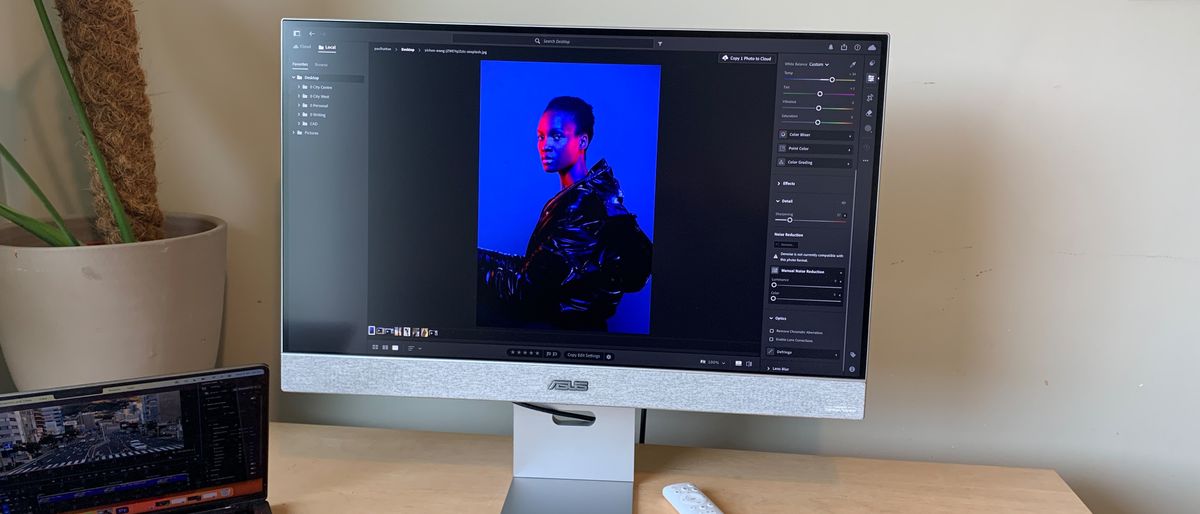
27-inch monitors are the workhorses for most creatives. They’re light, portable, and the perfect size for placing two side-by-side on a desk. Having just finished reviewing the Acer Predator Z57 (57 inches), I was relieved to be unboxing something a little more manageable! It’s called the ZenScreen Smart Monitor MS27UC and it’s a mashup of a monitor and a TV.

ASUS ZenScreen Smart MS27UC: Key Specifications

Screen:

27-inch UHD (3840 x 2160)

Inputs:

USB-C (90 W PD), HDMI, DisplayPort, USB hub, headphone out

Speakers:

Yes

Adjustments:

Not specified

Dimensions:

Not specified

Weight:

Not specified

Design and Build

The ASUS ZenScreen Smart oozes quality. After unboxing the unit, I was pleasantly surprised to see a classy grey fabric strip running across the front and back of the monitor. It was something that I didn’t expect but, on reflection, is a genius design decision that helps it blend in with the soft furnishings found in most living spaces.

The class continues with the grey metal and plastic casing with a super-thin frame around the left, top, and right of the display itself. The stand was easy to assemble with a click mechanism for attaching the stand to the display.

All the ports are located at the back, including HDMI, DisplayPort and USB-C and there’s even a USB hub containing two USB-A ports. The USB-C port also delivers 90 watts of power, which is ideal for even the most demanding of laptops. A pill-shaped hole is located in the upright part of the stand, which makes it possible to tidy cables away and force them out towards the back of your desk.

Above the location of the ports, you’ll find a shallow shelf which is designed to house your keyboard and mouse when they’re not in use. Being able to pack your peripherals away before kicking back and enjoying a movie is brilliant. ASUS really have thought of everything.

The monitor also comes with a white remote, although you can control it with the on-screen display (OSD). This remote makes it quick to transfer between inputs and apps.

Design and Build Score: 4.5/5

Features

One of the biggest selling points of this monitor is that it doubles up as a Google TV. That means you can access over 10,000 apps as well as live TV, music, and shows. As with all Google TVs, users will benefit from personalised content and a built-in Google assistant. I don’t think the monitor is worth buying just for Google TV, as you could easily convert any monitor into a smart TV using a Chromecast.

Considering most of the advertised features are related to the Google TV functionality, there isn’t a huge amount else to say regarding features for creatives. Maybe the only thing to mention is the dual front-facing 5-watt speakers that are certified by Harman Kardon.

Features Score: 3.5/5

Performance

Google TV performs like it does on any other device. Given that is the case, I don’t want to focus on how this aspect of the monitor performs. Instead, I’ll make some comments on whether this monitor delivers for creatives.

Let’s begin with the picture quality. The 4K UHD resolution provides all the pixels that most creatives will need at this point in time. With an increasing number of video editors working with 4K footage, the ZenScreen Smart is a perfect fit for these workflows. If you are working on detailed and complex video timelines though, we’d highly recommend getting two 27-inch monitors rather than just one.

Moving onto colour replication, this monitor covers 99% of the sRGB colour gamut. I know it’s not 100%, but this will be more than enough for most tasks, including browsing the web, watching videos, and editing photos for online use. Most real-world scenarios don’t demand 100%.

This isn’t true for colour-critical workflows such as photography and graphic design. For these you’d be expecting 100% coverage as well as support for wider colour gamuts like Adobe RGB or DCI-P3.

The pictures themselves are bold and vibrant and, in HDR mode, display a high level of contrast. This is a monitor that is trying to straddle the world of TV and creativity. It manages to do this relatively effectively but lacks the quality for more professional work.

Performance Score: 4/5

Price

The ASUS ZenScreen Smart costs £399.99, which is expensive compared to the Lenovo Legion R27qe but not as pricey as the AGON Pro AG276FK. If you were looking to buy two of these, then that will set you back a lot of money, but if one is enough, then you might be able to justify the cost.

Who’s it for?

The ASUS ZenScreen Smart is designed for those who love to work and play on one screen. It’s therefore perfect for people in small apartments who don’t have the luxury of space to set up a separate TV. The added benefit of only needing one screen is a financial one, which means the ZenScreen Smart will attract those on a budget.

Conclusion

The ASUS ZenScreen Smart is a great all-rounder, perfect for those who need a monitor and TV in one. It’s a beautifully designed monitor with good connectivity options and a high-quality picture. However, it lacks the features and colour accuracy that professionals need. If you’re looking for a monitor that can double up as a TV and want a stylish design, then the ZenScreen Smart is a great choice.

Frequently Asked Questions

Q: Is the ASUS ZenScreen Smart a good choice for creative professionals?
A: No, the ZenScreen Smart lacks the features and colour accuracy that professionals need.

Q: Is the ZenScreen Smart a good TV?
A: Yes, the ZenScreen Smart is a great TV with access to over 10,000 apps and live TV, music, and shows.

Q: Does the ZenScreen Smart have a webcam?
A: No, the ZenScreen Smart does not have a webcam.

Q: Is the ZenScreen Smart a good value for money?
A: The price of the ZenScreen Smart is £399.99, which is expensive compared to other monitors but not as pricey as some other options.

Q: Can I use the ZenScreen Smart as a second monitor?
A: Yes, the ZenScreen Smart can be used as a second monitor, but it may not be the best option for detailed and complex video timelines.

Adobe Firefly: The AI Image Tool That Matters

What is Adobe Firefly, and why is it important

Adobe Firefly is a generative AI tool integrated into Adobe Creative Cloud products like Photoshop, Illustrator, and Premiere Pro. Firefly allows users to generate images, text effects, vector art, and video enhancements using written prompts. It is designed to speed up the creative process by automating tasks like background replacement, object generation, and style application.

Everything Firefly generates is based on licensed, commercially safe data.

It is trained on content from Adobe Stock and public domain material where the copyright has expired. This is a game-changer, as it means that users can create stunning marketing visuals without worrying about legal drama.

What does Adobe Firefly have to offer?

Adobe Firefly has several use cases, including:

  • Text to image: Generate images from a simple written prompt.
  • Generative fill: Remove or add objects to an image.
  • Text effects: Apply styles and textures to text using a prompt.
  • Image to video: Turn a still image into a short animated clip.
  • Text to video: Start with a prompt, and Firefly will generate a clip based on your description.
  • Translate video: Translate a video into another language.

How to make the most of Firefly

To get the best out of Firefly, follow these tips:

  • Use real-world references in prompts.
  • Generate, then refine in-app.
  • Create variations for A/B testing.
  • Use Firefly to create elements that can be added to another body of work.

The elephant in the room

GPT-4o is a new AI tool that can generate images in seconds, but it’s not commercially viable due to uncertainty around its use. Firefly’s biggest advantage is that it’s commercially safe, making it a better option for business use.

My two cents

Firefly is a solid tool, but it’s not perfect. It’s a great option for those who need commercial safety without the worry. With patience and practice, it can produce stunning results.

Conclusion

Adobe Firefly is a groundbreaking AI tool that can revolutionize the way we create marketing visuals. With its ability to generate images, text effects, and video enhancements using licensed, commercially safe data, it’s a tool that every marketer and business owner should have in their arsenal.

Frequently Asked Questions

Q: What is Adobe Firefly?
A: Adobe Firefly is a generative AI tool integrated into Adobe Creative Cloud products like Photoshop, Illustrator, and Premiere Pro.

Q: What can I use Firefly for?
A: Firefly allows users to generate images, text effects, vector art, and video enhancements using written prompts.

Q: Is Firefly commercially safe?
A: Yes, everything Firefly generates is based on licensed, commercially safe data.

Q: Can I use Firefly for A/B testing?
A: Yes, Firefly can be used to create variations for A/B testing.

Q: Is GPT-4o a better option than Firefly?
A: GPT-4o is a powerful AI tool, but it’s not commercially viable due to uncertainty around its use. Firefly’s biggest advantage is that it’s commercially safe, making it a better option for business use.

Trump excludes smartphones, computers, and chips from tariffs

0

Trump Administration Excludes Certain Electronics from Tariffs

The Trump administration has made a significant move by excluding certain electronics from tariffs, including smartphones, computers, and other electronics, even those imported from China, according to a report by Bloomberg.

What’s Excluded?

Late last night, US Customs and Border Protection (CBP) updated its guidance to exempt the following electronics from tariffs:

  • Smartphones
  • Laptops
  • Hard drives
  • Computer processors
  • Memory chips
  • Machines used by companies like Taiwan Semiconductor Manufacturing Co. to make semiconductors

What Does This Mean?

The update follows Trump’s decision to issue a “90-day pause” on higher tariff rates for most countries, while increasing the rate for Chinese imports, the same day they went into effect. This move is seen as a significant concession to tech companies and consumers who have been affected by the tariffs.

Why Was This Decision Made?

The decision to exclude certain electronics from tariffs is likely a response to growing concerns about the impact of tariffs on the US tech industry. The tariffs, which were imposed in response to China’s alleged intellectual property theft and other trade practices, have been criticized for their potential to harm US businesses and consumers.

What’s Next?

The 90-day pause on higher tariff rates is set to expire, and it remains to be seen what the Trump administration will do next. The administration has previously stated that it is open to negotiating a trade deal with China, but it is unclear what the terms of such a deal would be.

Conclusion

The decision to exclude certain electronics from tariffs is a significant development in the ongoing trade dispute between the US and China. While it is unclear what the long-term implications of this move will be, it is clear that the Trump administration is willing to make concessions to protect the US tech industry and consumers.

Frequently Asked Questions

Q: What electronics are excluded from tariffs?

A: Smartphones, laptops, hard drives, computer processors, memory chips, and machines used by companies like Taiwan Semiconductor Manufacturing Co. to make semiconductors are all excluded from tariffs.

Q: Why were these electronics excluded from tariffs?

A: The electronics were excluded from tariffs likely due to growing concerns about the impact of tariffs on the US tech industry. The tariffs have been criticized for their potential to harm US businesses and consumers.

Q: What’s the impact of this decision?

A: The decision to exclude certain electronics from tariffs is a significant concession to tech companies and consumers who have been affected by the tariffs. It remains to be seen what the long-term implications of this move will be.

Sketching Mastery

0

My Passion for Stretching Informed My Early Development as an Artist

My comfort with drawing has given me the confidence to embrace oil painting (or colouring by numbers, as I jokingly call it) and extend my interest in storytelling into diverse and growing areas. If I can work out my intent for a new visual concept as a drawing, then I can surely paint it!

Thinking back about how and why I pursued a path in the arts, the passion to tell stories through drawing sits deep as a motivating, primal factor.

It’s for this reason I continue to exercise my drafting skills, forever pursuing areas of expression and challenges as a visual artist. I hope these 15 tips to improve your sketches will lead you into new territory with life drawing and other projects as we work our way through these dynamic times ahead.

01. Keep your pencils sharp

One of the greatest pieces of advice I received regarding life drawing was from the great draftsman and teacher Jerome Witkin: keep your drawing instruments sharp. This quality to a pencil brings accurate and subtle mark making and control of gestural lines.

02. Observe carefully

Jerome Witkin provided effective instruction on the use of keen observation of the forms I wished to draw before making my mark. Careful, introspective observation led me to create marks that better described that form, and capture the essence of the drawing to a higher degree of satisfaction.

03. Learn from the classics

Yet another valuable lesson from Jerome Witkin came from creating copies of old masters’ drawings, emulating the drawing style and near exact mark making carried out by artists such as Boucher and Rubens, who are shown here.

04. Roll with it

I love life drawing for its forced engagement on variety, from the dynamic poses taken by the model to the unexpected lighting or vantage point you may find yourself in for a not-so-perfect session.

05. Vary the focus areas in your artwork

I always like to capture the entirety of the overall body gesture as an artistic challenge. Learning what works to record anchor marks that imply the outer limits of the model’s gesture is a great way for us to grow our technical skills.

06. From head to hands to toes

I always like to capture the entirety of the overall body gesture as an artistic challenge. Learning what works to record anchor marks that imply the outer limits of the model’s gesture is a great way for us to grow our technical skills.

07. Toned paper

Back in 1998 I bought my first toned-paper sketchbook and have never gone back to white. The incredible thrill of hitting a two-minute drawing with a few white chalk marks to make it come to life volumetrically is a high like no other!

08. Negative spaces are shapes too

With only a handful of minutes available to capture information, I use every tool in my kit to do that effectively and quickly. One of my favourites is to use negative space and shape drawing to describe how an arm or leg interacts with other body parts.

09. Create thumbnails

The lack of precise, laboured details within these abstracts allows me to quickly jump and move into new visual solutions as my thoughts evolve or become inspired.

10A. From tangent to tangent

The small abstracts are far too vague and in a ‘language’ that doesn’t open up this dialogue. So on most of my commercial projects, I step up the details and structure in a second pass, offering greater clarity for my clients on how I’ll approach visually solving their project.

10B. Roughing it out

For oil-painted projects, I almost always create a full-sized preliminary drawing of figures and objects as my final step before going to colour.

10C. Final preliminary drawing

Unifying compositional themes are explored and pushed here as I harmonise the individual parts.

11. Drawing for fun

A major change for me came in 2002, when I began to create drawings for the sheer pleasure of it.

12. Stay diversified

I keep a wall of some favourite abstracts pinned near me in case a future project could be married to one of those past ideas.

13. Draw without fear

I find that one of the best attributes for drawing out narratives, rather than laboured renderings as paintings, is that deficiencies can be masked and diminished by other rendering and design aspects of a drawing.

14. Inspiring new projects

A great spin off from all that fun drawing was that art directors discovered all those images and are now commissioning final projects that are actually based upon my new style.

15. Be a prolific creator

Draw. Draw. Draw. There’s so much that comes from doing: seeing the human body in new, atypical ways, hand-eye coordination, experimental choices in mark making, confidence building, and one many people don’t think about: materials familiarity.

Conclusion

These drawing tips can be applied to traditional methods using the best pencils for artists or on a computer, using the best digital art software and best drawing tablets. Remember to keep your pencils sharp, observe carefully, learn from the classics, and have fun while drawing.

FAQs

Q: What is the most important thing to remember when drawing?
A: Keep your pencils sharp and observe carefully to create accurate and subtle mark making.

Q: How can I improve my drawing skills?
A: By exercising your drafting skills, pursuing areas of expression and challenges as a visual artist, and staying diversified in your projects.

Q: What is the best way to draw for fun?
A: Create drawings for the sheer pleasure of it, without worrying about the final outcome.

Q: How can I stay motivated to draw?
A: By being a prolific creator and staying excited about new projects and challenges.