Home Blog Page 117

Alan Turing Institute Plans Revamp

Britain’s Flagship Artificial Intelligence Agency to Slash Projects and Prioritize Defence, Environment, and Health

Major Overhaul Amid Criticism and Technological Advances

Britain’s flagship artificial intelligence agency, the Alan Turing Institute, will significantly reduce the number of projects it backs and focus on defence, the environment, and health. This major overhaul comes as the agency seeks to respond to criticism of its record and keep pace with rapid technological advances.

Turing’s New Direction

The institute, named after the pioneering British computer scientist, has been reviewing its projects and has concluded that only 22 of its initiatives are "aligned or are suitable to be realigned" with its future direction. As a result, it will shut or offload almost a quarter of its 101 initiatives, with 49 projects to be completed at the Turing, 21 to be closed, and four transferred elsewhere. Decisions on the last five projects are on hold.

Turing 2.0: A New Era for the Institute

The transformation, known as Turing 2.0, is aimed at creating a more focused agenda on a small number of problems that have an impact in the real world. The institute’s new direction will prioritize work on defence, the environment, and health, with a focus on using AI to address pressing global issues.

Defence, Environment, and Health: Key Areas of Focus

The institute’s defence and health initiatives are particularly notable. It is working on a range of projects, including the development of an AI weather forecasting model that can make accurate predictions on the basis of observations alone, without needing to solve physics-based equations with a supercomputer. In health, the most advanced project is constructing "cardiac digital twins" – computer models of individual human hearts that can be used to monitor people with cardiovascular disease.

Challenges Ahead

The transformation is not without its challenges. The institute’s staff has been unsettled by the threat of job cuts, with a reported 93 employees signing a letter in December expressing their loss of confidence in the leadership. However, the institute’s chief executive, Jean Innes, is confident that it can recruit the necessary specialist talent to drive its new direction forward.

Conclusion

The Alan Turing Institute’s decision to slash its project portfolio and focus on defence, the environment, and health is a significant step forward for the agency. While there are challenges ahead, the institute’s new direction has the potential to make a real impact in the world.

A Straight Up Heist of Intellectual Property

0

The AI-Generated Ghibli Trend: A Love-Hate Affair

The Rise of AI-Generated Ghibli-Style Images

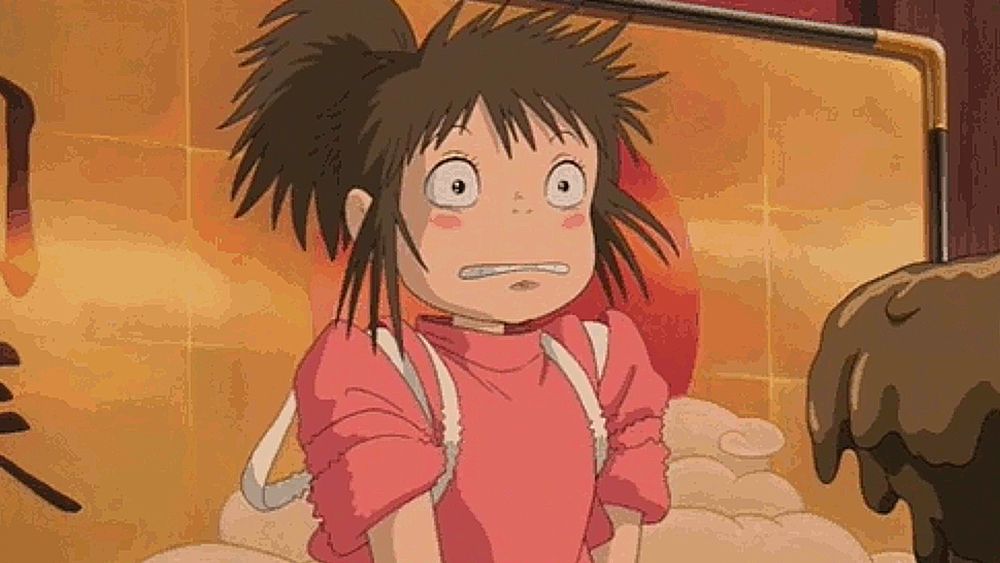
Unless you managed to check out from social media for the last few days, you’ll have noticed that the world has gone crazy for AI-generated images in the style of Studio Ghibli. Like really crazy. We’ve seen viral trends before, but the enthusiasm for the ability to ‘Ghiblify’ any image has been such that OpenAI temporarily limited access to GPT-4o to reduce the stress on its GPUs.

The Backlash

Far from showing any concern for the repercussions, OpenAI CEO Sam Altman seems to be loving it, personally showing off the new model’s abilities and using an AI-generated Ghibli-style profile picture on X. "It’s super fun seeing people love images in ChatGPT… But our GPUs are melting," he wrote.

Artists Speak Out

But can someone claim to be a fan of Studio Ghibli if they use AI to rip off the studio’s style when Ghibli founder Hayao Miyazaki is known to have a disdain for generative AI? When we first shared the news about what was happening on Facebook, artists provided quick to respond.

The Soulless Nature of AI-Generated Images

Some artists point to the soulless nature of the images generated by GPT-4o and suggest this proves that the beauty of hand-drawn animation is in the imperfections. But while some think this will make the emptiness and worthlessness of AI art clear, others are saddened by the enthusiasm with which the public and many brands have embraced the trend.

A Love-Hate Affair

The debate surrounding the AI-generated Ghibli trend has sparked a love-hate affair, with some people loving the creative possibilities it offers and others despising the lack of human touch and creativity it represents.

Conclusion

The AI-generated Ghibli trend has sparked a heated debate about the role of artificial intelligence in the world of art. While some see it as a creative opportunity, others view it as a threat to the very essence of human creativity. As the debate continues, one thing is clear: the future of art is uncertain, and only time will tell how AI will shape the world of art.

FAQs

Q: Is Studio Ghibli involved in the AI-generated Ghibli trend?
A: No, Studio Ghibli has not made an official statement on the trend.

Q: What is the purpose of AI image generation?
A: AI image generation is a form of artificial intelligence that uses machine learning algorithms to generate images from text prompts.

Q: Is the AI-generated Ghibli trend a form of copyright infringement?
A: Some argue that the trend is a form of copyright infringement, as it uses the style of Studio Ghibli without permission. However, others argue that it is not a form of copyright infringement, as it is simply generating images in a specific style.

Q: What is the future of art with AI?
A: The future of art with AI is uncertain, and only time will tell how AI will shape the world of art. While some see it as a creative opportunity, others view it as a threat to the very essence of human creativity.

MCP: The new “USB-C for AI”

Getting Along: OpenAI and Anthropic Join Forces to Overcome Technical Hurdle

What does it take to get OpenAI and Anthropic—two competitors in the AI assistant market—to get along? Despite a fundamental difference in direction that led Anthropic’s founders to quit OpenAI in 2020 and later create the Claude AI assistant, a shared technical hurdle has now brought them together: How to easily connect their AI models to external data sources.

A Unified Solution: Model Context Protocol (MCP)

The solution comes from Anthropic, which developed and released an open specification called Model Context Protocol (MCP) in November 2024. MCP establishes a royalty-free protocol that allows AI models to connect with outside data sources and services without requiring unique integrations for each service.

Standardizing AI Connectivity

“Think of MCP as a USB-C port for AI applications,” wrote Anthropic in MCP’s documentation. The analogy is imperfect, but it represents the idea that, similar to how USB-C unified various cables and ports (with admittedly a debatable level of success), MCP aims to standardize how AI models connect to the infoscape around them.

Conclusion

In conclusion, the collaboration between OpenAI and Anthropic is a significant step towards overcoming the technical hurdle of connecting AI models to external data sources. By adopting the Model Context Protocol, both companies can now focus on developing their AI assistants without the need for individual integrations with each data source. This development is a testament to the power of collaboration and the potential for open standards to drive innovation in the AI industry.

FAQs

Q: What is the Model Context Protocol (MCP)?
A: The Model Context Protocol (MCP) is an open specification developed by Anthropic that allows AI models to connect with outside data sources and services without requiring unique integrations for each service.

Q: How does MCP work?
A: MCP establishes a royalty-free protocol that enables AI models to communicate with external data sources and services, allowing for seamless integration and data exchange.

Q: What are the benefits of using MCP?
A: By adopting MCP, AI model developers can avoid the need for individual integrations with each data source, reducing development time and costs, and enabling a more streamlined and efficient development process.

Q: Are OpenAI and Anthropic now working together on AI projects?
A: Although OpenAI and Anthropic have collaborated on the Model Context Protocol, they remain competitors in the AI assistant market, and their collaboration is limited to this specific project.

Neo Geo Pocket Color: Fatal Lysis

0

Neo Geo Lineup Revealed by Evercade

After months of teasing, Evercade finally revealed its Neo Geo lineup of consoles and game carts in its showcase, and it features a retro game rarity that is reason enough to buy the new Super Pocket or cart.

Neo Geo Super Pocket Features 14 Built-in Games

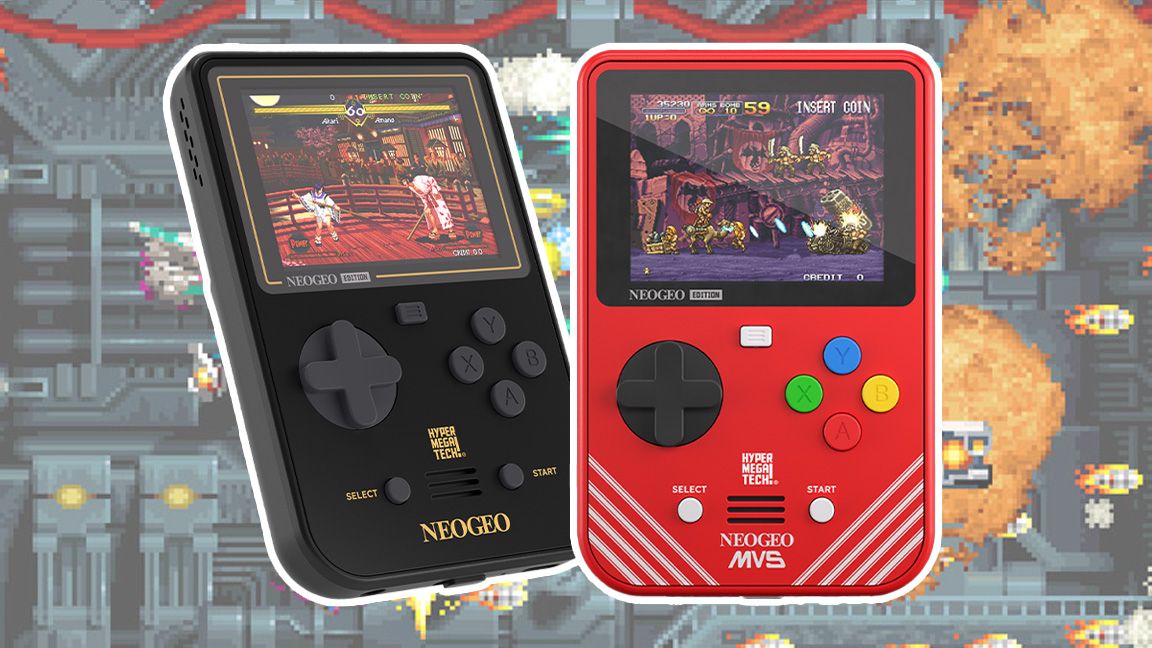
The new HyperMegaTech! Neo Geo Super Pocket features 14 built-in games, and the theme appears to be to shun some of the more familiar series – Fatal Fury, Art of Fighting, King of Fighters – in favor of including under the radar classics such as Metal Slug X, Top Hunter: Roddy & Cathy, and the superb The Last Blade.

Blazing Star, a Sequel to the Brilliant Pulstar, is a Standout

But it’s the inclusion of Blazing Star that has really caught my eye. This is a sequel to the brilliant Pulstar, a game I owned on my Neo Geo in the ’90s and played it daily, and both share a heritage with the iconic R-Type as nearly the entire team worked on the 1987 arcade hit.

Other Titles Include Shooters and Isometric Racer

It’s refreshing to see Evercade’s choice of games for its two new handhelds stray beyond the usual SNK games, with other titles, including shooters Last Resort and Alpha Mission II as well as isometric racer Over Top. If you do need a hit of classic SNK fighting, the experimental Fatal Fury Special is a good inclusion.

Pre-Order the HyperMegaTech! NEOGEO Super Pocket and HyperMegaTech! Limited Edition NEOGEO Super Pocket

Evercade has two handheld skews to pre-order today, my preference is actually the base mode, the HyperMegaTech! NEOGEO Super Pocket, which comes in black and gold of the old home console, while the HyperMegaTech! Limited Edition NEOGEO Super Pocket comes in red with white detailing of the MVS. Both can be pre-ordered from today at the Evercade website, with a release planned for 26th June. Or order from Amazon for $59.99 / £49.99.

Neo Geo Cart Available on 1 May

Alongside the two new Neo Geo handhelds, Evercade is also releasing a Neo Geo cart on 1 May featuring Metal Slug, King of Fighters 2000, Shock Troopers, Ironclad, Sengoku and Magician Lord. Priced $24.99 / £19.99, you can order this cart from Evercade.

Conclusion

The new HyperMegaTech! Neo Geo Super Pocket and its limited edition counterpart are set to be a hit among retro gaming enthusiasts. With 14 built-in games, including the rare Blazing Star, and a wide range of additional titles available, this is a must-buy for any fan of classic Neo Geo games.

FAQs

Q: What games are included in the Neo Geo Super Pocket?
A: The Neo Geo Super Pocket features 14 built-in games, including Metal Slug X, Top Hunter: Roddy & Cathy, and The Last Blade.

Q: What is the release date for the HyperMegaTech! NEOGEO Super Pocket and HyperMegaTech! Limited Edition NEOGEO Super Pocket?
A: The release date for the HyperMegaTech! NEOGEO Super Pocket and HyperMegaTech! Limited Edition NEOGEO Super Pocket is 26th June.

Q: How much does the Neo Geo cart cost?
A: The Neo Geo cart costs $24.99 / £19.99.

Q: Where can I pre-order the HyperMegaTech! NEOGEO Super Pocket and HyperMegaTech! Limited Edition NEOGEO Super Pocket?
A: You can pre-order the HyperMegaTech! NEOGEO Super Pocket and HyperMegaTech! Limited Edition NEOGEO Super Pocket from the Evercade website or Amazon.

Gitex Global in Asia: The Largest Tech Show in the World

GITEX ASIA 2025: A Global Tech Event

Event Overview

GITEX ASIA 2025 will take place from 23-25 April 2025 at Marina Bay Sands, Singapore. This prestigious event will bring together 700+ tech companies, featuring 400+ startups and digital promotion agencies, and 250+ global investors & VCs from 60+ countries.

Event Highlights

The event will serve as a bridge between the Eastern and Western technology ecosystems and feature 180+ hours of expert insights from 220 global thought leaders. It will foster cross-border collaboration, investment, and innovation, connecting global tech enterprises, unicorn founders, policymakers, SMEs, and academia to shape the future of digital transformation in Asia.

Co-Located Events

GITEX ASIA 2025 will comprise of five co-located events:

  • AI EVERTYTHING SINGAPORE – the AI showcase.
  • NORTHSTAR ASIA – for startups and investors.
  • GITEX CYBER VALLEY ASIA – helping create a defence ecosystem for governments and businesses.
  • GITEX QUANTUM QUANTUM EXPO ASIA – Asia’s quantum frontier.
  • GITEX DIGI HEALTH & BIOTECH SINGAPORE – the healthcare revolution.

Conferences and Summits

The event will host a lineup of conferences and summits, exploring a range of transformative trends in technology and investment. Key themes will include AI, cloud & connectivity, cybersecurity, quantum, health tech & biotech, green tech & smart cities, startups & investors, and SMEs.

Sessions and Topics

Sessions will include:

  • Asia Digital AI Economy
  • AI Everything: AI Adoption & Commercialisation
  • Cybersecurity: AI-Enabled Cybersecurity & Critical Infrastructure
  • Digital Health
  • Supernova Pitch Competition

Industry Insights

The event will bring together leading voices and ideas from different industries, including public services, retail, finance, education, health, and manufacturing.

Get Involved

Be part of the action at GITEX ASIA 2025 and witness the future of technology unfold in Singapore. For more information and updates on GITEX ASIA, visit www.gitexasia.com.

Social Media Links

LinkedIn | X | Facebook | Instagram | YouTube

FAQs

Q: What is GITEX ASIA 2025?
A: GITEX ASIA 2025 is a global tech event that will take place from 23-25 April 2025 at Marina Bay Sands, Singapore.

Q: What are the co-located events?
A: The event will comprise of five co-located events: AI EVERTYTHING SINGAPORE, NORTHSTAR ASIA, GITEX CYBER VALLEY ASIA, GITEX QUANTUM QUANTUM EXPO ASIA, and GITEX DIGI HEALTH & BIOTECH SINGAPORE.

Q: What are the key themes of the event?
A: The key themes of the event will include AI, cloud & connectivity, cybersecurity, quantum, health tech & biotech, green tech & smart cities, startups & investors, and SMEs.

Q: Who will be attending the event?
A: The event will bring together leading voices and ideas from different industries, including public services, retail, finance, education, health, and manufacturing.

How to Calculate Your Home Battery Needs for the Next Blackout

0

Buying a Giant Battery for the Next Blackout or Off-Grid Adventure

Understanding Watt-Hours (Wh)

Buying a giant battery for the next blackout or off-grid adventure can be daunting, especially when hundreds or even thousands of dollars are on the line. To get it right, you need to become intimate with the watt-hour (Wh). The watt-hour is a measure of capacity, or how much electrical energy a battery stores. If you know how much power — measured in watts — your devices consume, then the Wh rating of a battery lets you quickly calculate how long those devices will run.

Calculating Watt-Hours

For example, a typical LED light bulb requires about 10W to illuminate. So a 1000Wh (1kWh) battery can run that bulb for 100 hours because Wh divided by watts gives you the time. For context, the average US home consumes about 889kWh per month, or about 29.2kWh per day, according to the US Energy Information Administration. During a blackout, you’d need about $15,000 worth of batteries on hand to keep it running for just one day (based on a rough average of 50 cents per Wh of battery capacity). But that’d be silly because you really only need to keep your critical devices running for as long as the power is out.

Wh and Ah: Understanding the Numbers

We capitalize the “W” in Wh and kWh because the watt is named after Scottish inventor and engineer James Watt. Sadly for James, not all batteries or devices sold list the Wh spec; some opt for amp-hour (Ah or mAh) instead, where the capitalized “A” is for French physicist André-Marie Ampère. No offense to André-Marie, but the amp-hour is a dumb spec for consumer devices because it requires knowing the voltage. Nevertheless, amp-hours multiplied by the voltage gives you watt-hours.

Calculating Your Battery Needs

According to the most recent data available, US homes average about five to eight hours of electricity interruptions per year. But natural disasters like hurricanes and wildfires can extend outages over days. Buying a battery is therefore like buying insurance: do you spend more to cover all possible outcomes or just protect yourself against the basics? Either way, you need to calculate the watt-hours.

Common Household Devices and Watt-Hours

There are many publicly available watt-hour calculators available, including this one from EcoFlow and this one from Unbound Solar. What follows is a list of common household devices and a very rough estimate of how much power they could consume over a single day. To determine your battery needs, identify which electrical devices are critical to you and how long they’ll need to run, and then total up the watt-hours. That’s how much battery capacity you’ll need to survive without power.

Bar Chart: Watt-Hours Used by Different Appliances and Gadgets

[Insert bar chart]

Portable Power Stations and Solar Generators

In the real world, the actual watt-hours available to power your devices can be lower than the capacity written on the battery due to factors like age and operating temperature. And batteries aren’t very useful if you can’t easily access that stored energy. That’s why they’re often sold in the form of all-in-one power stations (aka “solar generators,” if equipped with a solar charge controller) with built-in AC and DC outputs for USB devices and household appliances. Just know that they divert some of that battery capacity to convert DC power to AC, to keep Wi-Fi and Bluetooth radios operating, to maximize solar energy collection, and possibly to heat the battery so it can be charged in cold weather.

Conclusion

Regardless of your energy needs, understanding watt-hours is crucial for buying the right battery. By calculating your watt-hour needs, you can determine the right amount of battery capacity to keep your critical devices running during a blackout or off-grid adventure. Remember to hedge a bit and purchase at least 10 percent more capacity than you actually need, and don’t forget to consider the age and operating temperature of your battery to get the most out of your investment.

Frequently Asked Questions (FAQs)

Q: What is a watt-hour (Wh)?
A: A watt-hour (Wh) is a measure of capacity, or how much electrical energy a battery stores.

Q: How do I calculate my battery needs?
A: Identify which electrical devices are critical to you and how long they’ll need to run, and then total up the watt-hours. That’s how much battery capacity you’ll need to survive without power.

Q: What is an amp-hour (Ah)?
A: An amp-hour (Ah) is a measure of capacity that requires knowing the voltage. Amp-hours multiplied by the voltage gives you watt-hours.

Q: How do I choose the right battery for my needs?
A: Calculate your watt-hour needs and consider factors like age and operating temperature to get the most out of your investment.

Q: What is a portable power station?
A: A portable power station is a device that combines a battery with a solar charge controller and other features to provide power on the go.

This shot is CRAZY lit

0

First Look at Spider-Man: Beyond the Spider-Verse Images

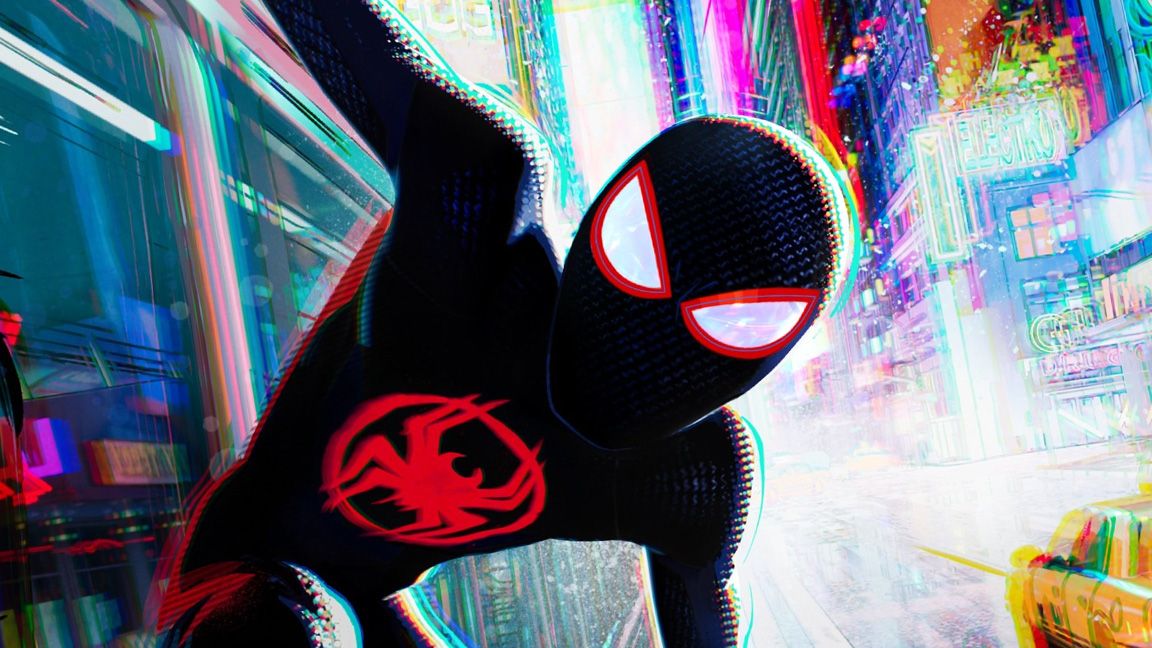
The first images for Spider-Man: Beyond the Spider-Verse have been released, and they are just as breathtaking and original as the previous two movies. The team behind the film, including producer Phil Lord and co-directors Bob Persichetti and Justin K. Thompson, said at CinemaCon that they "knew how important this franchise is to so many people around us. We just couldn’t run it back. So, we decided we needed to take the time to make sure we got it just right."

Visual Effects Supervisor Shares Insights

Visual effects supervisor Michael Lasker shared some insights into each of the new first-look images for Beyond the Spider-Verse on Twitter. He wrote: "I am SO EXCITED to be Visual Effects Supervising Spider-Man: Beyond the Spider-Verse and working with the best team in the business!!!"

New Images Revealed

The new images for Spider-Man: Beyond the Spider-Verse include:

Image 1

This shot was animated by Changsik Lee, lit by Kaitlyn Fox and composited by Craig Feifarek and Kaitlyn Fox!

Image 2

This killer shot was animated by Edward Han, lit by Kaitlyn Fox and composited by Pepe Orozco!!!

Image 3

This shot is CRAZYYY lit and composited by Bret St.Clair and Kelly Han!

Image 4

Love this shot, animated by Sophia Lee, lit by Kaitlyn Fox and composited by Rowan Young!

Image 5

This shot of Miles was animated by Martin Campos Amoros and Charlie Gordon-Ratzlaff, lit by Kaitlyn Fox and composited by Pepe Orozco and Rowan Young!

Style and Inspiration

The footage revealed at CinemaCon is clearly pushing the same brash, mix-and-match, and highly energetic animation style that made the original films huge hits. Without the Spider-Verse movies, we might not have had the similarly stylized Teenage Mutant Ninja Turtles: Mutant Mayhem and perhaps even the sweetly surreal Oscar-winning Flow.

Conclusion

Spider-Man: Beyond the Spider-Verse is set to release on June 4, 2027.

Frequently Asked Questions

Q: What is Spider-Man: Beyond the Spider-Verse about?
A: The film is a continuation of the Spider-Verse series, with more breathtaking animation and action-packed scenes.

Q: Who is working on the film?
A: The team behind the film includes producer Phil Lord, co-directors Bob Persichetti and Justin K. Thompson, and visual effects supervisor Michael Lasker, among others.

Q: When is the film set to release?
A: Spider-Man: Beyond the Spider-Verse is set to release on June 4, 2027.

How to Master Houdini’s Feather Tool

0

Write an article about

Being a 3D generalist isn’t an easy path. It requires constant learning of the best 3D modelling software and adaptation to a variety of fields, but for those driven by curiosity and a thirst for knowledge, it’s a rewarding journey.

Each day presents new challenges and opportunities for growth, which pushes us to expand our skill set and explore unfamiliar territory. For me, the best part of taking on the generalist role lies in the chance to constantly learn new skills and put them to the test across different 3D domains.

For those driven by curiosity, being a 3D generalist in rewarding


You may like

Anatomy of a feather

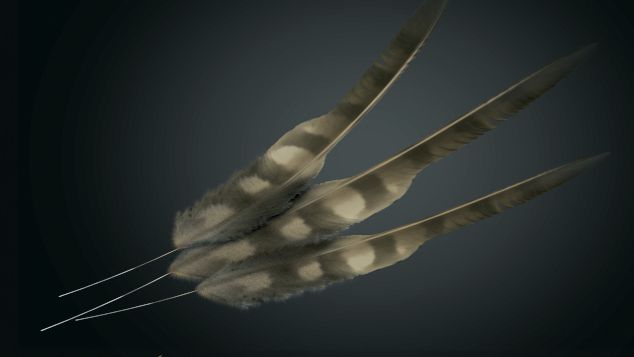
It’s important for us to understand the anatomy of a feather and its components:

Shaft: This is the long central part that holds the vanes

Vanes: The vanes are the plumed parts of the feather that grow from the central shaft.

Barbs: The individual strands that grow from the shaft. Each barb has a little shaft and tiny barbs, known as barbules.

01. Condensed workflow

When we’re working with feathers there are two different workflows: the condensed and the uncondensed. In the context of feathers, a condensed workflow involves working with feathers as some sort of packed geometry and relying on the GPU for visualisation.

This means we can efficiently create and groom our feathers in Houdini using some specific nodes that are capable of handling this complex virtual geometry, but we can’t manipulate primitives or points. At any moment we can use an ‘F. Uncondense’ node to switch to an uncondensed workflow.

02. Uncondense the workflow
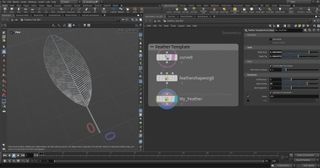
The uncondensed workflow is based on the Feather Uncondense SOP. This node will convert the virtual GPU-based condensed feather into proper geometry, allowing the use of any SOP-level node to tweak the feather’s appearance.

Some of the useful nodes that you can use on an uncondensed feather are the Edit SOP to manually transform certain elements of the feather, or a Mountain SOP to add different kinds of noise, which are impossible to add when the feather is condensed.

Overall, following this approach allows for greater control and attention to detail, with the trade-off that it can be heavier to compute, so you’ll need to rely on caching out your feather

03. Finding a feather atlas
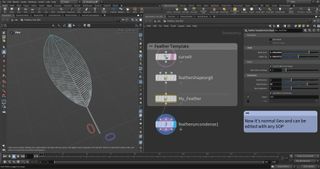
When working with feathers in Houdini, the first step is always to import a feather atlas. These are detailed diagrams featuring all manner of bird feathers, and useful for identifying species and studying the characteristics of feathers. You can download an atlas for your own research from either bit.ly/3Qi3H48 or bit.ly/44gBwID.

To import a feather atlas into your Houdini scene, first create a grid using a UV Texture SOP and change the Y Scale to -1, then add a UV Quick Shade SOP and path it to your feather atlas

04. Making feather templates
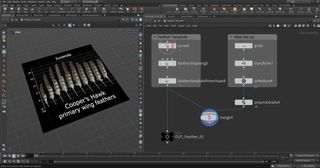
Now it’s time to actually create our first feather! If you’re already familiar with the process of creating feather templates, or if you just want to make a quick start, you can use Houdini’s Feather Template tool.

This conveniently creates a complete network with all the relevant nodes required for a basic feather. Every time you call up the Feather Template tool, Houdini will create a set of three nodes: a Curve SOP, a ‘Feather Shape Organize SOP’, and a ‘Feather Template from Shape SOP’.

05. Understanding the template structure
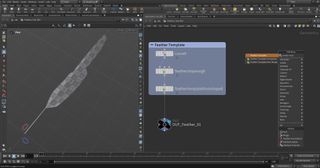
The Curve SOP provides three curves: a shaft and two boundaries representing the vanes. You can delete them and make your own custom curves if you want.

The ‘Feather Shape Organize SOP’ creates a name primitive attribute to identify the feather at a later stage, and the shaft and shape groups for further edits down the node stream.

The ‘Feather Template from Shape SOP’ turns the shape into a feather with barbs and also creates a wide range of point attributes like Barborient. Additionally, you can set a name for the feather.

06. Feather clumping details
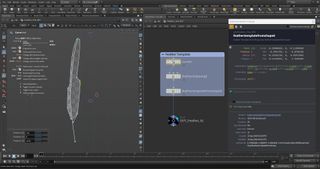
The Feather Clump SOP is an important node for mimicking the natural clumping of a feather and adding further details to the feather geometry.

This node is used to simulate the natural tendency of feathers to clump together in certain areas. With this node we can control the grouping and clustering of the barbs, copying the way they naturally form into bundles or tufts.

This tool is particularly useful for creating variations in the feather’s density and distribution, as well as adding visual interest to the overall arrangement. I’d recommend playing with the parameters here, as it’s a highly intuitive process.

07. Adding noise to the feathers
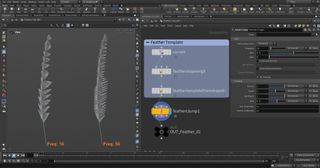
On top of the clumping capabilities, Houdini also features a Feather Noise SOP that’s used to introduce noise into the barbs of a feather, which in turn generates diverse positions for a more authentic and lifelike appearance.

This enables independent control over the level of noise found along the normal, tangent and bitangent axes, as well as the frequency seen along the shaft and barbs. By using noise in our project, we can add realism and complexity to the feathers, which helps them to feel more dynamic.

Additionally, animated noise can be used to quickly simulate any environmental factors you might need such as wind or general movement.

08. Making a texture mask
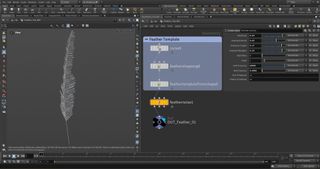
Our next step is to use the Texture Mask Paint SOP to create a mask. This node will store the mask as texture primitive. Connect it to a ‘Scatter In Mask SOP’ to create some points in the painted area and lastly connect it to a Hair Generate SOP. Use the Guide Mask SOP to create a procedural mask, name it in the Output Attribute parm, then in Curve Mask use the ramp to create the mask. Use a Color SOP set to ‘Ramp by Attribute’ and add your Output Attribute name.

See our list of the best 3D art here.

09. Adding extra SOPs
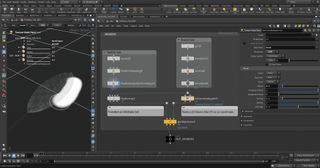
The Feather Visualize SOP is used to change the visualisation of the feather. It takes the feather primitives as input and generates polygonal representations of the them. Keep in mind that it’s only a representation, and the geometry is still condensed.

The Feather Width SOP is also incredibly useful to control the width of the shaft and the barb independently.

The Feather Surface SOP, meanwhile, instead takes feather primitives as input and generates polygonal representations of the feathers.

10. Grooming tools
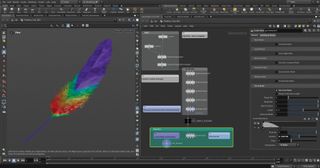
Houdini’s new feather tools are compatible with the software’s existing grooming tools, which enables artists to integrate feather grooming seamlessly into their character and creature workflows. This streamlines the process of creating and styling your feathers alongside other hair and fur.

If you’re new to hair, fur and feathers, you might need a little routine to become familiar with the grooming process. To groom our character we start by adding guides, which are used to set up the initial direction and length of the feathering. Later, the instances are interpolated between the guides. Instead of grooming large amounts of feathers, you only manipulate the guides and the interpolated feathers will follow.

11. The grooming workflow
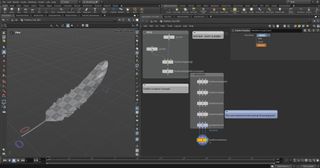
Let’s create a Guide Groom node after our geometry. The first step is to make the node aware that we’re going to use feather primitives. In the node properties, tick ‘Create & Output Feathers’, path it to your atlas and choose the feather you want to paint. Lastly click Set Feather Settings.

This button does two things: it turns on Orientation Attributes, and sets it to Barborient instead of Orient. The Guide Groom node has multiple painting modes. The most used are Draw, which lets you draw out curves from the object’s surface; Plant, which lets you add points where you want the feathers to appear; Paint/Sculpt, which lets you sculpt your guides; and Template, which lets you paint another feather type replacing your existing feathers.

12. Solaris starter
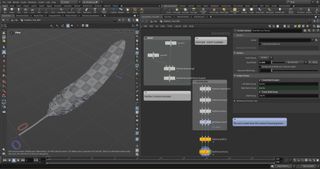
Solaris is a revolutionary suite of tools encompassing look development, layout and lighting, designed to empower artists in crafting USD-based scenes that seamlessly transition from asset creation to fi nal render. If you’ve previously been rendering within Houdini, you’re used to navigating through various contexts such as /obj, /mat, and /rop.

However, when we take a closer look, this divided way of working doesn’t fully make the most of Houdini’s strengths. One of the primary objectives of Solaris is to streamline and unify these contexts into a singular, cohesive network environment.

By consolidating multiple workflows within a single network, Solaris is increasing in popularity and I think it’s definitely worth giving it a look.

13. Setting up your scene in Solaris
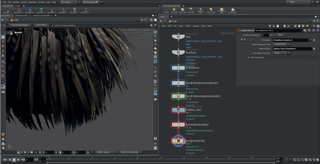
To get started, make sure to set your desktop to Solaris so you can look at the Scene Graph Tree (SGT). Because we want to recall our geometry from SOPs, we’ll create two SOP Import nodes, which are just like an Object Merge as they grab geo from SOPs, and pull it over to LOPs. Let’s path them correctly and connect one after the other; don’t worry, their order isn’t important.

To visualize the feathers, create a Primitive node, call it ‘Procedural’, set the primitive kind to Component and create a Houdini Feather Procedural node (HFP). In the HFP we want to path our primitive node to the Procedural Prim parm and our guides to the Groom Rest parm.

14. Preparing shading and rendering
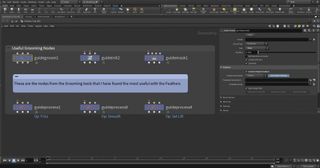
Time for the shading! Create a Material Library node and then set up a Karma Material Builder within it. Here we’re going to delete the pre-existing MtlX Standard Surface and substitute it with a Karma Hair material. At this point we can start to take a look at our Karma Hair node and check out the main parameters to see what they do.

15. Key parameters
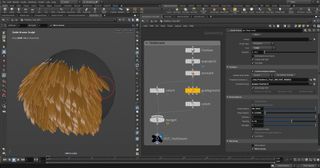
Within the Color tab, the main parameters are ‘melanin’ (the amount of melanin from 0 (white), to 1 (black), passing through multiple shades of brown); ‘melaninRedness’ the redness amount (for blonde, brown, black and so on, which should be kept low); and ‘melaninRandomize’ (the amount of variation in your melanin distribution, which adds in white and red hairs).

Under the Specular tab, the most important attributes are ‘roughness’ (how rough your feather looks), and ‘roughnessRandomize’ (the chance to have different values all around). If you want to assign a realistic color based on the feather atlas, there is a technique you can use: start the shading process by simply importing the atlas texture (MtlX Image) and then plug it into ‘baseColor’ and ‘diffuseColor’ of the Karma Hair material.

16. Assigning colours to your feathers
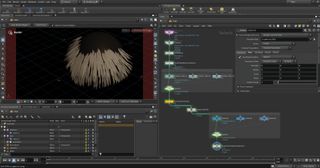
A quick way to assign a texture to your feather is by sampling it from the feather atlas image. This process can be a little tedious the first time around. Given your feather was traced on the grid with the atlas texture as previously explained, we’ll transfer the UVs from the grid across to the feather. The Feather Ray SOP is the fastest way to do this.

Connect your Feather Geo to the first input and the grid with the atlas assigned. In the third input, specify that you want to transfer the ‘uv’ attribute in the Feather Ray node properties.

.Organize the content with appropriate headings and subheadings ( h2, h3, h4, h5, h6). Include conclusion section and FAQs section with Proper questions and answers at the end. do not include the title. it must return only article i dont want any extra information or introductory text with article e.g: ” Here is rewritten article:” or “Here is the rewritten content:”

Can We Recreate the Ghibli Style with AI?

0

Las nuevas tecnologías de generación de imágenes y el impacto en el mundo creativo

La plataforma de inteligencia artificial (IA) ChatGPT ha sido actualizada recientemente para mejorar su tecnología de generación de imágenes. Esta actualización ha permitido a los usuarios convertir cualquier foto en un facsímil de la obra de Hayao Miyazaki, el famoso cineasta japonés, en cuestión de segundos.

La creación de imágenes estilo Ghibli

Mucha gente ha hecho precisamente eso esta semana, después de que OpenAI publicara la actualización de ChatGPT. Los usuarios han empezado a publicar imágenes estilo Ghibli en las redes sociales, que van desde selfies y fotos familiares hasta memes. Algunos han utilizado la función de ChatGPT para crear representaciones de imágenes violentas o oscuras, como la caída de las torres del World Trade Center y el asesinato de George Floyd.

La respuesta de la comunidad

Sam Altman, director ejecutivo de OpenAI, cambió su foto de perfil en X por una imagen ghiblificada de sí mismo y publicó una broma sobre la repentina popularidad del filtro y cómo había superado a su trabajo anterior y aparentemente más importante.

Kouka Webb, una nutricionista que vive en TriBeCa, convirtió las fotos de su boda en imágenes al estilo del Studio Ghibli. Webb, que tiene 28 años y se crió en Japón, dijo que verse a sí misma y a su marido estilizados de ese modo fue sorprendentemente conmovedor.

La crítica y el debate en torno al uso de la IA en el arte

En internet, algunos usuarios también han expresado su preocupación por el uso de la función de generación de imágenes. En un documental de 2016, Miyazaki calificó la IA de "un insulto a la vida misma". Un fragmento de la película circuló en X tras la repentina popularidad del filtro.

La respuesta de OpenAI

Taya Christianson, vocera de OpenAI, dijo que el objetivo es dar a los usuarios la mayor libertad creativa posible. "Seguimos impidiendo las generaciones al estilo de artistas vivos individuales, pero sí permitimos estilos de estudio más amplios, que la gente ha utilizado para generar y compartir algunas creaciones originales de fans realmente encantadoras e inspiradas", agregó.

La conclusión

La actualización de ChatGPT ha abierto nuevas posibilidades para la creación de arte y ha generado un gran interés en el mundo de la IA. Sin embargo, también ha generado preocupaciones sobre el impacto que puede tener en el mundo creativo. ¿Qué es lo que hay detrás de esta tecnología y qué implicaciones tendrá en el futuro del arte y la creatividad?

Preguntas y respuestas

Q: ¿Qué es ChatGPT?
A: ChatGPT es una plataforma de inteligencia artificial que ha sido actualizada recientemente para mejorar su tecnología de generación de imágenes.

Q: ¿Cómo funciona la tecnología de generación de imágenes de ChatGPT?
A: La tecnología de generación de imágenes de ChatGPT permite a los usuarios convertir cualquier foto en un facsímil de la obra de Hayao Miyazaki en cuestión de segundos.

Q: ¿Qué tipo de imágenes puede crear ChatGPT?
A: ChatGPT puede crear una amplia variedad de imágenes, desde selfies y fotos familiares hasta memes y representaciones de imágenes violentas o oscuras.

Q: ¿Qué es lo que hay detrás de esta tecnología y qué implicaciones tendrá en el futuro del arte y la creatividad?
A: La tecnología de generación de imágenes de ChatGPT es un ejemplo del avance de la inteligencia artificial en el mundo de la creatividad. Sin embargo, también ha generado preocupaciones sobre el impacto que puede tener en el mundo creativo y la propiedad intelectual.

NVIDIA RTX Advances with Neural Rendering and Digital Human Technologies

0

AI is Transforming the Gaming Experience

Neural Shading Support Coming to DirectX in April

At GDC 2025, NVIDIA is building upon its suite of neural rendering technologies, expanding NVIDIA ACE, and showcasing how generative AI amplifies the capabilities of game developers, helping to create bigger, more amazing worlds for gamers to enjoy.

NVIDIA RTX Kit Updates

NVIDIA RTX Kit, a suite of neural rendering technologies, has added a new RTX Texture Streaming SDK and improvements to RTX Texture Filtering.

  • RTX Texture Streaming divides textures into smaller tiles and efficiently manages and loads them based on need, minimizing memory overhead while ensuring that high-resolution textures are delivered exactly when and where they’re needed.
  • RTX Texture Filtering has expanded its DLSS support and added a new rasterization mode with deferred lighting.
  • The RTX Path Tracing code sample has been updated with full DLSS 4 integration and a transformer model for dramatic improvements to image quality in real-time, path-traced sample scenes.

Unreal Engine 5 and NVIDIA RTX

For Unreal Engine 5 developers, RTX Mega Geometry is now available in the NVIDIA RTX Experimental Branch of Unreal Engine 5 (NvRTX). RTX Mega Geometry is the NVIDIA technology for path-tracing massive worlds of dense geometry.

Zorah Demo

Many of these technologies can be seen in the NVIDIA neural rendering technology demo, Zorah, built using the NVIDIA RTX Branch of Unreal Engine. Zorah has been updated with new scenes to demonstrate the latest real-time path tracing capabilities.

DLSS 4 and Ray Tracing

NVIDIA DLSS 4 has become the gold standard for AI super resolution and frame generation, boosting frame rates by up to 8x over native rendering. DLSS 4 Multi Frame Generation is now available in over 100 titles, including Marvel Rivals, Indiana Jones and the Great Circle, and FragPunk.

RTX Remix Officially Released

RTX Remix is an open-sourced platform that enables modders to create stunning NVIDIA RTX remasters of classic games. Since the beta in January 2024, over 30K modders have used Remix across hundreds of games with over a million gamers playing RTX Remix mods.

NVIDIA ACE Models

The future of games will be living worlds powered by AI. From non-playable characters (NPCs) that you can converse using natural language to AI assistants that can analyze your gameplay in real-time to help you improve, the number of gameplay-changing experiences is countless.

New NVIDIA ACE Models

NVIDIA ACE is a suite of AI-powered, digital human technologies including language, speech, animation, and vision models. The suite continues to grow, adding new language and perception AI models, upgrading facial animation with a new diffusion architecture, and updating ACE plugins for Maya and Unreal Engine (coming soon).

Conclusion

AI is transforming the gaming experience, unlocking new levels of visuals, performance, and gameplay possibilities with neural rendering and generative AI-powered characters. With game development becoming more complex, AI is also playing a role in helping artists and engineers realize their creative visions.

FAQs

Q: What is NVIDIA RTX Kit?
A: NVIDIA RTX Kit is a suite of neural rendering technologies that has added a new RTX Texture Streaming SDK and improvements to RTX Texture Filtering.

Q: What is RTX Mega Geometry?
A: RTX Mega Geometry is the NVIDIA technology for path-tracing massive worlds of dense geometry, available in the NVIDIA RTX Experimental Branch of Unreal Engine 5 (NvRTX).

Q: What is DLSS 4?
A: DLSS 4 is the gold standard for AI super resolution and frame generation, boosting frame rates by up to 8x over native rendering.

Q: What is RTX Remix?
A: RTX Remix is an open-sourced platform that enables modders to create stunning NVIDIA RTX remasters of classic games.

Q: What is NVIDIA ACE?
A: NVIDIA ACE is a suite of AI-powered, digital human technologies including language, speech, animation, and vision models.