Home Blog Page 461

Maximize Your Laptop Battery Life

0

Dim Your Screen a Little

Yes, we get it. As a creative professional, you’ll normally want to keep your screen at maximum brightness. But it’s worth knowing that this is one of the most significant drains on its battery. Consequently, dimming your screen even a little can really help prolong its life.

Obviously, you don’t want to ruin your eyesight or create bad work, though. So it’s really about fiddling around and finding the right balance between power and performance for you, depending on the ambient lighting conditions you’re working in. Start by experimenting with lower brightness levels and work your way up until you hit that sweet spot.

Close Down Unnecessary Tabs

Creative software like the Adobe Creative Suite, video editing programs, and 3D rendering tools can do amazing things, but by the same token, they will drain your battery incredibly quickly. So you need to be strategic about what you do and when, if you’re working on battery power.

So for example, when you’re using a resource-intensive application like Final Cut Pro, make sure you have all other unnecessary browser tabs and tools closed. This might sound like a lot of faffing around, but this approach can significantly extend your battery life, giving you more uninterrupted creative time overall.

Use Airplane Mode

You might not think simply having your Wi-Fi and Bluetooth on would be a drain on your battery. But actually, both are constant energy consumers, even when it doesn’t seem like they’re actually doing anything. So when you’re working offline—such as editing photos, sketching designs, or rendering a video—consider switching to Airplane Mode. This simple tweak can dramatically reduce the amount of power your laptop is using.

Create the Right Physical Environment

Most people don’t think of this, but temperature and physical surroundings play crucial roles in the amount of energy your laptop uses.

Most importantly, avoid using your laptop on soft surfaces such as beds or sofas that can restrict airflow to its internal components. It’s much better to use your device on hard, flat surfaces that allow proper airflow. Alternatively, you might want to cool things down further by investing in a laptop stand (for better airflow) or a cooling pad (for direct cooling).

Monitor Your Battery Health

Sadly, batteries don’t operate at the optimum efficiency forever: they get less effective over time. There’s no way of preventing this, but you can at least monitor the situation to help you act accordingly. To learn how to do so in both Mac and Windows, read our article How to check your laptop’s battery health.

Stay Updated with Software and Drivers

Let’s face it, updating your software regularly probably isn’t at the top of your priorities. But if you want to get the maximum life out of your battery, maybe it should be. Firstly, because updates often include power management improvements. And secondly, because regularly updating your operating system and device drivers can make your laptop work more efficiently and be less draining on the battery. So set your system to automatically download and install updates, ensuring you’re always running the most optimised version.

Disconnect Peripherals

Got a USB stick plugged into your laptop doing nothing? Well, actually, it’s not doing nothing. Even when not actively used, such devices draw power from your laptop’s battery. So boost your laptop’s battery life by making sure you disconnect peripherals, including external hard drives, USB drives, mice, and keyboards, when you’re not using them.

Use Built-in Battery-Saving Modes

Both Windows and Mac laptops offer battery-saving modes that can significantly extend runtime by limiting background processes and reducing screen brightness. Mac offers similar energy-saving features. These modes can be lifesavers when you’re working away from a power outlet.

Manage Background Processes and Startup Apps

A lot of the time, applications run in the background of your laptop, consuming valuable battery resources without you even knowing about it. So take the time to review and manage startup applications and background processes. Both Windows and Mac offer tools to help you identify and disable unnecessary startup items. Check your task manager or activity monitor regularly, and close applications and processes you’re not actively using. Doing this can significantly extend your battery life.

Switch to a Lighter Web Browser

The major web browsers, Chrome, Firefox, Safari, and Edge, can be surprisingly power-hungry. So if you’re working on battery power, consider using lighter browsers such as Opera, or at least limiting the number of open tabs.

Conclusion

By following these simple yet effective techniques, you can potentially extend your device’s runtime, whether you’re using one of the best laptops for graphic design or one of the best MacBooks for students. Remember to dim your screen, close down unnecessary tabs, use Airplane Mode, create the right physical environment, monitor your battery health, stay updated with software and drivers, disconnect peripherals, use built-in battery-saving modes, manage background processes and startup apps, and switch to a lighter web browser.

FAQs

Q: Can I really make a difference with these tips?
A: Yes, following these simple techniques can significantly extend your device’s runtime, making it easier to work on the go or in areas with unpredictable power access.

Q: What are the most power-hungry applications?
A: Resource-intensive applications like the Adobe Creative Suite, video editing programs, and 3D rendering tools can drain your battery quickly. Be strategic about what you do and when, and consider closing down unnecessary tabs and processes.

Q: Can I use my laptop in a soft, non-flat surface?
A: Avoid using your laptop on soft surfaces like beds or sofas, as they can restrict airflow to its internal components. Use a hard, flat surface instead to allow proper airflow and cooling.

Q: How often should I update my software and drivers?
A: Regularly update your operating system and device drivers to ensure you’re always running the most optimised version, which can help extend your battery life. Set your system to automatically download and install updates.


Big Data Career Insights

Career Notes

Pat Gelsinger

Pat Gelsinger’s second stint at Intel ended abruptly this month when the 63-year-old CEO stepped down following poor financial results for the chipmaker. The Intel board has named David Zinsner and Michelle Johnston Holthaus as interim co-CEOs while it seeks a permanent leader for the storied firm.

Andy MacMillan

Alteryx, the embattled Southern California analytics company, has appointed IT industry veteran Andy MacMillan to be its new chief executive officer. MacMillan will be tasked with driving Alteryx to "new heights" following the company’s collapse in the public market and subsequent sale to private equity firms.

Baaziz Achour

Mobile chip giant Qualcomm has promoted Baaziz Achour to be its new chief technology officer. He will formally take the CTO role on February 3, 2025, when the current CTO, James Thompson, retires.

Piyush Verma

Coralogix, a provider of an AI-powered IT observability platform, has brought in Piyush Verma to be its new head of product strategy. In his new role, Verma will drive product innovation and enhance customer experiences for Coralogix, which has grown by 10x over the past three years.

Andy Wild

Database provider SingleStore has hired Andy Wild to be its new chief revenue officer. In this role, Wild will be responsible for leading the global sales teams for the company, which achieved $100 million in annual recurring revenue (ARR) this year.

Hoang Vuong

Distributed file system vendor WEKA has hired Hoang Vuong to be its new chief revenue officer. WEKA, which has more than $100 million in ARR and recently raised $140 million at a $1.6 billion valuation, has been growing quickly as companies face expanded data management needs driven by the AI boom.

Pete Harteveld

Cybersecurity firm Exabeam has tapped Pete Harteveld to be its new chief revenue officer. The appointment puts Harteveld in charge of what Exabeam boasts is "the world’s largest pure-play security analytics and security information and event management (SIEM) vendor."

Conclusion

This month’s edition of Career Notes highlights the latest career developments in the big data community. From CEO changes to new appointments, these moves are shaping the future of the industry. Stay tuned for next month’s edition to stay up-to-date on the latest career news.

FAQs

Q: What happened to Pat Gelsinger at Intel?
A: Pat Gelsinger stepped down as CEO of Intel following poor financial results.

Q: Who is the new CEO of Alteryx?
A: Andy MacMillan is the new CEO of Alteryx.

Q: Who is the new CTO of Qualcomm?
A: Baaziz Achour is the new CTO of Qualcomm.

Q: What is Piyush Verma’s new role at Coralogix?
A: Piyush Verma is the new head of product strategy at Coralogix.

Q: Who is the new CRO of SingleStore?
A: Andy Wild is the new CRO of SingleStore.

Q: Who is the new CRO of WEKA?
A: Hoang Vuong is the new CRO of WEKA.

Q: Who is the new CRO of Exabeam?
A: Pete Harteveld is the new CRO of Exabeam.

ChatGPT Hit by Major Outage

0

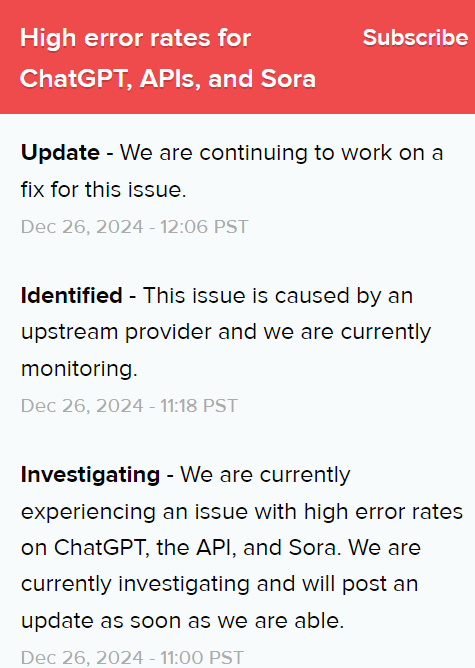
ChatGPT Search is down for users worldwide, becoming unresponsive at approximately 11 AM EST. Down detectors and reports on social media reflect that many users cannot access the site. OpenAI is reporting a major outage.

OpenAI is reporting that the outage is partially resolved:

Update – ChatGPT is partially recovered while chat history is still not loading.
We are continuing to work on a fix for this issue.
Dec 26, 2024 – 14:05 PST

Largest ChatGPT Outage Ever

This outage fits into a pattern of outages affecting an increasingly larger amount of people. Part of the reason is that there are more people using ChatGPT. Regardless, this outage is triggering the largest amount of people querying Google for the phrase “Is ChatGPT down.” The following Google Trends graph shows that more people queried “is ChatGPT was down” on 12-26-2024 than on any other date in the history of ChatGPT.

Screenshot: Comparison Of Outages By Search Queries

Major Outage At OpenAI

OpenAI is reporting a major outage is hitting it’s ChatGPT, API, and SORA services. The issue is described by OpenAI as caused by an upstream provider. Upstream provider is a vague description that can be compute-related on Microsoft’s side or a network related service.

Screenshot Of  Official ChatGPT Outage Status

OpenAI Sora Is Only Partially Affected

The major outage has hit both ChatGPT and the API but OpenAI’s Sora service is only partially affected.

Screenshot Shows Severity Of Outage

Conclusion

The major outage has been partially resolved, but users are still experiencing issues with chat history loading. OpenAI is continuing to work on a fix for the issue. This outage highlights the importance of having a robust infrastructure in place to handle increasing user traffic.

FAQs

Q: What caused the outage?

A: The outage was caused by an upstream provider, which is a vague description that can be compute-related on Microsoft’s side or a network-related service.

Q: Which services are affected?

A: The major outage has hit both ChatGPT and the API, but OpenAI’s Sora service is only partially affected.

Q: When did the outage start?

A: The outage began at approximately 11 AM EST.

Q: Is the outage resolved?

A: The outage is partially resolved, but users are still experiencing issues with chat history loading. OpenAI is continuing to work on a fix for the issue.

Upgrading Grails from 3.1.9 to 5.3.6

0

Upgrading Grails from 3.1.9 to 5.3.6: A Personal Journey

Over the past few months, I’ve enjoyed about 300 hours of coding, even though they were scattered between meetings, team changes, production issues, and grocery runs. I still like working on old stuff, so these hours were spent on upgrading a legacy microservice through multiple Grails versions: 3.1.9 → 3.3.6 → 4.1.4 → 5.3.6. It’s been an interesting ride since I haven’t had much hands-on experience with Groovy and Grails before. It feels like stepping back in time to trace Grails’ footprint, especially now that its founder has shifted focus to the Micronaut framework.

A Challenging Upgrade Process

The upgrade was quite a bit of work, so I naturally turned to Copilot. It was interesting to see that Copilot struggled with the upgrades from versions 3 to 4, only to suddenly perform much better during the 4 to 5 upgrade. In the end, I spent about 200 hours cleaning up and upgrading 3.1.x to 3.3.6, 150 hours upgrading 3.3.6 to 4.1.4, and just a week (with one bug) to complete the upgrade to 5.

Lessons Learned and Tips

I compiled upgrade instructions from scattered online sources, enriched them with my own notes, resolved issues, and added tips. Along the way, I realized that:

  • Grails 3.3.6 has a more modern Groovy version (2.5.4) compared to Grails 3.1.9 (2.4.8), which made some changes necessary.
  • Grails 4.1.4 introduced a new way of handling dependencies, which required some adjustments.
  • Grails 5.3.6 has a new web server, which needed to be configured.

Conclusion

This experience with upgrading Grails versions has been a valuable learning experience. I hope that sharing my notes and tips will help others who are facing similar challenges. The upgrade process was time-consuming, but the end result was worth it. If you’re working with Grails, I encourage you to take the time to upgrade to the latest version to benefit from new features and improvements.

FAQs
Q: What are the key differences between Grails 3.1.9 and 5.3.6?

A: Grails 3.1.9 has an older Groovy version (2.4.8), while Grails 5.3.6 has a newer Groovy version (2.5.4). Additionally, Grails 5.3.6 has a new web server and improved dependency management.

Q: How long did the upgrade process take?

A: The upgrade process took about 300 hours, spread across three major upgrades: 3.1.9 to 3.3.6 (200 hours), 3.3.6 to 4.1.4 (150 hours), and 4.1.4 to 5.3.6 (1 week with one bug).

Q: What is Copilot, and how did it help with the upgrade process?

A: Copilot is a tool that helps with the upgrade process. It struggled with the upgrades from versions 3 to 4, but performed much better during the 4 to 5 upgrade. It was an interesting experience to see how Copilot handled the different versions.

The Best iRobot Vacuums of 2024

0

What is the Best Roomba Vacuum Right Now?

A robot vacuum is a worthwhile investment, but it can still be a lot of money to spend on a household product. Whatever the price, you want a quality device that can reliably tackle your floor’s cleaning needs. Luckily, iRobot has been around the block for a while and has several reputable robot vacuums you can buy. At ZDNET, we’ve spent a lot of time testing and reviewing machines made by iRobot and other manufacturers to help you make the right purchase.

The Best iRobot Roomba Robot Vacuums of 2024

We’ve done hands-on testing with and reviewed several Roomba vacuums, evaluating each for design, mapping, self-emptying capabilities, pet waste avoidance skills, smart technology, and cost to help you find the best iRobot vacuum for your home. Based on our testing, the iRobot Roomba j7+ is our pick for the best iRobot vacuum overall, thanks to its smart navigation, self-emptying features, and great price. Read on for the rest of our picks for the best Roomba vacuums.

The Best iRobot Roomba Robot Vacuums

Best iRobot vacuum Cost Clean Base
iRobot Roomba j7+ $430 Yes
iRobot Roomba s9+ $935 Yes
iRobot Roomba Combo j9+ $1,200 Yes
iRobot Roomba Combo Essential $160 No

What to Consider When Choosing the Best Roomba Vacuum

  • Floor types: Some robot vacuums are equipped to work with certain floor types, like carpet or hardwood. Others may be able to accommodate other floor types, like stone or marble. Before you buy, consider the types of flooring in your home and which vacuum is most appropriate.
  • Mapping: For full automation, your robot vacuum must have a mapping feature to navigate each room. You also want to consider an obstacle avoidance feature that can avoid things like furniture, wires, and even pet waste.
  • Battery: An iRobot vacuum is hardly worth it if it doesn’t have the battery to keep it going. Consider the battery time before choosing the best robot vacuum to ensure it has enough power to clean your home.
  • Connectivity: Many of the best robot vacuums offer voice control, some even with Alexa. Others may feature an app that allows you to control your robot from afar, set schedules, track progress, and control the machine’s efforts.

How We Test Robot Vacuums at ZDNET in 2024

At ZDNET, we have several robot vacuum reviewers who have tested over 50 units thus far. We conduct tests in real homes with real challenges, and in a controlled lab environment for comparison.

Our Testing Process

  • Determine evaluation criteria: For our key evaluation criteria, we consider how robots perform by assessing their suction power, navigation, mapping, and battery life. We also assess the user experience, the robot’s versatility, longevity, and whether it delivers on its specifications.
  • Unboxing: During this process, we assess the packaging and setup experience and note any accessories and unique features.
  • Testing environments: We test the robot vacuums on different floor types (like carpet and hardwood) and see how they navigate various obstacles to test performance.
  • Performance metrics: We test suction power with various debris types and assess obstacle navigation and mapping accuracy.
  • Extra features: When testing robot vacuum and mop combinations, we evaluate their effectiveness at removing stains and overall cleaning quality. We also check how unique features work, like obstacle avoidance and recognition, extendable mop pads, etc.

Conclusion

iRobot vacuums are a worthwhile investment, but it’s crucial to choose the right one for your needs. With the right features, you can simplify your cleaning routine and save time. Whether you’re looking for a budget-friendly option or a high-end model, there’s an iRobot Roomba out there for you. Read our full reviews to find the best Roomba vacuum for your home.

FAQs

Q: What is the best Roomba vacuum for pet owners?
A: The iRobot Roomba s9+ is our top pick for pet owners, with its powerful suction and advanced pet hair management features.

Q: What is the best budget-friendly Roomba vacuum?
A: The iRobot Roomba Combo Essential is our top pick for those on a budget, offering great features at an affordable price.

Q: What is the best Roomba vacuum for large homes?
A: The iRobot Roomba j7+ is our top pick for larger homes, with its advanced navigation and mapping features.

Q: Can I use multiple Roomba vacuums in my home?
A: Yes, many iRobot vacuums are compatible with multiple robots, allowing you to control and schedule multiple units from a single app.

ChatGPT is down

0

ChatGPT Not Working for Many Users

ChatGPT isn’t working for many users right now. With numerous reports on social media, we also confirmed that the chatbot loads but isn’t able to respond to queries, while others are seeing an “internal server error” message.

Outage Started Around 1:30PM ET

It looks like the outage started around 1:30PM ET, which is when reports began to spike on Down Detector. At 2PM ET, OpenAI posted an update to its status page, saying ChatGPT, the API, and its text-to-video generator Sora are “currently experiencing high error rates.” An update posted at 2:18PM ET said the issue is “caused by an upstream provider” and that OpenAI is currently monitoring the situation.

OpenAI Working on a Fix

At 3:06PM ET, OpenAI said it’s “continuing to work on a fix.” There’s no mention of an ETA for when access will be restored.

Previous Outages

ChatGPT has gone down a few times in the past several months. Just days after OpenAI released Sora to ChatGPT subscribers earlier this month, the video generation tool and ChatGPT went down for hours. Meanwhile, a widespread outage affecting AI tools brought down ChatGPT in June.

Update, December 26th

Added an update from OpenAI.

Conclusion

ChatGPT’s outage is causing inconvenience to many users, and OpenAI is working to resolve the issue. While there is no estimated time of recovery, users can expect the chatbot to be back online once the issue is fixed.

FAQs

Q: What is causing the outage?

A: According to OpenAI, the issue is caused by an upstream provider.

Q: When will ChatGPT be back online?

A: There is no estimated time of recovery, but OpenAI is working to resolve the issue as soon as possible.

Q: Has ChatGPT experienced outages before?

A: Yes, ChatGPT has gone down a few times in the past several months due to various reasons.

Q: What is OpenAI doing to resolve the issue?

A: OpenAI is continuing to work on a fix and is monitoring the situation to ensure a timely resolution.

AI in 2024: A New Creative Frontier

0

Theft or Remix?

Perhaps the biggest complaint creatives have had about generative AI since the likes of Midjourney burst onto the scene is the use of original, human-made artwork as the raw material to train AI systems to produce its own images. Whether you view scraping (finding online content to use as training data) as outright copyright infringement or as a 21st-century spin on the famous maxim (usually attributed to Picasso) “good artists copy, great artists steal”, it suddenly becomes a lot more real when you see AI-made work that’s stylistically eerily similar to your own, as many prominent illustrators have.

Fairly Trained, an organisation advocating for the ethical use of data in training, has issued a straightforward declaration: “The unlicensed use of creative works for training generative AI is a major, unjust threat to the livelihoods of the people behind those works, and must not be permitted.” Among the 38,000 signatories to date are illustrator Claire Wendling and comic book artist Duncan Fegredo.

Where Do People Fit In?

Many creatives are worried or angry when they see generative AI producing material they might have expected themselves or their industry colleagues to have made previously. Artists and designers who’ve spent years honing their technical skills and their personal styles now find themselves pitching against people making material through text prompts.

It’s a hornets’ nest that Coca-Cola, arguably the world’s biggest brand, has poked on more than one occasion in 2024. In July, Ian reported from Siggraph on how agency WPP was collaborating with Nvidia to produce AI-generated Coca-Cola assets by the truckload, placing AI-made 3D assets into configurable virtual photoshoots. More contentious was the recent remake of a classic Coca-Cola Christmas TV spot, made entirely with AI and challenging the company’s own ‘Real Magic’ tagline: it felt neither real nor magical.

Against Slop

Beyond economic concerns, the strong feedback from both the creative community and the broader audience of consumers towards AI creative content is that so much of it is – how do I put this diplomatically? – awful. AI-shaming, where everyone competes to find the most egregious examples of bad AI art, has become one of social media’s biggest bloodsports.

AI Done Right?

If large-scale generative AI brings with it the risk of producing generic, lowest-common-denominator material, perhaps the most promising direction forward lies with private AI models – engines trained on smaller, privately owned data sets, with a tighter end goal than the ability to create anything that might appear in a text prompt.

The agency Rehab is a compelling example that Joe looked at for Creative Bloq’s AI Week in June. Rehab is using AI not to produce artwork, but to streamline the research stage of its projects, leaving responsibility for generating ideas and creative from that research to people. Data from social media and commissioned research helps Rehab’s AI to create profiles of potential customers: what they’re thinking, what they’re buying, and so on.

A Return to Discernment (Please)

If 2024 has taught us anything about AI in the creative fields, it’s that human taste is going to be more important than ever. The novelty of having access to a toolset that makes creating images and video easier than ever before is rubbing off fast, and expecting people to respond to your content simply because of the tool you used to make it isn’t, and has never been, enough.

We’ve been here before with digital art that felt too airbrushed and 3D graphics that hurled us into the Uncanny Valley, where something looks right and wrong at the same time. Step into this broader context, and generative AI becomes the newest inflexion point in a challenge artists and creatives have faced ever since Photoshop was unveiled in 1987. At what stage in your use of technology do you lose the sense of human connection that lies at the heart of any worthwhile creative endeavour? When does making art become so easy that you miss the part where you put something of yourself into the work?

AI image-making is succeeding massively at democratising the creative process, and failing wholeheartedly at fostering art with a genuine human connection. Can it ever find a balance? 2025 will start to answer that question.

Conclusion

The future of AI in the creative fields is uncertain, but one thing is clear: the stakes are high. As AI becomes more integrated into our workflows, we must be mindful of the potential consequences and strive to create a balance between technology and human connection. The onus is on us to ensure that AI is used responsibly and ethically, and that it enhances our creativity rather than replacing it.

FAQs

Q: What is generative AI?
A: Generative AI refers to artificial intelligence that can create new content, such as images, videos, or music, based on patterns and structures it has learned from existing data.

Q: Is AI going to replace human artists?
A: While AI can generate impressive content, it is unlikely to replace human artists entirely. AI can augment human creativity, but it lacks the emotional depth and nuance that human artists bring to their work.

Q: How can I use AI in my creative work?
A: AI can be used in a variety of ways, from generating ideas and inspiration to automating repetitive tasks and enhancing your workflow. However, it is essential to use AI responsibly and ethically, and to ensure that it does not replace human creativity.

Q: What are the ethical implications of using AI in the creative fields?
A: The ethical implications of using AI in the creative fields are significant. AI can be used to create content that is biased, inaccurate, or misleading, and it can also be used to exploit or manipulate people. It is essential to consider the ethical implications of using AI and to ensure that it is used responsibly and ethically.

Portable SSDs Up to $220 Off

0

The Best Post-Christmas Deals on Portable SSDs

Why You Need a Portable SSD

After another year of creative projects, chances are that you portable SSDs are running low on space and you need to either do a massive cull of material or get a new device for the new year. Happily, there are some great Post-Christmas deals about on portable SSDs to make that decision easier.

Top Deals on Portable SSDs

Amazon has up to 30% off the super-fast Micron Crucial X10 Pro, with the 4TB option reduced by $120 from $399.99 to $279.99. And there’s 40% off the 4TB Samsung T9, reduced from $549.99 to $329.99. In both cases, there are smaller discounts on lower capacities.

Features of Portable SSDs

These external SSDs are designed to provide the read and write speeds needed for video editing in a well-built, compact form factor that’s easy to carry around when working remotely.

The Best Portable SSDs for Your Needs

  • Micron Crucial X10 Pro
  • Samsung T9

Other Options

Need another option? Take a look below for the best SSD sale prices in your area. Or if you prefer to back up your year’s work up the cloud, see our pick of the best cloud storage.

Frequently Asked Questions

Q: What are portable SSDs used for?
A: Portable SSDs are used for storing and transferring large files, such as videos and photos, while working remotely.

Q: What are the benefits of using portable SSDs?
A: Portable SSDs provide fast read and write speeds, are compact and easy to carry, and are ideal for video editing and other data-intensive tasks.

Q: Are portable SSDs secure?
A: Yes, portable SSDs are designed with security features such as encryption and password protection to keep your data safe.

Q: Can I use a portable SSD for cloud storage?
A: Yes, many portable SSDs can be used as a backup device, but it’s recommended to use a dedicated cloud storage service for optimal performance and security.

AI Drove Everyone Crazy

0

AI’s Weird Impact on the World in 2024

It’s been a wild year in tech thanks to the intersection between humans and artificial intelligence. 2024 brought a parade of AI oddities, mishaps, and wacky moments that inspired odd behavior from both machines and man. From AI-generated rat genitals to search engines telling people to eat rocks, this year proved that AI has been having a weird impact on the world.

The Novelty of AI

Why the weirdness? If we had to guess, it may be due to the novelty of it all. Generative AI and applications built upon Transformer-based AI models are still so new that people are throwing everything at the wall to see what sticks. People have been struggling to grasp both the implications and potential applications of the new technology. Riding along with the hype, different types of AI that may end up being ill-advised, such as automated military targeting systems, have also been introduced.

Weird AI Advances and Applications

It’s worth mentioning that aside from crazy news, we saw fewer weird AI advances in 2024 as well. For example, Claude 3.5 Sonnet launched in June held off the competition as a top model for most of the year, while OpenAI’s o1 used runtime compute to expand GPT-4o’s capabilities with simulated reasoning. Advanced Voice Mode and NotebookLM also emerged as novel applications of AI tech, and the year saw the rise of more capable music synthesis models and also better AI video generators, including several from China.

A Year of Fewer Weird Advances

In contrast to previous years, we saw fewer unusual AI breakthroughs in 2024. However, the weirdness that did occur was certainly memorable. Whether it was the AI-generated rat genitals or the search engines’ bizarre recommendations, it’s clear that AI has the potential to surprise and intrigue us in ways both good and bad.

Conclusion

In conclusion, 2024 was a wild ride for AI, filled with both the exciting and the bizarre. As we move forward into the future, it will be important to continue exploring the potential of AI while also acknowledging its limitations and potential downsides. By doing so, we can ensure that AI is used in a responsible and beneficial way for all.

FAQs
Q: What is the main cause of the weirdness in AI advances?

A: The main cause of the weirdness is the novelty of AI and people’s struggle to grasp its implications and potential applications.

Q: What are some examples of novel AI applications?

A: Some examples of novel AI applications include Advanced Voice Mode, NotebookLM, and more capable music synthesis models and AI video generators.

Q: Were there fewer weird AI advances in 2024 compared to previous years?

A: Yes, compared to previous years, 2024 saw fewer unusual AI breakthroughs, but the weirdness that did occur was still memorable.

3D Dancing Orc Mastery

0

Artificial Intelligence in Marketing: The Future of Personalization

The Power of AI in Marketing

Watch the livestream here: https://www.youtube.com/watch?v=ANdPTXbNUa0

The Rise of AI in Marketing

Artificial Intelligence (AI) has revolutionized the way businesses operate, and marketing is no exception. With its ability to process vast amounts of data, identify patterns, and make predictions, AI has become an essential tool for marketers. In this article, we will explore the role of AI in marketing and its potential to transform the way we approach personalization.

The Benefits of AI in Marketing

AI-powered marketing offers numerous benefits, including:

Improved Personalization

AI can help businesses deliver targeted and personalized messages to their customers, increasing the likelihood of conversion. By analyzing customer data, AI can identify patterns and preferences, enabling marketers to tailor their campaigns to individual needs.

Enhanced Customer Experience

AI can help businesses provide a more seamless and efficient customer experience by automating routine tasks, such as customer service inquiries, and freeing up human representatives to focus on high-value tasks like problem-solving and relationship-building.

Increased Efficiency

AI can help marketers streamline their workflow, automate repetitive tasks, and make data-driven decisions, resulting in increased productivity and efficiency.

Better Predictive Analytics

AI can help marketers make more accurate predictions about customer behavior, allowing them to anticipate and respond to changes in the market.

Getting Started with AI in Marketing

If you’re new to AI in marketing, here are some steps to get you started:

Start with Small Batches

Begin by testing AI-powered tools and technologies on a small scale, such as using AI-powered chatbots for customer service or testing AI-driven ad targeting.

Integrate AI with Existing Tools

Integrate AI-powered tools with your existing marketing software, such as marketing automation platforms, customer relationship management (CRM) systems, and social media management tools.

Monitor and Analyze Results

Monitor and analyze the results of your AI-powered marketing campaigns, making adjustments as needed to optimize performance.

Conclusion

In conclusion, AI has the potential to revolutionize the way we approach marketing, enabling businesses to deliver targeted and personalized messages, provide a seamless customer experience, and increase efficiency. By understanding the benefits and getting started with AI in marketing, businesses can stay ahead of the competition and achieve greater success.

FAQs

Q: What is the difference between AI and machine learning?
A: AI is a broader field that encompasses machine learning, which is a subfield of AI that involves training algorithms to learn from data.

Q: How do I get started with AI in marketing?
A: Start by testing AI-powered tools and technologies on a small scale, integrating them with your existing marketing software, and monitoring and analyzing results.

Q: What are some popular AI-powered marketing tools?
A: Some popular AI-powered marketing tools include chatbots, marketing automation platforms, and AI-driven ad targeting platforms.