Home Blog Page 605

Nobody Uses These Colours in Logo Design

0

Colour Theory in Branding: The Most and Least Used Colours in Logo Design

Colour is hugely important in branding and logo design. While we often focus on what colours brands use, a new report takes an alternative approach by identifying the least used colours in logo design. In this article, we’ll explore the rarest and most common colours used in logo design, and what this means for brands looking to stand out in a crowded marketplace.

The Rarest Logo Colours

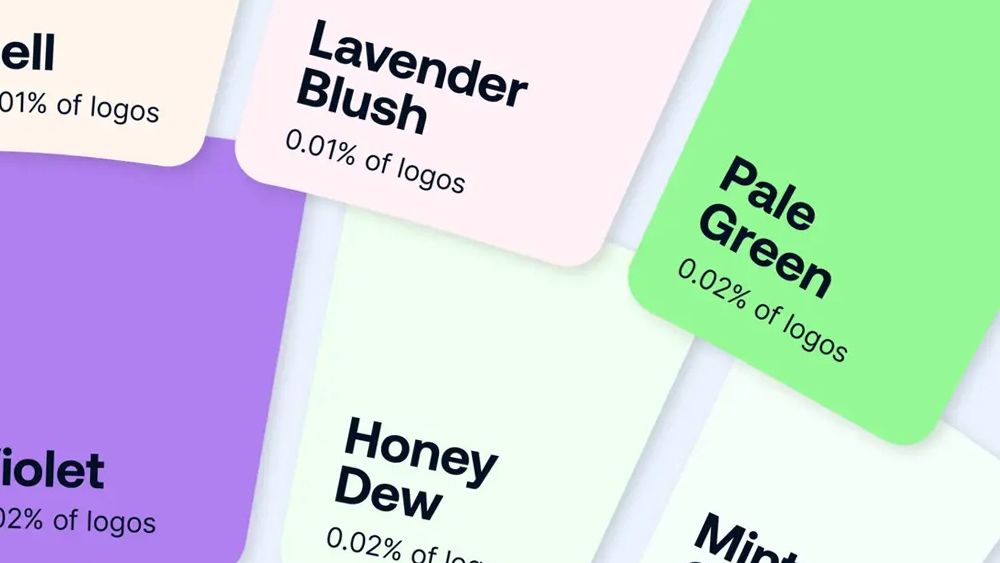
According to a dataset of over 15,000 designs, Bynder identified pale pink, mint green, and violet as the least used colours in logos. Pale pink, in particular, was found to be the rarest, making up just 0.01% of all logos.

Senior Director of Content Marketing Ljubica Jovanova explained that colours like mint green and pale pink are often associated with softness, calm, and subtlety, which may not align with the bold, attention-grabbing nature that many brands aim for in their logos. However, Bynder suggests that these pale colours should not be written off so quickly.

The Most Popular Colours in Logo Design

On the other hand, white and black were found to dominate logo design, with white being the most common, appearing in 70% of all logos. Black appeared in 16% of logos, followed by Midnight blue (14%) and Crimson (13%).

Jovanova noted that white and black are timeless, versatile colours that offer a high level of flexibility across different mediums. White is often associated with simplicity and clarity, while black conveys authority and sophistication.

Why Choose Uncommon Colours?

Bynder suggests that choosing rare or unexpected colours can provide brands with a distinct edge, instantly setting them apart from competitors who rely on more traditional shades. Uncommon colours not only create instant recognition but also evoke unique emotional responses, allowing brands to be seen as fresh, innovative, and different.


By choosing colours that aren’t widely used in their industry, companies can disrupt consumer expectations, signaling creativity and a willingness to break away from the norm. This approach can also appeal to niche audiences who are drawn to originality, helping brands foster deeper emotional connections and build a more memorable presence in the minds of consumers.

Conclusion

In a market where first impressions form in just 0.05 seconds and signature colours increase brand recognition by 80%, getting your logo and colour choices right is crucial for brand recognition. Bynder’s findings suggest that brands should not be afraid to experiment with uncommon colours to stand out in a crowded marketplace.

FAQs

Q: Why are pale pink, mint green, and violet considered rare colours in logo design?
A: These colours are considered rare because they are not commonly used in logo design. According to Bynder’s dataset, pale pink is the rarest, making up just 0.01% of all logos.

Q: Why do brands often choose white and black in their logos?
A: White and black are timeless, versatile colours that offer a high level of flexibility across different mediums. White is often associated with simplicity and clarity, while black conveys authority and sophistication.

Q: What are the benefits of choosing uncommon colours in logo design?
A: Choosing rare or unexpected colours can provide brands with a distinct edge, instantly setting them apart from competitors who rely on more traditional shades. Uncommon colours can also evoke unique emotional responses, allowing brands to be seen as fresh, innovative, and different.

AI in Learning: A Student’s Guide

Key Points

  • A new AI use guide from Elon University and the American Association of Colleges and Universities (AAC&U) aims to help college students navigate the digital AI world.
  • The guide, titled "AI-U/v1.0," is a free resource for students and institutions to distribute and adapt under a Creative Commons license.
  • The guide includes practical advice on using AI responsibly, a checklist for ethical use, and suggestions for ways to use AI.

Guide Overview

The guide, developed with the collaboration and review of faculty, scholars, academic leaders, and students at universities around the world, is designed to help students navigate the changing landscape of higher education in the age of artificial intelligence. The guide includes "the essential AI ‘how-to’ manual" with ground rules for students to follow in their classes and a checklist for using AI ethically.

Features of the Guide

  • Suggestions for ways to use AI, including cautions about the downsides of using AI
  • Lists of AI resources
  • Suggestions for writing prompts
  • Sections on creating an academic journey that prepares students to succeed in an AI-infused world
  • Advice about doing a career search using AI

Student Input and Feedback

More than 100 students at multiple universities submitted input and questions for inclusion in the guide, with answers provided by the guide’s authors and editors.

Reactions from Experts

  • Paul LeBlanc, former president of Southern New Hampshire University, encourages colleges to embrace the concept of "human-centered AI" and praises the guide for combining common sense advice with guidance on developing strong personal relationships and recognizing one’s own unique knowledge, skills, and creativity.
  • Ryan McCurdy, senior vice president and president of Lenovo North America, emphasizes the importance of empowering students as they prepare for AI-driven careers and notes that the guide provides a framework for harnessing the power of artificial intelligence.

Future Updates

The guide will be updated as AI continues to evolve, with changes made to the guide’s website and revised editions published for future academic terms.

Conclusion

The "AI-U/v1.0" guide is a valuable resource for college students seeking to navigate the digital AI world. By providing practical advice and guidance on using AI responsibly, the guide empowers students to make informed decisions about their use of AI and prepares them for the AI-infused world ahead.

Frequently Asked Questions

Q: What is the purpose of the "AI-U/v1.0" guide?
A: The guide aims to help college students navigate the digital AI world and make informed decisions about their use of AI.

Q: Who developed the guide?
A: The guide was developed with the collaboration and review of faculty, scholars, academic leaders, and students at universities around the world.

Q: Is the guide available for free?
A: Yes, the guide is available for free to students and institutions to distribute and adapt under a Creative Commons license.

Q: Will the guide be updated?
A: Yes, the guide will be updated as AI continues to evolve, with changes made to the guide’s website and revised editions published for future academic terms.

Showcasing Your Skills: Image Prompting Benefits

0

Creativity and technical skills often go hand in hand.

One such skill gaining recognition is image prompting—the art of crafting precise, descriptive inputs to generate high-quality AI visuals.

Showcasing your ability to prompt effectively is more than just a niche skill.

It demonstrates creativity, problem-solving, and adaptability in a tech-driven age.

This post explores the benefits of highlighting your image-prompting skills and how they can enhance your personal or professional brand.

Demonstrating Creativity

Image prompting is a creative process that requires imagination and attention to detail.

When you showcase your skills, you demonstrate the ability to think outside the box.

It’s not just about inputting a few words but crafting prompts that result in visually striking and meaningful outcomes.

Creativity can set you apart in design, marketing, or education industries.

Standing Out in Competitive Fields

In competitive industries, unique skills help you stand out.

You position yourself as someone ahead of the curve by showcasing your image-prompting abilities.

Employers and clients value professionals who bring innovative tools and techniques to their projects.

Your portfolio of AI-generated visuals can serve as proof of your ability to leverage cutting-edge technology.

Enhancing Your Portfolio

A well-curated portfolio is essential for creatives and professionals alike.

Incorporating AI-generated visuals adds an extra dimension to your body of work.

It shows your willingness to embrace new tools and expand your creative boundaries.

Potential clients or employers can see your range of skills and how they translate into real-world applications.

Showcasing Problem-Solving Skills

Effective image prompting is more than a technical skill—it’s a form of problem-solving.

Crafting a successful prompt often involves trial and error.

You must adjust inputs, refine descriptions, and consider constraints to achieve the desired output.

By sharing your process, you demonstrate your ability to tackle challenges and iterate until you reach the best solution.

Engaging Your Audience

Sharing your image-prompting creations can help you connect with a wider audience.

Social media platforms like Instagram, Twitter, or LinkedIn are ideal spaces to display your work.

Posting your visuals and insights into your prompting process engages followers and sparks conversations.

This engagement can build your network and establish you as an expert in your niche.

Building a Personal Brand

Your skills and accomplishments contribute to your personal brand.

Showcasing image prompting aligns you with innovation and adaptability.

It highlights your ability to merge creativity with technology—a valuable combination in today’s market.

Consistently sharing your work positions you as a thought leader, boosting your professional reputation.

Inspiring Others

By showcasing your image-prompting skills, you inspire others to explore the potential of AI tools.

Your work can encourage beginners to try their hand at prompting or motivating peers to experiment with new ideas.

This collaborative spirit fosters a sense of community and innovation within your field.

Monetising Your Skills

Highlighting your image prompting expertise can open doors to monetisation.

Clients may seek your skills to generate visuals for marketing, branding, or creative projects.

Additionally, you could offer tutorials, workshops, or consulting services to those interested in learning the craft.

Your showcased work acts as both a portfolio and a marketing tool, attracting opportunities that align with your expertise.

Adapting to Technological Trends

Staying relevant in a tech-driven world means embracing new trends and tools.

Image prompting is a skill that aligns with the growing integration of AI in creative industries.

By showcasing your abilities, you demonstrate that you’re aware of these trends and actively leveraging them to create value.

Connecting with Like-Minded Professionals

Sharing your work allows you to connect with others in the field.

These connections can lead to collaborations, mentorships, or even job opportunities.

Engaging with a community of image prompters broadens your horizons and helps you stay inspired and informed.

Increasing Your Confidence

Publicly sharing your skills builds confidence in your abilities.

It’s an opportunity to receive feedback, refine your craft, and grow as a creative professional.

Positive responses from your audience validate your expertise and motivate you to keep improving.

Expanding Your Skill Set

The act of showcasing your work often leads to skill growth.

As you prepare pieces for display, you may discover new techniques or tools to refine your process.

Sharing also invites constructive criticism, which can guide your development as an image prompter.

Creating a Lasting Impact

Image prompting is more than a trend—it’s shaping the future of visual communication.

By showcasing your skills, you contribute to this evolving landscape.

Your work can influence how others perceive and use AI tools in creative industries.

Wrapping Up

Showcasing your image prompting skills offers numerous benefits.

It highlights your creativity, problem-solving, and adaptability while enhancing your portfolio and personal brand.

Whether you aim to connect with an audience, inspire others, or monetise your expertise, sharing your work opens doors to new opportunities.

Don’t just keep your skills to yourself—show the world what you can create.

Your unique approach to image prompting could be the key to unlocking your next big opportunity.

FAQs

Q: What is image prompting?

A: Image prompting is the art of crafting precise, descriptive inputs to generate high-quality AI visuals.

Q: Why is showcasing image prompting skills important?

A: Showcasing your image prompting skills demonstrates creativity, problem-solving, and adaptability, while enhancing your portfolio and personal brand.

Q: How can I monetise my image prompting skills?

A: You can monetise your skills by offering tutorials, workshops, or consulting services to those interested in learning the craft, or by generating visuals for marketing, branding, or creative projects.

Q: How can I connect with like-minded professionals?

A: You can connect with like-minded professionals by sharing your work on social media platforms and engaging with a community of image prompters.

Q: What are the benefits of showcasing my image prompting skills?

A: The benefits of showcasing your image prompting skills include highlighting your creativity, problem-solving, and adaptability, while enhancing your portfolio and personal brand, and opening doors to new opportunities.

Principal Financial Group Boosts Productivity with Generative AI

0

Principal AI Generative Experience: A User-Friendly, Secure Internal Chatbot for Faster Access to Information

Challenges, Opportunities, and Constraints

Principal, a global financial company, sought to improve the wealth and well-being of people and businesses by streamlining access to internal information. With nearly 20,000 employees and a vast amount of unstructured data, Principal required a solution that could search and analyze this data quickly and accurately.

The Solution: Principal AI Generative Experience with QnABot

Principal deployed QnABot, a multilanguage, multichannel conversational interface, integrated with Amazon Q Business and Amazon Bedrock. The solution allows employees to receive role-based answers in real-time through a conversational chatbot interface.

Implementation and Integration

Principal used QnABot’s editor to author hard-coded questions and answers. The company also integrated QnABot with Azure Active Directory for single sign-on capabilities and role-based access controls. Generative AI models hosted on Amazon Bedrock were used for query disambiguation and semantic matching for answer lookups and responses.

Usability and Continual Improvement

Principal enhanced the standard user feedback from QnABot to gain input from end-users on answer accuracy, outdated content, and relevance. The company also implemented custom monitoring dashboards in Amazon OpenSearch Service for real-time visibility into platform performance.

Results

The initial proof of concept achieved an estimated 50% reduction in time required for users to respond to client inquiries and requests for proposals. The platform has delivered strong results across several key metrics, including:

  • Over 95% of queries received answers users accepted or built upon
  • Over 99% of documents provided through the system were evaluated as relevant and containing up-to-date information
  • 56% of total queries were addressed through either sourcing documentation related to the question or having the user attach a relevant file through the chat interface

Roadmap

The Principal AI Enablement team has an ambitious roadmap for 2024 focused on expanding the capabilities of its conversational AI platform. Future use cases are expected to use the Principal AI Generative Experience application due to its success in automating processes and empowering users with self-service insights.

Conclusion

Principal utilized QnABot on AWS paired with Amazon Q Business and Amazon Bedrock, to deliver a generative AI experience for its users, thereby reducing manual time spent on client inquiries and tasks and producing significant savings in hours and dollars. The platform effectively and quickly resolves issues by surfacing relevant information faster than manual searches, improving processes, productivity, and the customer experience.

FAQs

Q: What is QnABot?
A: QnABot is a multilanguage, multichannel conversational interface that responds to customers’ questions, answers, and feedback.

Q: What is Amazon Q Business?
A: Amazon Q Business is a generative AI-powered assistant that can answer questions, provide summaries, generate content, and securely complete tasks based on data and information in your enterprise systems.

Q: What is Amazon Bedrock?
A: Amazon Bedrock is a fully managed service that offers a choice of high-performing foundation models (FMs) from leading AI companies like AI21 Labs, Anthropic, Cohere, Meta, Mistral AI, Stability AI, and Amazon through a single API.

Q: How did Principal implement the solution?
A: Principal used QnABot’s editor to author hard-coded questions and answers and integrated QnABot with Azure Active Directory for single sign-on capabilities and role-based access controls.

3D Art of the Week: Kevin C. Sepúlveda Márquez

0

ZBrush Mastery: Creating a Xenomorph Sculpt

Kevin C. Sepúlveda Márquez, a 3D character artist, has created an impressive Xenomorph sculpture using ZBrush, Marmoset Toolbag, and Photoshop. This article will delve into his creative process, highlighting composition, balancing original character design with his unique twist, and showcasing his mastery of ZBrush.

Composition and Pose

In this piece, Kevin aimed to create a composition that went beyond just a static character. Using simple SubTools, he built a blockout for the pose and the column. Initially, he applied the golden spiral vertically but realized the column was too long and diminished the Xenomorph’s importance. He then duplicated and arranged the spirals horizontally, which worked perfectly.

Sculpting and Lighting

After setting the composition, Kevin gradually sculpted the creature. He brought it into Marmoset Toolbag for lighting and finally used Photoshop to enhance the renders and give them more personality. Marmoset is an incredibly powerful tool for showcasing characters, even if they’re not real-time. Combined with good post-production in Photoshop, it’s a guaranteed win.

Conclusion

This article showcases Kevin’s skill and creativity in using ZBrush, Marmoset Toolbag, and Photoshop to create a unique and captivating Xenomorph sculpture. By focusing on composition, balancing original design with his own twist, and mastering ZBrush techniques, Kevin has produced a stunning piece of art. For those inspired by this work, we recommend exploring our collection of ZBrush tutorials to hone your skills.

Frequently Asked Questions

Q: What software did Kevin use for this project? A: Kevin used ZBrush, Marmoset Toolbag, and Photoshop for this project.

Q: How did Kevin achieve the composition for this piece? A: Kevin used simple SubTools to build a blockout for the pose and the column, then duplicated and arranged the golden spirals horizontally.

Q: What is the importance of Marmoset Toolbag in showcasing characters? A: Marmoset is an incredibly powerful tool for showcasing characters, even if they’re not real-time. It can add depth and personality to a character, making it a valuable tool in any 3D artist’s workflow.

Q: Are there any tutorials available to help improve ZBrush skills? A: Yes, we have a collection of ZBrush tutorials available to help improve your skills and master the software.

Japan Research Secures Healthcare Data

0

Established 77 years ago, Mitsui & Co stays vibrant by building businesses and ecosystems with new technologies like generative AI and confidential computing.

Digital transformation takes many forms at the Tokyo-based conglomerate with 16 divisions. In one case, it’s an autonomous trucking service, in another it’s a geospatial analysis platform. Mitsui even collaborates with a partner at the leading edge of quantum computing.

One new subsidiary, Xeureka, aims to accelerate R&D in healthcare, where it can take more than a billion dollars spent over a decade to bring to market a new drug.

In Pursuit of Big Data

Though only three years old, Xeureka already completed a proof of concept addressing one of drug discovery’s biggest problems — getting enough data.

Speeding drug discovery requires powerful AI models built with datasets larger than most pharmaceutical companies have on hand. Until recently, sharing across companies has been unthinkable because data often contains private patient information as well as chemical formulas proprietary to the drug company.

A Proof of Concept for Privacy

To validate that confidential computing would allow its customers to safely share data, Xeureka created two imaginary companies, each with a thousand drug candidates. Each company’s dataset was used separately to train an AI model to predict the chemicals’ toxicity levels. Then the data was combined to train a similar, but larger AI model.

Xeureka ran its test on NVIDIA H100 Tensor Core GPUs using security management software from Fortanix, one of the first startups to support confidential computing.

Up to 74% Higher Accuracy

The results were impressive. The larger model’s predictions were 65-74% more accurate, thanks to use of the combined datasets.

The models created by a single company’s data showed instability and bias issues that were not present with the larger model, Ito said.

An AI Supercomputing Ecosystem

Now, Xeureka is exploring broad applications of this technology in drug discovery research, in collaboration with the community behind Tokyo-1, its GPU-accelerated AI supercomputer. Announced in February, Tokyo-1 aims to enhance the efficiency of pharmaceutical companies in Japan and beyond.

Initial projects may include collaborations to predict protein structures, screen ligand-base pairs and accelerate molecular dynamics simulations with trusted services. Tokyo-1 users can harness large language models for chemistry, protein, DNA and RNA data formats through the NVIDIA BioNeMo drug discovery microservices and framework.

Conclusion

Xeureka’s innovative approach to confidential computing and AI has the potential to revolutionize the pharmaceutical industry. By leveraging NVIDIA H100 Tensor Core GPUs and Fortanix security management software, Xeureka has demonstrated the ability to improve model accuracy while maintaining data privacy.

This breakthrough has far-reaching implications for the development of new treatments and therapies, and Xeureka is poised to play a leading role in shaping the future of healthcare.

FAQs

Q: What is Xeureka?
A: Xeureka is a new subsidiary of Mitsui & Co that aims to accelerate R&D in healthcare using new technologies like generative AI and confidential computing.

Q: What is confidential computing?
A: Confidential computing is a way of processing data in a protected part of a GPU or CPU that acts like a black box for an organization’s most important secrets.

Q: How does Xeureka use confidential computing?
A: Xeureka uses confidential computing to allow its customers to safely share data, ensuring that private patient information and chemical formulas remain protected.

Q: What are the benefits of Xeureka’s approach?
A: Xeureka’s approach has the potential to improve model accuracy by up to 74%, while maintaining data privacy. This breakthrough has far-reaching implications for the development of new treatments and therapies.

LG’s Stretchy Display Design

0

LG Unveils World’s First Stretchable Display that Can Expand by 50%

Introducing the Future of Display Technology

LG has just revealed a new ‘stretchable’ display that can expand by up to 50% without losing quality. This innovative technology was showcased at Seoul Fashion Week in collaboration with designers Youn-Hee Park and Chung-Chung Lee.

What is Stretchable Display Technology?

Stretchable displays are seen as the ultimate free-form screen technology because they can be freely transformed into any shape, including by stretching, folding, and twisting. The new prototype features a 12-inch screen that stretches up to 18 inches, while simultaneously delivering a high resolution of 100ppi (pixels per inch) and full red, green, and blue (RGB) color.

Significant Improvement Over Previous Concept

The display marks a significant improvement over the company’s first stretchable concept, revealed in 2022, which only managed a mere 20% expansion. "This enhanced stretchability enables various display design possibilities, raising the technology’s potential competitiveness when commercialized," LG adds.

Practical Applications

The company showcased numerous concepts for the application of Stretchable displays, including an automotive panel that stretches out into a convex shape and can be operated by hand as well as a wearable display attached to firefighters’ uniforms that provides real-time information.

Interactive Panels and Wearable Displays

The technology has practical applications that make use of the flexible design, such as interactive panels that adapt to the contours of interiors, particularly in vehicles. LG was also keen to show off how the tech could work as part of an outfit – putting Adobe’s ‘digital dress’ to shame.

Conclusion

LG’s stretchable display technology has the potential to revolutionize the way we interact with screens. With its ability to expand by 50% without losing quality, it opens up a world of possibilities for innovative designs and applications.

FAQs

Q: What is stretchable display technology?
A: Stretchable displays are free-form screen technology that can be freely transformed into any shape, including by stretching, folding, and twisting.

Q: How does the technology work?
A: The technology uses a special material that allows the screen to stretch and expand without losing quality.

Q: What are some practical applications of stretchable display technology?
A: The technology has practical applications such as interactive panels that adapt to the contours of interiors, particularly in vehicles, and wearable displays attached to firefighters’ uniforms that provide real-time information.

Q: Is this technology available for commercial use?
A: The technology is still in the prototype phase, but LG plans to commercialize it in the future.

AI Could Alter Data Science as We Know It

0

Generative Artificial Intelligence: The Future of Software Development

Paving the Way for Citizen Developers

Generative artificial intelligence (gen AI) is revolutionizing the way we approach software development. According to Thomas Davenport of Babson College and Ian Barkin, a venture capitalist, gen AI is making it possible for anyone to become a software developer. With low-code and no-code tools, robotic process automation, and now AI, the gates of software development are open to all.

Conversational User Interfaces

Davenport and Barkin note that gen AI will take citizen development to a whole new level. "First is through conversational user interfaces," they write. "Virtually every vendor of software today has announced or is soon to introduce a generative AI interface." With conversational user interfaces, users can make requests to an AI system in regular language to generate programs containing specific functions, automation workflows, or machine-learning analyses.

Specialized Bots and Software Development

The authors mention that part of this future are specialized bots designed to perform specific types of work. These bots can perform tasks such as data analysis, modeling, and insight generation. However, they also note that these bots are limited in their flexibility and will not replace human workers.

Gen AI as a Research Assistant or Programmer

Davenport and Barkin describe gen AI as a research assistant or programmer, generating code to this analysis. It will elicit what you want, work quickly, and allow you to change your mind infinitely. Gen AI will also make it easier to find existing models, features, or software components that can be used to begin a citizen project.

Future of Data Science and Software Development

Looking beyond the early starts, with the growth of AI, RPA, and other tools, "some citizen developers are likely to no longer be necessary, and every citizen will need to change how they do their work," Davenport and Barkin speculate. Gen AI will assume much of this work, including generating application code, automations, and data science analyses.

Conclusion

The rise of gen AI is poised to revolutionize the way we approach software development. With conversational user interfaces, specialized bots, and gen AI as a research assistant or programmer, the future of software development is bright. However, this also means that some extraordinary skills may become unnecessary. As AI takes on more tasks, it will be interesting to see how citizen developers adapt and evolve in this new landscape.

FAQs

Q: What is generative artificial intelligence (gen AI)?
A: Gen AI is a type of artificial intelligence that can generate code, programs, or data analyses in response to user requests.

Q: How will gen AI change the way we approach software development?
A: Gen AI will make it possible for anyone to become a software developer, regardless of technical skills. It will also automate tasks such as data preparation, cleansing, and analysis, freeing up human developers to focus on higher-level tasks.

Q: Will gen AI replace human workers?
A: According to Davenport and Barkin, gen AI will not replace human workers. Instead, it will make them more productive and allow them to focus on more complex tasks.

Q: What are the potential benefits of gen AI in software development?
A: The potential benefits of gen AI in software development include increased productivity, improved accuracy, and faster development times.

Multipurpose Packer Templates

0

What is a Multipurpose Packer Templates

We’ve now gotten to a point that I have probably the most experience with, and that is with Packer. After Terraform, Packer was the next HashiCorp tool that I picked up. Thankfully, the syntax moved from JSON to HCL a couple of years ago at this point.

Limitations

The downside with Packer are some of its limitations, specifically with meta-arguments.

Workarounds

So there are a couple of workarounds.

Dynamic Blocks

Dynamic blocks are similar to Terraform, where you can run a foreach against it, and it will loop through the input.

Shared Resources

When using shared scripts or files, I would recommend using environment_vars on the provisioners and have them specific for the build or source platform you will build on.

Additional Support

There are a couple of other ways I keep my templates generalized.

Tree Structure

The tree below is a work in progress, which I will later reference, but it is close to the final product.

└── packer
    ├── builds
    │   ├── app
    │   │   ├── build.pkr.hcl
    │   │   ├── hcp.pkr.hcl
    │   │   ├── locals.pkr.hcl
    │   │   ├── plugins.pkr.hcl
    │   │   ├── source_aws.pkr.hcl
    │   │   ├── source_azure.pkr.hcl
    │   │   ├── source_gce.pkr.hcl
    │   │   ├── variables_aws.pkr.hcl
    │   │   ├── variables_azure.pkr.hcl
    │   │   ├── variables_common.pkr.hcl
    │   │   └── variables_hcp.pkr.hcl
    │   └── base
    │       ├── build.pkr.hcl
    │       ├── locals.pkr.hcl
    │       ├── plugins.pkr.hcl
    │       ├── source_aws.pkr.hcl
    │       ├── source_azure.pkr.hcl
    │       ├── source_gce.pkr.hcl
    │       ├── variables_aws.pkr.hcl
    │       ├── variables_azure.pkr.hcl
    │       ├── variables_common.pkr.hcl
    │       └── variables_hcp.pkr.hcl
    ├── pkrvars
    │   ├── os
    │   │   ├── linux
    │   │   │   ├── debian
    │   │   │   │   ├── base.pkrvars.hcl
    │   │   │   │   ├── nomad.pkrvars.hcl
    │   │   │   │   ├── packer.pkrvars.hcl
    │   │   │   │   ├── terraform.pkrvars.hcl
    │   │   │   │   └── vault.pkrvars.hcl
    │   │   │   └── rhel
    │   │   └── windows
    │   │       └── base.pkrvars.hcl
    │   └── sources
    │       └── sources.pkrvars.hcl
    └── shared
        ├── README.MD
        ├── bootstrap
        │   └── bootstrap_win.txt
        ├── files
        ├── playbooks
        │   └── readme.md
        └── scripts
            ├── debian
            │   ├── base.sh
            │   ├── deprovision-aws.sh
            │   ├── deprovision-azure.sh
            │   ├── deprovision-google.sh
            │   ├── docker.sh
            │   └── nomad.sh
            ├── rhel
            └── windows
                ├── base.ps1
                ├── deprovision-aws.ps1
                ├── deprovision-azure.ps1
                └── deprovision-google.ps1

Conclusion

In this article, I have shown how to create a multipurpose Packer template that can be used for various cloud providers and on-premise hosting solutions. By using dynamic blocks and variables, you can create a template that can be easily customized for different use cases.

FAQs

Q: What are the limitations of Packer?
A: Packer has limitations with meta-arguments, which can make it difficult to create complex templates.

Q: How do I create a multipurpose Packer template?
A: You can create a multipurpose Packer template by using dynamic blocks and variables to customize the template for different use cases.

Q: What is the best way to organize my Packer templates?
A: The best way to organize your Packer templates is to use a structured directory layout, such as the one shown in this article.

Q: Can I use Packer to create images for multiple cloud providers?
A: Yes, Packer can be used to create images for multiple cloud providers, such as AWS, Azure, and GCP.

AI’s Crucial Role in Children’s Future

Parents Optimistic About AI’s Potential in Education

Key points:

Parents of Gen Alpha and Gen Z students are optimistic about the potential of artificial intelligence (AI) to enhance various aspects of education, according to a new survey commissioned by Samsung Solve for Tomorrow.

Emphasizing the importance of AI knowledge:

  • 88 percent of Gen Alpha and Gen Z parents believe that knowledge of AI will be crucial in their child’s future education and career.
  • 89 percent believe that it is vital for the next generation to play an active role in shaping the development and use of AI.
  • 84 percent consider it important or very important to offer teachers extra training on how to incorporate AI into the classroom.

Tapping into AI’s potential in education:

  • A significant majority of parents (69 percent) are optimistic that AI has the potential to significantly advance education and learning.
  • 76 percent see AI’s greatest opportunity in education as assisting with content creation.
  • Other notable applications include answering students’ questions (72 percent), simulating real-world scenarios (70 percent), and offering personalized learning experiences (67 percent).

Enhancing educational experiences:

  • Among the 19 percent of parents who report that AI is already being used in their child’s curriculum, applications cited as significantly enhancing education are:
    • AI-powered educational games or simulations (89 percent)
    • Content creation tools (88 percent)
    • Chatbots or virtual assistants (83 percent)

Growing interest in AI tools:

  • Approximately 42 percent of Gen Alpha and Gen Z parents say their child is interested in specific AI tools, with:
    • Generative AI (62 percent)
    • Robotics (49 percent)
    • Computer Vision (44 percent) leading the way.

Balancing optimism with caution:

  • Despite overwhelming optimism, parents are also aware of the challenges and potential downsides of AI integration in education.
  • 70 percent believe it’s essential to have guidelines for AI education.
  • 92 percent emphasize the importance of educating students about AI’s potential negative impacts and 91 percent feel they should be fully informed about the use of AI in their child’s school.

Harnessing AI for community challenges:

  • Samsung Solve for Tomorrow is a national competition that fosters innovation among U.S. public middle and high school students.
  • The competition challenges students to explore the transformative potential of STEM in addressing significant issues within their local communities.

Conclusion:

The survey highlights the importance of narrowing the AI gap in education by equipping students, educators, and parents with the knowledge and tools they need to navigate the impact of this transformative technology. With the increasing use of AI in education, it is essential to prioritize teaching AI ethics and responsible use alongside technical skills.

FAQs:

Q: What percentage of Gen Alpha and Gen Z parents believe that knowledge of AI will be crucial in their child’s future education and career?
A: 88 percent

Q: What percentage of parents believe that it is vital for the next generation to play an active role in shaping the development and use of AI?
A: 89 percent

Q: What percentage of parents consider it important or very important to offer teachers extra training on how to incorporate AI into the classroom?
A: 84 percent

Q: What is the percentage of parents who report that AI is already being used in their child’s curriculum?
A: 19 percent