Home Blog Page 609

ChatGPT’s Windows App Now Available

0

OpenAI Expands ChatGPT Windows App to All Users

OpenAI has made its ChatGPT Windows app freely available to anyone with a ChatGPT account, just a month after its initial launch for subscribers. This means you no longer need to visit the website to chat with your favorite AI.

To grab the free app, browse OpenAI’s Download page and click the link for the Windows version under Desktop applications. This will take you to the Microsoft Store to download the program. Run the downloaded ChatGPT Installer.exe file, and after installation, sign up or log in with a ChatGPT account.

The Windows app is compatible with Windows 10 and 11, and it offers a similar experience to the website. You can ask questions, submit requests, and generate content. The app allows you to ask the AI to create images, analyze uploaded files, summarize text, access custom GPTs, and more.

Paid subscribers can use voice mode to carry on a natural, back-and-forth conversation with ChatGPT. As an introductory bonus, free users can tap into voice mode for a short period of time each month. The app also syncs with your overall ChatGPT activity, so you can continue a conversation or view a past chat from the desktop app, mobile app, or website.

Another cool feature of the Windows app is the ability to use keyboard shortcuts. Click the question mark icon in the lower right and select Keyboard shortcuts to access a host of shortcuts for performing actions, such as opening a new chat, copying the last response, toggling the sidebar, and deleting a chat.

You can also add the ChatGPT program to your desktop or Taskbar for quick access, making it more convenient than having to browse the website whenever a question pops into your head.

The Mac version of the app isn’t standing still either. A new beta version of the app will now work with apps on your desktop, allowing ChatGPT Plus and Team users to tell the AI to look at the content in coding apps to help them in their work.

Conclusion

The ChatGPT Windows app is now freely available to anyone with a ChatGPT account, offering a convenient and powerful way to interact with your favorite AI. Whether you’re a paid subscriber or a free user, you can take advantage of the app’s features, including voice mode, keyboard shortcuts, and syncing with your overall ChatGPT activity.

FAQs

Q: What is the ChatGPT Windows app?
A: The ChatGPT Windows app is a desktop application that allows you to interact with your favorite AI, just like the website.

Q: Is the app free?
A: Yes, the app is now freely available to anyone with a ChatGPT account.

Q: What features does the app offer?
A: The app offers a similar experience to the website, allowing you to ask questions, submit requests, and generate content.

Q: Can I use voice mode with the app?
A: Paid subscribers can use voice mode, while free users can tap into voice mode for a short period of time each month.

Q: Can I add the app to my desktop or Taskbar?
A: Yes, you can add the ChatGPT program to your desktop or Taskbar for quick access.

Maximize Your 3DS Max Potential

0

The Best 3ds Max Plugins

The best 3ds Max plugins can help speed up your modelling, rendering, and texturing, as well as unlocking more of the potential of this software. That’s quite something, considering Autodesk’s 3ds Max is one of the best 3D modelling software packages in the world.

RailClone is, hands down, the best tool for parametric modelling. I’ve lost count of the number of hours that I’ve saved by using a tool that is driven by parameters.

V-Ray is a photorealistic rendering engine from Chaos. It offers both CPU and GPU+CPU hybrid rendering options for excellent versatility. Create images and videos using this popular plugin.

Phoenix is a simulator for fluid dynamics. Through an intuitive interface and quick presets, all types of users can create simulations that look incredible. Works with V-Ray and Corona renderers.

Laubwerk Plants is a plugin that allows you to drag-and-drop realistic plants using Laubwerk. Intuitive tools make it easy to modify the shape, age, season, and level of detail for each of Laubwerk’s 3D plants.

MultiScatter is a plugin that allows you to scatter objects using a variety of methods, including randomness, patterns, and more. It’s a powerful tool for creating realistic environments and scenes.

The best 3ds Max plugin for floors

Specifications

Publisher: Floor Generator

Features: Support for patterns including herringbone, basket weave, and chevron

Reasons to Buy

Support for various floor patterns

Incredibly easy-to-use

Very affordable

Reasons to Avoid

Limited support or updates

This long-standing and well-established plugin has been around since 2013 and works right up to the latest version of 3ds Max (2025 at time of writing). The plugin generates floorboard geometry, including running bond, herringbone, and basket weave patterns.

Geometry can be adjusted using simple parameters to get the desired result. Many rely on displacement and bump maps to generate geometry at render-time but this isn’t ideal for close-ups and intricate flooring patterns. There’s also a significant level of flexibility with the ability to randomly rotate, offset, and tilt boards for that well-worn floor look. Floor objects can be textured using MultiTexture.

Unwrella is one of those plugins that automates a process that would otherwise be nigh on impossible to achieve. Unwrapping regular objects is fairly straightforward but the same definitely can’t be said for irregular or complex 3D geometry. Unwrella generates UVs that do away with the need for manually placed seams and intricate arranging of UV chunks.

Alongside an ‘organic’ mode, the plugin also includes a ‘hard surface’ mode, which is ideally suited for unwrapping architectural elements, machines, weapons, engineered structures and masses of generic assets.

Another mode is ‘projection’ which only unwraps the areas of a model that are facing the camera. This has the added benefit of saving UV space and therefore making better use of texture resolutions. If you want to speed up your texture unwrapping workflow, then there’s no better than Unwrella.

There are thousands of plugins available for 3ds Max and it can be hard to know which ones are best. In this guide, we’ve included some of the more mainstream options but if you head over to somewhere like ScriptSpot, then you’ll find a plethora of smaller but equally useful plugins.

The key to choosing a good plugin is to get it from a trusted resource and do a little bit of research before downloading it. Most plugins come with documentation and reviews so you can see, ahead of time, whether it’s going to meet your needs.

At Creative Bloq, we test 3ds Max plugins by downloading them and putting them through their paces. More often than not, we test and review each new release so you can get a thorough critique of all the latest features. We’ll also take a look at the design and usability of the software as well as what alternative options there are on the market.

How do I install a 3ds Max plugin?

A lot of 3ds Max plugins come with a separate installer, which guides users through the installation steps. If you’re running a maxscript file, then you’ll need to follow these instructions. Open 3ds Max and click the ‘MAXScript’ menu item. If you click ‘Run Script’ then you’ll be presented with the ‘Choose Editor File’ dialog box. Select your.ms file and click ‘Open’. 3ds Max will immediately run the maxscript file.

Do I have to pay for 3ds Max plugins?

It depends on the plugin or the script. A general rule will be that more established plugins cost a bit of money, whereas maxscripts are usually more affordable or even free. If there’s a cost, then try to take advantage of a free trial before committing.

Can plugins harm my computer?

As with any piece of software, there is the risk of harm to your computer. That’s why it’s important to only download and install plugins from trustworthy sources. If anything looks dodgy, then it’s probably worth doing a few more checks to see whether it’s genuine or not.

Conclusion

In conclusion, the best 3ds Max plugins can help speed up your modelling, rendering, and texturing, as well as unlocking more of the potential of this software. Whether you’re a seasoned professional or just starting out, there’s a plugin out there that can help you achieve your goals.

Customizing React Fiber with 3D Images for Unexpected Textures

0

Product Customization in React using React Fiber and 3D Images (.gltf,.glb files)

Overview

In recent years, product customization has become a crucial aspect of e-commerce, allowing customers to personalize products to their liking. React, a popular JavaScript library, can be used to create interactive and customizable 3D product visualizations. This article will explore how to achieve product customization in React using React Fiber and 3D images (.gltf,.glb files).

Setting up the Project

To get started, create a new React project using create-react-app and install the necessary dependencies:

npx create-react-app my-app
cd my-app
npm install react-fiber three gl-matrix

Loading 3D Models

To load 3D models, we’ll use the three library, which provides a JavaScript engine for rendering 3D graphics. We’ll also use gl-matrix for matrix operations.

Create a new file called 3DModel.js and add the following code:

import * as THREE from 'three';
import { GLMatrix } from 'gl-matrix';

class ThreeDModel {
  constructor(url) {
    this.url = url;
    this.scene = new THREE.Scene();
    this.camera = new THREE.PerspectiveCamera(75, window.innerWidth / window.innerHeight, 0.1, 1000);
    this.renderer = new THREE.WebGLRenderer({
      canvas: document.getElementById('canvas'),
      antialias: true,
    });
    this.loadModel();
  }

  loadModel() {
    const loader = new THREE.GLTFLoader();
    loader.load(this.url, (gltf) => {
      this.scene.add(gltf.scene);
      this.renderer.render(this.scene, this.camera);
    });
  }

  render() {
    this.renderer.render(this.scene, this.camera);
  }
}

export default ThreeDModel;

Customizing the 3D Model

To customize the 3D model, we’ll create a new component called ProductCustomizer.js and add the following code:

import React, { useState } from 'react';
import ThreeDModel from './3DModel';

const ProductCustomizer = () => {
  const [color, setColor] = useState('#FFFFFF');
  const [texture, setTexture] = useState('default');

  const handleColorChange = (event) => {
    setColor(event.target.value);
  };

  const handleTextureChange = (event) => {
    setTexture(event.target.value);
  };

  return (
    <div>
      <h2>Customize Your Product</h2>
      <label>
        Color:
        <input type="color" value={color} onChange={handleColorChange} />
      </label>
      <label>
        Texture:
        <select value={texture} onChange={handleTextureChange}>
          <option value="default">Default</option>
          <option value="pattern1">Pattern 1</option>
          <option value="pattern2">Pattern 2</option>
        </select>
      </label>
      <ThreeDModel url="path/to/model.gltf" color={color} texture={texture} />
    </div>
  );
};

export default ProductCustomizer;

Rendering the 3D Model

Finally, render the ProductCustomizer component in your App.js file:

import React from 'react';
import ProductCustomizer from './ProductCustomizer';

function App() {
  return (
    <div>
      <h1>Product Customizer</h1>
      <ProductCustomizer />
    </div>
  );
}

export default App;

Troubleshooting Texture Issues

If the texture is not displaying as expected, ensure that the texture file is correctly loaded and that the texture coordinates are correctly set in the 3D model. You can use tools like Blender or 3ds Max to export the 3D model with the correct texture coordinates.

Conclusion

In this article, we’ve explored how to achieve product customization in React using React Fiber and 3D images (.gltf,.glb files). By loading 3D models using the three library and customizing the model using React state, we can create interactive and customizable 3D product visualizations. With this knowledge, you can take your e-commerce platform to the next level by providing customers with a more immersive and personalized shopping experience.

FAQs

Q: What are the benefits of using React Fiber for product customization?
A: React Fiber provides a more efficient and scalable way of rendering 3D graphics, allowing for smoother and more responsive performance.

Q: How do I troubleshoot texture issues in my 3D model?
A: Ensure that the texture file is correctly loaded and that the texture coordinates are correctly set in the 3D model. You can use tools like Blender or 3ds Max to export the 3D model with the correct texture coordinates.

Q: Can I use other types of 3D files besides.gltf and.glb?
A: Yes, you can use other types of 3D files, such as.obj or.fbx, but you may need to convert them to.gltf or.glb using tools like Blender or 3ds Max.

Multiple AI models help robots execute complex plans more transparently | MIT News

0

Your daily to-do list is likely pretty straightforward: wash the dishes, buy groceries, and other minutiae. It’s unlikely you wrote out “pick up the first dirty dish,” or “wash that plate with a sponge,” because each of these miniature steps within the chore feels intuitive. While we can routinely complete each step without much thought, a robot requires a complex plan that involves more detailed outlines.

MIT’s Improbable AI Lab, a group within the Computer Science and Artificial Intelligence Laboratory (CSAIL), has offered these machines a helping hand with a new multimodal framework: Compositional Foundation Models for Hierarchical Planning (HiP), which develops detailed, feasible plans with the expertise of three different foundation models. Like OpenAI’s GPT-4, the foundation model that ChatGPT and Bing Chat were built upon, these foundation models are trained on massive quantities of data for applications like generating images, translating text, and robotics.

Unlike RT2 and other multimodal models that are trained on paired vision, language, and action data, HiP uses three different foundation models each trained on different data modalities. Each foundation model captures a different part of the decision-making process and then works together when it’s time to make decisions. HiP removes the need for access to paired vision, language, and action data, which is difficult to obtain. HiP also makes the reasoning process more transparent.

What’s considered a daily chore for a human can be a robot’s “long-horizon goal” — an overarching objective that involves completing many smaller steps first — requiring sufficient data to plan, understand, and execute objectives. While computer vision researchers have attempted to build monolithic foundation models for this problem, pairing language, visual, and action data is expensive. Instead, HiP represents a different, multimodal recipe: a trio that cheaply incorporates linguistic, physical, and environmental intelligence into a robot.

“Foundation models do not have to be monolithic,” says NVIDIA AI researcher Jim Fan, who was not involved in the paper. “This work decomposes the complex task of embodied agent planning into three constituent models: a language reasoner, a visual world model, and an action planner. It makes a difficult decision-making problem more tractable and transparent.”

The team believes that their system could help these machines accomplish household chores, such as putting away a book or placing a bowl in the dishwasher. Additionally, HiP could assist with multistep construction and manufacturing tasks, like stacking and placing different materials in specific sequences.

Evaluating HiP

The CSAIL team tested HiP’s acuity on three manipulation tasks, outperforming comparable frameworks. The system reasoned by developing intelligent plans that adapt to new information.

First, the researchers requested that it stack different-colored blocks on each other and then place others nearby. The catch: Some of the correct colors weren’t present, so the robot had to place white blocks in a color bowl to paint them. HiP often adjusted to these changes accurately, especially compared to state-of-the-art task planning systems like Transformer BC and Action Diffuser, by adjusting its plans to stack and place each square as needed.

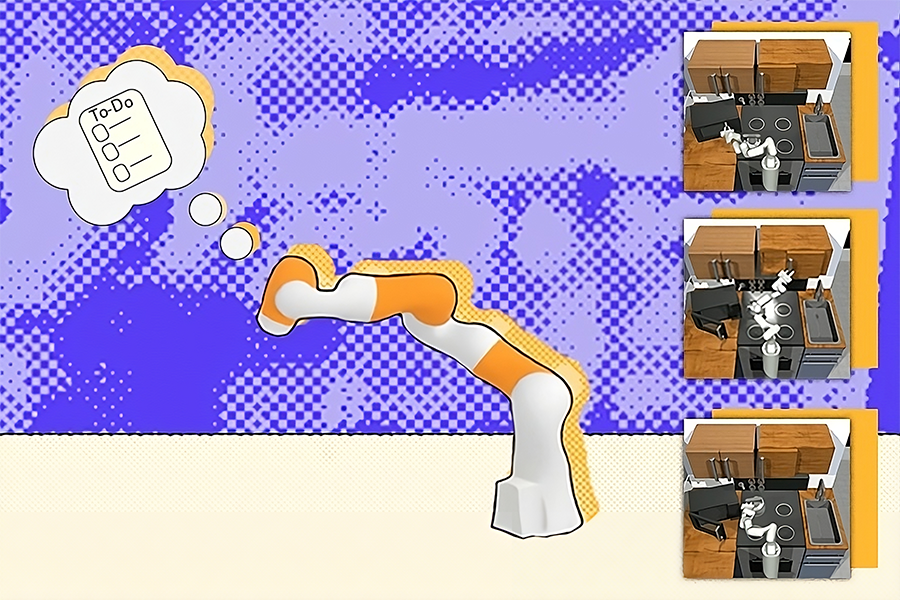
Another test: arranging objects such as candy and a hammer in a brown box while ignoring other items. Some of the objects it needed to move were dirty, so HiP adjusted its plans to place them in a cleaning box, and then into the brown container. In a third demonstration, the bot was able to ignore unnecessary objects to complete kitchen sub-goals such as opening a microwave, clearing a kettle out of the way, and turning on a light. Some of the prompted steps had already been completed, so the robot adapted by skipping those directions.

A three-pronged hierarchy

HiP’s three-pronged planning process operates as a hierarchy, with the ability to pre-train each of its components on different sets of data, including information outside of robotics. At the bottom of that order is a large language model (LLM), which starts to ideate by capturing all the symbolic information needed and developing an abstract task plan. Applying the common sense knowledge it finds on the internet, the model breaks its objective into sub-goals. For example, “making a cup of tea” turns into “filling a pot with water,” “boiling the pot,” and the subsequent actions required.

“All we want to do is take existing pre-trained models and have them successfully interface with each other,” says Anurag Ajay, a PhD student in the MIT Department of Electrical Engineering and Computer Science (EECS) and a CSAIL affiliate. “Instead of pushing for one model to do everything, we combine multiple ones that leverage different modalities of internet data. When used in tandem, they help with robotic decision-making and can potentially aid with tasks in homes, factories, and construction sites.”

These models also need some form of “eyes” to understand the environment they’re operating in and correctly execute each sub-goal. The team used a large video diffusion model to augment the initial planning completed by the LLM, which collects geometric and physical information about the world from footage on the internet. In turn, the video model generates an observation trajectory plan, refining the LLM’s outline to incorporate new physical knowledge.

This process, known as iterative refinement, allows HiP to reason about its ideas, taking in feedback at each stage to generate a more practical outline. The flow of feedback is similar to writing an article, where an author may send their draft to an editor, and with those revisions incorporated in, the publisher reviews for any last changes and finalizes.

In this case, the top of the hierarchy is an egocentric action model, or a sequence of first-person images that infer which actions should take place based on its surroundings. During this stage, the observation plan from the video model is mapped over the space visible to the robot, helping the machine decide how to execute each task within the long-horizon goal. If a robot uses HiP to make tea, this means it will have mapped out exactly where the pot, sink, and other key visual elements are, and begin completing each sub-goal.

Still, the multimodal work is limited by the lack of high-quality video foundation models. Once available, they could interface with HiP’s small-scale video models to further enhance visual sequence prediction and robot action generation. A higher-quality version would also reduce the current data requirements of the video models.

That being said, the CSAIL team’s approach only used a tiny bit of data overall. Moreover, HiP was cheap to train and demonstrated the potential of using readily available foundation models to complete long-horizon tasks. “What Anurag has demonstrated is proof-of-concept of how we can take models trained on separate tasks and data modalities and combine them into models for robotic planning. In the future, HiP could be augmented with pre-trained models that can process touch and sound to make better plans,” says senior author Pulkit Agrawal, MIT assistant professor in EECS and director of the Improbable AI Lab. The group is also considering applying HiP to solving real-world long-horizon tasks in robotics.

Ajay and Agrawal are lead authors on a paper describing the work. They are joined by MIT professors and CSAIL principal investigators Tommi Jaakkola, Joshua Tenenbaum, and Leslie Pack Kaelbling; CSAIL research affiliate and MIT-IBM AI Lab research manager Akash Srivastava; graduate students Seungwook Han and Yilun Du ’19; former postdoc Abhishek Gupta, who is now assistant professor at University of Washington; and former graduate student Shuang Li PhD ’23.

The team’s work was supported, in part, by the National Science Foundation, the U.S. Defense Advanced Research Projects Agency, the U.S. Army Research Office, the U.S. Office of Naval Research Multidisciplinary University Research Initiatives, and the MIT-IBM Watson AI Lab. Their findings were presented at the 2023 Conference on Neural Information Processing Systems (NeurIPS).

Microsoft Aims to Convert Google Chrome Users

0

Microsoft Edge: The Browser that Won’t Take No for an Answer

Microsoft Edge has evolved into more than just a browser; it’s a critical component of Microsoft’s ecosystem, designed to integrate seamlessly with Windows and showcase the company’s latest innovations, such as its AI assistant, Copilot.

A Browser that Won’t Take No for an Answer

While these interconnections make Edge a viable choice, Microsoft’s methods for persuading consumers to choose it have been far from covert. From default settings that prioritize Edge to persistent prompts at startup, Microsoft has made it clear they want Edge to be the go-to browser for Windows users. And lately, it’s upped the ante: now, Edge can launch automatically when your computer boots up, instantly nudging you to bring over your data from other browsers.

The Auto-Import Feature

The most recent update includes an auto-checked option to import browsing data from Chrome, such as history, bookmarks, and open tabs, in the name of users leveraging the features of AI assistant, Copilot. Although AI features may be appealing to some, the aggressive approach has left many users feeling annoyed rather than tempted.

A Forced Sales Pitch

The Verge recently noticed that when you start up your PC, Edge might decide to open on its own, promptly displaying a pop-up for its AI assistant, Copilot. Right next to Copilot, there’s a conveniently checked box allowing Edge to import data from other browsers automatically. For some users, this seems like an overreach, raising doubts about how far Microsoft is ready to go to make Edge the browser of choice.

The Uninstall Process

Microsoft has confirmed this setup and stated that customers have the option to opt-out. Still, with default settings that favor data imports and an eye-catching import button, it’s easy for users to unintentionally make the switch, especially if they’re not paying attention. For those who prefer sticking with their existing browsers without interruption, the approach can feel unwelcome. Uninstalling Edge is a complex process, and it often gets reinstalled by Windows updates, much to the frustration of users who would rather go without.

A History of Aggressive Tactics

This isn’t the first time Microsoft has tried this type of strategy. A similar message appeared to users earlier this year but was pulled back after strong objections. Now, it’s back, with Microsoft’s Caitlin Roulston stating the notification is meant to "give users the choice to import data from other browsers." In fact, Microsoft’s bold tactics go back some years. In 2022, it introduced a feature that could automatically pull data from Chrome into Edge – although users had the option to decline. In 2021, the company made it practically impossible to set any browser other than Edge as the default, resulting in enough outcry for Microsoft to back down.

Conclusion

While Microsoft promotes its intrusive pop-ups as a way to give users more control, others who value choice without constant nudges. The relentless push for Edge usage could actually be detrimental, as the company’s persistence may drive users toward other browsers rather than away. To truly compete, Microsoft might benefit from letting Edge’s strengths speak for themselves rather than relying on aggressive prompts to change hearts and minds.

FAQs

Q: Why is Microsoft pushing Edge so aggressively?
A: Microsoft wants Edge to be the go-to browser for Windows users and is using various tactics to persuade consumers to choose it.

Q: Can I opt-out of the auto-import feature?
A: Yes, Microsoft has confirmed that customers have the option to opt-out of the auto-import feature.

Q: Why is uninstalling Edge so complex?
A: Uninstalling Edge is a complex process because it is deeply integrated with Windows, making it difficult to remove completely.

Q: Is this the first time Microsoft has used aggressive tactics to promote Edge?
A: No, Microsoft has a history of using aggressive tactics to promote Edge, including making it practically impossible to set any browser other than Edge as the default in 2021.

Unlock Python’s Potential with PyKX 3.0

Enhancing PyKX: A Python-first Interface for kdb+

As AI-driven algorithms become increasingly complex, the demand for scalable solutions that integrate powerful analytical engines with machine learning libraries has surged. KX, a performance analytical database for AI, has responded to this need by enhancing PyKX, its Python-first interface for kdb+, with a new hybrid architecture.

PyKX 3.0: A Hybrid Architecture

PyKX 3.0 merges kdb+’s processing power with Python’s ML capabilities. The company claims that developers can use the platform to build advanced AI-driven applications and analytics without compromising on speed or scalability.

Open-sourcing PyKX

In May 2023, KX had open-sourced PyKX, making its kdb+ time-series database and q programming language accessible to the global Python developer and data science communities. This move led to over 400,000 downloads across various distribution channels, highlighting PyKX’s rapid adoption.

Python’s Widespread Popularity

A key factor in this success is Python’s widespread popularity among data scientists and developers. By integrating seamlessly with Python’s existing tools and libraries, PyKX enabled users to quickly tap into KX’s advanced analytics capabilities, driving its growth and making it an attractive solution for real-time and historical data analysis.

Enhancements in PyKX 3.0

The two major upgrades include the PyKX query API update to support Python first syntax and the addition of a streaming module for high-velocity data ingestion and persistence. PyKX shared that “5% of tasks can be done fully via Python, removing programming language knowledge gaps.”

Additional Enhancements

Additionally, enhancements in this update include the migration of beta features introduced in PyKX 2.x to full production. This includes database creation and management, remote function execution, and multi-threaded use of PyKX. Users also get more granular control over the IPC reconnection process and access to support for the Python help command on all PyKX keywords.

Conclusion

PyKX has evolved to support the needs of millions of Python users, enabling them to leverage kdb+ alongside popular ML and AI tools, all while maintaining their existing workflows. The goal of the new update is to enable Python developers to build advanced AI-driven applications and analytics without compromising on speed or scalability.

Frequently Asked Questions

Q: What is PyKX?

A: PyKX is a Python-first interface for kdb+, a performance analytical database for AI.

Q: What are the key upgrades in PyKX 3.0?

A: The key upgrades include the PyKX query API update to support Python first syntax and the addition of a streaming module for high-velocity data ingestion and persistence.

Q: What are the benefits of using PyKX?

A: PyKX enables developers to build advanced AI-driven applications and analytics without compromising on speed or scalability, and integrates seamlessly with Python’s existing tools and libraries.

Q: Is PyKX open-sourced?

A: Yes, PyKX was open-sourced in May 2023, making its kdb+ time-series database and q programming language accessible to the global Python developer and data science communities.

GluFormer: Predicting Diabetes Outcomes with AI

0

Revolutionizing Diabetes Management: GluFormer AI Predicts Future Glucose Levels

A New Era of Personalized Medicine

Diabetics — or others monitoring their sugar intake — may look at a cookie and wonder, “How will eating this affect my glucose levels?” A generative AI model can now predict the answer.

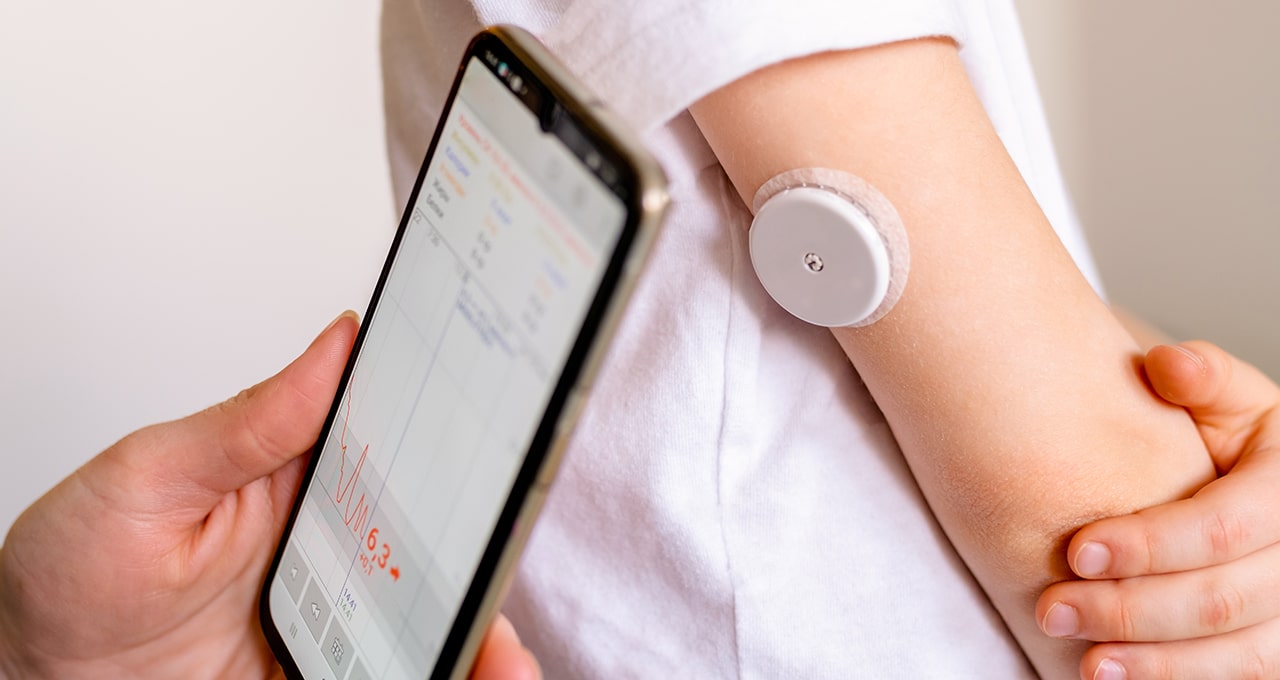
Researchers from the Weizmann Institute of Science, Tel Aviv-based startup Pheno.AI, and NVIDIA led the development of GluFormer, an AI model that can predict an individual’s future glucose levels and other health metrics based on past glucose monitoring data.

Data-Driven Insights for Better Diagnoses and Treatment

Data from continuous glucose monitoring could help more quickly diagnose patients with prediabetes or diabetes, according to Harvard Health Publishing and NYU Langone Health. GluFormer’s AI capabilities can further enhance the value of this data, helping clinicians and patients spot anomalies, predict clinical trial outcomes, and forecast health outcomes up to four years in advance.

Predicting Glucose Levels with Dietary Intake Data

The researchers showed that, after adding dietary intake data into the model, GluFormer can also predict how a person’s glucose levels will respond to specific foods and dietary changes, enabling precision nutrition.

A Potential Game-Changer for Diabetes Prevention

Accurate predictions of glucose levels for those at high risk of developing diabetes could enable doctors and patients to adopt preventative care strategies sooner, improving patient outcomes and reducing the economic impact of diabetes, which could reach $2.5 trillion globally by 2030.

AI-Powered Insights for a Healthier Future

AI tools like GluFormer have the potential to help the hundreds of millions of adults with diabetes. The condition currently affects around 10% of the world’s adults — a figure that could potentially double by 2050 to impact over 1.3 billion people. It’s one of the 10 leading causes of death globally, with side effects including kidney damage, vision loss, and heart problems.

Transforming Medical Data with Neural Networks

GluFormer is a transformer model, a kind of neural network architecture that tracks relationships in sequential data. It’s the same architecture as OpenAI’s GPT models — in this case, generating glucose levels instead of text.

Training and Validation of the Model

The model was trained on 14 days of glucose monitoring data from over 10,000 non-diabetic study participants, with data collected every 15 minutes through a wearable monitoring device. The data was collected as part of the Human Phenotype Project, an initiative by Pheno.AI, a startup that aims to improve human health through data collection and analysis.

Conclusion

GluFormer has the potential to revolutionize diabetes management by enabling personalized predictions of glucose levels and health outcomes. The model’s ability to incorporate dietary intake data and predict responses to specific foods and dietary changes could lead to more effective treatment plans. As AI technology continues to advance, we can expect to see even more innovative applications of machine learning in healthcare.

Frequently Asked Questions
Q: What is GluFormer?

A: GluFormer is a generative AI model that can predict an individual’s future glucose levels and other health metrics based on past glucose monitoring data.

Q: How does GluFormer work?

A: GluFormer uses a transformer model to track relationships in sequential data, generating glucose levels instead of text. The model was trained on 14 days of glucose monitoring data from over 10,000 non-diabetic study participants.

Q: Can GluFormer predict how a person’s glucose levels will respond to specific foods and dietary changes?

A: Yes, GluFormer can predict how a person’s glucose levels will respond to specific foods and dietary changes, enabling precision nutrition.

Q: What are the potential applications of GluFormer in healthcare?

A: GluFormer has the potential to improve diabetes management by enabling personalized predictions of glucose levels and health outcomes. It could also be used to identify high-risk individuals and help them adopt preventative care strategies sooner, reducing the economic impact of diabetes.

Richard Wiesman, professor of the practice in mechanical engineering, dies at age 69 | MIT News

0

Richard M. Wiesman ’76, SM ’76, PhD ’83, a professor of the practice in the MIT Department of Mechanical Engineering (MechE), died on Sunday, Jan. 7. He was 69. 

A technology innovator and leader who saw many complex engineering systems reach the marketplace, Wiesman’s work spanned from laboratory development to field deployment. His broad skills in all aspects of automation and robotics — including design, control, communications, locomotion, actuation, sensing, and power — brought a unique perspective to the education of MIT students and made him a tremendous educator, mentor, and colleague.

“Dr. Wiesman’s great enthusiasm for teaching, in parallel with his distinguished industry career, was a wonderful inspiration for our students,” says John Hart, department head and professor of mechanical engineering. “We will miss him very much.”

Wiesman was a lecturer in MechE in the early 1980s and from 2005 to 2007, and was named professor of the practice in 2007. He taught and supervised research in the areas of design, product development, robotics, controls, and manufacturing, and served as co-director of MIT’s Field and Space Robotics Laboratory. In recent years he served on the teaching teams for courses 2.00B, 2.007, 2.008, 2.009, and 2.810, and worked with and inspired many generations of students, including as a 2.009 instructor last fall.  

Wiesman was born on Oct. 7, 1954, to Harold and Elaine Wiesman. He had two brothers, John and Ron, and grew up in Omaha, Nebraska, before coming to study at MIT. Wiesman earned his bachelor’s, master’s, and PhD degrees in MechE at MIT. His doctoral thesis was on high-speed linear induction machines for transportation applications, which led him to work on the U.S. Navy’s Electromagnetic Aircraft Launch System and the Advanced Arresting Gear system.

Wiesman’s work on mobile robots started with the development of a new class of explosive ordnance disposal robots, which grew into a successful business in mobile robots for hazardous ground-based activities — including special robots for internal pipe inspection, robots for warehouse and packing activities, and analysis of robot team characteristics for planetary exploration.

Wiesman worked at Foster Miller/QinetiQ for over 40 years, starting as an engineer and ending his tenure as the executive vice president and chief technology officer. Most recently, he served as a senior fellow for General Atomics and as a member of Arsenal Capital’s Industrial Growth Advisory Board. In 2021, he shared reflections on his career in mechanical engineering with MechE students, telling them in his summation, “I believe you’ve selected an absolutely wonderful career.”

The Institute is also where Wiesman met his wife of 44 years, Suzanne. Together, they took great pleasure in traveling, hiking, snowshoeing, being with friends, and most of all, raising their three children.

Wiesman is survived by his wife; his son Josh and wife Kristina; his son David and wife Haley; his son Ben and wife Emily; and his grandchildren, Elena, John, William, and Julian, in whom he delighted as “Papa.”

In lieu of flowers, the family asks to please consider a donation to the American Heart Association. 

Wicked Meets Gladiator

0

Movie Mashup Poster Trend Continues with Glicked

Remember Barbenheimer? It was the feel-good hit movie of the summer of 2023, blending one doll’s journey of self-discovery with the life story of the physicist who helped develop the first nuclear weapons. The feature existed only in the imaginations of poster designers but took on a life of its own.

The Latest Unlikely Double Bill

The latest unlikely double bill matches Gladiator II with Wicked, which seems particularly apt considering the existing Wicked poster controversy. Behold, the marvel that is Glicked… or Wickiator, if you prefer.

goodbye barbenheimer, it’s time for glicked#Wicked #Gladiator
pic.twitter.com/cMDaO1hfG2

The Artist Behind the Design

The artist and designer Kadir Ozan, founder of @PosterEscape, has decided that the release of Gladiator II and Wicked just a week apart from each other merited a design mashup. The result is a fictional poster design for a film called Glicked (although some have suggested alternative portmanteau titles), combining elements of the posters for the two real movies.

Not Everyone is a Fan

Considering how upset actress Cynthia Erivo was about fans editing the Wicked poster to obscure her face, I’m not sure she’ll appreciate people replacing her with Paul Mescal, the star of Gladiator II. But some fans seem to be keen on the concept.

“That sounds like the most intense crossover ever! Imagine the soundtrack alone – goosebumps!,” one person responded on X (see our pick of the best X alternatives). “Both are sequels we never asked for or wanted,” someone else wrote.

Some aren’t so sure. “I know there’s nothing at all similar between Oppenheimer and Barbie but I feel like Barbenheimer just made sense. Glicked is just… strange,” one person wrote.

Release Dates

Gladiator II will be released on 14 November and Wicked on 21 November. For more inspiration, see our pick of the best film posters of all time.

Conclusion

The movie mashup poster trend continues to delight fans with its creative and unexpected combinations. While not everyone may appreciate the latest offering, Glicked is sure to spark conversation and debate. Whether you’re a fan of Gladiator II, Wicked, or just enjoy the art of poster design, there’s no denying the excitement and anticipation surrounding these upcoming releases.

FAQs

Q: What is Glicked?
A: Glicked is a fictional movie mashup poster design combining elements of the posters for Gladiator II and Wicked.

Q: Who created the Glicked poster?
A: The artist and designer behind the Glicked poster is Kadir Ozan, founder of @PosterEscape.

Q: Will Cynthia Erivo be involved in the Glicked movie?
A: There is no official announcement about a Glicked movie, and even if there was, it’s unlikely that Cynthia Erivo would be involved given her previous reaction to fans editing the Wicked poster.

Q: When are Gladiator II and Wicked being released?
A: Gladiator II will be released on 14 November, and Wicked will be released on 21 November.

School Privacy and Accessibility Guidelines

Data Privacy Considerations and Recommendations for GenAI Adoption in Schools

Key Points:

  • School districts must carefully select GenAI tools to meet their unique needs, ensuring data privacy and accessibility.
  • Protecting student data and complying with accessibility standards is crucial for creating an inclusive and secure educational environment.

Data Privacy Considerations and Recommendations:

Linnette Attai, Project Director for CoSN’s Student Data Privacy Initiative, shares insights on data privacy risks associated with adopting GenAI tools and offers guidance for responsible implementation.

  • Ownership and Control of Data: District leaders should be cautious when using large language models not specifically designed for educational purposes.
  • Key Privacy Considerations:
    • Have a clear objective for using GenAI tools.
    • Be informed before testing new tools.
    • Start with staff testing before involving students.

Practical Example: Hinsdale Township High School District 86

Keith Bockwoldt, Chief Information Officer for Hinsdale Township High School District 86, shares his district’s thoughtful approach to GenAI. Keith’s ‘Reimagining Learning through Innovation’ program allows teachers to pilot new tools funded by the district’s IT budget.

  • Vendor Compliance: Ensure vendors are aware of and comply with data privacy policies.
  • Ongoing Vendor Engagement: Continuous communication with vendors is crucial for maintaining compliance with data privacy standards.

Ensuring Accessibility

Jordan Mroziak, Project Director for AI and Education at InnovateEDU, emphasizes the need for a deliberate approach to adopting new technologies.

  • EdSAFE AI Industry Council: Aims to offer guidance and reliable standards for districts exploring GenAI tools.
  • ADA Title II: Requires that accessibility is prioritized from the beginning.

Conclusion:

The integration of Generative AI tools into education offers significant opportunities for enhancing learning and efficiency. However, it also poses challenges related to data privacy and accessibility. Thoughtful implementation and ongoing evaluation are essential to maximize the benefits of these tools while ensuring the protection and support of all students.

Frequently Asked Questions:

Q: What are the key privacy considerations for adopting GenAI tools in schools?
A: Ownership and control of data, having a clear objective, being informed before testing, and starting with staff testing.

Q: How can districts ensure vendor compliance with data privacy policies?
A: By ensuring vendors are aware of and comply with data privacy policies, and maintaining continuous communication with vendors.

Q: What is the EdSAFE AI Industry Council?
A: A collective effort to offer guidance and reliable standards for districts exploring GenAI tools, developed with the principles of safety, accountability, fairness, equity, and efficacy.