Home Blog Page 619

De-Aging Tom Hanks with AI

0

A Look into the AI-Driven De-Aging Effect in Robert Zemeckis’ Movie Here

We mentioned a few months ago how convincing the AI de-aging of Tom Hanks looked in Robert Zemeckis’ new movie Here. Now we’ve learned more about how Miramax created the effect.

How Miramax Achieved the AI De-Aging Effect

Visual effects supervisor Kevin Baillie turned to the creative studio Metaphysic, which digitally augmented performances using its own generative artificial intelligence technology and team of digital character artists. And the process even allowed actors to rehearse while watching their young selves perform. The results could replace the Irishman in our pick of the best CGI movie moments.

(Image credit: Metaphysic / Miramax)

The Process of De-Aging

Baillie invited Metaphysic to screen test for the project back in 2022. For that, they recreated a young Tom Hanks, reminiscent of his appearance in Big while maintaining the emotional integrity of a contemporary performance by the actor.

Metaphysic’s proprietary process involves training a neural network model on a reference input, in this case video footage and images of a younger Hanks. A human artist then refines the results until the model is ready for production. From there, an actor or performer can drive the model, be it for a film or a live event.

Real-Time De-Aging

As Here moved into production, Metaphysic trained the initial neural network models to generate photoreal younger versions of the actors. Metaphysic VFX supervisor Jo Plaete and his team ran the workflow in real-time during the shoot, providing a visual reference of what the performers would look like.

This allowed Zemeckis to provide direction while viewing both the raw camera feed and the digitally augmented feed with the actors’ younger faces with only about a six-frame delay. Metaphysic also set up a camera and monitor system that allowed the actors to rehearse while seeing their younger selves. This ‘youth mirror’ system had just a two-frame delay and provided the actors with feedback that helped them to fine-tune their performances to better match their younger selves.

Conclusion

The AI de-aging effect in Here is a testament to the advancements in technology and the creativity of the team involved. The ability to recreate younger versions of the actors in real-time allowed for a more immersive experience and enabled the actors to refine their performances. The use of Metaphysic’s proprietary process and neural network models has opened up new possibilities for the film industry, and we can expect to see more impressive AI-driven de-aging effects in the future.

Frequently Asked Questions

Q: How did Metaphysic create the AI de-aging effect?
A: Metaphysic used its proprietary process involving training a neural network model on a reference input and refining the results until the model is ready for production. A human artist was then involved to fine-tune the results.

Q: How did the actors rehearse with the AI de-aging effect?
A: The actors rehearsed using a ‘youth mirror’ system that provided a visual reference of their younger selves with only a two-frame delay. This allowed them to fine-tune their performances to better match their younger selves.

Q: How many different ages were created for each actor?
A: Tom Hanks was portrayed at five different ages, Robin Wright at four ages, and Paul Bettany and Kelly Reilly at two ages each.

Q: What is the significance of the AI de-aging effect in the film industry?
A: The AI de-aging effect in Here is a testament to the advancements in technology and the creativity of the team involved. It has opened up new possibilities for the film industry, allowing for more immersive experiences and new storytelling opportunities.

5 Best Buy Black Friday Deals I’d Buy

0

Black Friday Deals on Student-Friendly Tech

Introduction

If you’re looking for some deals on student-friendly tech this Black Friday then you’re in the right place. I graduated just over 2 years ago with my photography degree, and making the transition from my “university tech” to more “working professional” tech wasn’t difficult at all. I already owned one of the best student laptops, which was excellent for gaming, studying, and intensive photo editing.

The Importance of Performance

Not all student tech should have to compromise on performance to be considered budget-friendly. And I know from experience that deals pitched exclusively to students aren’t always the ones to look out for. With this in mind, I’ve hand-picked several Black Friday deals from Best Buy that I think are perfect for students, and can stay with you after your university studies too.

Hand-Picked Deals

Conclusion

These hand-picked deals from Best Buy offer the perfect balance of performance and affordability for students. Whether you’re looking for a new laptop, tablet, or pair of headphones, you can trust that these deals will meet your needs both now and in the future.

Frequently Asked Questions

Q: What types of deals can I expect to find on Black Friday?

A: You can expect to find deals on a wide range of student-friendly tech, including laptops, tablets, headphones, and more.

Q: Do I need to be a student to take advantage of these deals?

A: No, these deals are available to anyone, not just students. However, some deals may be exclusive to students, so be sure to check the terms and conditions before making a purchase.

Q: Are these deals only available on Black Friday?

A: While many deals will be available exclusively during Black Friday, some retailers may offer similar deals leading up to or following Black Friday. Be sure to check the retailer’s website for the most up-to-date information.

Self-Organizing Textures

0

Patterns, Textures and Physical Processes

Neural Cellular Automata (NCA) are capable of learning a diverse set of behaviors: from generating stable, regenerating, static images to segmenting images to learning to “self-classify” shapes. The inductive bias imposed by using cellular automata is powerful. A system of individual agents running the same learned local rule can solve surprisingly complex tasks. Moreover, individual agents, or cells, can learn to coordinate their behavior even when separated by large distances.

Patterns, Textures and Physical Processes

Zebra stripes are an iconic texture. Ask almost anyone to identify zebra stripes in a set of images, and they will have no trouble doing so. Ask them to describe what zebra stripes look like, and they will gladly tell you that they are parallel stripes of slightly varying width, alternating in black and white. And yet, they may also tell you that no two zebra have the same set of stripes.

Patterns and textures are ill-defined concepts. The Cambridge English Dictionary defines a pattern as “any regularly repeated arrangement, especially a design made from repeated lines, shapes, or colors on a surface”. This definition falls apart rather quickly when looking at patterns and textures that impart a feeling or quality, rather than a specific repeating property.

As a result, when having any model learn to produce textures or patterns, we want it to learn a generative process for the pattern. We can think of such a process as a means of sampling from the distribution governing this pattern.

Hidden States

When biological cells communicate with each other, they do so through a multitude of available communication channels. Cells can emit or absorb different ions and proteins, sense physical motion or “stiffness” of other cells, and even emit different chemical signals to diffuse over the local substrate.

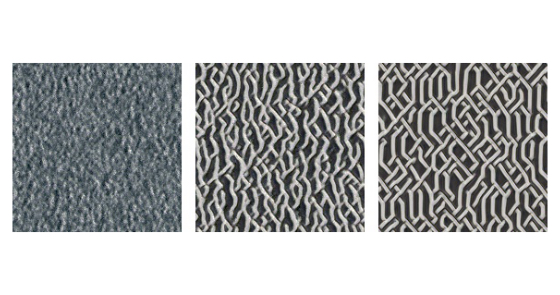
In the principal components of this coral-like texture, we see a pattern which is similar to the visible channels. However, the “threads” pointing in each diagonal direction have different colors – one diagonal is green and the other is a pale blue. This suggests that one of the things encoded into the hidden states is the direction of a “thread”, likely to allow cells that are inside one of these threads to keep track of which direction the thread is growing, or moving, in.

Conclusion

In this work, we selected texture templates and individual neurons as targets and then optimized NCA populations so as to produce similar excitations in a pre-trained neural network. This procedure yielded NCAs that could render nuanced and hypnotic textures. During our analysis, we found that these NCAs have interesting and unexpected properties.

Hidden States

We hypothesize that the hidden states are a way for cells to communicate with each other, allowing them to learn distributed, local, algorithms.

Make ChatGPT Your Default Search Engine in Chrome

0

ChatGPT Search: A New Era in Search Engines

The biggest benefit of using an AI chatbot is being able to input and receive conversational queries. Combine that with real-time access to the Internet, and you have a more efficient search engine. That’s exactly what ChatGPT Search is — and now you can make it your default search engine.

What is ChatGPT Search?

ChatGPT Search can be accessed through the regular ChatGPT interface as long as you are a ChatGPT Plus or Teams subscriber or were on the waitlist for SearchGPT. If you have access to ChatGPT Search and are ready to commit to always using ChatGPT instead of Google, you can do so by installing the free Chrome extension.

How to Install the ChatGPT Extension

Open the Chrome web store and visit the ChatGPT Search page. Click “Add to Chrome” and then click “Add extension” on the pop-up to finish the process. After installation, your Chrome interface will look the same; however, when you enter something in the search bar, you will see that it is redirected automatically to ChatGPT Search.

Using ChatGPT Search

Some use cases where SearchGPT excels are when working on a research paper or project that involves examining many newer topics. It can break down the material in a much simpler way to understand and narrow down the number of links you have to sift through.

However, for some prompts — such as anything shopping-related — Google is still the best alternative. For example, when I entered “Best coats for winter,” the ChatGPT results populated a list of jackets with links to the websites that recommended them. I prefer to see clickable links to the sites so that I can visit the sites myself, see the prices, and browse on my own. For that reason, I think the Google Shopping experience is better suited for shopping queries.

Should You Keep ChatGPT On by Default?

Should you keep ChatGPT on by default and turn it off for specific queries where Google is preferred, or the other way around? That depends on your particular needs. I’m keeping Google as my default search engine because, daily, I rely on a traditional search engine results page for my job. However, I’m not uninstalling the extension because I find it helpful, especially in situations where I want to learn more about a subject, as ChatGPT answers conversationally and saves me time from skimming multiple articles.

Conclusion

ChatGPT Search is a game-changer in the world of search engines. With its ability to provide conversational answers and real-time access to the Internet, it’s a powerful tool for anyone looking to streamline their search experience. While it may not be perfect for all use cases, it’s definitely worth trying out, especially if you’re already a ChatGPT Plus subscriber.

FAQs

Q: Do I need to be a ChatGPT Plus subscriber to use ChatGPT Search?
A: Yes, you need to be a ChatGPT Plus subscriber or were on the waitlist for SearchGPT to access ChatGPT Search.

Q: How do I install the ChatGPT extension?
A: Open the Chrome web store and visit the ChatGPT Search page. Click “Add to Chrome” and then click “Add extension” on the pop-up to finish the process.

Q: Can I use ChatGPT Search for all my search queries?
A: While ChatGPT Search is a powerful tool, it may not be suitable for all use cases. For example, if you’re looking for shopping-related information, Google may be a better alternative.

Q: Can I turn the ChatGPT extension on and off?
A: Yes, you can turn the ChatGPT extension on and off depending on your current search needs. Simply click on the extension next to your search bar, click on manage extension, and toggle it off.

Robotic palm mimics human touch | MIT News

0

“I’ll have you eating out of the palm of my hand” is an unlikely utterance you’ll hear from a robot. Why? Most of them don’t have palms.

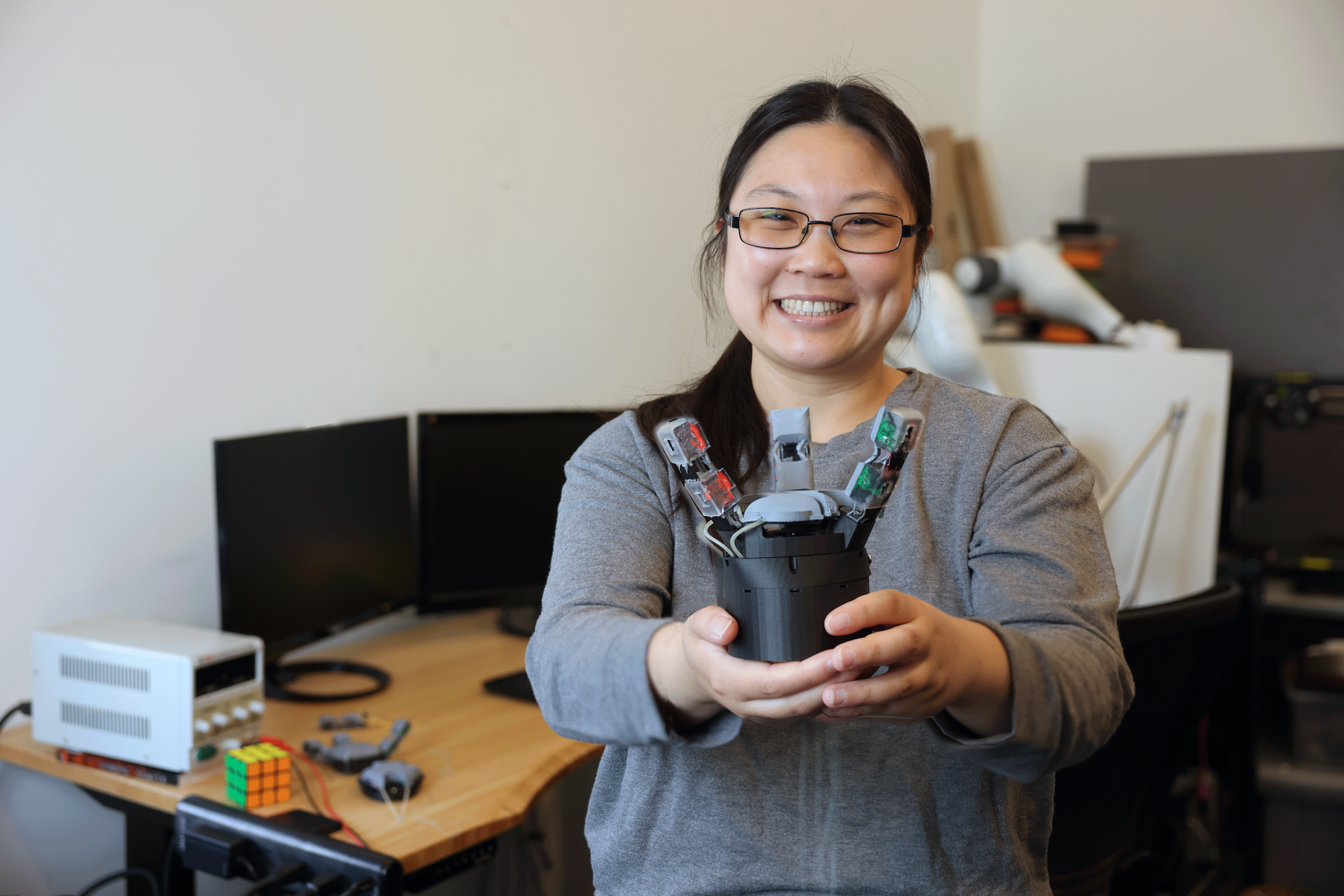
If you have kept up with the protean field, gripping and grasping more like humans has been an ongoing Herculean effort. Now, a new robotic hand design developed in MIT’s Computer Science and Artificial Intelligence Laboratory (CSAIL) has rethought the oft-overlooked palm. The new design uses advanced sensors for a highly sensitive touch, helping the “extremity” handle objects with more detailed and delicate precision.

GelPalm has a gel-based, flexible sensor embedded in the palm, drawing inspiration from the soft, deformable nature of human hands. The sensor uses a special color illumination tech that uses red, green, and blue LEDs to light an object, and a camera to capture reflections. This mixture generates detailed 3D surface models for precise robotic interactions.

And what would the palm be without its facilitative fingers? The team also developed some robotic phalanges, called ROMEO (“RObotic Modular Endoskeleton Optical”), with flexible materials and similar sensing technology as the palm. The fingers have something called “passive compliance,” which is when a robot can adjust to forces naturally, without needing motors or extra control. This in turn helps with the larger objective: increasing the surface area in contact with objects so they can be fully enveloped. Manufactured as single, monolithic structures via 3D printing, the finger designs are a cost-effective production.

Beyond improved dexterity, GelPalm offers safer interaction with objects, something that’s especially handy for potential applications like human-robot collaboration, prosthetics, or robotic hands with human-like sensing for biomedical uses.

Many previous robotic designs have typically focused on enhancing finger dexterity. Liu’s approach shifts the focus to create a more human-like, versatile end effector that interacts more naturally with objects and performs a broader range of tasks. 

“We draw inspiration from human hands, which have rigid bones surrounded by soft, compliant tissue,” says recent MIT graduate Sandra Q. Liu SM ’20, PhD ’24, the lead designer of GelPalm, who developed the system as a CSAIL affiliate and PhD student in mechanical engineering. “By combining rigid structures with deformable, compliant materials, we can better achieve that same adaptive talent as our skillful hands. A major advantage is that we don’t need extra motors or mechanisms to actuate the palm’s deformation — the inherent compliance allows it to automatically conform around objects, just like our human palms do so dexterously.”

The researchers put the palm design to the test. Liu compared the tactile sensing performance of two different illumination systems — blue LEDs versus white LEDs — integrated into the ROMEO fingers. “Both yielded similar high-quality 3D tactile reconstructions when pressing objects into the gel surfaces,” says Liu.

But the critical experiment, she says, was to examine how well the different palm configurations could envelop and stably grasp objects. The team got hands-on, literally slathering plastic shapes in paint and pressing them against four palm types: rigid, structurally compliant, gel compliant, and their dual compliant design. “Visually, and by analyzing the painted surface area contacts, it was clear having both structural and material compliance in the palm provided significantly more grip than the others,” says Liu. “It’s an elegant way to maximize the palm’s role in achieving stable grasps.”

One notable limitation is the challenge of integrating sufficient sensory technology within the palm without making it bulky or overly complex. The use of camera-based tactile sensors introduces issues with size and flexibility, the team says, as the current tech doesn’t easily allow for extensive coverage without trade-offs in design and functionality. Addressing this could mean developing more flexible materials for mirrors, and enhancing sensor integration to maintain functionality, without compromising practical usability.

“The palm is almost completely overlooked in the development of most robotic hands,” says Columbia University Associate Professor Matei Ciocarlie, who wasn’t involved in the paper. “This work is remarkable because it introduces a purposefully designed, useful palm that combines two key features, articulation and sensing, whereas most robot palms lack either. The human palm is both subtly articulated and highly sensitive, and this work is a relevant innovation in this direction.”

“I hope we’re moving toward more advanced robotic hands that blend soft and rigid elements with tactile sensitivity, ideally within the next five to 10 years. It’s a complex field without a clear consensus on the best hand design, which makes this work especially thrilling,” says Liu. “In developing GelPalm and the ROMEO fingers, I focused on modularity and transferability to encourage a wide range of designs. Making this technology low-cost and easy to manufacture allows more people to innovate and explore. As just one lab and one person in this vast field, my dream is that sharing this knowledge could spark advancements and inspire others.”

Ted Adelson, the John and Dorothy Wilson Professor of Vision Science in the Department of Brain and Cognitive Sciences and CSAIL member, is the senior author on a paper describing the work. The research was supported, in part, by the Toyota Research Institute, Amazon Science Hub, and the SINTEF BIFROST project. Liu presented the research at the International Conference on Robotics and Automation (ICRA) earlier this month.

Mattel’s Wicked Design Blunder

0

Wicked Movie Poster Design Controversy Strikes Again

Packaging Blunder Prompts Apology from Mattel

The Wicked movie is becoming as famous for its poster design controversy as much as anything else. Now, with a few weeks to go until the cinematic release, it’s in the headlines for an unexpected design-related reason; this time for promoting a porn site on the packaging for children’s dolls.

The Mistake

Yes, you read that right. Incredibly, Glinda and Elphaba dolls based on the characters played by Arianna Grande and Cynthio Erivo in the film, rolled out into shops in the US with packaging that mistakenly carried the web address www.wicked.com instead of the correct address www.wickedmovie.com. Whoops!

The Fallout

LMAO Universal pictures put the wrong website for @wickedmovie on the back of their dolls for kids. It leads to a porn website 😂😂😂😂😂 #Wicked pic.twitter.com/agD48yHltVNovember 10, 2024

Mattel’s Response

The toy maker Mattel has apologised for the blunder. “Mattel was made aware of a misprint on the packaging of the Mattel Wicked collection dolls, primarily sold in the US, which intended to direct consumers to the official WickedMovie.com landing page,” the company said in a statement sent to CNN.

Recommendation

People who have already purchased the dolls are advised to discard the packaging or obscure the link.

A Lesson Learned

The blunder just goes to show the importance of proofing a design carefully, including every detail of the copy.

About the Movie

Wicked (the Universal Pictures movie, not the porn site) is an adaptation of the Broadway musical that prequels The Wizard of Oz, telling an alternate version of events. Part one will be released on 22 November and part two in November 2025.

Conclusion

The Wicked movie poster design controversy has struck again, this time with a packaging blunder that has led to an unexpected consequence. Mattel has apologized for the mistake and is taking immediate action to remedy the situation.

Frequently Asked Questions

Q: What happened to the packaging of the Wicked dolls?
A: The packaging of the dolls mistakenly carried the web address www.wicked.com instead of the correct address www.wickedmovie.com.

Q: What is the correct website address?
A: The correct website address is www.wickedmovie.com.

Q: What should parents do if they have already purchased the dolls?
A: Parents are advised to discard the packaging or obscure the link.

Q: What is Mattel doing to rectify the situation?
A: Mattel is taking immediate action to remedy the situation and has apologized for the mistake.

Boost Your Skills with AI Courses

0

Artificial Intelligence: Preparing Your Career for AI

AI continues to transform industries, and having the right skills can make a significant difference to your career. Professionals wishing to get into this evolving field can take advantage of a variety of specialized courses that teach how to use AI in business, creativity, and data analysis.

Artificial Intelligence: Preparing Your Career for AI

Artificial Intelligence: Preparing Your Career for AI is an option for those wanting to future-proof their careers in an AI-centric workplace. The course outlines five essential steps for preparing for AI’s impact on job roles and skill requirements. Participants learn the basics of AI, strategies for aligning their career paths with AI advancements, and how to use AI responsibly.

Generative AI for Leaders

For business leaders, Generative AI for Leaders focuses on integrating AI into organization’s strategy. AI’s rapid advancement offers both opportunities and challenges for business leaders, who must balance innovation with ethical and operational concerns.

Business Analyst: Digital Director for AI and Data Science

Business Analyst: Digital Director for AI and Data Science is a course designed for business analysts and professionals explaining how to define requirements for data science and artificial intelligence projects. The course covers the requirements elicitation process for AI applications and teaches participants how to work closely with data scientists and machine learning engineers to ensure that AI projects meet business goals.

Prompt Engineering+: Master Speaking to AI

One valuable course is Prompt Engineering+: Master Speaking to AI, which teaches the art of creating precise instructions for generative AI models. ‘Prompt engineering’ is essential for situations in which human intent must be accurately translated into AI output.

Canva AI: Master Canva AI Tools and Apps 2024

Content creators can benefit from Canva AI: Master Canva AI Tools and Apps 2024, a course focused on using Canva’s AI-driven tools to streamline and enhance content production. This course introduces participants to Canva’s Magic Studio, where they explore tools for creating engaging social media posts, PDFs, videos, and presentations.

Conclusion

These courses offer a comprehensive toolkit for mastering AI skills in various fields. Embracing these opportunities can empower professionals to lead, create, and adapt in an AI-driven organization. Whether you’re a business leader, a content creator, or a data professional, investing in AI skills prepares you to navigate the future with confidence and purpose.

FAQs

Q: What are the essential skills required to work with AI?
A: The essential skills required to work with AI include understanding AI basics, strategies for aligning career paths with AI advancements, and how to use AI responsibly.

Q: What is prompt engineering, and why is it essential for AI interactions?
A: Prompt engineering is the art of creating precise instructions for generative AI models. It is essential for situations in which human intent must be accurately translated into AI output.

Q: Can I learn AI skills through online courses?
A: Yes, there are various online courses available that teach AI skills in business, creativity, and data analysis.

Q: What is the future of AI in the workplace?
A: AI is transforming industries, and having the right skills can make a significant difference to your career. Embracing AI opportunities can empower professionals to lead, create, and adapt in an AI-driven organization.

Professional Learning for Equitable AI Access

Key Points:

The Digital Divide and AI in Education

Generative AI is transforming the nature of work in many fields, and education is no exception. AI has the power to revolutionize education, but it is also creating a new digital divide that could widen the existing equity gaps among students from different socio-economic backgrounds.

Educational Benefits of AI:

AI can help teachers save time on administrative tasks, allowing them to refocus on students. It can also help teachers personalize instruction for every child, accelerating learning and improving outcomes. However, students can only experience these benefits if their schools have developed forward-thinking AI policies and their teachers are trained in using AI to support instruction.

Challenges and Opportunities:

Despite the educational benefits of AI, teachers’ use of AI in their classrooms is still limited. Only one in three teachers say they’ve used AI tools at least once in the past year, and many schools lack clear policies on AI use. To bridge this gap and ensure equity for all students, educators must be equipped with the skills and expertise needed to help students successfully navigate these tools.

Recommendations for School Systems:

Build the Capacity of K-12 Leaders to Create and Implement Effective AI Policies

Leaders must develop well-reasoned policies around the use of AI in their schools, acknowledging that student privacy and data should be protected.

Offer Teachers AI Professional Development

Teachers need guidance in using AI as a tool to support instruction. They also need support integrating AI into lessons and teaching students how to use the technology ethically and responsibly.

Look to Organizational Partners for Help

AI tools and technologies are rapidly evolving, and it can be hard for educators and administrators to keep up. Partner organizations, such as the National Math and Science Initiative, can help educational leaders meet this need for professional learning around AI and its use in education.

Conclusion:

Bridging the digital divide and ensuring equity for all students will require high-quality professional development that empowers both teachers and K-12 leaders to harness AI effectively in teaching and learning.

Frequently Asked Questions:

Q: What are the benefits of AI in education?

A: AI can help teachers save time on administrative tasks, allow for personalized instruction for every child, and accelerate learning and improve outcomes.

Q: What are the challenges of implementing AI in education?

A: Many schools lack clear policies on AI use, and teachers may not have the skills and expertise needed to help students navigate these tools.

Q: What can school systems do to ensure equity in AI education?

A: Build the capacity of K-12 leaders to create and implement effective AI policies, offer teachers AI professional development, and look to organizational partners for help.

Q: What is the role of organizational partners in AI education?

A: Partner organizations, such as the National Math and Science Initiative, can help educational leaders meet the need for professional learning around AI and its use in education.

Designers Think Comic Sans Deserves Love

0

Comic Sans: Love it or Hate it?

Comic Sans is perhaps one of the most divisive fonts around, either hated or ironically adored by the masses. Since its humble beginnings, Comic Sans has evolved from a casual, accessible typeface to an all-out meme, mocked for its juvenile design and oversaturated appearance on janky homemade birthday invitations and missing pet posters.

A Brief History

Comic Sans was created in 1994 by Microsoft in-house designer Vincent Connare. Feeling that Times New Roman didn’t suit the pup’s playful illustrated appeal, Vincent created the comic book-inspired font to match the cartoony skeuomorphic design. Initially designed for the Microsoft Bob interface, Comic Sans was made to be a typographic voice for the dog.

The Refresh

Thanks to its laidback, human-made appeal, Comic Sans grew in popularity. In 2010, creative type director Terrance Weinzierl refreshed the font, adding extra glyphs and new features to Microsoft Office 2010. The refreshed font included small caps, old style figures, dingbats, and more, while maintaining the core characters.

Oversaturation and Controversy

Unfortunately, Comic Sans’s popularity led to its oversaturation, and it became synonymous with amateur, unprofessional design. Type designer Julien Fincker notes that the font’s misuse by inexperienced font users contributed to its decline. "Unfortunately, it has been misused for completely random projects and, since it is freely available, completely overused – a problem that many fonts have experienced," he says.

A Love-Hate Relationship

Comic Sans has developed into a cultural icon that continues to divide people. Some, like designer Svet Simov, consider it a specific time classic that belongs in a museum. Others, like Donald Tarallo, typeface and graphic designer at Tarallo Design, believe it’s a phenomenon worth discussing in design classes. As a teacher, he sometimes finds it in discussions with his new design students.

Accessibility and Legibility

Despite its controversy, studies suggest that Comic Sans boosts legibility and accessibility, particularly for individuals with dyslexia. Terrence Weinzierl notes that Comic Sans has fulfilled its mission and more. "In our digital world, typefaces are the way we communicate our stories. And we’ll always need to tell new stories, make new art, make new music and dance, and make new typefaces. What’s more, art doesn’t have to be beautiful or sombre to be effective," he adds.

Conclusion

Comic Sans is a font that continues to polarize people. Love it or hate it, its impact on the design world is undeniable. From its humble beginnings as a playful, accessible typeface to its current status as a cultural icon, Comic Sans has evolved and continues to inspire.

Frequently Asked Questions

Q: What is Comic Sans?
A: Comic Sans is a font created by Microsoft in-house designer Vincent Connare in 1994.

Q: What is Comic Sans used for?
A: Initially designed for the Microsoft Bob interface, Comic Sans was later used for various applications, including birthday cards, missing pet posters, and amateur design projects.

Q: Why is Comic Sans controversial?
A: Comic Sans is often associated with amateur, unprofessional design, leading to its oversaturation and misuse by inexperienced font users.

Q: What are the benefits of Comic Sans?
A: Comic Sans has been found to boost legibility and accessibility, particularly for individuals with dyslexia.

SearchGPT

0

OpenAI is bringing real-time web search capabilities to ChatGPT, enhancing the functionality of the AI chatbot.

Key Updates

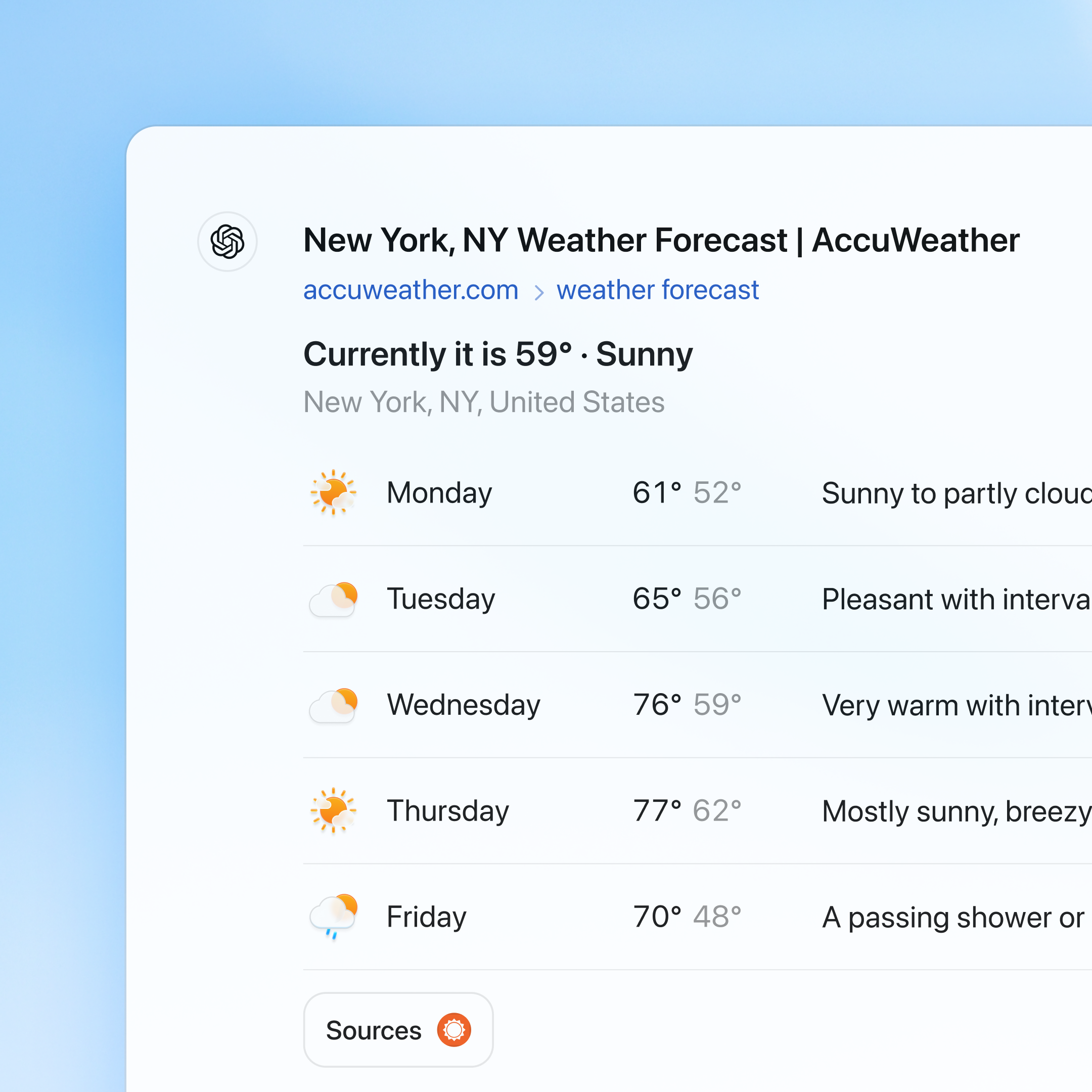
ChatGPT can now deliver real-time data, including news, sports scores, stock prices, and weather updates.

Search results are displayed automatically based on queries or triggered manually using a dedicated search icon.


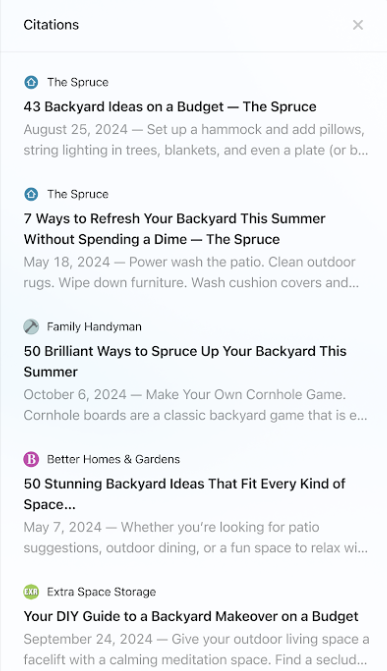
You can verify information through a “Sources” sidebar that contains reference links.

Technical Framework

The search functionality is powered by a fine-tuned version of GPT-4o, which has been improved using synthetic data generation techniques and integration with the company’s o1-preview system.

The platform combines third-party search capabilities with content from direct partners.

OpenAI has partnered with several news organizations, including the Associated Press, Axel Springer, the Financial Times, and Reuters.

Future Development

OpenAI plans to expand its search capabilities, particularly in the shopping and travel sectors.

The company also intends to integrate the feature with its Advanced Voice and Canvas products.

All website owners and publishers can participate in ChatGPT’s search results.

The Search AI Race

While Microsoft Copilot and Google Gemini have offered real-time search for months, ChatGPT’s implementation differs in key ways:

  • ChatGPT: Offers both manual and automatic search triggering, includes a source attribution sidebar, and supports interactive maps.
  • Google Gemini: Integrated with traditional search, ad-supported, and features an extensive knowledge graph.
  • Microsoft Copilot: Integrates with Bing, supports multimodal search, and includes shopping features.

Meta is reportedly working on its own AI search solution, while Google recently announced $49.4 billion in search revenue in Q3. The competition for search market dominance is higher than ever.

Hands-On Testing

Real-Time Search Capabilities

ChatGPT can now access up-to-date information and provide responses that include cited sources.

Initial testing indicates that response times are similar to traditional search engines, with results available within minutes.

In breaking news situations, the system has shown strong accuracy.

When asked about Apple’s latest product announcements, ChatGPT provided precise information supported by citations from major technology publications.

Publisher Attribution and Traffic Tracking

A key feature for publishers is the use of UTM tracking parameters in outbound links.

All citations include “utm_source=chatgpt.com,” enabling publishers to track traffic from the platform directly in their analytics.

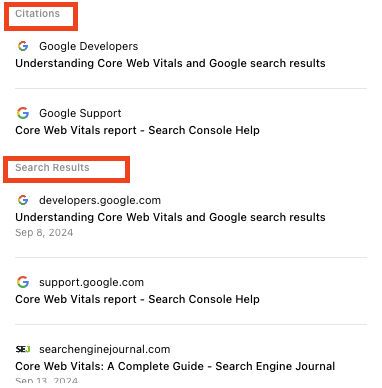
The system categorizes sources into two groups: direct citations used within responses and additional related search results.

Content Freshness & Accuracy

ChatGPT demonstrated the ability to retrieve articles published within the past hour; however, testing revealed some inconsistencies in its awareness of time.

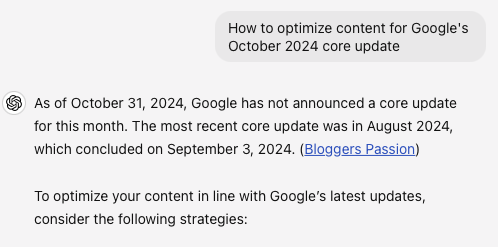
When asked about recent Google updates, it returned outdated 2019 information pointing to potential issues with accurately dating content.

On the other hand, the system exhibited strong fact-checking abilities by correctly identifying and declining to validate incorrect premises.

When queried about a non-existent Google core update in October, it accurately referenced the most recent update from August instead.

Coverage Limitations

Testing revealed a potential bias toward official sources in certain scenarios.

For instance, when discussing Google’s helpful content update, ChatGPT emphasized official statements while omitting widespread industry discussions about negative impacts.

Additionally, OpenAI’s partner publications are consistently cited throughout ChatGPT’s responses.

Availability and Access

The search feature is launching today for ChatGPT Plus and Team subscribers and users on the SearchGPT waitlist.

Enterprise and educational users will gain access in the coming weeks, and a broader rollout to free users is planned over the next several months.

This marks an important development in AI-powered search, but its full impact on search traffic patterns is still unknown.

We encourage you to monitor your analytics for ChatGPT referral patterns and evaluate your content’s visibility within the new system.

Conclusion

OpenAI’s integration of real-time search capabilities into ChatGPT marks a significant advancement in AI-powered search, offering users a more natural and conversational experience. As the search landscape continues to evolve, it is essential for publishers and SEO professionals to stay up-to-date with the latest developments and optimize their content accordingly.

FAQs

Q: How does ChatGPT’s real-time search feature work?
A: ChatGPT uses a fine-tuned version of GPT-4o and synthetic data generation techniques to power its real-time search capabilities.

Q: What are the limitations of ChatG