Home Blog Page 63

Astro: Revolutionizing Workflows with AI

0

Wix’s New AI Tool Consolidates Features, Raises Questions About the Future of Creative Work

Introduction

Over the last couple of years, Wix has been pouring more and more into AI research, leading to new features like the AI Design Assistant, an AI Text and Image Creator, and a bevy of advanced AI design tools released as part of Wix Studio. Now, the company is looking to consolidate all these different enhancements into a single AI product called Astro – an all-in-one site and business management tool that will be available to all premium users at no extra cost.

What is Astro?

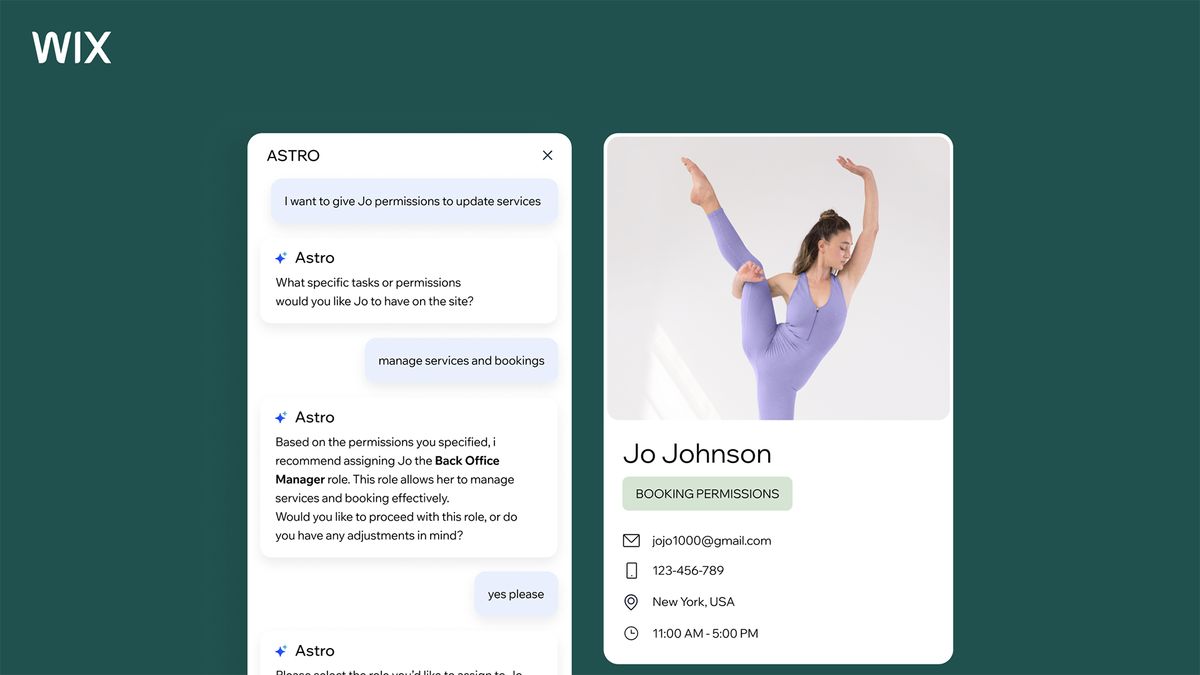
Astro is a chatbot that can track visitor behavior, generate marketing content, customize site services, and build detailed reports, all from a single interface. Users simply need to tell Astro what they want to accomplish in natural language, and it will recommend the necessary add-ons, adjust site settings, and do all the other heavy-lifting needed to make it happen.

A Streamlined Interface for Wix Users

With a little over 800 third-party add-ons accessible through the Wix App Market, not to mention several more built-in modules and native integrations, Wix is an incredibly feature-rich website builder for creative workers and small businesses. But with new tools added every week, it can be a bit tricky to keep pace with the platform. That’s where Astro comes in – it will organize all these different aspects of the AI builder into a single interface that’s easy to navigate and understand.

The Impact on Creative Professionals

However, this added convenience raises some uncomfortable questions for creative professionals. When developing a design-heavy small business website, updating it, and managing your digital operations is as easy as interacting with a chatbot, will business owners still hire digital creatives to do it for them? It’s a bit early to say, but I’m not entirely optimistic. Evidence has shown over and over how important the human element is to UI and UX design. But with cash-strapped startups, the choice often comes down to financial convenience.

Conclusion

While Wix’s new AI agent is accessible, user-friendly, and takes away a lot of the hassle of creating and managing an early-stage business website, it’s unclear whether this will create more opportunities for creative workers, take them away, or perhaps even both. Only time will tell how this new tool will shape the future of website development and digital marketing.

Frequently Asked Questions

Q: What is Astro?
A: Astro is a chatbot that can track visitor behavior, generate marketing content, customize site services, and build detailed reports, all from a single interface.

Q: What features will Astro offer?
A: Astro will offer a range of features, including tracking visitor behavior, generating marketing content, customizing site services, and building detailed reports.

Q: Will Astro be available to all Wix users?
A: Yes, Astro will be available to all premium Wix users at no extra cost.

Q: Will Astro replace human creative professionals?
A: It’s unclear whether Astro will replace human creative professionals, but it may reduce the demand for certain services and create new opportunities for others.

Apple’s Folding iPhone and iPad: One Device?

0

Rumors of a Foldable iPhone and iPad: Is Apple Planning a Game-Changer?

Despite Apple having lodged several patents for folding hardware, including even a foldable watch phone, years-old rumors about a foldable iPhone or foldable iPad have always seemed like a bit of a myth. But those rumors have been getting much more specific of late.

A Foldable Future?

We recently heard a suggestion that Apple plans to launch a $2,000 foldable iPhone next year. Now, it’s being said that 2026 will see not only an iPhone Fold but an iPad Fold too. Two separate foldable devices in one year without waiting for feedback on the first sounds like a rash move. But what if they’re the same product?

Rumors and Speculation

Analyst Jeff Pu has claimed in a research note that Apple will release both a 7.8-inch foldable iPhone and an 18.8-inch foldable iPad next year, according to 9to5Mac.

A Unified Product?

A hugely expensive folding device could be quite a niche product. Perhaps not so niche as the Vision Pro, but of limited mass appeal all the same. So releasing two risky new products in the same year sounds unlikely. But they could be two models of the same device.

Apple’s Strategy

Apple likes to make its products sound like a new invention. Consider its late entry into AI. It waited to see how other companies’ efforts were received and finally burst into the fray by revealing ‘Apple Intelligence’ as if it had just invented AI.

Samsung’s been making foldable phones for ages, and delights in rubbing that in Apple’s face. And Google got on board with the Pixel Fold in 2023. Merely releasing a foldable iPhone or iPad this late after its rivals wouldn’t be very Apple.

Apple’s folding devices are rumoured to have a distinguishing feature to set them apart: no crease. To hype that as much as possible, it would be more Apple if the tech giant billed this not as part of the iPad or iPhone family but an entirely new line of its own: an iFold, if you will.

A New Line of Products?

Folding phones already blur the line between tablet and phone, so it could make sense to market the tablet and phone as the same device in two sizes: a vanilla phone-sized iFold and a tablet-sized iFold Pro.

Conclusion

This is all total speculation. Bloomberg’s regular Apple crystal ball gazer Mark Gurman has said that he expects a foldable iPhone in 2026 and a “a giant iPad that unfolds into the size of two iPad Pros side-by-side” in 2028.

Some are saying that either Gurman and Jeff Pu must be wrong: the foldable iPad is coming in 2026 or it’s coming in 2028. But they could both be right if next year’s ‘iPad Fold’ is simply a larger version of the ‘iPhone Fold’, while Mark’s ‘giant iPad’ could either be an ‘Ultra’ version, or something else entirely (a foldable MacBook maybe?). It all means that autumn 2026 could be one of Apple’s most exciting product seasons for a long time.

Frequently Asked Questions
Q: What is the release date for the foldable iPhone and iPad?

A: According to rumors, the foldable iPhone and iPad are expected to be released in 2026.

Q: How much will the foldable devices cost?

A: The rumored price for the 7.8-inch foldable iPhone is $2,000.

Q: Will the foldable devices have a crease?

A: Rumors suggest that Apple’s foldable devices will have no crease.

Q: Will the foldable devices be part of the iPhone or iPad family?

A: There is speculation that Apple may release a new line of products, possibly called ‘iFold’, to differentiate its foldable devices from existing iPhone and iPad products.

Q: What is Mark Gurman’s prediction for the foldable iPad?

A: Mark Gurman expects a “giant iPad that unfolds into the size of two iPad Pros side-by-side” in 2028.

What is Google’s A2A?

What Is Google’s Agent2Agent Protocol?

Agent2Agent (A2A) is an open-source protocol developed by Google to enable AI agents to discover, communicate, and collaborate with each other across different systems and vendors. By providing a standardized framework, it allows agents to share capabilities, negotiate tasks, and exchange data securely, thus eliminating the need for custom integration code and reducing dependency on single-vendor ecosystems.

Defining A2A

Agent2Agent (A2A) is an open-source protocol developed by Google to enable AI agents to discover, communicate, and collaborate with each other across different systems and vendors. By providing a standardized framework, it allows agents to share capabilities, negotiate tasks, and exchange data securely, thus eliminating the need for custom integration code and reducing dependency on single-vendor ecosystems.

How A2A Works

A2A operates on the principle of enabling AI agents to autonomously access, interpret, and utilize data from various sources without the need for extensive custom integrations. This approach involves standardizing communication protocols, dynamic context management, and modular integration, allowing agents to interact with multiple data sources and maintain context while doing so.

Core Components of A2A

  • Agent Cards: JSON metadata files that describe an agent’s capabilities, identity, and communication endpoints. These cards are typically exposed at a well-known endpoint (e.g., /.well-known/agent.json) to facilitate discovery by other agents.
  • Task Management: A structured approach to handling tasks between agents, including task initiation, status updates, and completion notifications. This ensures that agents can coordinate effectively to accomplish complex workflows.
  • Collaboration Mechanisms: Support for various communication formats, including text, audio, video, and structured data, allowing agents to exchange information in the most appropriate medium for the task at hand.
  • User Experience Negotiation: Agents can specify preferred content types and formats, enabling them to adapt interactions based on user preferences and system capabilities.
  • Security Features: Built-in authentication, authorization, and encryption mechanisms aligned with OpenAPI standards to ensure secure and trustworthy interactions between agents.

The Significance of A2A in the AI Landscape

Addressing Fragmentation in AI Systems

As organizations increasingly adopt AI solutions, the diversity of platforms and frameworks has led to fragmentation, hindering seamless integration and collaboration between AI agents. A2A addresses this challenge by providing a universal communication protocol, enabling agents from different vendors to work together without the need for extensive custom integration.

Enabling Complex Multi-Agent Workflows

By facilitating interoperability, A2A empowers organizations to design complex workflows involving multiple specialized agents. For example, in a recruitment process, a hiring manager’s agent can coordinate with agents responsible for candidate sourcing, resume screening, and interview scheduling, streamlining the entire hiring process.

Fostering an Open and Collaborative Ecosystem

Google’s commitment to open-source development and collaboration is evident in A2A’s design. By inviting contributions from the broader community and establishing a governance board, Google aims to ensure that it evolves to meet the diverse needs of the AI industry, promoting innovation and inclusivity.

What Kind of Help Can CometAPI Provide on A2A?

CometAPI, as a unified platform aggregating various AI model APIs—including those for image generation, video synthesis, conversational AI, text-to-speech (TTS), and speech-to-text (STT)—is well-positioned to play a pivotal role in the Agent2Agent (A2A) ecosystem. By integrating with the A2A protocol, CometAPI can enhance interoperability among AI agents, streamline complex workflows, and foster a more cohesive AI environment.

1. Serving as a Centralized Agent Registry

CometAPI can function as a centralized registry for AI agents by exposing standardized Agent Cards at designated endpoints (e.g., /.well-known/agent.json). These Agent Cards provide metadata about each agent’s capabilities, communication protocols, and authentication requirements, facilitating discovery and interaction among agents across different platforms.

2. Facilitating Seamless Multi-Modal Workflows

With its support for diverse AI models, CometAPI can orchestrate complex, multi-modal workflows involving various agents. For instance:

  • Image Generation: A design agent can request image assets from a generative model agent via CometAPI.
  • Video Synthesis: A marketing agent can collaborate with a video generation agent to produce promotional content.
  • Conversational AI: Customer service agents can interact with chat agents to handle inquiries.
  • TTS and STT: Voice assistants can utilize TTS and STT agents for speech processing tasks.

3. Enhancing Security and Compliance

CometAPI can implement robust authentication and authorization mechanisms aligned with A2A’s security standards, such as OAuth 2.0 and OpenID Connect. This ensures secure interactions among agents, protecting sensitive data and maintaining compliance with enterprise security policies.

4. Supporting Long-Running and Asynchronous Tasks

A2A is designed to handle long-running tasks and asynchronous operations. CometAPI can facilitate such tasks by managing stateful interactions among agents, providing real-time updates, and ensuring task completion notifications are properly handled.

5. Promoting Vendor-Neutral Interoperability

By adhering to A2A’s open standards, CometAPI can promote interoperability among agents developed by different vendors. This vendor-neutral approach allows organizations to integrate best-of-breed AI solutions without being locked into a single provider, fostering innovation and flexibility.

Conclusion

Integrating CometAPI with A2A can streamline complex workflows, enhance security and compliance, and promote vendor-neutral interoperability. By leveraging A2A’s open standards, organizations can unlock the full potential of AI, fostering innovation and driving business success.

FAQs

Q: What is A2A?

A2A is an open-source protocol developed by Google to enable AI agents to discover, communicate, and collaborate with each other across different systems and vendors.

Q: What are the core components of A2A?

The core components of A2A include Agent Cards, Task Management, Collaboration Mechanisms, User Experience Negotiation, and Security Features.

Q: How does A2A work?

A2A operates on the principle of enabling AI agents to autonomously access, interpret, and utilize data from various sources without the need for extensive custom integrations.

Q: What kind of help can CometAPI provide on A2A?

CometAPI can serve as a centralized registry for AI agents, facilitate seamless multi-modal workflows, enhance security and compliance, and promote vendor-neutral interoperability.

Revolutionizing Financial Planning with AI and ML

The Future of Financial Planning: How AI and Machine Learning are Revolutionizing the Industry

The financial planning process is on the verge of a transformative shift, driven by the integration of artificial intelligence and machine learning. Traditional financial forecasting simplified the process of looking at data manually from previous years and quarters, and projecting a growth or decline of a certain percentage. Leveraging AI can propel forecasting and financial planning to the next level, allowing organizations to make faster, more effective, data-driven decisions with greater confidence.

Dynamic Forecasting

AI is moving financial planning from a backward-looking exercise to a forward-thinking, predictive process. Traditional methods typically involved analyzing past performances and making educated guesses about future trends. However, with AI, its advanced ML algorithms and capabilities to find the patterns in the data and how these can be connected, can now predict future financial forecasts with greater accuracy.

By analyzing vast datasets, ranging from market trends, such as interest rates, CPI, and commodities prices, to internal financial data, like marketing expenditure, AI can generate real-time forecasts that are more responsive to market uncertainties and other variables. This capability allows businesses to be more agile, adjusting their strategies to optimize outcomes based on the most current and relevant data.

For financial forecasting, the majority of time data is available periodically, e.g., weeks, months, time-series forecasting algorithms, a concept of statistical and machine learning, are well suited to solve budgeting and forecasting use cases.

Enhancing Scenario Planning

Scenario planning is an essential aspect of financial planning, helping businesses prepare for various potential futures. AI enhances this by providing more detailed and accurate scenario analyses.

AI can model how different economic conditions, regulatory changes, or market shifts could impact a company’s financial health. For example, a business can generate best case or worst case scenarios for Demand forecasting, by using multiple business levers, e.g., inventory levels, inflation rate or discounts etc. This enables businesses to develop more robust strategies that can be implemented quickly as conditions change, reducing the risks associated with market volatility.

Moreover, AI-driven scenario analysis allows companies to simulate the impacts of various decisions before they are made, helping to avoid costly mistakes. This dynamic forecasting ensures that financial planning is not just a static annual exercise but a continuous process that evolves in real-time with the business environment.

AI Agents

Traditionally enterprise applications are, at their core, rule-based systems. They follow predefined workflows and require structured data and human input for decision-making. AI agents, on the other hand, can plan and execute actions based on dynamic context without relying on hard rules.

One of the most immediate and impactful applications of AI in finance is the automation of repetitive and time-consuming tasks. AI agents bring intelligent reasoning, real-time analysis, and decision-making capabilities. It can be used for anomaly detection to identify unusual patterns in financial data, automate the generation of financial reports in a coherent format, for financial forecasting it can analyze variances between actuals and forecasts, identifies the drivers, suggests adjustments for future planning, and generates scenario-based forecasts.

Leveraging GenAI for Strategic Insights

Generative AI, a subset of AI that can create new content or predictions based on existing data, is beginning to make its mark in financial planning. For instance, generative AI models can analyze contracts and CRM data to identify discrepancies, streamlining the contract review process and preventing downstream accounting errors.

It has lots of potential to empower the finance functions:

  • Personalized financial insights and analysis based on their specific needs and historical actions or on-demand narrative financial reports
  • Natural language queries for irregular users or executives, it can answer topics like top-performing products, gross profit for a division or alternative roll-ups
  • Generate and compare multiple financial scenarios which assist executives in strategic decision-making

Challenges in Implementing AI in Finance

AI adoption in finance does not come easily, because finance systems contain vast amounts of sensitive data, they are more susceptible to data breaches. Integrating AI systems with other components, such as cloud services and APIs, can increase the number of entry points that hackers might exploit. Hence, most of the finance executives cite data security as a top challenge.

Limited AI skills is another hurdle, most of the finance orgs don’t have the skill set which leverage the AI in planning and budgeting activities. In early stages, high costs, staff resistance, lack of transparency, and uncertain ROI dominate. Other hurdles stay constant, such as data security and finding consistent data. As companies expand their use of AI, the potential for bias and misinformation rises, particularly as finance teams tap GenAI. Integrating AI solutions and tools into existing systems also presents more challenges.

Conclusion

As AI and ML continue to evolve, their role in financial planning will only grow. The ability to continuously adapt to new data, automate routine processes, and generate predictive insights positions AI as a critical tool for financial leaders. By embracing these technologies, businesses can transition from reactive financial management to proactive, data-driven decision-making that not only mitigates risks but also identifies new opportunities for growth.

The integration of AI and ML into financial planning represents a fundamental shift, turning what was once a backward-looking discipline into a forward-looking strategy. As companies continue to adopt these technologies, the financial planning process will become more agile, accurate, and aligned with the rapidly changing business environment. The time to embrace AI-driven financial planning is now, as it holds the key to staying competitive and thriving in an increasingly complex and uncertain world.

FAQs

Q: What is the current state of AI adoption in finance?

A: According to Gartner, 58% of finance functions are already using AI in 2024, and this number is expected to increase to 90% by 2026, with at least one AI-enabled technology solution deployed.

Q: How is AI changing the financial planning process?

A: AI is moving financial planning from a backward-looking exercise to a forward-thinking, predictive process. It can analyze vast datasets, generate real-time forecasts, and provide more detailed and accurate scenario analyses.

Q: What are the challenges in implementing AI in finance?

A: The main challenges include data security, limited AI skills, high costs, staff resistance, lack of transparency, and uncertain ROI, as well as the potential for bias and misinformation.

Q: How can businesses benefit from AI-driven financial planning?

A: By embracing AI-driven financial planning, businesses can transition from reactive financial management to proactive, data-driven decision-making that mitigates risks and identifies new opportunities for growth.

Trump Wants to Reverse Coal’s Decline

0

Executive Orders Aim to Revive Coal Use in Power Plants

President Trump last week issued executive orders designed to revive the use of coal in power plants, a practice that has been steadily declining for more than a decade.

Why Coal Use Has Declined

Once the primary source of electricity in the United States, coal plants now produce just 17 percent of the nation’s power. The main reason is that natural gas, another fossil fuel, became abundant and cheap because of the shale fracking boom that began in the early 2000s. Use of renewable energy sources, like wind and solar, has also grown a lot.

Current Energy Mix

Natural gas now provides about 38 percent of U.S. electricity, according to the Energy Information Administration. Renewable energy technologies such as solar, wind, and hydroelectric power produce about 25 percent, and nuclear energy generates about 20 percent.

Coal’s Declining Use

Some regions, like New England, are scheduled to shut down their last coal power plants soon. The most populous state in the country, California, uses virtually no coal for electricity generation.

Environmental Concerns

Coal has also been under pressure because burning it releases greenhouses gases responsible for climate change and pollutants that harm people and nature. To get around those concerns, Mr. Trump said, he will waive certain air-pollution restrictions for dozens of coal plants.

Where Coal is Still Used

In the Southeast and the Midwest, many utilities continue to generate electricity from coal plants. Companies such as Alabama Power, Georgia Power, Duke Energy, and the Tennessee Valley Authority — the nation’s largest government-run power provider — are among the largest users of coal.

States that have a long history of coal mining are still very reliant on the fuel. They include West Virginia, which got 85 percent of its electricity from coal last year, and Kentucky, which got 67 percent, according to the Energy Information Administration.

Can the Trump Administration Revive Coal?

While federal policies can play a role, utilities and the state lawmakers and regulators that oversee them ultimately determine how much coal is burned in power plants.

The Edison Electric Institute, or E.E.I., a utility trade association, said in a statement that it agreed with the administration that the United States needed more sources of electricity, but it declined to speak for or against the use of coal.

Some large utilities, like Xcel Energy, have been converting coal plants to solar farms, in part to take advantage of federal incentives created during the Biden administration.

Environmental Activists’ Response

Environmental activists said efforts to revive coal were misguided. They point out that states that use more coal tend to have higher electricity bills, more health problems, and greater risk of power plant failures because of aging equipment.

“We’re really reversing decades of work here,” said Holly Bender, chief program officer at the Sierra Club, which has run a campaign called Beyond Coal to end the use of that fuel. “It’s obvious that Trump is trying to put his finger on the scale to keep coal open. But these are pieces of infrastructure that are at the end of their useful life.”

Conclusion

The Trump administration’s efforts to revive coal use in power plants may face significant challenges due to the decline of coal as a primary source of electricity and the growing use of renewable energy sources.

FAQs

Q: Why has coal use declined in the United States?

A: Coal use has declined due to the rise of natural gas and renewable energy sources, such as wind and solar.

Q: Where is coal still used in the United States?

A: Coal is still used in the Southeast and the Midwest, particularly in states with a long history of coal mining such as West Virginia and Kentucky.

Q: Can the Trump administration revive coal use?

A: While federal policies can play a role, utilities and state lawmakers and regulators ultimately determine how much coal is burned in power plants.

Q: What are the environmental concerns associated with coal use?

A: Burning coal releases greenhouse gases responsible for climate change and pollutants that harm people and nature.

Q: What are the challenges facing coal plants?

A: Many coal plants are old and would need extensive and expensive upgrades to continue running, and they often cannot compete with the cost of cleaner alternatives.

A Life of Royal Intrigue

0

Day in the Life of Julian Kyanston, Founder of Propaganda

This can be insanely varied – it really does depend on the day. I like an early start. First thing is doing a full catch up on emails and social. I try and respond to emails as quickly as possible after they come in. Throughout the day I deal with them almost in real time.

I’ll work wherever motivates me that day. Either in the office, at home, a coffee bar, or sometimes I’ll work at a client’s office. It’s all about my mood on the day.

How Did Your Upbringing Influence Your Career?

Growing up in working class Yorkshire and falling into the ‘casuals’ youth culture in the 80s had a huge impact on my career, which is something I talk a lot about in Brand Warfare. The biggest influence for me has got to be the obsession with designer labels and brands. It was a real culture of one-upmanship and wearing the right brands was everything!

In the casuals, when you’re dressed in your gear, it felt like armour. It gave you the courage to stand your ground in a brawl or to rush the pitch or whatever. You felt invincible. All this from a cotton jumper! That’s the power of brand. Experiencing that as a teenager taught me what I needed to learn – the value of brand, the importance of perception, the power of standing your ground. So this is a book for people with imposter syndrome!

What Do You Think Your Industry Needs to Improve?

Gravitas gravitas gravitas. Agencies need to earn the respect of the brands they work with. So first off, free pitching needs to go. They’re never going to respect you when the marketing head’s made you jump through all these hoops just to get the contract.

On top of that, we need to engage directly with the C-suite or business owners. They’re the people who make the real decisions and have the business’ long term goals in mind. Even with the best intentions, having to work through a marketing manager just dilutes the relationship.

Before we started working with the C-suite, there were so many times we’d share an amazing idea with the Head of Marketing who absolutely loved it. But then we’d hear that the execs didn’t sign off on the strategy because they don’t see the vision. Of course the marketing person – who’s thinking more about their next promotion than on the business goals – won’t present the approach as well as the agency who came up with it. Agencies need the gravitas to work with the actual decision makers.

What Career Advice Would You Give Your Younger Self?

This one’s simple: Take. More. Risks.

Conclusion

Julian Kyanston, founder of Propaganda, shares his unique perspective on the branding industry and the importance of taking risks. With his book, Brand Warfare: From the Terraces to the Boardroom, Julian inspires readers to think outside the box and push the boundaries of creativity and innovation.

FAQs

What is Propaganda?
Propaganda is a brand consultancy transforming business through “creative excellence and commercial rigour.”

What is Brand Warfare: From the Terraces to the Boardroom?
Brand Warfare is Julian Kyanston’s memoir, a candidly inspiring tale of his creative journey.

What does Julian think is the most important aspect of branding?
According to Julian, the most important aspect of branding is the power of perception and the value of standing your ground.

What is the biggest risk Julian would advise taking?
Julian advises taking more risks and being bold in one’s career.

Real-time Monitoring Revolution with AI-Driven Digital Twins

What are digital twins?

Digital twins, originally developed to aid in the design of complex machinery, have evolved significantly over the last two decades. They track and analyze live systems in real-time by processing device telemetry, detecting shifting conditions, and enhancing situational awareness for operational managers. Powered by in-memory computing, they enable fast, actionable alerts. Beyond real-time monitoring, digital twins also can simulate intricate systems like those for use in airlines and logistics, supporting strategic planning and operational decisions through predictive analytics.

Proactively identifying anomalies with AI-powered digital twins

Continuous, real-time monitoring is a strategic necessity for organizations that manage complex live systems, like transportation networks, cybersecurity systems, and smart cities. Emerging problems must never be overlooked because delayed responses can cause small problems to become large ones.

Enhancing digital twins with generative AI reshapes how real-time monitoring interprets massive volumes of live data, enabling the reliable and immediate detection of anomalies that impact operations. Generative AI can continuously examine analytics results produced by digital twins to uncover emerging trends and mitigate disruptions before they escalate. While AI enhances situational awareness for managers, it can also pinpoint new opportunities for optimizing operations and boosting efficiency.

At the same time, real-time data supplied by digital twins constrains the output of generative AI to avoid erratic results, like hallucinations. In a process called retrieval augmented generation, AI always uses the most up-to-date information about a live system to analyze behavior and create recommendations.

Transforming data interaction with AI-driven visualisations

Unlocking insights from digital twin analytics should be intuitive, not technical. Generative AI is redefining how teams interact with massive datasets by enabling natural language-driven queries and visualizations. Instead of manually constructing intricate queries, users can simply describe their needs, and generative AI immediately visualizes relevant charts and query results that provide new insights. This capability simplifies interactions and gives decision-makers the data they need. As organizations handle increasingly complex live systems, AI-powered intelligence allows them to efficiently sift through vast data pools, extract meaningful trends, and optimize operations with greater precision. It eliminates technical barriers, enabling faster, data-driven decisions that have a strategic impact.

Incorporating machine learning with automatic retraining

Digital twins can track numerous individual data streams and look for issues with the corresponding physical data sources. Working together, thousands or even millions of digital twins can monitor very large, complex systems. As messages flow in, each digital twin combines them with known information about a particular data source and analyzes the data in a few milliseconds. It can incorporate a machine learning algorithm to assist in the analysis and find subtle issues that would be difficult to describe in hand-coded algorithms. After training with data from live operations, ML algorithms can identify anomalies and generate alerts for operational managers immediately.

Once deployed to analyze live telemetry, an ML algorithm will likely encounter new situations not covered by its initial training set. It may either fail to detect anomalies or generate false positives. Automatic retraining lets the algorithm learn as it gains experience so it can improve its performance and adapt to changing conditions. Digital twins can work together to detect invalid ML responses and build new training sets that feed automatic retraining. By incorporating automatic retraining, businesses gain a competitive edge with real-time monitoring that reliably delivers actionable insights as it learns over time.

Looking forward

Integrating digital twin technology with generative AI and ML can transform how industries monitor complex, live systems by empowering better real-time insights and enabling managers to make faster, more informed decisions. ScaleOut Software’s newly-released Digital Twins™ Version 4 adds generative AI using OpenAI’s large language model and automatic ML retraining to move real-time monitoring towards the goal of fully-autonomous operations.

(Image source: Unsplash)

Conclusion

Combining digital twins with AI has the potential to enhance the effectiveness of large language models and enable new applications for AI in real-time monitoring, offering significant business and operational benefits. By integrating digital twin technology with generative AI and ML, organizations can transform their real-time monitoring capabilities, empowering better decision-making and driving business success.

Frequently Asked Questions

What are digital twins?

Digital twins are virtual replicas of physical systems that track and analyze live data in real-time, enabling fast, actionable alerts and supporting strategic planning and operational decisions.

How do digital twins work with AI?

Digital twins can be enhanced with generative AI to reshape how real-time monitoring interprets massive volumes of live data, enabling the reliable and immediate detection of anomalies that impact operations.

What are the benefits of integrating digital twins with AI?

Integrating digital twins with AI can offer significant business and operational benefits, including enhanced real-time monitoring, improved situational awareness, and faster, more informed decision-making.

What is automatic retraining in digital twins?

Automatic retraining is a process that lets machine learning algorithms learn as they gain experience, improving their performance and adapting to changing conditions, and enabling more accurate anomaly detection and alerting.

Best Print Ads of the 2010s

0

Ikea – ‘The original’

In a world that moves at the speed of social, even print ads need to be timely and topical to catch people’s attention. Back in 2017, an Ikea ad, parodying Balenciaga did just that. Balenciaga had just released a $2,145 blue bag that looked suspiciously similar to Ikea’s iconic Frakta shopping bag.

The likeness was impossible to ignore. However, “if it rustles, it’s real”, Ikea says. The tongue-in-cheek advert from the Swedish home furnishings store presented both versions of the big blue bag together, along with advice on how to identify the original from the “copy”.


(Image credit: Ikea)

The Guardian – ‘We’ve got enemies in higher places’

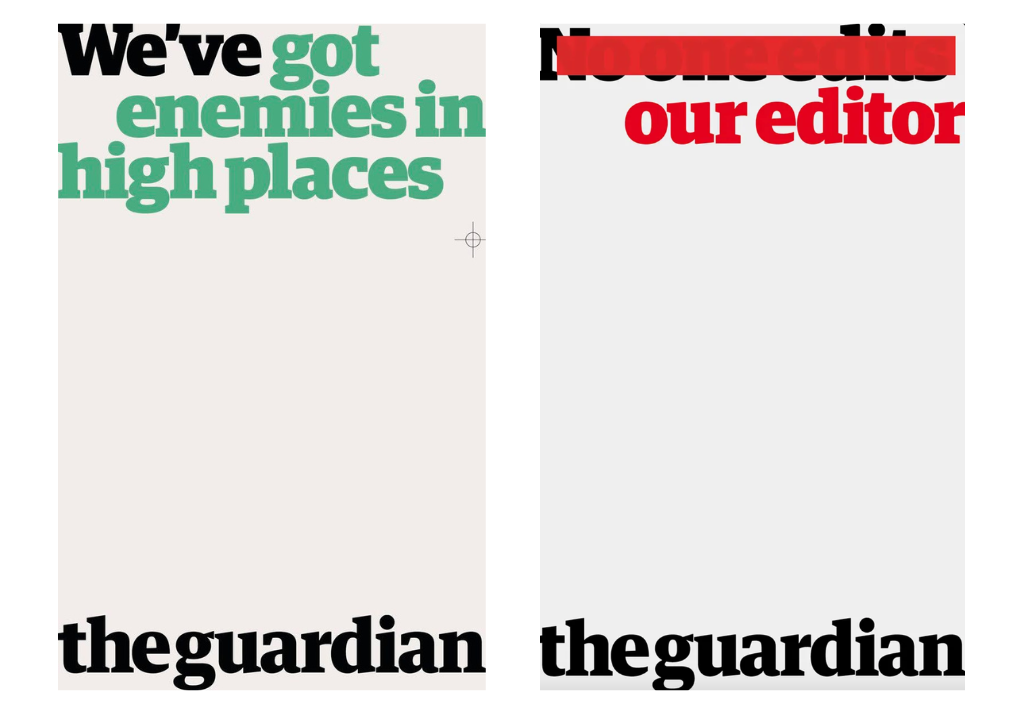
This next provocative print campaign, created by BBH in 2016 for the Guardian, is a top choice for Ciara Stonley, a creative at agency syn. Given that almost all other major news outlets are owned by shareholders who may influence content, the campaign focuses on the fact that the paper asks questions that others can’t.

The Guardian
(Image credit: The Guardian)

Go Compare – ‘Saving the Nation’

These bold, pre-faced billboards caused quite a stir across socials in 2012. Created by agency Dare, for insurance comparison site GoCompare, the agency jumped on the public’s dislike of the brand’s curly-moustache opera singer character, Gio Compario. The campaign staged a great example of an “accidental fail” campaign, says Laura Jordan Bambach, founder and chief creative officer at agency Uncharted, former president of D&AD, author, lecturer and multi-titled creative.

GoCompare
(Image credit: GoCompare)

Stabilo – ‘Highlighting the Remarkable’

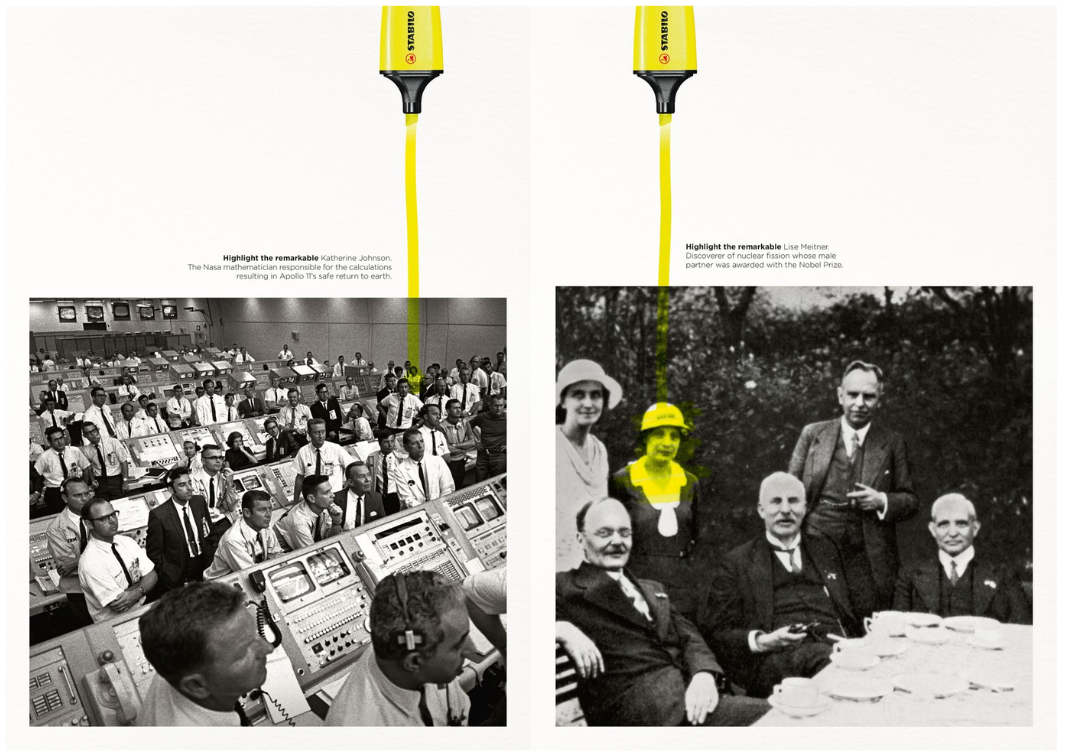
In this next ad from 2018, stationery brand Stabilo turned a promo for a highlighter pen into a push for female empowerment. “A great strapline – ‘highlighting the remarkable’,” says designer Mike Roberts. “This ad series highlights influential women in the background with great storytelling, while showing the product in action.”

Stabilo
(Image credit: Stabilo)

KFC – ‘FCK’

In February 2018, all KFC joints in the UK faced a shut-down as they were completely out of chicken due to some problem with a new supply partner,” says Dave Buonaguidi, ad expert, author of Blah! Blah! Blah

Canva is getting AI Image Generation, Interactive Coding, Spreadsheets, and More.

0

Baking in AI

Although there has been significant pushback from artists regarding the proliferation of AI design tools and the content used to train generative models, the companies making the software for creative work are nevertheless building AI into their toolkits. It’s a signal of just how quickly AI has gained importance — regardless of what their customers say, graphic design software makers clearly seem to think they cannot survive without implementing some form of AI.

The latest to double down on that strategy is Canva. The company on Thursday said it is adding a suite of new AI features to its platform, including an AI assistant, the ability to create apps with prompts, support for spreadsheets, and AI-powered editing tools.

Called Canva AI, the company’s AI assistant can perform a host of tasks, from creating images according to your instructions, to coming up with design ideas — say, collateral for social media or mock-ups for printing. It can even write copy and create documents.

And by tapping into a new tool dubbed Canva Code, the assistant can also be prompted to create mini-apps, like interactive maps or custom calculators, that can then be integrated in designs. Canva has partnered with Anthropic for this feature, the Australian design company’s co-founder and chief product officer Cameron Adams told TechCrunch.

For the Enterprise

Last year, Canva launched an enterprise-focused product to better serve larger teams with features like single sign-on and access management tools. Now it’s adding spreadsheets to the mix with Canva Sheets.

Canva Sheets comes with a tool called Magic Insights, which, as it says on the tin, surfaces insights gleaned from data on the sheet. There’s also a feature called Magic Charts, which converts raw numbers into charts automatically, complete with brand-specific graphics and logos.

The company said Canva Sheets supports integrations with HubSpot, Statista, Google Analytics, and more to let users import data easily.

The Artist vs. AI Dilemma

Companies like Adobe, Canva, and Pixlr may be looking to add more value to their offerings, but the fact remains that bringing AI into design tools is causing some tension. Not only are artists worried about their work being used to train AI models without permission, but there’s also a real threat to creative design jobs.

Still, Adams doesn’t see this as a clash between AI and creativity; rather, he sees this as a moment of growth and opportunity in the field.

“I think all our jobs will change as AI comes, as different tools are integrated across every specialty, whether it be design, product management, engineering, marketing, or sales,” he said. “I think each job is going to change and adapt to the help they will get from AI tools. We just see a massive opportunity,” Adams said.

Those changes, it seems, will be here sooner than most expect. Earlier this month, the company laid off some technical writing staff, nine months after its co-founders reportedly asked employees to use AI apps wherever they could. Adams, however, said that these layoffs were not related to AI tools the company is building, but were an effect of restructuring.

Conclusion

Canva’s latest move is a significant development in the world of graphic design and creative software. As AI continues to gain importance, it’s clear that companies like Canva are looking to integrate these tools into their offerings. While this may cause some tension in the creative community, it’s also an opportunity for growth and evolution.

FAQs

Q: What is Canva’s AI assistant called?
A: Canva’s AI assistant is called Canva AI.

Q: What can Canva AI do?
A: Canva AI can perform a host of tasks, from creating images according to your instructions, to coming up with design ideas, writing copy, and creating documents.

Q: What is Canva Code?
A: Canva Code is a new tool that allows users to create mini-apps, like interactive maps or custom calculators, that can be integrated in designs.

Q: What is Canva Sheets?
A: Canva Sheets is a new feature that adds spreadsheets to Canva’s platform, complete with tools like Magic Insights and Magic Charts.

Desktop-Class Power for Creatives

0

Why you can trust Creative Bloq

Our expert reviewers spend hours testing and comparing products and services so you can choose the best for you. Find out more about how we test.

Design, Build, and Display

Apple makes great tablets. There’s no need to say anything else. The 2025 edition of the iPad Air retains the design of the 2024 model, with flat sides and rounded corners. The back has lost the ‘iPad’ wordmark but the Apple logo remains, and there’s a single camera lens to mark the Air out from the better-endowed Pro, but they share the three-dot connector for the Magic Keyboard on the back.

It’s a very restrained design, with all the attention focused instead on the screen. As your main way of interacting with a tablet, this is to be expected, and the rest of the iPAd fades into the background when you’re engrossed in the display. The edges of the iPad Air are broken by the little plastic sections that denote the points at which antennas pass through the metal to get a better signal, and there are four speakers split between top and bottom. The USB-C port sits where you’d expect it to, and there are the usual volume rocker and lock buttons too, the latter doubling as a fingerprint reader.

The 13in iPad Air is lighter than a laptop but heavier than some other tablets – though it is quite large, which immediately means it will weigh more, and will require a bag that can fit a thin and light laptop to carry with you. Apple doesn’t say what the glass covering the touchscreen is, but the entire build feels stiff and assured in the hand, though there’s no IP rating, so it might be best to keep it dry and clean.

Design Score: 4/5

Key Specifications

* CPU: Apple M3
* NPU: 16-core Neural Engine
* Graphics: Integrated, nine cores
* Memory: 8GB
* Storage: 128GB – 1TB
* Screen size: 11 or 13in (version tested)
* Screen type: LED-backlit IPS touchscreen
* Resolution: 2,732 x 2,048 (version tested)
* Refresh rate: 60Hz
* Colour gamut (claimed): P3 wide colour
* Brightness (claimed): 600 nits
* Ports: 1x USB-C (10Gbps)
* Wireless connectivity: Wi-Fi 6E, Bluetooth 5.3, 5G eSIM (optional)
* Dimensions: 281 x 215 x 6mm (13in model)
* Weight: 616 grams (version tested)

Performance

So we’re looking at an excellent processor, that’s slightly weak in the GPU area but no more than most chips that use integrated graphics. The problem with iPadOS for creatives is the software: you’ve got versions (with missing features) of Photoshop, Lightroom and Illustrator, plus the full Affinity suite, DaVinci Resolve, Procreate, Sketchup, Nomad Sculpt, Pixelmator Pro and more, along with GarageBand and Logic Pro. If those are good enough for you, or you’re prepared to learn something new, then Apple has made a productivity powerhouse. If not, then a traditional laptop may be more appealing.

Battery life is tricky to evaluate on a tablet, as none of the standardised tests we usually use are available, but Apple claims 10 hours of endurance out of a charge, and that feels a little high but not too far off the mark. It will last all day, but the battery life is down compared to the M1 and M2 models.

Performance Score: 5/5

Price

The iPad Air base price is deceptive. £799 for the 13in sounds like a good deal for a tablet of this quality, but once you’ve added the Apple Pencil Pro and Magic Keyboard it’s suddenly £1,098. Then as you upgrade the storage, the price climbs even higher. You could buy the base model 13in MacBook Air M4 for £999, and have more RAM, twice the storage, and £100 back in your pocket, though the laptop doesn’t come with a touchscreen. Meanwhile, the Samsung Galaxy Tab S10 Ultra costs a lot more. It means that the iPad can be a tricky recommendation – they make truly excellent creative machines, but the price can be somewhat daunting.

Value Score: 3/5

Who is it for?

* Creatives and students

The iPad Air is hugely versatile, able to be used for sketching as well as word processing and everything in between. Having just one USB port is a definite limitation, so you will need a hub if you’re doing serious work on it, but the possibilities are endless. With a desktop-class CPU at its heart, you’ll never feel slowed down, and with excellent battery life the Air is a great choice for a main or backup machine.

Product Score Card

* Attributes
* Notes
* Rating
* Design: Looks like an iPad – it’s functional, but a bit dull
* 4/5
* Features: Only one USB port, but some good accessories available.
* 3/5
* Performance: Just excellent, the most powerful tablet you can get (apart from the iPad Pro)
* 5/5
* Value: Starts off well, but gets expensive as you add options.
* 3/5

Buy it if…

* You want a versatile, powerful tablet
* You can work with the apps available
* You appreciate the touchscreen and Pencil

Don’t buy it if…

* You really need a laptop
* You need an unsupported app (like InDesign)
* A 13in screen isn’t big enough

Also consider…

* Samsung Galaxy Tab S10 Ultra
* Apple iPad Pro
* Microsoft Surface Go