Home Blog Page 78

Chat with Photoshop Soon

0

What is Agentic AI in Creative Software?

Amid all the controversy over AI in creative tech, it seems that we’ve yet to see the tech’s most useful possible applications. Surely, the real potential of AI in creative software is not to create images of ourselves as action figures but to streamline how we interact with the software.

Applying AI to Digital Art Programs

Apply the text-based approach of AI image generation to a whole digital art program like Photoshop, and we’d be able to do repetitive everyday tasks without having to scroll through menus and drag sliders for every filter or tool we want to use.

Add voice input, and we could tell Photoshop to invert a selection or increase the feathering by a certain number of pixels like Harrison Ford asking the computer to zoom in on an image in Blade Runner.

Adobe’s Agentic AI in Photoshop

Well, it seems that Adobe is on it. Ok, not the Blade Runner bit yet, but the first part is coming.

What is Agentic AI in Photoshop?

Adobe thinks AI agents will soon become a natural part of creative professionals’ workflows, helping to make us all more productive. It’s already laid some of the groundwork in Photoshop with things like AI image generation and Distraction Removal.

At MAX London later this month, it’s planning to demonstrate the next step: a ‘creative agent’ that will be accessible via a redesigned Actions panel. The idea is that Photoshop will be able to analyze your work, spot opportunities for improvements and recommend context-aware edits, allowing you to apply actions with a single click. It says users should be able to use natural language to access more than 1,000 one-click actions.

For the moment, this sounds limited, and a bit like a more functional extension of the existing contextual task bar, which is sometimes useful but sometimes just distracting. And although the user will still be in control, I don’t much like the idea of Photoshop ‘suggesting’ how I could improve my work, unless its suggestions are based on my own previous decisions and workflows. Everyone’s work could start to look a bit similar if we’re all taking the same creative direction from Photoshop.

But Adobe sees these suggestions as just the foundation. Further ahead, its intention is that the creative agent will be able to help users learn Photoshop – which could save time trawling through our collection of Photoshop tutorials. And it may be able to handle repetitive tasks like preparing assets for export itself.

What I’m hoping for is that the ultimate goal will be a full natural language interface in which we can tell Photoshop what we want it to do, without having to select from a list of suggestions.


Premiere Pro and Agentic AI

Similar changes are afoot in Adobe’s video editing software. Adobe recently released Media Intelligence in Premiere Pro, which automatically recognizes objects and visual composition to help you find the shot you want. The next step will be agents that understand users’ media and can suggest actions. Again, Adobe says the agents will be able to teach users how to use the software.

"We envision a world where you can direct a creative agent to help you refine shot choices, craft rough cuts, assist with color, help mix audio, and more," Adobe says.

Adobe Express and Agentic AI

A lot of Adobe’s focus for agentic AI has been in Adobe Express, which makes sense since this is the product it aims at non-pros and ‘solopreneurs’, who may need more of a hand in terms of suggestions to get started. Adobe says that in Express users can simply ask the agent to create and improve on a design, while still having the option to manually edit the results. For enterprise marketers, that could mean creating a new set of campaign collaterals by finding pre-approved on-brand materials made by the creative team.

What is Agentic AI?

Agentic AI refers to artificial intelligence systems designed to operate autonomously, making decisions and taking actions with minimal human intervention. They act as AI agents that work on behalf of users, executing common tasks and workflows with a degree of autonomy.

In Adobe’s case, they’re not going to be running wild doing everything for us on their own volition (I hope), but will be able to understand context and suggest appropriate actions we might want to take, potentially learning from our own workflow to automate certain repetitive actions.

Conclusion

The integration of agentic AI in creative software like Photoshop and Premiere Pro has the potential to revolutionize the way we work. By automating repetitive tasks and providing intelligent suggestions, agentic AI can help us become more productive and efficient. However, it’s essential to ensure that these AI agents learn from our own workflows and don’t impose their own creative direction on us.

FAQs

  • Q: What is agentic AI in creative software?
    A: Agentic AI refers to artificial intelligence systems designed to operate autonomously, making decisions and taking actions with minimal human intervention.
  • Q: How does agentic AI work in Photoshop?
    A: Adobe’s agentic AI in Photoshop will analyze your work, spot opportunities for improvements, and recommend context-aware edits, allowing you to apply actions with a single click.
  • Q: Will agentic AI replace human creativity?
    A: No, agentic AI will work alongside humans, providing intelligent suggestions and automating repetitive tasks, but ultimately, the creative decisions will remain with the user.
  • Q: What is the ultimate goal of Adobe’s agentic AI?
    A: Adobe’s ultimate goal is to create a full natural language interface in which we can tell Photoshop what we want it to do, without having to select from a list of suggestions.

Here is a single title: “Securly Aware: A Reliable Way to Monitor Student Wellness”

District Leadership Teams: Effective Student Wellness Monitoring with Securly Aware

District leadership teams are under pressure like never before. As you seek ways to effectively support your students, often with limited staff resources, it’s easy to feel like you’re always one step behind. To meet this challenge, many districts are turning to edtech solutions to help them monitor student wellness and identify indicators of self-harm, suicide, bullying, violence, and emotional distress in students’ online activities.

But not all student wellness monitoring platforms are created equal. Most flood staff with alerts of concerning activities, but fall short of providing tools for managing those alerts. This all-too-common scenario can leave your student support teams feeling more overwhelmed than in control.

Securly Aware Student Wellness Monitoring

That’s where Securly Aware student wellness monitoring stands apart. Unlike traditional student monitoring that focuses on individual flagged activities, Securly Aware takes a student-centered approach.

By providing a holistic view of each student’s wellness, Securly Aware helps school staff see beyond flagged activities. It gives them a deeper, more actionable view of student wellness, along with the tools to respond effectively, even with limited resources.

Wellness Levels Offer a Holistic Understanding of Student Wellbeing

Not all students in distress will trigger high-risk alerts; some quietly signal their struggles over time. Securly Aware’s Wellness Levels offer a 60-day rolling view of a student’s emotional well-being, continuously updated based on the risks associated with their digital activities. By giving your team deeper insights beyond one-off alerts, Wellness Levels empower staff to:

  • Identify issues and intervene earlier, before a crisis occurs
  • Triage support effectively over time, reducing the number of critical cases
  • Monitor wellness levels after support is provided

Advanced Detection Ensures More Accurate Alerts and Less Noise

Most tools to monitor student wellness rely heavily on keyword detection. But keyword analysis alone creates alert fatigue by generating too many false positives.

Securly Aware goes beyond keywords, integrating natural language processing (NLP), sentiment analysis, and image analysis into its advanced AI analysis of students’ online activities. Able to analyze the tone, context, and emotional nuance, Securly Aware produces more reliable and accurate alerts so your team’s time is focused on what matters most.

Integrated Case Management Keeps Students from Falling through the Cracks

Student monitoring is best known for its ability to alert school staff to signs of distress. This alerting process is critical, but it puts the focus on flagged activities instead of the students at risk. Securly Aware goes further, automatically creating a new case for each alert.

Case management in Securly Aware helps busy student services teams coordinate their response efforts and maintain a centralized record of all cases, so no student slips through the cracks. They’re able to quickly identify students who are at risk, investigate and intervene if needed, assign cases to specific team members, track each case from inception to resolution, and maintain thorough and accessible records. Every note, every flag, every follow-up is captured in a centralized student record.

Preventative Tools Help Students In the Moment

Student monitoring software is a powerful tool to help prevent child and adolescent suicide, self-harm, bullying, and violence. AI-powered student wellness monitoring software that also provides automated interventions takes prevention a step further. Securly Aware provides two powerful prevention tools to help students make better decisions in the moment and know they’re not alone:

  • Think Twice bullying prevention detects hurtful language in messages as they’re being written and prompts students to “think twice” before they hit send. Watch the video.
  • Wellness Pathways Widget intervention detects increasingly concerning online activities and automatically presents the student with a pop-up message in their web browser to offer support and links to helpful resources.

AI Observation Assistant Integrates Teacher Insights for a Comprehensive View of Student Wellbeing

Even teacher observations are added to the student’s case in Securly Aware. The AI Observation Assistant prompts teachers to share their insights about students’ physical appearance, behaviors, and other safety and wellness indicators. It then adds these to a student’s existing case or creates a new case if one doesn’t already exist. With Securly Aware, school support teams have all of the information they need in one place, so they can conduct investigations quickly and offer students the support they need.

Granular Contact Management Ensures No Alert Is Missed

Your student services team’s ability to monitor student wellness and respond to students who need support is critical. With granular contact management in Securly Aware, you can assign the right staff members to the right students based on roles, responsibilities, and availability. This flexibility empowers your team to respond quickly and efficiently, even with lean resources. Launching later this year, granular contact management makes it possible to:

  • Import contacts directly from Securly Sync
  • Map student support contacts by alert category and student wellness level
  • Assign preferred contact methods for staff members (SMS, email, or phone)
  • Schedule staff for specific shifts

Delegated Alert Management Provides an Extra Layer of Protection and Peace of Mind

If you have limited resources during the school day or want 24/7 coverage of alert management, Securly On-Call provides expert management and analysis of Securly Aware alerts. Staffed 24/7/365 by an expertly trained team of former educators, counselors, and clinicians, Securly On-Call analyzes incoming alerts and notifies designated school personnel of extreme-risk situations in under five minutes. Native Spanish speakers are also available to provide bilingual support.

Conclusion

Securly Aware student wellness monitoring is designed to help school districts like yours support your students more effectively, even with limited resources. By providing a holistic view of student wellbeing, advanced detection, integrated case management, preventative tools, AI observation assistant, granular contact management, and delegated alert management, Securly Aware empowers your team to respond quickly and efficiently to student needs.

FAQs

Q: How does Securly Aware differ from other student wellness monitoring platforms?
A: Securly Aware takes a student-centered approach, providing a holistic view of each student’s wellbeing and tools to respond effectively, even with limited resources.

Q: What does Securly Aware’s Wellness Levels feature offer?
A: Wellness Levels provide a 60-day rolling view of a student’s emotional well-being, continuously updated based on the risks associated with their digital activities.

Q: How does Securly Aware’s Advanced Detection feature ensure accurate alerts and less noise?
A: Advanced Detection integrates natural language processing (NLP), sentiment analysis, and image analysis to analyze the tone, context, and emotional nuance of students’ online activities.

Q: What is Securly On-Call, and how does it support student wellness monitoring?
A: Securly On-Call provides expert management and analysis of Securly Aware alerts, 24/7/365, and notifies designated school personnel of extreme-risk situations in under five minutes.

Power-Hungry AI to Devour Japan-Sized Energy Supply by 2030

AI is Already Straining Power Grids

By 2030, AI data centers will devour almost as much electricity as the entire country of Japan consumes today, according to the latest forecasts from the International Energy Agency (IEA).

Today’s Data Centers

Today’s data centers already consume approximately 1.5% of the world’s electricity – that’s roughly 415 terawatt hours every year. The IEA expects this to more than double to nearly 950 TWh by 2030, claiming almost 3% of global electricity.

Accelerated Servers

The specialized hardware running AI systems is the real consumer. Electricity demand for these “accelerated servers” will jump by a stunning 30% each year through 2030, while conventional servers grow at a more modest 9% annually.

Data Centers of the Future

Some data centers already under construction will consume as much power as 2 million average homes, with others already announced for the future set to consume as much as 5 million or more.

A Very Uneven Distribution

By 2030, American data centers will consume about 1,200 kilowatt-hours (kWh) per person – which is roughly 10% of what an entire US household uses in a year, and “one order of magnitude higher than any other region in the world,” according to the IEA. Africa, meanwhile, will barely reach 2 kWh per person.

Regionally, some areas are already feeling the squeeze. In Ireland, data centers now gulp down an incredible 20% of the country’s electricity. Six US states devote more than 10% of their power to data centers, with Virginia leading at 25%.

Can Clean Energy Keep Up?

Despite fears that AI’s appetite might effectively sabotage climate goals, the IEA believes these concerns are “overstated.” Nearly half the additional electricity needed for data centers through 2030 should come from renewable sources, though fossil fuels will still play a leading role.

The Energy Mix

The energy mix varies dramatically by region. In China, coal powers nearly 70% of data centers today. In the US, natural gas leads at 40%, followed by renewables at 24%.

SMRs: A Future Solution

Looking ahead, small modular nuclear reactors (SMRs) could become vital for satiating AI’s power consumption post-2030. Tech companies such as OpenAI are already planning to finance more than 20 gigawatts of SMR capacity – a sign they’re thinking about long-term energy security. Microsoft even wants to resurrect the defunct Three Mile Island nuclear plant.

Efficiency vs. Expansion

The IEA speculates several possible futures for AI’s energy consumption. In their “Lift-Off” scenario, which assumes widespread accelerated AI adoption, global data center electricity could exceed 1,700 TWh by 2035 – nearly 45% higher than their base projection.

Conclusion

The IEA’s main takeaway is that the next decade will test AI’s careful balance between power and energy efficiency. Whether the tech industry can solve this puzzle may impact not just the future of AI, but also its role in addressing, rather than worsening, the global climate crisis.

FAQs

Q: How much electricity will AI data centers consume by 2030?
A: AI data centers will consume almost as much electricity as the entire country of Japan consumes today.

Q: What is the current electricity consumption of data centers?
A: Data centers already consume approximately 1.5% of the world’s electricity – that’s roughly 415 terawatt hours every year.

Q: What is the projected growth rate of electricity demand for accelerated servers?
A: Electricity demand for accelerated servers will jump by a stunning 30% each year through 2030.

Q: What is the role of renewable energy in powering data centers?
A: Nearly half the additional electricity needed for data centers through 2030 should come from renewable sources.

Garmin’s Varia Vue Cycling Headlight with 4K Incident Camera

0

The Varia Vue: A Next-Generation Action Camera

Recording Capabilities

The Varia Vue can capture 4K video for up to six hours on a full charge, but battery life is reduced to as little as 1.25 hours with the headlight set to its brightest setting. To compensate, dropping the camera’s resolution to 1080P at 30fps can boost recording times to up to nine hours, or up to 1.5 hours with the headlight at full brightness.

Features and Functions

Electronic image stabilization helps to reduce shakiness in footage captured on rough terrain, while continuous recording allows the events leading up to an incident (detected by the Vue’s accelerometer) to be stored alongside the aftermath. With the camera paired to devices like Garmin’s smartwatches, cycling computers, or even its mobile app, video is recorded with GPS speed and location information.

Additional Recording Modes

To further maximize battery life, the Vue can be connected to Garmin’s camera-equipped radar taillight. Not only does that unlock an additional recording mode where the Vue only starts to capture footage when a vehicle approaches from behind, it also allows incidents to be captured from two different angles.

Storage and Sharing

Footage is recorded locally to an SD card, but when connected to Wi-Fi, videos can be automatically uploaded to the online Garmin Vault for added security. However, that feature requires either a $9.99 monthly subscription or a $99.99 annual one.

Headlight Capabilities

Garmin says the Vue’s headlight has a maximum brightness of 600 lumens, but that’s only available in a flashing mode designed for daytime use. At full brightness, the Vue outputs 550 lumens, and can be dimmed to as low as 140 lumens. The headlight is also designed with a cutoff beam that angles the illumination down onto the road so it doesn’t shine in the eyes of oncoming drivers.

Conclusion

The Varia Vue offers an impressive range of features and functions, including the ability to capture 4K video, electronic image stabilization, and continuous recording. Its compatibility with Garmin’s other devices and the option to connect to a radar taillight further enhance its capabilities. While battery life may be a concern, the Vue’s ability to adapt to different recording modes and its automatic upload feature to the Garmin Vault make it a compelling option for those looking for a high-quality action camera.

FAQs

Q: How long does the Varia Vue’s battery last?

A: The Varia Vue’s battery life varies depending on the setting. It can capture 4K video for up to six hours on a full charge, but drops to as little as 1.25 hours with the headlight set to its brightest setting.

Q: Can I record video with the Varia Vue’s headlight set to its brightest setting?

A: Yes, but battery life will be reduced to as little as 1.25 hours.

Q: Can I upload videos to the Garmin Vault without a subscription?

A: No, automatic upload to the Garmin Vault requires either a $9.99 monthly subscription or a $99.99 annual one.

Unified Omnichannel Communications

Creating Secure and Connected Omnichannel Communications

© 2024 HIMSS. All rights reserved. 

Overcoming Omnichannel Obstacles

According to an IQVIA study, U.S. patients made 10 times more digital health visits in March 2021 than March 2020, showing that patients have come to appreciate telehealth’s speed and service. Adopting omnichannel patient communications enables healthcare organizations (HCOs) to connect with patients according to their communication preferences.

However, implementation of such communications systems often meet organizational obstacles, including internal misalignment, data security concerns and resistance to change. This RingCentral infographic offers ways that the RingCentral platform can help overcome these challenges.

How RingCentral Can Help

Discover how the RingCentral platform:

  • Integrates with an HCO’s existing systems and workflows
  • Offers reliable, regulation-compliant security measures
  • Streamlines communications between HCOs, patients and payers
Sponsored by:

Conclusion

By leveraging the RingCentral platform, healthcare organizations can overcome the obstacles associated with implementing omnichannel patient communications and provide patients with a seamless and connected experience.

Frequently Asked Questions

Q: What are the benefits of adopting omnichannel patient communications?

A: Omnichannel patient communications enable healthcare organizations to connect with patients according to their communication preferences, improving patient engagement and experience.

Q: What are some common obstacles to implementing omnichannel patient communications?

A: Common obstacles include internal misalignment, data security concerns, and resistance to change.

Q: How can RingCentral help overcome these obstacles?

A: RingCentral offers a platform that integrates with existing systems and workflows, provides reliable and regulation-compliant security measures, and streamlines communications between healthcare organizations, patients, and payers.

The US Secretary of Education referred to AI as ‘A1,’ like the steak sauce

0

U.S. Secretary of Education Linda McMahon’s AI Mix-up

ASU+GSV Summit Discussion

U.S. Secretary of Education Linda McMahon attended the ASU+GSV Summit this week, where experts in education and technology gathered to discuss how AI will impact learning.

“A1” Instead of AI

While speaking on a panel about AI in the workforce, McMahon repeatedly referred to AI as “A1,” like the steak sauce.

Quotes from the Panel

“You know, AI development — I mean, how can we educate at the speed of light if we don’t have the best technology around to do that?” she said. “I heard […] that there was a school system that’s going to start making sure that first graders, or even pre-Ks, have A1 teaching in every year, starting that far “down in the grades. That’s a wonderful thing!”

In McMahon’s defense, it doesn’t seem like she actually thinks that artificial intelligence is abbreviated “A1.” During the panel, she said “AI” at first, but became increasingly less consistent.

Context and Reactions

“It wasn’t all that long ago that it was, ‘We’re going to have internet in our schools!’” she continued. “Now, let’s see A1, and how can that be helpful.”

AI is such a ubiquitous term that it seems hard to imagine how one could forget the correct acronym — it’s like if a professional athlete referred to Major League Baseball as the “NFL.”

Sometimes people misspeak. Nobody’s perfect. But this feels like a bigger whiff than usual, particularly coming from the secretary of education.

Conclusion

AI is a rapidly evolving field that has the potential to revolutionize the way we learn. While mistakes happen, it is essential for those in positions of leadership to be accurate and informed when discussing critical topics like AI in education.

FAQs

Q: What is the correct abbreviation for artificial intelligence?

A: The correct abbreviation for artificial intelligence is AI.

Q: Was Linda McMahon actually referring to AI as “A1”?

A: It doesn’t seem like she actually thinks that artificial intelligence is abbreviated “A1.” During the panel, she said “AI” at first, but became increasingly less consistent.

Q: Is it a big deal for the secretary of education to make a mistake like this?

A: While mistakes happen, it is essential for those in positions of leadership to be accurate and informed when discussing critical topics like AI in education.

A Pivotal Moment for AI in the Workplace

0

Reflexive Use of AI

A memo by Shopify’s CEO Tobi Lütke sets a company-wide expectation for the use of AI, not just throughout the company but also encourages employees to think about how their end users can use AI. Everyone needs to read this because it marks a pivotal moment in how everyone should be using AI to hundredfold increase what they can accomplish and to visualize how AI can be employed for end users as well.

The Heart of the Memo

The heart of the memo is the CEO’s encouragement of discovering how AI can be applied to every aspect of how work gets done internally, citing his own usage of AI and how he feels he’s only scratching the surface of how it can be integrated into his own workflow. He asks all employees to "tinker" with AI and encourage company-wide adoption so that the usage of AI becomes reflexive.

Workplace Expectations and Requirements

What’s important about the Lütke memo is that it sets expectations about the use of AI in the workplace in a way that should serve as an inspiration for how all workplaces may consider following as well. Using AI effectively is now a fundamental expectation of all Shopify employees and it will be factored into the peer and performance review questionnaires. Employees will be mandated to demonstrate why AI cannot be used to accomplish goals before asking for more resources.

AI at Every Workflow Step

The memo sets the expectation that AI must be involved during the GSD (Get Sh*t Done) prototype phase and at a "fraction of the time it used to take." Teams are also encouraged to envision their projects as if AI were also a part of the team.

Learning, Collaboration, and Community

The other exciting part of Lütke’s memo for AI usage in the workplace is that he encourages employees to share their discoveries and breakthroughs with each other so that all employees can benefit from new and creative ways of getting things done with AI, to share all of their wins with each other.

Takeaways

Lütke’s memo shows how AI is radically changing the workplace at Shopify and how it can spread across every workforce, including your own.

Conclusion

Shopify is envisioning the next stage of ecommerce entrepreneurship, AI-everything, where AI is an ubiquitous presence for merchants. This is an example of the kind of leadership all entrepreneurs and small businesses should have, to start thinking of how they can integrate AI for themselves and their customers instead of lowering the window blinds to spy across the street to see what competitors are doing.

FAQs

Q: What is the main idea of Tobi Lütke’s memo?
A: The main idea of Tobi Lütke’s memo is to encourage the use of AI throughout the company and to think about how end users can use AI.

Q: What is the expectation for AI usage in the workplace?
A: Using AI effectively is now a fundamental expectation of all Shopify employees and it will be factored into the peer and performance review questionnaires.

Q: What is the goal of the memo?
A: The goal of the memo is to make AI an ubiquitous presence for merchants and to encourage the use of AI at every workflow step.

Q: What is the most important part of the memo?
A: The most important part of the memo is the encouragement of discovering how AI can be applied to every aspect of how work gets done internally.

Designers’ Dilemma: Canva’s AI Expansion

0

Canva Unveils Biggest Expansion Yet, Introduces AI-Powered Creative Suite

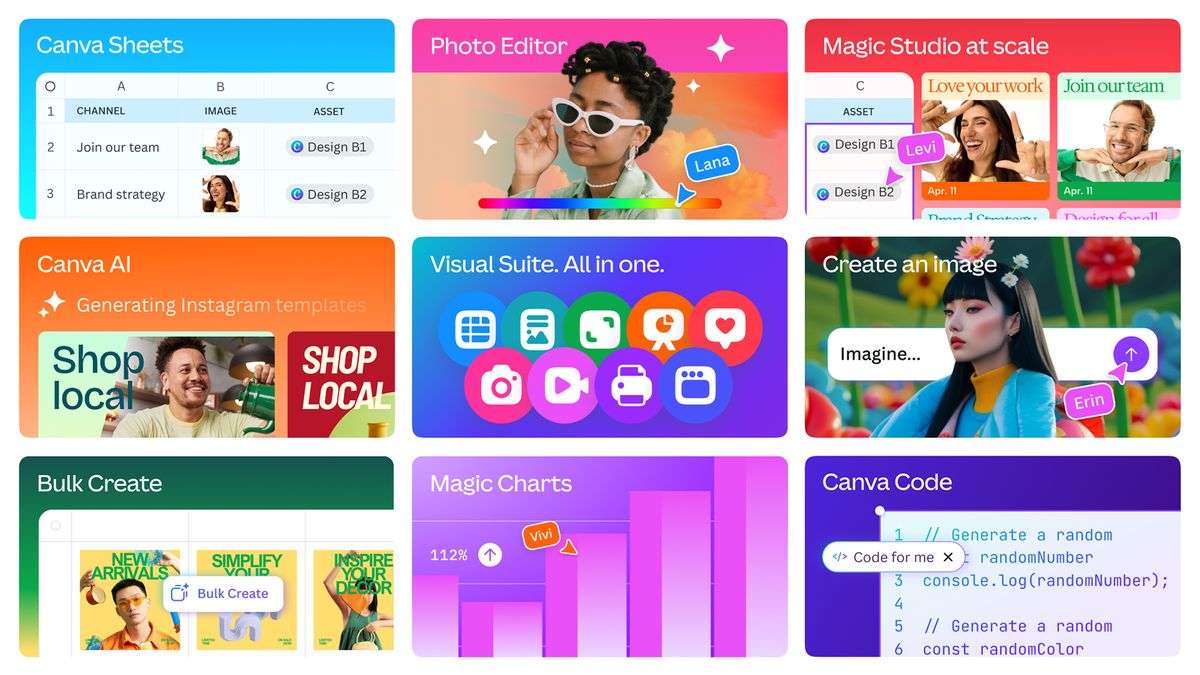
Canva has announced its biggest expansion yet, unveiling a new suite of AI tools to boost creative freedom and productivity. The innovative additions aim to enhance collaboration through spreadsheets, data storytelling, and design, solidifying Canva as the frontrunner in AI-powered creativity.

New AI-Powered Tools

Visual Suite 2.0 introduces brand-new tools alongside improvements to Canva’s existing creative suite. Highlights of the expansion include:

  • A unified creative process allowing collaborators to create entire campaigns – from documents to websites – in one single format.
  • Canva Sheets and Magic Charts, making data handling more intuitive and immersive.
  • Canva Code, transforming static content into dynamic visuals via simple prompts with no coding experience necessary.
  • AI-powered photo editing tools and Canva AI, a “voice-enabled, conversational creative partner” that can help with tasks such as generating text and images, editing, and resizing designs.

A Responsive Approach to AI

Despite creatives’ concerns about how AI is impacting graphic design, Canva claims it “sees AI as a tool to amplify, not replace, human creativity, and is committed to building AI responsibly and transparently.” By providing intuitive tools, Canva aims to bridge the creative gap and make design more accessible to a wider audience.

A New Era of Creative Autonomy

Canva’s latest expansion takes us into a new era of creative autonomy, where designers can focus on their craft while leveraging AI to streamline their workflow. With the introduction of these innovative tools, Canva reestablishes itself as a leader in the AI-powered design space.

Conclusion

Canva’s Visual Suite 2.0 is a significant step forward in the world of graphic design, offering a range of AI-powered tools to boost creativity and productivity. As more companies embrace AI in their creative practice, Canva’s expansion is a sign of the times, and a testament to the company’s commitment to responsible and transparent AI development.

FAQs

Q: What is Canva’s approach to AI in graphic design?
A: Canva sees AI as a tool to amplify, not replace, human creativity, and is committed to building AI responsibly and transparently.

Q: What new tools are being introduced in Visual Suite 2.0?
A: The expansion includes Canva Sheets and Magic Charts, Canva Code, AI-powered photo editing tools, and Canva AI, a “voice-enabled, conversational creative partner.”

Q: How will Visual Suite 2.0 improve collaboration?
A: The suite allows collaborators to create entire campaigns – from documents to websites – in one single format, streamlining the creative process and enhancing collaboration.

South of Midnight

Unleash the Magic

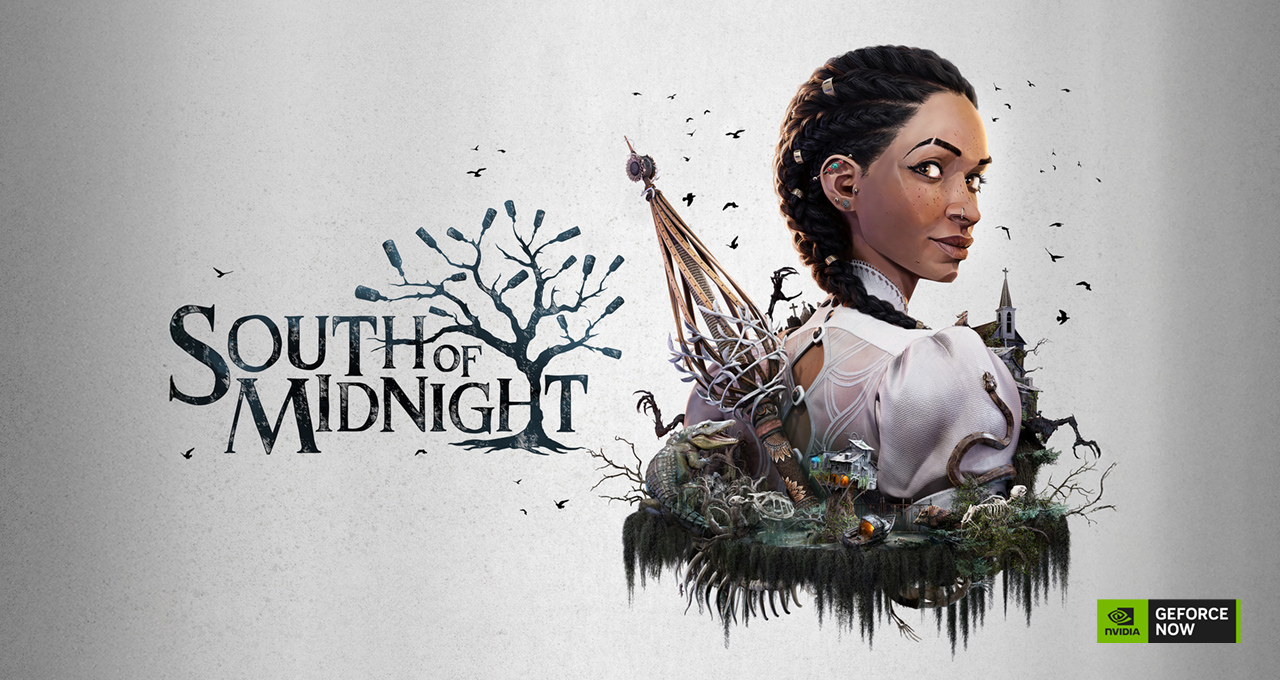
South of Midnight, a captivating third-person action-adventure game, is set against the backdrop of a Gothic fantasy version of the American Deep South. Step into the shoes of Hazel, a young woman who embarks on a journey to find her missing mother and discovers her unique abilities as a Weaver — a magical individual who can mend broken bonds and spirits. Throughout her quest, Hazel encounters intriguing mythical creatures inspired by Southern folklore, explores surreal landscapes and unravels deep family secrets.

Blending mesmerizing visuals with innovative gameplay mechanics, South of Midnight combines traditional action-adventure elements with Souls-like combat and strategic spellcasting. Players use Hazel’s Weaver powers — such as Push, Pull and Weave — to tactically engage formidable enemies known as Haints, navigate challenging scenarios and solve intricate puzzles.

Everybody Jump

GeForce NOW members can jump right into games without waiting for patches or downloads, whether for a seasonal update or the latest in-game event. This week, Fortnite and Honkai: Star Rail fans can dive into plenty of new content from the cloud.

Fortnite Festival Season 8

Global superstar and two-time GRAMMY award winner Sabrina Carpenter takes center stage in Fortnite Festival season eight with her eccentric brand of pop. Unlock her outfit, along with her “Juno” and “Nonsense” Jam Tracks, through the Music Pass or Shop. The Music Pass offers a mix of free and premium rewards for just 1,400 V-Bucks or through Fortnite Crew, with XP earned across all Fortnite modes.

Fortnite Season 8 on GeForce NOW

Honkai: Star Rail V3.2

The latest update in the cloud is Honkai: Star Rail Version 3.2, which celebrates the game’s second anniversary. There are two new five-star characters — Castorice and Anaxa — and players can experience anniversary-themed events like “Star Rail WORLD” and a Light Cone giveaway. The update also introduces a revamped banner system for better character pull customization, as well as reruns of fan-favorite characters and challenging new events that bring fresh bosses and gameplay mechanics.

Time to Celebrate

Commandos: Origins is launching in the cloud this week for members to stream. Head on a mission that’ll shape the fate of the entire world, and witness the beginning of a legendary elite World War II force. The long-awaited sequel to the Commandos series brings players back to the foundations of the real-time tactics genre and the days of Jack O’Hara, aka the Green Beret, and his five companions, completing missions no others would dare to accept.

Games Available in the Cloud This Week

  • South of Midnight (New release on Steam and Xbox, available on PC Game Pass, April 8)
  • Commandos: Origins (New release on Steam and Xbox, available on PC Game Pass, April 9)
  • The Talos Principle: Reawakened (New release on Steam, April 10)
  • Backrooms: Escape Together (Steam)
  • Diablo III (Xbox, available on PC Game Pass)
  • Sultan’s Game (Steam)

Conclusion

Get ready to explore the Deep South with South of Midnight, and experience the thrill of new content from Fortnite and Honkai: Star Rail. As a GeForce NOW member, you can jump straight into these games without waiting for patches or downloads. Happy gaming!

FAQs

Q: What is South of Midnight?
A: South of Midnight is a third-person action-adventure game set in a Gothic fantasy version of the American Deep South.

Q: What is Fortnite Festival Season 8?
A: Fortnite Festival Season 8 is a new season of Fortnite featuring a new theme, music, and gameplay mechanics.

Q: What is Honkai: Star Rail V3.2?
A: Honkai: Star Rail V3.2 is the latest update to the game, featuring new characters, events, and gameplay mechanics.

Q: What games are available in the cloud this week?
A: The following games are available in the cloud this week: South of Midnight, Commandos: Origins, The Talos Principle: Reawakened, Backrooms: Escape Together, Diablo III, and Sultan’s Game.

Bot Verification Rule Migration Instructions

SafeLine: A Self-Hosted WAF Powered by Semantic Analysis Engine

SafeLine is a WAF powered by a semantic analysis engine, unlike traditional signature-based solutions. It’s self-hosted and very easy to deploy & configure.

Website: https://ly.safepoint.cloud/n4YmqH4
Discord: https://discord.gg/dy3JT7dkmY

Original Bot Verification Custom Rules

Migration Rules

  • If the “Application” parameter is configured, the rule will be migrated to the specified application, and bot verification will be automatically enabled for that application, with “No-Interaction Verification” selected by default.

  • If the “Application” parameter is not configured, the rule will be migrated to all applications, and bot verification will be automatically enabled for all of them, with “No-Interaction Verification” selected by default.

  • If a custom bot verification rule is disabled, it will not be migrated.

  • If bot verification is already enabled for the original application, the rule will not be migrated.

Image

Conclusion

SafeLine’s original bot verification custom rules provide a seamless migration process for users. With its self-hosted and easy-to-deploy nature, SafeLine is an ideal solution for those looking for a robust WAF powered by semantic analysis engine.

FAQs

Q: What is SafeLine?

A: SafeLine is a WAF powered by a semantic analysis engine, unlike traditional signature-based solutions.

Q: Is SafeLine self-hosted?

A: Yes, SafeLine is self-hosted and very easy to deploy & configure.

Q: What is the migration process for custom bot verification rules?

A: The migration process for custom bot verification rules depends on whether the “Application” parameter is configured or not.

Q: What happens if a custom bot verification rule is disabled?

A: If a custom bot verification rule is disabled, it will not be migrated.

Q: What happens if bot verification is already enabled for the original application?

A: If bot verification is already enabled for the original application, the rule will not be migrated.